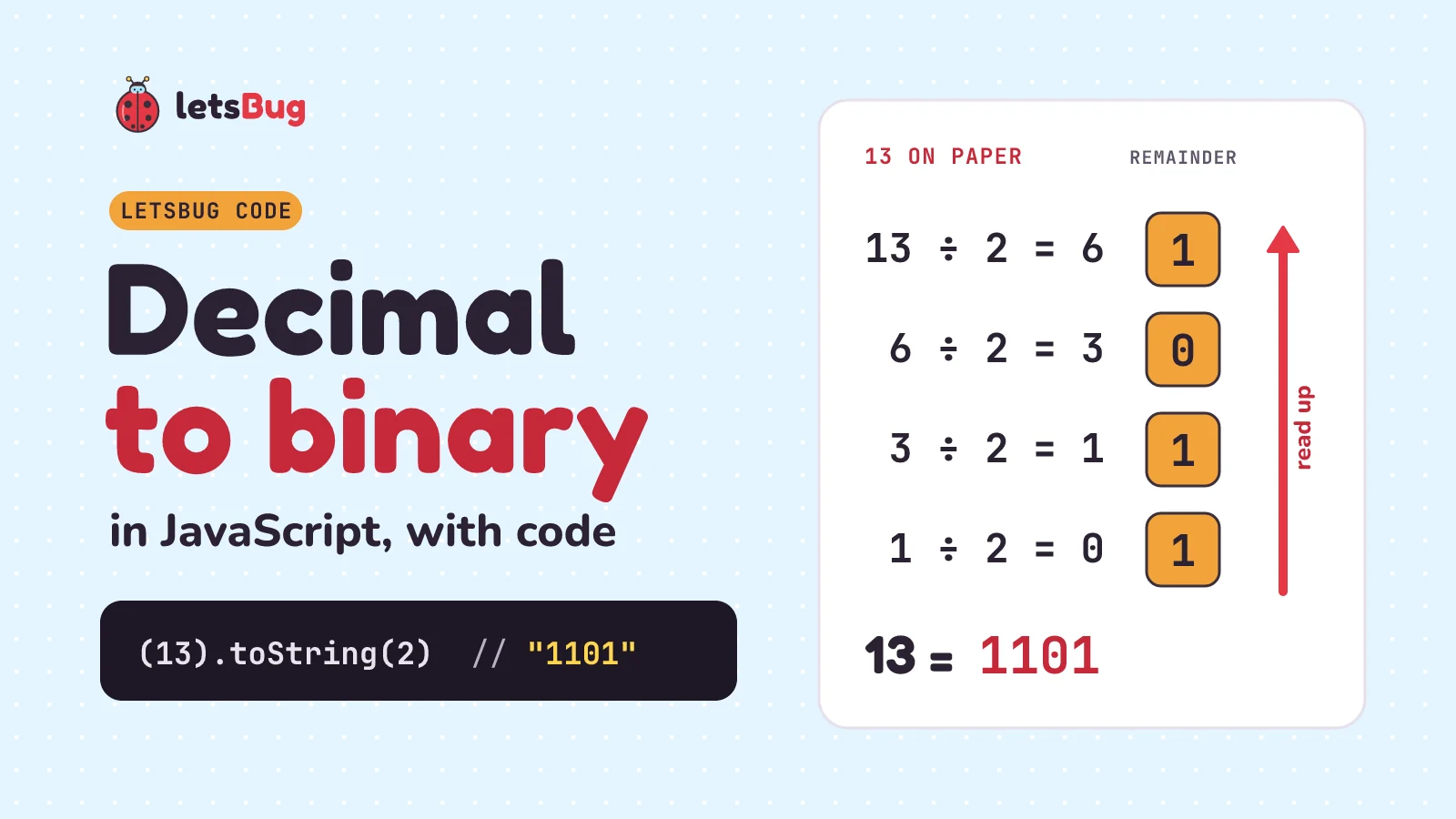
To convert a decimal number to binary in JavaScript, call toString(2) on it: (13).toString(2) gives "1101". By hand, and in your own function, you divide by 2 again and again, write down each remainder, and read the remainders from the bottom up.
In this post we do it on paper first, then write the loop, use the built-in, pad to 8 bits, and handle the parts that trip people up: negative numbers, numbers past 2^53, and a 0 that comes back as an empty string. There's a Python version too.
Key takeaways
n.toString(2)turns a number into a binary string.parseInt(s, 2)turns it back.- On paper: divide by 2, keep the remainder, repeat until you reach 0, then read the remainders bottom-up. 156 is 10011100.
.padStart(8, "0")gives a fixed width: 5 becomes00000101.- Negative numbers:
(-5).toString(2)is"-101". For the two's complement bits a computer actually stores, use(-5 >>> 0).toString(2)(32 bits). - Past
Number.MAX_SAFE_INTEGER(9,007,199,254,740,991, which is 2^53 − 1), a Number can't hold every whole number. Use BigInt:(2n ** 64n).toString(2). - In Python:
bin(13)gives'0b1101'andformat(13, "b")gives'1101'.
Our only video on this exact conversion is a one-minute Short from 2023 (it's in Keep going below). This longer lesson from letsBug Explains counts in binary from 1:14 and then shows how a computer adds binary numbers with logic gates:
Why you'd convert to binary at all
Every value in a computer is stored as bits. The letter H in "Hello" is the number 72, and in memory it sits as the byte 01001000 (we follow those bytes all the way to the screen in what happens when you run Hello World). You'll want binary when you debug bit flags and permissions, read a network mask, check a bitwise trick, or answer the interview question "write a function that converts decimal to binary". Let's start on paper, because the code does exactly what your pencil does.
How do you convert decimal to binary by hand? Divide by 2
Take 13. Divide it by 2 and write down the whole-number answer and the remainder. Then divide that answer by 2. Keep going until the answer is 0:
| Step | Divide | Answer (quotient) | Remainder |
|---|---|---|---|
| 1 | 13 ÷ 2 | 6 | 1 |
| 2 | 6 ÷ 2 | 3 | 0 |
| 3 | 3 ÷ 2 | 1 | 1 |
| 4 | 1 ÷ 2 | 0 | 1 |
Now read the remainder column from the bottom up: 1, 1, 0, 1. So 13 in binary is 1101.
Why bottom-up? The first remainder tells you whether 13 is odd, so it's the 1s place, the rightmost bit. Each division by 2 shifts everything one place to the right, so each new remainder is the next place to the left. The last remainder you write is the leftmost bit.
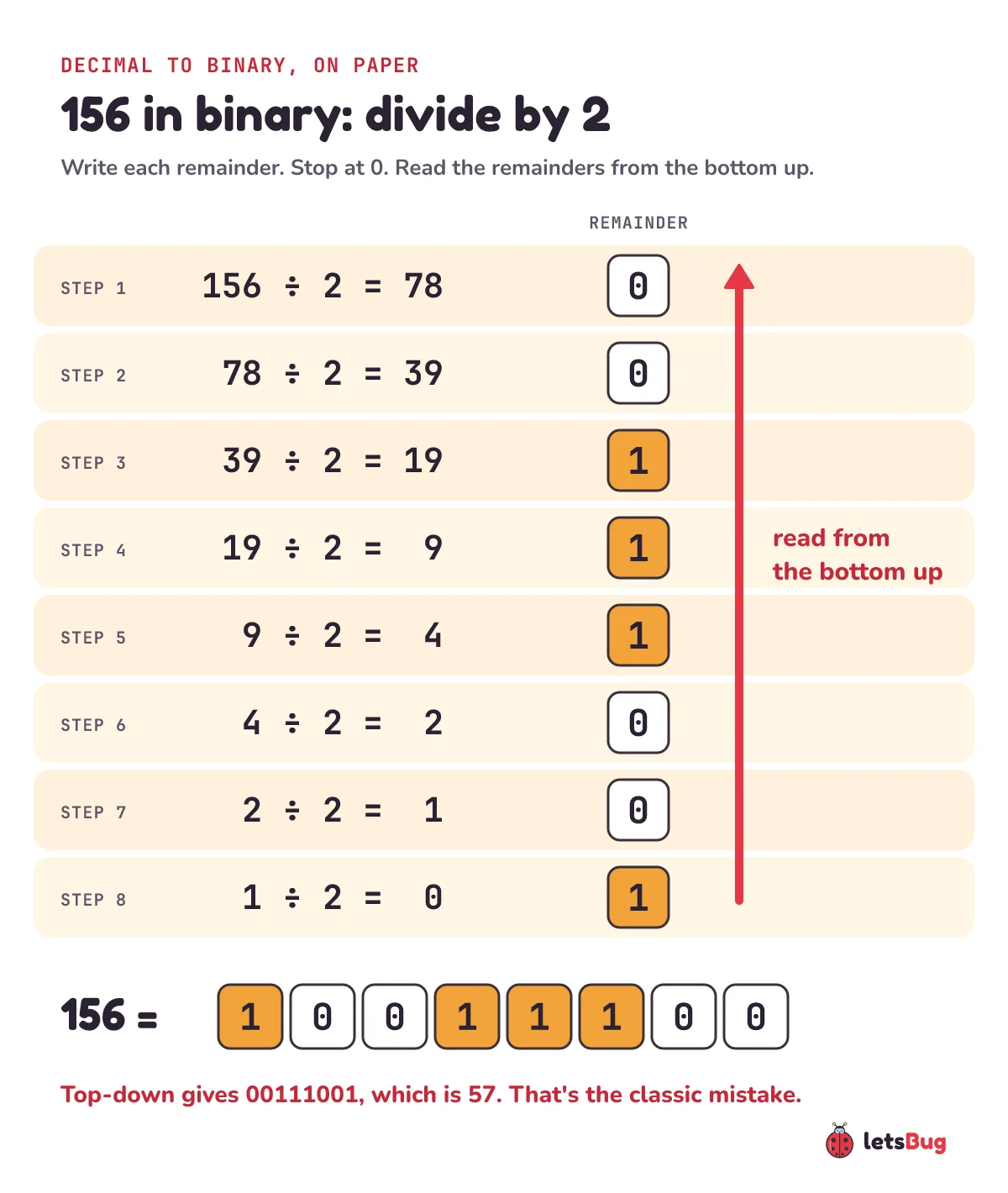
A bigger one, 156, takes eight steps:
Check it with place values
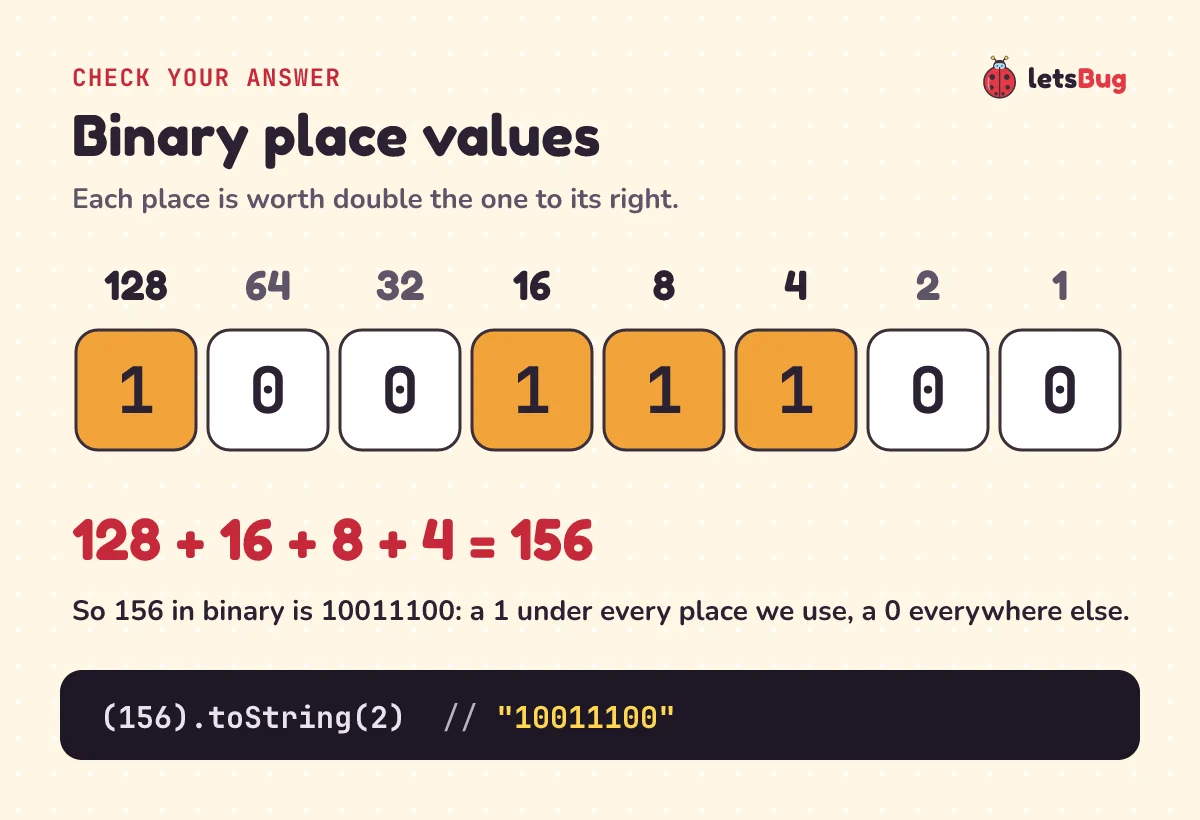
In binary, each place is worth double the one to its right: 1, 2, 4, 8, 16, 32, 64, 128. To check an answer, add up the places that have a 1. For 10011100 that's 128 + 16 + 8 + 4 = 156. It matches, so the conversion is right.
Adding place values is also how you go the other way, binary to decimal. That has its own post: binary to decimal in JavaScript.
How do you write a decimal to binary function in JavaScript?
The paper method turns straight into a loop. n % 2 is the remainder and Math.floor(n / 2) is the whole-number answer:
function toBinary(n) {
  if (!Number.isSafeInteger(n) || n < 0) {
    throw new RangeError("toBinary needs a safe whole number, 0 to 2**53 - 1");
  }
  if (n === 0) return "0";
  let bits = "";
  while (n > 0) {
    bits = (n % 2) + bits; // new remainder goes in front: bottom-up
    n = Math.floor(n / 2);
  }
  return bits;
}

console.log(toBinary(13));  // 1101
console.log(toBinary(156)); // 10011100
console.log(toBinary(0));   // 0
Line by line:
- The first check refuses anything the paper method doesn't cover: fractions, negative numbers, and numbers too big to store exactly (more on those below).
if (n === 0) return "0": without it the loop never runs and you get an empty string.n % 2is the remainder, 0 or 1.bits = (n % 2) + bitsputs each new remainder in front of the ones before. That's the "read from the bottom up" step, done as we go. Adding a number to a string in JavaScript gives a string, so1 + "01"is"101".Math.floor(n / 2)drops the .5, like the whole-number answer on paper.
Here's the loop on 13, one pass at a time:
| Pass | n | n % 2 | bits after | n for the next pass |
|---|---|---|---|---|
| 1 | 13 | 1 | "1" | 6 |
| 2 | 6 | 0 | "01" | 3 |
| 3 | 3 | 1 | "101" | 1 |
| 4 | 1 | 1 | "1101" | 0, so the loop stops |
The loop runs once per bit, so 156 takes 8 passes. That's about log2(n) passes, written O(log n): doubling the number adds just one more pass. If an interviewer asks for recursion, it's one line (for whole numbers, 0 or more):
const toBin = n => n < 2 ? String(n) : toBin(Math.floor(n / 2)) + (n % 2);

console.log(toBin(156)); // 10011100
The first version of this post (2023) pushed the remainders into an array and called reverse().join("") at the end. That's the same idea: collect top-down, then flip. Here are its five test numbers through the new function:
for (const n of [29, 35, 102, 88, 69]) {
  console.log(n, toBinary(n));
}
29 11101
35 100011
102 1100110
88 1011000
69 1000101The built-in way: toString(2) and parseInt(s, 2)
In real code you don't need the loop. Every number has a toString method, and its argument is the base (MDN calls it the radix), any whole number from 2 to 36. Base 2 is binary:
console.log((13).toString(2));     // 1101
console.log((156).toString(2));    // 10011100
const count = 255;
console.log(count.toString(2));    // 11111111
console.log(parseInt("1101", 2));  // 13
console.log(parseInt("10011100", 2)); // 156
console.log(0b1101);               // 13
The brackets around (13) matter. 13.toString(2) is a SyntaxError, because JavaScript reads the dot as a decimal point. A variable like count needs no brackets.
parseInt(s, 2) reads a binary string back into a number. Always pass the 2: without it, parseInt("1101") reads the string as decimal and gives one thousand one hundred and one. You can also write binary straight into your code with the 0b prefix, as in 0b1101.
How do you pad binary to 8 bits? Use padStart
toString(2) gives the shortest answer, with no leading zeros. A byte is 8 bits, and it's usually shown with all 8, leading zeros included, so pad the front with padStart:
console.log((5).toString(2));                  // 101
console.log((5).toString(2).padStart(8, "0")); // 00000101
console.log((72).toString(2).padStart(8, "0")); // 01001000

const bytes = [..."Hi"].map(c => c.charCodeAt(0).toString(2).padStart(8, "0"));
console.log(bytes.join(" "));                  // 01001000 01101001
The last two lines turn each letter of "Hi" into its character code (72 and 105) and show it as a byte. padStart only adds characters: if the binary is already longer than 8, you get it back whole. More on that in the mistakes below. New to bits and bytes? What is a bit and a byte? shows what one bit is and why the 8 bits of a byte hold 0 to 255.
Negative numbers: "-101" or two's complement?
Ask for −5 in binary and JavaScript gives a minus sign in front of the bits for 5:
console.log((-5).toString(2));                // -101
console.log((-5 >>> 0).toString(2));          // 11111111111111111111111111111011
console.log((-5 & 0xff).toString(2));         // 11111011
console.log(parseInt("11111111111111111111111111111011", 2) | 0); // -5
MDN's own wording: the string returned is "the positive binary representation of the number value preceded by a - sign, not the two's complement of the number value."
A computer doesn't store a minus sign. It stores negative whole numbers in two's complement: write the positive number in the fixed number of bits, flip every bit, then add 1. In 8 bits, 5 is 00000101. Flip it to 11111010, add 1, and −5 is 11111011.
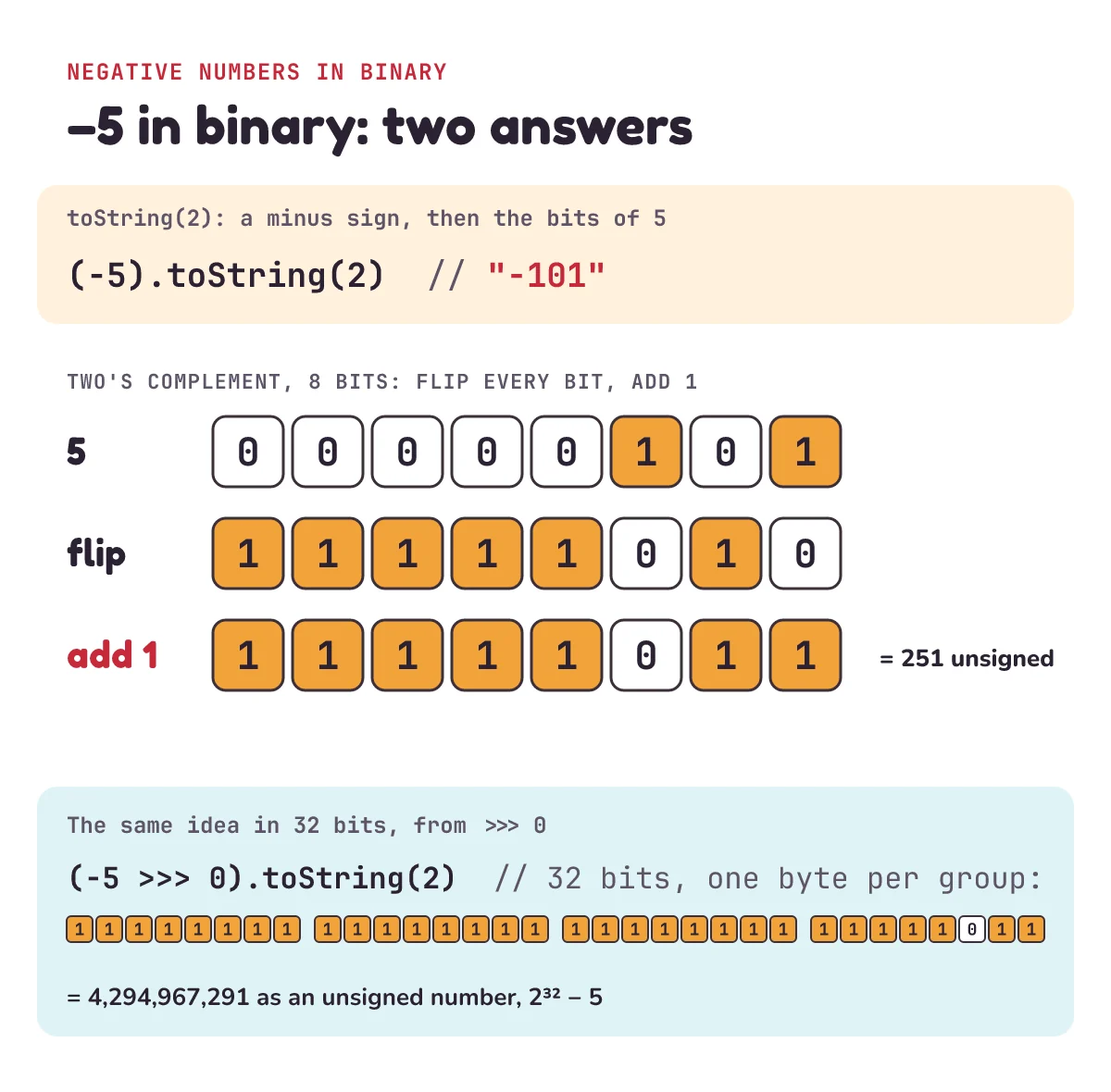
That's what the second line does. >>> is the unsigned right shift. Shifting by 0 moves nothing, but it turns −5 into a 32-bit pattern and reads it back as an unsigned number: 4,294,967,291, which is 232 − 5. Its binary is the 32-bit two's complement of −5. The other two lines:
& 0xffkeeps only the last 8 bits: the 8-bit two's complement, 11111011.| 0turns an unsigned 32-bit pattern back into a signed number, so the 32 bits read back as −5.
>>> 0 only keeps 32 bits. (2 ** 32 + 5) >>> 0 is just 5: the higher bits are thrown away. It also refuses BigInt values. For a 64-bit two's complement, use BigInt.asUintN(64, -5n).toString(2).Big numbers: BigInt, and why Number breaks past 2^53
A JavaScript Number is a 64-bit floating-point value. Only 52 of those bits store the digits (plus one hidden leading 1), so it holds 53 binary digits exactly. MDN puts it this way: it "can only safely represent integers between -(253 – 1) and 253 – 1." Past that, some whole numbers simply can't be stored, so toString(2) shows the wrong bits:
console.log(Number.MAX_SAFE_INTEGER);                // 9007199254740991
console.log(2 ** 53 + 1);                            // 9007199254740992
console.log((2 ** 53 + 1).toString(2).endsWith("1")); // false
console.log((2n ** 53n + 1n).toString(2).endsWith("1")); // true
console.log(BigInt("123456789012345678901234567890").toString(2).length); // 97
2 ** 53 + 1 should end in 1, because it's odd, but the + 1 is lost before toString ever runs. A BigInt (an integer with an n on the end, or made with BigInt("...")) has no such limit. Its toString(2) works the same way, and so does our loop, with 2n in place of 2:
function toBinaryBig(n) {
  if (n < 0n) throw new RangeError("toBinaryBig needs 0n or more");
  if (n === 0n) return "0";
  let bits = "";
  while (n > 0n) {
    bits = (n % 2n) + bits;
    n = n / 2n; // BigInt division drops the remainder for us
  }
  return bits;
}

console.log(toBinaryBig(156n));                       // 10011100
console.log(toBinaryBig(2n ** 64n).length);           // 65
console.log(toBinaryBig(2n ** 53n + 1n) === (2n ** 53n + 1n).toString(2)); // true
You can't mix the two types: 2n + 1 throws a TypeError. Convert first, with BigInt(x) or Number(x).
Decimal to binary in Python
Python has bin(), which adds a 0b prefix, and format() with "b", which doesn't. Python integers have unlimited precision, so there's no 253 problem:
print(bin(13))                          # 0b1101
print(format(13, "b"))                  # 1101
print(f"{5:08b}")                       # 00000101
print(int("10011100", 2))               # 156
print(bin(-5))                          # -0b101
print(format(-5 & 0xFFFFFFFF, "032b"))  # 11111111111111111111111111111011
print(bin(2**53 + 1)[-3:])              # 001
bin(-5) keeps the minus sign, just like JavaScript. & 0xFFFFFFFF keeps the low 32 bits, which gives the same two's complement as >>> 0. The divide-by-2 loop in Python, if an exam or interview asks you to write it yourself:
def to_binary(n):
    if n < 0:
        raise ValueError("to_binary needs 0 or more")
    if n == 0:
        return "0"
    bits = ""
    while n > 0:
        bits = str(n % 2) + bits
        n //= 2
    return bits

print(to_binary(13))   # 1101
print(to_binary(156))  # 10011100
Common decimal to binary mistakes
Reading the remainders top-down
The most common slip, on paper and in code. If you append each remainder instead of putting it in front, you get the bits backwards:
function toBinaryWrong(n) {
  let bits = "";
  while (n > 0) {
    bits += n % 2; // appends: top-down
    n = Math.floor(n / 2);
  }
  return bits;
}

console.log(toBinaryWrong(13));  // 1011, which is 11
console.log(toBinaryWrong(156)); // 00111001, which is 57
console.log(JSON.stringify(toBinaryWrong(0))); // ""
Put the remainder in front (bits = (n % 2) + bits), or collect them in an array and reverse it at the end.
0 comes back as an empty string
That last line shows the second bug. With while (n > 0), the loop never runs for 0, so the function returns "". Check for 0 first and return "0". The built-in gets it right: (0).toString(2) is "0".
Calling toString(2) on a string
Values from a form field, prompt() or a URL are strings, and a string's toString ignores the 2:
const input = "13"; // what an <input> gives you
console.log(input.toString(2));         // 13
console.log(Number(input).toString(2)); // 1101
Expecting padStart to cut
(300).toString(2).padStart(8, "0") is "100101100", 9 characters. 300 doesn't fit in 8 bits (the most 8 bits hold is 255), and padStart never removes characters. If you need exactly 8 bits, mask first with & 0xff, and decide whether losing the top bit is what you want.
parseInt quietly stops at a bad digit
parseInt("1021", 2) returns 2. It reads "10", hits the 2 (not a binary digit) and stops without an error. parseInt("2", 2) is NaN. If the string comes from a user, check it first with /^[01]+$/.test(s).
Try these on paper first, then check with toString(2).
1) What is 29 in binary? Write out the divide-by-2 steps.
2) What is 200 in binary, padded to 8 bits?
3) What does (-1 >>> 0).toString(2) print, and why?
Show the answers
1) 29 ÷ 2 = 14 r 1, 14 ÷ 2 = 7 r 0, 7 ÷ 2 = 3 r 1, 3 ÷ 2 = 1 r 1, 1 ÷ 2 = 0 r 1. Bottom-up: 11101 (16 + 8 + 4 + 1 = 29).
2) 11001000 (128 + 64 + 8 = 200). It's already 8 bits, so padStart adds nothing.
3) Thirty-two 1s. In two's complement, −1 is every bit set: 1 is 000…001, flipped it's 111…110, and adding 1 gives 111…111. As an unsigned number that's 4,294,967,295, or 232 − 1.
Questions people ask
How do I convert decimal to binary in JavaScript?
Call toString(2) on the number: (13).toString(2) returns "1101", and for a variable it's n.toString(2). The result is a string. To write the conversion yourself, divide by 2 in a loop with % and Math.floor, putting each remainder in front of the string.
How do I convert binary back to decimal?
Use parseInt(s, 2): parseInt("1101", 2) is 13. By hand, add the place values that have a 1 (8 + 4 + 1 = 13). The full walk-through is in binary to decimal in JavaScript.
How do I get 8-bit or 32-bit binary in JavaScript?
Pad with n.toString(2).padStart(8, "0") for 8 bits or padStart(32, "0") for 32. That works for numbers that fit. For negative numbers, use (n & 0xff) for the 8-bit two's complement or (n >>> 0) for 32 bits before calling toString(2).
Why does toString(2) give "-101" for -5?
Because toString keeps the sign and writes the bits of the positive number: −5 becomes "-" plus "101". It does not give two's complement. For the bits a computer stores, use (-5 >>> 0).toString(2), which gives 32 bits ending in 011.
Can toString(2) convert fractions?
Yes: (0.5).toString(2) is "0.1", because 0.5 is one half. But (0.1).toString(2) is a long string that starts 0.000110011001100…. 0.1 has no exact binary form, which is why 0.1 + 0.2 === 0.3 is false in JavaScript.
What is the largest number I can convert safely?
With a Number, Number.MAX_SAFE_INTEGER: 9,007,199,254,740,991, which is 2^53 − 1, or fifty-three 1s in binary. Beyond that, use BigInt, which has no fixed limit.
Keep going
- The reverse trip: binary to decimal in JavaScript, with place values and
parseInt. - What computers do with these bits: how do computers add numbers? Logic gates, carries and overflow, from the same video as above. Its Short is 1 + 1 = 10? Inside a computer, that's exactly right.
- Another place where halving wins: binary search in JavaScript and Python, which finds one item in a million in 20 checks.
- The original 2023 video for this post, a one-minute Short: how to convert decimal numbers to binary. Then see the rest of the letsBug Code series on YouTube.
Checked on 15 October 2026 against the 10 sources below.
Sources
- MDN: Number.prototype.toString() (radix 2 to 36, negative numbers keep the sign)
- MDN: parseInt() (radix, stopping at an invalid digit)
- MDN: String.prototype.padStart()
- MDN: Unsigned right shift (>>>) (two's complement, 32 bits)
- MDN: Number.MAX_SAFE_INTEGER (253 − 1)
- MDN: BigInt and BigInt.asUintN()
- Python documentation: built-in functions, bin() and format(), the format specification mini-language ("b") and built-in types (unlimited-precision integers)
Every code sample in this post was run in Node.js 24 and Python 3.13 before publishing.