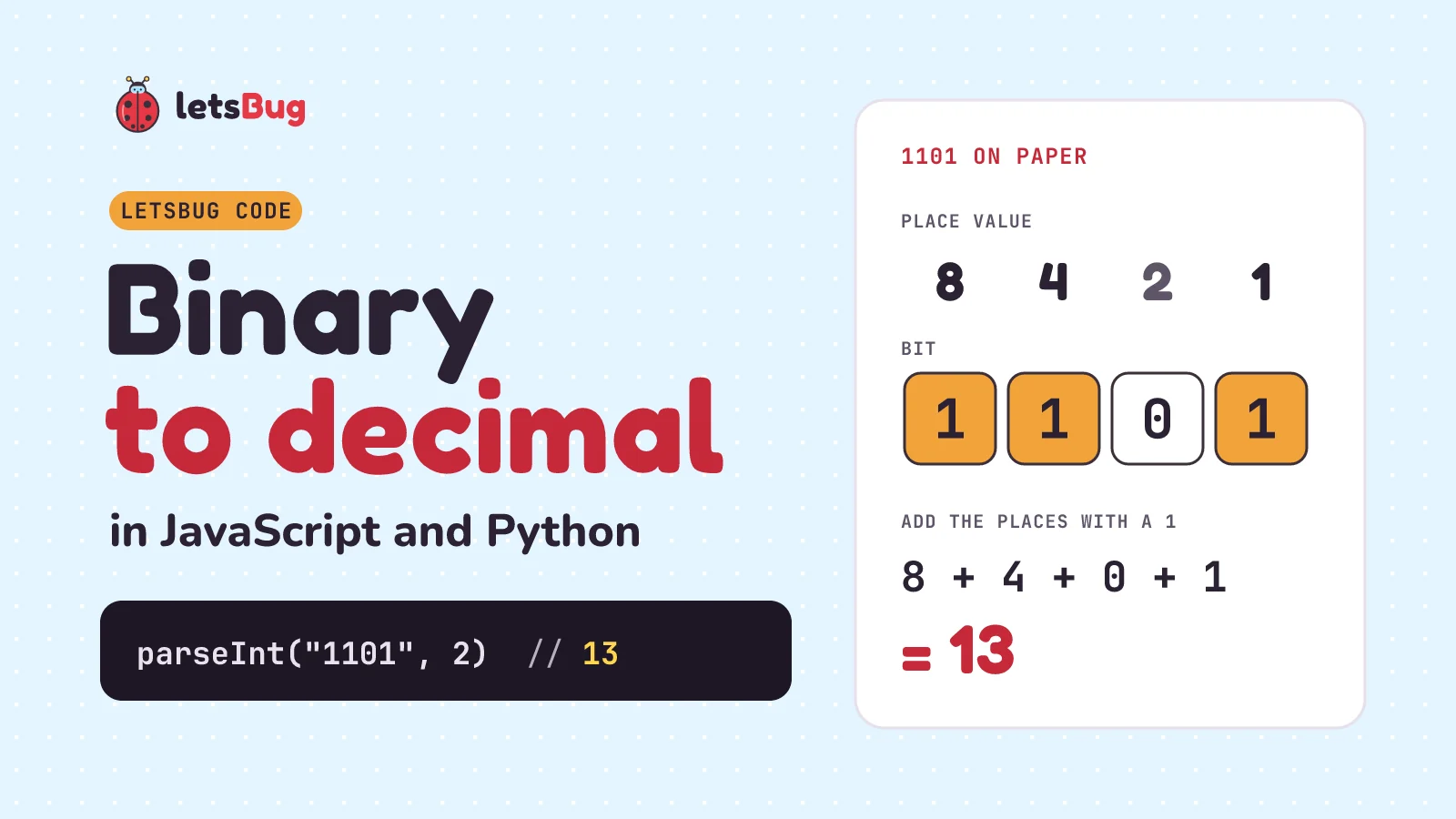
To convert binary to decimal in JavaScript, call parseInt(s, 2): parseInt("1101", 2) gives 13. In Python it's int("1101", 2). For strings longer than 53 bits, use BigInt("0b" + s). By hand, write the place values 1, 2, 4, 8 from the right and add the ones that sit under a 1: 8 + 4 + 1 = 13.
In this post we do it on paper two ways, write our own function, fix the three bugs in our 2023 version, check that the input really is binary, handle numbers past 53 bits with BigInt, and do the same in Python. The quick answer:
console.log(parseInt("1101", 2)); // 13
console.log(Number("0b1101"));    // 13
console.log(BigInt("0b1101"));    // 13n
Key takeaways
parseInt(s, 2)reads a binary string as a number. Always pass the 2:parseInt("1101")is one thousand one hundred and one.- By hand: each place is worth double the one to its right (1, 2, 4, 8, 16…). Add the places that hold a 1. 10110101 is 128 + 32 + 16 + 4 + 1 = 181.
- Or go left to right: double the total, add the next bit. That's the shortest loop to write in code.
parseIntdoesn't reject bad input:parseInt("1021", 2)quietly returns 2. Check with/^[01]+$/first.- Past 53 bits a Number can lose digits.
BigInt("0b" + s)is exact at any length. - In Python:
int("1101", 2)gives 13, and Python integers never lose digits.
Prefer to watch? Our 2023 video writes a place-value function in Node.js in under a minute. This post keeps that idea, fixes what it got wrong and adds the built-ins:
How do you convert binary to decimal by hand?
In decimal, each place is worth ten times the one to its right: ones, tens, hundreds. Binary works the same way with 2 instead of 10, so each place is worth double the one to its right: 1, 2, 4, 8, 16, 32, 64, 128. A binary digit is called a bit, and it's either 0 or 1, so each place is either counted once or not at all.
Take 1101. Write the place values over the bits, starting with 1 on the right:
| Place value | 8 | 4 | 2 | 1 |
|---|---|---|---|---|
| Bit | 1 | 1 | 0 | 1 |
| Counts | 8 | 4 | 0 | 1 |
Add the bottom row: 8 + 4 + 0 + 1 = 13. So 1101 in binary is 13 in decimal.
A full byte (8 bits) works the same way. For 10110101, the 1s sit under 128, 32, 16, 4 and 1:
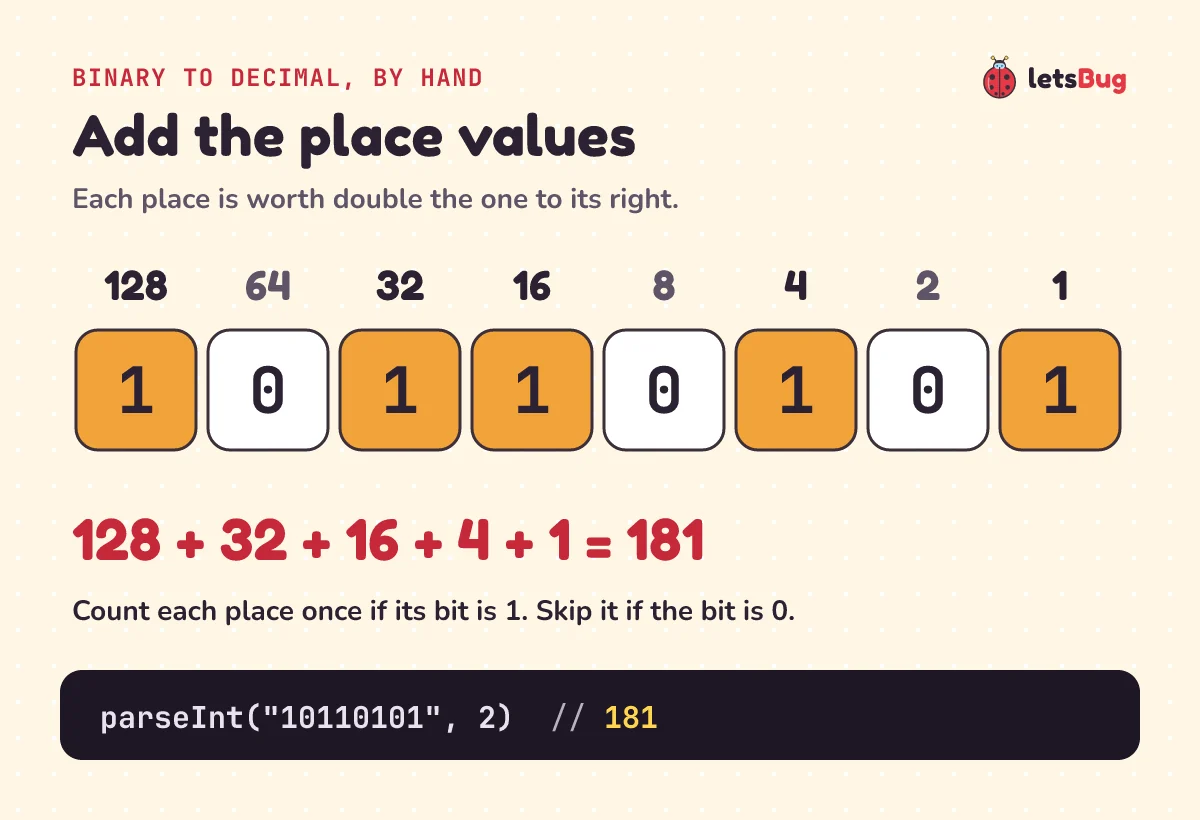
128 + 32 + 16 + 4 + 1 = 181. A computer's adder works with these same place values, carrying a 1 into the next place when two 1s meet. We build one from logic gates in how do computers add numbers?
What is the double-and-add method?
There's a second way that never needs the place values written out. Start with 0. Read the bits from the left. For each bit, double what you have, then add the bit:
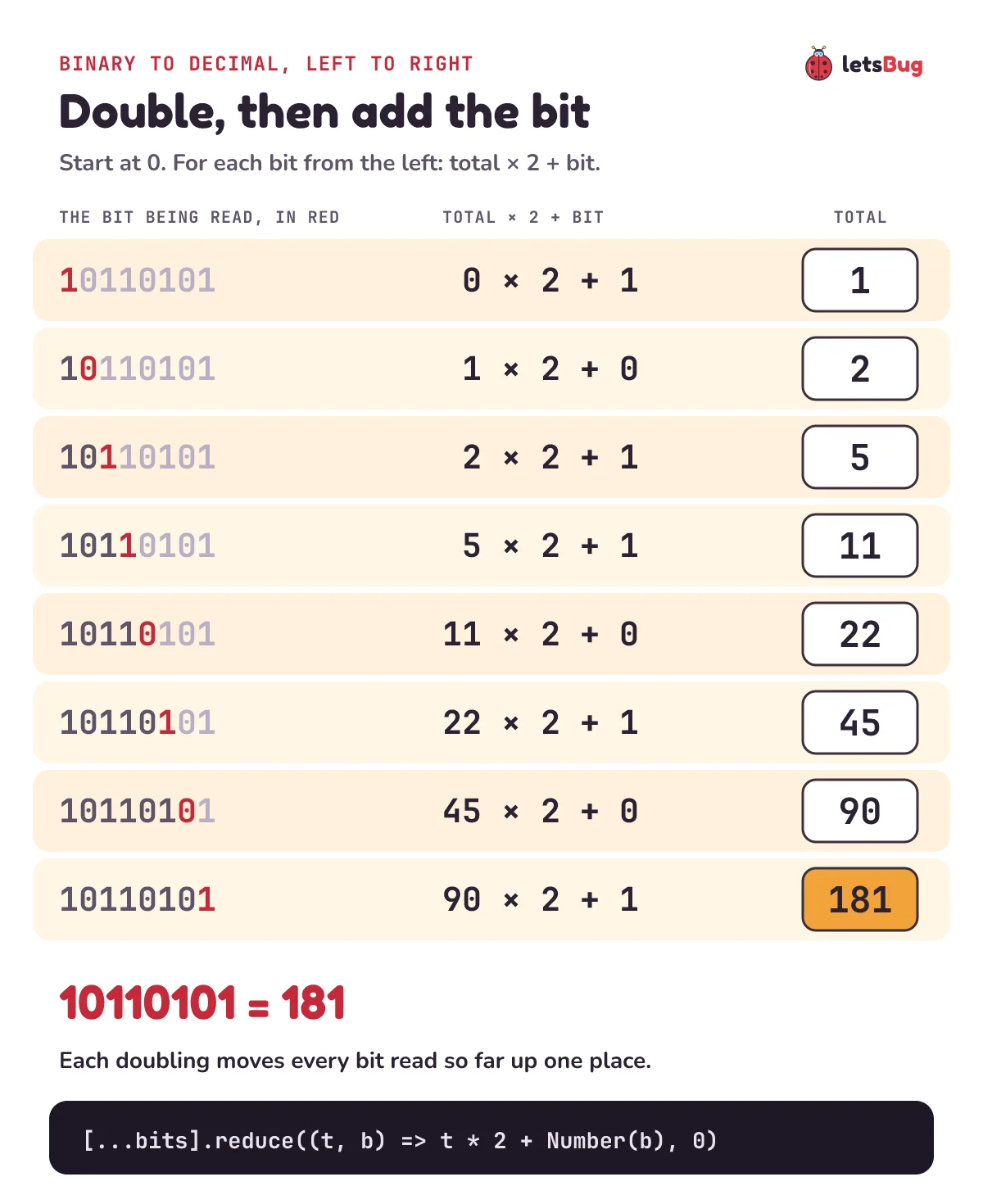
Why does it work? Every time you double, every bit you've already read moves up one place. The first 1 gets doubled seven times, so it ends up worth 27 = 128, just as the place-value table said. Both methods give 181. The doubling one is shorter to code because you never need to know how long the string is.
How do you write a binary to decimal function in JavaScript?
Here's the place-value method as a loop. It walks the string from the right, and place doubles each step: 1, 2, 4, 8…
function binToDec(bits) {
  if (typeof bits !== "string" || !/^[01]+$/.test(bits)) {
    throw new TypeError("binToDec needs a string of 0s and 1s");
  }
  let total = 0;
  let place = 1; // the rightmost bit is worth 1
  for (let i = bits.length - 1; i >= 0; i--) {
    if (bits[i] === "1") total += place;
    place *= 2;
  }
  if (!Number.isSafeInteger(total)) {
    throw new RangeError("Too big for a Number: use BigInt");
  }
  return total;
}

console.log(binToDec("1101"));     // 13
console.log(binToDec("10110101")); // 181
console.log(binToDec("0"));        // 0
Line by line:
- The first check only lets through a string made of 0s and 1s, at least one of them.
^and$pin the pattern to the whole string, so"1021"fails instead of matching its"10". bits[i] === "1"compares with the character "1". Anything else has already been turned away, so a 0 adds nothing.place *= 2moves one place to the left.- The last check catches numbers too big for a Number to hold exactly (more on that in the BigInt section).
The double-and-add method fits in one line with reduce. It does no checking, so use it on strings you've already checked:
const binToDec2 = bits => [...bits].reduce((total, bit) => total * 2 + Number(bit), 0);

console.log(binToDec2("10110101")); // 181
console.log(binToDec2("1101"));     // 13
Both loops run once per bit, so a 32-bit string takes 32 steps. That's O(n) in the length of the string.
What was wrong with our 2023 function?
The first version of this post took the binary as a number, turned it into a string, reversed the digits and added a doubling counter for every digit that wasn't 0. Here it is with semicolons added, plus three calls:
const toDecimal = (binaryNumber) => {
  const digits = String(binaryNumber).split("").reverse();
  let sum = 0;
  let counter = 1;
  digits.forEach(e => {
    if (Number(e) !== 0) sum = sum + counter;
    counter = counter * 2;
  });
  return sum;
};

console.log(toDecimal(11010));  // 26
console.log(toDecimal("1021")); // 11, but 1021 isn't binary
console.log(toDecimal(10000000000000000000000)); // 31, should be 4194304
The idea is right, and 11010 really is 26. Three things go wrong:
- Any digit that isn't 0 counts as a 1. The 2 in
"1021"is counted as a 1 in the 2s place, and you get 11 with no error. - Binary stored as a number stops being the digits you typed. A 1 followed by 22 zeros is a number literal for ten sextillion, and
String()writes it as"1e+22". The function then counts "1", "e", "+", "2", "2" as digits and returns 31. The right answer is 222 = 4,194,304. It goes wrong much sooner, too: from 17 digits the number can be rounded before the function sees it, sotoDecimal(10000000000000001)returns 65536 instead of 65537. - A leading 0 changes the base. Type
toDecimal(0101)and JavaScript reads0101as an old-style octal number, 65, so the function sees the digits 6 and 5 and returns 3. In strict mode, and in every module,0101is a SyntaxError.
The fix for all three: take binary as a string, and check it holds only 0s and 1s, as binToDec does above.
Which built-in should you use: parseInt, Number or BigInt?
In real code you don't need your own loop. JavaScript has three built-ins that read binary, plus a way to write binary straight into your code:
const bits = "10110101";
console.log(parseInt(bits, 2));   // 181
console.log(Number("0b" + bits)); // 181
console.log(BigInt("0b" + bits)); // 181n
console.log(0b10110101);          // 181
parseInt(s, 2): the 2 is the base, which MDN calls the radix. It can be any whole number from 2 to 36.Number("0b…"):Number()reads a string as if it were a number literal in code, and0bis how code writes binary.BigInt("0b…"): the same, but it returns a BigInt (an integer with annon the end) that never loses digits.0b10110101: a binary literal, for binary you know when you write the code. It's a plain number:0b11111111 === 255.
They agree on clean input. They differ on everything else, and that matters as soon as the string comes from a user:
Input s | parseInt(s, 2) | Number("0b" + s) | BigInt("0b" + s) |
|---|---|---|---|
"1101" | 13 | 13 | 13n |
"1021" | 2 | NaN | SyntaxError |
"" | NaN | NaN | SyntaxError |
" 1101" | 13 | NaN | SyntaxError |
"-101" | −5 | NaN | SyntaxError |
| sixty 1s | 1152921504606847000 | 1152921504606847000 | 1152921504606846975n |
What the table shows:
parseIntis forgiving. It skips leading spaces, accepts a minus sign, and stops at the first character that isn't a binary digit. In MDN's words, it "ignores it and all succeeding characters and returns the integer value parsed up to that point". So"1021"gives 2, from the "10".NumberandBigIntare strict. The whole string has to be a valid binary literal, or you getNaNor a SyntaxError. Neither accepts a minus sign with0b, before it or after it:Number("-0b101")isNaNtoo, because in the ECMAScript grammar for strings only decimal numbers can have a sign.- Sixty 1s is 260 − 1 = 1,152,921,504,606,846,975, an odd number. The two Number results are 260 = 1,152,921,504,606,846,976, which is even and 1 too big (the console prints it in short form, ending in 000). Only BigInt gets it right. The BigInt section below explains why.
So: parseInt(s, 2) for strings you trust, BigInt("0b" + s) when they might be long, and a check first whenever a person typed them.
How do you check that the input is really binary?
Text from a form field, prompt() or the terminal always arrives as a string (reading it is in read input from the terminal in Node.js). People add spaces, paste a 0b prefix, or type a 2 by mistake. This function trims the spaces, allows an optional 0b, and refuses everything else with a clear error:
function parseBinary(input) {
  const bits = String(input).trim().replace(/^0b/i, "");
  if (!/^[01]+$/.test(bits)) {
    throw new SyntaxError(`Not a binary number: "${input}"`);
  }
  const value = parseInt(bits, 2);
  if (!Number.isSafeInteger(value)) {
    throw new RangeError("More than 53 bits: use BigInt");
  }
  return value;
}

for (const input of [" 1101 ", "0b10110101", "", "1021", "0b"]) {
  try {
    console.log(JSON.stringify(input), "->", parseBinary(input));
  } catch (e) {
    console.log(JSON.stringify(input), "->", e.message);
  }
}
" 1101 " -> 13
"0b10110101" -> 181
"" -> Not a binary number: ""
"1021" -> Not a binary number: "1021"
"0b" -> Not a binary number: "0b"Three details make it work:
+in/^[01]+$/means "one or more", so an empty string fails. With*(zero or more) an empty box would pass, andNumber("")is 0, so it would quietly turn into 0.- The prefix is removed before the check, so
"0b"on its own leaves nothing and fails. Number.isSafeIntegercatches strings that are binary but too long for a Number. TryparseBinary("1".repeat(60)): it throws a RangeError instead of returning a wrong answer.
How do you convert long binary strings with BigInt?
A JavaScript Number is a 64-bit floating-point value. MDN explains that it "only has 52 bits to represent the mantissa, so it can only safely represent integers between -(253 – 1) and 253 – 1." (There's also one hidden leading bit, which is why the limit is 253 and not 252.) Every whole number up to 9,007,199,254,740,991 is stored exactly. Past that, some whole numbers can't be stored, and you get the nearest one that can:
const bits64 = "1".repeat(64);
console.log(parseInt(bits64, 2));                     // 18446744073709552000
console.log(BigInt(parseInt(bits64, 2)));             // 18446744073709551616n
console.log(BigInt("0b" + bits64));                   // 18446744073709551615n
console.log(BigInt("0b" + bits64) === 2n ** 64n - 1n); // true
console.log(Number.MAX_SAFE_INTEGER);                 // 9007199254740991
Sixty-four 1s is 264 − 1 = 18,446,744,073,709,551,615. A Number can't hold that, so parseInt returns the nearest Number that it can hold: 264 = 18,446,744,073,709,551,616, which is 1 too big. The console prints it as 18446744073709552000, the shortest digits that point to that value; wrapping it in BigInt() shows every digit. That's not a bug in parseInt: the exact answer just doesn't fit in a Number. MDN's parseInt page says so: "The BigInt() function supports parsing integers of arbitrary length accurately, by returning a BigInt."
The double-and-add loop works with BigInt too. Use 2n and BigInt(bit), because BigInt and Number can't be mixed in one sum:
const binToBig = bits => [...bits].reduce((total, bit) => total * 2n + BigInt(bit), 0n);

console.log(binToBig("10110101"));                       // 181n
console.log(binToBig(bits64) === BigInt("0b" + bits64)); // true
When do you meet binary this long? Bit masks often use 64 bits, and so do chess programs that keep one bit for each of the 64 squares on the board.
What about negative binary numbers?
If the string has a minus sign, parseInt keeps it: parseInt("-101", 2) is −5. But whole-number types in hardware (and in languages like C and Java) don't store a minus sign. They use two's complement, where the leftmost bit counts as minus its place value. In 8 bits it's worth −128 instead of 128. Read 11111011 as an ordinary binary number and you get 251. Read it as 8-bit two's complement and it's −128 + 64 + 32 + 16 + 8 + 2 + 1 = −5:
console.log(parseInt("-101", 2));                    // -5
console.log(parseInt("11111011", 2));                // 251
console.log(BigInt.asIntN(8, BigInt("0b11111011"))); // -5n
console.log(parseInt("11111111111111111111111111111011", 2) | 0); // -5
BigInt.asIntN(8, …) keeps the last 8 bits and reads them as a signed number. For 32 bits, | 0 does the same with a plain Number. The other direction, and why flipping the bits and adding 1 gives −5, is in our decimal to binary post.
How do you convert binary to decimal in Python?
Python's int() takes the base as its second argument. It accepts the 0b prefix, spaces around the number and underscores between digits, and it raises a ValueError for anything else. Python integers have unlimited precision, so 64 bits come out exact:
print(int("1101", 2))        # 13
print(int("0b10110101", 2))  # 181
print(int("0b1101", 0))      # 13
print(int(" 1101\n", 2))     # 13
print(int("1111_0000", 2))   # 240
print(int("1" * 64, 2))      # 18446744073709551615
try:
    int("1021", 2)
except ValueError as e:
    print(e)                 # invalid literal for int() with base 2: '1021'
Base 0 means "work out the base from the prefix", so "0b1101" is read as binary. Unlike JavaScript's parseInt, int("1021", 2) refuses the whole string instead of stopping at the 2. If an exam or interview asks you to write it yourself, here's double-and-add in Python:
def bin_to_dec(bits):
    if not bits or any(b not in "01" for b in bits):
        raise ValueError(f"not a binary string: {bits!r}")
    total = 0
    for bit in bits:
        total = total * 2 + int(bit)
    return total

print(bin_to_dec("10110101"))  # 181
print(bin_to_dec("1101"))      # 13
How do you convert decimal back to binary?
Call toString(2) on the number. It gives the shortest binary string, so pad it with padStart when you want a fixed width:
console.log((181).toString(2));                 // 10110101
console.log((13).toString(2).padStart(8, "0")); // 00001101
console.log(parseInt((181).toString(2), 2));    // 181
The brackets around (181) matter: without them JavaScript reads the dot as a decimal point. The full walk-through, with the divide-by-2 method on paper, negative numbers and BigInt, is in decimal to binary in JavaScript.
Common binary to decimal mistakes
Forgetting the 2
Without a base, both parseInt and Number read the string as decimal:
console.log(parseInt("1101")); // 1101
console.log(Number("1101"));   // 1101
Pass the 2 to parseInt, or put "0b" in front for Number.
Expecting parseInt to reject bad input
parseInt stops at the first character that isn't 0 or 1 and returns whatever it read so far. That includes a 0b prefix: parseInt only understands the 0x prefix for hexadecimal, so it reads the 0, stops at the b, and returns 0:
console.log(parseInt("1021", 2));   // 2
console.log(parseInt("0b1101", 2)); // 0
console.log(parseInt("2", 2));      // NaN
Check the string with /^[01]+$/ first, or use Number("0b" + s), which turns any bad character into NaN.
An empty box turning into 0
Number("") is 0 and BigInt("") is 0n, so an empty form field looks like the binary number 0:
console.log(Number(""));        // 0
console.log(BigInt(""));        // 0n
console.log(Number("0b" + "")); // NaN
Adding the "0b" prefix fixes it, because "0b" with no digits isn't a valid number. A regex with + catches it too.
Starting the place values from the left
The 1s place is always the rightmost bit. Give the leftmost bit the value 1 and you read the string backwards: 1101 becomes 1 + 2 + 8 = 11, which is the value of 1011. In a loop, walk from the end of the string (as binToDec does) or use double-and-add, which reads from the left by design.
Keeping binary in a number variable
let b = 1101 stores one thousand one hundred and one, not thirteen. That's the 2023 function's mistake: leading zeros turn into octal, and long numbers get rounded or turn into 1e+22. Keep binary in a string, or write it as a 0b literal.
Try these on paper first, then check them in the console.
1) What is 10110110 in decimal? Use the place values.
2) Convert 1011 with double-and-add, writing each step.
3) What does parseInt(" -1010", 2) return, and why?
Show the answers
1) The 1s sit under 128, 32, 16, 4 and 2: 128 + 32 + 16 + 4 + 2 = 182. It's one more than 10110101 (181), because only the last two bits differ.
2) 0 × 2 + 1 = 1, 1 × 2 + 0 = 2, 2 × 2 + 1 = 5, 5 × 2 + 1 = 11. Check: 8 + 2 + 1 = 11.
3) −10. parseInt skips the leading spaces, keeps the minus sign, and reads 1010, which is 8 + 2 = 10.
Questions people ask
How do I convert binary to decimal in JavaScript?
Use parseInt(s, 2), where s is the binary string: parseInt("1101", 2) returns 13. Number("0b" + s) gives the same result but returns NaN for bad input, and BigInt("0b" + s) stays exact for strings longer than 53 bits.
What is 11111111 in decimal?
255. It's every place from 128 down to 1 added up: 128 + 64 + 32 + 16 + 8 + 4 + 2 + 1. That's the largest unsigned value one byte (8 bits) can hold, and it's 28 − 1.
Why does parseInt("0b101", 2) return 0?
parseInt doesn't understand the 0b prefix. It reads the 0, stops at the b, and returns 0. Strip the prefix first, or use Number("0b101"), which gives 5.
How do I convert a long binary string without losing digits?
Use BigInt("0b" + s). A Number holds whole numbers exactly only up to 253 − 1, so parseInt can round anything longer. BigInt has no fixed limit: sixty-four 1s give 18446744073709551615n.
How do I convert binary to decimal in Python?
Use int(s, 2): int("1101", 2) is 13. It also accepts "0b1101", raises a ValueError for anything that isn't binary, and never loses digits, because Python integers have unlimited precision.
How do I convert decimal to binary in JavaScript?
Call toString(2) on the number: (13).toString(2) is "1101". Add .padStart(8, "0") for a full byte. The details are in our decimal to binary post.
Keep going
- The other direction: decimal to binary in JavaScript, with the divide-by-2 method,
toString(2), two's complement and BigInt. - What computers do with these bits: how do computers add numbers? Logic gates, carries and overflow.
- Ask for the binary string yourself: read input from the terminal in Node.js, then pass the answer to
parseBinary. - Watch the original video, how to convert binary numbers to decimal numbers, then the rest of the letsBug Code videos on YouTube.
Checked on 21 October 2026: every code sample in this post was run in Node.js 24.20.0 and Python 3.13.2, and every fact was checked against the sources below.
Sources
- MDN: parseInt() (radix 2 to 36, stopping at an invalid digit, the 0b prefix, loss of precision)
- MDN: Number (number coercion:
Number("0b11"), empty strings become 0) - MDN: Number.prototype.toString() and Number.MAX_SAFE_INTEGER (253 − 1)
- MDN: BigInt() constructor (0b strings, SyntaxError), BigInt (no mixing with Number) and BigInt.asIntN()
- MDN: Lexical grammar (binary literals, legacy octal literals)
- ECMAScript specification: parseInt ( string, radix ) and ToNumber applied to the String type (the StringNumericLiteral grammar)
- Python documentation: int() and bin() and numeric types (unlimited-precision integers)