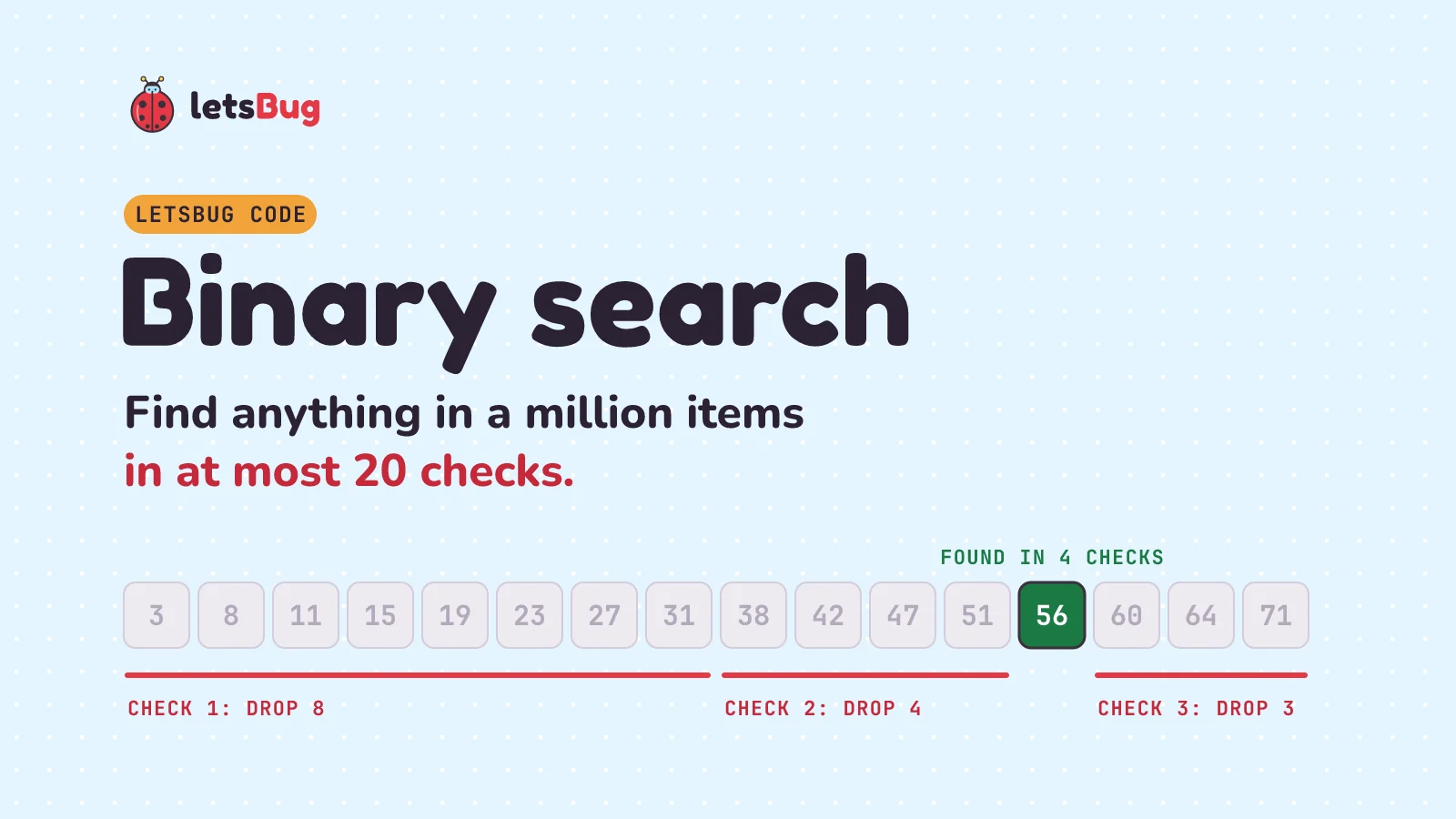
Binary search finds an item in a sorted list by checking the middle and throwing away the half that can't contain it, again and again. A million items take at most 20 checks. It only works on sorted data, because the middle item has to tell you which half to keep.
In this post we write it in JavaScript and Python, trace it by hand, see why it's so fast, and fix the two off-by-one bugs almost everyone writes the first time.
Key takeaways
- Check the middle of the sorted range. Too small: drop the left half. Too big: drop the right half. Repeat.
- It only works on sorted data. On an unsorted list it doesn't slow down, it gives wrong answers.
- Worst case is about log2(n) checks, written O(log n): 1,000 items need 10, a million need 20, a billion need 30.
- Loop
while lo <= hiand always move pastmid(mid + 1,mid - 1). Break either rule and the search loops forever or misses items. - Python has it built in: the
bisectmodule. JavaScript doesn't, so we write a short one.
This post goes with letsBug Code, episode 1. Watch it first, or read on: everything in the video is here, with the JavaScript version added.
The guessing game
I'm thinking of a whole number from 1 to 100. You guess, and I only say "higher" or "lower". What's your first guess?
The smart guess is 50, right in the middle. If I say "higher", you've thrown away half of all the possibilities in one go. Next you guess 75, the middle of what's left. "Lower." Half gone again. Keep guessing the middle and the range shrinks from 100 to 50 to 25 and on down to one number. Seven guesses are always enough for 1 to 100.
That's binary search. A list replaces the numbers in your head, and comparing replaces "higher" and "lower".
Linear search vs binary search
The obvious way to search a list is to start at the front and check every item. That's linear search, and if the item is last (or missing) it checks everything. Binary search never walks the list. Every check throws away half of what's left:
| Items in the list | Linear search, worst case | Binary search, worst case |
|---|---|---|
| 16 | 16 checks | 5 checks |
| 1,000 | 1,000 checks | 10 checks |
| 1,000,000 | 1,000,000 checks | 20 checks |
| 1,000,000,000 | 1,000,000,000 checks | 30 checks |
The same halving idea is behind git bisect, which finds the one commit that broke your code, and behind the indexes that let a database find one row among millions.
Does binary search need a sorted list?
"Too small, so go right" only makes sense if smaller things are on the left. (Getting a list into order is a job of its own: see bubble sort and insertion sort.) Let's break that on purpose. Here's a jumbled list, and we want 8:
[27, 3, 56, 11, 8]The middle item is 56. 8 is smaller, so binary search throws away the right half, which is exactly where 8 was sitting. Then it checks 27, goes left again, runs out of items and reports "not found". No error, no warning, just a wrong answer.
So sort first, then search. In JavaScript, watch out for this one:
[3, 11, 8].sort();               // [11, 3, 8]: sorted as text, not numbers
[3, 11, 8].sort((a, b) => a - b); // [3, 8, 11]: sorted as numbers.sort() compares numbers as strings, so "11" comes before "3". Binary search on that array quietly misses items. Always pass (a, b) => a - b for numbers. In Python, items.sort() sorts numbers correctly.Binary search in JavaScript
function binarySearch(items, target) {
  let lo = 0;
  let hi = items.length - 1;
  while (lo <= hi) {
    const mid = Math.floor((lo + hi) / 2);
    if (items[mid] === target) return mid;
    if (items[mid] < target) lo = mid + 1;
    else hi = mid - 1;
  }
  return -1;
}

const items = [3, 8, 11, 15, 19, 23, 27, 31, 38, 42, 47, 51, 56, 60, 64, 71];
console.log(binarySearch(items, 56)); // 12
console.log(binarySearch(items, 40)); // -1
Line by line:
loandhiare the lowest and highest index still in play. At the start that's the whole list.while (lo <= hi): as long as the range isn't empty, there's something left to check.midis the middle index.Math.floorrounds down, because an index has to be a whole number.- If the middle item is the target, we're done: return its index.
- If it's too small, the target can only be to the right, so
lojumps tomid + 1. - Otherwise it's too big, so
hidrops tomid - 1. - If
lopasseshi, the range is empty and the target isn't there: return-1.
Binary search in Python
The same function in Python. // is whole-number division, so it does the rounding down for us:
def binary_search(items, target):
    lo, hi = 0, len(items) - 1
    while lo <= hi:
        mid = (lo + hi) // 2
        if items[mid] == target:
            return mid
        elif items[mid] < target:
            lo = mid + 1
        else:
            hi = mid - 1
    return -1

items = [3, 8, 11, 15, 19, 23, 27, 31, 38, 42, 47, 51, 56, 60, 64, 71]
print(binary_search(items, 56))  # 12
print(binary_search(items, 40))  # -1
Walk-through: finding 56
Let's run it by hand on those 16 sorted numbers (indexes 0 to 15) and look for 56:
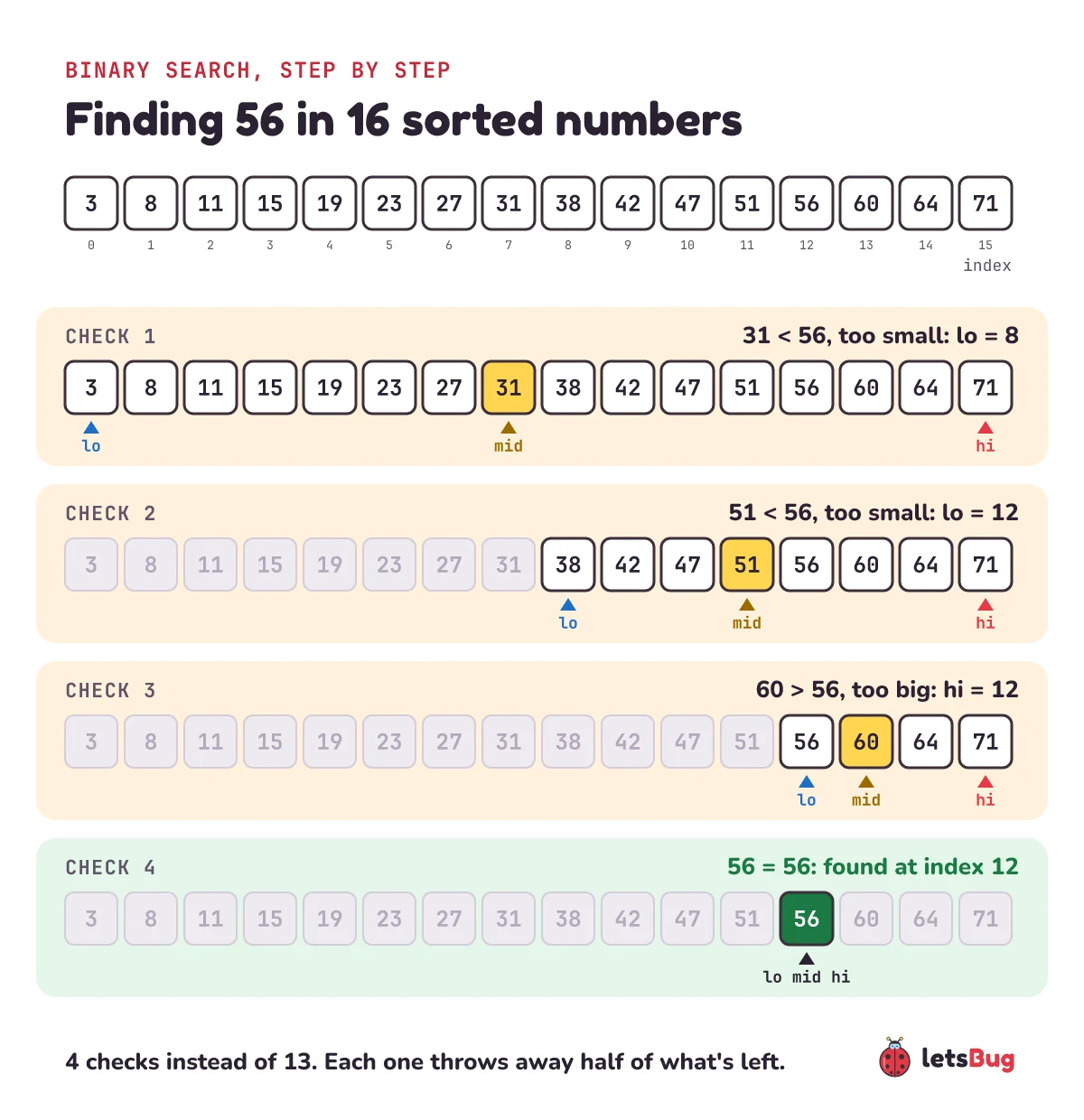
| Check | lo | mid | hi | items[mid] | What happens |
|---|---|---|---|---|---|
| 1 | 0 | 7 | 15 | 31 | Too small, so lo = 8 |
| 2 | 8 | 11 | 15 | 51 | Too small, so lo = 12 |
| 3 | 12 | 13 | 15 | 60 | Too big, so hi = 12 |
| 4 | 12 | 12 | 12 | 56 | Found it at index 12 |
Four checks out of sixteen. Linear search would have needed thirteen.
When the target isn't there
Now search for 40, which isn't in the list. The middles go 31, 51, 42, then 38. 38 is too small, so lo moves to 9, but hi is 8. The markers have crossed, the loop stops, and we return -1. It takes four checks to prove something is missing.
What is the time complexity of binary search?
Each check halves what's left. Start with n items: after one check n/2 remain, after two n/4, and after k checks n/2k. We're down to one item when 2k reaches n, so k is about log2(n).
220 = 1,048,576, just over a million, and log2(1,000,000) ≈ 19.93. So a million items need at most 20 comparisons. Programmers write this as O(log n): double the data, and you add just one more check.
Why does my binary search loop forever? The two off-by-one bugs
Binary search is easy to explain and easy to get slightly wrong. Here are the two classic mistakes.
Mistake 1: hi = mid instead of hi = mid - 1
Search [2, 5] for 1. lo is 0, hi is 1, so mid is 0. 2 is too big, so hi = mid sets hi to 0. Next round: lo 0, hi 0, mid 0, 2 is too big, hi becomes 0 again. Nothing changes, and the loop runs forever.
Mistake 2: while (lo < hi) without the equals sign
When lo and hi meet on a single item, the loop quits without checking it. In our walk-through that's check 4, so the search for 56 returns -1 even though 56 is right there. With our 16 numbers, this version misses half of them.
hi is inclusive, so loop while lo <= hi, and always move past mid with mid + 1 or mid - 1.One more, for other languages. In Java or C, (lo + hi) / 2 can overflow a 32-bit int on huge arrays. That bug sat in Java's own library for years (Joshua Bloch wrote about it in 2006). There the safe form is lo + (hi - lo) / 2. JavaScript numbers and Python integers are big enough that our code doesn't hit it.
Python's bisect module, and a JavaScript twin
In real Python code you rarely write binary search yourself. The standard library's bisect module does it. bisect_left returns where the value is, or where it would go to keep the list sorted:
import bisect

items = [3, 8, 11, 15, 19, 23, 27, 31, 38, 42, 47, 51, 56, 60, 64, 71]
bisect.bisect_left(items, 56)  # 12: it's at index 12
bisect.bisect_left(items, 40)  # 9: 40 would go between 38 and 42

i = bisect.bisect_left(items, 40)
found = i < len(items) and items[i] == 40  # False

bisect.insort(items, 40)  # inserts 40 in the right place
JavaScript has no built-in binary search on arrays (indexOf and includes are linear). If you need the "where would it go" version, this is the JavaScript twin of bisect_left:
function lowerBound(items, target) {
  let lo = 0;
  let hi = items.length; // note: not length - 1
  while (lo < hi) {
    const mid = Math.floor((lo + hi) / 2);
    if (items[mid] < target) lo = mid + 1;
    else hi = mid;
  }
  return lo;
}

lowerBound(items, 56); // 12
lowerBound(items, 40); // 9
With duplicates, binarySearch returns a matching index, not necessarily the first. In [1, 2, 2, 2, 3] it finds the 2 at index 2. bisect_left and lowerBound always give the first one, index 1, which is what interview questions like "first occurrence" want.
Notice that this one uses lo < hi and hi = mid, the two "mistakes" from above. It's correct here because hi starts one past the end (it's exclusive). So the real rule is: pick inclusive or exclusive for hi, and stick to it.
Using the same 16 numbers, which middle items do you check when you search for 8? And for 64? Trace it on paper, then run the code to check.
Show the answers
8: the middles are 31, 15, 8. Found at index 1 in 3 checks.
64: the middles are 31, 51, 60, 64. Found at index 14 in 4 checks.
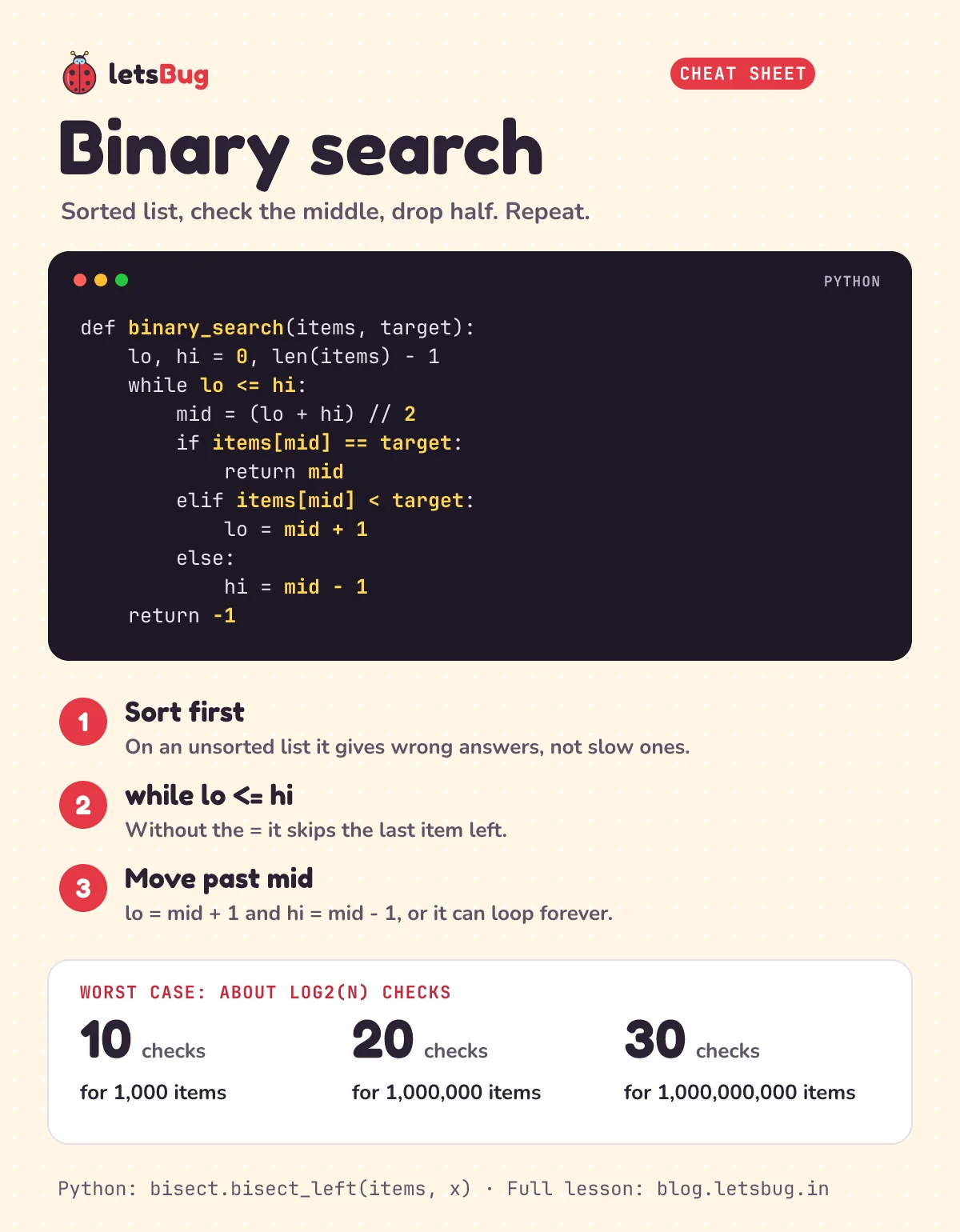
Binary search cheat sheet
Everything above on one page: the Python function, the three rules that keep it correct, and how many checks it needs. Save it for revision.
Questions people ask
What is the time complexity of binary search?
O(log n) in the worst case: at most ⌊log2(n)⌋ + 1 comparisons. That's 10 for 1,000 items and 20 for a million. The best case is O(1), when the first middle is the target.
Is binary search always faster than linear search?
Only on sorted data. Sorting costs O(n log n), which is more than one linear search. So if you search an unsorted list once, linear search wins. If you search the same list many times, sort it once and use binary search.
Should I write binary search with a loop or with recursion?
Both work. The loop version above uses constant memory, while the recursive version adds a stack frame per halving (about 20 for a million items). Most libraries use the loop.
Does binary search work on strings?
Yes, on any values you can compare, as long as the list is sorted with the same comparison. In JavaScript, < on strings compares character codes, so "Zebra" sorts before "apple". Sort and search with the same rule.
Can I use binary search on a linked list?
Not usefully. Binary search needs to jump straight to the middle, and a linked list has to walk there node by node, so each "check the middle" costs O(n). Use an array, or a binary search tree.
Keep going
- Watch the full lesson, Binary Search Explained in Python, and the rest of the letsBug Code series on YouTube.
- Don't need the whole list sorted, only its biggest or smallest item? One pass does it: largest and smallest number in an array in JavaScript.
- Next lesson: bubble sort and insertion sort in Python, step by step, and why simple sorts get slow on big lists.
- Next up: how do you sort a million items quickly in the first place? Start with sorting algorithms in C and JavaScript.
Checked on 9 October 2026 against the 5 sources below.
Sources
- Python documentation: bisect, array bisection algorithm
- Wikipedia: Binary search (complexity and variants)
- University of San Francisco: linear vs binary search, visualised
- MIT OpenCourseWare: 6.006 Introduction to Algorithms
- Joshua Bloch, Google Research (2006): Nearly all binary searches and mergesorts are broken
Every code sample in this post was run in Node.js 24 and Python 3.13 before publishing.