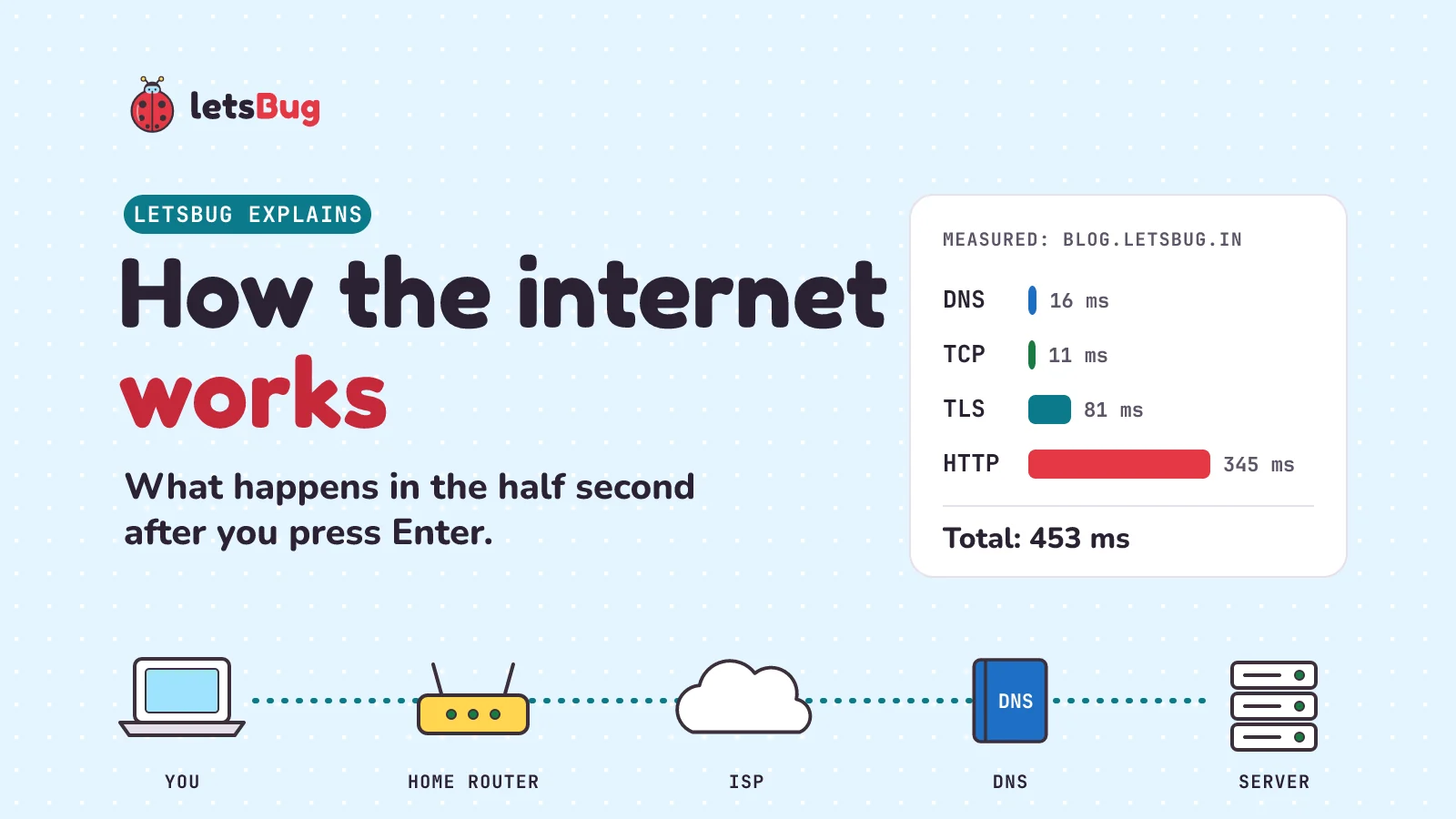
When you open a website, your computer first asks DNS to turn the name into an IP address, then opens a connection to that address, sets up encryption with TLS, and sends an HTTP request. The server's answer comes back as small packets, passed from router to router, sometimes through cables on the sea floor, and your browser puts them back together into the page. On my connection in India, getting from the name to the first bytes of this blog's page took under half a second. In this post we follow each step in order, and run real commands (nslookup, a short Python script and tracert) so you can watch every step happen on your own machine.
Key takeaways
- DNS is the internet's phone book: it turns
blog.letsbug.ininto an IP address like192.178.211.121. - TCP (or QUIC for HTTP/3) opens a connection; TLS encrypts it. That's the lock in your address bar.
- HTTP is the actual conversation: the browser asks
GET /, the server answers200 OKand the page. - Everything travels in packets of up to about 1,500 bytes, and routers pass them hop by hop.
tracertshows you the hops. - Between countries, most of that trip is on undersea fibre-optic cables: TeleGeography tracks more than 600 active and planned ones, and Mumbai and Chennai are India's big landing cities.
This post goes with our short How the Internet Works: A Fun Journey! The video, from December 2024, gives the big picture in under a minute. This written guide goes deeper, and every command and number in it was run and checked in October 2026.
The whole journey in one picture
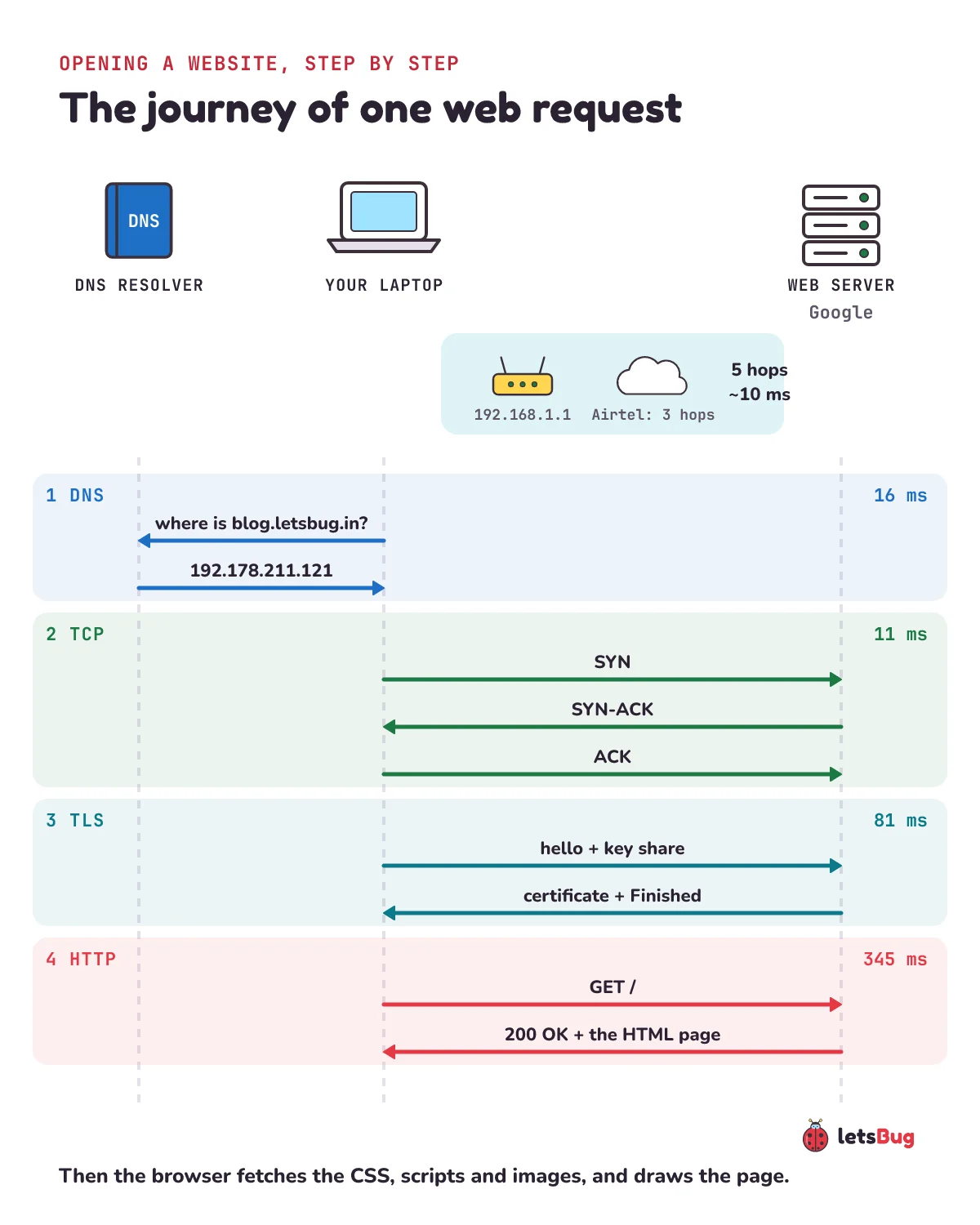
Let's say you type blog.letsbug.in and press Enter. Here's everything that happens before the page appears, in order:
- DNS lookup: find the IP address for the name.
- Connect: open a TCP connection to that address (or QUIC, for HTTP/3).
- TLS: agree on encryption keys and check the site's certificate.
- HTTP: ask for the page and get it back.
- Packets and routers: under all of this, data moves in small packets, router to router, over copper, Wi-Fi, fibre and undersea cables.
- Back to your screen: the browser reads the HTML, fetches the images and styles it needs, and draws the page.
Step 1: DNS turns a name into an address
Computers on the internet find each other by IP address, a number. People remember names. DNS, the Domain Name System, connects the two. Let's ask it ourselves. Open a terminal (Command Prompt on Windows, Terminal on Mac or Linux) and type:
nslookup blog.letsbug.inHere's what I got:
Server:  dns.google
Address:  8.8.8.8

Non-authoritative answer:
Name:    ghs.google.com
Addresses:  2404:6800:4000:1025::79
          192.178.211.121
Aliases:  blog.letsbug.in
Three things to notice:
- Server: dns.google is the recursive resolver my computer asked: Google Public DNS at 8.8.8.8. Yours is probably your internet provider's resolver, or 1.1.1.1 if you've set Cloudflare's.
- Aliases: blog.letsbug.in and Name: ghs.google.com: our blog's name is an alias (a CNAME record) that points to Google's Blogger servers. Blogger's help tells every custom domain to point a CNAME at
ghs.google.com. - Two addresses:
192.178.211.121is an IPv4 address (four numbers), and2404:6800:4000:1025::79is an IPv6 address, the newer, much longer kind. Run it again later and you may get a different 192.178.x.x address: Google spreads the blog across many servers.
Who the resolver asks
If the resolver hasn't seen the name recently, it walks down the DNS tree, asking a different server at each level:
- A root server, which points it to the servers for
.in. The root zone has 13 named root servers (a.root-servers.net to m.root-servers.net), which IANA says are really "a network of hundreds of servers in many countries". - The TLD server for
.in, which points it to the nameservers forletsbug.in. - The authoritative nameserver for
letsbug.in, which has the actual answer.
You can see the real servers at each level with -type=NS:
nslookup -type=NS in.
in      nameserver = ns1.registry.in
in      nameserver = ns2.registry.in
...

nslookup -type=NS letsbug.in
letsbug.in      nameserver = cody.ns.cloudflare.com
letsbug.in      nameserver = joselyn.ns.cloudflare.com
So India's .in registry sends the resolver to Cloudflare, which holds letsbug.in's records. Cloudflare's own guide counts 8 steps in a full lookup when nothing is cached. Most of the time something is cached: in my runs the first lookup took 34 ms and later ones 6 to 22 ms, because the answer was already saved nearby.
What an IP address is
MDN puts it nicely: a MAC address is like a fingerprint, but an IP address is a street address. It says where a computer is on the network, so routers can work out which way to send data, the same way a postal worker uses a PIN code. Your home router gives your laptop a private address (my router itself is 192.168.1.1), and your internet provider gives your router a public one.
Step 2: open a connection (TCP or QUIC)
Now our computer knows where to go. Before sending the request, it opens a connection. With TCP, that's a three-way handshake:
- Your computer sends SYN ("can we talk?").
- The server replies SYN-ACK ("yes").
- Your computer sends ACK ("great, starting now").
TCP also numbers the data so it arrives complete and in order, and resends anything that gets lost. HTTPS uses port 443 (plain HTTP uses port 80), like a flat number inside the building.
Newer sites can use HTTP/3, which runs on QUIC instead of TCP. QUIC is built on UDP, folds the TLS handshake into its own handshake, and copes better when a packet is lost or your phone switches from Wi-Fi to mobile data. A server tells the browser it speaks HTTP/3 with a response header. Google's home page sends one; our blog doesn't (yet), so browsers reach it over TCP:
curl -sI https://www.google.com/
Alt-Svc: h3=":443"; ma=2592000,h3-29=":443"; ma=2592000
Step 3: TLS makes it private
HTTPS is HTTP inside a TLS tunnel. In the TLS handshake, the browser and server agree on encryption keys, and the server shows a certificate that proves it really is blog.letsbug.in. Your browser checks that certificate before it sends anything private. With TLS 1.3, the current version, the handshake needs just one round trip (TLS 1.2 needed two), and when you reconnect to a site it can even send data with zero extra round trips (0-RTT).
Step 4: the HTTP request and response
Finally, the browser asks for the page. An HTTP request is plain text with a method, a path and headers:
GET / HTTP/1.1
Host: blog.letsbug.in
Connection: close
That's HTTP/1.1, which is readable text, so it's what we send in our script. Browsers usually use HTTP/2 (or HTTP/3), which carries the same requests in a compact binary form; our blog's server speaks HTTP/2.
The server answers with a status code (200 means OK, 404 means not found), its own headers, and then the body: the HTML of the page. HTTP is stateless, MDN notes: each request stands alone, which is why websites use cookies to remember that you're logged in.
Measure the whole trip with Python
Let's time each step ourselves. This script uses only Python's standard library (I ran it with Python 3.13), so there's nothing to install. Save it as journey.py:
import socket, ssl, time

HOST = "blog.letsbug.in"
ctx = ssl.create_default_context()  # load trusted certificates before timing

t0 = time.perf_counter()
ip = socket.getaddrinfo(HOST, 443, socket.AF_INET, socket.SOCK_STREAM)[0][4][0]
t1 = time.perf_counter()
sock = socket.create_connection((ip, 443), timeout=10)
t2 = time.perf_counter()
tls = ctx.wrap_socket(sock, server_hostname=HOST)
t3 = time.perf_counter()
tls.sendall(f"GET / HTTP/1.1\r\nHost: {HOST}\r\nConnection: close\r\n\r\n".encode())
data = b""
while b"\r\n\r\n" not in data:
    data += tls.recv(4096)
t4 = time.perf_counter()
version = tls.version()
tls.close()

head = data.split(b"\r\n\r\n")[0].decode("latin-1").split("\r\n")
print("1. DNS  ", HOST, "->", ip, f"({(t1 - t0) * 1000:.0f} ms)")
print("2. TCP  ", "connected to port 443", f"({(t2 - t1) * 1000:.0f} ms)")
print("3. TLS  ", version, f"({(t3 - t2) * 1000:.0f} ms)")
print("4. HTTP ", head[0], f"({(t4 - t3) * 1000:.0f} ms)")
for line in head[1:]:
    if line.lower().startswith(("content-type:", "server:")):
        print("        ", line)
Run it with python journey.py. Here's one of my runs:
1. DNS   blog.letsbug.in -> 192.178.211.121 (16 ms)
2. TCP   connected to port 443 (11 ms)
3. TLS   TLSv1.3 (81 ms)
4. HTTP  HTTP/1.1 200 OK (345 ms)
         Content-Type: text/html; charset=UTF-8
         Server: GSE
What the numbers say:
- DNS, 16 ms: quick, because the answer was already cached nearby, so nobody had to walk the whole DNS tree.
- TCP, 11 ms: one round trip to the server and back. That matches the 9 to 12 ms that
tracertshows below. - TLS, 81 ms: TLS 1.3 needs only one round trip on the wire, so most of this is probably time the server spends before replying. For comparison,
www.google.comfinished its TLS handshake in about 16 ms in my runs. - HTTP, 345 ms: the longest step. Blogger builds the page before sending the first bytes. One run took over a second, so expect yours to jump around.
Add them up: 16 + 11 + 81 + 345 = 453 ms, less than half a second from name to first bytes of the page. Server: GSE is the name Google's server reports, and Content-Type: text/html tells the browser the body is a web page.
Packets and routers: see every hop with tracert
The page doesn't travel as one big piece. It's cut into packets, small chunks that are put back together at the other end. On most networks a packet can carry at most about 1,500 bytes (the usual MTU, the largest packet a link accepts), so a 300 KB page needs at least 200 packets. Each packet has the destination IP address on it, and each router along the way reads it and passes the packet to the next router that's closer.
On Windows, tracert shows those routers. (On Mac and Linux it's traceroute.) Here's my trace to our blog. The -d flag skips name lookups so it runs faster:
tracert -d blog.letsbug.in

Tracing route to ghs.google.com [192.178.211.121]
over a maximum of 30 hops:

  1    14 ms    29 ms     7 ms  192.168.1.1
  2    14 ms     8 ms    12 ms  110.226.15.255
  3    10 ms    10 ms     5 ms  125.20.27.9
  4     9 ms    15 ms    11 ms  116.119.57.26
  5    12 ms    11 ms     9 ms  192.178.211.121

Trace complete.- Each hop is tried three times, so you get three times per line.
- Hop 1 is my home router (a private 192.168 address).
- Hops 2 to 4 are my internet provider's routers. The public registry, APNIC, lists all three as Bharti networks (one record names Bharti Airtel Limited).
- Hop 5 is Google's server. Airtel hands our packets straight to Google's network, and the round trip is only about 10 ms, so the server is close by.
How does tracert find the routers? Every packet carries a TTL (time to live) number, and each router lowers it by 1. When it hits 0, that router drops the packet and sends back a "time exceeded" message. tracert sends packets with TTL 1, then 2, then 3, and each reply reveals the next router. Microsoft's documentation notes that some routers don't send these replies. Their line shows * stars and "Request timed out", but your traffic still goes through them.
One more piece of physics. Light in glass fibre travels at about 200,000 km per second, two-thirds of its speed in a vacuum, because glass slows it down (its refractive index is about 1.5). That's 200 km per millisecond. A 10 ms round trip is 5 ms each way, so this server is at most about 1,000 km of cable away, and likely much closer, since routers add delay too.
Servers and data centres
The "server" that answered is one computer among thousands in a data centre, a building full of servers with fast links, backup power and cooling. Big sites don't keep just one copy of a page: a CDN (content delivery network), in Cloudflare's words, is "a geographically distributed group of servers" that caches content closer to users. That's why a site run from the US can still answer in India in a few milliseconds.
Undersea cables: how the internet crosses oceans
When the server is overseas, the packets almost always cross the sea on a submarine cable, not a satellite. TeleGeography, which maps them, says:
- As of 2026 it tracks more than 600 active and planned submarine cables, and as of early 2026 there are over 1.5 million km of them in service.
- In the deep ocean a cable is about as wide as a garden hose, and the glass fibres inside carrying the light are roughly the width of a human hair. Near the shore the cables are buried under the seabed.
- Cables break about 200 times a year (data from the International Cable Protection Committee), two-thirds of the time from fishing boats and dragged anchors. You rarely notice because traffic is spread across many cables.
India's landing points. In TeleGeography's Submarine Cable Map data (fetched 10 October 2026), 23 cables land in India: 18 in service and 5 planned. Mumbai is the busiest, with 16 (12 in service, including 2Africa, SeaMeWe-4, AAE-1 and IMEWE), and Chennai has 10 (7 in service, including Bay of Bengal Gateway, i2i and the Chennai-Andaman & Nicobar Islands cable). So when you open a site hosted in Europe, your packets most likely leave India from a landing station in Mumbai.
Back to your screen
The first HTML that arrives is only the start. MDN describes a web page as "constructed from resources such as text content, layout instructions, images, videos, scripts". So the browser reads the HTML, finds the CSS, JavaScript and images it mentions, and fetches each one. Files from the same site reuse the open connection and the cached DNS answer, so they're much faster than the first; files from other hosts (our images come from media.letsbug.in) need their own lookup and connection. As the pieces land, it lays out the page and paints it on your screen.
What each layer does
Network engineers group these jobs into layers. Each one only talks to the layer above and below it, which is why your browser doesn't care whether you're on Wi-Fi or mobile data.
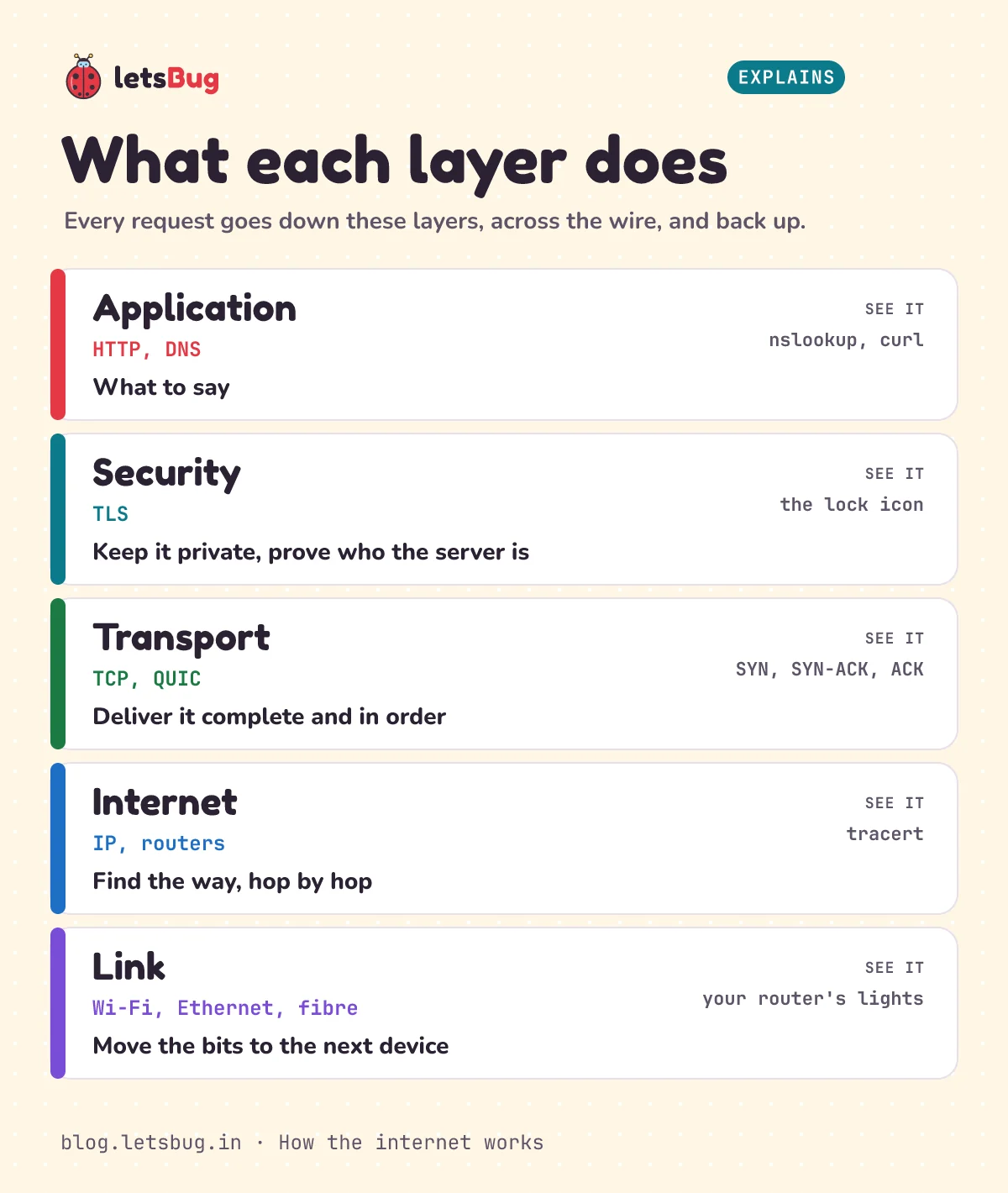
| Layer | Examples | Its job | See it with |
|---|---|---|---|
| Application | HTTP, DNS | What to say: "GET /", "what's the address?" | nslookup, curl -I |
| Security | TLS | Keep it private and prove who the server is | The lock icon, tls.version() |
| Transport | TCP, QUIC (on UDP) | Deliver it complete and in order | The TCP time in journey.py |
| Internet | IP, routers | Find the way, hop by hop | tracert |
| Link | Wi-Fi, Ethernet, fibre | Move the bits to the next device | Your router's lights |
For exams you'll see this as the 4-layer TCP/IP model or the 7-layer OSI model. Our network models questions and answers compare them. TLS isn't a layer of its own in those textbook models: it sits between transport and application.
Common errors and what they mean
Each step can fail in its own way, and the error message tells you which step broke. These are the real messages from Windows and Python 3.13:
- DNS failed.
nslookupsays*** dns.google can't find nosuchname.letsbug.in: Non-existent domain, and Python raisessocket.gaierror: [Errno 11001] getaddrinfo failed(on Linux the number and wording differ). Check the spelling, then your network. If only one network fails, try another DNS resolver. - Connection failed.
TimeoutError: timed outmeans no reply came back at all: you're offline, a firewall blocks the port, or the server is down. On a web page you can detect this with JavaScript, see detect online or offline status in JavaScript. - TLS failed.
ssl.SSLCertVerificationError: [SSL: CERTIFICATE_VERIFY_FAILED] certificate verify failed: certificate has expired, orHostname mismatch, certificate is not valid for 'wrong.host.badssl.com'. The connection worked, but the certificate didn't prove who the server is. Also check your computer's date: a wrong clock makes valid certificates look expired. - HTTP failed.
urllib.error.HTTPError: HTTP Error 404: Not Found. Everything worked up to the server, which simply has no page at that path. A 5xx code (like 500 or 503) means the server itself had a problem.
Try these on your own machine. (1) Run python journey.py twice in a row. Which number drops the second time, and why? (2) In my trace, light needed about 10 ms for the round trip. If a server in Europe answers in 150 ms, what's the most fibre the packets could have crossed one way?
Show the answers
(1) DNS usually drops (from 34 ms to as low as 6 ms in my runs), because the answer is now cached by your computer or resolver.
(2) 150 ms round trip is 75 ms each way, and light in fibre covers about 200 km per ms: 75 × 200 = 15,000 km at most. The real cable path is shorter, because routers and servers add delay too.
Questions people ask
What happens when you type a URL in the browser?
The browser looks up the domain's IP address with DNS, opens a TCP or QUIC connection to it, sets up encryption with TLS, and sends an HTTP request. The server sends back the HTML in packets that routers carry hop by hop. The browser then fetches the CSS, scripts and images the page needs and draws it.
Is the internet the same as the World Wide Web?
No. The internet is the network itself: cables, routers and the IP addresses that connect computers. The Web is one thing that runs on it: pages and links fetched with HTTP. Email, online games and video calls use the internet too, without being the Web.
Does the internet go through satellites or cables?
Mostly cables. Between countries, traffic travels on undersea fibre-optic cables; TeleGeography tracks more than 600 active and planned ones. In TeleGeography's words, satellites "do an excellent job of reaching areas that aren't yet wired with fiber", but the cables carry the bulk of it.
What is the difference between HTTP and HTTPS?
HTTPS is HTTP sent inside an encrypted TLS connection. Nobody between you and the server, like the café Wi-Fi or your ISP, can read or change the contents (they can still see which site's IP address you connect to), and the certificate proves you're talking to the real site. HTTPS uses port 443; plain HTTP uses port 80.
Why is a website slow sometimes?
Any step can be the slow one. DNS can be slow on the first lookup, a far-away server adds round-trip time, a busy server takes longer to build the page, and a weak Wi-Fi signal loses packets that must be resent. Run journey.py to see which step takes longest.
Keep going
- Watch the short, How the Internet Works: A Fun Journey!, and more on the letsBug YouTube channel.
- Something that works with no internet at all: how GPS works without internet.
- For web developers: detect online or offline status in JavaScript.
- For exams: network models questions and answers.
Sources
All pages fetched 10 October 2026.
- Cloudflare Learning Center: What is DNS? (resolver, root, TLD and authoritative servers; 8 steps)
- IANA: Root servers (13 named authorities, hundreds of servers)
- MDN: How does the Internet work? (routers, IP addresses, ISPs) and Overview of HTTP (status codes, stateless)
- Cloudflare Learning Center: What is TCP/IP? (SYN, SYN-ACK, ACK) and What is HTTP/3? (QUIC over UDP)
- IETF: RFC 9000, QUIC (QUIC integrates the TLS handshake)
- Cloudflare Learning Center: Why use TLS 1.3? (one round trip instead of two) and What happens in a TLS handshake?
- Cloudflare Learning Center: What is a packet?, What is MTU? (1,500 bytes) and What is a CDN?
- Cloudflare Learning Center: What is HTTPS? (ports 443 and 80)
- Blogger Help: Set up a custom domain (CNAME to ghs.google.com)
- Microsoft Learn: tracert (how TTL reveals each router; /d; 30 hops by default)
- Wikipedia: Optical fiber (refractive index about 1.5)
- TeleGeography: Submarine cable FAQs (600+ cables, 1.5 million km, garden hose, about 200 faults a year) and the Submarine Cable Map: India
- APNIC: registry records for 110.226.15.255, 125.20.27.9 and 116.119.57.26 (Bharti)
Every command and code sample in this post was run on Windows 11 with Python 3.13 on 10 October 2026, and every number was checked by a script before publishing. Your addresses and times will differ: that's the point, so run them yourself.