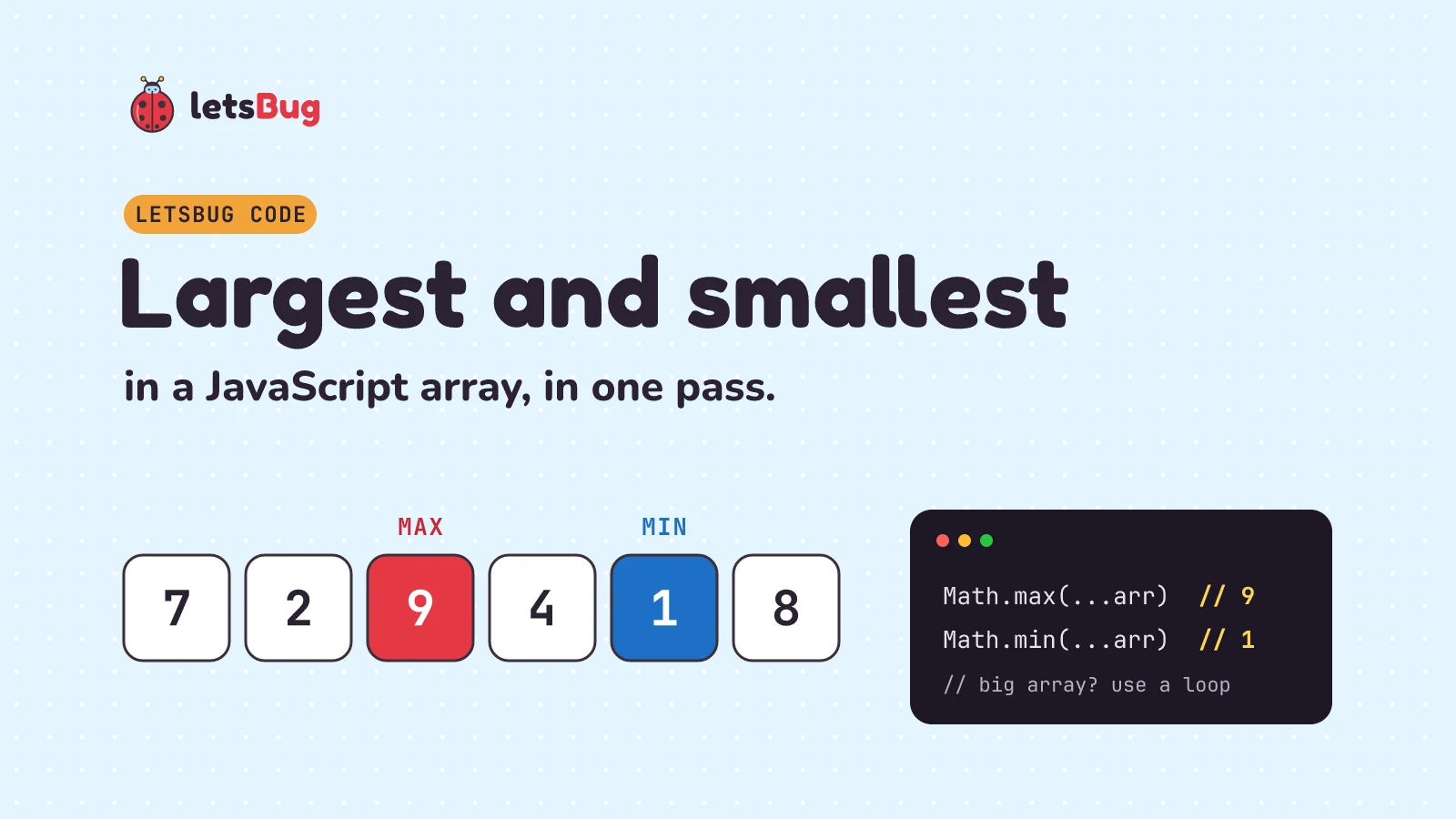
To find the largest and smallest number in a JavaScript array, use Math.max(...arr) and Math.min(...arr) for everyday arrays, or one for loop that tracks both as it goes. The loop works on an array of any size; the spread version throws a RangeError once the array gets big: at around 125,000 numbers on the laptop we tested.
In this post we write both, plus reduce, and handle the cases that trip people up: empty arrays, strings and NaN, finding the index, and the second largest, a favourite interview follow-up.
Key takeaways
Math.max(...arr)andMath.min(...arr)are the shortest answer, and fine for arrays of a few thousand items.- Spreading a huge array passes every item as a separate argument. In Node.js 24 on our machine that failed at about 125,000 items with
RangeError: Maximum call stack size exceeded. - A
forloop finds both values in one pass, works at any size, and was the fastest method we measured. - Empty arrays:
Math.max()gives-Infinity,Math.min()givesInfinity, andreducewithout a start value throws aTypeError. Decide what "empty" should return. - One
NaNmakesMath.maxreturnNaN. Clean the data withNumberandNumber.isFinitefirst.
This post goes with our 2021 video on the same problem. The video shows the loop idea from back then; the written steps below are up to date for Node.js 24 and add the edge cases.
Method 1: one loop, two trackers
The idea works in any language. Keep two variables, min and max. Start both at the first item, then walk the rest of the array once. Anything smaller than min becomes the new min; anything bigger than max becomes the new max.
function minMax(arr) {
  if (arr.length === 0) return null;
  let min = arr[0];
  let max = arr[0];
  for (let i = 1; i < arr.length; i++) {
    if (arr[i] < min) min = arr[i];
    if (arr[i] > max) max = arr[i];
  }
  return { min, max };
}

console.log(minMax([7, 2, 9, 4, 1, 8])); // { min: 1, max: 9 }
console.log(minMax([-3, -8, -1]));       // { min: -8, max: -1 }
console.log(minMax([]));                 // null
Here's that loop on [7, 2, 9, 4, 1, 8], one item at a time:
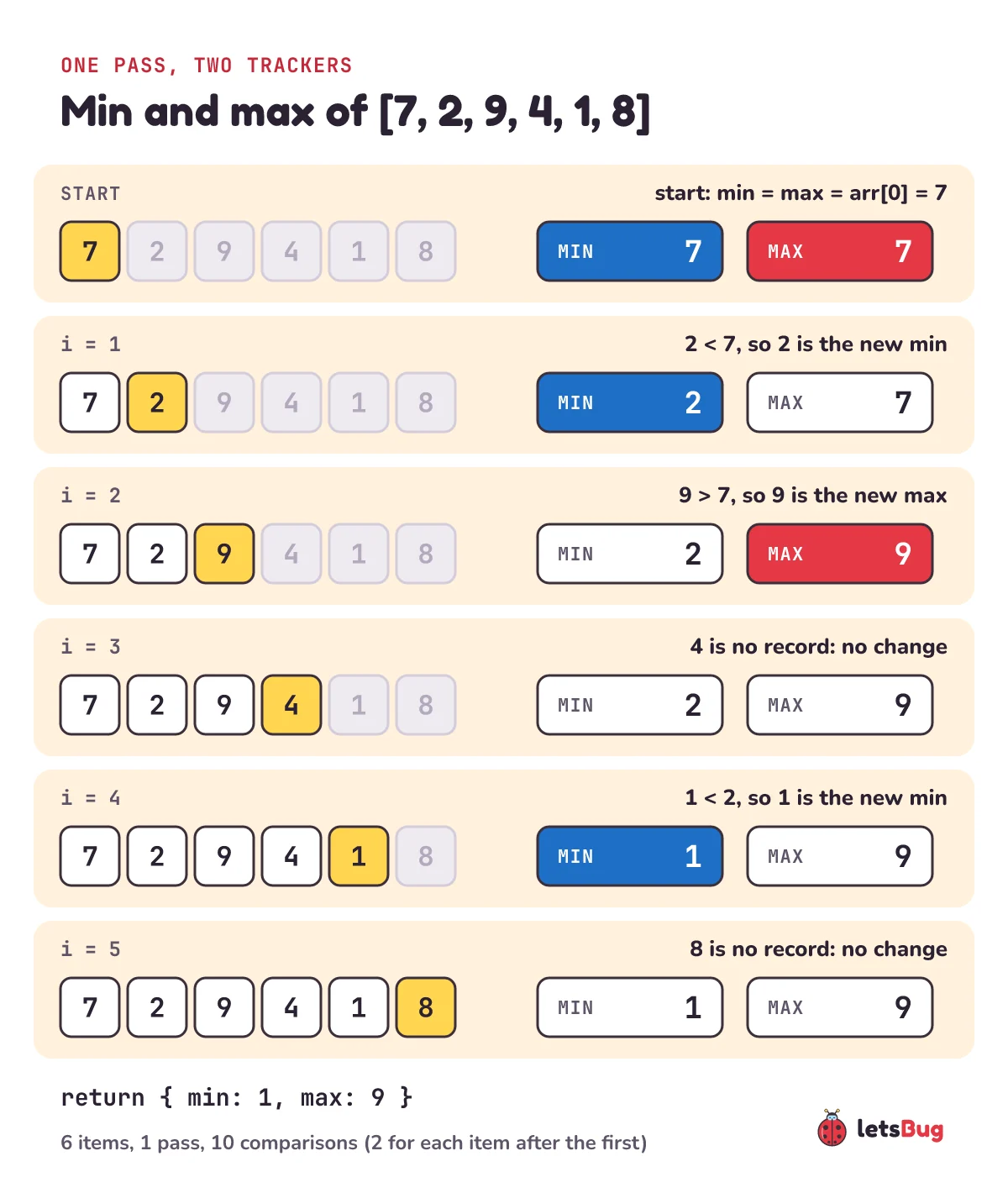
Six items, one pass, ten comparisons (two for each of the five items after the first). Why start at arr[0] and not at 0? Because the array might be all negative. Start max at 0 and [-3, -8, -1] reports a maximum of 0, a number that isn't even in the array.
Method 2: Math.max and Math.min with spread
Math.max takes any number of arguments and returns the biggest. The spread operator ... unpacks the array into those arguments:
const scores = [7, 2, 9, 4, 1, 8];
console.log(Math.max(...scores)); // 9
console.log(Math.min(...scores)); // 1
Two lines, easy to read, and the right choice for most arrays you'll meet: marks in a class, prices in a cart, a few thousand readings. Older code writes the same thing as Math.max.apply(null, scores); spread replaced that in 2015, and both have the same size limit.
Why a very large array throws RangeError
Math.max(...arr) doesn't receive an array. It receives one argument per item, and the JavaScript engine has to hold all of them at once. MDN's Math.max page warns that spread and apply "will either fail or return the wrong result if the array has too many elements". Let's see where that happens:
const big = Array.from({ length: 200_000 }, (_, i) => i);
try {
  console.log(Math.max(...big));
} catch (err) {
  console.log(`${err.name}: ${err.message}`);
}
// RangeError: Maximum call stack size exceeded
To find the exact size on your own machine, this script halves its way to the first length that fails (the same trick as binary search):
function spreadWorks(n) {
  const arr = new Array(n).fill(1);
  try {
    Math.max(...arr);
    return true;
  } catch {
    return false;
  }
}

let lo = 1;
let hi = 10_000_000; // assumed to fail
while (lo < hi) {
  const mid = Math.floor((lo + hi) / 2);
  if (spreadWorks(mid)) lo = mid + 1;
  else hi = mid;
}
console.log(`Math.max(...arr) first failed at ${lo} items`);
On our test laptop (Node.js 24.20.0, Windows 11, Intel Core i7-1255U, 32 GB RAM) six runs over two sessions printed lengths between 124,677 and 125,176. It isn't a fixed limit. It moves a little from run to run, it depends on how deep in the call stack your code already is, and other engines and machines will give other numbers. MDN notes, for example, that Safari's JavaScriptCore has a hard-coded limit of 65,536 arguments.
The Node number lines up with V8's stack size. node --v8-options lists the default as --stack-size=984 (kilobytes), and 984 × 1,024 ÷ 8 bytes per argument is about 126,000. When we ran the same script with node --stack-size=4000, the failing length jumped to about 511,000. Don't fix it that way in real code, though. When we pushed it to --stack-size=100000 and spread 5 million items, Node didn't throw anything: the process died with no message and Windows exit code 0xC00000FD (stack overflow), which no try/catch can catch. Use a loop.
reduce) there. Keep Math.max(...arr) for arrays you know are small.Method 3: reduce
reduce walks the array and carries one value along, here the best item seen so far:
const scores = [7, 2, 9, 4, 1, 8];
const max = scores.reduce((best, x) => (x > best ? x : best));
const min = scores.reduce((best, x) => (x < best ? x : best));
console.log(max, min); // 9 1
It has no size limit, because it never spreads the array. It's the same idea as the loop, written as a function call, so pick whichever your team finds easier to read. Finding both values this way takes two passes; the loop does both in one.
What happens with an empty array? -Infinity, Infinity and TypeError
Every method above has a different answer for [], so it's worth knowing all three:
console.log(Math.max());      // -Infinity
console.log(Math.min());      // Infinity
console.log(Math.max(...[])); // -Infinity

try {
  [].reduce((best, x) => (x > best ? x : best));
} catch (err) {
  console.log(`${err.name}: ${err.message}`);
}
// TypeError: Reduce of empty array with no initial value

console.log([].reduce((best, x) => (x > best ? x : best), -Infinity)); // -Infinity
Why -Infinity? It's the only starting value that any real number beats, so "the largest of nothing" is the value that loses to everything. That's mathematically tidy, but it's rarely what you want on screen: "Highest score: -Infinity" is a bug report. Check for an empty array first and decide what to show, the way minMax returns null.
Strings, NaN and other non-numbers
Math.max converts every argument to a number first. That's helpful for numeric strings and fatal for anything else:
console.log(Math.max(3, "10", 7));   // 10   ("10" becomes the number 10)
console.log(Math.max(3, "ten", 7));  // NaN  ("ten" becomes NaN)
console.log(Math.max(3, NaN, 7));    // NaN
console.log(Math.max(-5, null));     // 0    (null becomes 0)
console.log(Math.max(3, undefined)); // NaN
The loop has the opposite problem: it doesn't convert anything. < and > compare two strings letter by letter, and a comparison with NaN is always false, so the result depends on where the NaN sits:
console.log(minMax(["10", "9", "100"])); // { min: '10', max: '9' }  compared as text
console.log(minMax([NaN, 3, 1]));        // { min: NaN, max: NaN }
console.log(minMax([3, NaN, 1]));        // { min: 1, max: 3 }
The fix for both is to clean the data before looking for the extremes. Values from a form or a CSV usually arrive as strings, so convert them with Number and keep only real numbers:
const raw = ["12", "7", "abc", "", "30"];

console.log(raw.map(Number).filter(Number.isFinite));
// [ 12, 7, 0, 30 ]  careful: Number("") is 0

const nums = raw
  .filter((s) => s.trim() !== "")
  .map(Number)
  .filter(Number.isFinite);
console.log(nums);                                // [ 12, 7, 30 ]
console.log(Math.max(...nums), Math.min(...nums)); // 30 7
Number.isFinite also drops Infinity. If Infinity is a legitimate value in your data, filter with (n) => !Number.isNaN(n) instead.
How to find the index of the largest number
Sometimes you need where the maximum is, not just its value: which student topped the class, which day was hottest. The short way finds the value, then searches for it:
const scores = [7, 2, 9, 4, 1, 9];
console.log(scores.indexOf(Math.max(...scores))); // 2  (the first 9)
console.log(scores.lastIndexOf(9));               // 5  (the last 9)

function indexOfMax(arr) {
  if (arr.length === 0) return -1;
  let best = 0;
  for (let i = 1; i < arr.length; i++) {
    if (arr[i] > arr[best]) best = i;
  }
  return best;
}
console.log(indexOfMax(scores)); // 2
The indexOf version reads the array twice and has the spread size limit. indexOfMax reads it once and has no limit. With ties, > keeps the first one; change it to >= to keep the last.
How to find the second largest number (the interview follow-up)
Once you've found the largest, interviewers often ask for the second largest, usually with two rules: one pass, and duplicates of the largest don't count. So the second largest of [5, 5, 3] is 3, not 5. Track the top two:
function secondLargest(arr) {
  let first = -Infinity;
  let second = -Infinity;
  for (const x of arr) {
    if (x > first) {
      second = first;
      first = x;
    } else if (x > second && x < first) {
      second = x;
    }
  }
  return second === -Infinity ? null : second;
}

console.log(secondLargest([7, 2, 9, 4, 1, 8])); // 8
console.log(secondLargest([5, 5, 3]));          // 3
console.log(secondLargest([9, 8, 9]));          // 8
console.log(secondLargest([4, 4]));             // null (there isn't one)
When a new record arrives, the old record moves down to second place. That's the step people forget, and without it [2, 9] would report no second largest at all. The x < first check is what skips duplicates of the maximum.
Outside an interview, a short version is fine for small arrays. A Set removes duplicates, then we sort biggest first:
const second = [...new Set([7, 2, 9, 4, 1, 8])].sort((a, b) => b - a)[1];
console.log(second); // 8
It sorts the whole array to read one number, so it's slower than the loop, and it returns undefined when there's no second largest.
What about sorting?
Sorting puts the smallest item first and the largest last, so it does answer the question. It just does far more work than needed, and plain .sort() has a trap: it compares numbers as text.
console.log([10, 9, 1].sort()); // [ 1, 10, 9 ]  sorted as text

const sorted = [10, 9, 1].toSorted((a, b) => a - b);
console.log(sorted[0], sorted.at(-1)); // 1 10
toSorted (Node.js 20 and later, all current browsers) returns a sorted copy and leaves the original alone. Sorting is worth it when you need more than the extremes: the median of an array, for example, needs the middle item, and that needs sorted data.
Which is fastest? We measured it
We timed each method on 100,000 random whole numbers: Node.js 24.20.0 on Windows 11, Intel Core i7-1255U laptop, 32 GB RAM, the median of 300 runs after a warm-up. Each method found both the minimum and the maximum. We ran it in two sessions on the same laptop, and the times moved a lot between them, so here are both. Where we ran the benchmark more than once in a session, the cell shows the lowest and highest median.
| Method | Session 1 | Session 2 |
|---|---|---|
for loop, both in one pass | 0.10 ms | 0.20 to 0.29 ms |
Math.min(...arr) + Math.max(...arr) | 0.24 ms | 0.68 to 1.6 ms |
Two reduce calls | 0.8 to 0.9 ms | 3.2 to 3.5 ms |
toSorted, then first and last | about 19 ms | 75 to 84 ms |
The honest summary: the absolute numbers changed by up to about seven times between sessions, but the order never changed. The loop won every run, and sorting was a couple of hundred times slower than the loop every time. On 100,000 numbers everything except sorting took a few milliseconds at most, so choose by readability and by the size limit, not by speed. Your numbers will differ on another machine or Node version.
Which method should you use?
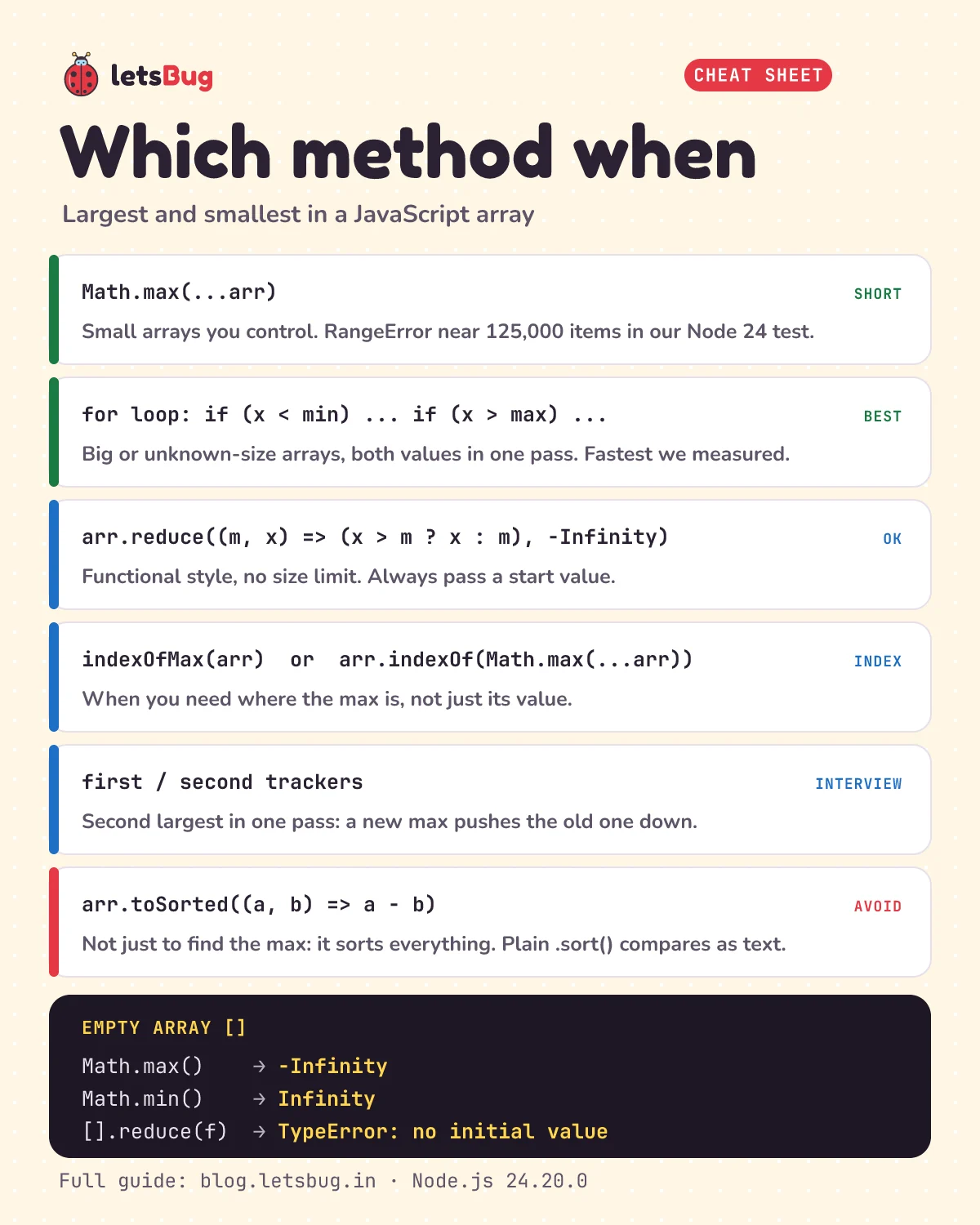
- Small array you control:
Math.max(...arr)andMath.min(...arr). - Big or unknown-size array, or both values at once: the
forloop with two trackers. - Functional style:
reduce, always with a start value. - The position of the max:
indexOfMax, orindexOf(Math.max(...arr))for small arrays. - The second largest: first and second trackers in one pass.
- Avoid: sorting just to find the max.
Common errors and fixes
RangeError: Maximum call stack size exceededonMath.max(...arr)orMath.max.apply(null, arr): the array is too big to spread. Switch to the loop orreduce.TypeError: Reduce of empty array with no initial value:reduceran on[]. Pass a start value (-Infinityfor a max,Infinityfor a min) or checkarr.lengthfirst.- The page shows
-InfinityorInfinity:Math.maxorMath.mingot an empty array. Handle the empty case before you display anything. - The result is
NaN: something in the array isn't a number ("abc",undefined, aNaNfrom a failed calculation). Clean it withNumberandNumber.isFinite. - The "max" is 9 but the array has 100: the values are strings and the loop compared them as text. Convert with
Numberfirst. - The max of an all-negative array is 0: the loop started
maxat 0. Start atarr[0]or at-Infinity.
Without running it, what does minMax([4, -2, "15", 8]) return? And what does Math.max(4, -2, "15", 8) return? Then run both to check.
Show the answers
minMax returns { min: -2, max: '15' }. A number compared with a numeric string converts the string, so "15" beats 4 and 8; the max comes back as the string '15', not the number 15.Math.max returns the number 15, because it converts every argument to a number first.
Questions people ask
What is the fastest way to find the max in a JavaScript array?
A plain for loop. In our test on 100,000 numbers in Node.js 24 it was the fastest method in every run, two to eight times quicker in our runs than Math.min plus Math.max with spread. Both are fast enough for most code; the loop also has no size limit.
Why does Math.max() return -Infinity?
With no arguments there's nothing to compare, so it returns the value every real number is bigger than. The same rule makes Math.min() return Infinity. You get the same thing from Math.max(...[]), so check for empty arrays.
How many items can I pass to Math.max with spread?
There's no fixed number in the JavaScript standard. In Node.js 24.20.0 on our Windows laptop it failed at about 125,000 items (between 124,677 and 125,176 across six runs). Safari's engine has a limit of 65,536 arguments. If the size isn't under your control, use a loop.
How do I find the min and max of an array of objects?
Compare one property. For students = [{ name, marks }, ...], Math.max(...students.map((s) => s.marks)) gives the top mark, and students.reduce((a, b) => (b.marks > a.marks ? b : a)) gives the whole top student (both assume the array isn't empty).
What is the time complexity?
O(n) for the loop, reduce and Math.max: each looks at every item once. Sorting is O(n log n), which is why it's the slow option in the table above.
Keep going
- Sorting is the right tool when you need the middle, not the ends: Find the Median of an Array in JavaScript.
- How a simple sort works, comparison by comparison: bubble sort and insertion sort in Python.
- Searching a sorted array in about 20 steps per million items: Binary Search in JavaScript and Python, Step by Step.
- Spread's twin, rest parameters, is question one in Top 10 JavaScript Interview Questions With Answers.
Checked on 10 October 2026 against the 6 sources below.
Sources
- MDN: Math.max() (returns -Infinity with no arguments; spread and apply can fail on large arrays)
- MDN: Math.min()
- MDN: Function.prototype.apply() (the engine's argument length limit, JavaScriptCore's 65,536)
- MDN: Array.prototype.reduce() (the empty-array TypeError)
- MDN: Array.prototype.toSorted()
- MDN: Spread syntax
Every code sample in this post was run in Node.js 24.20.0 before publishing, and the RangeError sizes and timings are from our own runs on the machine named above.