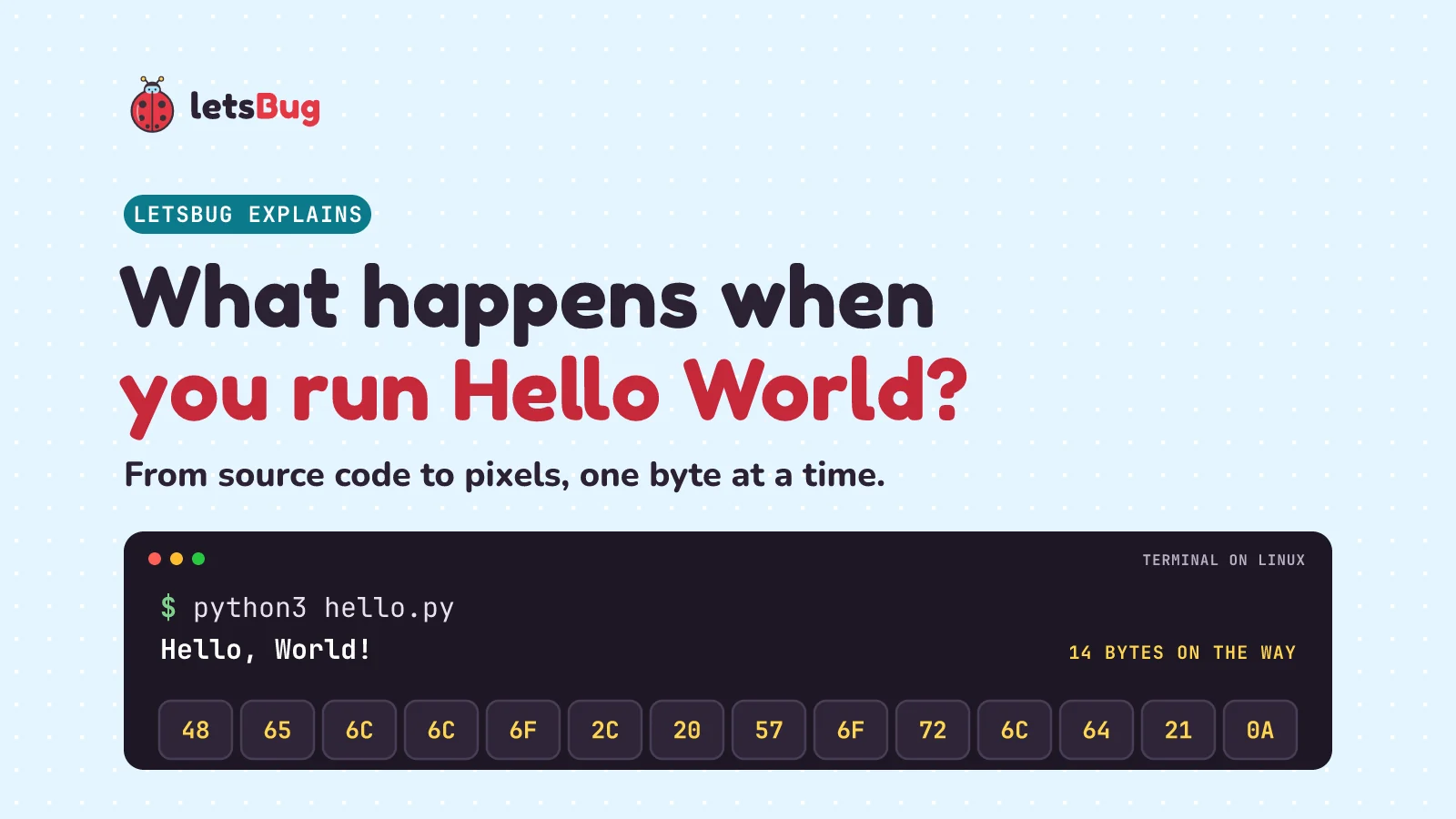
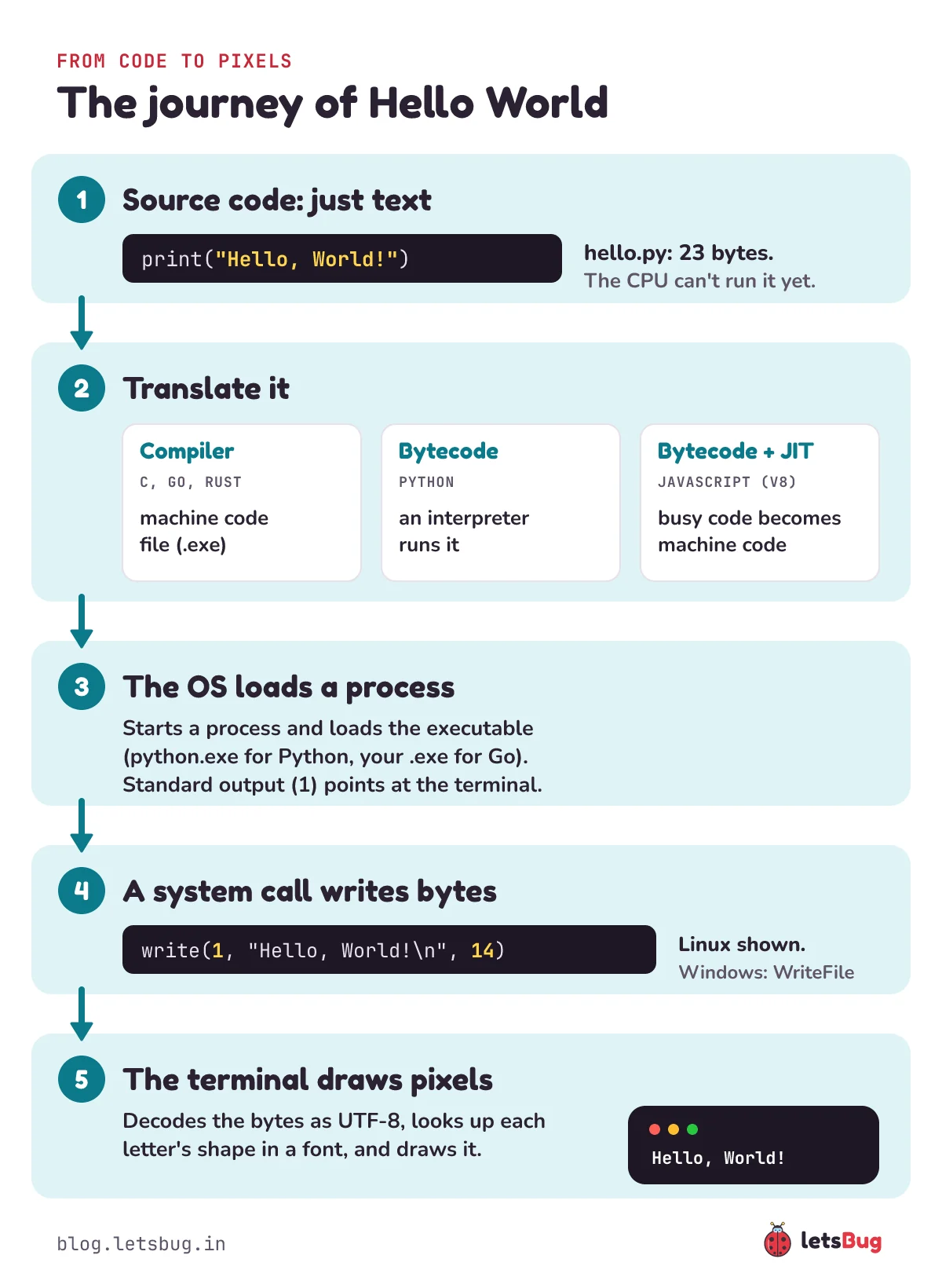
When you run Hello World, five things happen in a fraction of a second. Your source code, saved as plain bytes, is translated into something a machine can run. The operating system loads it into memory as a process. The program asks the operating system to write 14 bytes. The terminal turns those bytes into letters using a font.
In this post we follow Hello, World! through every step, and we look at the real bytecode, the real executable and the real bytes on a Windows laptop.
Key takeaways
- Source code is just a text file.
print("Hello, World!")is 23 bytes on disk, saved with one newline at the end. - Not every language compiles to machine code. C and Go do, ahead of time. Python compiles to bytecode that its interpreter runs. JavaScript engines like V8 start with bytecode and turn busy code into machine code while it runs.
- The operating system starts a process, loads the executable (for Python and Node, that's
python.exeornode.exe, not your file), and connects its standard output to the terminal. print,printfandconsole.logare library functions. Underneath, they ask the operating system to write bytes: on Linux, with thewritesystem call.Hello, World!plus a newline is 14 bytes:48 65 6C 6C 6F 2C 20 57 6F 72 6C 64 21 0A. On Windows, Python'sprintinto a pipe adds a carriage return and writes 15.
This post goes with our YouTube Short The Journey of 'Hello World' in Programming (December 2024), which is about where Hello World comes from. Here we go further, inside the computer. The video is the earlier, short version. Every Python, Node and Go command below was run on Windows in October 2026; the C and Linux lines are marked as such.
Where does Hello World come from?
The tradition is usually traced to Brian Kernighan at Bell Labs (it may be older still, from the language BCPL). His 1974 memo Programming in C: A Tutorial printed "hello, world", and that example went into the 1978 book The C Programming Language. An earlier version appears in his 1972 tutorial for the language B. Ever since, it's the first program people write in a new language, because it proves the whole chain works: editor, compiler or interpreter, operating system and screen. That chain is what we'll follow.
Step 1: source code is just text
Here's Hello World in three languages. Save each one in its own file:
# hello.py
print("Hello, World!")
// hello.js
console.log("Hello, World!");// hello.go
package main
import "fmt"
func main() {
fmt.Println("Hello, World!")
}And the classic, in C:
// hello.c (not compiled here: our test laptop had no C compiler)
#include <stdio.h>

int main(void) {
    printf("Hello, World!\n");
    return 0;
}
To your computer, each file is only a list of bytes, the same kind of data as a note or a song lyric. hello.py is 23 bytes: 22 characters you can see plus the newline at the end. (Some Windows editors save it as 22 bytes with no final newline, or 24 with a \r\n ending.) Nothing can run it yet. The CPU doesn't understand the word print. Something has to translate it.
Step 2: compiler vs interpreter (or both)
This is where languages differ, and it's the step people most often get wrong. There are three common routes.
Route A: compile ahead of time to machine code (C, Go, Rust)
A compiler reads your whole program before it runs and writes a new file full of machine code: the numbered instructions your CPU executes directly. (For how a CPU adds two numbers with logic gates, see how do computers add numbers? To run code on a real chip, try ESP32 LED blink.) You then run that file, and the compiler isn't needed any more.
The laptop we tested on had no C compiler installed (no gcc or clang), so we used Go, which works the same way. In PowerShell:
go build hello.go
.\hello.exe
Hello, World!go build wrote hello.exe, a real Windows program of about 2.3 MB (2,302,976 bytes with Go 1.24). It's that big because Go builds every program with the Go runtime inside it, along with type information for features like reflection and readable crash reports. Let's peek at its first two bytes:
python -c "print(open('hello.exe', 'rb').read(2))"b'MZ'Every Windows executable starts with MZ: it's the start of a small MS-DOS stub that Microsoft's format puts at the front of every .exe. On Linux the same go build makes an ELF file instead, which always starts with the bytes 7F 45 4C 46 (a byte, then "ELF"). With a C compiler installed, gcc hello.c -o hello produces the same kind of file.
Route B: compile to bytecode, then interpret it (Python)
When you type python hello.py, Python (the standard version, called CPython) first compiles your file into bytecode: simple instructions for Python's own virtual machine, not for your CPU. Then its interpreter, itself a machine-code program, runs those instructions one by one. The dis module shows us the bytecode:
python -m dis hello.py 0 RESUME 0
1 LOAD_NAME 0 (print)
PUSH_NULL
LOAD_CONST 0 ('Hello, World!')
CALL 1
POP_TOP
RETURN_CONST 1 (None)LOAD_NAMEfinds theprintfunction.LOAD_CONSTloads our string.CALL 1callsprintwith one argument.POP_TOPthrows away whatprintreturned (None), andRETURN_CONSTends the program.RESUMEandPUSH_NULLare bookkeeping steps for the interpreter.
This output is from Python 3.13. Bytecode is an internal detail and changes between versions, so other versions print slightly different instructions. For the file you run directly, Python recompiles every time and doesn't save the result; modules you import get their bytecode saved in __pycache__ as .pyc files so the next start is faster.
Route C: bytecode first, machine code for busy code (JavaScript in Node)
Node.js runs JavaScript with Google's V8 engine. V8 compiles your code to its own bytecode and its interpreter, Ignition, runs it. While the program runs, V8 watches which functions are used a lot and compiles those into machine code, a technique called just-in-time (JIT) compilation. A Hello World is over long before any of that matters.
Node can print V8's bytecode. Put the greeting in a function so we can ask for just that one:
// hello2.js
function hello() {
  console.log("Hello, World!");
}
hello();
node --print-bytecode --print-bytecode-filter=hello hello2.jsHere's the part that matters, with the memory addresses removed (they change every run) and our comments added after the ;:
LdaGlobal [0], [0]              ; load the global "console"
Star1
GetNamedProperty r1, [1], [2]   ; get its "log" property
Star0
LdaConstant [2]                 ; load "Hello, World!"
Star2
CallProperty1 r0, r1, r2, [4]   ; call console.log with one argument
LdaUndefined
Return
...
Hello, World!
Same idea as Python, different instruction set. So when someone asks "is Python compiled or interpreted?", the honest answer is "both": compiled to bytecode, then interpreted.
The three routes side by side, as we measured them on Windows:
| Language | Translated to | What the OS loads | Bytes written into a pipe |
|---|---|---|---|
| Go (like C) | A machine-code file, before it runs | Your hello.exe | 14 |
| Python | Bytecode, then interpreted | python.exe | 15 (adds \r) |
| JavaScript (Node) | V8 bytecode; busy code JIT-compiled | node.exe | 14 |
Step 3: the operating system loads the program
When you press Enter, your shell (PowerShell, bash, zsh) asks the operating system to start a new process. On Linux the shell first copies itself with the fork system call, and the copy calls execve to swap in the new program. On Windows the shell calls the CreateProcess function, which makes the system calls for it. Then the operating system:
- reads the executable's header (
MZon Windows,7F 45 4C 46on Linux) to see what's inside, - maps its machine code and data into memory (pages are read from disk when they're first used), and a loader brings in any shared libraries it needs,
- gives it three open streams it inherits from the shell: standard input, standard output and standard error (numbers 0, 1 and 2 on Linux and macOS), already connected to your terminal (it's the same standard input we read in our Node.js terminal input guide),
- and the CPU jumps to the program's entry point.
Notice which executable gets loaded. For .\hello.exe, it's your program. For python hello.py it's python.exe, and hello.py is just a file that Python reads. Same for node.exe and hello.js.
Step 4: a system call writes the bytes
Programs aren't allowed to touch the screen or the disk directly. They ask the operating system's core, the kernel, through a system call. print, printf and console.log are ordinary library functions that end in one. On Linux, our Hello World ends in this call (shown for Linux; we didn't trace it on our Windows laptop):
write(1, "Hello, World!\n", 14); /* file descriptor 1 = standard output */That means "write 14 bytes from here to standard output". The Linux manual describes it as writing "up to count bytes from the buffer starting at buf to the file referred to by the file descriptor fd", and it returns how many bytes it wrote. Windows does the same job through its own functions, WriteFile and, for console windows, WriteConsole.
Python and Node both let us make that low-level write ourselves and see the count it returns:
python -c "import os; print(os.write(1, b'Hello, World!\n'))"
node -e "const fs = require('fs'); console.log(fs.writeSync(1, 'Hello, World!\n'))"
Hello, World!
14
Hello, World!
14Each program wrote our 14 bytes, then printed the number that came back: 14.
A closer look: the 14 bytes on the way
So what exactly are those 14 bytes? Let's catch them. This small script runs any program and shows exactly what it wrote, byte by byte:
# count_bytes.py: run a program and show the exact bytes it writes
import subprocess, sys

out = subprocess.run(sys.argv[1:], capture_output=True, check=True).stdout
print(out)
print(out.hex(" ").upper())
print(len(out), "bytes")
python count_bytes.py node hello.js
python count_bytes.py .\hello.exe
python count_bytes.py python hello.pyb'Hello, World!\n'
48 65 6C 6C 6F 2C 20 57 6F 72 6C 64 21 0A
14 bytes
b'Hello, World!\n'
48 65 6C 6C 6F 2C 20 57 6F 72 6C 64 21 0A
14 bytes
b'Hello, World!\r\n'
48 65 6C 6C 6F 2C 20 57 6F 72 6C 64 21 0D 0A
15 bytesNode and Go write 14 bytes. Python on Windows writes 15: it turns each \n into the Windows line ending \r\n (bytes 0D 0A), and you can see that when its output goes into a pipe or a file. On Linux and macOS, Python writes 14 like the others.
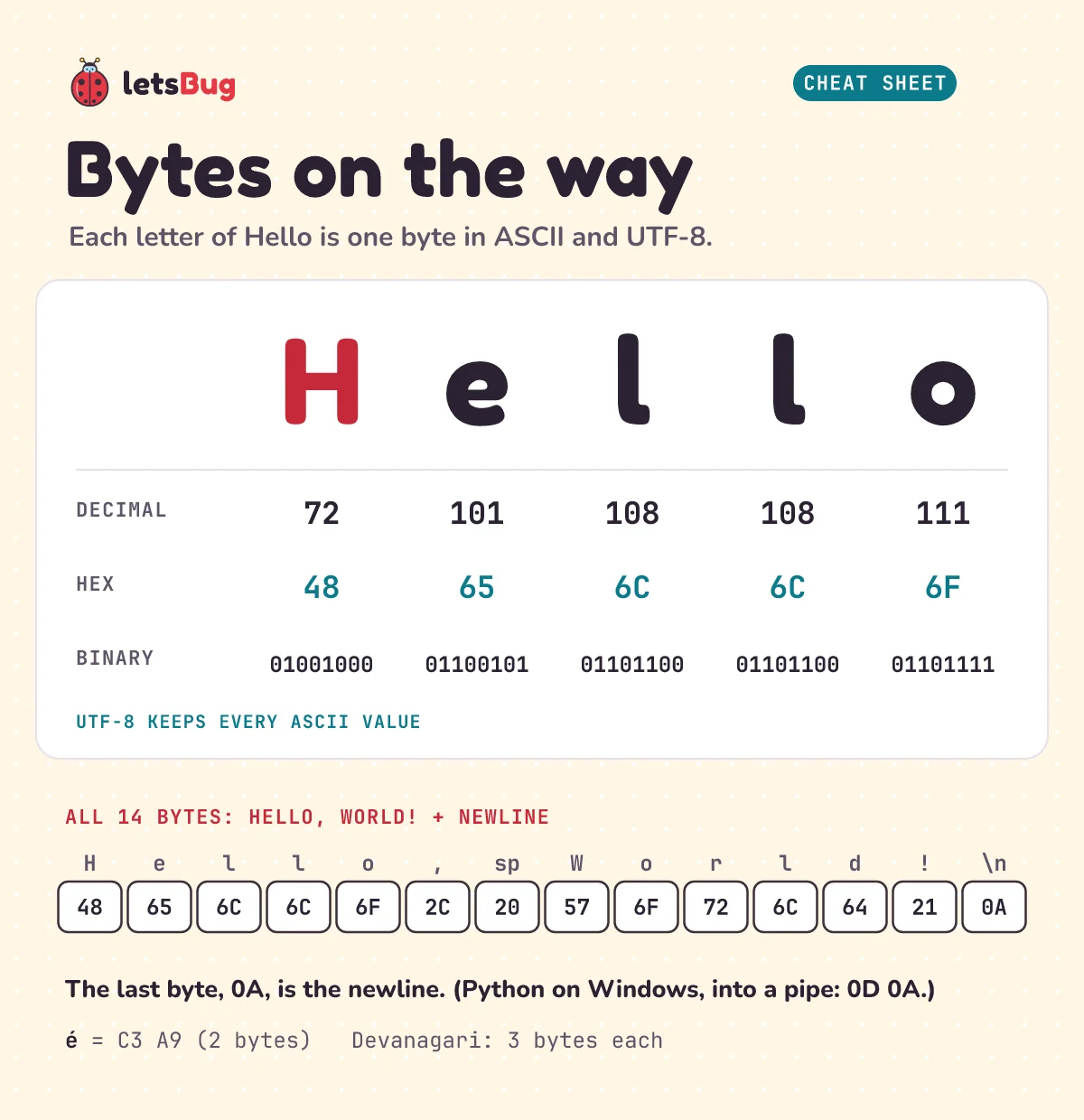
Each letter is a number. H is 72 (hex 48), e is 101 (65), the space is 32 (20), ! is 33 (21) and the newline is 10 (0A). These are the old ASCII codes, and UTF-8 keeps them unchanged: every ASCII character is one byte with its ASCII value. (Want to turn hex like 48 into binary yourself? See decimal to binary in JavaScript.) Letters outside ASCII take more bytes:
# bytes.py
for word in ["Hello", "café", "नमस्ते"]:
    data = word.encode("utf-8")
    print(word, len(word), "characters,", len(data), "bytes:", data.hex(" "))
Hello 5 characters, 5 bytes: 48 65 6c 6c 6f
café 4 characters, 5 bytes: 63 61 66 c3 a9
नमस्ते 6 characters, 18 bytes: e0 a4 a8 e0 a4 ae e0 a4 b8 e0 a5 8d e0 a4 a4 e0 a5 87The é takes two bytes, and each Devanagari character in नमस्ते takes three. (Python counts Unicode code points, and the vowel signs and the virama are code points of their own, which is why it says 6.) JavaScript can show the bytes too: node -e "console.log(Buffer.from('Hello'))" prints <Buffer 48 65 6c 6c 6f>.
Step 5: the terminal turns bytes into pixels
The bytes now reach the program on the other end of standard output: the terminal (Windows Terminal, the VS Code terminal, macOS Terminal, GNOME Terminal and so on). It does the last bit of work:
- Decode. It reads the bytes as UTF-8:
48becomes the character H,e0 a4 a8becomes न. - Obey control codes. Some bytes aren't letters.
0Amoves the cursor to a new line. Special sequences that start with the escape byte1Bchange colours or move the cursor; Microsoft calls these virtual terminal sequences. - Draw. It looks up each character's shape (glyph) in a font, draws it into a grid of character cells at the cursor, and hands the finished image to the operating system to put on your screen. For Latin letters one character is one glyph. Scripts like Devanagari need shaping: in नमस्ते, स + ् + त join into one conjunct, so the font has to supply a combined shape, and some terminals still draw this imperfectly.
WriteConsoleW in UTF-16. The 14 bytes we caught above are exactly what goes into a pipe or a file, and what a program sends to the terminal on Linux and macOS.So the last step from "Hello" to your eyes is a font file turning the number 72 into the shape of an H.
Try it before you peek. How many bytes does print("Hi") write on Linux, and what are they in hex? And how many bytes is the single character é in UTF-8?
Show the answers
print("Hi") writes 3 bytes: 48 69 0A (H, i, newline). On Windows into a pipe, Python writes 4, because the newline becomes 0D 0A.é is 2 bytes in UTF-8: C3 A9.
Common errors and fixes
The term 'gcc' is not recognized as the name of a cmdlet, function, script file, or operable program.
PowerShell can't find a C compiler: none is installed, or its folder isn't on your PATH. Install one, for example MinGW-w64 on Windows (it gives you gcc) or sudo apt install gcc on Ubuntu, then open a new terminal. (Microsoft's C++ Build Tools work too, but their compiler is cl, run from the Developer PowerShell.) Or try the same steps with Go or Python, as we did.
The term 'hello.exe' is not recognized ...
PowerShell 7 words it slightly differently ("is not recognized as a name of a cmdlet, function, script file, or executable program"). Either way, PowerShell doesn't run programs from the current folder unless you say so. Type .\hello.exe, not hello.exe.
can't open file 'C:\\Users\\you\\helo.py': [Errno 2] No such file or directory
Python couldn't find the file: a typo in the name (here helo.py), or you're in a different folder. Run ls (or dir) to see where you are and what's there.
NameError: name 'Print' is not defined. Did you mean: 'print'?
Python is case-sensitive: Print and print are different names. The same goes for JavaScript, where Console.log(...) fails with ReferenceError: Console is not defined. Use lowercase console.
UnicodeEncodeError: 'charmap' codec can't encode characters in position 0-5: character maps to <undefined>
You ran python bytes.py > out.txt on Windows with Python 3.14 or older. A real console window gets text through Windows' Unicode console functions, but a pipe or a file gets your Windows ANSI code page (cp1252 on most English installs), which has no Devanagari letters. Switch Python to UTF-8 mode with -X utf8 (or set $env:PYTHONUTF8 = "1"). In Windows PowerShell 5.1, also tell PowerShell to read Python's output as UTF-8, or the file gets garbled letters instead of an error:
[Console]::OutputEncoding = [Text.Encoding]::UTF8
python -X utf8 bytes.py > out.txt
Python 3.15 turns UTF-8 mode on by default.
Questions people ask
Does every programming language compile to machine code?
No. C, C++, Go and Rust usually compile ahead of time to machine code. Python compiles to bytecode that its interpreter runs. JavaScript engines like V8 start with bytecode and compile busy functions to machine code while the program runs. In the end, the CPU only ever runs machine code: sometimes yours, sometimes the interpreter's.
Is Python compiled or interpreted?
Both. CPython compiles your source to bytecode first (you can see it with python -m dis) and then interprets that bytecode. It doesn't produce a standalone machine-code file the way gcc or go build does.
What is a system call, in simple words?
A request from a program to the operating system's kernel to do something the program isn't allowed to do itself: write to a file or the terminal, read the keyboard, open a network connection, start another program. print and console.log end in one.
Why is "Hello, World!" 14 bytes and not 13?
The 13 characters you can see, plus the newline at the end (0A), which print, console.log and fmt.Println add for you. Python on Windows writing into a pipe or a file uses 0D 0A for the newline, so it writes 15.
Why is a Go Hello World 2 MB when a C one is much smaller?
Go links programs statically by default, so every binary carries the Go runtime (memory management, goroutine scheduling and more) inside it, plus type information for reflection and crash reports. A C program usually links to the system's C library instead of carrying it.
Keep going
- Standard output has a twin, standard input. Read it from your own program with Read Input From the Terminal in Node.js.
- Bytes like
48and01001000are the same number in different bases. See how with Decimal to Binary in JavaScript. - The same compile-then-run journey on a tiny chip: ESP32 LED blink, where Upload compiles your sketch into machine code for the board.
- Ready for a real algorithm? Try Binary Search in JavaScript and Python, Step by Step, and watch more on the letsBug YouTube channel.
Checked on 10 October 2026 against the 23 sources below.
Sources
- Wikipedia: "Hello, World!" program (Kernighan's 1972 B tutorial, 1974 memo and 1978 book)
- Python documentation: dis, disassembler for Python bytecode, glossary: bytecode, "Compiled" Python files and io.TextIOWrapper (newline translation)
- PEP 528: Change Windows console encoding to UTF-8, and PEP 686: Make UTF-8 mode default (Python 3.15)
- V8 blog: Firing up the Ignition interpreter and Maglev, V8's fastest optimizing JIT
- Go FAQ: Why is my trivial program such a large binary?
- Linux man pages: write(2), fork(2), execve(2), stdout(3), syscalls(2) and elf(5)
- Microsoft Learn: PE format (the MS-DOS stub), CreateProcessW, WriteFile, WriteConsole and console virtual terminal sequences
- The Unicode Standard: chapter 12 (Devanagari conjuncts and how fonts render them)
- RFC 3629: UTF-8, a transformation format of ISO 10646
Every command in this post was run on Windows 11 in October 2026 with Python 3.13.2, Node.js 24.20.0 (V8 13.6) and Go 1.24.3. No C compiler was installed, so the C examples weren't compiled.