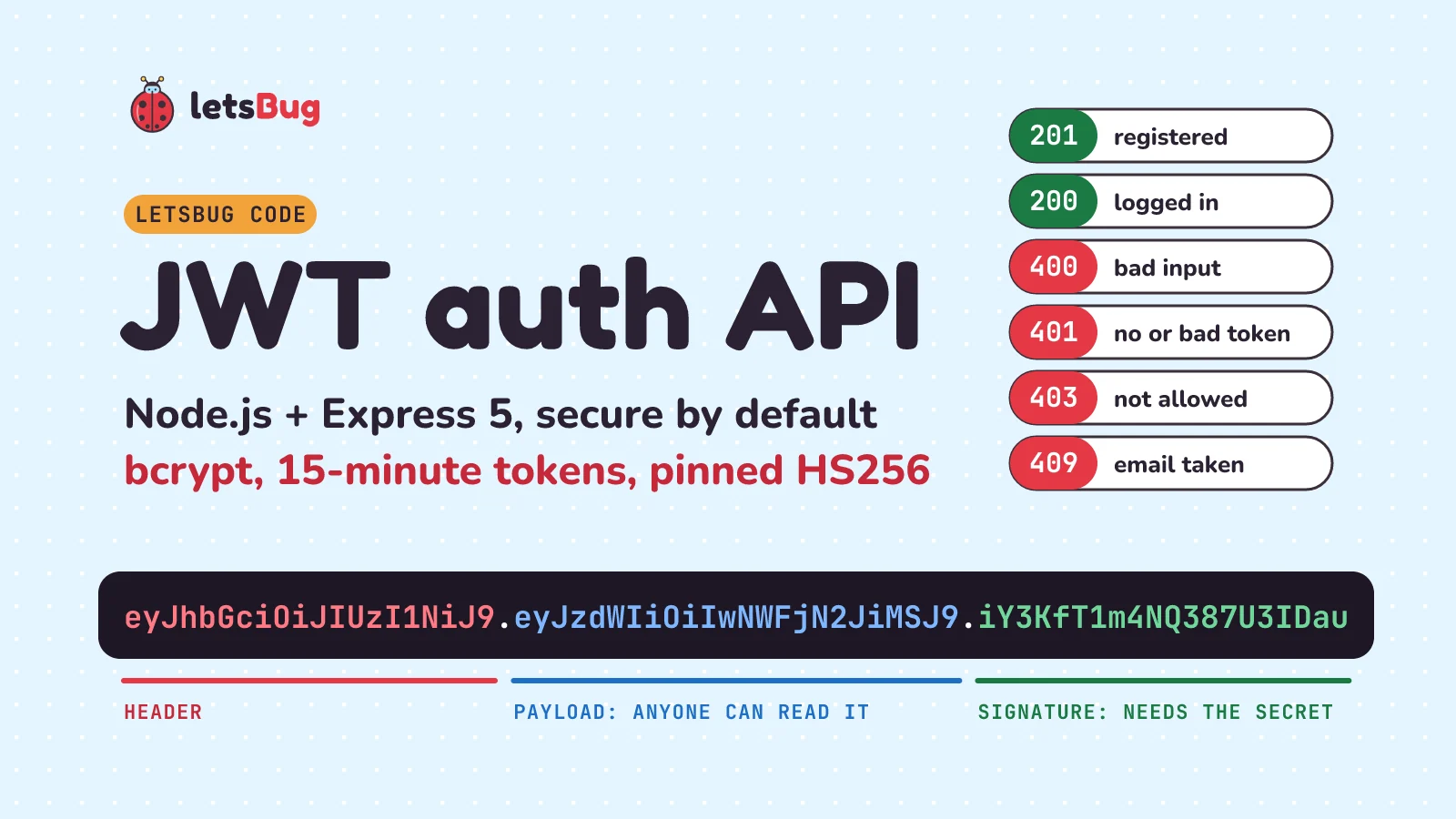
A JWT authentication API does three jobs: it stores a bcrypt hash of each password at sign-up, gives back a short-lived signed token at login, and checks that token on every protected route. In Node.js with Express 5, all of it fits in one file of about 100 lines.
In this post we build it step by step: register, login, a verify-JWT middleware, input validation, one central error handler and the right status codes (400, 401, 403, 409). Then we run a script that tries every case, including a tampered token.
Key takeaways
- Hash passwords with bcrypt at a work factor of 10 or more (we use 12). Ask for at least 15 characters and cap passwords at 72 bytes, because bcrypt ignores anything after that.
- Sign a short-lived access token (we use 15 minutes) with a random secret of at least 256 bits kept in an environment variable, never in your code.
- When you verify, pin the algorithm (
algorithms: ['HS256']) and check the issuer and audience. Never let the token choose how it gets checked. - The payload is only base64url-encoded, so anyone can read it. Put an ID in it, never a password, a secret or personal data.
- 400 for bad input, 401 for a missing, bad or expired token, 403 for a logged-in user who isn't allowed in, 409 for an email that's already taken.
This post goes with the letsBug "Making Authentication API in Node.js" series (seven videos, August to November 2023). The embed below is Part 4, where we add JWT. The videos show the 2023 version (Express 4 with MongoDB). The written steps here are updated for October 2026: Express 5, current package versions, and the security rules from OWASP and the JWT standard.
What we're building
Four routes. Two are public, two need a token:
| Route | What it does | Success | Errors |
|---|---|---|---|
POST /api/auth/register | Create a user from an email and password | 201 | 400 bad input, 409 email taken |
POST /api/auth/login | Check the password, return an access token | 200 | 400 bad input, 401 wrong email or password |
GET /api/me | Return the logged-in user | 200 | 401 no token, bad token or expired token |
GET /api/admin/stats | Admins only | 200 | 401 as above, 403 not an admin |
Here's how a request moves through it:
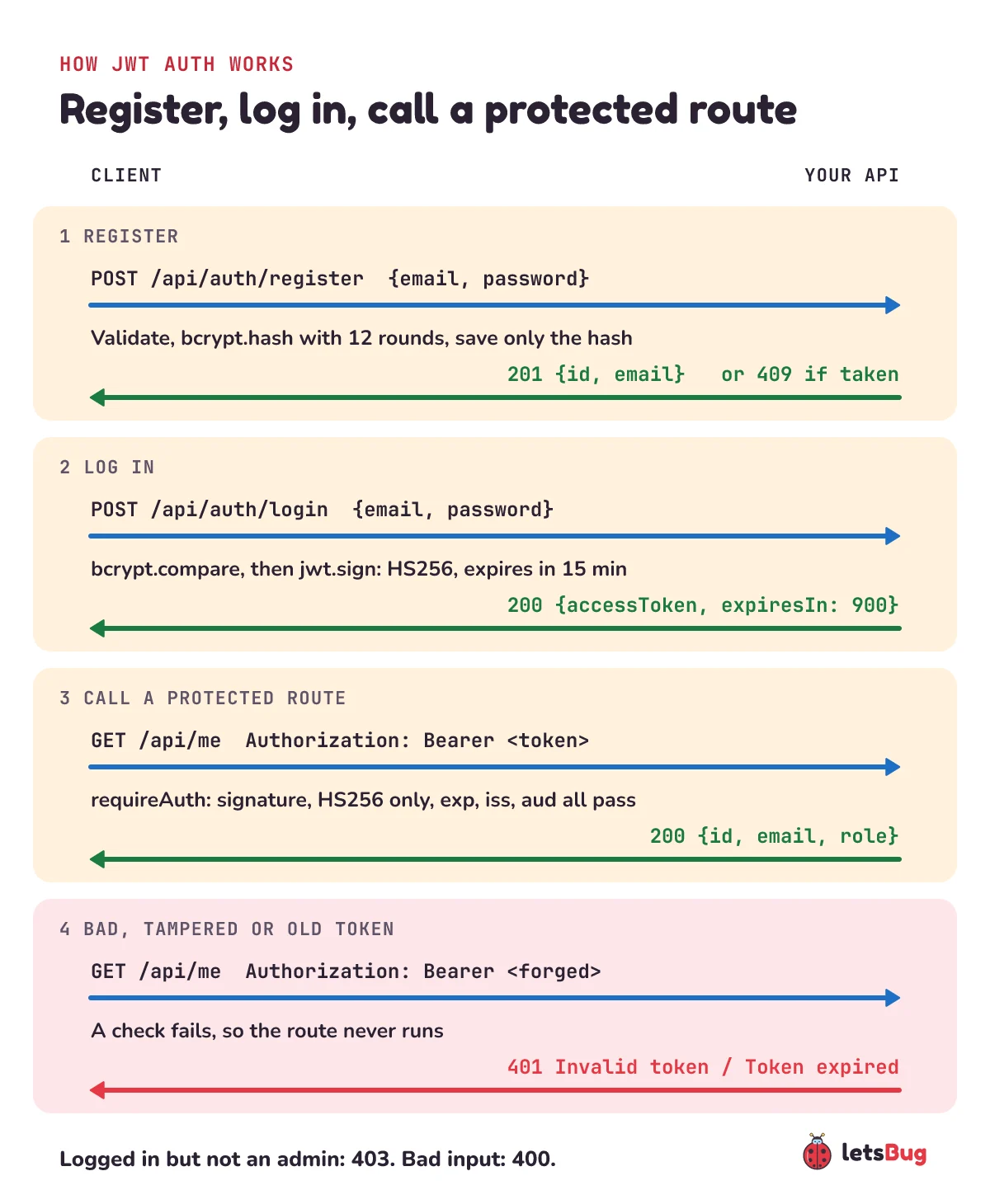
We keep users in memory so you can run this with nothing but Node.js installed. The series stores them in MongoDB; we'll swap that in near the end, and it only changes the register and login lines.
Set up the project
You need Node.js 24 (an LTS release) or newer. Make a folder and install the four packages at the exact versions this post was tested with:
mkdir jwt-auth-api
cd jwt-auth-api
npm init -y
npm install --save-exact express@5.3.0 jsonwebtoken@9.0.3 bcrypt@6.0.0 express-validator@7.3.2
Then make package.json look like this. "type": "module" lets us use import, and the start script loads a .env file with Node's built-in --env-file flag, so we don't need the dotenv package any more:
{
  "name": "jwt-auth-api",
  "private": true,
  "type": "module",
  "scripts": {
    "start": "node --env-file=.env server.js"
  },
  "dependencies": {
    "bcrypt": "6.0.0",
    "express": "5.3.0",
    "express-validator": "7.3.2",
    "jsonwebtoken": "9.0.3"
  }
}
Now the secret. It signs every token, so it must be long and random, not a word you made up. OWASP's JWT cheat sheet says an HS256 secret must be at least as long as the output, 256 bits, and must not be a password. This prints 32 random bytes (256 bits) as hex:
node -e "console.log(require('crypto').randomBytes(32).toString('hex'))"Put it in a file called .env next to package.json, and add .env to .gitignore so it never reaches GitHub:
JWT_SECRET=paste-the-64-character-hex-string-hereStep 1: settings, the user store and the app
Everything goes in one file, server.js. Paste the steps one after another and you'll have the whole server. The top loads the packages and refuses to start without a long enough secret:
import crypto from 'node:crypto';
import express from 'express';
import bcrypt from 'bcrypt';
import jwt from 'jsonwebtoken';
import { body, matchedData, validationResult } from 'express-validator';

const { JWT_SECRET, PORT = 3000 } = process.env;
if (!JWT_SECRET || JWT_SECRET.length < 64) {
  throw new Error('Set JWT_SECRET to 32+ random bytes in hex (64+ characters)');
}

const SALT_ROUNDS = 12; // OWASP: a bcrypt work factor of 10 or more
const TOKEN = { algorithm: 'HS256', expiresIn: '15m', issuer: 'letsbug-auth', audience: 'letsbug-api' };
const DUMMY_HASH = await bcrypt.hash('not-a-real-password', SALT_ROUNDS);

// In-memory store: it empties when the server stops. MongoDB replaces it later.
const usersByEmail = new Map();
const usersById = new Map();

class HttpError extends Error {
  constructor(status, message) {
    super(message);
    this.status = status;
  }
}

const app = express();
app.disable('x-powered-by');
app.use(express.json({ limit: '10kb' }));- The secret check stops the server instead of signing tokens with
undefined. A crash at startup is much easier to spot than a login that breaks later. SALT_ROUNDS = 12: bcrypt does 212 rounds of work per hash. Each +1 doubles the time. OWASP asks for at least 10; we go a little higher.TOKENholds the signing options in one place, sosignandverifycan't drift apart.DUMMY_HASHis a real bcrypt hash of a throwaway password. Login uses it when the email doesn't exist (step 4).HttpErroris an error that carries a status code. Routes throw it; the error handler in step 7 turns it into a response.express.json({ limit: '10kb' })reads JSON bodies and rejects anything bigger than 10 KB with a 413.app.disable('x-powered-by')stops Express announcing itself in every response, as the Express security guide suggests.
Step 2: validate the request body
Never trust what the client sends. express-validator checks each field, cleans it up, and collects every problem so we can answer with one 400:
const email = body('email').trim().isEmail().withMessage('Enter a valid email').toLowerCase();
const registerRules = [
  email,
  body('password').isString().isLength({ min: 15 }).withMessage('Password must be at least 15 characters')
    .isByteLength({ max: 72 }).withMessage('Password must be at most 72 bytes'),
];
const loginRules = [email, body('password').isString().notEmpty().withMessage('Password is required')];

function validate(req, res, next) {
  const result = validationResult(req);
  if (result.isEmpty()) return next();
  res.status(400).json({
    error: 'Invalid input',
    details: result.array().map((e) => ({ field: e.path, message: e.msg })),
  });
}
The email is trimmed and lower-cased, so Asha@Example.com and asha@example.com are the same account. isEmail() does the format check for us, so we don't need our own email regular expression.
The password needs 15 characters at least and 72 bytes at most. Why 15? NIST's password guideline (SP 800-63B-4) requires at least 15 characters when the password is the only thing protecting the account, and 8 only when there's also a second factor such as an OTP. Our API has no second factor, so 15 it is. Long passphrases like correct-horse-42 are easy to remember and hard to guess.
The 72-byte cap isn't style either. OWASP says to cap bcrypt passwords at 72 bytes, and the bcrypt README warns that anything after that is ignored. It's bytes, not characters, because emoji and many non-English letters take 2 to 4 bytes each. (OWASP also asks you to allow passphrases of at least 64 characters; 72 bytes covers that for plain English letters, but not for every script. That's one reason OWASP now prefers Argon2id.)
Login only checks that a password was sent. If you change the password rules later, people with older passwords can still log in.
Step 3: register with bcrypt and answer 409 for a taken email
app.post('/api/auth/register', registerRules, validate, async (req, res) => {
  const { email, password } = matchedData(req);
  const passwordHash = await bcrypt.hash(password, SALT_ROUNDS);
  if (usersByEmail.has(email)) throw new HttpError(409, 'Email is already registered');
  const user = { id: crypto.randomUUID(), email, role: 'user', passwordHash };
  usersByEmail.set(email, user);
  usersById.set(user.id, user);
  res.status(201).json({ id: user.id, email: user.email });
});
matchedData(req) gives back only the fields we validated, already cleaned, so a sneaky extra field like "role": "admin" in the body is simply ignored. When we pass a number of rounds, bcrypt makes a fresh random salt for each hash and writes it into the hash string it returns (it starts $2b$12$, then the salt). That's why bcrypt.compare needs only the stored hash, and why the same password never gives the same hash twice. Use the async bcrypt.hash: the bcrypt docs warn that the sync version blocks the event loop, so every other request would wait.
Notice the order: hash first, then check for the email, then save. Hashing takes a moment and the server keeps taking other requests meanwhile. If we checked first, two sign-ups for the same email arriving together could both pass the check. Checking right before the save, with no await in between, closes that gap. If the email is taken we answer 409 Conflict, which RFC 9110 defines as a conflict with the current state of the resource that the user might be able to fix.
Be honest about the trade-off: a 409 tells anyone who asks that this email has an account. OWASP's authentication cheat sheet suggests that sensitive apps answer every sign-up the same way and send the details by email instead. Most apps accept the 409 for a friendlier sign-up form, and limit how fast anyone can try (see step 4).
We return the new user's ID and email, never the hash.
Step 4: log in and issue a short-lived token
app.post('/api/auth/login', loginRules, validate, async (req, res) => {
  const { email, password } = matchedData(req);
  const user = usersByEmail.get(email);
  // Compare even when there is no such user, so both failures take the same time.
  const ok = await bcrypt.compare(password, user?.passwordHash ?? DUMMY_HASH);
  if (!user || !ok) throw new HttpError(401, 'Invalid email or password');
  const accessToken = jwt.sign({}, JWT_SECRET, { ...TOKEN, subject: user.id });
  res.json({ accessToken, tokenType: 'Bearer', expiresIn: 900 });
});- One message for both failures. "Invalid email or password" doesn't tell an attacker which emails have accounts. OWASP's authentication cheat sheet recommends exactly this kind of generic message.
- The dummy hash. Without it, an unknown email would answer instantly and a wrong password would take a bcrypt-sized moment, and that time difference leaks which emails exist. OWASP calls this out too. Comparing against
DUMMY_HASHmakes both paths do the same work. - Rate limiting. Nothing here stops someone trying thousands of passwords a minute. Before going live, limit attempts on
/api/auth/loginand/api/auth/registerper IP address and per account, for example with theexpress-rate-limitpackage. OWASP's authentication cheat sheet covers login throttling and account lockout. - The token.
jwt.signaddsiat(issued at),exp(15 minutes later),iss,audandsub(the user ID). The payload we pass is empty on purpose: there's nothing else the server needs.
Why 15 minutes? The jsonwebtoken library sets no expiry unless you ask for one, and a token with no exp works forever if it leaks. OWASP says short expiry limits token reuse but doesn't give a number. 15 minutes is a common choice; real apps pair it with a refresh token so users don't log in every quarter-hour.
Step 5: the middleware that verifies the JWT
This is the piece from the last video in the series. It runs before any protected route:
function requireAuth(req, res, next) {
  const [scheme, token] = (req.get('Authorization') ?? '').split(' ');
  if (scheme !== 'Bearer' || !token) throw new HttpError(401, 'Missing bearer token');
  try {
    req.auth = jwt.verify(token, JWT_SECRET, {
      algorithms: ['HS256'], // pin it: never let the token pick its own algorithm
      issuer: TOKEN.issuer,
      audience: TOKEN.audience,
    });
  } catch (err) {
    throw new HttpError(401, err.name === 'TokenExpiredError' ? 'Token expired' : 'Invalid token');
  }
  next();
}
It expects the header Authorization: Bearer <token>. jwt.verify checks the signature with our secret, checks exp, and checks iss and aud against what we issued. If all of that passes, the claims land on req.auth for the route to use.
Pinning the algorithm matters. A token's header says which algorithm signed it, and the attacker writes that header. The classic attacks set it to none (no signature at all) or switch the algorithm so a public key gets used as an HMAC secret. RFC 8725, the JWT best-practices standard, says libraries must let the caller choose the allowed algorithms and must not use any others. OWASP says to hardcode them. algorithms: ['HS256'] is that one line.
Every failure becomes a 401. We tell the client "Token expired" apart from "Invalid token" so the app knows when to log in again, but we don't echo the library's detailed reason back.
Step 6: protected routes, and 401 vs 403
app.get('/api/me', requireAuth, (req, res) => {
  const user = usersById.get(req.auth.sub);
  if (!user) throw new HttpError(401, 'Invalid token');
  res.json({ id: user.id, email: user.email, role: user.role });
});

app.get('/api/admin/stats', requireAuth, (req, res) => {
  const user = usersById.get(req.auth.sub);
  if (user?.role !== 'admin') throw new HttpError(403, 'Admins only');
  res.json({ users: usersById.size });
});
These two status codes get mixed up all the time:
- 401 Unauthorized means "I don't know who you are": no token, a bad one or an expired one. Logging in again can fix it.
- 403 Forbidden means "I know who you are, and you can't do this." OWASP's REST cheat sheet puts it as authentication succeeded but the user doesn't have permission. Logging in again won't help.
The admin check reads the role from our store on every request instead of from the token. If you demote someone, it takes effect at once rather than when their token runs out.
Step 7: one central error handler
Last in the file, after every route:
app.use((req, res) => res.status(404).json({ error: 'Not found' }));

app.use((err, req, res, next) => {
  const status = err.status ?? 500; // our HttpError, or 400/413 from express.json()
  if (status === 401) res.set('WWW-Authenticate', 'Bearer');
  if (status >= 500) console.error(err);
  res.status(status).json({ error: status >= 500 ? 'Something went wrong' : err.message });
});

app.listen(PORT, () => console.log(`Auth API on http://localhost:${PORT}`));
Express knows a function is an error handler because it takes four arguments, (err, req, res, next). Keep next in the list even though we don't call it, or Express treats it as normal middleware.
In Express 5, a rejected promise or an error thrown inside an async handler goes to this handler by itself. That's why our routes can just throw new HttpError(...) after an await. In Express 4, which the videos use, you had to wrap async handlers or call next(err) yourself.
Three more details. Errors without a status (real bugs) become a 500 with a generic message, and the details go to the server log, not to the client. Bad JSON from express.json() arrives here with status 400 already set, and an oversized body with 413. And every 401 carries a WWW-Authenticate: Bearer header, because RFC 9110 says a 401 response must include one.
Run it and try every case
Start the server:
npm startIn a second terminal, save this as try-it.mjs. It uses the fetch built into Node, so it works the same on Windows, macOS and Linux:
const API = process.env.API ?? 'http://localhost:3000';

async function call(method, path, body, token) {
  const res = await fetch(API + path, {
    method,
    headers: {
      'Content-Type': 'application/json',
      ...(token && { Authorization: `Bearer ${token}` }),
    },
    body: body && JSON.stringify(body),
  });
  const data = await res.json();
  console.log(method, path, res.status, JSON.stringify(data));
  return data;
}

const user = { email: 'asha@example.com', password: 'correct-horse-42' };
await call('POST', '/api/auth/register', user);
await call('POST', '/api/auth/register', user);
await call('POST', '/api/auth/register', { email: 'nope', password: '123' });

const { accessToken } = await call('POST', '/api/auth/login', user);
await call('GET', '/api/me', null, accessToken);
await call('GET', '/api/me');
await call('GET', '/api/admin/stats', null, accessToken);

// Anyone can read the payload: it is only base64url, not encrypted.
const [header, payload, signature] = accessToken.split('.');
const claims = JSON.parse(Buffer.from(payload, 'base64url'));
console.log('claims', Object.keys(claims).join(','));

// Change the payload but keep the old signature: the server must refuse it.
claims.sub = 'someone-else';
const forged = [header, Buffer.from(JSON.stringify(claims)).toString('base64url'), signature].join('.');
await call('GET', '/api/me', null, forged);
Run node try-it.mjs. Your IDs and token will differ, but the status codes should match:
POST /api/auth/register 201 {"id":"05ac7bb1-0ec0-4f12-badb-6b2c4a955b82","email":"asha@example.com"}
POST /api/auth/register 409 {"error":"Email is already registered"}
POST /api/auth/register 400 {"error":"Invalid input","details":[{"field":"email","message":"Enter a valid email"},{"field":"password","message":"Password must be at least 15 characters"}]}
POST /api/auth/login 200 {"accessToken":"eyJhbGciOiJIUzI1NiIsInR5cCI6IkpXVCJ9.eyJpYXQiOj…","tokenType":"Bearer","expiresIn":900}
GET /api/me 200 {"id":"05ac7bb1-0ec0-4f12-badb-6b2c4a955b82","email":"asha@example.com","role":"user"}
GET /api/me 401 {"error":"Missing bearer token"}
GET /api/admin/stats 403 {"error":"Admins only"}
claims iat,exp,aud,iss,sub
GET /api/me 401 {"error":"Invalid token"}
Read the last two lines closely. The script decoded the payload without the secret, because it's only base64url. Then it changed sub to someone else's ID and kept the old signature. The signature no longer matches the payload, so the server says 401. That's the whole point of signing: anyone can read a JWT, but nobody without the secret can change one.
What's inside a JWT?
A JWT is three base64url parts joined by dots: header, payload, signature. Decoded, ours look like this:
{ "alg": "HS256", "typ": "JWT" }

{
  "iat": 1791616084,
  "exp": 1791616984,
  "aud": "letsbug-api",
  "iss": "letsbug-auth",
  "sub": "05ac7bb1-0ec0-4f12-badb-6b2c4a955b82"
}
exp minus iat is 900 seconds, our 15 minutes. RFC 7519 says a JWT must not be accepted on or after its exp time. The OWASP JWT cheat sheet says it plainly: a signed JWT gives integrity but not confidentiality, and anyone who gets the token can read every claim. So never put secrets in the payload: no password or hash, no API keys, and no personal data you wouldn't print in a log. RFC 7519's privacy section calls leaving such data out "the simplest way of minimizing privacy issues".
How do you store the users in MongoDB?
The series stores users in MongoDB with Mongoose, and that's what you'd do in a real app. Only the store changes; validation, tokens, the middleware and the error handler stay the same. A user model (Mongoose 9.11.1 was current on npm when we wrote this) looks like this:
import mongoose from 'mongoose';

const userSchema = new mongoose.Schema({
  email: { type: String, required: true, unique: true, lowercase: true, trim: true },
  passwordHash: { type: String, required: true },
  role: { type: String, enum: ['user', 'admin'], default: 'user' },
}, { timestamps: true });

export const User = mongoose.model('User', userSchema);
And register becomes:
await mongoose.connect(process.env.MONGODB_URI);

app.post('/api/auth/register', registerRules, validate, async (req, res) => {
  const { email, password } = matchedData(req);
  const passwordHash = await bcrypt.hash(password, SALT_ROUNDS);
  try {
    const user = await User.create({ email, passwordHash });
    res.status(201).json({ id: user.id, email: user.email });
  } catch (err) {
    if (err.code === 11000) throw new HttpError(409, 'Email is already registered');
    throw err;
  }
});
Here the database does the duplicate check, which is safer than our in-memory version. unique: true creates a unique index on email, and a second insert with the same email fails with MongoDB's DuplicateKey error, code 11000, which we turn into a 409. One catch from the Mongoose FAQ: unique isn't a validator, it only asks MongoDB to build the index. Until the index exists, duplicates can slip in, so for production create it yourself in the MongoDB shell. Login changes to await User.findOne({ email }), /api/me to await User.findById(req.auth.sub), and the admin count to await User.countDocuments().
.env as MONGODB_URI, never in the code.Where should the client keep the token?
For a mobile app or another server, keep it in the platform's secure storage or in memory. In a browser, don't put it in localStorage. OWASP's HTML5 security cheat sheet says not to store session identifiers there, because any JavaScript on the page can read it, and a single cross-site scripting bug can steal everything in it. The same page notes that cookies can reduce this risk with the HttpOnly flag. Two safer choices: keep the access token in a JavaScript variable (it's gone when the page reloads, so apps pair it with a refresh token kept in an HttpOnly cookie), or have the server set it in an HttpOnly, Secure cookie. If you pick cookies, read OWASP's CSRF cheat sheet next, because browsers send cookies automatically.
Wherever it lives, send it only over HTTPS, and never put it in a URL: OWASP's REST cheat sheet points out that URLs end up in server logs.
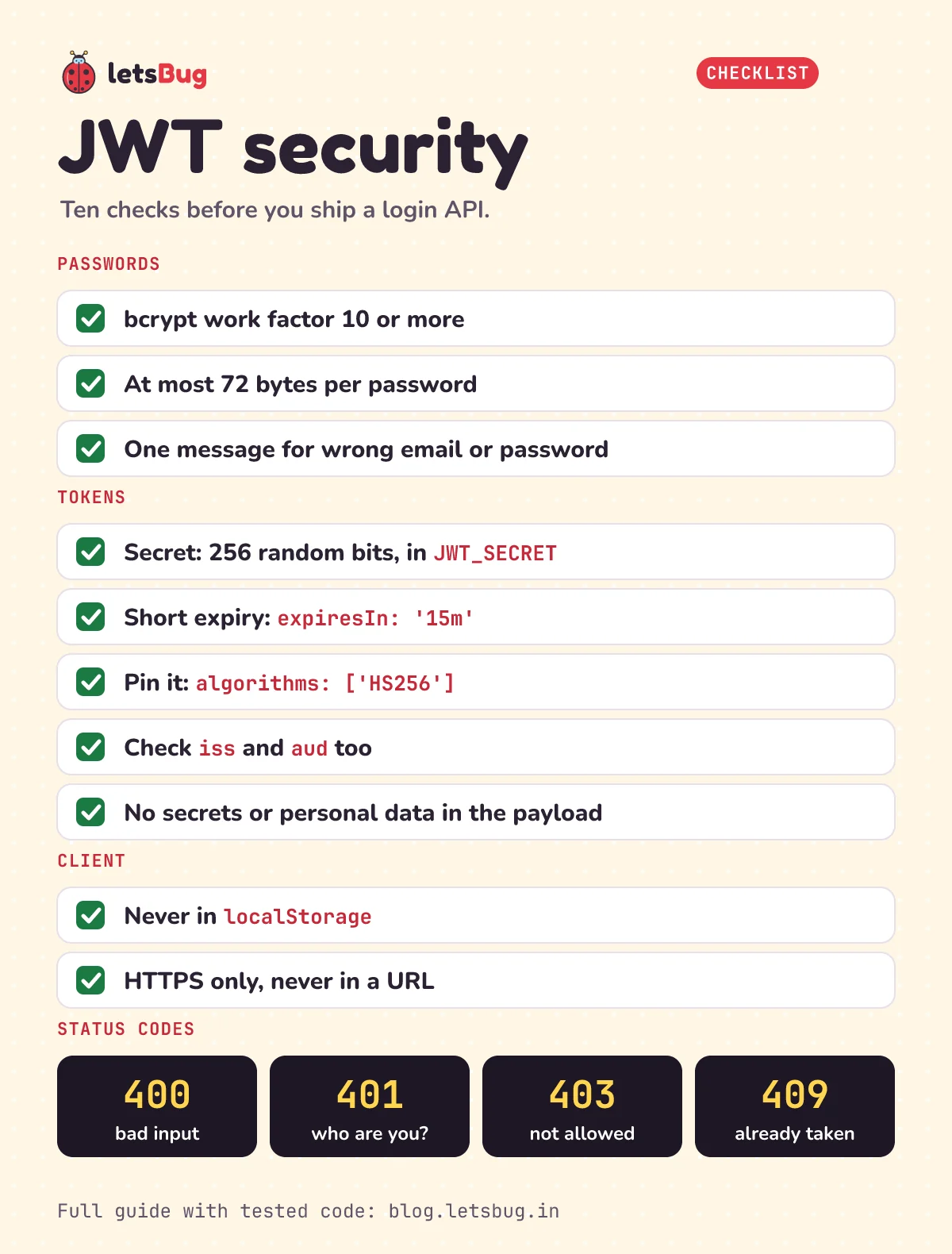
JWT security checklist
Everything above on one card. Go through it before you ship any login API:
Common errors and fixes
Error: secretOrPrivateKey must have a value:jwt.signgotundefinedas the secret, usually because the.envfile wasn't loaded. Start withnpm start(which passes--env-file=.env) instead of plainnode server.js. Our server stops at startup with its own message instead.node: .env: not found:--env-filelooks in the folder you run the command from. Run it from the project folder, or use--env-file-if-existsif the file is optional.JsonWebTokenError: invalid signature: the token was signed with a different secret. Common cause: you changedJWT_SECRETor restarted with a new random one. Log in again for a fresh token.JsonWebTokenError: jwt malformed: the string isn't three dot-separated parts, often because the client sentBearer undefinedorBearer null. Check that you readaccessTokenfrom the login response. If you seeinvalid tokeninstead, look for quotes stuck around the token.TokenExpiredError: jwt expired: working as intended. The client should log in again (or use a refresh token).TypeError: Cannot destructure property 'email' of 'req.body' as it is undefined.: in Express 5,req.bodyis undefined unless a body parser actually parsed the request. Eitherapp.use(express.json())is missing or comes after the routes, or the client didn't sendContent-Type: application/json.Error: data and hash arguments required:bcrypt.comparegotundefinedas the hash because the user wasn't found. Our login avoids it withuser?.passwordHash ?? DUMMY_HASH.- Bad JSON in the request comes back as 400 with a message like
Expected property name or '}' in JSON at position 1 (line 1 column 2). That'sexpress.json()rejecting it before your route runs. npm install bcryptfails while building native code: bcrypt 6 ships prebuilt binaries for Windows, macOS and Linux on x64 and ARM64, so this is rare. If it still fails on your machine,bcryptjsis a plain-JavaScript package that describes itself as compatible with bcrypt.
Two quick ones. What does /api/me answer if you send the token without the word Bearer in front? And what if you send a token that's 20 minutes old?
Show the answers
Without Bearer: 401 with {"error":"Missing bearer token"}, because the middleware checks the scheme first.
20 minutes old: 401 with {"error":"Token expired"}, because exp was 15 minutes after login.
Questions people ask
Is JWT better than sessions for login?
Not always. OWASP's JWT cheat sheet says using JWTs for "stateless" sessions is frowned upon, because you then need a way to cancel tokens, and a deny list makes it stateful again. JWTs suit APIs called by mobile apps or other services. For a classic website, a server session in an HttpOnly cookie is often simpler.
How do I log out a user with JWT?
Delete the token on the client, and keep tokens short-lived. If you must cancel a token before it expires, add a jti (token ID) claim and keep a deny list of revoked IDs until their expiry, as the OWASP JWT and REST cheat sheets describe.
Should I use bcrypt or Argon2?
OWASP's first choice today is Argon2id. It says bcrypt should only be used in legacy systems where Argon2 and scrypt aren't available, with a work factor of at least 10. bcrypt is still widely used and fine at that setting. For a new project with Argon2 support, Argon2id is the stronger pick.
Why HS256 and not RS256?
HS256 uses one shared secret, which is fine when the same server issues and checks the tokens, as ours does. If other services must verify your tokens, use a public-key algorithm so they only need the public key. OWASP recommends ES256 or PS256 over RS256 for that.
Can I put the user's role in the token?
You can, since the signature stops anyone changing it. But it stays valid until the token expires, even after you change the role. Our admin route reads the role from the store on every request so changes apply at once.
Watch the series
All seven parts of the original 2023 series, in order. The code in the videos is the earlier version; use the steps above for current versions.
- Part 1: project setup (4 min): the plan for the API: Express, MongoDB with Mongoose, and JSON Web Tokens.
- Part 2: dependencies and the auth route (20 min)
- Part 3: add MongoDB and create a user (7 min)
- Part 4: adding JWT (4 min)
- Part 5: error handler middleware (9 min)
- Validating the request body with express-validator (10 min)
- A middleware to verify the JWT (4 min)
Keep going
- Start from the basics: a REST API in Express.js 5, step by step.
- Getting
undefined? req.body is undefined in Express 5: the three causes and fixes. - Put it online: deploy a Vite React app to Vercel and an Express API to Render.
- See how the same login looks with an HTML form and a server language: username and password form in HTML and PHP.
- Want a closer look at the email check? Regular expression for email validation in JavaScript explains each part of the pattern.
- More projects like this one: the letsBug Code videos on YouTube.
- New to Node.js? Start with reading input from the terminal in Node.js.
Checked on 10 October 2026 against the 18 sources below.
Sources
- OWASP Cheat Sheet Series: Password Storage (bcrypt work factor, 72-byte limit, Argon2id)
- OWASP Cheat Sheet Series: JSON Web Token (secret size, algorithms,
alg: none, confidentiality, revocation) - OWASP Cheat Sheet Series: REST Security (validate
iss,aud,exp; 401 vs 403; no tokens in URLs) - OWASP Cheat Sheet Series: Authentication (generic error messages, response timing, password length, throttling)
- NIST: SP 800-63B-4, Authentication and Authenticator Management (15-character minimum for single-factor passwords)
- OWASP Cheat Sheet Series: HTML5 Security (local storage) and CSRF Prevention
- IETF: RFC 7519, JSON Web Token; RFC 8725, JWT Best Current Practices; RFC 9110, HTTP Semantics (400, 401, 403, 409)
- jsonwebtoken: README (sign and verify options, error names)
- bcrypt: README (rounds, 72 bytes, async API)
- Express: Error handling and Security best practices; express-validator: Getting started
- Node.js:
--env-file; Mongoose: FAQ (unique indexes); MongoDB: error codes
Tested on Node.js 24.20.0 with express 5.3.0, jsonwebtoken 9.0.3, bcrypt 6.0.0 and express-validator 7.3.2. Every request and response shown here was run before publishing; the MongoDB snippets were syntax-checked only.