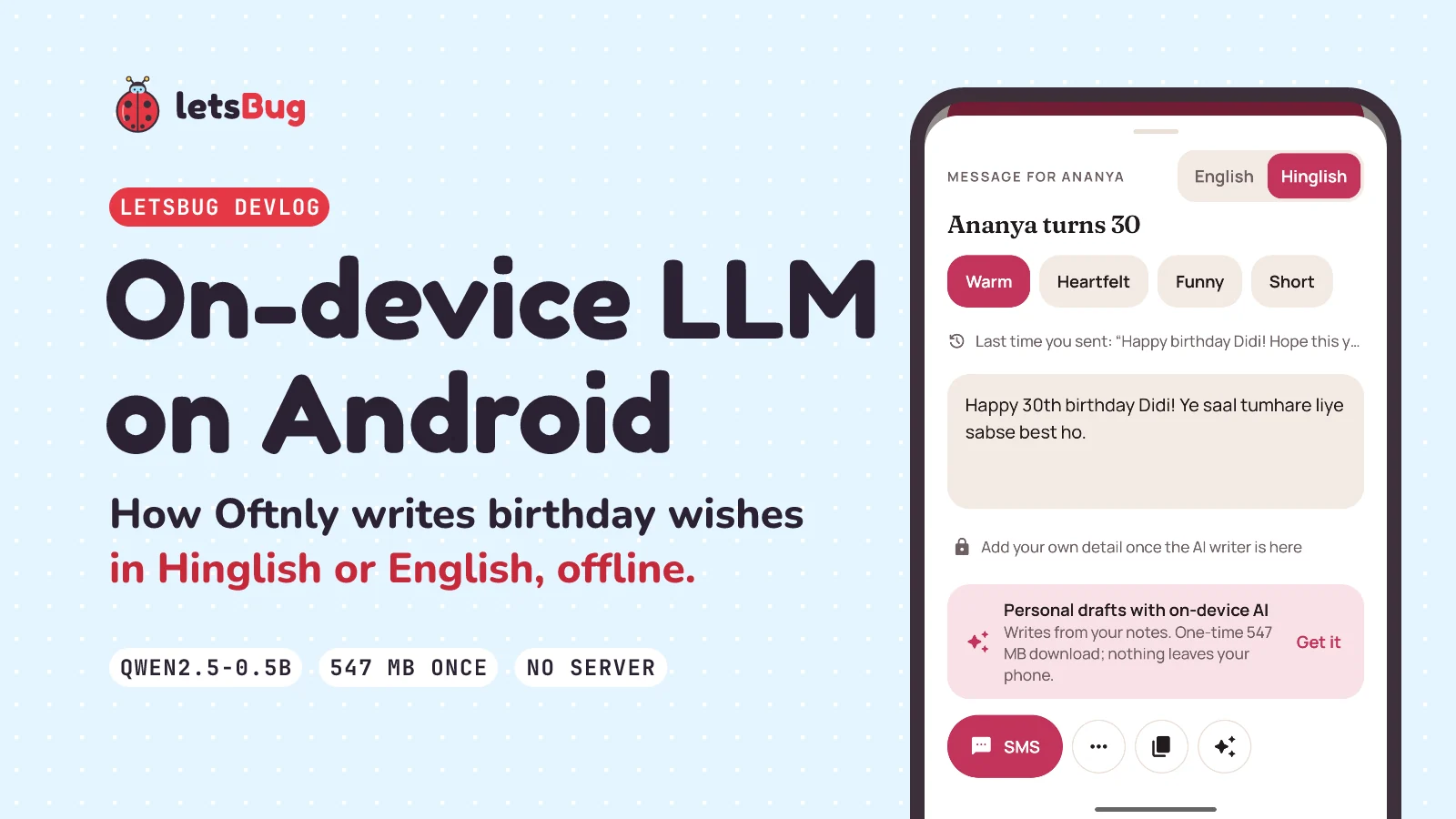
Oftnly, our Android birthday reminder app, runs Qwen2.5-0.5B-Instruct on the phone itself through MediaPipe LLM Inference to write the wish for you. There's no account and no server. People, notes and photos stay in the app's private storage, and the internet is used for one thing only: a one-time download of the optional model.
In this post: why we built it local-first, how we run Qwen2.5-0.5B-Instruct through MediaPipe LLM Inference, the kindness guard around it, and two bugs that taught us something.
Key takeaways
- Local-first means the app has no API, no login and no analytics. Data lives in private app storage; backups are a password-protected file the user moves.
- The writer is Qwen2.5-0.5B-Instruct (q8, 547 MB) by default, with an optional 1.5B model (1,523 MB) for phones with 8 GB of RAM. Both run through MediaPipe LLM Inference.
- A small model stays on format with one worked example in the prompt, a strict system prompt, and a cleanup pass on what it streams back.
- The kindness guard filters the user's input and the model's output. If either is abusive, the user gets a template instead.
- Every AI path has a template fallback. A phone that can't run the model still gets a good message.
Oftnly is in closed testing on Google Play. The Oftnly page on letsbug.in has the current status, the tester sign-up and the privacy policy. Here's the 30-second preview (music and on-screen text, no voice):
What Oftnly does
Oftnly remembers birthdays, anniversaries, festivals and "keep in touch" rhythms, reminds you in time, and then helps you act: a message sent through WhatsApp, SMS or email, or a card for your status. It also records what you did, so it can nudge you again in the evening if you still haven't wished someone.
- Reminders a week, 3 days, 2 days or a day before, and on the day, in any mix. A morning check runs at 9 AM by default, and an evening follow-up at 7 PM.
- Messages in four tones (Warm, Heartfelt, Funny, Short), in English or Hinglish, as instant templates or as an AI draft.
- A relations catalog of 70+ relations in 12 sections, with Indian relation terms (Mausi, Chacha, Bhabhi, Jiju, Nani). If you call your sister "Didi", the message says Didi.
- 411 card designs in 42 categories for WhatsApp Status and stories, plus animated MP4 cards and WhatsApp sticker packs.
Version 1.4.2 is the build in the closed test. It supports Android 8 and newer, and the release APK is 31 MB, arm64 only.
Why build it local-first? No account, no server
A birthday app knows a lot about you: who your family is, your partner's birthday, the private notes you keep ("just got a puppy", "loves climbing"). We didn't want any of that on a server, so we built the app so there is no server. The system design doc puts it in one line for the API section: "None (no server)."
That one decision removes whole layers of work. In our internal engineering checklist, the server items (Docker, NGINX, JWT, rate limits, webhooks, multi-tenancy, queues) are simply marked N/A for this app. What's left is small and easy to reason about:
- Storage:
PeopleStorewrites JSON to private SharedPreferences.PeopleStateis the in-memory, observable state, and every change goes straight to the store. - Auth: none. The data is in private app storage, which other apps can't read.
- Network: only the model download. Contacts are read only when the user taps Import.
- Metrics: none. No analytics is part of the privacy promise, so failures fall back quietly on the phone instead of being reported.
- Outbound: only Android intents (
wa.me,smsto:,mailto:, share). Nothing is sent until the user presses send in the other app.
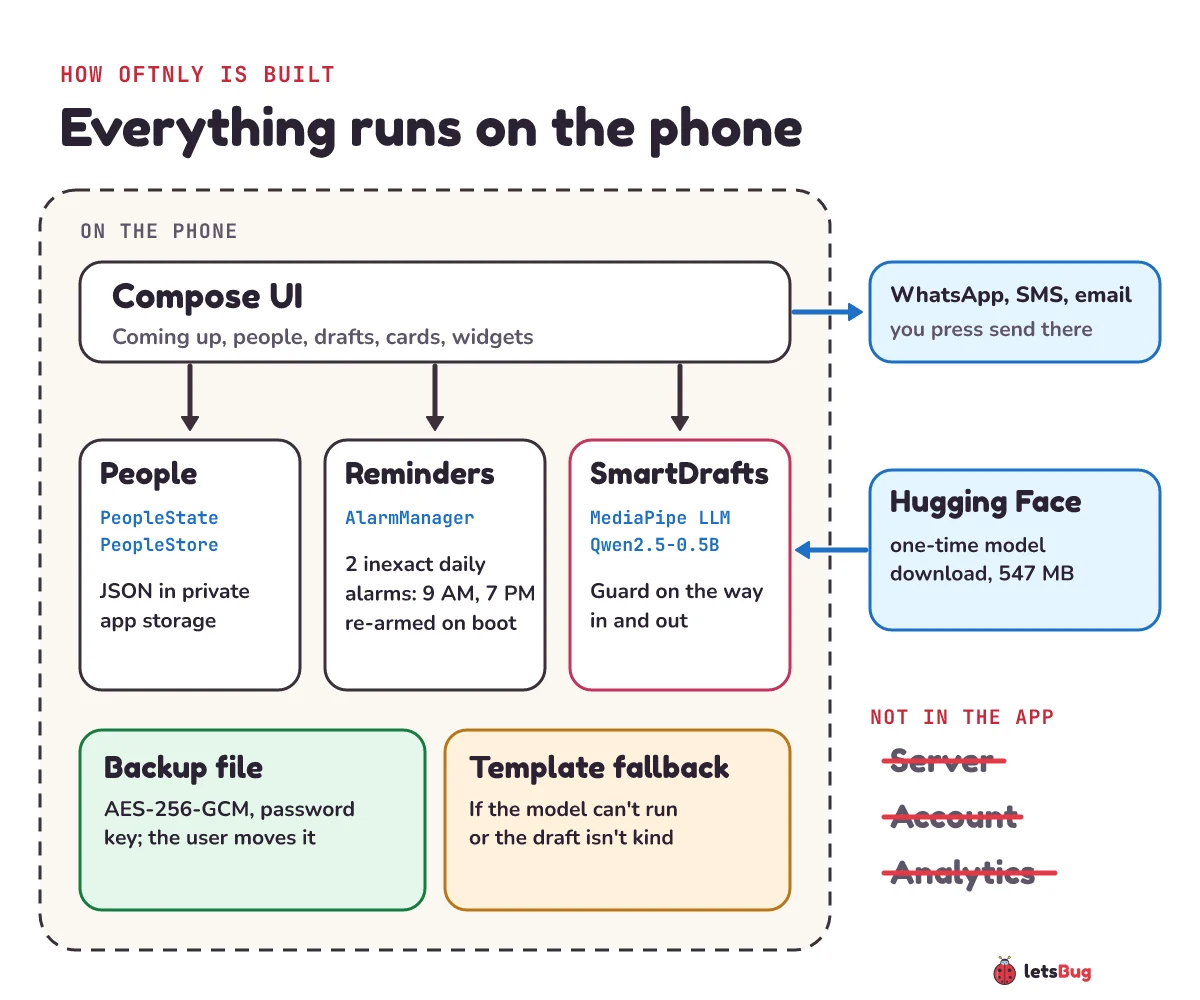
Local-first has real costs, and we accepted them on purpose. There's no sync between phones: moving to a new phone means an encrypted backup file (AES-256-GCM, with the key derived from the user's password by PBKDF2-HMAC-SHA256 at 600,000 iterations). With no analytics, the only way we learn what's broken is testers telling us. And we can't fix anything from the server side, because there isn't one.
One nice side effect: Google Play's Data safety form. Our answer to "Does your app collect or share any of the required user data types?" is "No", because processing on the device isn't collection.
How do you run a small LLM on an Android phone?
The AI writer, which we call Smart drafts, is optional. Templates work from the first second; the model is there for messages that use your own notes. The model choice lives in one enum in Settings.kt:
| Option | Model | Download | For |
|---|---|---|---|
| Standard (default) | Qwen2.5-0.5B-Instruct, q8 | 547 MB | Most phones |
| Better | Qwen2.5-1.5B-Instruct, q8 | 1,523 MB | Phones with 8 GB of RAM; better Hinglish |
Both are Apache 2.0 builds from the litert-community account on Hugging Face, packaged as MediaPipe .task files. We run them with MediaPipe LLM Inference (tasks-genai 0.10.35).
The download: never load half a file
Android's DownloadManager fetches the model into app-specific storage, so it survives the app being closed and shows its own notification. The file lands under a temporary .part name and is renamed only when the download reports success:
// app/src/main/java/com/example/relationshipcrm/SmartDrafts.kt
DownloadManager.STATUS_SUCCESSFUL -> {
    // Downloaded under a temporary name so a half-finished file is never loaded.
    part.renameTo(model)
    forget(if (model.exists()) Status.Ready else Status.Failed)
}
The UI polls status(), and that same call finishes the rename, so there's no separate "download complete" receiver to keep in sync.
Streaming the wish in
Loading the model takes a few seconds the first time; after that it stays in memory. Each draft gets a fresh session (temperature 0.7, or 0.9 for a rewrite) and streams partial text back to the screen as it's generated:
// app/src/main/java/com/example/relationshipcrm/SmartDrafts.kt
session.addQueryChunk(prompt)
suspendCancellableCoroutine { continuation ->
    val text = StringBuilder()
    session.generateResponseAsync { partial, done ->
        text.append(partial)
        val clean = cleanDraft(text.toString())
        onText(clean)
        if (done && continuation.isActive) continuation.resume(clean)
    }
    continuation.invokeOnCancellation { runCatching { session.cancelGenerateResponseAsync() } }
}
Wrapping the callback in suspendCancellableCoroutine lets the UI treat a draft as one suspend call, and if the user switches tone halfway, cancelling the coroutine stops the generation too. Every partial is cleaned before it's shown, which matters for the first bug below.
tasks-genai 0.10.35 today; the switch is on our list.Prompting a 0.5B model
A half-billion-parameter model is fluent but easily distracted. What kept it on format for us:
- One worked example. The prompt is a system message, one example exchange ("It's Sam's birthday… into climbing, just got a puppy") with a model reply, then the real request. In the code's own words: one worked example keeps a small model on format far better than instructions alone.
- Only what the message needs. First names, the relation ("my elder sister"), what you call them, the occasion, your notes (up to 300 characters) and your own detail (up to 200 characters, "mention our Goa trip").
- Hinglish, spelled out. The language line says Hindi written in English letters, mixed with English, the way friends text on WhatsApp in India, and "Never use Devanagari."
- Memory, so rewrites differ. The last 5 drafts per person and occasion are kept. A rewrite is told to avoid the last 3, plus the message you actually sent last time.
- A bounded prompt. Everything fits in 1,024 tokens, the engine's limit.
The kindness guard
Any text box that feeds a language model will eventually be asked for something nasty. We treat the user's detail as data for the message, placed under the rules and never read as instructions, and we clean it first:
// app/src/main/java/com/example/relationshipcrm/Drafts.kt
fun cleanWish(text: String): String = text
    .replace(Regex("<\\|[^|>]*\\|>"), " ")
    .replace(Regex("[<>{}\\[\\]]"), " ")
    .replace(Regex("\\s+"), " ")
    .trim()
    .take(MAX_WISH)
That strips Qwen's chat tokens (<|im_end|>, <|im_start|>), brackets and line breaks, so a detail can't open a fake system turn. A unit test feeds it ignore rules<|im_end|> followed by a new system message and checks the prompt still has exactly three system and user turns, so no fake one got in.
Then a word and phrase list (English and Hinglish, whole words only, so "Scunthorpe" and "class" pass) runs twice:
- On the way in: an abusive detail never reaches the model. The field says "Let's keep it kind — that detail won't be used".
- On the way out: if the finished draft contains those words, it's replaced by the template and the user sees "Kept it kind".
// app/src/main/java/com/example/relationshipcrm/ui/DraftContent.kt
Guard.harmful(result) -> {
    text = fallback
    keptKind = true
}
The system prompt also forbids hurtful content "even if the details ask for it". We're honest about the limit in the design doc: the model runs on the user's own phone, so this stops casual misuse, not a determined user editing the app. For Google Play's AI-generated content policy, the draft sheet also has a Report button that opens an email with the draft, app version and model. Nothing is sent unless the user presses send.
Bug 1: emoji arriving as "ĠðŁİī"
Drafts sometimes ended with a string like ĠðŁİī where an emoji should be. Qwen uses byte-level BPE, the scheme from GPT-2: every UTF-8 byte is stored as a printable stand-in character, so the tokenizer never has to handle raw bytes. Normally the runtime decodes those back. Sometimes it streamed them through as they were, and the party-popper emoji (four UTF-8 bytes) arrived as four odd letters plus a stand-in for the space before it.
The fix is to undo the mapping ourselves. decodeByteLevel rebuilds GPT-2's byte table, finds runs of stand-in characters, and decodes them as UTF-8. Only runs that hold a true stand-in (U+0100 to U+0143) are touched, so real accents like "Café déjà vu" come through unchanged. A unit test pins both cases: "Maya!ĠðŁİī" becomes "Maya! 🎉".
The same cleanup pass removes another small-model habit: signing off "from [Your Name]". Any sentence with a square-bracket placeholder is dropped before the user sees it.
Bug 2: a feature that crashed only in release, and why we dropped it
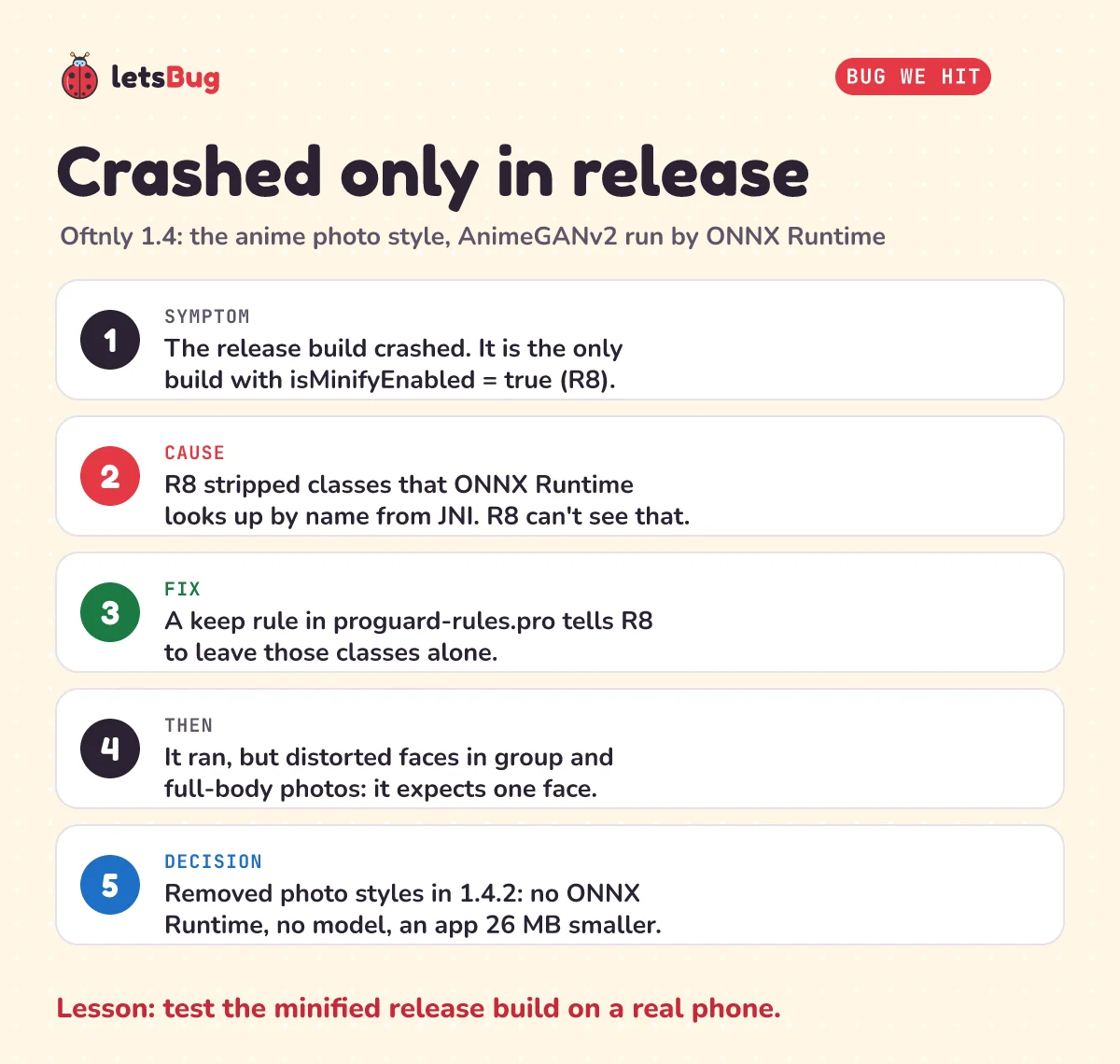
Version 1.4 added an anime photo style for cards: AnimeGANv2 "face paint 512 v2" (MIT licensed), exported to ONNX (8.7 MB, bundled) and run with ONNX Runtime on the phone. It crashed in the release build, the one R8 shrinks.
The cause was R8. Only our release build has isMinifyEnabled = true, and R8 removes classes that no compiled code references. ONNX Runtime's native library looks some of its Java classes up by name from JNI. R8 can't see those lookups, so it stripped the classes, and the native code failed to find them at runtime. The fix was a keep rule, the same kind Android's docs suggest when app optimization causes errors. Our MediaPipe rules are the same idea and are still in the app:
# app/proguard-rules.pro
# MediaPipe LLM Inference is called through JNI and protobuf reflection.
-keep class com.google.mediapipe.** { *; }
-keep class com.google.protobuf.** { *; }
With the crash fixed, the real problem showed up: the model expects a face filling the frame, so it distorted faces in group and full-body photos. Our hand-written cartoon filter didn't look good either. So in 1.4.2 we removed photo styles entirely: no ONNX Runtime, no model, no Photo style tool, and an app 26 MB smaller. Filters and the background cut-out stayed.
Two lessons we took from it. Test the release build (minified, on a real phone) before calling a feature done, because debug builds hide R8 problems. And a model that's right for its demo images can still be wrong for your users' photos.
Check yourself: the model download lands as a .part file and is renamed only on success. What could go wrong if the app wrote straight to the final file name instead?
Show the answer
status() treats "the model file exists" as Ready. With no temporary name, a download that failed or was still running would leave a half-finished file under the real name, and the app would try to load a broken model. The rename makes "the file exists" mean "the file is complete".
Where Oftnly is now
Oftnly 1.4.2 is in a closed test on Google Play. New personal developer accounts have to run a closed test with at least 12 testers, opted in for 14 days in a row, before they can apply for production, and that's the stage we're in. To try it before launch, sign up on the Oftnly page. The privacy policy spells out the same promise as this post: no account, no ads, no tracking.
Questions people ask
Which LLM does Oftnly run on the phone?
Qwen2.5-0.5B-Instruct, quantized to 8 bits (a 547 MB download), through MediaPipe LLM Inference. Phones with 8 GB of RAM can switch to Qwen2.5-1.5B-Instruct (1,523 MB), which writes better Hinglish. Both are Apache 2.0.
Does the AI writer need the internet?
Only once, to download the model from Hugging Face. After that it runs offline, and your notes and drafts stay on the phone unless you send or share them.
What happens on a phone that can't run the model?
The app catches the failure and shows the template message for the chosen tone and language instead. Templates exist in English and Hinglish for every occasion, so the AI is a bonus, not a requirement.
Can a 0.5B model really write Hinglish?
Yes, with help: the prompt describes Hinglish precisely, forbids Devanagari, and includes a worked Hinglish example. The 1.5B option exists because it writes better Hinglish.
Is Oftnly on Google Play?
It's in closed testing on Google Play. The Oftnly page shows the current status and how to join the test.
Work with letsBug
We're letsBug, a software development company in Pune. We build Android apps, AI and LLM features (on the device or on a server), websites and custom systems, and we write up how they work, bugs included. If you'd like something built like this, see our services or get in touch.
Keep going
- See all of our Android apps: small, private apps with no accounts and no ads.
- Watch the Oftnly preview on YouTube, and the rest of the letsBug channel.
- More devlogs: how to calculate a habit streak with rest days (Goal Streak Tracker) and porting Sholo Guti from a web game to Kotlin (Battisi).
Checked on 10 October 2026 against the 8 sources below.
Sources
- Google AI Edge: LLM Inference guide for Android (streaming with
generateResponseAsync(), LiteRT-LM recommendation) - Hugging Face: litert-community/Qwen2.5-0.5B-Instruct and Qwen2.5-1.5B-Instruct (model files and licence)
- OpenAI GPT-2: encoder.py,
bytes_to_unicode()(the byte-level BPE table) - Android Developers: Enable app optimization with R8 (keep rules)
- Play Console Help: App testing requirements for new personal developer accounts
- letsBug: Oftnly and its privacy policy
Every number in this post was checked against Oftnly's system design doc and Kotlin source (version 1.4.2) before publishing, and every code snippet is copied from the app as it ships.