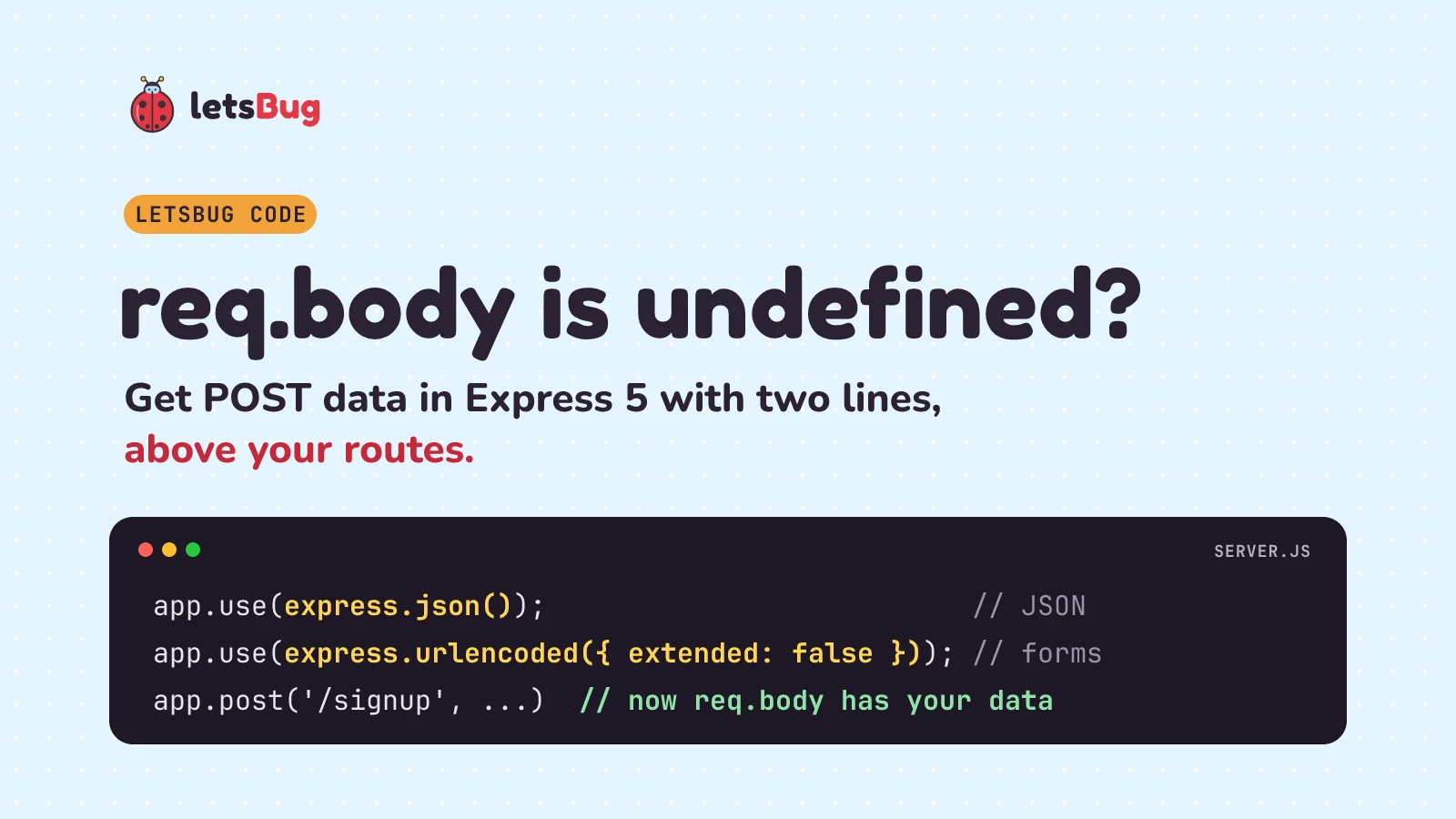
In Express 5, req.body is undefined until a body parser reads it. Add app.use(express.json()) for JSON and app.use(express.urlencoded({ extended: false })) for HTML forms, put them above your routes, and make sure the client sends a matching Content-Type header. That fixes almost every case. Below we reproduce the error, fix it, and then handle the parts that still trip people up: query strings vs route params vs body, size limits, broken JSON and checking the input.
Key takeaways
- Express doesn't read the request body on its own. Without a parser,
req.bodyisundefined. In Express 5 it also staysundefinedwhen a parser skips the request. express.json()readsapplication/json.express.urlencoded()readsapplication/x-www-form-urlencoded, which is what an HTML form sends.- Order matters:
app.use(express.json())must come before the routes that need it. - The client must send the header.
fetch()with a string body sendstext/plain, so add'Content-Type': 'application/json'. - In Express 5,
extendeddefaults tofalse. Both parsers reject bodies over 100kb with 413 unless you raiselimit. Treat everything inreq.bodyas untrusted and check it.
This post goes with a one-minute letsBug Short from 2022. It was made two years before Express 5 came out, so the video shows the earlier version; the written steps here are up to date and tested on Express 5.3.0.
Set up the project
We'll use Node.js 24 and Express 5.3.0, the current release in October 2026 (it installs body-parser 2.3.0, which does the actual parsing). In an empty folder:
npm init -y
npm install express@5.3.0
Express 5 needs Node.js 18 or newer. The code below uses require; with "type": "module" in package.json, write import express from 'express' instead.
Reproduce "req.body is undefined"
Let's break it on purpose first, so you can recognise it. Save this as broken.js:
const express = require('express');
const app = express();

app.post('/signup', (req, res) => {
  console.log(req.body); // undefined
  res.send(`req.body is ${typeof req.body}`);
});

app.listen(process.env.PORT || 3000);
Run node broken.js and send it some JSON from a second terminal (the curl commands in this post are for macOS, Linux and Git Bash; Windows PowerShell users, see the Invoke-RestMethod version further down):
curl -X POST http://localhost:3000/signup -H "Content-Type: application/json" -d '{"name":"Asha"}'The reply is req.body is undefined, and the terminal running the server prints undefined. A form body gives the same result. The data did arrive, but nothing turned the raw bytes into an object. As soon as your code reads a field, it crashes with one of these:
TypeError: Cannot destructure property 'name' of 'req.body' as it is undefined.
TypeError: Cannot read properties of undefined (reading 'name')
The Express 5 migration guide says it directly: "The req.body property returns undefined when the body has not been parsed. In Express 4, it returns {} by default." That {} appeared when a parser was installed but skipped the request, for example because of the wrong Content-Type. Express 4 with no parser at all gave undefined too. So Express 4 code where req.body.name quietly came out undefined can now throw instead.
The fix: express.json() and express.urlencoded()
Here's the full working server. Save it as server.js:
const express = require('express');

const app = express();
app.use(express.json());                          // Content-Type: application/json
app.use(express.urlencoded({ extended: false })); // Content-Type: application/x-www-form-urlencoded

// params, query and body side by side
app.post('/users/:id', (req, res) => {
  res.json({ params: req.params, query: req.query, body: req.body });
});

app.post('/signup', (req, res) => {
  if (req.body === undefined) {
    return res.status(415).json({ error: 'Send JSON or form data with a matching Content-Type' });
  }
  const { name, email, age } = req.body;
  const errors = [];
  if (typeof name !== 'string' || name.trim() === '') errors.push('name is required');
  if (typeof email !== 'string' || !/^[^\s@]+@[^\s@]+\.[^\s@]+$/.test(email)) errors.push('email is not valid');
  const years = Number(age);
  if (!Number.isInteger(years) || years < 13 || years > 120) errors.push('age must be a whole number from 13 to 120');
  if (errors.length > 0) return res.status(400).json({ errors });

  res.status(201).json({ name: name.trim(), email, age: years });
});

// errors from the body parsers: broken JSON (400) and bodies over the limit (413)
app.use((err, req, res, next) => {
  if (err.type === 'entity.parse.failed') return res.status(400).json({ error: 'Body is not valid JSON' });
  if (err.type === 'entity.too.large') return res.status(413).json({ error: 'Body is too large' });
  next(err);
});

const port = process.env.PORT || 3000;
app.listen(port, () => console.log(`Listening on http://localhost:${port}`));
Run node server.js and try both kinds of body:
curl -X POST http://localhost:3000/signup -H "Content-Type: application/json" -d '{"name":"Asha","email":"asha@example.com","age":19}'
# {"name":"Asha","email":"asha@example.com","age":19}

curl -X POST http://localhost:3000/signup -d "name=Asha&email=asha@example.com&age=19"
# {"name":"Asha","email":"asha@example.com","age":19}
On Windows PowerShell, where curl is a different command, the same two requests are:
Invoke-RestMethod -Method Post -Uri http://localhost:3000/signup -ContentType 'application/json' -Body '{"name":"Asha","email":"asha@example.com","age":19}'

Invoke-RestMethod -Method Post -Uri http://localhost:3000/signup -Body @{ name = 'Asha'; email = 'asha@example.com'; age = 19 }
Both return status 201 with the same object. Notice the form sent age as the text "19": form values are always strings, and Number(age) turns it into 19. (The second curl has no -H because curl's -d already sends the form Content-Type.)
Each parser only looks at requests whose Content-Type matches its own. The Express API reference says the parsed object goes on req.body "or undefined if there was no body to parse, the Content-Type was not matched, or an error occurred". That one sentence explains every cause in the next section.
req.body is undefined: the 3 causes
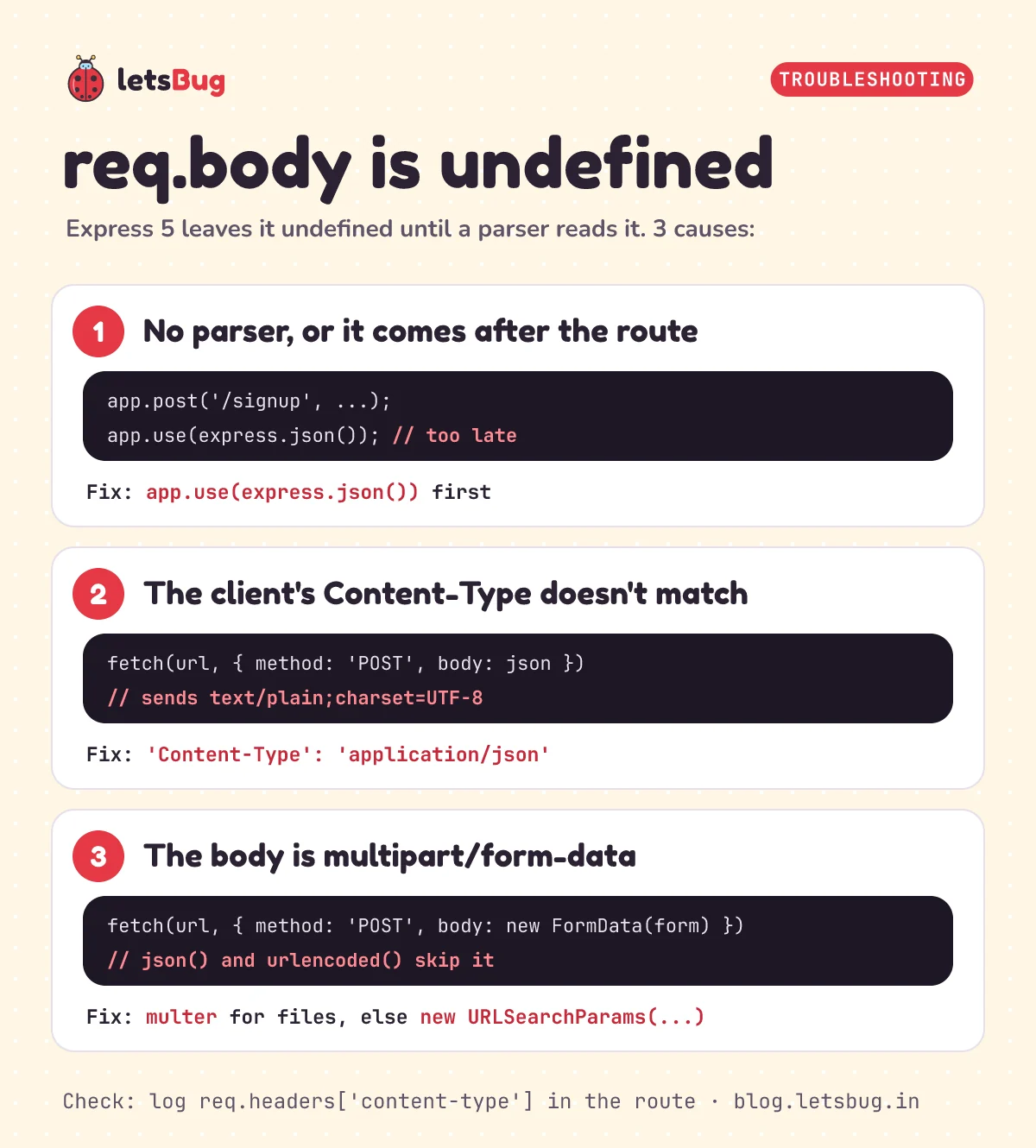
1. No parser, or the parser comes after the route
Express runs middleware and routes in the order you write them. This looks fine but still gives req.body is undefined:
app.post('/signup', (req, res) => {
  res.send(`req.body is ${typeof req.body}`);
});

app.use(express.json()); // too late: /signup already answered
Move the app.use(...) lines to the top, straight after const app = express(). If you use routers (app.use('/api', apiRouter)), the parsers must come before that line too.
2. The client sends the wrong Content-Type (or none)
This is the sneaky one, because the server code is correct. fetch() with a string body and no headers sends Content-Type: text/plain;charset=UTF-8 (that's the Fetch standard), so express.json() skips it. Our server answers 415 (Unsupported Media Type, which it also sends for an empty request), and without that check you'd get the TypeError again. Always set the header:
const res = await fetch('/signup', {
  method: 'POST',
  headers: { 'Content-Type': 'application/json' },
  body: JSON.stringify({ name: 'Asha', email: 'asha@example.com', age: 19 }),
});
console.log(res.status, await res.json()); // 201 { name: 'Asha', ... }
The reverse mistake is odd to look at. Send JSON text with the form type (curl -d without the JSON header does this) and express.urlencoded() reads the whole JSON string as one key with an empty value: { '{"name":"Asha",...}': '' }. If you see your JSON as a key, fix the header. In Postman, Insomnia or Thunder Client, check the request headers and make sure Content-Type: application/json is really being sent.
3. The body is multipart/form-data
A FormData object in fetch(), or a form with enctype="multipart/form-data" (needed for file uploads), sends multipart/form-data. Neither built-in parser reads that, and body-parser's README says so: "This does not handle multipart bodies". For uploads, use a multipart library such as multer. For a form without files, send it as URL-encoded instead:
const form = document.querySelector('form');
form.addEventListener('submit', async (event) => {
  event.preventDefault();
  await fetch('/signup', { method: 'POST', body: new URLSearchParams(new FormData(form)) });
});
A URLSearchParams body is sent as application/x-www-form-urlencoded;charset=UTF-8 automatically, so no header is needed.
HTML form bodies and the extended option
A plain HTML form posts URL-encoded data by default (MDN: application/x-www-form-urlencoded is "the default value" of enctype). Each input's name becomes a key in req.body:
<form method="post" action="/signup">
  <input name="name" required>
  <input name="email" type="email" required>
  <input name="age" type="number" min="13" max="120" required>
  <button>Sign up</button>
</form>
Now the extended option. The migration guide says: "The express.urlencoded method makes the extended option false by default." With false, brackets in names stay as plain text keys. With true, brackets build nested objects (up to 32 levels deep, set by the depth option):
| Form body sent | extended: false (default) | extended: true |
|---|---|---|
user[name]=Asha&user[city]=Pune | { 'user[name]': 'Asha', 'user[city]': 'Pune' } | { user: { name: 'Asha', city: 'Pune' } } |
We write extended: false anyway: it's the default, but it tells the next reader what to expect. Switch to true only if your form really uses user[name]-style names. If you're upgrading Express 4 code that relied on nested objects, you must now set extended: true yourself.
Where does my data live? params, query and body
POST data isn't the only input a request carries. Let's send all three at once to the /users/:id route:
curl -X POST "http://localhost:3000/users/42?notify=yes" -H "Content-Type: application/json" -d '{"name":"Asha"}'
# {"params":{"id":"42"},"query":{"notify":"yes"},"body":{"name":"Asha"}}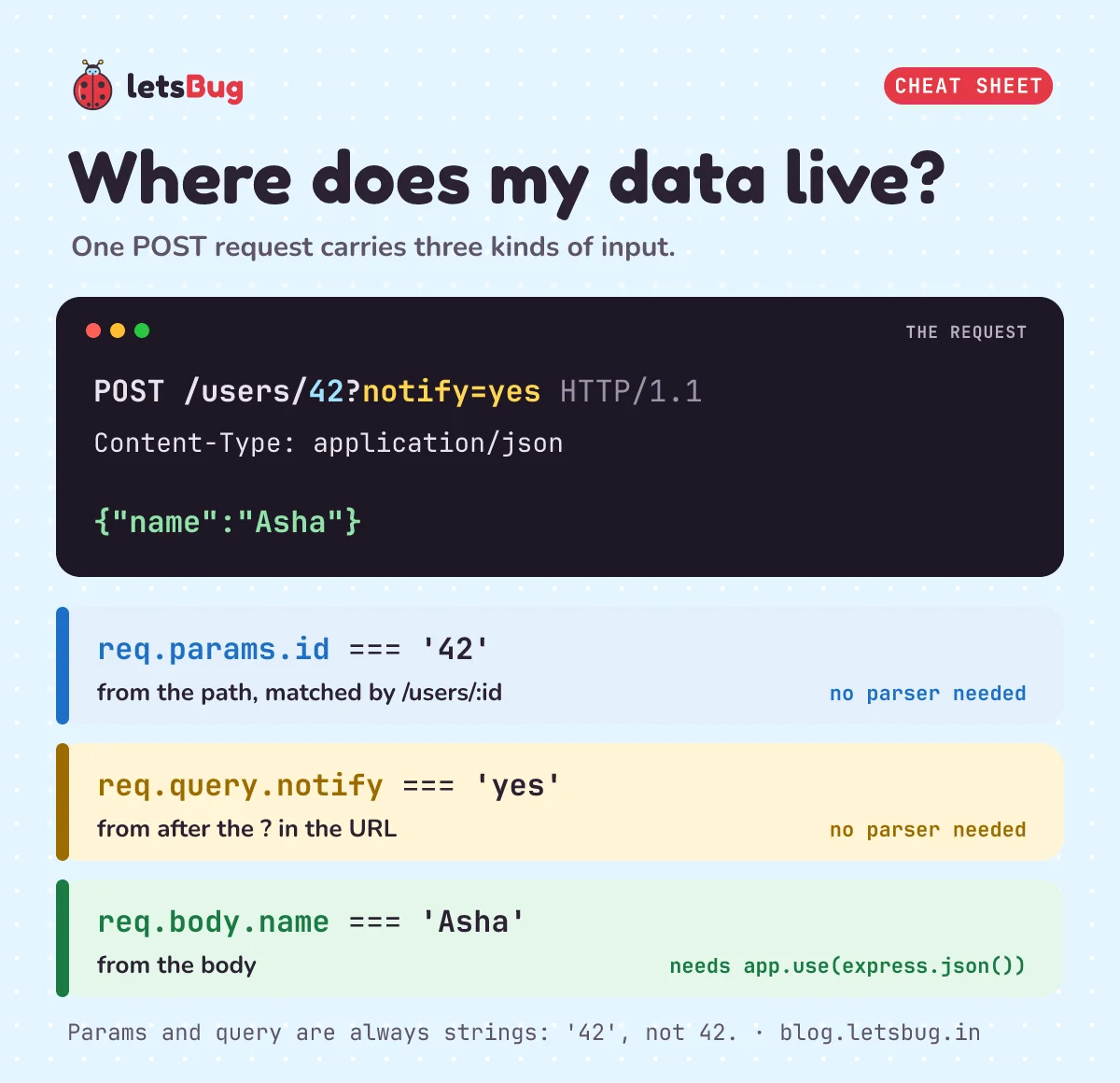
| Where | Example | Read it with | Needs a parser? |
|---|---|---|---|
| Route params (in the path) | /users/42 | req.params.id | No |
Query string (after ?) | ?notify=yes | req.query.notify | No |
| Body | {"name":"Asha"} | req.body.name | Yes |
Params and query values are always strings, so "42", not 42. Use params to name the thing (which user), query for options (filters, pages), and the body for the data you're sending. Passwords and personal details belong in the body, never the URL, because URLs end up in browser history and server logs.
Three Express 5 changes to know about: req.query is now read-only (a getter), and the default query parser is "simple". ?tag=a&tag=b still gives { tag: ['a', 'b'] }, but ?user[name]=x gives the flat key 'user[name]', not a nested object. And req.param(), which searched all three, is gone; ask req.params, req.query or req.body directly.
Body size limits
Both parsers reject bodies over 100kb by default (the limit option). A bigger body fails before your route runs, with status 413:
PayloadTooLargeError: request entity too largeOur error handler turns that into {"error":"Body is too large"}. If you really need more, say for a long article, raise it for that parser only:
app.use(express.json({ limit: '1mb' })); // JSON bodies up to 1 MB; forms keep 100kbKeep the limit as small as your app allows; it stops one request from eating your server's memory. For files, don't raise the JSON limit: upload them as multipart with multer. URL-encoded bodies also have parameterLimit, 1000 fields by default.
Validate what's in req.body
A working parser only means the body is valid JSON or form data. It says nothing about what's inside. The Express docs warn that "all properties and values in this object are untrusted and should be validated before trusting". A field can be missing, empty, the wrong type ("age": "twelve") or an array where you expected a string.
The /signup route above does the basic checks by hand: typeof to make sure strings are strings, trim() so a name of spaces doesn't count, a simple email pattern (it catches typos, not every invalid address), and Number.isInteger plus a range for the age. It collects every problem and answers 400:
curl -X POST http://localhost:3000/signup -H "Content-Type: application/json" -d '{"name":" ","email":"asha.example.com","age":"twelve"}'
# {"errors":["name is required","email is not valid","age must be a whole number from 13 to 120"]}
Browser checks like required and min="13" are only for convenience: anyone can skip them with curl, so the server must check again. Once you have more than a few fields, a schema library such as Zod or express-validator saves writing these checks one by one.
Common errors and fixes
| What you see | Why | Fix |
|---|---|---|
TypeError: Cannot destructure property 'name' of 'req.body' as it is undefined. | No parser ran for this request | Add the parser above the route, and check the client's Content-Type |
TypeError: Cannot read properties of undefined (reading 'name') | Same cause, reading req.body.name | Same fix |
Your JSON appears as one key: { '{"name":"Asha"}': '' } | JSON sent with the form Content-Type | Send Content-Type: application/json |
SyntaxError: Expected double-quoted property name in JSON at position 16 (line 1 column 17), status 400 | The body isn't valid JSON, here a trailing comma in {"name": "Asha",} | Send JSON.stringify(data), not a hand-written string. Handle entity.parse.failed to answer cleanly |
PayloadTooLargeError: request entity too large, status 413 | Body over the 100kb default | Send less, or raise limit for that parser |
Nested form fields arrive as 'user[name]' | extended is false by default in Express 5 | express.urlencoded({ extended: true }) |
File upload form gives undefined | Multipart isn't parsed by Express | Use multer |
Try it: with server.js running, what does /signup answer to {"name":"Ravi","email":"ravi@example.in","age":12}? And what happens if you send the same JSON with -H "Content-Type: text/plain"?
Show the answers
The first gives status 400 with {"errors":["age must be a whole number from 13 to 120"]}: the name and email pass, but 12 is under 13.
The second gives status 415 with {"error":"Send JSON or form data with a matching Content-Type"}, because no parser matches text/plain, so req.body stays undefined.
Questions people ask
Do I still need to install body-parser?
No. Since Express 4.16, express.json() and express.urlencoded() are built in, and they are body-parser underneath. npm install express brings it along (Express 5.3.0 installs body-parser 2.3.0). You'd only install body-parser yourself for old tutorials' bodyParser.json() syntax, which does the same thing.
Why is req.body an empty object {} instead of undefined?
That's either Express 4, where a parser that skipped the request still set req.body to {}, or a parser that matched while the client sent an empty object. Log req.headers['content-type'] and the Express version (require('express/package.json').version) to find out which.
Can a GET request have a body?
Not from fetch(): the Fetch standard says to throw a TypeError when a GET or HEAD request has a body (Node.js says "Request with GET/HEAD method cannot have body."). curl can send one, but since browsers can't, don't design an API around it. Send GET inputs in the query string and read them from req.query.
Should I use extended: true or false?
Use false (the Express 5 default) unless your form uses bracket names like user[name] or items[] and you want nested objects. With true, nesting is limited to 32 levels by default (the depth option).
How do I read raw text or a webhook signature body?
Use express.text() for text/plain bodies (you get a string) and express.raw() for the exact bytes as a Buffer. When you need to check a signature computed over the body, add express.raw({ type: 'application/json' }) to that one route and parse the JSON yourself after checking.
Keep going
- Start from the basics: a REST API in Express.js 5, step by step.
- Protect it: a Node.js JWT authentication API with Express 5 and bcrypt.
- Watch the original one-minute Short, How to get data from post request in express.js, and the rest of the letsBug Code series on YouTube.
- Check the email field more carefully with a regular expression for email validation in JavaScript.
- See the same form-to-server idea in PHP: a username and password form in HTML and PHP.
- Take input in Node.js without a browser at all: read input from the terminal in Node.js.
Sources
- Express.js: Upgrade to Express v5 (
req.bodyreturnsundefined,extendeddefaults tofalse,req.queryandreq.param()changes) - Express.js: 5.x API, express.json() and express.urlencoded() (options, 100kb limit, when
req.bodyisundefined) - Express.js: 5.x API, the request object (
req.body,req.params,req.query) - GitHub: expressjs/body-parser README (error types, no multipart support)
- WHATWG: Fetch standard, extracting a body (string bodies are
text/plain;charset=UTF-8) - MDN: The form element (
enctypedefault) and 415 Unsupported Media Type
Every server in this post was run with Node.js 24, Express 5.3.0 and body-parser 2.3.0, and every response shown was checked with a script before publishing.