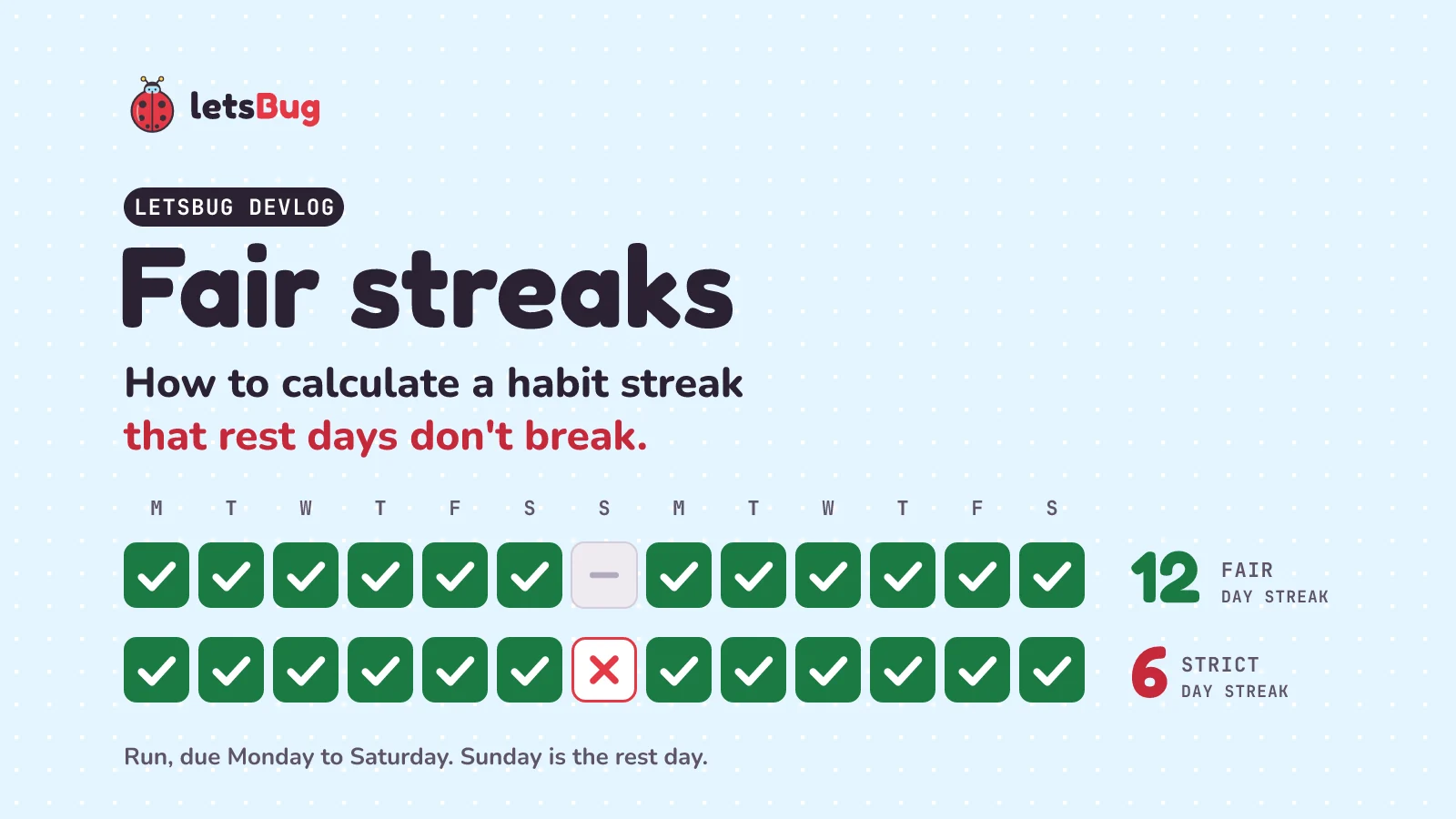
To calculate a fair habit streak, start at today and walk backwards one day at a time: skip the days the habit isn't due, add one for every due day that's done, and stop at the first due day that isn't. If today is due but not done yet, start from yesterday instead.
In this post we show the real Kotlin behind Goal Streak Tracker, our Android habit app, run it on two example weeks, and go through the edge cases that took the most thought: midnight, time zones and changing a habit's schedule.
Key takeaways
- A strict streak counts calendar days, so a planned rest day resets it. A fair streak counts only the days the habit is due.
- Each habit stores a set of weekdays. Days outside it are skipped, never counted as missed.
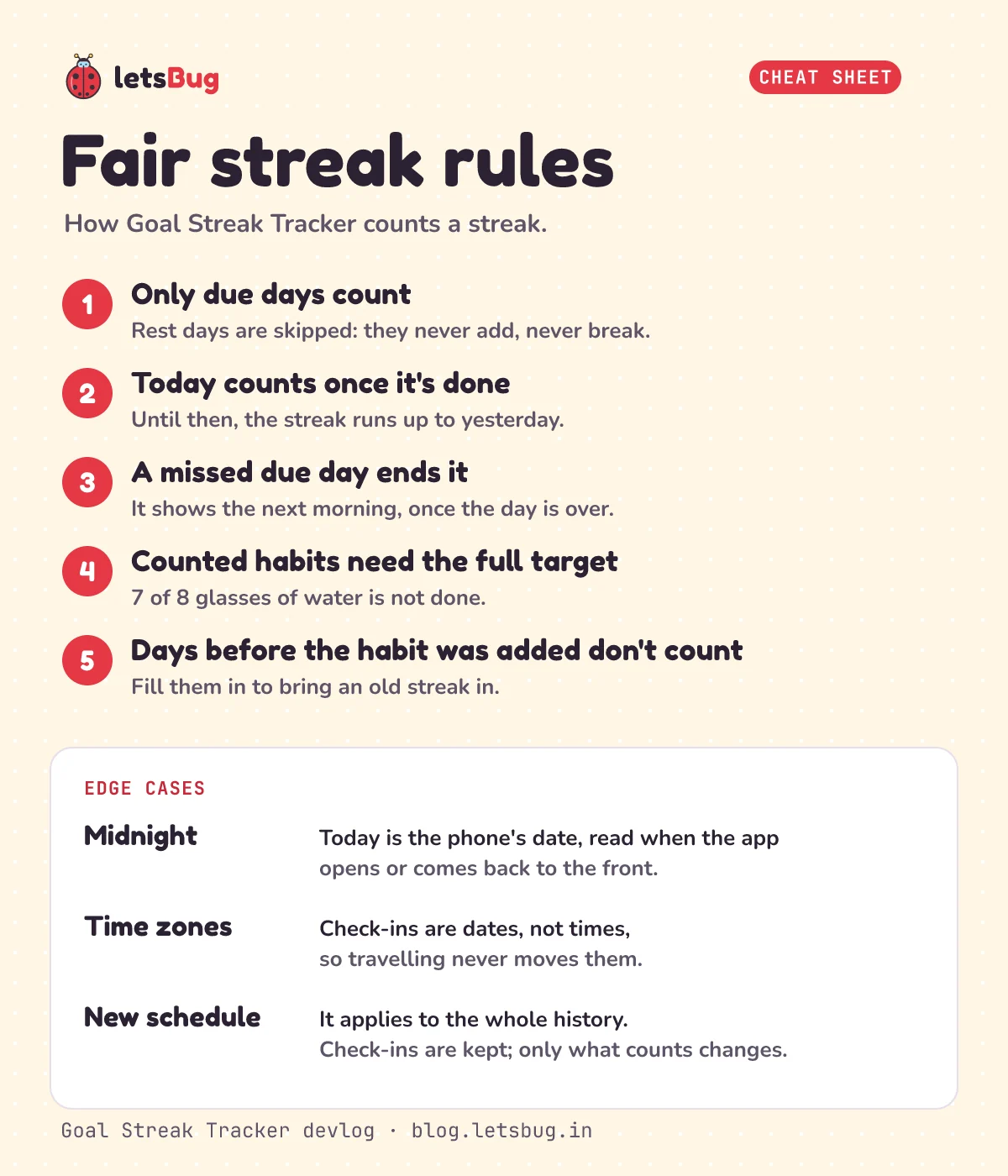
- Today only counts once it's done, so an unfinished morning never shows a broken streak. A miss shows the next morning.
- Check-ins are stored as dates, not timestamps, so travelling doesn't move them.
- The streak functions take
todayas a parameter, which makes them easy to test with a fixed date.
Goal Streak Tracker is in closed testing on Google Play. Here's the 28-second preview; the post is about what happens behind the "days off never break it" screen.
Why are strict streaks unfair?
The simplest streak counts calendar days in a row. That works for "drink water", which you want every day. It doesn't work for "run six days a week". The plan has a rest day built in, and a strict counter resets on exactly the day you followed the plan.
So we wanted a streak that measures whether you did the habit when you said you would. That needs two things the strict version doesn't have: a schedule per habit, and a rule for days that aren't over yet.
The data: a schedule and a map of dates
Every habit carries its own schedule and the day it was added. This excerpt from app/src/main/java/com/example/streaks/Model.kt is trimmed to the parts that matter for streaks:
data class Habit(
    // ...
    /** Taps needed per day: 1 is a simple check, 8 could be glasses of water. */
    val target: Int = 1,
    /** Days it is expected. Unscheduled days never break a streak. */
    val days: Set<DayOfWeek> = DayOfWeek.entries.toSet(),
    /** Epoch day it was created; earlier days don't count against it. */
    val since: Long = LocalDate.now().toEpochDay()
) {
    // ...
    fun scheduled(day: LocalDate) = day.toEpochDay() >= since && day.dayOfWeek in days
}

/** Taps per habit per epoch day. */
typealias Logs = Map<Long, Map<Long, Int>>

fun Logs.done(habit: Habit, day: LocalDate) = count(habit, day) >= habit.targetdaysis the schedule: every day, weekdays, weekends or any days you pick.sinceis the day the habit was added, so the days before it don't count against you.Logsmaps each habit to a map of epoch day (days since 1 January 1970) to taps. There's no time of day anywhere.- A day is done when the taps reach the target. One tap for "Read", eight for "Water".
How to calculate a streak in Kotlin
Here's the function behind each habit's current streak, unedited:
/**
 * Consecutive scheduled days completed, ending today. A scheduled day that isn't done yet
 * today doesn't break the streak; the day is still in progress.
 */
fun Logs.currentStreak(habit: Habit, today: LocalDate): Int {
    var day = if (habit.scheduled(today) && !done(habit, today)) today.minusDays(1) else today
    var streak = 0
    while (day.toEpochDay() >= habit.since) {
        if (habit.scheduled(day)) {
            if (!done(habit, day)) break
            streak++
        }
        day = day.minusDays(1)
    }
    return streak
}
Line by line:
- The first line picks the starting day. If today is due and not done yet, we start from yesterday: the day is still in progress, so it can't break anything.
- The loop walks backwards and stops at
since, the day the habit was added. - A day that isn't scheduled is skipped. It neither adds to the streak nor breaks it.
- A scheduled day that's done adds one. A scheduled day that isn't done ends the loop.
The best streak uses the same two checks, walking forwards from since to today: a done due day adds one to the current run, a missed due day resets the run to zero, rest days are skipped, and the longest run wins.
Worked example: a week with a rest day
Take a habit "Run", due Monday to Saturday, added on Monday 14 September 2026. Sunday is the rest day. Every run gets done, Monday 14 to Saturday 26, and Sunday 20 is rested as planned.
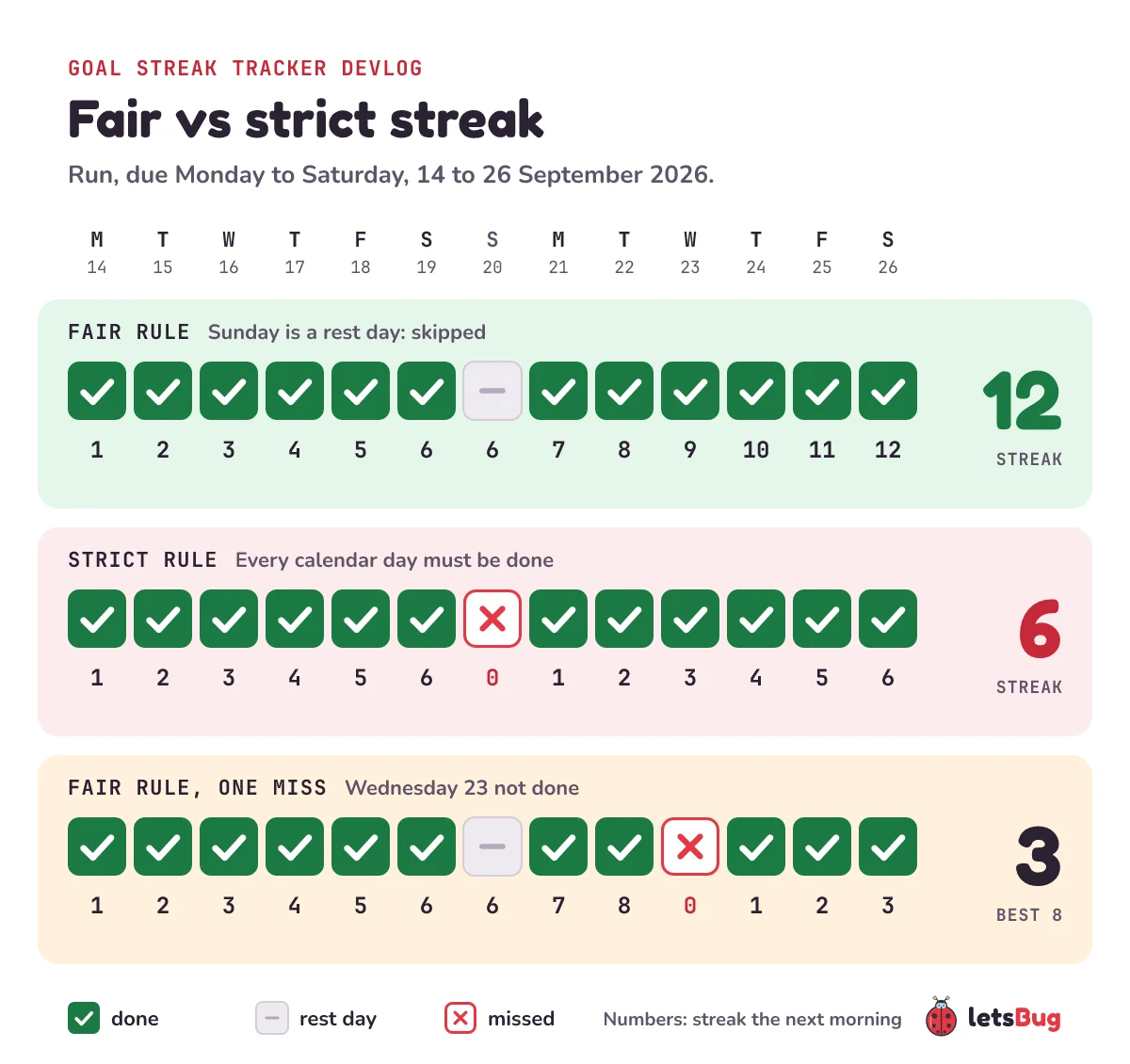
On Saturday evening, after the run:
| Rule | Walk back from Saturday 26 | Streak |
|---|---|---|
| Fair (due Mon to Sat) | Sat to Mon: 6 done. Sun 20: not due, skip. Sat 19 to Mon 14: 6 done. Reached since. | 12 |
| Strict (every day) | Sat to Mon: 6 done. Sun 20: due and not done, stop. | 6 |
A few more moments from the same two weeks:
- Saturday morning, before the run: the fair streak shows 11. Saturday is due but not done, so the walk starts on Friday.
- Sunday 27, a rest day: still 12. Today isn't due, so there's nothing to wait for.
- Monday 28 morning, before the run: fair still shows 12. A strict counter would show 0, because it treats Sunday as a missed day.
Worked example: a missed day
Same habit, same two weeks, but Wednesday 23 doesn't happen. The third row of the picture above shows it:
- Wednesday night the streak still shows 8. Wednesday is today and not over, so it can't break anything yet.
- Thursday morning it shows 0. Wednesday is now in the past, due and not done, so the walk stops there.
- By Saturday 26 it's back to 3 (Thursday, Friday, Saturday), and the best streak is 8: Monday 14 to Tuesday 22, straight across the rest Sunday.
That delay is deliberate. A streak that turns red at 8 in the morning because you haven't run yet trains you to ignore it.
What about midnight, time zones and schedule changes?
Counted habits need the full target
"Water, 8 glasses" is done at 8 taps, not 7. Seven glasses yesterday means yesterday wasn't done, and the streak stops there. The heatmap still shows the partial day in a lighter shade, so the effort isn't invisible; it just doesn't count as done.
Days before the habit existed
Add a habit on Thursday 24 and do it Thursday to Saturday: on Saturday the streak is 3, and the walk stops at Thursday. Monday to Wednesday weren't missed, because since says the habit didn't exist yet. If you already had a streak going before you installed the app, tap those past days on the habit's heatmap. Filling in a day before since moves since back, so an old streak can be brought in: fill in Monday to Wednesday and a three-day streak becomes six.
Midnight and time zones
The app never stores a time. "Today" comes from LocalDate.now(), which reads "the system clock in the default time-zone", so it's whatever date your phone shows. That has three consequences:
- A check-in belongs to the date on your phone when you tap. A run logged at 23:50 is that day's; at 00:10 it's the next day's.
- Travelling doesn't move old check-ins. They're dates, and a date has no time zone to convert. Flying west across the International Date Line skips a calendar date entirely. If a habit was due on that date, it counts as missed; fill it in from the heatmap.
- The app reads the date when it starts and each time it comes back to the front (
onResumecallsreload()). Leave it open on screen across midnight and it keeps yesterday's date until you switch away and back. A tap on the Check in widget, or on a habit's button in the evening notification, reads the clock at the moment you tap, so those always log the right day.
The widgets redraw on every check-in and once an hour (Android won't deliver periodic widget updates more often than every 30 minutes anyway), so for a while after midnight a widget can still show yesterday's progress.
Changing the schedule
This one is a real trade-off. A habit has one set of days, not a history of schedules, so a new schedule applies to the whole past. Our Run habit has a fair streak of 12 on Saturday 26. Switch it to "every day" and Sunday 20 becomes a due day that wasn't done, so the streak drops to 6. It works the other way too: turn Sundays into rest days and a streak broken only on Sundays comes back.
Nothing is deleted either way. Check-ins stay in the log; the schedule only decides which of them count. The editor also won't let you untick the last day, so every habit is due at least once a week. If re-scoring the past ever becomes a problem, the fix is to store each schedule with the date it started and ask "was this day due under the schedule of that time?" We haven't needed it yet.
How do you test a streak function?
Notice that currentStreak takes today as a parameter instead of calling LocalDate.now() inside. Oracle's documentation says calling now() directly "will prevent the ability to use an alternate clock for testing because the clock is hard-coded". Passing the date in means every test can pin a fixed Thursday. This test, from app/src/test/java/com/example/streaks/ModelTest.kt, is the rest-day rule in four lines:
    @Test
    fun unscheduledDaysAreSkipped() {
        // Gym on Mon/Wed/Fri. Today is Thursday, so Wednesday and Monday count; Tuesday is skipped.
        val gym = Habit(name = "Gym", days = setOf(DayOfWeek.MONDAY, DayOfWeek.WEDNESDAY, DayOfWeek.FRIDAY), since = daysAgo(30))
        assertEquals(2, logs(gym, 1, 3).currentStreak(gym, today))
    }
ModelTest.kt has 9 tests: the streak counts back from today, an unfinished today doesn't break it, rest days are skipped, counted habits need their target, the best streak finds the longest run, perfect days need every due habit, the 30-day rate ignores an unfinished today, the perfect-day record, and one that maps old emoji to icons. They're local JVM tests with no phone or emulator, and on the last run the nine tests together took under a tenth of a second.
For this post we went one step further. We ported the rules to Python, re-ran the eight streak-related tests against the port, then asserted every number above against it: 12 and 6, 11 on Saturday morning, 8 on Wednesday night, 0 on Thursday morning, 3 with a best of 8, and 6 after the schedule change.
The rest of the app, briefly
- Perfect-day streak. The flame on the Today screen counts days on which every habit due that day was done. Days with nothing due are skipped, the same way rest days are.
- Heatmaps. Each habit has an 18-week heatmap. Rest days are faded and can't be tapped; any past due day can be tapped to fill it in or clear it.
- Widgets. Three of them: Check in (4×2) to log habits from the home screen, Streak heatmap (4×2) with 15 weeks of perfect days and the current and best streak, and Today (3×1) with the streak and what's left.
- Share cards. 25 designs in four groups (Classic, Aesthetic, Stats, Retro), from a flame card to a receipt and a terminal, exported at 1080×1920 to any app.
- No internet permission. The manifest asks for two permissions: notifications (for the evening nudge) and starting after a reboot (to re-arm it). We checked the merged release manifest too, so no library slips the internet permission in. There's no account and no ads, and a JSON backup export is in Profile.
Status: closed testing on Google Play
Goal Streak Tracker 1.1.0 runs on Android 8 and newer, and it's in closed testing on Google Play. Google asks new personal developer accounts to run a closed test with at least 12 testers, opted in for 14 days in a row, before an app can go to production. If you'd like to help, join the test from the app's page and you'll get an invite link to install it from Play.
A habit "Gym" is due Monday, Wednesday and Friday, and was added on Monday 14 September. You went on Monday 21 and Wednesday 23 September. What streak does the app show on Thursday? On Friday morning, before the gym? On Friday evening, after it? And if on Thursday you switch Gym to every day?
Show the answers
Thursday: 2. Thursday isn't due, so the walk skips it and counts Wednesday and Monday; Tuesday is skipped too.
Friday morning: 2. Friday is due but not done, so the walk starts on Thursday.
Friday evening: 3.
Switched to every day on Thursday: 1. Thursday is now due but still in progress, so the walk starts at Wednesday (done), then reaches Tuesday, which is now due and wasn't done.
Questions people ask
How do you calculate a habit streak in code?
Walk backwards from today. Skip days the habit isn't scheduled, add one for each scheduled day that's done, and stop at the first scheduled day that isn't. If today is scheduled but not done yet, start from yesterday so an unfinished day doesn't show as a break.
Does a rest day break the streak?
Not in Goal Streak Tracker. You pick the days each habit is due, and the streak only looks at those days. A rest day is skipped: it doesn't add to the streak and it doesn't end it.
What happens to my streak at midnight if I haven't checked in?
Until the day ends, nothing: today only counts once it's done. If the day was due and ends without a check-in, the next morning the streak shows 0. You can still fill in a forgotten day from the habit's heatmap if you did it and just didn't log it.
What's the difference between the current streak and the best streak?
The current streak is the run that ends today (or yesterday, while today is in progress). The best streak is the longest run anywhere in the habit's history. In our missed-Wednesday example the current streak is 3 and the best is 8.
Is Goal Streak Tracker on Google Play?
It's in closed testing on Google Play now, which every new app from a personal developer account goes through before production. You can join the test from its page on letsbug.in.
Work with letsBug
We build small, careful Android apps like this one, from the data model and its tests to the widgets, store listing and launch video. If you have an app or a tricky piece of logic you'd like built properly, see what we do or get in touch.
Keep going
- See the screens and join the test: Goal Streak Tracker on letsbug.in, and the rest of our apps.
- More devlogs: how Oftnly runs an LLM on the phone to write birthday wishes offline, and porting Sholo Guti from a web game to Kotlin (Battisi).
- Watch the Goal Streak Tracker preview and more on the letsBug YouTube channel.
Checked on 10 October 2026 against the 6 sources below.
Sources
- Goal Streak Tracker 1.1.0 source code:
Model.kt,ModelTest.kt,HabitState.kt,MainActivity.kt,Widgets.ktandAndroidManifest.xml - Oracle, Java SE 17 API: LocalDate (
now()and the system clock) - Android Developers: The activity lifecycle (
onResume) - Android Developers: AppWidgetProviderInfo (
updatePeriodMillisand the 30-minute minimum) - Play Console Help: App testing requirements for new personal developer accounts
- letsBug: Goal Streak Tracker
Every streak number in this post was checked against a Python port of the app's streak rules, and the Kotlin excerpts are copied from the app's source as written.