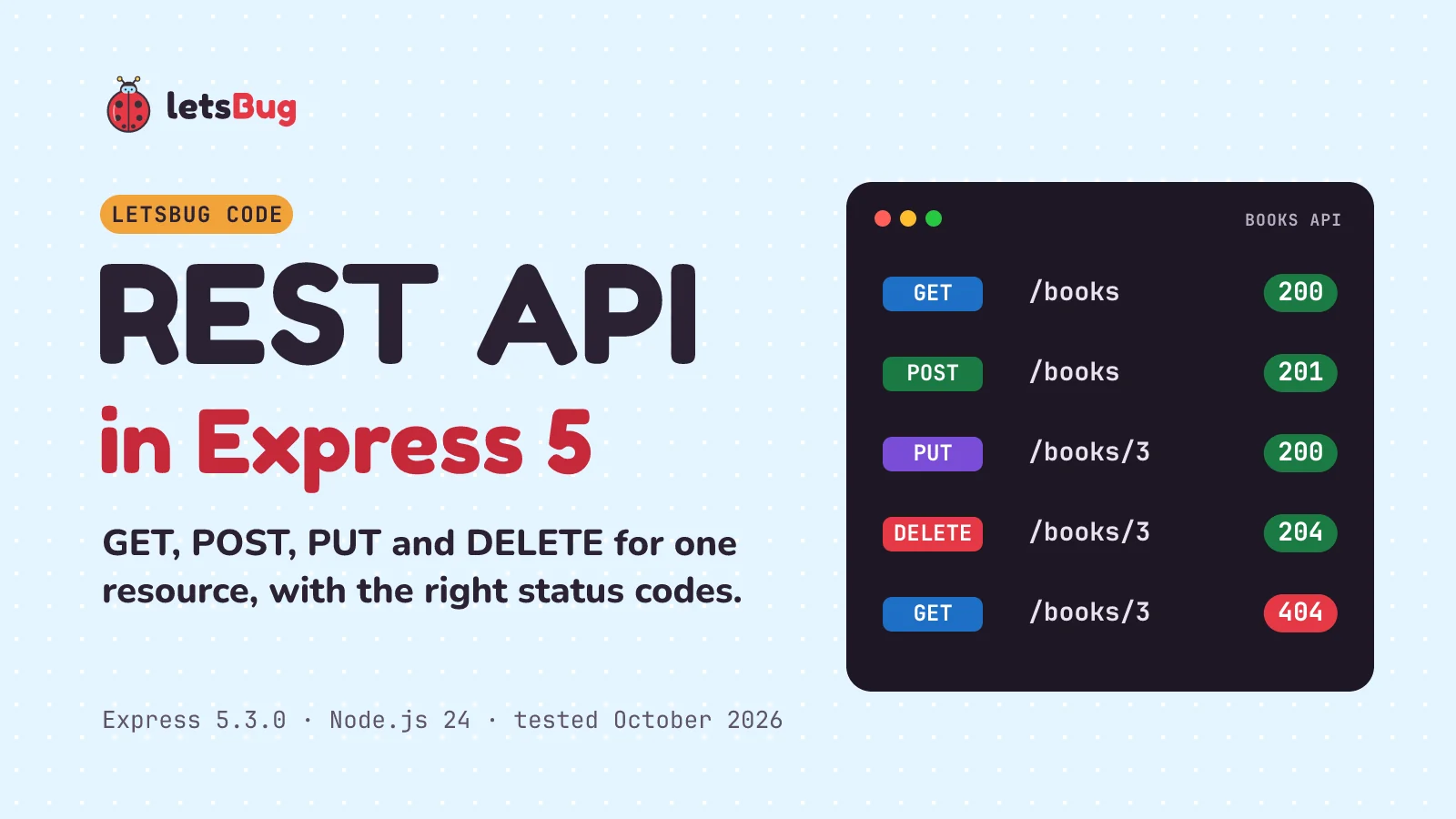
A REST API in Express.js is a set of routes, one per HTTP verb and path, that read or change a resource and answer with JSON and the status code that matches what happened. For books, that's five routes (list, read, create, update and delete) and the status codes clients expect: 200, 201, 204, 400 and 404.
In this post we build it in under 90 lines of Express 5. We use express.json() to read request bodies and express.Router to keep the routes in their own file, then test every endpoint with curl and with fetch.
Key takeaways
- One resource, five routes:
GET /books,GET /books/:id,POST /books,PUT /books/:id,DELETE /books/:id. - Add
app.use(express.json())before your routes, orreq.bodyisundefinedin Express 5. - Send the status first, then the body:
res.status(201).json(book). Express 5 droppedres.json(book, 201). - Use 201 for "created", 204 for "deleted, nothing to send", 400 for a bad body and 404 for a missing book.
- Always
returnafter sending an error response, or the handler keeps running.
The one-minute letsBug short below (July 2022) shows the idea on an earlier Express version, tested with Thunder Client. The written steps are up to date: Express 5.3.0 on Node.js 24, all run and tested in October 2026.
What we're building
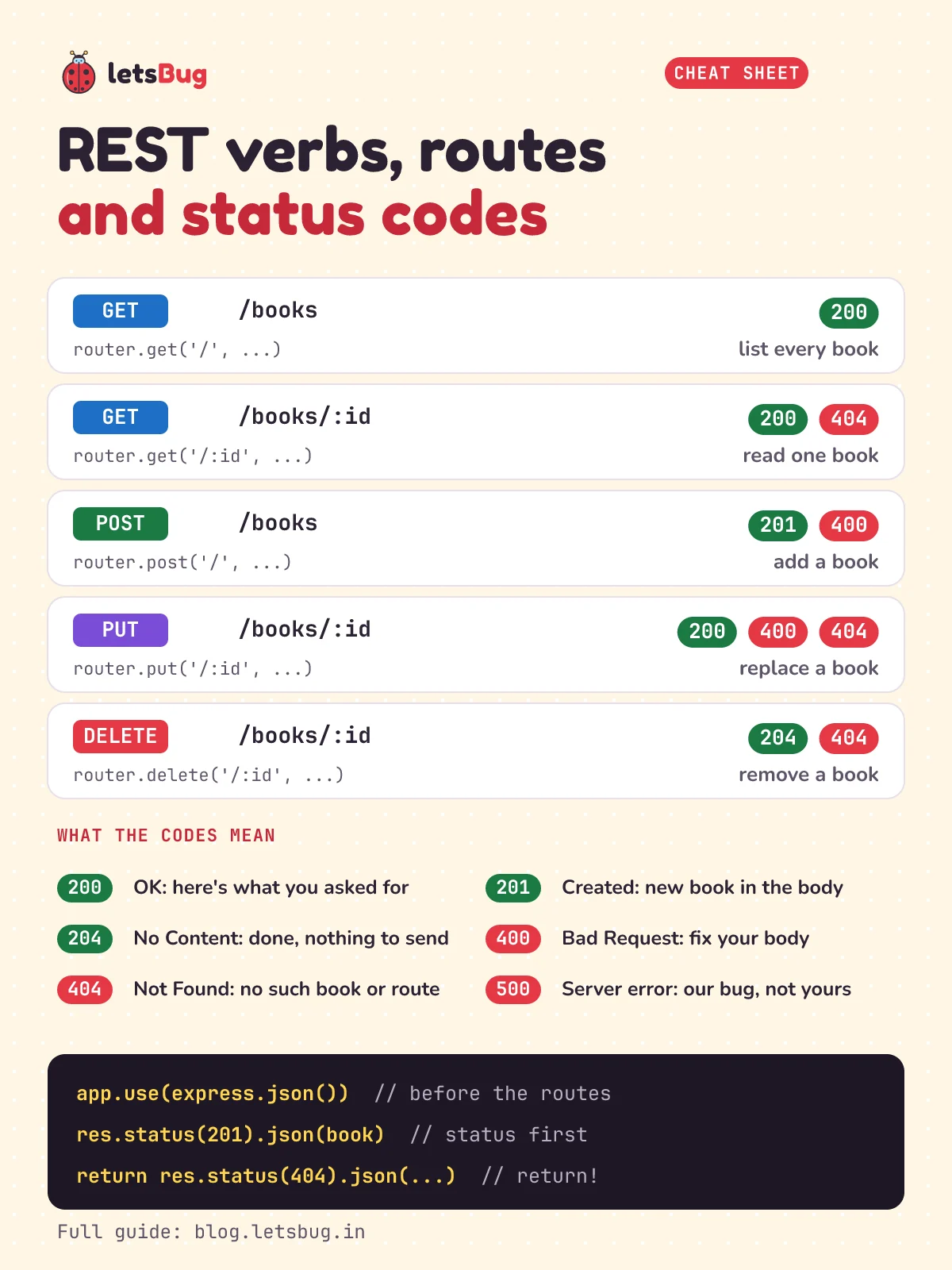
REST means the URL names a thing (a resource, here /books) and the HTTP verb says what to do with it. Our API keeps its books in an array in memory, so there's no database to set up. Here's the whole thing in one table:
| Request | What it does | Success | When it fails |
|---|---|---|---|
GET /books | List every book | 200 OK | (never) |
GET /books/:id | Read one book | 200 OK | 404 if no such id |
POST /books | Add a book | 201 Created | 400 if title or author is missing |
PUT /books/:id | Replace a book | 200 OK | 404 no such id, 400 bad body |
DELETE /books/:id | Remove a book | 204 No Content | 404 if no such id |
Step 1: set up the project
Express 5 needs Node.js 18 or higher. We used Node.js 24, an LTS release as of October 2026. Check yours with node -v, then make a folder and install Express:
mkdir books-api
cd books-api
npm init -y
npm install express@5
npm pkg set type=module
npm init -y creates package.json with the defaults. npm install express@5 adds the latest Express 5 (5.3.0 when we tested). The last line adds "type": "module" to package.json, so Node treats our .js files as ES modules and we can write import instead of require.
Step 2: the server
Create server.js. It sets up the app, mounts the books routes, and handles the two things that can go wrong everywhere: a URL nobody handles, and an error.
// server.js
import express from 'express';
import books from './routes/books.js';

const app = express();
app.use(express.json()); // turns a JSON request body into req.body

app.use('/books', books); // every route in books.js now starts with /books

// no route matched: answer in JSON instead of Express's HTML page
app.use((req, res) => {
  res.status(404).json({ error: `No route for ${req.method} ${req.path}` });
});

// error handler: four arguments, registered last
app.use((err, req, res, next) => {
  if (res.headersSent) return next(err); // too late to send JSON: let Express close the request
  const status = err.status ?? 500;
  res.status(status).json({ error: status < 500 ? err.message : 'Something went wrong' });
});

const port = process.env.PORT ?? 3000;
app.listen(port, (error) => {
  if (error) throw error; // e.g. EADDRINUSE: the port is taken
  console.log(`Books API on http://localhost:${port}`);
});express.json()is built-in middleware. For every request withContent-Type: application/json, it parses the body and puts the result onreq.body. It must come before the routes that read the body.app.use('/books', books)mounts the router, so a route written as'/:id'inside it answers/books/:id.- The 404 handler has no path, so it catches anything no route answered. Without it, Express sends an HTML page saying
Cannot GET /something, which is awkward for an API client. - The error handler is the one with four arguments. That's how Express knows it handles errors. If
express.json()can't parse the body, the error arrives here witherr.status400, and we pass its message on. Anything else becomes a 500 with a vague message, so we don't leak details to clients. process.env.PORT ?? 3000uses port 3000 unless aPORTvariable says otherwise. Most hosting services set one: Render does, so the same file runs when you deploy it to Render.
Step 3: the books router
Create a routes folder with books.js inside. A router is a mini app: it holds a group of routes that you mount at a path. The second letsBug video, how to create routes in Node.js with express.Router, shows why this keeps a project readable as it grows.
// routes/books.js
import { Router } from 'express';

const router = Router();

// our "database": an array in memory, reset every time the server restarts
const books = [
  { id: 1, title: 'Wings of Fire', author: 'A. P. J. Abdul Kalam' },
  { id: 2, title: 'The Guide', author: 'R. K. Narayan' },
];
let nextId = 3;

const findBook = (id) => books.find((book) => book.id === Number(id));

// returns an error message, or nothing if the body is fine
function validate(body) {
  const { title, author } = body ?? {};
  if (typeof title !== 'string' || !title.trim()) return 'title is required';
  if (typeof author !== 'string' || !author.trim()) return 'author is required';
}

// GET /books: list every book
router.get('/', (req, res) => {
  res.json(books);
});

// GET /books/:id: one book
router.get('/:id', (req, res) => {
  const book = findBook(req.params.id);
  if (!book) return res.status(404).json({ error: 'Book not found' });
  res.json(book);
});

// POST /books: add a book
router.post('/', (req, res) => {
  const error = validate(req.body);
  if (error) return res.status(400).json({ error });
  const book = { id: nextId++, title: req.body.title.trim(), author: req.body.author.trim() };
  books.push(book);
  res.status(201).location(`/books/${book.id}`).json(book);
});

// PUT /books/:id: replace a book
router.put('/:id', (req, res) => {
  const book = findBook(req.params.id);
  if (!book) return res.status(404).json({ error: 'Book not found' });
  const error = validate(req.body);
  if (error) return res.status(400).json({ error });
  book.title = req.body.title.trim();
  book.author = req.body.author.trim();
  res.json(book);
});

// DELETE /books/:id: remove a book
router.delete('/:id', (req, res) => {
  const index = books.findIndex((book) => book.id === Number(req.params.id));
  if (index === -1) return res.status(404).json({ error: 'Book not found' });
  books.splice(index, 1);
  res.status(204).end();
});

export default router;
What each route does, and why it answers the way it does:
- GET /books sends the whole array.
res.json()turns it into JSON and sets theContent-Typeheader; the status is 200 by default. - GET /books/:id reads the id from
req.params.id. Route parameters are always strings, sofindBookconverts withNumber()before comparing. No match means 404. (A non-number like/books/abcbecomesNaN, matches nothing, and also gets a 404.) - POST /books checks the body first. A missing or empty title or author is the client's mistake, so it's a 400 with a message that says what's wrong. A good body gets a new id, and we answer 201 Created with the new book and a
Locationheader pointing at it. - PUT /books/:id replaces the title and author of an existing book. It checks "does it exist?" (404) before "is the body valid?" (400), and returns the updated book with 200.
- DELETE /books/:id removes the book and answers 204 No Content: it worked and there's nothing to send back, so
res.status(204).end()sends no body.
return res.status(...).json(...). The return stops the handler. Leave it out and the code carries on after sending the error, which is the most common Express bug (see "Common errors" below).Step 4: run it
node server.jsYou should see Books API on http://localhost:3000. Open http://localhost:3000/books in your browser and you'll get the two starting books as JSON. A browser address bar can only send GET, though, so for the other verbs we need a client. Leave the server running and open a second terminal.
Step 5: test every endpoint with curl
curl is built into Windows 10 and 11 and macOS, and most Linux systems have it. Each command below is followed by a # comment with the status code and body you should get back (add -i to any command to see the status line and headers yourself). Run them in order, because they change the data.
Read:
curl http://localhost:3000/books
# 200 [{"id":1,"title":"Wings of Fire","author":"A. P. J. Abdul Kalam"},{"id":2,"title":"The Guide","author":"R. K. Narayan"}]
curl http://localhost:3000/books/1
# 200 {"id":1,"title":"Wings of Fire","author":"A. P. J. Abdul Kalam"}
curl http://localhost:3000/books/99
# 404 {"error":"Book not found"}
Create. -H sets the Content-Type header, which express.json() needs, and -d is the body:
curl -X POST http://localhost:3000/books -H 'Content-Type: application/json' -d '{"title":"Malgudi Days","author":"R. K. Narayan"}'
# 201 {"id":3,"title":"Malgudi Days","author":"R. K. Narayan"}
curl -X POST http://localhost:3000/books -H 'Content-Type: application/json' -d '{"title":"Untitled"}'
# 400 {"error":"author is required"}
Update, delete, and check it's gone:
curl -X PUT http://localhost:3000/books/3 -H 'Content-Type: application/json' -d '{"title":"Swami and Friends","author":"R. K. Narayan"}'
# 200 {"id":3,"title":"Swami and Friends","author":"R. K. Narayan"}
curl -X DELETE http://localhost:3000/books/3
# 204
curl http://localhost:3000/books/3
# 404 {"error":"Book not found"}curl is an alias for Invoke-WebRequest, so you'd have to type curl.exe. The easy way out is Git Bash, or the fetch script in the next step, which works the same everywhere.Step 6: test it with fetch
Node.js has fetch built in, the same one browsers have, so a small script can call every endpoint. This is also exactly how a React or plain JavaScript front end would talk to the API. Save this as test.js:
// test.js: run with  node test.js  while the server is running
const base = 'http://localhost:3000/books';

async function call(method, path = '', body) {
  const res = await fetch(base + path, {
    method,
    headers: body ? { 'Content-Type': 'application/json' } : {},
    body: body ? JSON.stringify(body) : undefined,
  });
  const text = await res.text();
  console.log(method, path || '/', res.status, text);
}

await call('GET');
await call('POST', '', { title: 'Malgudi Days', author: 'R. K. Narayan' });
await call('PUT', '/3', { title: 'Swami and Friends', author: 'R. K. Narayan' });
await call('DELETE', '/3');
await call('GET', '/3');
Restart the server first (Ctrl+C, then node server.js) so the data is back to the two starting books, then run node test.js in the second terminal:
GET / 200 [{"id":1,"title":"Wings of Fire","author":"A. P. J. Abdul Kalam"},{"id":2,"title":"The Guide","author":"R. K. Narayan"}]
POST / 201 {"id":3,"title":"Malgudi Days","author":"R. K. Narayan"}
PUT /3 200 {"id":3,"title":"Swami and Friends","author":"R. K. Narayan"}
DELETE /3 204
GET /3 404 {"error":"Book not found"}
Two details that trip people up: the Content-Type header is what makes express.json() read the body, and JSON.stringify turns the object into the JSON text that goes over the wire. Leave out either one and the server answers 400.
How does a request flow through an Express app?
Here's the path a POST /books takes, and where the other answers come from:
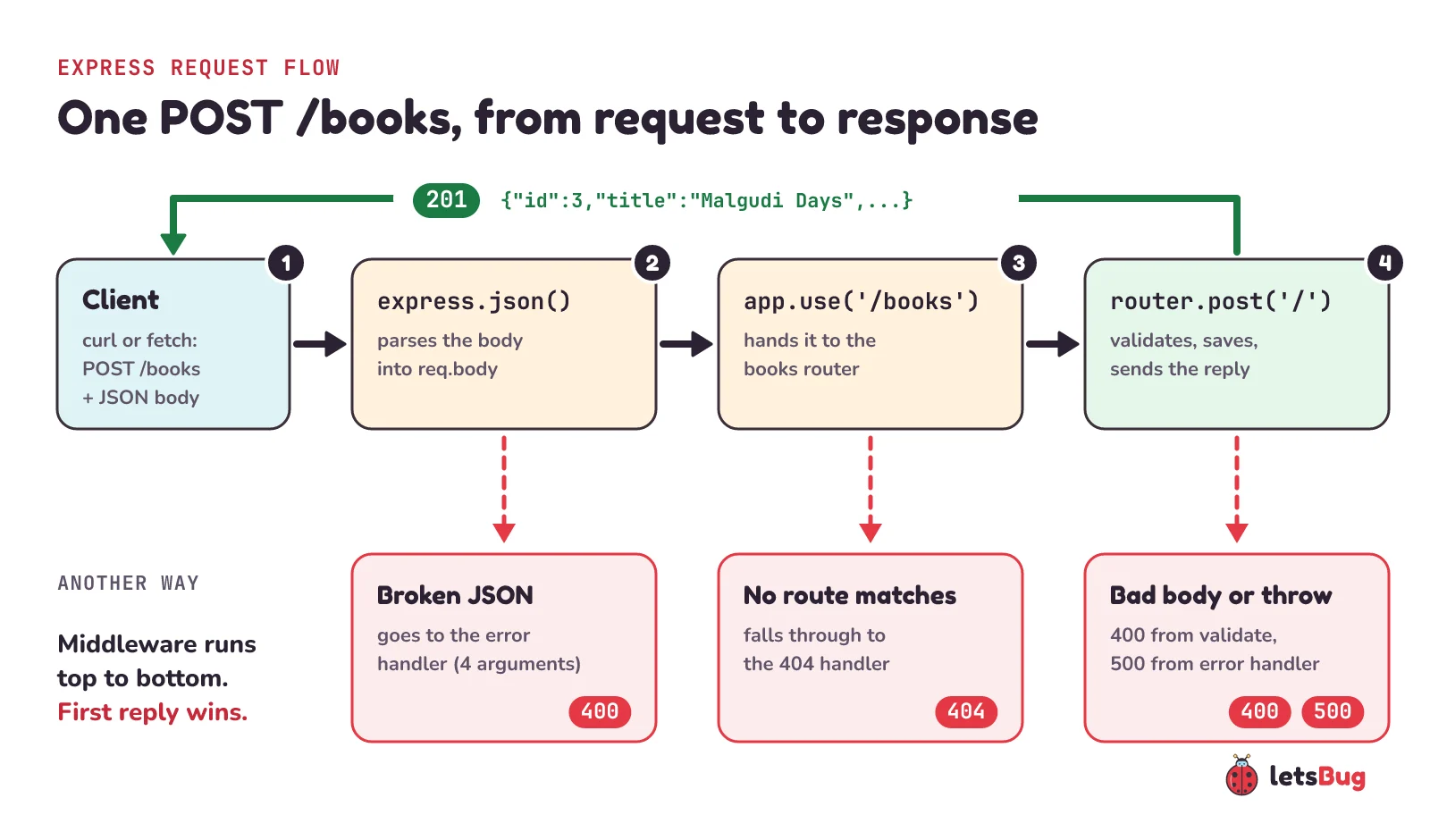
- The client sends
POST /bookswith a JSON body andContent-Type: application/json. express.json()parses the body intoreq.body. Broken JSON stops here and goes to the error handler as a 400.app.use('/books', books)passes the request to the router, which picks the handler whose verb and path match.- The handler validates, changes the array, and sends
res.status(201).json(book). A response is sent, so the trip ends. - If no route matched, the request falls through to the 404 handler. If anything threw, Express jumps to the error handler.
What changed in Express 5?
Most Express tutorials, including our 2022 video, were written for Express 4. Express 5 keeps the same basic API, but the official migration guide lists changes that break old code. These are the ones that matter for a REST API:
| Express 4 code | Express 5 |
|---|---|
res.json(book, 201), res.send(200) | Removed. Use res.status(201).json(book) and res.sendStatus(200). (We tried the old form on 5.3.0: it doesn't throw, it quietly answers 200 instead of 201.) |
req.body is {} when nothing parsed it | req.body is undefined, so req.body.title throws a TypeError |
app.get('*', ...) | The wildcard needs a name: '/*splat', or '/{*splat}' to match / too |
'/:file.:ext?' for an optional part | ? is gone; use braces: '/:file{.:ext}' |
Async errors need .catch(next) | A rejected promise or a throw in an async handler goes to the error handler by itself |
A listen error is thrown | It's passed to the app.listen callback, which is why our callback checks error |
Express 5 also needs Node.js 18 or higher, and express.urlencoded() now defaults to extended: false. The migration guide has the full list, plus codemods that rewrite old code for you (npx codemod@latest @expressjs/v5-migration-recipe).
The async change is the one you'll feel most once the array becomes a real database. To see it, add this route to server.js above the 404 handler:
// an async handler that fails, like a database call that rejects
app.get('/crash', async (req, res) => {
  await new Promise((resolve) => setTimeout(resolve, 10)); // pretend to wait for a database
  throw new Error('database is down');
});
curl http://localhost:3000/crash now answers 500 {"error":"Something went wrong"} from our error handler, with no try/catch in sight. Database clients return promises, so you can drop the try/catch from every handler. Delete the /crash route when you're done.
Common errors and fixes
TypeError: Cannot destructure property 'title' of 'req.body' as it is undefined.
Your handler did const { title, author } = req.body; but nothing parsed the body. Either app.use(express.json()) is missing or comes after the routes, or the request didn't send Content-Type: application/json. In curl that's the -H part; in fetch it's the headers option. (Our validate uses body ?? {}, so a missing header gets a clean 400 instead.)
400: Expected property name or '}' in JSON at position 1 (line 1 column 2)
The body isn't valid JSON, for example {title: 'Dune'}. JSON needs double quotes around every key and string: {"title": "Dune"}. Build bodies with JSON.stringify instead of typing them by hand.
Error [ERR_HTTP_HEADERS_SENT]: Cannot set headers after they are sent to the client
Something sent two responses for one request, nearly always a missing return:
if (error) res.status(400).json({ error }); // no return: the handler keeps goingWe tried it: POST a book with an empty author and the client gets the 400, but the code carries on, saves the bad book anyway, then throws when it tries to send the 201. The server logs the error and keeps running, so the bug is easy to miss. Write return res.status(400).json(...).
PathError [TypeError]: Missing parameter name at index 1: *
The full message ends with visit https://git.new/pathToRegexpError for info, and it appears as soon as the server starts. It's an Express 4 route like app.get('*', ...) or app.all('*', ...) running on Express 5. For a catch-all 404, use app.use((req, res) => ...) with no path, like ours. If you need a wildcard, name it: '/{*splat}'.
Error: listen EADDRINUSE: address already in use :::3000
Something is already using port 3000, usually your own server still running in another terminal. Stop it with Ctrl+C, or start this one on another port: PORT=3001 node server.js in bash, or $env:PORT=3001; node server.js in PowerShell.
Cannot GET /book (an HTML page)
That's Express's built-in 404 for a URL no route matches. Check the spelling (/books, not /book), the verb, and the mount path in app.use. With our 404 handler in place you'll see {"error":"No route for GET /book"} instead.
Make GET /books accept a filter, so that /books?author=R.%20K.%20Narayan returns only his books. Hint: query string values are on req.query.
Show the answer
Replace the GET /books route in routes/books.js with:
// GET /books, or GET /books?author=...: list books, optionally by one author
router.get('/', (req, res) => {
  const { author } = req.query;
  res.json(author ? books.filter((book) => book.author === author) : books);
});
With the starting data, curl "http://localhost:3000/books?author=R.%20K.%20Narayan" returns [{"id":2,"title":"The Guide","author":"R. K. Narayan"}]. With no ?author= it still returns every book.
Questions people ask
What is the difference between PUT and PATCH?
PUT replaces the whole resource, so the client sends every field (that's why our PUT requires both title and author). PATCH changes only the fields you send. Our API has no PATCH route, so PATCH /books/1 falls through to the 404 handler. To add one, write router.patch('/:id', ...) and update only the fields present in req.body.
Why do my books disappear when I restart the server?
They live in a JavaScript array, which is in memory and resets every time the process starts. That's fine for learning. For real data, swap the array for a database (SQLite, PostgreSQL or MongoDB); the routes and status codes stay the same, and the handlers become async functions that await the database.
Should I learn Express 4 or Express 5 in 2026?
Express 5. It's the version npm installs by default (npm install express gave us 5.3.0), and the official docs are written for it. If you follow an older tutorial, the "What changed in Express 5" table above covers the lines you'll need to change.
Do I still need body-parser?
No. express.json() is built into Express and is based on body-parser, so app.use(express.json()) is all you need for JSON bodies. Its default size limit is 100kb.
My React app gets a CORS error calling this API. Why does curl work?
CORS is enforced by browsers, not by the server; curl and Postman ignore it. The browser blocks the response unless the API sends CORS headers. Install the official middleware with npm install cors and add app.use(cors()) before your routes (the cors docs show how to allow only your front end's origin).
Keep going
- Getting
undefined? req.body is undefined in Express 5: the three causes and fixes. - Protect it: a Node.js JWT authentication API with Express 5 and bcrypt.
- Put it online: deploy a Vite React app to Vercel and an Express API to Render.
- Show users when the API can't be reached: check the internet connection in JavaScript by pinging a tiny
/pingroute on your own server. - Watch the one-minute REST API short and express.Router in Node.js, then the rest of the letsBug Code series on YouTube.
- Validate more than "is it empty": regular expression for email validation in JavaScript drops straight into a
validatefunction. - More Node.js: read input from the terminal in Node.js and build a small CLI.
- Interview coming up? Top 10 JavaScript interview questions with answers.
Checked on 10 October 2026 against the 12 sources below.
Sources
- Express: Upgrade to Express v5 (every Express 4 vs 5 change in this post)
- Express: express.json() and express.Router() (body parsing, the 100kb default limit)
- Express: Routing guide and Error handling guide
- Express: Installing and cors middleware
- MDN: HTTP status codes 200, 201, 204, 400, 404
- Node.js: release schedule (Node.js 24 LTS)
Every code sample and every response in this post was run on Express 5.3.0 and Node.js 24.20.0 in October 2026.