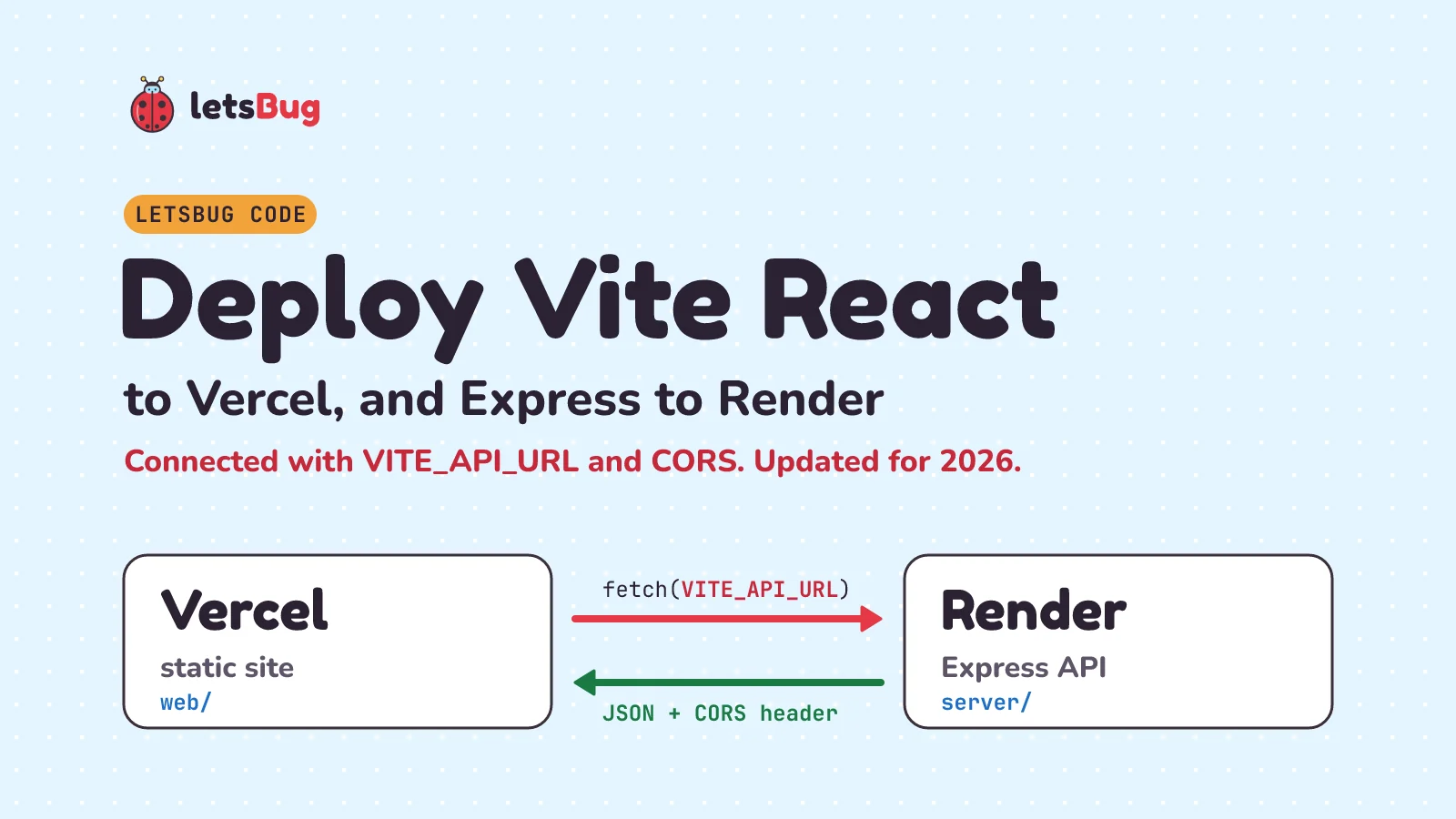
To deploy a Vite React app to Vercel and an Express API to Render, put both in one GitHub repo, create a Render Web Service for the server folder and a Vercel project for the web folder, then connect them with two environment variables: VITE_API_URL tells React where the API lives, and CORS_ORIGIN tells Express which site may call it.
In this post we build a small working example and deploy both halves: VITE_API_URL goes on Vercel and CORS_ORIGIN on Render. Then we fix the three errors almost everyone hits: the CORS error, the 404 on refresh, and an API URL that comes out as undefined. Last, we add a MongoDB Atlas database and a one-service setup with no CORS at all.
Key takeaways
- Vercel serves the built React app as static files. Render runs the Express server. The browser talks to both.
- Vite only exposes variables that start with
VITE_, and it bakes them into the JavaScript at build time. Change one on Vercel and you must redeploy. - The browser blocks the API's answer unless Express sends an
Access-Control-Allow-Originheader that matches your Vercel address exactly. Thecorspackage does this. - A React app with client-side routes needs a
vercel.jsonrewrite to/index.html, or refreshing/aboutgives a 404. - As of October 2026, Render's free web services spin down after 15 minutes without traffic and take about a minute to wake up. Show a loading message so the first visitor doesn't think the site is broken.
- Pinging a free Render service to keep it awake uses free instance hours: one service awake all month is 744 of your workspace's 750.
This post goes with the most-watched video on the letsBug channel, from September 2023. The video shows the Vercel and Render dashboards as they looked then. The written steps below are up to date: checked against Vercel's and Render's docs in October 2026, with Vite 8, React 19 and Express 5.
How the pieces fit together
When someone opens your site, two separate servers do the work:
- The browser asks Vercel for the page. Vercel sends back
index.htmland the JavaScript and CSS thatvite buildmade. There's no Node.js server running your code here, just files. - React starts in the browser and calls
fetch()on your Render address, for examplehttps://my-api.onrender.com/api/hello. - Express on Render answers with JSON, plus a CORS header that says "the Vercel site is allowed to read this".
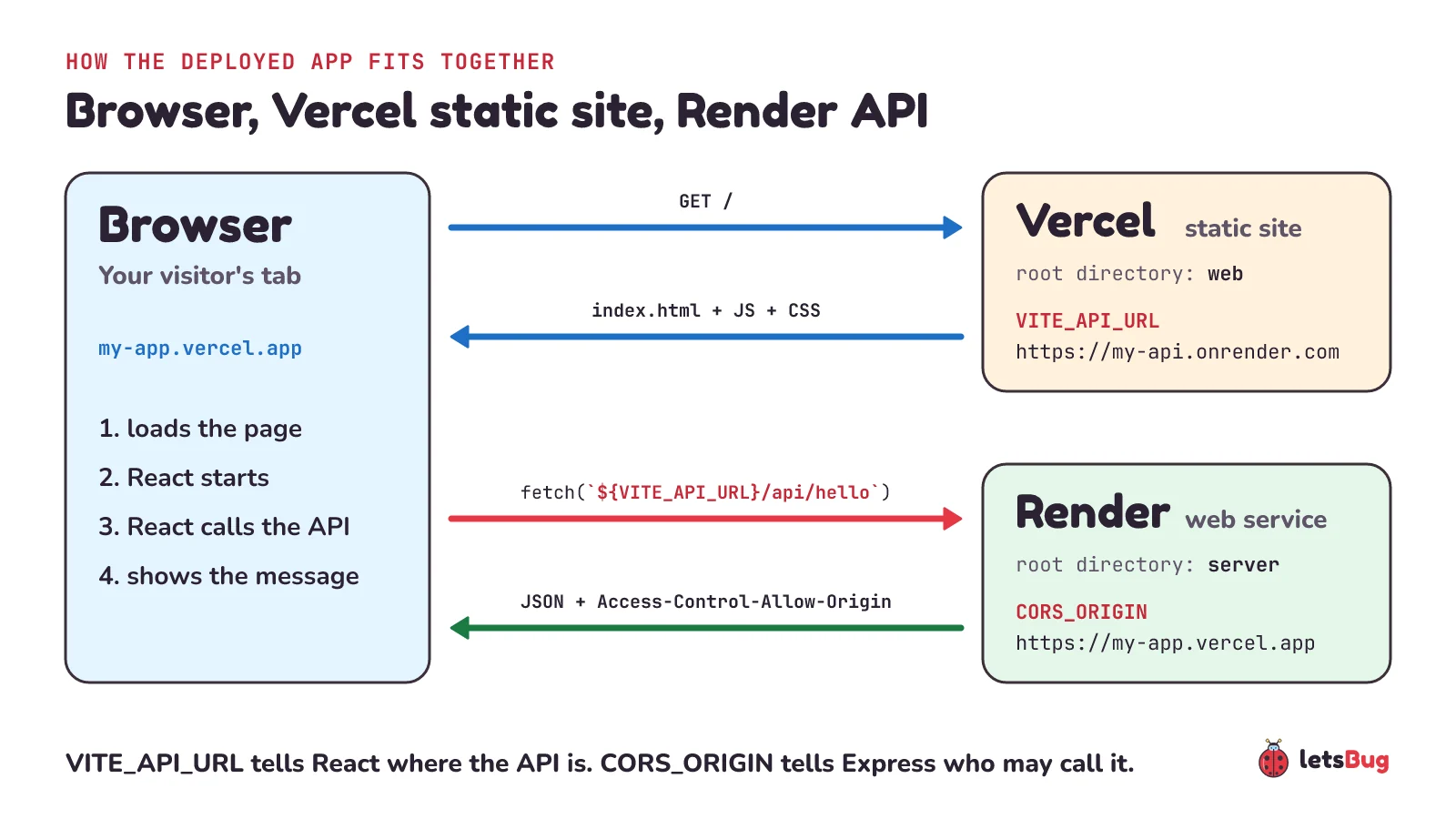
Because the page comes from my-app.vercel.app and the data comes from my-api.onrender.com, they're different origins. That's why CORS comes into it at all.
What we'll build
One repo, two folders. Each host only looks at its own folder:
my-app/
├── .gitignore
├── server/              (deployed to Render)
│   ├── index.js
│   └── package.json
└── web/                 (deployed to Vercel)
    ├── .env.development
    ├── vercel.json
    ├── index.html
    ├── package.json
    └── src/App.jsx
We tested every file in this post with Node.js 24, Express 5.3.0, cors 2.8.6, Vite 8.3.4, React 19.3.0 and @vitejs/plugin-react 6.1.2. Newer patch versions should work the same.
Step 1: the Express API
Make the server folder and add this package.json:
{
  "name": "server",
  "private": true,
  "type": "module",
  "scripts": {
    "start": "node index.js"
  },
  "engines": {
    "node": "24.x"
  },
  "dependencies": {
    "cors": "2.8.6",
    "express": "5.3.0"
  }
}
The engines field matters on Render: it's one of the ways Render picks the Node.js version, and Render's docs ask for a range with an upper bound, which 24.x is. Now server/index.js:
import express from 'express'
import cors from 'cors'

const app = express()

// Sites allowed to call this API, comma-separated, e.g. https://my-app.vercel.app
const allowedOrigins = (process.env.CORS_ORIGIN || 'http://localhost:5173')
  .split(',')
  .map((origin) => origin.trim())

app.use(cors({ origin: allowedOrigins }))

app.get('/api/hello', (req, res) => {
  res.json({ message: 'Hello from Express on Render!' })
})

const port = process.env.PORT || 3000
app.listen(port, () => {
  console.log(`API listening on port ${port}`)
})
Line by line:
allowedOriginscomes from theCORS_ORIGINenvironment variable. On your laptop it isn't set, so it falls back tohttp://localhost:5173, the address of Vite's dev server.cors({ origin: allowedOrigins })checks each request'sOriginheader. If it's on the list, the response getsAccess-Control-Allow-Originset to that origin, plusVary: Origin. If it isn't, the header is left out and the browser refuses to hand the response to your React code.process.env.PORT: Render tells your app which port to listen on throughPORT(its default is 10000). Locally we use 3000.
Run it:
cd server
npm install
npm start
It prints API listening on port 3000. Open http://localhost:3000/api/hello and you should see {"message":"Hello from Express on Render!"}.
cors() with no options? That sends Access-Control-Allow-Origin: *, which lets every website read your API's responses. MDN's advice is to use * only for public APIs. Listing your own site is just as easy and safer.Step 2: the Vite React app
From the my-app folder, create the frontend with Vite's React template:
npm create vite@latest web -- --template react --no-immediate
cd web
npm install
--no-immediate stops Vite from installing and starting the dev server straight away. If it still asks whether to install and start now, choose no: we install on the next line.
Replace web/src/App.jsx with a component that calls the API:
import { useEffect, useState } from 'react'

const API_URL = import.meta.env.VITE_API_URL

export default function App() {
  const [message, setMessage] = useState('Waking up the API, the first request can take about a minute...')

  useEffect(() => {
    fetch(`${API_URL}/api/hello`)
      .then((res) => {
        if (!res.ok) throw new Error(`HTTP ${res.status}`)
        return res.json()
      })
      .then((data) => setMessage(data.message))
      .catch((err) => setMessage(`Could not reach the API (${err.message}). If it was asleep, reload in a minute.`))
  }, [])

  return (
    <main>
      <h1>Vite + React on Vercel</h1>
      <p>{message}</p>
    </main>
  )
}
The API address is never written in the code. It comes from import.meta.env.VITE_API_URL. For local work, create web/.env.development:
VITE_API_URL=http://localhost:3000With the API still running in another terminal, start the dev server with npm run dev and open http://localhost:5173. The heading appears, and a moment later the message from Express replaces the loading text.
Two rules from Vite's docs explain most deployment bugs:
- Only variables starting with
VITE_reach your React code. A variable calledAPI_URLis simplyundefinedin the browser. The prefix is a safety catch so database passwords don't end up in the bundle by accident. - The value is baked in when you build.
vite buildpastes the text ofVITE_API_URLinto the JavaScript file. We checked: building withVITE_API_URL=https://my-api.onrender.computs that exact address indist/assets/index-*.js. So never put a secret in aVITE_variable: anyone can read it in the browser.
.env.development is only read by the dev server. vite build runs in production mode, so on Vercel the value comes from Vercel's own environment variables (Step 6).
Step 3: add vercel.json for client-side routes
If your app uses React Router (or any client-side routing), there is no real about.html file on Vercel, only index.html. Clicking a link works, because React changes the page in the browser. But refreshing /about asks Vercel for a file that doesn't exist, and you get a 404. Vercel's Vite guide gives the fix. Create web/vercel.json:
{
  "$schema": "https://openapi.vercel.sh/vercel.json",
  "rewrites": [{ "source": "/(.*)", "destination": "/index.html" }]
}
Every path now gets index.html, and React Router shows the right page. Your JavaScript and CSS still load normally, because Vercel serves real files before it applies rewrites.
Step 4: push to GitHub
The Vite template already has a .gitignore inside web. Add one at the top of my-app with a single line, node_modules, so the server's packages stay out of the repo too. Then push:
git init
git add .
git commit -m "Vite React frontend and Express API"
git branch -M main
git remote add origin https://github.com/YOUR-NAME/my-app.git
git push -u origin main
Both Vercel and Render redeploy automatically on every push to this branch from now on.
Step 5: deploy the Express API on Render
Deploy the API first, because the frontend needs its address.
- In the Render Dashboard, click New > Web Service and pick Git Provider. Connect GitHub if you haven't, then choose your repo.
- Fill in the form. Name becomes part of your address (
my-apigives something likemy-api.onrender.com). Choose the Region closest to most of your users, branchmain, language Node. - Set the root directory to
server, so Render builds only that folder. Render's monorepo guide shows the Root Directory setting under the service's Build & Deploy settings. If you change it after creating the service, Render asks you to confirm the commands, which then run insideserver. - Build Command:
npm install. Start Command:npm start. - Choose the Free compute plan, then click Create Web Service.
When the deploy finishes, open https://YOUR-SERVICE.onrender.com/api/hello. You should see the same JSON as on your laptop. Copy that address without /api/hello and without a trailing slash: it's your VITE_API_URL.
"engines": { "node": "24.x" } line, or set a NODE_VERSION environment variable on the service.Step 6: deploy the React app on Vercel
- In the Vercel dashboard, click New Project and import the same repo.
- On the configure page, set the root directory to
web. Vercel should pick the Vite framework preset by itself, which sets the build command and thedistoutput folder. - Open Environment Variables and add
VITE_API_URLwith your Render address, for examplehttps://my-api.onrender.com. - Click Deploy.
Vercel gives the project an address based on its name, ending in .vercel.app, for example https://my-app.vercel.app. Use this short production address, not a longer address for one particular deployment: it's the one that goes in CORS_ORIGIN in the next step. Open it. You'll probably see "Could not reach the API" for now, and the browser console shows a CORS error. That's expected: Express doesn't know about the Vercel site yet.
VITE_API_URL later, redeploy (or push a commit) before you test again.Step 7: connect them with CORS_ORIGIN
Back on Render, open your service, click Environment, and add a variable:
- Key:
CORS_ORIGIN - Value: your Vercel address, for example
https://my-app.vercel.app. No path, no trailing slash.
Save it with Save and deploy so the server restarts with the new value. Wait until the deploy finishes (the service's Deploys page shows its progress), then reload your Vercel site: the message "Hello from Express on Render!" appears. Reload too early and you'll still see the old error.
Need more than one site, say a custom domain too? Separate them with commas: https://my-app.vercel.app,https://www.example.com. Our code trims spaces, so a, b also works.
Why is the Render API slow at first? The free tier's one-minute wait
Here's what Render's free instance docs say, as of October 2026:
- "Render spins down a Free web service that goes 15 minutes without receiving any inbound traffic."
- It spins back up on the next request, and "this process takes about one minute". Render shows a loading page to browsers that open the service while it wakes.
- Each workspace gets 750 free instance hours per calendar month. A spun-down service doesn't use them.
- The filesystem isn't kept: files your app writes are lost when it redeploys, restarts or spins down. Store data in a database, not on disk.
For your users, this means the first visit after a quiet spell is slow. The page from Vercel still loads quickly, but the API isn't ready until Render has woken it. Render's docs don't say exactly what a fetch() from another site receives during that minute, so plan for both cases: a long wait, or an error on the first try. That's why our useState starts with "Waking up the API...", and why the error message tells the visitor to reload in a minute instead of leaving them thinking the site is broken. Render itself says free instances are for testing and hobby projects, not production. For a real product, move the service to a paid instance, which doesn't spin down.
The same goes for Vercel's free plan: Vercel's docs say the Hobby plan is for "non-commercial, personal use only". For a college project or a portfolio, both free plans are fine.
How do you keep a free Render API awake?
A popular trick is to ping the API from an outside service (an uptime checker or a scheduled job) more often than every 15 minutes, so it never goes idle long enough to spin down. It works, but it isn't free in the way it looks:
- It spends your free hours. Render's docs say a free web service "consumes these hours as long as it's running", and a spun-down one doesn't. Kept awake for a 31-day month, one service runs 31 × 24 = 744 hours. Your workspace gets 750, so there are only 6 hours to spare.
- Two awake services run out. Two services use 48 hours a day, and 750 ÷ 48 is about 15.6, so the hours are gone on day 16. Then, in Render's words, it "suspends all of your Free web services until the start of the next month". That means every free service in the workspace, not just the ones you pinged.
- It doesn't stop restarts. Render's docs also say it "might restart a Free web service at any time", and files on its disk are lost each time that happens.
Neither Render's free instance docs nor its Acceptable Use Policy mentions pinging by name. The policy does forbid any attempt to "bypass, circumvent, or defeat any access or usage restrictions", and Render doesn't say whether a keep-awake ping counts. Our advice: for a portfolio or a class project, let it sleep and keep the "Waking up the API..." message. If real users need a fast first answer, a paid instance is the honest fix.
Common deployment errors and fixes
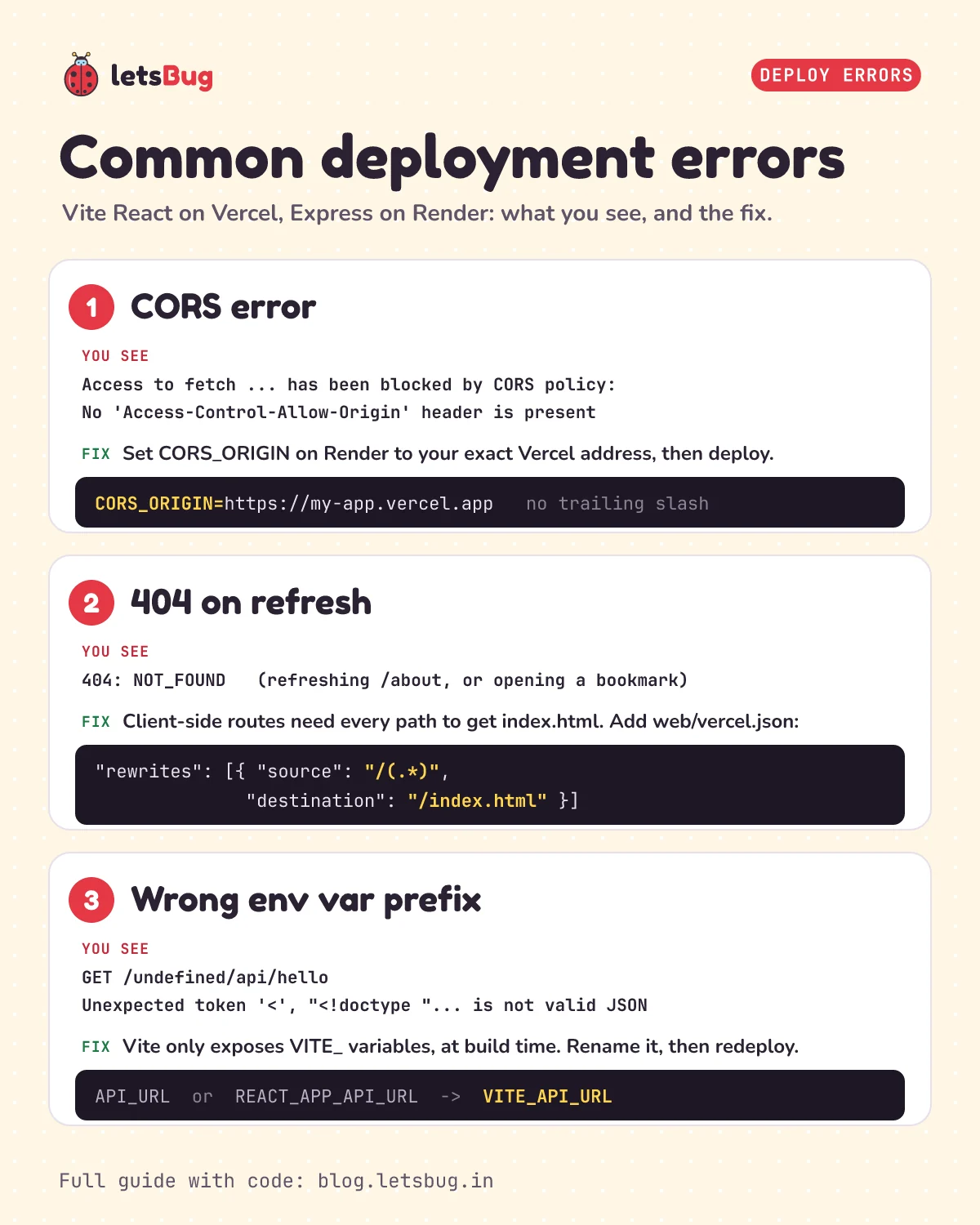
1. "Blocked by CORS policy"
Chrome shows something like this in the console:
Access to fetch at 'https://my-api.onrender.com/api/hello' from origin 'https://my-app.vercel.app'
has been blocked by CORS policy: No 'Access-Control-Allow-Origin' header is present on the requested resource.
Firefox says Reason: CORS header 'Access-Control-Allow-Origin' missing. The request did reach Express, and Express answered. The browser just won't let your code read an answer without the header. Check, in this order:
CORS_ORIGINon Render matches the address in your browser's address bar exactly:https, no trailing slash, no path. We tested it: withhttps://my-app.vercel.app/(one extra slash), Express sends no header at all.- You saved the variable with a deploy, so the running server has it.
- You're opening the same address you listed. Test on the production address: Vercel's preview deployments have their own addresses, so they show the CORS error unless you add each one.
2. "404: NOT_FOUND" when you refresh a page
The home page works, links work, but refreshing /about or opening it from a bookmark shows Vercel's 404 page with the code NOT_FOUND. That's the client-side routing problem from Step 3. Add vercel.json with the rewrite to /index.html, make sure it's inside web (your root directory, not the repo root), and push.
3. The API URL is undefined
The page says Could not reach the API (HTTP 404), or this, followed by our "reload in a minute" hint:
Could not reach the API (Unexpected token '<', "<!doctype "... is not valid JSON).Open the Network tab and you'll see a request to https://my-app.vercel.app/undefined/api/hello. VITE_API_URL was missing when Vercel built the app, so the URL started with the word undefined and pointed back at Vercel. With the rewrite in place, Vercel answers with index.html, and res.json() chokes on the first <. Causes:
- The variable is named
API_URLorREACT_APP_API_URL(the old Create React App prefix). Vite ignores both. We built the app with onlyAPI_URLset, and the address was nowhere in the bundle. - The variable was added after the last deploy. Redeploy.
- The variable is only set for Preview and you're on the Production deployment, or the other way round. In Vercel, each variable is applied to the environments you select.
4. 502 Bad Gateway or a failed deploy on Render
Render's troubleshooting guide says a 502 usually means the web service isn't listening where Render expects: bind to 0.0.0.0 and use the PORT variable. app.listen(port) with process.env.PORT does both. If the build fails with something like SyntaxError: Unexpected token '??=', Render's guide says your Node.js version is too old for the code: check the engines field.
How do you add MongoDB Atlas to the Express API?
Render's free instances forget files on disk, so real data belongs in a database. MongoDB Atlas has a Free cluster: MongoDB's docs list 0.5 GB of storage and 100 operations per second, running MongoDB 8.0. That's plenty for a project like this one.
Set up Atlas
- In Atlas, create a Free cluster. Pick a region close to your Render region, because the API talks to the database on every request. Render's Atlas guide pairs them up, for example Render's Frankfurt region with AWS Frankfurt (
eu-central-1). - Create a database user with a username and password. Save the password somewhere safe.
- Under Network Access, let Render in (next section).
- Open the cluster's Connect options, choose the Node.js driver, and copy the connection string. It looks like
mongodb+srv://USER:PASSWORD@cluster0.example.mongodb.net/. - On Render, open your service, click Environment, add
MONGODB_URIwith the whole string as its value, and save with a deploy. LikeCORS_ORIGIN, it lives only on Render. Never put it in aVITE_variable: those end up in the browser.
One trap: if your password has any of these characters, $ : / ? # [ ] @, MongoDB's docs say they "must be converted using percent encoding". An @ becomes %40, for example. The easy way out is a long password made of letters and numbers only.
Network access: let Render connect
MongoDB's docs say "Atlas only allows client connections to the cluster from entries in the project's IP access list". Until Render's address is on that list, every database call fails. You have two choices:
- Render's outbound IP ranges. Render's Atlas guide says to add your service's outbound IP addresses. Open the service in the Render Dashboard, open the Connect menu, switch to the Outbound tab and copy the ranges into Atlas. Know what this buys you: Render says "Outbound IP ranges are shared across all services in the same region", so other people's Render apps send from the same addresses. It narrows things down, but your password still does the real work.
0.0.0.0/0, which means anywhere. It always works. MongoDB warns that it "can expose your deployment to unauthorized access", and Atlas emails everyone on the project when you add it. Use it only with a long random password, ideally just while you test.
Need fixed addresses that are only yours? Render's docs say you can buy dedicated outbound IPs for your workspace.
Connect from Express
In the server folder, install MongoDB's Node.js driver:
npm install mongodbCreate server/db.js:
import { MongoClient } from 'mongodb'

const uri = process.env.MONGODB_URI
if (!uri) {
  throw new Error('MONGODB_URI is not set. Add it on Render under Environment.')
}

const client = new MongoClient(uri)
export const db = client.db('myapp')
If the variable is missing, the server stops at once with that message in Render's logs, instead of failing later with a confusing error. There's no connect() call: MongoDB's docs say the driver "automatically calls the MongoClient.connect() method" the first time you read or write.
In server/index.js, add this line under the other two imports:
import { db } from './db.js'Then add two routes under the /api/hello route:
app.use(express.json())

app.get('/api/notes', async (req, res) => {
  const notes = await db.collection('notes').find().sort({ _id: -1 }).limit(20).toArray()
  res.json(notes)
})

app.post('/api/notes', async (req, res) => {
  const text = req.body?.text
  if (typeof text !== 'string' || text.trim() === '') {
    return res.status(400).json({ error: 'Send JSON like {"text": "Buy milk"}' })
  }
  const result = await db.collection('notes').insertOne({ text: text.trim() })
  res.status(201).json({ _id: result.insertedId, text: text.trim() })
})express.json()reads JSON request bodies. Without it,req.bodyisundefined: see req.body is undefined in Express 5 for the details.- The
POSTroute checks the input before it touches the database. Anything that isn't a non-empty string gets a400. - If Atlas can't be reached, the
awaitfails. Express 5 catches a failedasyncroute by itself (its migration guide calls this "forwarding the rejected value as an Error"), so the visitor gets a500error and the server keeps running.
We ran this code against MongoDB 8.0, the version Atlas uses for Free clusters, with version 7.7.0 of the mongodb package: posting {"text": "Buy milk"} returned 201, and GET /api/notes listed the note. We couldn't test against a real Atlas cluster from our check script, so the Network Access steps come from the Atlas and Render docs.
Option B: serve the React build from Express on Render (no CORS)
You don't have to use two hosts. Express can send the React files too, so one Render web service does everything. The page and the API then come from the same address, the browser sees one origin, and CORS never comes up. The trade-off: the whole site, not just the API, sleeps on the free plan, and you lose Vercel's preview build for every branch.
Replace server/index.js with this:
import path from 'node:path'
import express from 'express'

const app = express()
const dist = path.join(import.meta.dirname, '..', 'web', 'dist')

app.get('/api/hello', (req, res) => {
  res.json({ message: 'Hello from Express on Render!' })
})

// Unknown API paths get a JSON 404, not the React page
app.use('/api', (req, res) => {
  res.status(404).json({ error: 'Not found' })
})

// The React build: index.html plus the files in dist/assets
app.use(express.static(dist))

// Any other path, like /about, gets index.html so React can show the page
app.get('/{*splat}', (req, res) => {
  res.sendFile(path.join(dist, 'index.html'))
})

const port = process.env.PORT || 3000
app.listen(port, () => {
  console.log(`App listening on port ${port}`)
})- The order matters. API routes come first. Next, any other
/apipath gets a JSON 404, so a typo in a URL gives a clear error instead of the React page. Thenexpress.staticsends real files fromweb/dist. Last, every other path getsindex.html. That last route does the jobvercel.jsondid on Vercel. '/{*splat}'is Express 5 syntax. Express's migration guide says the wildcard*"must have a name", and wrapping it in braces makes it match/as well. The old Express 4 lineapp.get('*', ...)now crashes at startup withTypeError: Missing parameter name at index 1: *.import.meta.dirnameis the folder thatindex.jsis in, so the path toweb/distis right whichever folder Render starts in. Express's docs warn that a plainexpress.staticpath "is relative to the directory from where you launch your node process".
In web/src/App.jsx, change one line so the API address falls back to "this same site":
const API_URL = import.meta.env.VITE_API_URL ?? ''With no VITE_API_URL set, fetch() now asks for /api/hello on the same address. We checked the build: the API address becomes an empty string.
On Render, create one Web Service from the repo:
- Root Directory: leave it empty. Render's docs say "Files outside your service's root directory are not available to the service at build time or at runtime", and this build needs both
webandserver. - Build Command:
cd web && npm install && npm run build && cd ../server && npm install - Start Command:
cd server && npm start - No
VITE_API_URLand noCORS_ORIGIN.
Vite is in the devDependencies of web/package.json. If you ever set NODE_ENV to production on the service, npm's docs say it "will not install modules listed in devDependencies", and the build fails because Vite isn't installed. Use npm install --production=false in web in that case.
To try it on your laptop, run npm run build in web, then npm start in server, and open http://localhost:3000. Refreshing /about works too.
Should the Express API go on Vercel or Render?
Vercel can run the Express API as well (see the FAQ below), so why use Render at all? It's still the better fit in three cases:
- Slow requests. On Vercel's free Hobby plan, a request can run for at most 300 seconds. Render says its web services "allow HTTP responses to take up to 100 minutes".
- Live connections (WebSockets), like a chat or a multiplayer game. Vercel's WebSockets are in beta, and its docs say "WebSocket connections close when a Vercel Function reaches its maximum duration". Render says its web services "support WebSockets on long-lived service instances". On the free plan, WebSocket messages even count as traffic, so a chat that's in use keeps the service awake.
- Serving the React build from Express, as in Option B. Vercel's docs say
express.static()is ignored there, so that setup doesn't work on Vercel as written.
Your API works at https://my-api.onrender.com/api/hello, and your site is at https://my-app.vercel.app. You set CORS_ORIGIN to https://my-app.vercel.app/ and VITE_API_URL to https://my-api.onrender.com. The site still says "Could not reach the API". Which variable is wrong, and what does the console show?
Show the answer
CORS_ORIGIN has a trailing slash. The browser sends Origin: https://my-app.vercel.app with no slash, so the strings don't match and Express sends no Access-Control-Allow-Origin header. The console shows the "blocked by CORS policy" error. Remove the slash and save with a deploy. VITE_API_URL is fine.
Questions people ask
Why can't I just use process.env in my Vite React app?
Your React code runs in the browser, which has no process. Vite gives you import.meta.env instead, and only exposes variables that start with VITE_. If you're moving from Create React App, rename REACT_APP_API_URL to VITE_API_URL and update the code that reads it.
Can I put an API key in a VITE_ variable?
No. Vite's docs say these values "are bundled into your source code at build time", so anyone can read them in the browser. Keep secrets on Render as normal environment variables (without the prefix) and let Express call the other service for you.
Can I avoid CORS completely?
Yes. Vercel can rewrite requests to an external origin, acting as a proxy. A rewrite from /api/(.*) to your Render address makes the browser see one origin, so no CORS check happens. It's a good option once you understand the basic setup. The CORS approach in this post keeps the two hosts independent and makes errors easier to read.
Why is my site slow the first time I open it?
The Vercel part isn't slow. The Render free instance spins down after 15 minutes without traffic and takes about a minute to start again, as of October 2026. Show a loading message, or move the service to a paid instance.
Can the Express API go on Vercel too?
Yes. Since September 2025, Vercel has deployed Express apps with zero configuration: no vercel.json and no /api folder. The whole app becomes one Vercel Function that scales with traffic. Know the limits first: express.static() is ignored (static files go in public/), and on the free Hobby plan a request can run for at most 300 seconds. Render is still the simpler choice when you want one ordinary, long-running Node server, and that is what this post uses.
Can I host the React app on Render too?
Yes. Render's docs say static sites are free to deploy on Render. Vercel is used here because it detects Vite automatically and builds a preview for every branch. The CORS and VITE_API_URL steps are the same either way.
Keep going
- Start from the basics: a REST API in Express.js 5, step by step.
- Put it on your own subdomain: Firebase Hosting custom subdomain DNS setup walks through adding DNS records and checking them with
nslookup. On Vercel, a subdomain is one CNAME record. - Getting
undefinedfrom a POST? req.body is undefined in Express 5: the causes and fixes. - Protect it: a Node.js JWT authentication API with Express 5 and bcrypt.
- Watch the video, Deploying a Vite React frontend on Vercel and a Node.js Express server on Render, and the rest of the letsBug Code videos on YouTube.
- Show users a clear message when the API can't be reached at all: detect online or offline status in JavaScript.
- More Node.js: read input from the terminal in Node.js and build a small CLI.
- Preparing for interviews? Revise with top 10 JavaScript interview questions.
Checked on 20 October 2026 against the 35 sources below.
Sources
- Vercel docs: Vite on Vercel (SPA rewrite), Environment variables, Deploying Git repositories, Configuring a build (root directory), vercel.json, Rewrites, Working with domains, Hobby plan, NOT_FOUND, Zero-configuration Express backends (changelog, 5 September 2025), Express on Vercel (one Vercel Function,
express.static()ignored), Functions limits (Hobby: 300 s maximum), WebSockets (beta) - Render docs: Deploy a Node Express app, Web services (port binding), Deploy for free (spin-down and limits), Environment variables, Monorepo support, Setting your Node.js version, Troubleshooting deploys, Connecting to MongoDB Atlas, Outbound IP addresses, Render vs Vercel (100-minute responses, WebSockets), Acceptable Use Policy
- Vite docs: Env variables and modes
- Express: cors middleware, Migrating to Express 5 (path syntax, rejected promises), Serving static files
- MongoDB docs: Configure IP access list entries, Atlas Free cluster limits, Connection strings (percent encoding), Create a MongoClient
- npm docs: npm install (
NODE_ENVand devDependencies) - MDN: Cross-Origin Resource Sharing (CORS), CORS header 'Access-Control-Allow-Origin' missing
Every file in this post was run before publishing: the Express API in Node.js 24 (JSON and CORS headers checked), npm run build for the Vite app, with and without the VITE_ prefix, the Option B server (home page, a deep link, the API and a missing API path), and the MongoDB routes against a local MongoDB 8.0.