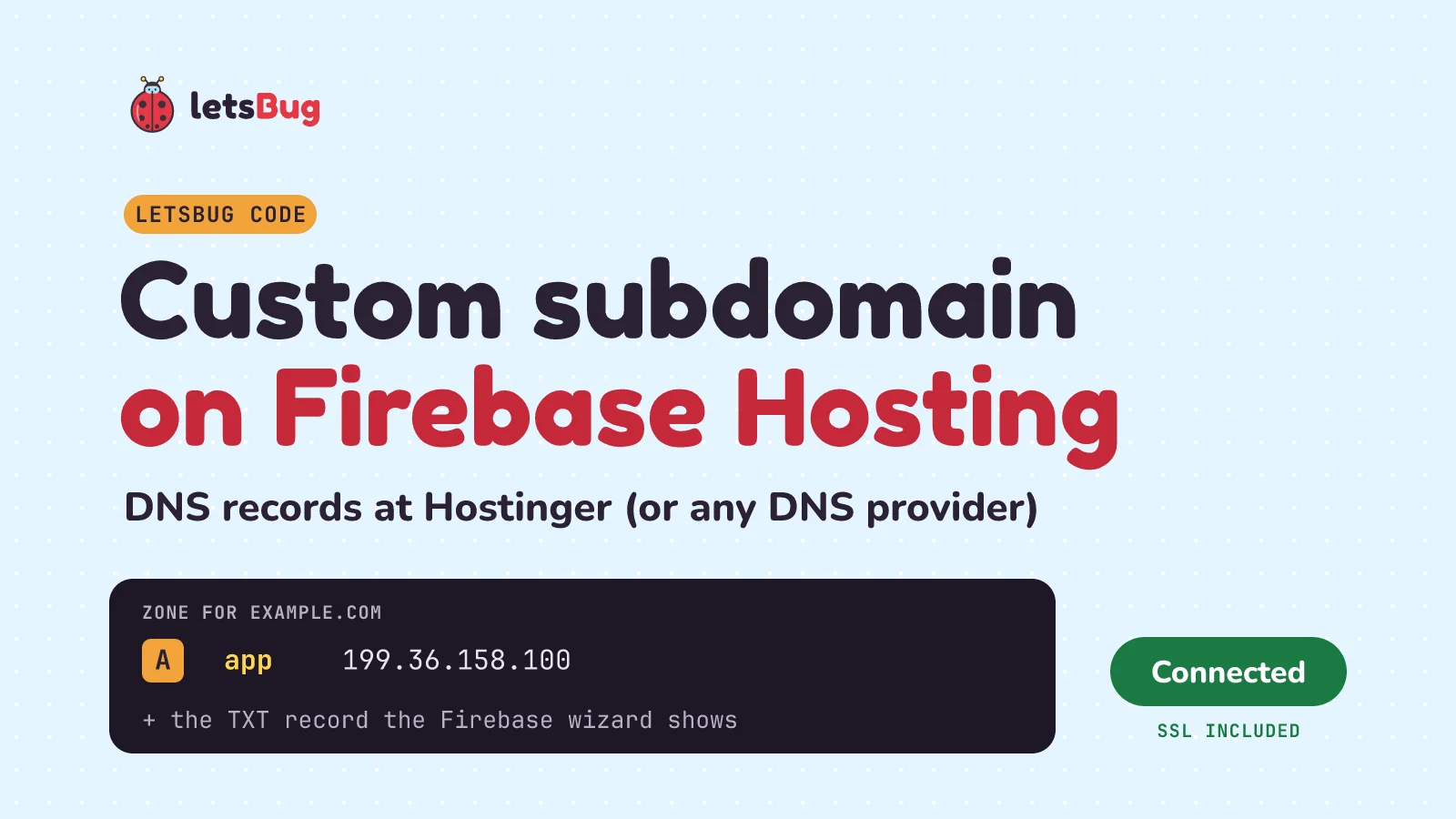
To put a Firebase Hosting site on a subdomain like app.example.com, open your site's Hosting page in the Firebase console, click Add custom domain, type the subdomain, and copy the DNS records Firebase shows into your domain's DNS zone. Firebase then checks the records and issues a free SSL certificate.
In this post we add the records in Hostinger step by step, check them with nslookup and dig, and fix the "Needs setup" and "Pending" statuses. At Hostinger the zone is under Domains, then DNS, and for app.example.com you type only app in the Name field. The certificate usually takes a few hours, and Firebase allows up to 24.
Key takeaways
- A subdomain needs no extra purchase and no Hostinger hosting. A DNS record for the name
appis enough. - Firebase's records are an A record to Firebase Hosting's IP (199.36.158.100 in Firebase's own examples) and, when the wizard asks for one, a TXT record that proves you own the domain. Copy the exact values from the wizard.
- Delete any other A, AAAA or CNAME record on the same name. While they exist, Firebase can't issue the SSL certificate.
- Keep Firebase's TXT record forever: Firebase uses it to renew the certificate.
- The same records work at any DNS provider. Only the name of the "Host" field changes.
The video below is from October 2023 and shows the older Firebase and Hostinger screens. The written steps are up to date for October 2026 and follow the current Firebase and Hostinger documentation.
What you need before you start
- A Firebase project with a Hosting site that you've already deployed, so it works on its
web.appaddress. Firebase asks you to finish the "Get Started" wizard on the Hosting page first. (Need a server as well as a static site? See how to deploy a Vite React app to Vercel and an Express API to Render.) - A domain whose DNS you can edit. In this post it's at Hostinger, and we use the placeholder
example.com. Swap in your own domain everywhere. - Nothing to pay Firebase for this. As of October 2026, Firebase's pricing page ticks "Custom domain & SSL" for Hosting on both the no-cost Spark plan and the Blaze plan.
How does a custom subdomain reach Firebase?
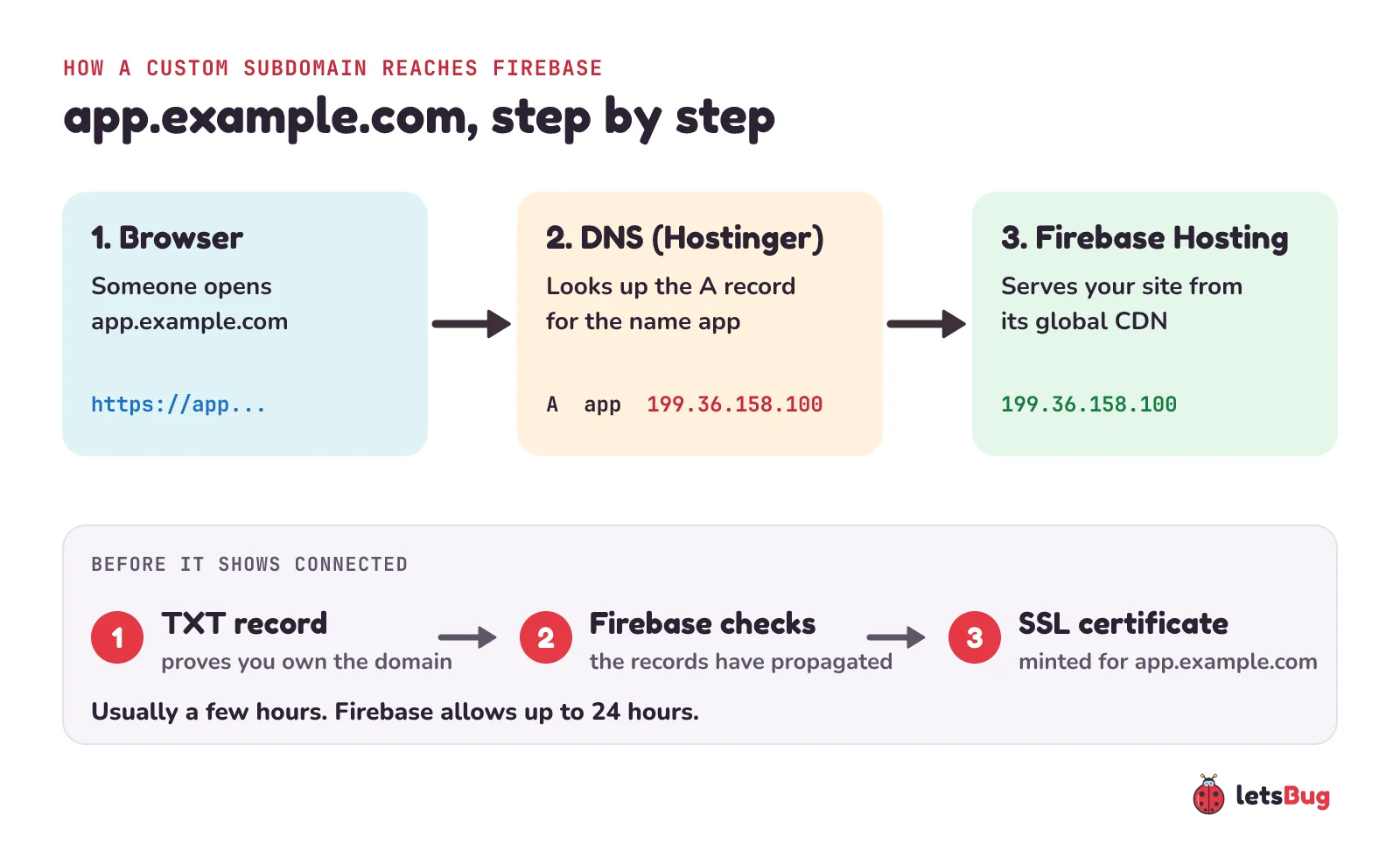
When someone opens app.example.com, the browser first asks DNS for that name's address. Your DNS zone at Hostinger answers with the A record you added, which points to Firebase Hosting, and Firebase serves your site from its global CDN. Before it will do that over HTTPS, Firebase needs to see the TXT record (so it knows the domain is yours) and mint an SSL certificate for the name.
What are A records, CNAMEs and TTL? The DNS words in one minute
- A record: maps a name to an IPv4 address, like
appto199.36.158.100. An AAAA record does the same for an IPv6 address. - CNAME record: makes a name an alias of another name. RFC 1034 sets the rule: "If a CNAME RR is present at a node, no other data should be present". So a leftover CNAME on
appcan't live next to the A and TXT records Firebase needs. That's why Step 3 below deletes it. Firebase's documentation lists A, AAAA, TXT and CAA records for custom domains, not CNAME, so use the record types the wizard shows. - TXT record: free text attached to a name. Firebase reads it to check that you own the domain.
- TTL (time to live): how many seconds other DNS servers may cache a record before asking again (RFC 1035). Hostinger's default is 14400 seconds, which is 4 hours.
- Propagation: the wait while those caches expire and everyone sees the new answer. Hostinger says to allow up to 24 hours after a change.
Step 1: add the custom domain in Firebase
- Open your project in the Firebase console and go to Hosting.
- If the project has one Hosting site, click Add custom domain. If it has more than one, click View on the site you want, then Add custom domain.
- Type the full subdomain, for example
app.example.com, and click Continue. - Pick Quick Setup if the subdomain isn't in use yet (or you're moving it from another Firebase Hosting site). Pick Advanced Setup only if it already serves a live site somewhere else and you need to move it with no downtime.
The wizard now shows the records to add. Leave this tab open: we copy the values from it in the next step. You can also click Cancel and come back later. Firebase says that doesn't affect propagation, but you'll have to type the domain name again.
@. Proving you own the apex proves you own all its subdomains.Step 2: add the DNS records in Hostinger
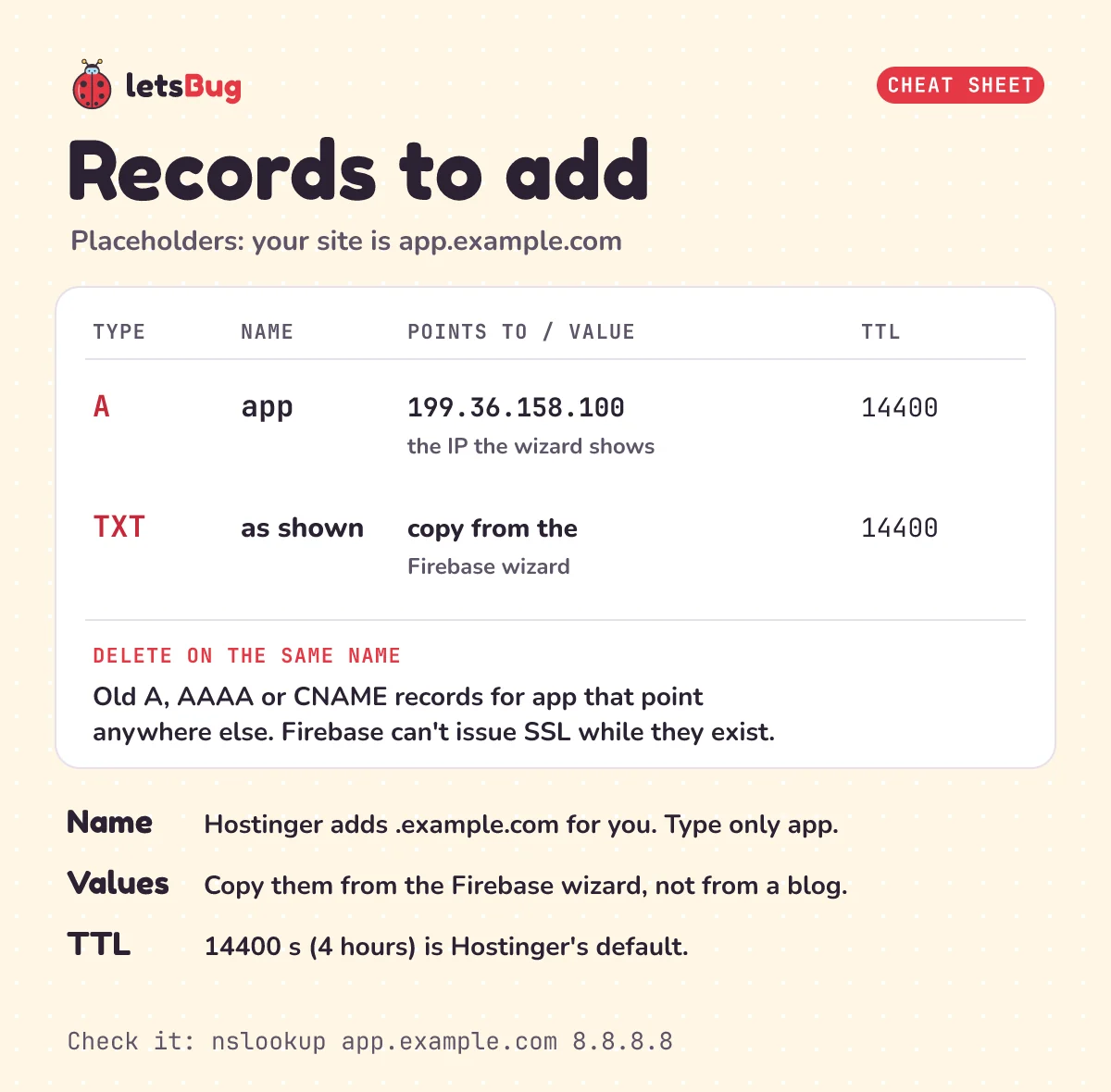
In Hostinger's dashboard, open Domains in the left sidebar, click DNS, and select your domain. You land on the DNS records page. For each record the Firebase wizard showed, fill in the form and click Add Record:
| Field in Hostinger | A record | TXT record (if the wizard shows one) |
|---|---|---|
| Type | A | TXT |
| Name | app (just the subdomain part) | the host the wizard shows (@ means the apex, app means the subdomain) |
| Points to / TXT value | the IP from the wizard, for example 199.36.158.100 | the value from the wizard, pasted exactly |
| TTL | 14400 (Hostinger's default) | 14400 |
Hostinger says the domain name "is automatically appended", so type only app in the Name field, not app.example.com. Hostinger's A record help uses the same pattern: for blog.domain.tld, "enter only blog".
Step 3: remove records that get in the way
Use the search bar on Hostinger's DNS records page to find every record named app. Delete any A, AAAA or CNAME record for that name that doesn't point to Firebase, for example one left over from Vercel, Netlify or an old Hostinger site. Firebase's documentation is direct about this: "If any of these record types exist, Firebase cannot provision an SSL certificate."
One more check. If your domain's nameservers point somewhere else (Cloudflare, for example), Hostinger's zone isn't the one the internet reads. Hostinger's help says to use "the DNS management tools provided by the respective platform" in that case. We test for this in the DNS section below.
Step 4: wait for "Connected"
Back in the Firebase wizard, finish the remaining steps (click Verify if it asks you to) once the records have had time to spread. Firebase says propagation and verification "will happen within a few hours" in most cases, and to allow up to 24 hours. After that it mints the certificate. Your domain's status on the Hosting page moves through these stages:
| Status | What it means |
|---|---|
| Needs setup | Firebase can't see the right records yet. Usually they just haven't propagated. |
| Pending | The records are right, but Firebase hasn't issued the SSL certificate yet. |
| Minting Certificate | The certificate is being made. |
| Connected | Records and certificate are in place. Your site is live on the subdomain. |
While the certificate is being made, the browser may show a certificate warning that doesn't mention your domain. Firebase calls this "a normal part of the process". It goes away once your certificate is ready.
How to check your DNS
Don't guess whether the records are live. Ask a public DNS server directly. Here's a real lookup of a site that we know runs on Firebase Hosting, firebase.web.app, using Google's public DNS at 8.8.8.8 (Windows Command Prompt or PowerShell):
nslookup firebase.web.app 8.8.8.8

Non-authoritative answer:
Server:  dns.google
Address:  8.8.8.8

Name:    firebase.web.app
Addresses:  2620:0:890::100
          199.36.158.100
Now run the same checks on your own subdomain. The A lookup should show the IP from your Firebase wizard, and the TXT lookup should show the value you pasted (look it up on whatever host the wizard used, app.example.com or example.com):
nslookup app.example.com 8.8.8.8
nslookup -type=TXT app.example.com 8.8.8.8
nslookup -type=NS example.com 8.8.8.8
The last one lists your domain's nameservers. If they belong to another provider (Cloudflare, say), edit the records there, not at Hostinger.
On macOS or Linux, use dig. The +short option prints just the answer, and @8.8.8.8 picks the DNS server to ask:
dig +short app.example.com A @8.8.8.8
dig +short app.example.com TXT @8.8.8.8
dig +short example.com CAA @8.8.8.8
No terminal handy? Firebase's documentation points to the Google Admin Toolbox Dig page, which runs the same kind of lookups in the browser.
Python can do the same lookup with only its standard library. This Python 3.13 snippet prints the IPv4 addresses for a name, and it's what our check script runs against firebase.web.app:
import socket

def ipv4(host):
    return sorted({a[4][0] for a in socket.getaddrinfo(host, 443, socket.AF_INET)})

print(ipv4("firebase.web.app"))  # ['199.36.158.100']
Troubleshooting: "Needs setup", SSL pending and other errors
- Clicking Verify shows an error. Firebase says this means "your records have not propagated or your values may be incorrect". Run the TXT lookup above. If it shows nothing, wait. If it shows a different value, fix the record in Hostinger.
- Status stays "Needs setup". Most often the A record hasn't propagated yet. If it's been more than 24 hours, check that the A record really points to the IP Firebase gave you, and that the nameserver lookup shows the provider where you added it. With Advanced Setup, the SSL challenge may have failed, which makes its token invalid: click View on the domain and add the new token Firebase gives you.
- Status stays "Pending" (SSL not issued). Firebase lists three causes. Your CAA records are too strict: they must allow
letsencrypt.organdpki.googto issue certificates. Your challenge code is invalid (Advanced Setup: click View and use the new token). Or you've asked for certificates for too many subdomains: Firebase limits each apex domain to 20 subdomains. - Status is "Minting Certificate" for a while. Nothing to fix. Wait, and give it up to 24 hours from when you pointed the A record at Firebase.
- The browser warns that the certificate is invalid. Normal while the certificate is being made. It resolves itself once the status is Connected.
- The subdomain still shows an old site. Another A, AAAA or CNAME record for
appis still in the zone (Step 3), or caches still hold the old answer until its TTL runs out. *** dns.google can't find app.example.com: Non-existent domain(this is the exact Windows output we got for a name with no records). Public DNS doesn't know the name at all. Check the record's Name field for a typo (justapp), check the nameservers, and give the change time to propagate.nslookupprintsName: app.example.combut no Address line. In our tests this happened when the name exists but has no record of the type you asked for. For the A lookup, that means the A record is missing or still on its way.
Using another DNS provider
Nothing about the records is specific to Hostinger. Firebase's documentation notes that providers call the fields different things: the host may be "Host Name", "Name" or "Domain", and the value may be "Data", "Points To", "Content", "Address" or "IP Address". For a subdomain, providers expect one of these in the host field:
- the full name,
app.example.com - only the subdomain part,
app(Hostinger works this way)
If you're not sure which one your provider wants, check its help page for adding an A record, then run the nslookup check above to confirm the record answers for app.example.com.
Your domain mysite.in is at Hostinger, and you want your Firebase site on shop.mysite.in. What do you type in Hostinger's Name field for the A record? And which existing record do you have to delete first if shop already has a CNAME to an old Netlify site?
Show the answers
Name: shop (Hostinger adds .mysite.in itself).
Delete the CNAME on shop: a name with a CNAME can't hold other records, and Firebase can't issue SSL while it's there.
Questions people ask
Is a custom domain free on Firebase Hosting?
Yes. As of October 2026, Firebase's pricing page includes "Custom domain & SSL" on the no-cost Spark plan as well as the Blaze plan. You only pay your registrar for the domain itself.
How long does a Firebase custom domain take to connect?
Firebase says records usually propagate and the domain verifies "within a few hours", and to allow up to 24 hours. The SSL certificate is deployed within 24 hours after you point the A records to Firebase Hosting.
Can I use a CNAME record instead of an A record?
Firebase's documentation describes A, AAAA, TXT and CAA records for custom domains and doesn't describe a CNAME option. Add whatever record types the wizard shows for your domain, and delete existing CNAMEs on the same name.
Can I delete the TXT record after the domain says Connected?
No. Firebase says to keep the TXT record "continually present" to prove ownership and to let it assign and renew SSL certificates.
How many subdomains can I connect?
Firebase limits each apex domain to 20 subdomains, because of SSL certificate limits. Each custom domain can be connected to only one Hosting site.
Can I connect the root domain (example.com) the same way?
Yes. The steps are the same, but the host is @ instead of app. At Hostinger, turn off Hostinger CDN before adding an A record for @, as their help page says.
Keep going
- Watch the original video, How to add a custom subdomain in Firebase, and the rest of the letsBug channel on YouTube.
- Deploying a React front end and an API instead? Deploy a Vite React app to Vercel and an Express API to Render.
- Build the API side: a REST API in Express.js 5, step by step.
- Need something to put on your new subdomain? Build the to-do list in HTML, CSS and JavaScript and deploy it to Firebase Hosting.
- Or make it look good first with the glass effect in HTML and CSS.
Checked on 10 October 2026 against the 11 sources below.
Sources
- Firebase documentation: Connect a custom domain (records, setup statuses, SSL provisioning; last updated 2026-10-07)
- Firebase: Pricing plans (Custom domain & SSL on Spark and Blaze)
- Hostinger help: How to manage DNS records at Hostinger, A records, TXT records and CNAME records
- IETF: RFC 1034 (the CNAME rule) and RFC 1035 (TTL)
- Microsoft Learn: nslookup; ISC: dig manual (BIND 9.20); Google: Admin Toolbox Dig
All documentation was read on October 10, 2026. The lookups in this post were run that day with Windows 11's nslookup and Python 3.13.