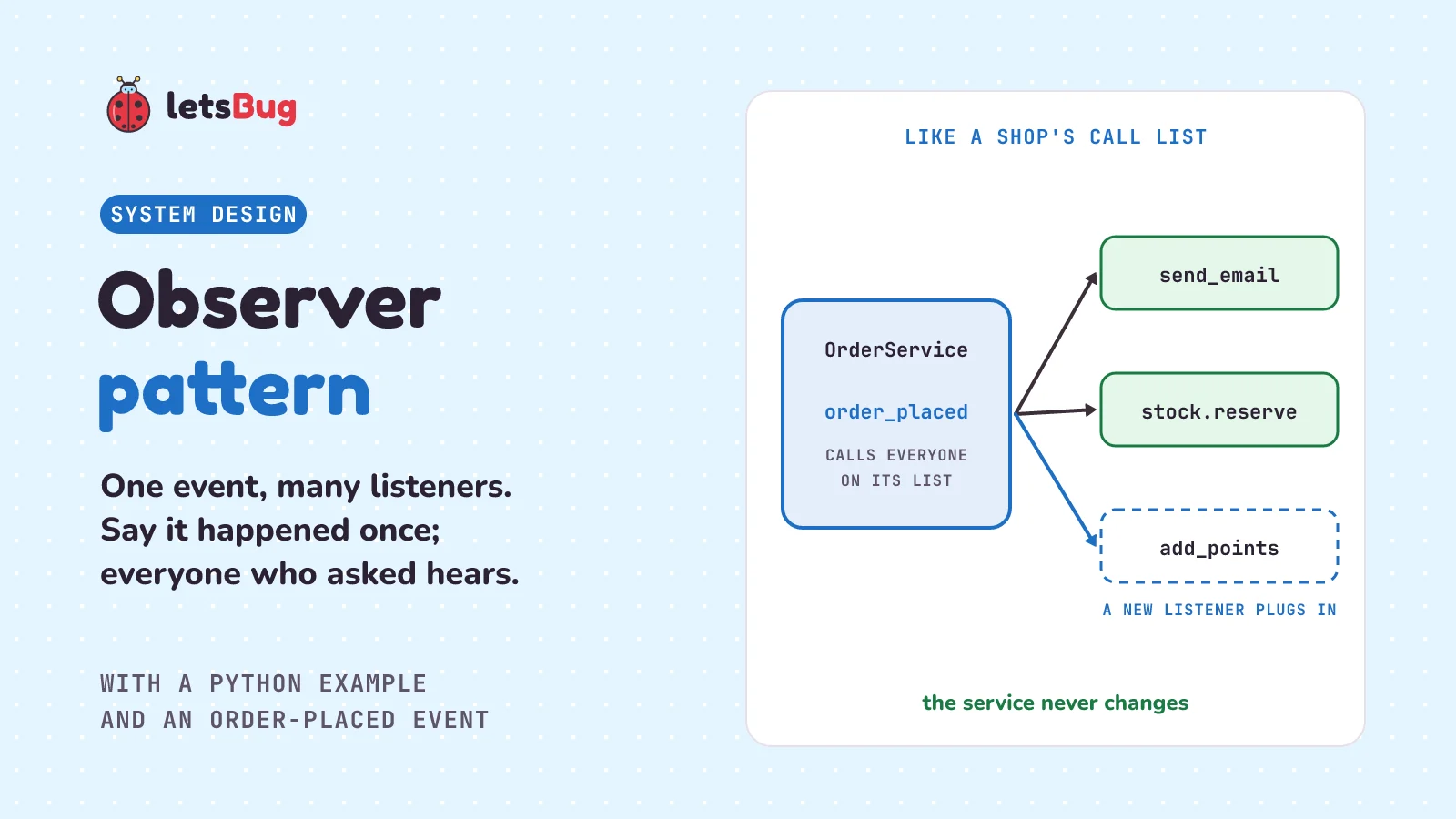
The observer pattern lets one object announce that something happened, and lets any number of other objects react to it. The announcer keeps a list of listeners. When the event happens, it calls each one in turn. The announcer only calls whatever is on its list, so listeners can come and go without changing it.
In this post we start with a fruit shop's call list. Then we look at what goes wrong when a shop's order service calls every follow-up job by name, and fix it with a small Event class in plain Python: subscribe, unsubscribe, notify. We test it and find the same idea in your browser's addEventListener and in Python's own logging. Then we compare it with publish-subscribe. We finish with when it hurts more than it helps, and the mistake that lets one broken listener stop all the others.
A few words first. An event is something that happened that other code may care about, such as "an order was placed". A listener (the pattern's own word is observer) is a function that should run when it happens. The object that keeps the list and calls the listeners is the subject. To subscribe is to add a listener to the list, and to notify is to call everyone on it. An exception is Python's way of saying an error happened; if nothing catches it, it stops the program.
Key takeaways
- The observer pattern splits "this happened" from "what to do about it". The subject announces; the listeners decide what to do.
- The subject only keeps a list of functions. It doesn't know if they send emails, update stock or write logs, so adding a new job means adding a listener, not editing the subject.
- In Python a listener can be any function or method. You don't need a special class with an
updatemethod. - You use it every day: the functions you pass to a web page's
addEventListener("click", ...)are observers, and so are Python'slogginghandlers. - Catch errors per listener inside
notify. Otherwise one broken listener stops every listener after it. - Don't use it for one fixed follow-up, or for a step that must happen in order and report back. Call those directly.
- Even where it fits, it has a cost: the flow becomes hard to follow, because the code that announces never says who reacts.
What is the observer pattern in simple words?
Think of a fruit shop at the start of mango season. Customers keep asking, "Are the mangoes in yet?" So the shopkeeper keeps a notebook, and anyone who wants to know writes their phone number in it. When the mangoes arrive, the shopkeeper goes down the list and calls each number in turn. One customer comes to buy a box, another tells a friend, another just makes a note. The shopkeeper doesn't care which. Anyone who stops caring asks to have their number crossed out. And if one number doesn't answer, the shopkeeper doesn't give up on the rest of the list.
Code is the same. In our shop app, the order service is the shopkeeper, "an order was placed" is the mangoes arriving, and the jobs that should follow, such as sending a confirmation email and taking the items out of stock, are the numbers in the notebook. The order service says "order placed" once. Each job hears it and does its own thing.
What problem does the observer pattern solve?
Here's the same shop app as in the last few posts. When a customer places an order, two things should happen: they get a confirmation email, and the items come out of stock. First, the two jobs. Ours print, so the example runs anywhere:
# listeners.py
def send_email(order):
    print(f"Email to {order['email']}: order {order['id']} confirmed")


class Stock:
    def __init__(self, counts):
        self.counts = counts

    def reserve(self, order):
        self.counts[order["item"]] -= order["qty"]
        print(f"Stock: {self.counts[order['item']]} {order['item']} left")
Stock keeps a count for each item, and reserve takes the ordered quantity off. Now the order service, written the way most of us write it first:
# orders_before.py
from listeners import send_email


class OrderService:
    def __init__(self, stock):
        self.orders = []
        self.stock = stock

    def place(self, order):
        self.orders.append(order)
        send_email(order)
        self.stock.reserve(order)
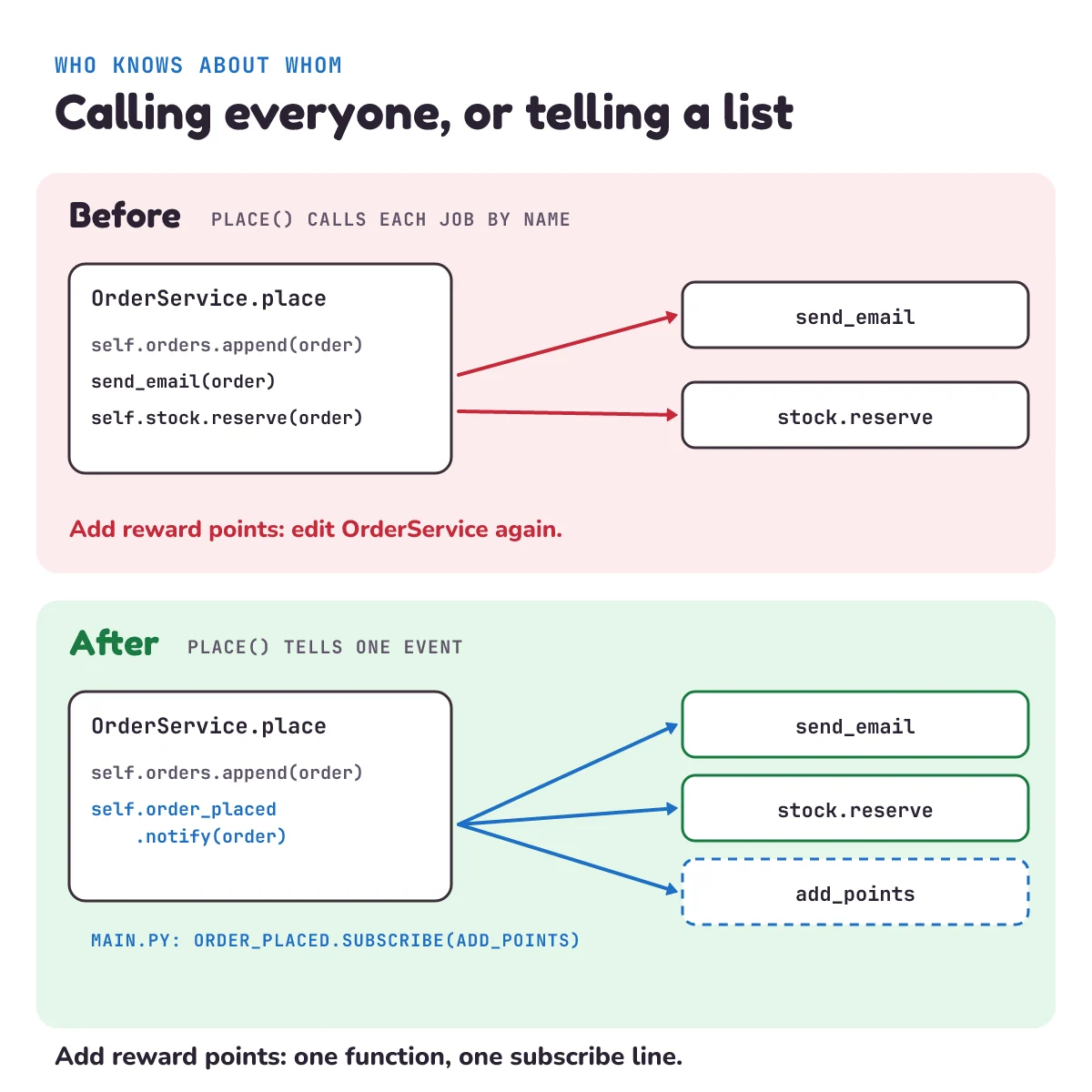
It works. Then the shop grows, and three things go wrong:
- Every new job edits the order service. Reward points, a message to the warehouse, a sales dashboard: each one is another import and another line in
place. The class that should only save orders ends up knowing about every team in the company. - You can't place an order without sending an email. A test of
placesends a real email, becausesend_emailis imported and called by name. The class gives you no way to hand in a fake:Stockis passed in, butsend_emailis fixed. - You can't switch a job off without editing the order service. The mail server is down for an hour? To stop sending emails, you have to change
OrderServiceitself and put the new version live. With the observer pattern, you'd change one line inmain.pyinstead, or callunsubscribewhile the app runs (Try it 2 below does exactly that).
The service has two jobs mixed together: placing orders, and knowing everything that should happen after. The observer pattern pulls the second job out.
How does the observer pattern work?
The order service stops calling the jobs by name. Instead, it owns one event, order_placed, which is just a list of listeners. When an order is placed, the service tells the event, and the event calls every function on its list. Which functions are on the list is decided somewhere else, usually where the app starts.
Martin Fowler, a software author whose site collects many of these patterns, ties it to MVC (model, view, controller), the first post in this series, in a 2006 article on screen designs: "The best way to think of MVC is as set of principles including the separation of presentation from domain logic and synchronizing presentation state through events (the observer pattern)." Here presentation means the screens the user sees, and domain logic means the rules of the business itself, such as how an order is priced. In MVC, the screens are the listeners: when the data changes, every screen that shows it is told to redraw.
The textbook way to write it gives every observer a class with an update method. Python doesn't need that, because a function can be stored in a list and called later, just like any other value. So our listeners are plain functions, or methods such as stock.reserve.
How do you write the observer pattern in Python?
Here's the event, standard library only (the tools that come with Python), so there's nothing to install:
# events.py
import logging

log = logging.getLogger(__name__)


class Event:
    """Something that can happen. Listeners subscribe; notify calls each one."""

    def __init__(self):
        self.listeners = []

    def subscribe(self, listener):
        self.listeners.append(listener)

    def unsubscribe(self, listener):
        self.listeners.remove(listener)

    def notify(self, *args):
        for listener in list(self.listeners):
            try:
                listener(*args)
            except Exception as error:
                name = getattr(listener, "__name__", repr(listener))
log.error("%s failed: %r", name, error)subscribeadds a function to the list, andunsubscribetakes it off again.notify(*args)calls every listener with whatever it was given.*argsmeans "any number of arguments, passed straight through", so the same class works for any event.list(self.listeners)loops over a copy of the list. A listener might unsubscribe itself while we're looping, and removing an item from a list while you loop over it makes Python skip the item after it.- The
tryandexceptcatch an error from one listener, write it to the log (a record of what the program did) with the listener's name, and carry on with the next one.getattrfalls back to a description of the listener when it has no__name__, as with afunctools.partial(a function with some arguments already filled in) from the factory pattern post, so the error report can't fail too. We'll see why this matters in the beginner mistake below.
The order service now owns an event and tells it, and that's all it does after saving the order:
# orders.py
from events import Event


class OrderService:
    def __init__(self):
        self.orders = []
        self.order_placed = Event()

    def place(self, order):
        self.orders.append(order)   # a real app saves the order to its database here
        self.order_placed.notify(order)
orders.py doesn't import send_email or Stock. It has no idea what happens after an order. main.py is the one place that decides who listens:
# main.py
from listeners import Stock, send_email
from orders import OrderService

shop = OrderService()
stock = Stock({"dosa-mix": 10})
shop.order_placed.subscribe(send_email)
shop.order_placed.subscribe(stock.reserve)

shop.place({"id": 101, "email": "asha@example.com", "item": "dosa-mix", "qty": 2})
Put the four files in one folder (listeners.py, events.py, orders.py and main.py) and run python main.py:
Email to asha@example.com: order 101 confirmed
Stock: 8 dosa-mix left
The listeners ran in the order they subscribed: the email first, then the stock went from 10 to 8. To add reward points tomorrow, you write one new function and add one subscribe line to main.py. orders.py doesn't change.
How do you test code that uses observers?
Two things need testing, and the pattern lets us test them apart: the event (does it call the right listeners?) and the service (does it tell the event?). For the service, the test subscribes a listener that just writes down what it hears, so no email is sent and no stock changes.
# test_orders.py
import unittest

from events import Event
from orders import OrderService


class EventTest(unittest.TestCase):
    def test_notify_calls_every_listener_in_order(self):
        calls = []
        event = Event()
        event.subscribe(lambda order: calls.append(("email", order)))
        event.subscribe(lambda order: calls.append(("stock", order)))
        event.notify("order 7")
        self.assertEqual(calls, [("email", "order 7"), ("stock", "order 7")])

    def test_unsubscribed_listener_is_not_called(self):
        calls = []

        def listener(order):
            calls.append(order)

        event = Event()
        event.subscribe(listener)
        event.unsubscribe(listener)
        event.notify("order 7")
        self.assertEqual(calls, [])

    def test_one_failing_listener_does_not_stop_the_rest(self):
        def broken(order):
            raise ConnectionError("mail server is down")

        calls = []
        event = Event()
        event.subscribe(broken)
        event.subscribe(calls.append)
        with self.assertLogs("events", level="ERROR") as logs:
            event.notify("order 7")
        self.assertEqual(calls, ["order 7"])
        self.assertIn("broken failed", logs.output[0])


class OrderTest(unittest.TestCase):
    def test_place_tells_the_listeners(self):
        received = []
        shop = OrderService()
        shop.order_placed.subscribe(received.append)
        shop.place({"id": 7})
        self.assertEqual(shop.orders, [{"id": 7}])
        self.assertEqual(received, [{"id": 7}])
lambda order: ...is a tiny one-line function. Each one is a listener that adds a note tocalls.calls.appendandreceived.appendare listeners too: a list's ownappendmethod, so whatever the event sends gets added to the list.assertLogs("events", level="ERROR")checks that an error was logged by oureventsmodule, and keeps it from cluttering the test output.
Run python -m unittest in the same folder. unittest is Python's built-in test tool:
....
----------------------------------------------------------------------
Ran 4 tests in 0.001s

OK
Each dot is one test that passed. (The time on your machine may be a little different.)
Where have you already seen the observer pattern?
In every web page. A button on a page is a subject, and addEventListener is its subscribe. MDN, the Mozilla reference that web developers use, describes it like this: "The addEventListener() method of the EventTarget interface sets up a function that will be called whenever the specified event is delivered to the target." (An interface is the set of methods an object offers, and EventTarget is the browser's name for anything that can have listeners, such as a button.) The first benefit MDN lists: "It allows adding more than one handler for an event." Unsubscribing has its own method too: "The removeEventListener() method of the EventTarget interface removes an event listener previously registered with EventTarget."
const button = document.querySelector("#buy");

function showThanks() {
  console.log("Thanks for your order!");
}

button.addEventListener("click", showThanks);      // subscribe
button.removeEventListener("click", showThanks);   // unsubscribe
The button doesn't know what showThanks does. It only knows that when it's clicked, everyone on its list gets called. To remove a listener, you pass the same function you added, which is why it has a name here instead of being written inline.
In Python's logging. A logger is the subject, and its handlers (one writes to the screen, one to a file, one sends an email) are the listeners. The logging guide: "Logger objects can add zero or more handler objects to themselves with an addHandler() method." And later: "logger objects pass along relevant log messages to all interested log handlers." The code that writes log.error(...) never knows where the message ends up.
Observer pattern vs pub/sub: what's the difference?
This answer is our own short summary; real systems differ in the details. In the observer pattern, the subject keeps the list itself and calls each listener directly, inside one program. In publish-subscribe (pub/sub), as we use the term here, there's a go-between. The announcer (the publisher) hands each event to a middle piece, which we'll call a broker, and the broker passes it on to the subscribers. The two sides never meet. They can be separate programs on separate machines, and a subscriber may get the event later, not straight away.
Our Event is the in-one-program kind, and that has a cost worth knowing: notify calls the listeners one after another, and place waits until all of them are done. A slow email server makes checkout slow. Fowler describes event notification as what happens when "a system sends event messages to notify other systems of a change in its domain." (A system's domain is the area of business it handles, such as orders.) He adds: "A key element of event notification is that the source system doesn't really care much about the response." Our Event already ignores the answers. Handing the event to a queue or broker that delivers it later also means place stops waiting. That's the next step in this series: events between whole services.
When should you not use the observer pattern?
- There's one listener, and it will never change. If placing an order always does exactly one thing after, call that thing.
send_email(order)on one line is easier to read than an event, asubscribecall in another file, and a loop. Add an event on the day a second listener comes along. - The next step must happen, in order, and report back. Charging the customer's card has to succeed before the order is saved, and
placeneeds the answer. Listeners are for "by the way, this happened" jobs. Ournotifydoesn't even return what the listeners return, and one failing doesn't stop the order. For a step that decides whether the order goes ahead, call it directly. - You need to follow the flow by reading the code. This is the big one. Fowler, writing about Observer Synchronization (his name for keeping screens in step with the data by making them observers, as in MVC): "The problem with Observer Synchronization is the core problem of the observer pattern itself - you can't tell what is happening by reading the code." And: "Observer behavior is hard to understand and debug because it's implicit behavior." Implicit means it isn't written where you're looking:
placesaysnotify(order), and you have to find everysubscribecall to know what that does. If listeners then fire their own events, a bug can pass through several files before you see where it started. Keep all thesubscribelines in one place, like ourmain.py, so there's one file to read.
Fowler warns about the same trap with events between whole systems: "The danger is that it's very easy to make nicely decoupled systems with event notification, without realizing that you're losing sight of that larger-scale flow, and thus set yourself up for trouble in future years." Decoupled means the parts don't depend on each other, which is the pattern's goal. The cost is that no single file shows the whole story.
What mistake do beginners make with observers?
Letting one listener's error stop the rest. The first notify most of us write is the simple loop:
    def notify(self, *args):
        for listener in self.listeners:
            listener(*args)
Now the mail server goes down, and send_email raises an exception:
def send_email(order):
    raise ConnectionError("mail server is down")
Run main.py with the simple loop and you get a traceback (Python's report of where an error happened, read from the bottom):
Traceback (most recent call last):
  ...
ConnectionError: mail server is down
The exception left send_email, left the loop, and left place. stock.reserve never ran. The order was saved, but the stock still says 10. The email listener's problem broke the stock listener, and the two have nothing to do with each other.
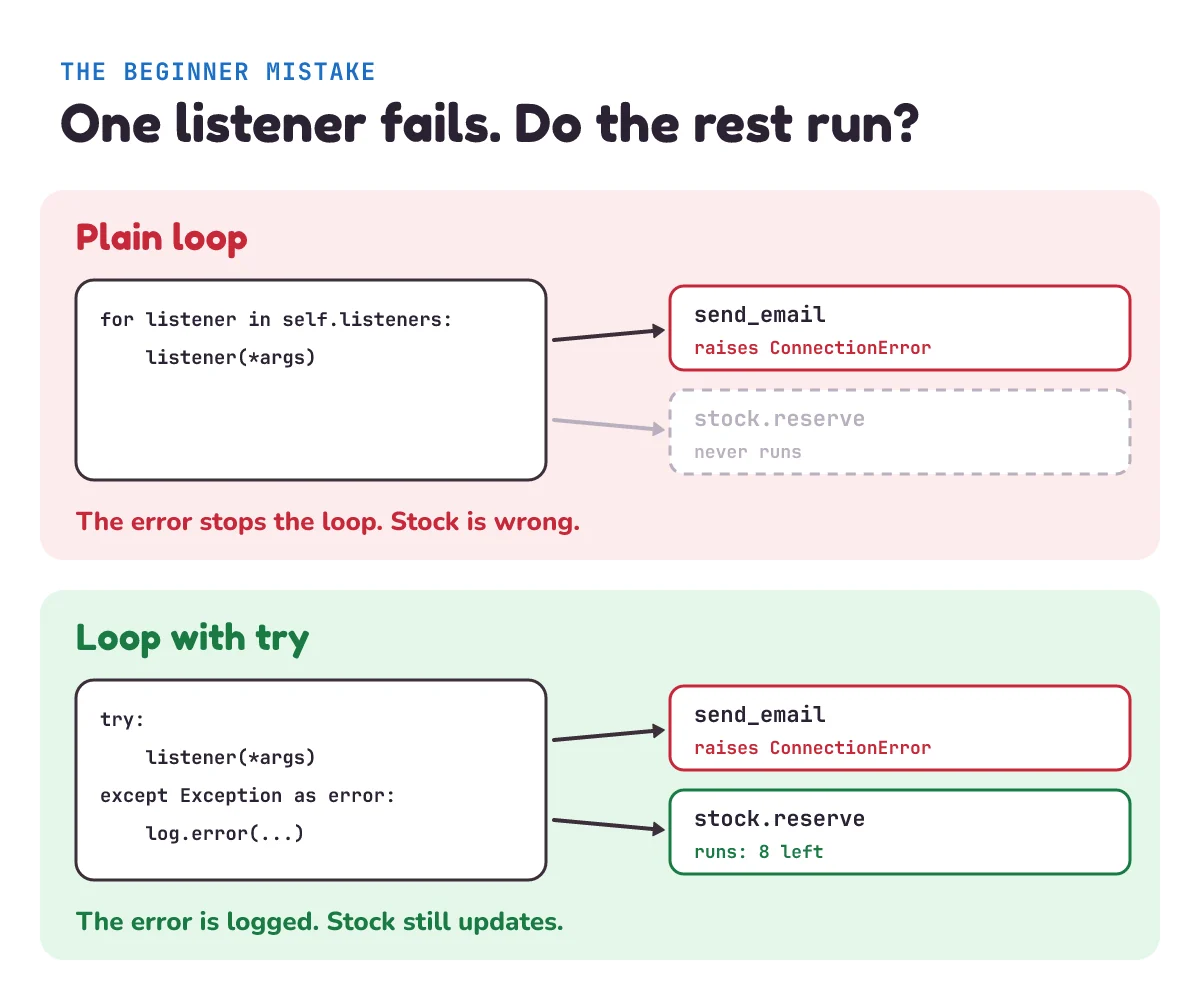
try around each call keeps the other listeners running.That's why our events.py puts a try around each call. Run the same broken send_email with it:
send_email failed: ConnectionError('mail server is down')
Stock: 8 dosa-mix left
The error is logged with the listener's name, and the stock is right. Python's built-in logging handlers guard themselves in a similar way: each one catches errors inside its own emit method and passes them to handleError. That method is documented this way: "This method should be called from handlers when an exception is encountered during an emit() call." (emit is the handler method that writes one message.) If a handler can't write a message, say because its file was closed, it prints a --- Logging error --- report, and your program and the other handlers carry on.
Two details. First, we catch Exception, not everything. The Python docs explain that KeyboardInterrupt, the error you get when you press Ctrl+C, "inherits from BaseException so as to not be accidentally caught by code that catches Exception and thus prevent the interpreter from exiting." Python's errors form a family tree. BaseException is at the top and Exception sits under it. Inherits from means KeyboardInterrupt is a kind of BaseException, but not a kind of Exception. The interpreter is the program that runs your Python code. So Ctrl+C still stops the program. Second, the email is still lost: logging it doesn't send it. A real shop puts jobs like that in a queue that tries again later, which is a post of its own later in this series.
1) The shop adds reward points: 10 points for each item ordered. Which files change, and which don't?
2) In main.py, after order 101, add shop.order_placed.unsubscribe(send_email) and place order 102 for 1 dosa-mix. What does the second order print?
3) What happens if main.py subscribes send_email twice by mistake? What would addEventListener do with the same function added twice?
Show the answers
1) Two files change: listeners.py gets the new function, and main.py imports it and gets one subscribe line. events.py, orders.py and the tests don't change.
points = {}


def add_points(order):
    points[order["email"]] = points.get(order["email"], 0) + 10 * order["qty"]
    print(f"Points: {order['email']} has {points[order['email']]}")


# and in main.py: add add_points to the import line, then one more subscribe line:
shop.order_placed.subscribe(add_points)
Order 101 then prints a third line: Points: asha@example.com has 20.
2) Only Stock: 7 dosa-mix left. The email listener is off the list, so order 102 gets no email, and the stock goes from 8 to 7.
3) Asha gets two identical emails: our list happily holds the same function twice. The browser is stricter. MDN: "If the function or object is already in the list of event listeners for this target, the function or object is not added a second time." To make ours behave the same way, start subscribe with if listener not in self.listeners:.
Questions people ask
What is the observer pattern in simple words?
One object keeps a list of functions to call when something happens, such as "an order was placed". Other code adds itself to that list. When the thing happens, the object calls everyone on the list, without knowing what each one does. It's like a shopkeeper with a notebook of phone numbers: when the mangoes arrive, everyone in the notebook gets a call.
Is an event listener the same as the observer pattern?
An event listener is an observer, and addEventListener in the browser is how you subscribe one. The element (a button, a page) is the subject, and when the event happens it calls every listener on its list. Python's logging handlers work the same way.
What is the difference between the observer pattern and pub/sub?
In the observer pattern, the subject keeps its own list and calls each listener directly, usually right away and inside one program. In pub/sub, as we use the term, a broker sits in the middle: publishers send events to it, and subscribers get them from it. They don't know about each other and often run as separate programs.
What is the difference between the observer and strategy patterns?
A strategy is one swappable piece that does a job, and the code that uses it calls it and uses its answer. Observers are many listeners that are all told about something that already happened, and the subject doesn't use their answers. Strategy: "do this step, one of these ways". Observer: "this happened, tell everyone who asked".
Keep going
- Previous in this System Design series: Strategy pattern, where one swappable object does a job. Here, many listeners all hear about one event.
- Next: "Event-driven architecture", where events leave one program and travel between whole services, and the flow gets even harder to see.
- Where observers keep screens up to date: What is MVC architecture?, whose views redraw themselves when the model changes.
Checked on 1 November 2026 against the 7 sources below.
Sources
- MDN Web Docs: EventTarget: addEventListener() method
- MDN Web Docs: EventTarget: removeEventListener() method
- Python documentation: Logging HOWTO (loggers and handlers)
- Python documentation: logging (
Handler.handleError) - Python documentation: Built-in Exceptions (
KeyboardInterrupt) - Martin Fowler: GUI Architectures (2006), MVC and Observer Synchronization
- Martin Fowler: What do you mean by "Event-Driven"? (2017), event notification
Every Python sample in this post was run in Python 3.13 before publishing, and the tests were run with the listeners swapped for ones that only write down what they hear.