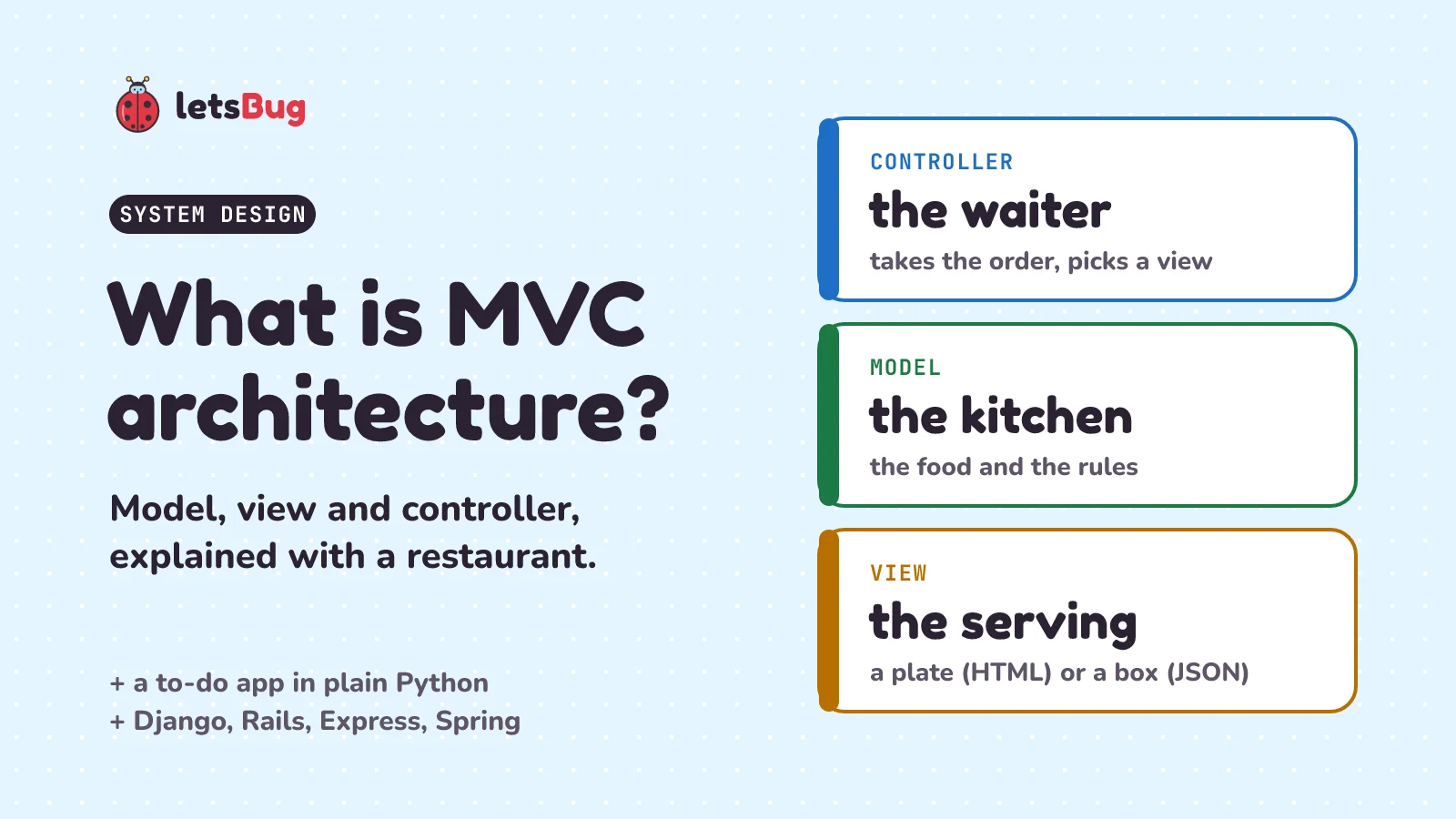
MVC (model, view, controller) is a way to split an app into three parts. The model holds the data and the rules, the view decides how that data looks, and the controller takes each request, asks the model, and hands the result to a view. So you can change one part with little or no change to the others.
In this post we start with the mess MVC fixes, picture it as a restaurant, then build a small to-do app in plain Python with a real model, view and controller that you can run in your browser. After that we map the three parts onto Django, Rails, Express and Spring MVC, look at where MVC stops helping, and meet its two cousins, MVP and MVVM.
Key takeaways
- Model: the data and the rules ("a to-do needs a title"). It knows nothing about web pages.
- View: how the data is shown: an HTML page for people, JSON for apps. It never changes the data.
- Controller: reads the request, asks the model to do the work, and picks a view for the answer. Keep it thin.
- One model can have many views. Our to-do app serves the same list as a web page and as JSON with no change to the model.
- Frameworks rename the parts. In Django the "view" is the controller and the "template" is the view, so Django calls itself MTV.
- MVC began in Smalltalk desktop programs in the late 1970s. MVP and MVVM are its cousins for screens with a lot going on.
- For a 30-line script, three parts is more ceremony than help.
What problem does MVC solve?
Most first web apps put everything in one function: read the form, check it, save it, build the HTML. Here's a tiny to-do app written that way. TODOS is a list, a row of values in square brackets, and each to-do is a dictionary, a set of labelled values in curly brackets, like a form with fields:
TODOS = []

def add_todo(form):  # one function does every job
    title = form["title"]
    if title.strip() == "":
        return "<p>A to-do needs a title.</p>"
    TODOS.append({"title": title, "done": False})
    rows = "".join(f"<li>{t['title']}</li>" for t in TODOS)
    return f"<h1>To-do</h1><ul>{rows}</ul>"

print(add_todo({"title": "Learn the <table> tag"}))
# <h1>To-do</h1><ul><li>Learn the <table> tag</li></ul>
It works, until it doesn't. Three things go wrong as the app grows:
- The page breaks. The title "Learn the <table> tag" went into the page as a real
<table>tag, so the text "<table>" never shows up and the layout can break. Type a<script>tag instead and it runs code in the visitor's browser. That attack is called cross-site scripting (XSS), and OWASP, a non-profit that tracks web security problems, describes it as an attack "in which malicious scripts are injected into otherwise benign and trusted websites." Every function that builds HTML has to remember to make text safe, and one of them will forget. - The rules get copied. Next month you add a phone app that talks to the same server and wants JSON, plain data with no HTML. Its new function needs the "a to-do needs a title" rule too, so you copy it. Now there are two copies to keep in step.
- Testing is hard. To check one rule, you have to fake a whole web request and dig through HTML for the answer.
Each of these comes from one function doing three different jobs: keeping the data and its rules, deciding how things look, and handling the request. Those jobs change for different reasons. A designer changes the look, a product rule changes the data, a new URL changes the handling. MVC gives each job its own place.
What is MVC architecture in simple words?
Think of a restaurant. You never walk into the kitchen. You tell the waiter, "One dal makhani, please." The waiter takes the order to the kitchen. The kitchen has the food and the rules: what's on the menu, how each dish is made, and "sorry, the paneer is finished". When the dish is ready, it's served: on a plate with rice if you're at a table, or packed in a box if it's going out for delivery. The waiter brings it back to you.
| Restaurant | MVC | In a web app |
|---|---|---|
| The kitchen: food, recipes, "paneer is finished" | Model | The data and its rules (a to-do needs a title) |
| How the dish is served: a plate at the table, a box for delivery | View | An HTML page for the browser, JSON for a phone app |
| The waiter: takes the order, passes it on, brings the result | Controller | Reads the request, asks the model, picks a view |
Notice what each one doesn't do. The waiter doesn't cook. The kitchen doesn't talk to customers. The same dal can go out on a plate or in a box, and the kitchen cooks it exactly the same way. That's the whole idea of MVC.
The pattern is older than the web. Martin Fowler, a well-known writer on software design, says MVC "started as a framework developed by Trygve Reenskaug for the Smalltalk platform in the late 1970s". Smalltalk was an early programming language whose programs already had windows on screen. He sums up MVC in one line: it "Splits user interface interaction into three distinct roles." The user interface (UI) is the part of a program people see and touch.
How does a request flow through MVC?
On the web, every click or form you send is a request: a message from the browser to the server, like an order slip. The server sends back a response, usually a web page. In an MVC web app, one request goes round like this:
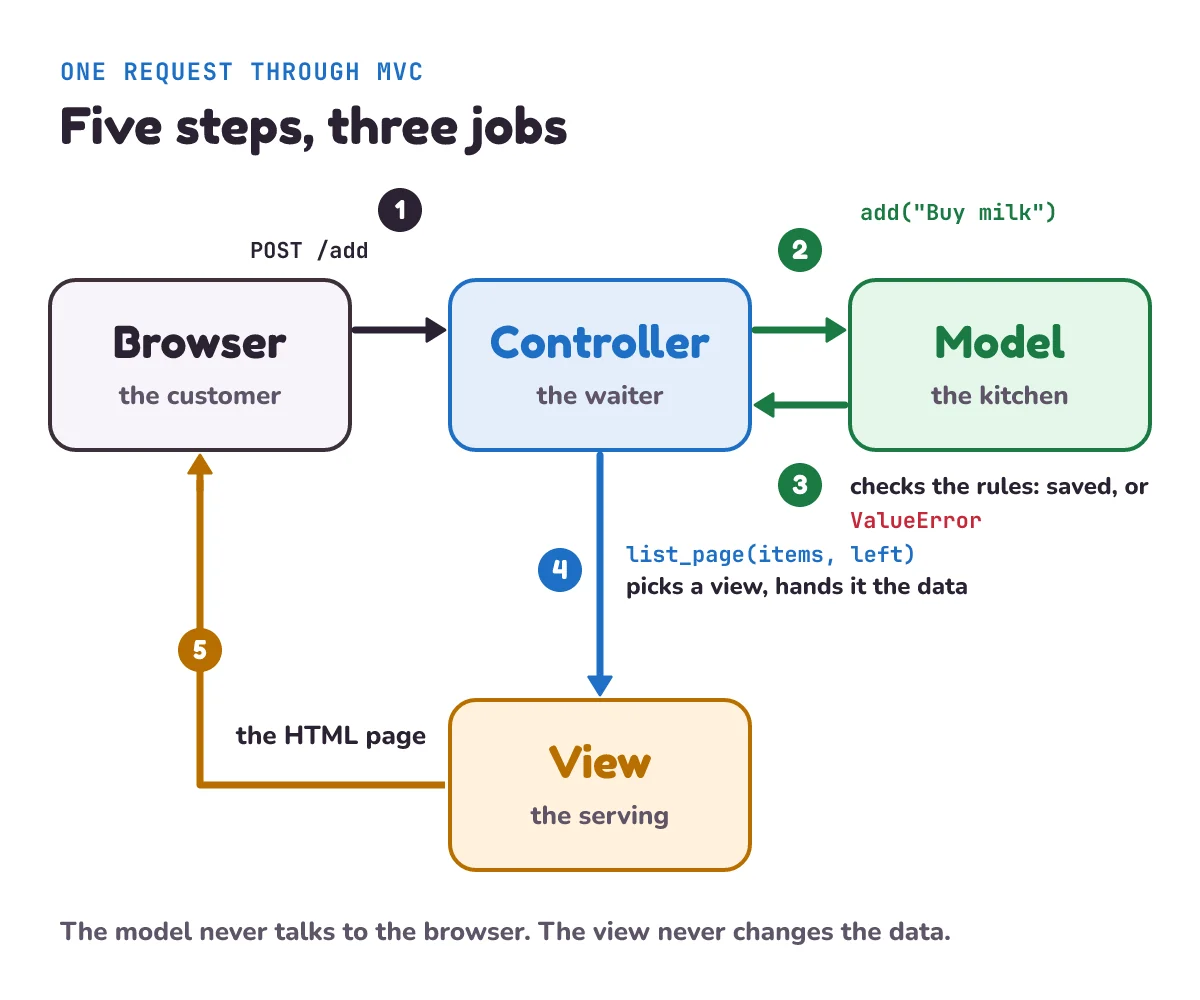
- The browser sends a request, such as "add the to-do Buy milk". It reaches the controller.
- The controller reads the request and asks the model: "add this to-do".
- The model checks its rules (is there a title?) and saves the data, or says no.
- If the model said no, the controller picks a view right away: the list page with the model's error. If it said yes, the controller tells the browser to load the list again (a redirect), and that new request is answered by the list view.
- The view builds the HTML page, and it goes back to the browser.
The Ruby on Rails guide describes the controller's place the same way: "You can imagine that a controller sits between models and views."
What does an MVC architecture example look like in Python?
Let's build the to-do app properly, one part at a time. It's plain Python, standard library only (the tools that come with Python), so there's nothing to install. Put all four pieces in one file called todo_mvc.py.
First, the model. A class is a blueprint for an object that keeps its own data and the functions that work on it, like a form template that every copy is printed from. Functions inside a class are called methods. Our model keeps the to-dos and the rules about them:
class TodoList:
    """The model: the to-dos and their rules. No HTML, no web."""

    def __init__(self):
        self.items = []

    def add(self, title):
        title = title.strip()
        if not title:
            raise ValueError("A to-do needs a title.")
        if len(title) > 80:
            raise ValueError("Keep it to 80 characters or fewer.")
        item = {"id": len(self.items) + 1, "title": title, "done": False}
        self.items.append(item)
        return item

    def finish(self, item_id):
        for item in self.items:
            if item["id"] == item_id:
                item["done"] = True
                return item
        raise KeyError(f"No to-do with id {item_id}")

    def left(self):
        return sum(1 for item in self.items if not item["done"])
A few words to unpack. __init__ runs once when a new list is made and starts it empty. self means "this particular list". strip() removes spaces from both ends, so a title of only spaces counts as empty. raise ValueError(...) stops and reports a problem, like a kitchen saying "we can't make that". left() counts the to-dos not yet done.
Look at what's missing: no HTML, no URLs, no forms. That means you can test the rules in three lines, with no browser and no server:
todos = TodoList()
todos.add("Read chapter 3")
todos.add("Water the plants")
todos.finish(1)
print(todos.left())  # 1
Django, a popular Python web framework (a ready-made toolkit for building web apps), puts it well in its own docs: "A model is the single, definitive source of information about your data." Every rule about to-dos lives here, once.
Next, the view. It turns data into something to show. It reads the data and never changes it. We'll write two views for the same list: an HTML page for people and JSON for programs.
import html
import json

FORM = ('<form method="post" action="/add">'
        '<input name="title" placeholder="New to-do"> <button>Add</button></form>')


def list_page(items, left, error=""):
    """The HTML view: how the list looks in a browser."""
    rows = []
    for item in items:
        title = html.escape(item["title"])
        if item["done"]:
            rows.append(f"<li><s>{title}</s></li>")
        else:
            rows.append(f'<li>{title} <form method="post" action="/done">'
                        f'<input type="hidden" name="id" value="{item["id"]}">'
                        f'<button>Done</button></form></li>')
    note = f'<p role="alert">{html.escape(error)}</p>' if error else ""
    return f"<h1>To-do: {left} left</h1>{note}<ul>{''.join(rows)}</ul>{FORM}"


def as_json(items):
    """The JSON view: the same data for a phone app or another program."""
    return json.dumps(items)


def message_page(text):
    """A one-line HTML page, for "not found" answers."""
    return f"<p>{html.escape(text)}</p>"
html.escape is the fix for the broken page from the start of this post. Python's docs say it will "Convert the characters &, < and > in string s to HTML-safe sequences." So <table> becomes <table>, which the browser shows as the words "<table>" instead of drawing a table. And because every page is built here, in the view, this is the one place that has to remember to do it.
<s> draws a line through finished to-dos, and role="alert" tells screen readers (the apps blind people use to hear a page) that the error is important. json.dumps turns the list into JSON text.
What does the controller do in MVC?
The controller is the waiter. It looks at the request's method (GET means "show me", POST means "here's something to save") and its path (the part of the address after the domain, such as /add). Then it calls the model and picks a view. It answers with three things: a status code (a number saying how it went: 200 is OK, 400 is "your request was wrong", 404 is "not found"), some headers (labels on the response, such as what kind of content it is) and the body (the page itself).
HTML = {"Content-Type": "text/html; charset=utf-8"}
JSON = {"Content-Type": "application/json"}
BACK_TO_LIST = (303, {"Location": "/"}, "")


class TodoController:
    """The controller: reads the request, asks the model, picks a view."""

    def __init__(self, model):
        self.model = model

    def handle(self, method, path, form):
        m = self.model
        if method == "GET" and path == "/":
            return 200, HTML, list_page(m.items, m.left())
        if method == "GET" and path == "/api/todos":
            return 200, JSON, as_json(m.items)
        if method == "POST" and path == "/add":
            try:
                m.add(form.get("title", ""))
            except ValueError as err:
                return 400, HTML, list_page(m.items, m.left(), str(err))
            return BACK_TO_LIST
        if method == "POST" and path == "/done":
            try:
                m.finish(int(form.get("id", "")))
            except (KeyError, ValueError):
                return 404, HTML, message_page("No such to-do.")
            return BACK_TO_LIST
        return 404, HTML, message_page("Page not found.")
Notice the controller has no rules of its own. It doesn't know a title can't be empty: it just tries m.add, and if the model says no, it shows the list again with the model's message. try and except mean "try this, and if that problem happens, do this instead".
After a successful POST, it answers 303 with a Location header. That tells the browser "go and load / now". So a refresh reloads the list instead of sending the form again and adding the same to-do twice.
Because the controller is just a method, you can try it without a browser:
app = TodoController(TodoList())
print(app.handle("POST", "/add", {"title": "Buy milk"})[0])            # 303
print(app.handle("POST", "/add", {"title": "   "})[0])                 # 400
print(app.handle("POST", "/add", {"title": "Learn the <table> tag"})[0])  # 303
print(app.handle("POST", "/done", {"id": "1"})[0])                     # 303
print(app.handle("GET", "/api/todos", {})[2])
# [{"id": 1, "title": "Buy milk", "done": true}, {"id": 2, "title": "Learn the <table> tag", "done": false}]
The [0] picks the status code out of the answer, and [2] picks the body. The empty title got a 400 and was never saved, so the JSON view shows two to-dos, not three. The same list, through the HTML view, starts <h1>To-do: 1 left</h1> and shows the second title safely escaped.
How do you run the MVC to-do app in a browser?
The last piece connects our controller to real web requests. Python comes with wsgiref, a small web server. WSGI is Python's standard way for a web server to hand a request to a Python app. Our wsgi_app function reads the method, the path and the form out of the request, calls the controller, and sends its answer back:
from http import HTTPStatus
from urllib.parse import parse_qs
from wsgiref.simple_server import make_server

controller = TodoController(TodoList())


def wsgi_app(environ, start_response):
    """Turns a real web request into controller.handle(method, path, form)."""
    method, path = environ["REQUEST_METHOD"], environ["PATH_INFO"]
    form = {}
    if method == "POST":
        size = int(environ.get("CONTENT_LENGTH") or 0)
        body = environ["wsgi.input"].read(size).decode("utf-8")
        form = {key: values[0] for key, values in parse_qs(body).items()}
    status, headers, page = controller.handle(method, path, form)
    start_response(f"{status} {HTTPStatus(status).phrase}", list(headers.items()))
    return [page.encode("utf-8")]


if __name__ == "__main__":
    print("To-do app on http://127.0.0.1:8000 (press Ctrl+C to stop)")
    make_server("127.0.0.1", 8000, wsgi_app).serve_forever()
Run it, then open http://127.0.0.1:8000 in your browser. 127.0.0.1 is your own computer, and 8000 is the port, a numbered door the server listens at.
python todo_mvc.pyAdd a few to-dos, tick one off, and try an empty one to see the model's error. Then open http://127.0.0.1:8000/api/todos: the same list, as JSON. parse_qs reads the form data the browser sends, which looks like title=Buy+milk.
One honest warning. Python's docs say "wsgiref is a reference implementation and is not recommended for production." It's for learning and testing. Real sites run their app on a production server, one built to handle many visitors at once, often with NGINX in front, which is the next post in this series.
How do Django, Rails, Express and Spring MVC use MVC?
Most server-side web frameworks follow the same split, but they name and divide the parts differently. Here's where each part lives:
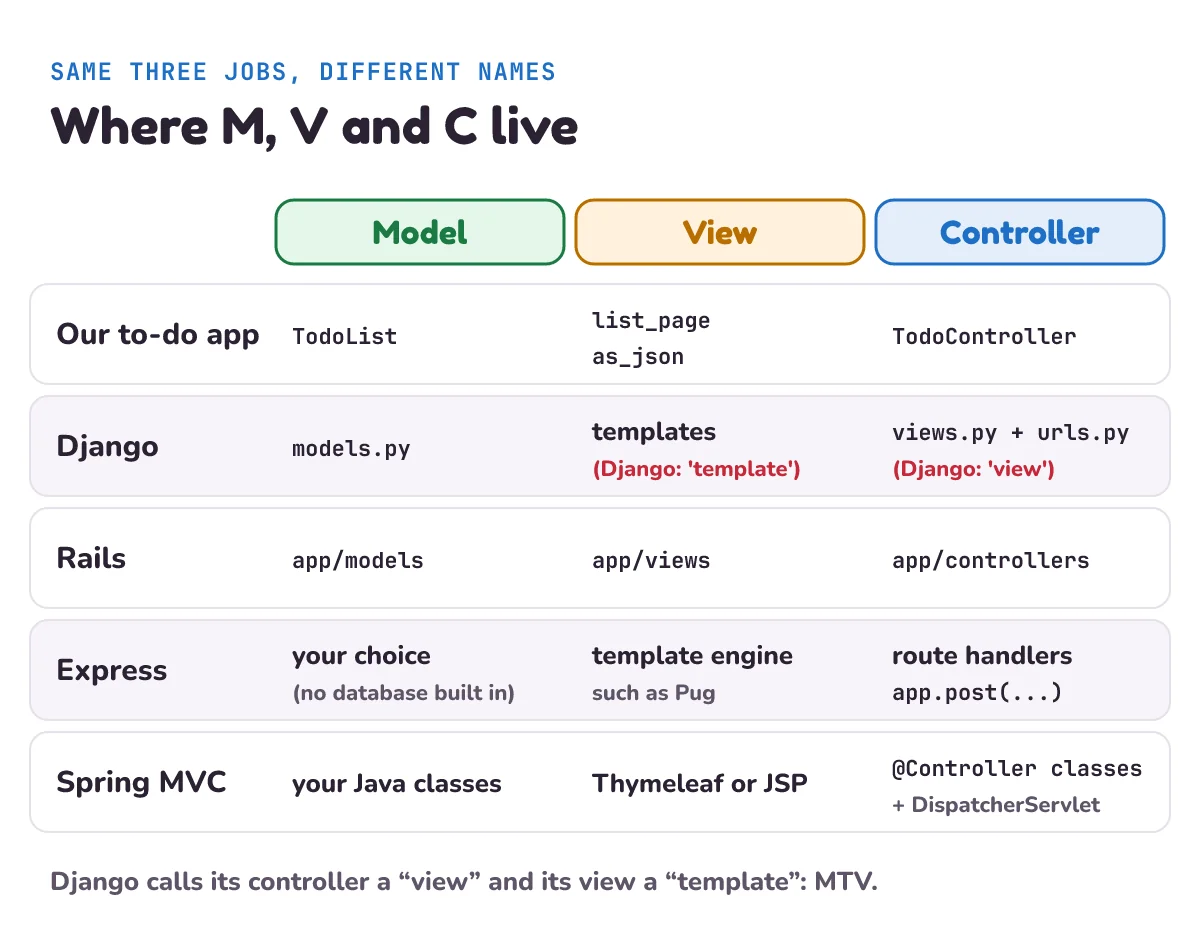
| Framework | Model | View | Controller |
|---|---|---|---|
| Django (Python) | Model classes | Templates | "Views" (functions) plus the URL configuration |
| Ruby on Rails | app/models | app/views | app/controllers |
| Express (Node.js) | Your choice | A template engine, such as Pug | Route handler functions |
| Spring MVC (Java) | Your Java classes | Templates such as Thymeleaf or JSP | @Controller classes, behind the DispatcherServlet |
Django calls itself MTV. Its FAQ even asks the question: "Django appears to be a MVC framework, but you call the Controller the “view”, and the View the “template”." Django's view is the function for a URL, and Django says it "describes which data you see, not how you see it". The template decides how it looks. As for the controller, Django says "it's probably the framework itself: the machinery that sends a request to the appropriate view, according to the Django URL configuration." So, in its own words, "you might say that Django is a “MTV” framework": model, template, view. Same three jobs, different names.
Rails is MVC by name. Its getting-started guide says "Rails code is organized using the Model-View-Controller (MVC) architecture." The app/ folder "Contains the controllers, models, views, helpers, mailers, jobs, and assets for your application." And Rails lists JSON as a view's job too: a view "Handles rendering responses in different formats like HTML, JSON, XML, etc." That's our as_json.
Express leaves it to you. Express is a small web framework for Node.js (JavaScript on the server). Its FAQ says "Express makes no assumptions in terms of structure" and "Express has no notion of a database." So the model is whatever you write. For views, a template engine "replaces variables in a template file with actual values, and transforms the template into an HTML file sent to the client." Your route handlers, such as app.post("/add", ...), are the controllers. Our REST API in Express post builds those handlers step by step.
Spring MVC adds a front controller. Spring's docs say Spring MVC "is designed around the front controller pattern where a central Servlet, the DispatcherServlet, provides a shared algorithm for request processing, while actual work is performed by configurable delegate components." A servlet is a Java class that answers web requests. In plain words: one front desk receives every request and passes it to the right @Controller class, the way a hotel reception sends you to the right department. Your controllers "use annotations to express request mappings" (an annotation is a tag like @PostMapping("/add") written above a method), and views can be any template technology, because Spring "defines the ViewResolver and View interfaces that let you render models in a browser without tying you to a specific view technology." Our wsgi_app plays a small version of that front-desk role.
When should you not use MVC?
MVC is a good default for a server that sends pages, but it has limits.
- Tiny scripts. A 30-line tool that reads a file and prints a total doesn't need three parts. Splitting it adds files to open and names to remember, and buys nothing. Split when a second view or a second way in (a phone app, a command) shows up.
- Screens with a lot going on. Fowler warns that MVC is "the most misquoted" pattern, and wrote in 2006 that "parts of classic MVC don't really make sense for rich clients these days." By rich clients he meant desktop-style apps, where buttons and boxes on the screen handle their own input. His essay goes on to the patterns built for them, including MVP and the Presentation Model, which is now usually called MVVM (below).
- Everything else in a real app. MVC says where data, display and request handling go. It doesn't say where to send emails, charge a card, call another company's service or run a job every night. If all that lands in the models, they grow into huge "fat models". Real apps add more layers, like services, repositories and background workers, which later posts in this series cover.
- Arguments about names. Since every framework draws the lines a little differently, "is this really MVC?" debates waste time. Fowler's advice is to treat MVC "as set of principles including the separation of presentation from domain logic", where presentation is what's shown and domain logic is the rules of the thing your app is about.
What mistake do beginners make with MVC?
The big one is the fat controller: putting rules in the controller because that's where the request arrives. Say the empty-title check lives inside the /add branch of the controller instead of in TodoList.add. It works. Then someone adds a /api/add route for the phone app, or a script that imports to-dos from a file, and neither goes through that branch. Empty to-dos sneak in through the side door.
The fix is the rule we followed above: rules go in the model, and the controller only asks. A quick test: if a line would still be true in a phone app, a command-line tool and a web page, it belongs in the model. If it's about HTTP (status codes, redirects, reading forms), it belongs in the controller. If it's about looks, it belongs in the view.
What are MVP and MVVM, and how do they differ from MVC?
MVC has two well-known cousins. Both keep the model the same and change how the screen and the logic talk.
MVP (model, view, presenter). The view is kept as plain as possible and passes every click to a presenter, which updates the model and then tells the view exactly what to show. Fowler writes that "presenters are a loose form of MVC controller." He later split his MVP write-up into two patterns, Supervising Controller and Passive View, depending on how much the view does by itself.
MVVM (model, view, view model). A view model holds everything the screen needs, already shaped for it, such as the text for a label or whether a button is on. The view binds to it, which means it's wired up so that when a value in the view model changes, the screen updates by itself. Microsoft's .NET docs describe it as: "The view model implements properties and commands to which the view can data bind to, and notifies the view of any state changes through change notification events." Fowler's name for the same idea was Presentation Model, and he notes "it is increasingly known as MVVM (Model-View-ViewModel)".
| MVC | MVP | MVVM | |
|---|---|---|---|
| The middle part | Controller | Presenter | View model |
| Who updates the screen | The view, from the data it's given | The presenter tells the view what to show | The screen follows the view model by itself (data binding) |
| Typical home | Server-side web frameworks | Desktop apps with forms | Apps with data binding, such as .NET apps |
For a web server that sends pages or JSON, MVC is the split Rails, Django and Spring MVC are built around. For an app with a busy screen and data binding, such as a .NET app, MVVM is the pattern Microsoft's docs teach.
1) Add a third view, as_text(items), that returns one line per to-do, like [x] Buy milk or [ ] Water the plants. Which of the three parts do you need to change?
2) New rule: no two to-dos may have the same title (ignoring capitals). Where does the check go, and what should /add answer when it fails?
3) In a Django project, which file plays the controller's part, and which plays the view's?
Show the answers
1) Only the view, plus one line in the controller to give it a URL. The model doesn't change at all, which is the point of MVC.
def as_text(items):
    return "\n".join(("[x] " if i["done"] else "[ ] ") + i["title"] for i in items)

print(as_text(app.model.items))
# [x] Buy milk
# [ ] Learn the <table> tag
2) In the model, inside TodoList.add, before the item is saved: if any(i["title"].lower() == title.lower() for i in self.items): raise ValueError("You already have that one."). The controller doesn't change: it already catches ValueError and answers 400 with the model's message. That's the payoff of keeping rules in the model.
3) The "view" function in views.py, together with the URL configuration in urls.py, does the controller's job. The template file does the view's job. Django calls this MTV: model, template, view.
Questions people ask
What does MVC stand for?
Model, view, controller: a way to split an app into three parts with separate jobs. The model keeps the data and the rules, the view shows the data, and the controller takes each request, asks the model, and picks a view. Like a restaurant: the kitchen cooks, the waiter takes orders, and the dish is served on a plate or in a box.
Is MVC a design pattern or an architecture?
Both words are used. Fowler lists it among his patterns, and frameworks like Rails call it their architecture. It's a pattern for how the parts of an app's user-facing side are split, which shapes the whole app's folder layout.
Is MVC frontend or backend?
It started on the desktop, in Smalltalk programs in the late 1970s. Today you'll mostly meet it on the backend (the server), in frameworks like Rails, Django and Spring MVC, where the "view" is the HTML or JSON the server sends back.
Does a REST API use MVC?
Usually, yes. An API has models and controllers like any web app. Its view is the JSON it sends back instead of an HTML page, like our as_json. Rails says a view handles "different formats like HTML, JSON, XML".
Is Django MVC or MTV?
Django calls itself MTV: model, template, view. It's the same split as MVC with different names. Django's "view" decides which data to show (MVC's controller job), and its "template" decides how it looks (MVC's view). The framework's URL routing does the rest of the controller's work.
What is the difference between MVC, MVP and MVVM?
All three keep the model separate. They differ in the middle part. In MVC a controller handles input and picks a view. In MVP a presenter tells a very plain view exactly what to show. In MVVM the screen is bound to a view model and updates by itself when the view model changes.
Where does validation go in MVC?
In the model. Rules like "a title is required" or "no duplicate emails" belong to the data, so every way into the app that goes through the model (web page, API, import script) gets the same rules. The controller only turns the model's "no" into the right response, such as a 400 with the message.
Keep going
- This is post 1 of the letsBug System Design series, one pattern a day. Next: How NGINX works, the web server that sits in front of apps like this one.
- Controllers in JavaScript: REST API in Express.js: CRUD with Express 5, step by step.
- More plain Python, one careful step at a time: sentinel values in Python.
- Logins for an API like ours: JWT authentication API in Node.js and Express.
Checked on 26 October 2026 against the 17 sources below.
Sources
- Martin Fowler: Model View Controller, Patterns of Enterprise Application Architecture (Reenskaug, Smalltalk, late 1970s; three roles)
- Martin Fowler: GUI Architectures (most misquoted, rich clients, MVC as principles, presenters vs controllers)
- Martin Fowler: Retirement note for Model View Presenter (split into Supervising Controller and Passive View)
- Martin Fowler: Presentation Model (also known as MVVM)
- Microsoft Learn: Model-View-ViewModel (MVVM), .NET MAUI (view models and data binding)
- Django documentation: FAQ: General (MTV, which part is the controller)
- Django documentation: Models
- Ruby on Rails Guides: Getting Started with Rails (MVC basics, the
app/folder) - Ruby on Rails Guides: Action Controller Overview
- Express: FAQ (no assumed structure, no notion of a database)
- Express: Using template engines with Express
- Spring Framework: DispatcherServlet (front controller)
- Spring Framework: Annotated Controllers
- Spring Framework: View Resolution
- OWASP: Cross Site Scripting (XSS)
- Python documentation: html (
html.escape) - Python documentation: wsgiref (not for production)
Every code sample in this post was run in Python 3.13 before publishing.