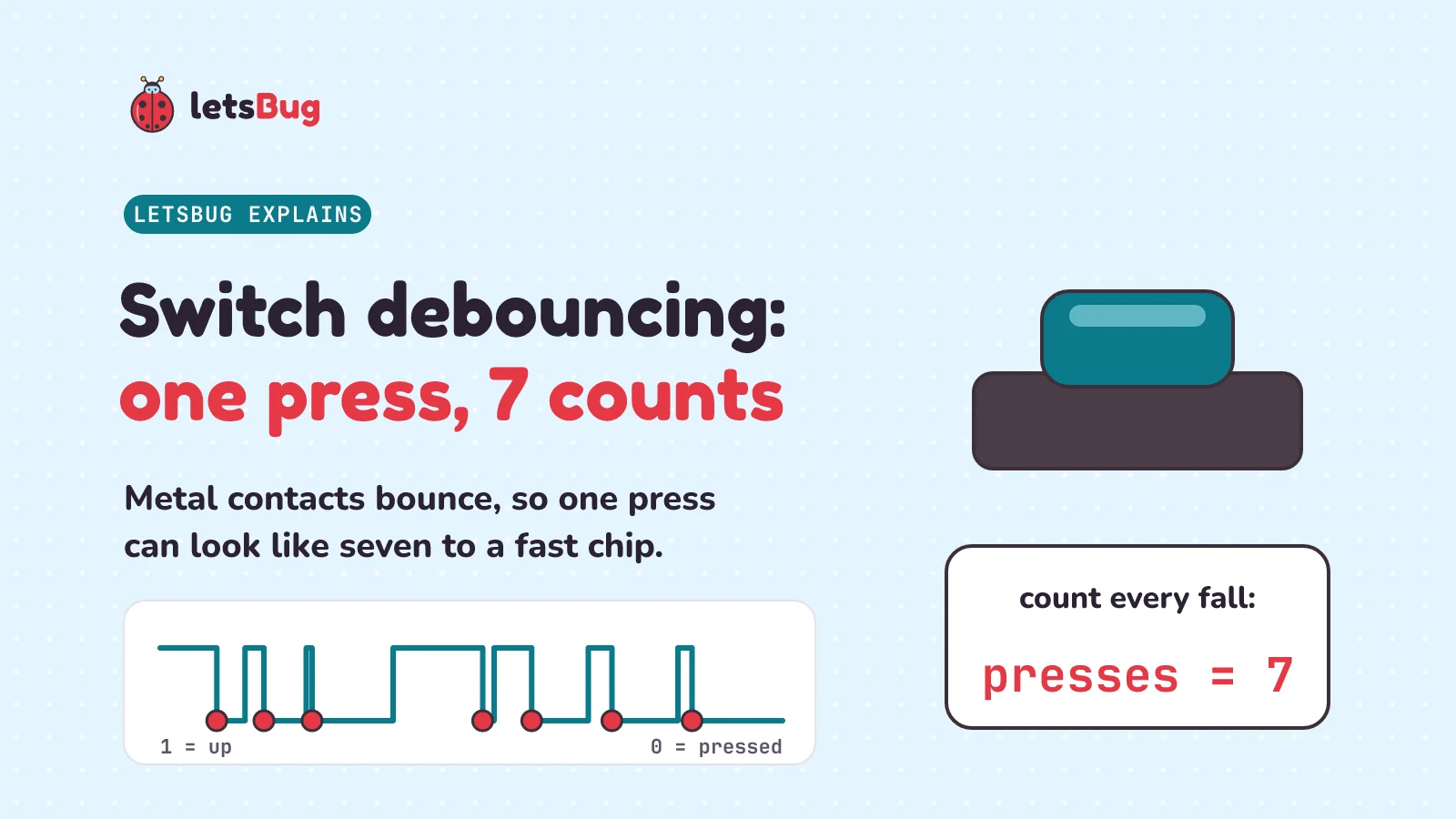
Switch debouncing turns one bouncy button press back into one count. A button's contacts are springy metal, so they hit, bounce apart and hit again before settling. A fast chip can count every bounce as a press. A common debouncer believes a change only once the signal has stayed steady for a set time, such as 5 or 50 milliseconds.
In this post we open up a button, read real bounce measurements from an engineer's tests, and see why a chip notices it. Then we write the naive code that counts one press as seven, fix it two ways in Python that you can run, try a phantom-press puzzle, and meet the hardware fixes.
Key takeaways
- A button's contacts are springy metal. When they close, they bounce apart and touch again several times before they settle. This is called contact bounce, or chatter.
- In Jack Ganssle's tests of 18 switches, 16 bounced for 1.6 ms on average (1,557 microseconds) and never more than 6.2 ms. One red pushbutton bounced for up to 157 ms when it was let go.
- A chip is far faster than that. At 16 MHz (16 million clock ticks a second), 1.557 ms is 24,912 clock ticks, so code that reads the pin in a loop can see the flickers.
- One high-quality switch, operated once, gave 7 short lows and 7 short highs: 14 short flickers. Code that counts every fall from 1 to 0 counts at least 7 presses.
- Wait until steady (QMK, a keyboard program, calls it "defer"): restart a timer on every change, and believe the new level only when it has lasted the debounce time. Arduino's example waits 50 ms. QMK's default debounce time is 5 ms.
- Eager: act on the first change at once, then ignore the pin for a while (a lockout). It's quicker, but a noise blip (a random flicker on the wire) or a late bounce can fool it.
- Hardware can do it too: a resistor and capacitor smooth the flickers, a Schmitt trigger (an input with two switching levels) turns the result into one clean step, and a latch (a 1-bit memory) can hold the first touch of a two-way switch.
This post goes with letsBug Explains, episode 6. Watch it, or read on: the post adds both debouncers in Python that you can run, the phantom-press puzzle worked out by the code, and practice questions with answers.
What is switch bounce?
Myth or fact: when you press a button, its metal contacts close once, cleanly? Myth. Wikipedia's switch article explains: "Switch and relay contacts are usually made of springy metals. When the contacts strike together, their momentum and elasticity act together to cause them to bounce apart one or more times before making steady contact." (A relay is a switch that an electromagnet flips.) Momentum means the moving contact keeps going when it hits. Elasticity means springy metal springs back. Together, they make the contact bounce, like a ball dropped on a floor.
This is called contact bounce. Wikipedia: "Contact bounce (also called chatter) is a common problem with mechanical switches". You may have met it already. In our post on how a rotary encoder works, the spec sheet of the EC11 encoder (the kind inside a volume knob) lists "Bounce: 2ms max.", and we said that cleaning it up needs its own episode. This is that episode.
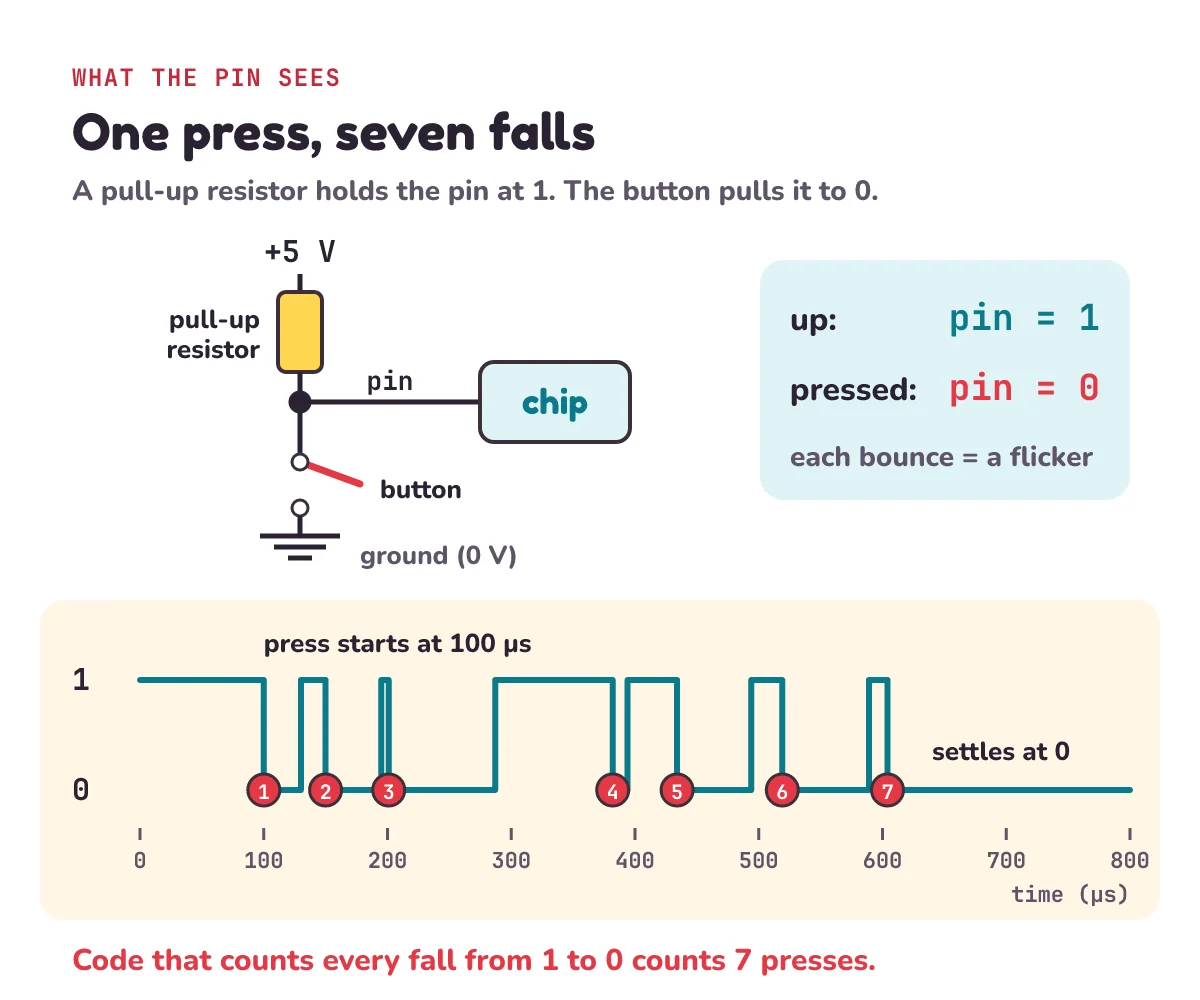
How does a bounce reach the chip? The button is wired to a pin, a metal leg of the chip that it can read as 1 or 0. A pull-up resistor joins the pin to the + side of the power supply, so it gently holds the pin at 1 when nothing else is connected. In Wikipedia's words, a pull-up resistor "ensures that a wire will have a high logic level" (a high voltage, which the chip reads as 1) when nothing else is pushing the wire to 1 or 0. Press the button, and the contacts connect the pin straight to 0 volts (ground), so the pin reads 0. So 1 means up and 0 means pressed. Every bounce opens the contacts for a moment, so the pin flickers: 0, 1, 0, 1, and then settles at 0.
How long does switch bounce last?
The engineer Jack Ganssle wanted real numbers, because, as he wrote, "we working engineers need some empirical information" (facts from measuring, not guessing). So he collected switches: "Eventually I had 18 very different kinds of switches." He pressed and released each one again and again while an oscilloscope (a screen that draws a voltage as it changes over time) recorded the signal. His test circuit used "A 5 volt supply and 1k pull-up": a 1,000-ohm pull-up resistor (the ohm is the unit of resistance), the same kind of wiring as above.
Two units first. A millisecond (ms) is a thousandth of a second. A microsecond (µs) is a millionth of a second, so 1,000 µs make 1 ms.
| Switch | Bounce |
|---|---|
| 16 of Ganssle's 18 switches, on average | 1,557 µs, about 1.6 ms |
| Those 16 switches, the longest bounce | 6,200 µs, 6.2 ms |
| Switch E, a red pushbutton, when let go | 157 ms at worst, almost 1/6 of a second |
| Switch E when pressed | never more than 20 µs |
| Alps EC11 encoder (spec sheet) | 2 ms at most |
Ganssle writes µs as "µsec" and ms as "msec". He wrote that "Only two switches exhibited bounces exceeding 6200 µsec." He left those two out to work out the average for the other 16.
The worst was switch E, "what seemed like a nice red pushbutton". When he let go of it, it bounced for up to 157 ms. When he pressed it, the bounce was tiny: "it never exceeded a 20 µsec bounce when closed."
So bounce happens when you let go, too, not just when you press. It can be very different each way: "Seven of the switches consistently bounced much longer when closed than when opened." It changes from switch to switch and press to press. QMK is firmware: the built-in program that runs many custom keyboards. Its docs say that the time a switch takes to settle "might vary with switch type, age, and even pressing technique". Ganssle's advice is short: "Assume things are worse than shown."
The EC11's 2 ms limit is a little above the 1.6 ms average of Ganssle's 16 switches, and well below their longest bounce, 6.2 ms. A spec sheet gives a limit the maker promises, while Ganssle measured what real switches did.
Why does a microcontroller see switch bounce?
To you, 1.6 ms is nothing. To a chip, it's a long time. A microcontroller is a small computer on one chip, built to read buttons and sensors (like the ESP32 in our LED blink post). The Arduino Uno is a small board that is popular for learning electronics. Its documentation says it is "based on the ATmega328P" (the microcontroller chip on the board) and has "a 16 MHz ceramic resonator". The resonator sets the chip's clock, the steady tick that paces everything the chip does. 16 MHz (megahertz) means 16 million ticks every second.
In 1,557 µs, the average bounce, the clock ticks 0.001557 × 16,000,000 = 24,912 times, about 25,000. Code that reads the pin over and over, in a loop, can read it many times during one bounce, and see each flicker.
Ganssle's switch O shows how much a good switch can still flicker. It "is a very nice, high quality microswitch which never showed more than 1.18 msec of bouncing." (A microswitch is a small switch that clicks with a tiny push.) But: "One actuation yielded 7 clean zeroes levels ranging in time from 12 to 86 µsec, and 7 logic ones varying from 6 to 95 µsec." He means 7 clean zero levels. An actuation is one operation of the switch. (He doesn't say if it was a press or a release.) That's 7 short lows and 7 short highs: 14 short flickers. The video calls these 14 flips. Even the shortest high, 6 µs, lasts 0.000006 × 16,000,000 = 96 clock ticks.
A loop might still miss the very shortest flickers. But Ganssle warns that a narrow first pulse "might escape your polled I/O, but would surely fire off an interrupt". Polled I/O (input/output) means reading the pin in a loop. An interrupt is a signal that makes the chip stop what it is doing and run some code as soon as the pin changes. An interrupt will catch even the narrow ones. Wikipedia says bounce causes problems in some circuits "that respond fast enough to misinterpret the on‑off pulses as a data stream": they mistake the flickers for a run of real 1s and 0s.
Why does my button count more than one press?
Here is the naive code: the simplest first try. We don't need a real button. We describe one press as a list of changes: at this time, in microseconds, the pin became this level. The bounce is made up, but shaped like Ganssle's switch O: 6 short lows of 12 to 86 µs and 6 short highs of 6 to 95 µs, then a 7th low that stays. We made it fall exactly 7 times, once for each of switch O's 7 short lows (our 7th low is the one that stays). The rule is simple: every time the pin falls from 1 to 0, count a press.
# One press of a bouncy button: (time in microseconds, the pin's new level).
# 1 = up (the pull-up resistor holds the pin at 1), 0 = pressed (the contacts pull it to 0).
PRESS = [(0, 1), (100, 0), (130, 1), (150, 0), (195, 1), (201, 0), (287, 1),
         (382, 0), (394, 1), (434, 0), (494, 1), (519, 0), (589, 1), (604, 0)]

def level(trace, t):
    """What the pin reads at time t."""
    now = trace[0][1]
    for when, new in trace:
        if when <= t:
            now = new
    return now

def naive(trace, end):
    presses, last = 0, trace[0][1]
    for t in range(end):                 # read the pin once every microsecond
        reading = level(trace, t)
        if last == 1 and reading == 0:   # it fell from 1 to 0: count a press
            presses += 1
        last = reading
    return presses

print(naive(PRESS, 2000)) # 7: one press, counted seven times7Line by line:
PRESSis a list of pairs.(100, 0)means "at 100 µs, the pin became 0". The first pair,(0, 1), says the button starts up. The press starts at 100 µs, and the last change is at 604 µs, so the whole bounce lasts 504 µs, about half a millisecond.traceis our list of changes, likePRESS.level()plays the role of the pin. It goes through the changes in order and keeps the last one that has already happened by timet.naive()plays the role of the chip.for t in range(end)reads the pin once every microsecond, from 0 to 1,999.lastremembers the reading before, so the code can spot a fall: last time 1, this time 0.
The code counted 7 presses for one. If that button changed TV channels, you'd jump seven channels instead of one. On a keypad, you'd type the same digit seven times. QMK's docs say that without debouncing, "often actions that happen when the switch is pressed are repeated multiple times."
How does debouncing work?
The fix is called debouncing. One common way, the one Arduino's example uses: don't believe a change until it has lasted. When the pin changes, start a timer. If it flickers again, start the timer over. Only when the pin has stayed the same for a set time, the debounce time, accept the new level. Wikipedia describes the idea: "multiple samples of the contact state can be taken at a low rate and examined for a steady sequence, so that contacts can settle before the contact level is considered reliable and acted upon." Real code can read much less often, at that "low rate". Ours reads every microsecond, so that you can see every flicker.
Arduino's own Debounce example does exactly this. One comment in its code says "If the switch changed, due to noise or pressing:", and the next one says "reset the debouncing timer". Once the reading has stayed the same for longer than the delay, the code will "take it as the actual current state". QMK calls this style defer: "wait for no changes for DEBOUNCE ms before reporting change." Here it is in Python, added to the code above:
def steady(trace, end, wait):
    """Wait until steady: believe a new level only once it has lasted `wait` microseconds."""
    state = last = trace[0][1]
    changed_at = 0
    for t in range(end):
        reading = level(trace, t)
        if reading != last:              # it changed: start the timer over
            changed_at, last = t, reading
        if reading != state and t - changed_at >= wait:   # steady for long enough
            state = reading
            print(f"{t / 1000:g} ms:", "pressed" if state == 0 else "released")

steady(PRESS, 20_000, wait=5_000)        # QMK's default wait: 5 ms
5.604 ms: pressedstateis what the code believes: up (1) or pressed (0).lastis the reading before, as innaive().state = last = trace[0][1]starts both at the first level, andchanged_at, last = t, readingsets two names in one line.changed_atis the timer. Every change, even a tiny flicker, moves it to now.t - changed_atis how long the pin has stayed the same. Only when that reacheswait, and the reading is different from what we believe, do we accept it.20_000is just 20000: Python lets you put_in a number to make it easier to read. Anfbefore the quotes lets Python put values inside{ }, and{t / 1000:g}prints the time in milliseconds without extra zeros."pressed" if state == 0 else "released"picks one word or the other.
The last change was at 604 µs, which is 0.604 ms. Add the 5 ms wait: the press is accepted at 0.604 + 5 = 5.604 ms, and only once. The cost is a small delay: the code reports the press 5 ms after the contacts settle.
What debounce time should you use?
Pick a wait longer than any quiet gap inside a bounce (a moment when the pin holds still before it flickers again), but short enough that you don't notice the wait. Arduino's example waits 50 ms: "unsigned long debounceDelay = 50; // the debounce time; increase if the output flickers". QMK's docs say: "Default debounce time is 5 milliseconds". A 5 ms wait reports a press sooner. A 50 ms wait leaves more room for long bounces.
One thing to know before you copy the Arduino example: it wires the button in the opposite way to ours. Its notes say "pushbutton attached from pin 2 to +5V" (the 5-volt supply) and "10 kilohm resistor attached from pin 2 to ground" (10,000 ohms), so the resistor pulls the pin down, and a press reads 1, not 0. The debounce idea is the same.
Fast inputs need care. In the rotary encoder post, spinning the EC11 a whole turn in a quarter of a second gives a change on A or B about every 4 ms. They take turns, so each contact changes about every 8 ms. Its bounce can last up to 2 ms. A 50 ms wait would miss whole clicks, because a contact never stays the same for 50 ms during the spin. The timer has to finish before that contact's next real change. After a 2 ms bounce, that leaves about 6 ms of quiet, far less than 50 ms.
The decoder from that post also helps. An encoder has two contacts, A and B, and each reading of both (like 10) is one state. The decoder turns each step between states into +1 or −1. A bounce on one contact just steps back and forth between two neighbouring states, 00, 10, 00, 10, which counts +1, −1, +1. The total still comes out right: +1. But this only works if the chip reads every flicker. If it misses a flicker just as the other contact changes, it can see both contacts change at once, and then it can't tell which way the knob went. So encoders still need debouncing.
What is eager debouncing?
There's a quicker style too, called eager. Act on the very first change at once, then ignore the pin for a while. That ignore time is a lockout. QMK describes it: "Eager - any key change is reported immediately. All further inputs for DEBOUNCE ms are ignored."
def eager(trace, end, lockout):
    """Eager: act on the first change at once, then ignore the pin for `lockout` microseconds."""
    state = trace[0][1]
    ignore_until = 0
    for t in range(end):
        if t < ignore_until:
            continue                     # locked out: don't even look
        reading = level(trace, t)
        if reading != state:             # a change: act on it at once
            state = reading
            print(f"{t / 1000:g} ms:", "pressed" if state == 0 else "released")
            ignore_until = t + lockout

eager(PRESS, 20_000, lockout=5_000)
0.1 ms: pressedThe press is reported at 0.1 ms, the moment the contacts first touch, about 5.5 ms sooner than the wait-until-steady code. continue jumps to the next pass of the loop, so during the lockout the code doesn't even read the pin. But QMK adds a warning: "Eager algorithms are not noise-resistant." Noise is an unwanted blip on a wire. Here are both debouncers with a 20 µs blip while nobody touches the button:
# nobody touches the button: a 20 microsecond blip of noise
GLITCH = [(0, 1), (3_000, 0), (3_020, 1)]
print("eager:")
eager(GLITCH, 20_000, lockout=5_000)
print("wait until steady:")
steady(GLITCH, 20_000, wait=5_000)
eager:
3 ms: pressed
8 ms: released
wait until steady:The eager code reported a press that never happened. The wait-until-steady code printed nothing, because the blip never lasted 5 ms. QMK also says the opposite about defer: "Defer algorithms are noise-resistant". So you have to choose. Eager is quicker to respond. Wait-until-steady is harder to fool. QMK lets keyboard makers choose: "Keyboards may select one of the core debounce methods".
| Wait until steady (defer) | Eager | |
|---|---|---|
| When it reports a press | After the pin has stayed the same for the wait | At the first change |
| A 20 µs blip of noise | Ignored | Counted as a press |
| Our press, 5 ms setting | 5.604 ms | 0.1 ms |
| Who uses it | Arduino's Debounce example; QMK (defer) | QMK (eager) |
What goes wrong with eager debouncing?
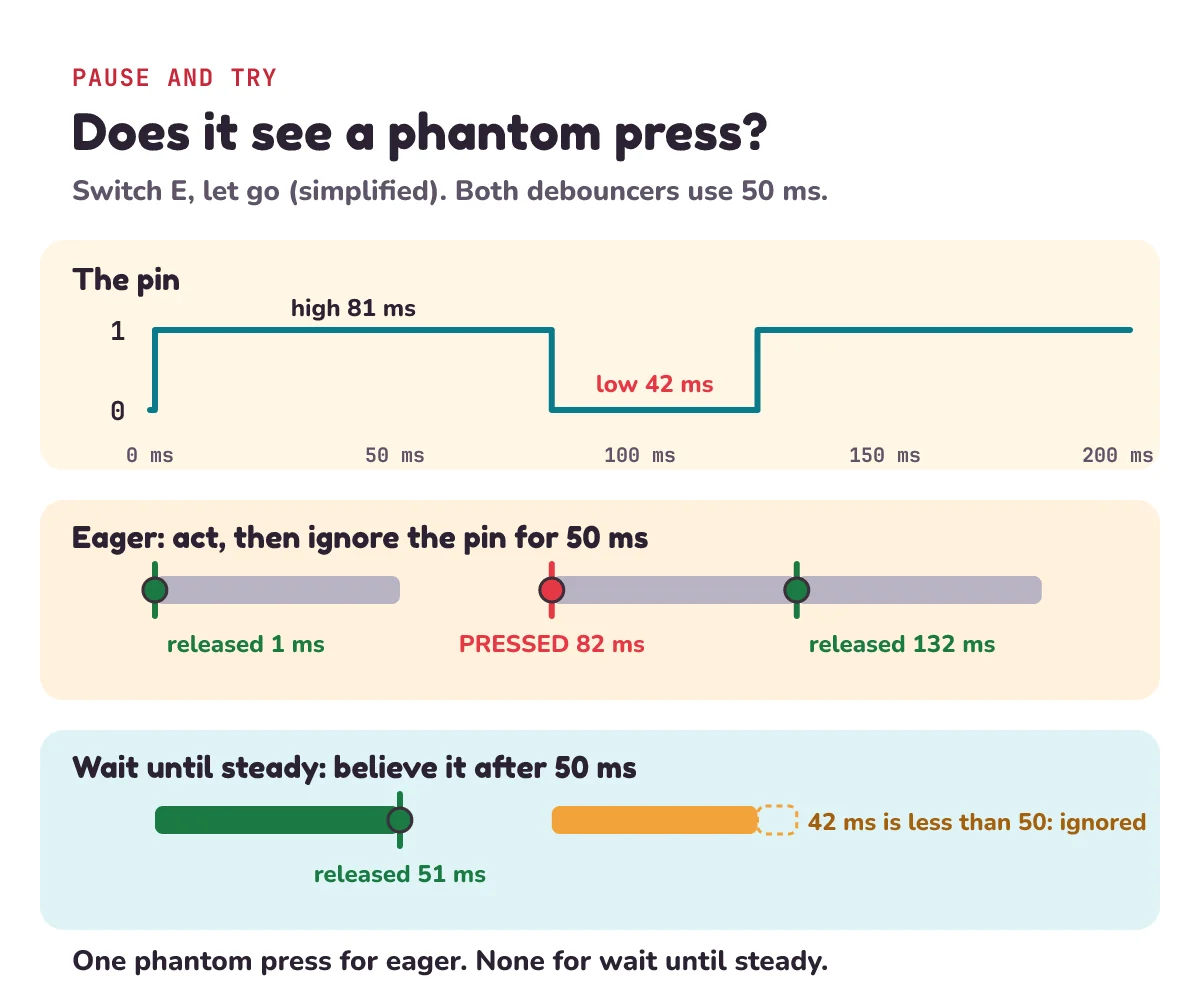
Pause and try this one before you read on. Your code is eager: on a change, it acts at once, then ignores the pin for 50 ms. You let go of Ganssle's red pushbutton, switch E. He wrote: "Consider switch E again, that one with the pretty face that hides a vicious 157 msec bouncing heart." He means it looked good but bounced badly. Then: "One test showed the switch going to a solid one for 81 msec, after which it dropped to a perfect zero for 42 msec before finally assuming its correct high state." Does your code see a phantom press, a press that nobody made?
The code can answer. We simplify the trace (our list of changes) to just those three levels, and start the release at 1 ms:
# Ganssle's switch E, let go (simplified): up at 1 ms, high for 81 ms, low for 42 ms, then high for good.
RELEASE_E = [(0, 0), (1_000, 1), (82_000, 0), (124_000, 1)]
print("eager, 50 ms lockout:")
eager(RELEASE_E, 300_000, lockout=50_000)
print("wait until steady, 50 ms:")
steady(RELEASE_E, 300_000, wait=50_000)
eager, 50 ms lockout:
1 ms: released
82 ms: pressed
132 ms: released
wait until steady, 50 ms:
51 ms: releasedYes, a phantom press. The eager code acts on the release at 1 ms, and its lockout ends at 1 + 50 = 51 ms. At 1 + 81 = 82 ms, the pin drops to 0, so the code counts a new press. It ignores the pin for another 50 ms, then sees it high again at 132 ms.
The wait-until-steady code accepts the release at 51 ms, because the pin stayed high for 50 ms. Then the low lasts only 42 ms, less than the 50 ms wait, so it is never believed. There is no phantom press.
Wait-until-steady can be fooled too. If that low had lasted 60 ms, longer than the 50 ms wait, it would have counted a press too. As the Arduino comment says, "increase if the output flickers".
How do you debounce a switch with hardware?
You can also debounce with parts instead of code.
- Resistor and capacitor. A capacitor is a part that stores a little electric charge. Ganssle explains the trick in part two of his guide: "Charge or discharge a capacitor through a resistor and you'll find the voltage across the cap rises slowly; it doesn't snap to a new value". (The cap is the capacitor.) So the flickers are smoothed into one slow change, like a shock absorber. QMK calls this "an RC filter" (R for resistor, C for capacitor). It is a kind of low-pass filter: it lets slow changes through and weakens fast ones.
- Schmitt trigger. A threshold is the level the input must cross to flip between 0 and 1. A slow change can wobble around a single threshold and flip the output back and forth. A Schmitt trigger input fixes that, because "the circuit has two different thresholds": one to flip up and a lower one to flip back down. A small wobble near one threshold can't reach the other. Ganssle: "These devices have hysteresis; the inputs can dither yet the output remains in a stable, known state." (Hysteresis is this gap between the two thresholds, and to dither is to wobble.)
- Latch. Some switches have two contacts, and the moving part flips from one to the other (a double-throw switch). An SR (set-reset) latch is a tiny memory that stores "a single bit (binary digit) of data". Ganssle: "Two cross-coupled NAND gates form a very simple Set-Reset (SR) latch." NAND (not-AND) gates are logic gates (tiny circuits that turn input bits into an output bit), and cross-coupled means each one feeds its output into the other. The first touch on one contact sets the latch. When that contact bounces, it lifts off, but in Ganssle's words it "will never bang all the way back to the other contact", so nothing resets the latch. We'll build one on letsBug Builds.
Back to the myth
So, a button's contacts usually don't close just once. They chatter, about 1.6 ms on average in Ganssle's tests, sometimes for much longer, and when you let go as well as when you press. Keyboards need debouncing, and so does the encoder from episode 4. One press usually counts as one because someone wrote, or built, a debouncer.
1) A chip runs at 48 MHz. How many clock ticks is 2 ms of bounce?
2) Wait-until-steady with a 20 ms wait. You press a button, and the pin changes at 0, 0.4, 1.1, 1.5 and 2.0 ms, then stays low. When is the press accepted?
3) An eager debouncer has a 10 ms lockout. You press the button, and 12 ms later the contacts bounce open for a moment, once. What happens?
4) With no debouncing, the pin reads 1, 0, 1, 0, 0, 1, 0 and then stays 0. How many presses does the naive code count?
Show the answers
1) 0.002 × 48,000,000 = 96,000 ticks.
2) 20 ms after the last change: 2.0 + 20 = 22 ms.
3) The lockout has ended, so the code reports a release that never happened, then a press again: one press is counted twice.
4) The pin falls from 1 to 0 three times, so it counts 3 presses.
Questions people ask
What is switch debouncing?
Debouncing turns the burst of flickers from one bouncy press back into one clean change. The common way is to wait until the signal has stayed the same for a set time, the debounce time, before believing it. It can be done in code or with parts such as a resistor, a capacitor and a Schmitt trigger.
Why does my Arduino button register multiple presses?
The button's metal contacts bounce, so the pin flickers between 1 and 0 for a short while after each press or release. Code that counts every change counts every flicker. Add debouncing: Arduino's Debounce example waits until the reading has been steady for 50 ms. Its loop works like steady() in this post, using millis() (the milliseconds since the board started) for the time.
Is 1 ms of switch bounce normal?
Yes. In Jack Ganssle's tests of 18 switches, the 16 shorter-bouncing ones averaged about 1.6 ms, and none went over 6.2 ms. One red pushbutton bounced for up to 157 ms when it was let go. The Alps EC11 encoder's spec sheet allows up to 2 ms.
Is 50 ms debounce too long?
For a push button, Arduino's own example uses 50 ms, and its code comment says to increase it if the output flickers. For a fast input like an encoder, it is too long: on a fast spin, each contact changes about every 8 ms. QMK keyboard firmware uses 5 ms by default.
What is the difference between eager and defer debouncing?
Eager reports a change at once, then ignores the pin for the debounce time. It's quick, but QMK says eager algorithms are not noise-resistant. Defer, or wait until steady, reports a change only after the pin has stopped changing for the debounce time. It's a little slower, and harder to fool.
Can you debounce a button without code?
Yes. A resistor and a capacitor make a low-pass filter that smooths the flickers. A Schmitt trigger input, with its two thresholds, turns the smoothed signal into one clean step. A switch with two contacts can drive an SR latch that holds the first touch.
Keep going
- Watch the full lesson, Switch Debouncing Explained: One Button Press, 14 Flips (Arduino), and its Short, You Pressed the Button Once. The Chip Saw 14 Flips. Then see the rest of letsBug Explains on YouTube.
- Where we first met bounce: how does a rotary encoder work?, letsBug Explains episode 4.
- Ones and zeros as switches: what is a bit and a byte? Logic gates using switches.
- Try it on a real chip: ESP32 LED blink, your first program.
- The episode before this one: how does UPI work? One Rs 10 chai payment, step by step.
- The next episode: how touchscreens work, and why they ignore you in gloves.
Checked on 4 November 2026 against the 11 sources below.
Sources
- Jack Ganssle: A Guide to Debouncing, Internet Archive copy of 3 October 2026; the original page was no longer online on 4 November 2026 (18 switches; 1,557 µs average and 6.2 ms max for 16; switch E's 157 ms and its 81 ms and 42 ms levels; switch O's 7 lows and 7 highs; test circuit)
- Jack Ganssle: A Guide to Debouncing, part 2, Internet Archive copy of 5 September 2026 (the SR latch from two NAND gates; the RC network; Schmitt trigger inputs)
- Wikipedia: Switch (contact bounce and chatter; springy contacts; low-pass filtering; steady samples; Schmitt trigger and SR latch debouncing)
- Wikipedia: Schmitt trigger (two thresholds; switch debouncing circuit)
- Wikipedia: Low-pass filter (definition; resistor and capacitor circuit)
- Wikipedia: Flip-flop (electronics) (a latch stores one bit; a pair of cross-coupled inverting gates)
- Wikipedia: Pull-up resistor (holds a wire at a high logic level)
- QMK Firmware: Contact bounce / contact chatter (repeated actions; RC filter; 5 ms default; eager and defer)
- Arduino: Debounce.ino example (50 ms debounce delay; reset the timer on every change; pull-down wiring)
- Arduino: UNO R3 documentation (ATmega328P; 16 MHz ceramic resonator)
- Alps Alpine: EC11E15244G1 specifications (2 ms bounce)
Every code sample in this post was run in Python 3.13 before publishing.