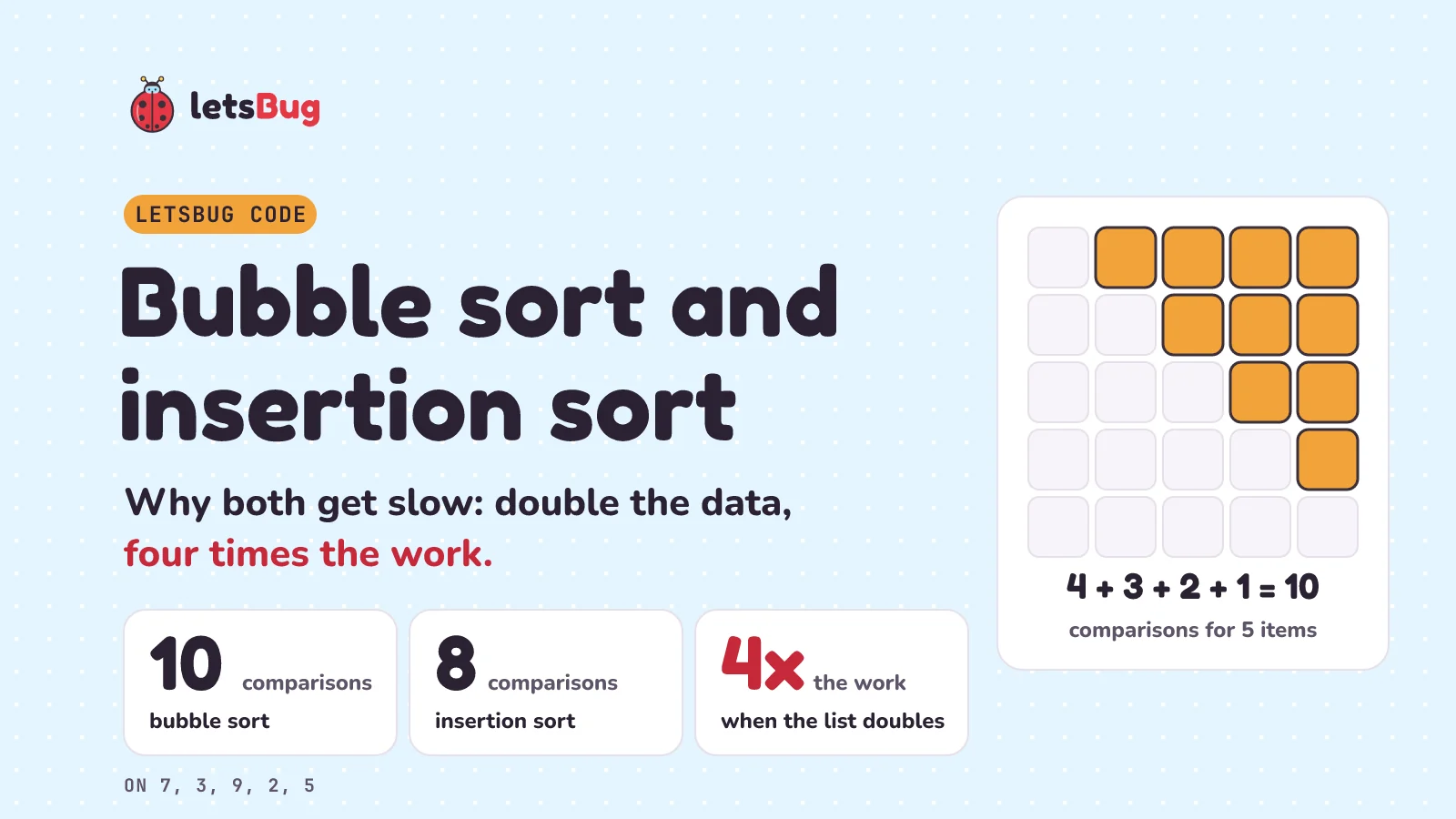
Bubble sort walks along a list comparing neighbours and swapping any pair that's out of order; each pass carries the biggest remaining item to the end. Insertion sort takes the items one at a time and slides each one left until it fits, like sorting a hand of cards. On random data, insertion sort usually wins: about half the comparisons.
In this post we trace both by hand on five numbers, write them in Python and in OCR's GCSE exam pseudocode, catch the classic mistakes, and count every comparison to see why a full spreadsheet would take bubble sort 549,755,289,600 of them. Both are six lines of Python, and both are O(n²) on average: on a random list, double the data and the work goes up four times.
Key takeaways
- Bubble sort compares neighbours and swaps them if the left one is bigger. Pass 1 puts the biggest item in its final place, pass 2 the second biggest, and so on.
- Insertion sort keeps the left part of the list sorted and slides each new item left past every bigger item.
- On 7, 3, 9, 2, 5, bubble sort makes 10 comparisons and insertion sort makes 8. Both make the same 6 swaps: one for every pair that starts out of order.
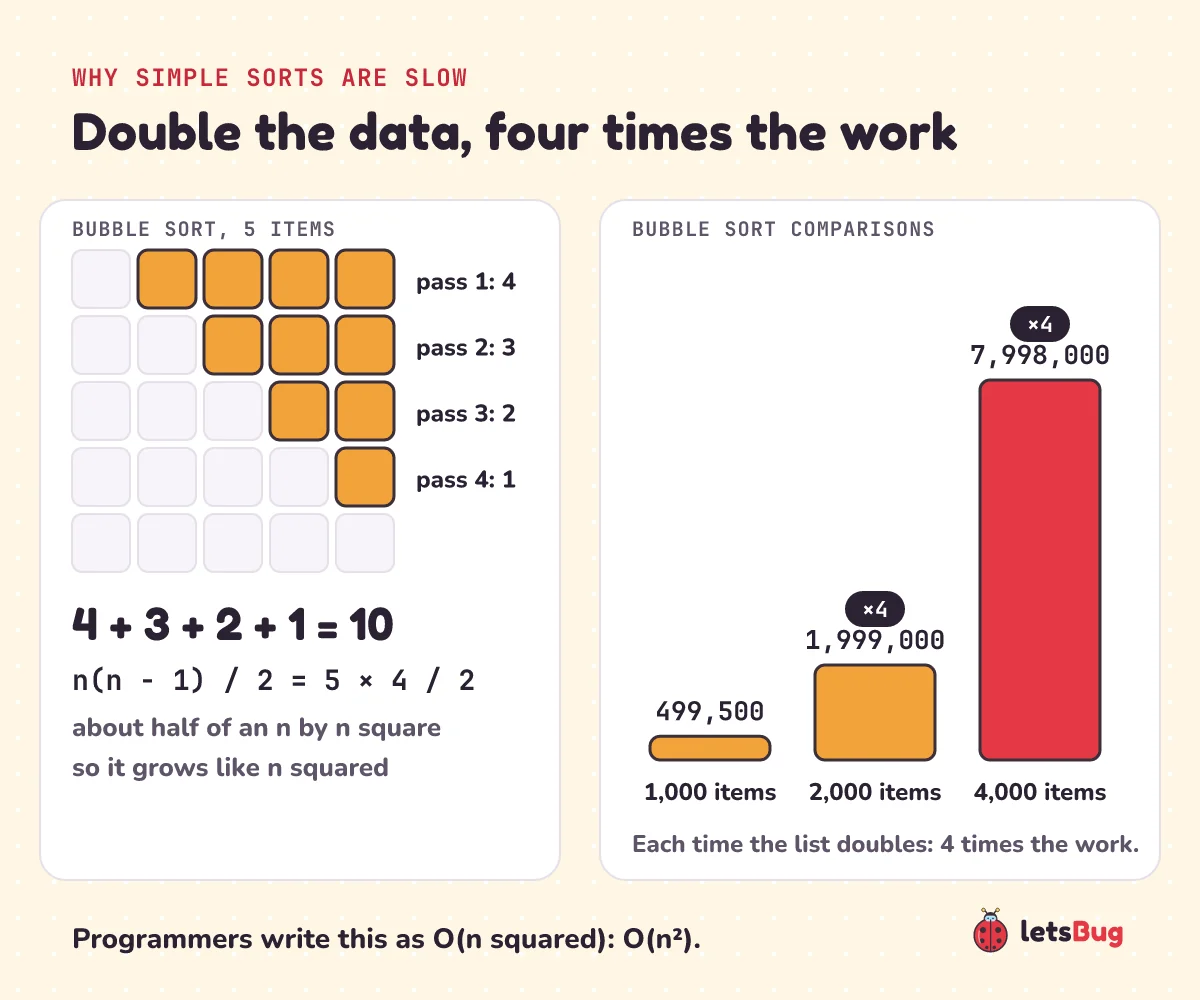
- Bubble sort (as usually written) always makes n(n − 1)/2 comparisons. Insertion sort makes n − 1 on a sorted list and n(n − 1)/2 on a reversed one. 1,000 items: 499,500. 2,000 items: 1,999,000, four times as many.
- Optimised bubble sort stops after a pass with no swaps, so a sorted list takes one pass: n − 1 comparisons.
- For OCR GCSE Computer Science (J277) you need to apply both sorts to a list and recognise their code or pseudocode. You don't have to remember the code.
- In real code, use
sorted()orlist.sort(). On 1,048,576 random numbers,sorted()made 19,651,111 comparisons, about 28,000 times fewer than bubble sort. And it still uses insertion sort for small pieces.
This post goes with letsBug Code, episode 2. Watch it first, or read on: everything in the video is here, plus the counting code, a side-by-side table and a challenge.
Sorting a million rows
Open a spreadsheet, pick a column and click Sort A to Z. Your contacts, a game's leaderboard, your emails by date: all of them are sorted by a program. A full Excel sheet holds 1,048,576 rows. That's 220, just over a million: the number behind the binary search post, where a million sorted items took at most 20 checks to search. But that list had to be sorted first. How?
Before we start, a prediction. Suppose a simple sort takes 1 second to sort 1,000 numbers. How long does it take for 2,000? The tempting answer is 2 seconds: double the data, double the work. Hold on to your answer; we come back to it below.
How does bubble sort work?
Here are five numbers: 7, 3, 9, 2, 5. Bubble sort walks along the list comparing neighbours. If the left one is bigger, they swap. Then it moves one step right and compares the next pair. One full walk along the list is called a pass.
On every pass, the biggest number not yet in place gets carried to the end, like a bubble rising to the top. That's where the name comes from.
Tracing pass 1
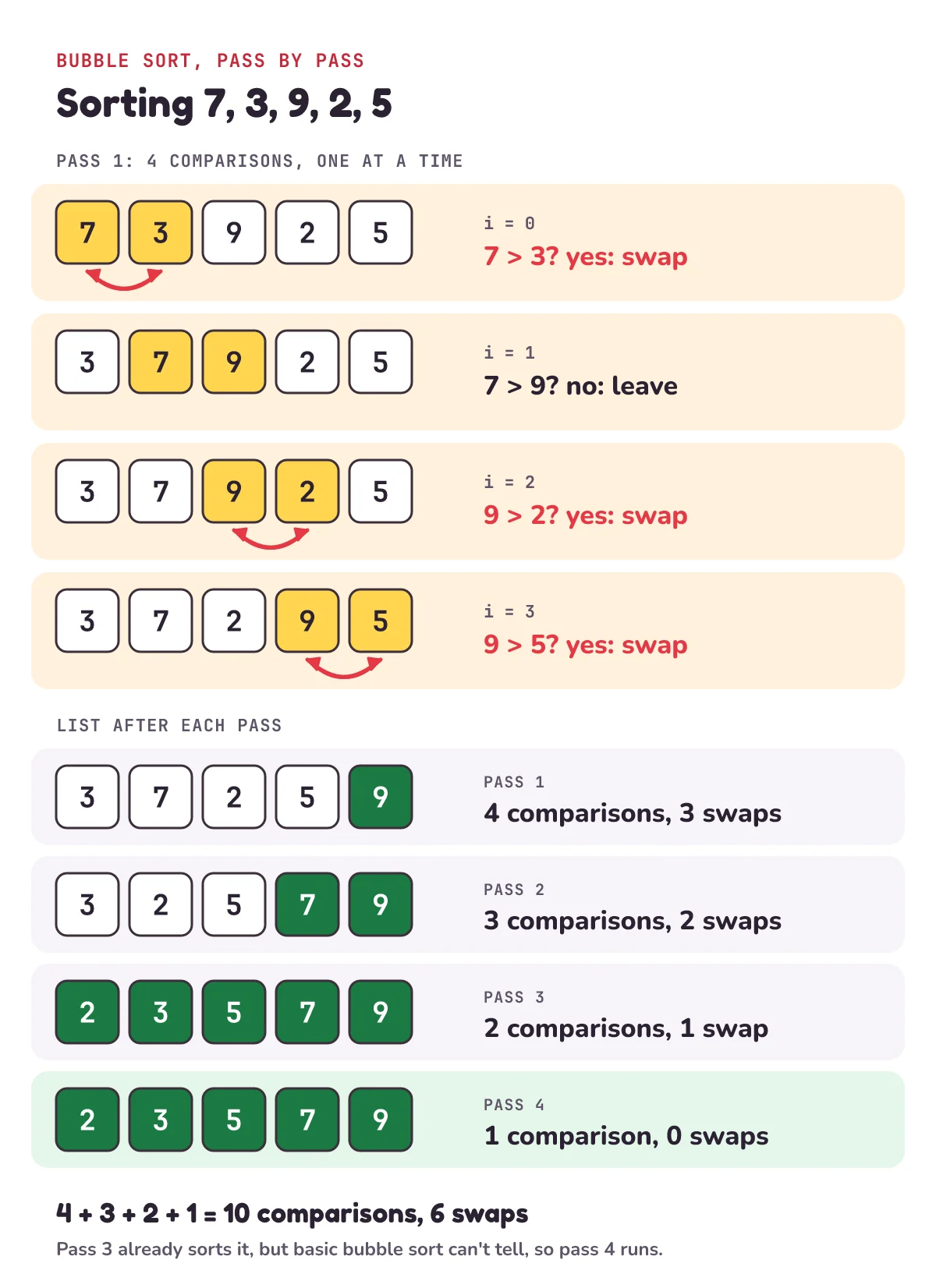
Let's trace the first pass, one comparison at a time. i is the position of the left number in each pair:
| i | Compare | Swap? | List after |
|---|---|---|---|
| 0 | 7 > 3? | yes | 3, 7, 9, 2, 5 |
| 1 | 7 > 9? | no | 3, 7, 9, 2, 5 |
| 2 | 9 > 2? | yes | 3, 7, 2, 9, 5 |
| 3 | 9 > 5? | yes | 3, 7, 2, 5, 9 |
That's 4 comparisons and 3 swaps. The 9 has reached the end, its final place, and it never moves again. Notice row 1: nothing changed, but it's still a row in the trace. Skipping the "no change" rows is an easy way to lose track.
The other passes: 10 comparisons
Here's the classic slip: writing the list after one pass as if it's sorted. It isn't. After pass 1 we have 3, 7, 2, 5, 9, and only the 9 is in its final place. So we keep going, and each pass is one comparison shorter, because the end of the list is already done:
| Pass | Comparisons | Swaps | List after |
|---|---|---|---|
| 1 | 4 | 3 | 3, 7, 2, 5, 9 |
| 2 | 3 | 2 | 3, 2, 5, 7, 9 |
| 3 | 2 | 1 | 2, 3, 5, 7, 9 |
| 4 | 1 | 0 | 2, 3, 5, 7, 9 |
After pass 3 the list is already sorted. But the code can't see that, so pass 4 still makes one more comparison. Add them up: 4 + 3 + 2 + 1 = 10 comparisons for five numbers, and 3 + 2 + 1 = 6 swaps.
Bubble sort in Python
def bubble_sort(items):
    n = len(items)
    for end in range(n - 1, 0, -1):
        for i in range(end):
            if items[i] > items[i + 1]:
                items[i], items[i + 1] = items[i + 1], items[i]

numbers = [7, 3, 9, 2, 5]
bubble_sort(numbers)
print(numbers)  # [2, 3, 5, 7, 9]
Line by line:
endis the last position each pass reaches: 4, then 3, 2 and 1 for our five numbers.range(n - 1, 0, -1)counts down and stops before 0.- The inner loop walks
ifrom 0 up toend - 1, so it comparesitems[i]withitems[i + 1], ending at the pairitems[end - 1]anditems[end]. - If the pair is out of order,
a, b = b, aswaps them in one line. Python builds the right-hand side first, so no temporary variable is needed. - It sorts the list in place: it changes
numbersitself and returns nothing.
The classic bug: range(n)
Let the inner loop run over the whole list and it breaks on the very first pass:
def bubble_sort_buggy(items):
    n = len(items)
    for end in range(n - 1, 0, -1):
        for i in range(n):  # the bug: should be range(end)
            if items[i] > items[i + 1]:
                items[i], items[i + 1] = items[i + 1], items[i]

bubble_sort_buggy([7, 3, 9, 2, 5])
# IndexError: list index out of range
On the last step i is 4, so i + 1 is 5, one past the end of a five-item list. That's why the inner range stops one short. range(n - 1) would also avoid the crash, but it keeps re-checking the finished end of the list on every pass. range(end) skips it.
Optimised bubble sort: stop when a pass makes no swaps
Remember pass 4 on our five numbers: the list was already sorted, but the code couldn't see it. Let's teach it to notice. If a whole pass makes no swaps, every pair of neighbours is in order, so the list is sorted and we can stop. A variable that remembers a yes or no like this is called a flag.
def bubble_sort_early_exit(items):
    n = len(items)
    for end in range(n - 1, 0, -1):
        swapped = False
        for i in range(end):
            if items[i] > items[i + 1]:
                items[i], items[i + 1] = items[i + 1], items[i]
                swapped = True
        if not swapped:
            break  # a pass with no swaps: the list is sorted

numbers = [7, 3, 9, 2, 5]
bubble_sort_early_exit(numbers)
print(numbers) # [2, 3, 5, 7, 9]swappedstarts every pass asFalseand becomesTrueon any swap.- After the pass,
breakleaves the outer loop if nothing moved.
On a list that's already sorted, it makes one pass of n − 1 comparisons, sees no swaps and stops: 999 comparisons for 1,000 sorted numbers instead of 499,500. On our five numbers it saves nothing. Pass 3 still swapped, so pass 4 has to run to find out the list is sorted: still 10 comparisons.
How does insertion sort work? Like sorting a hand of cards
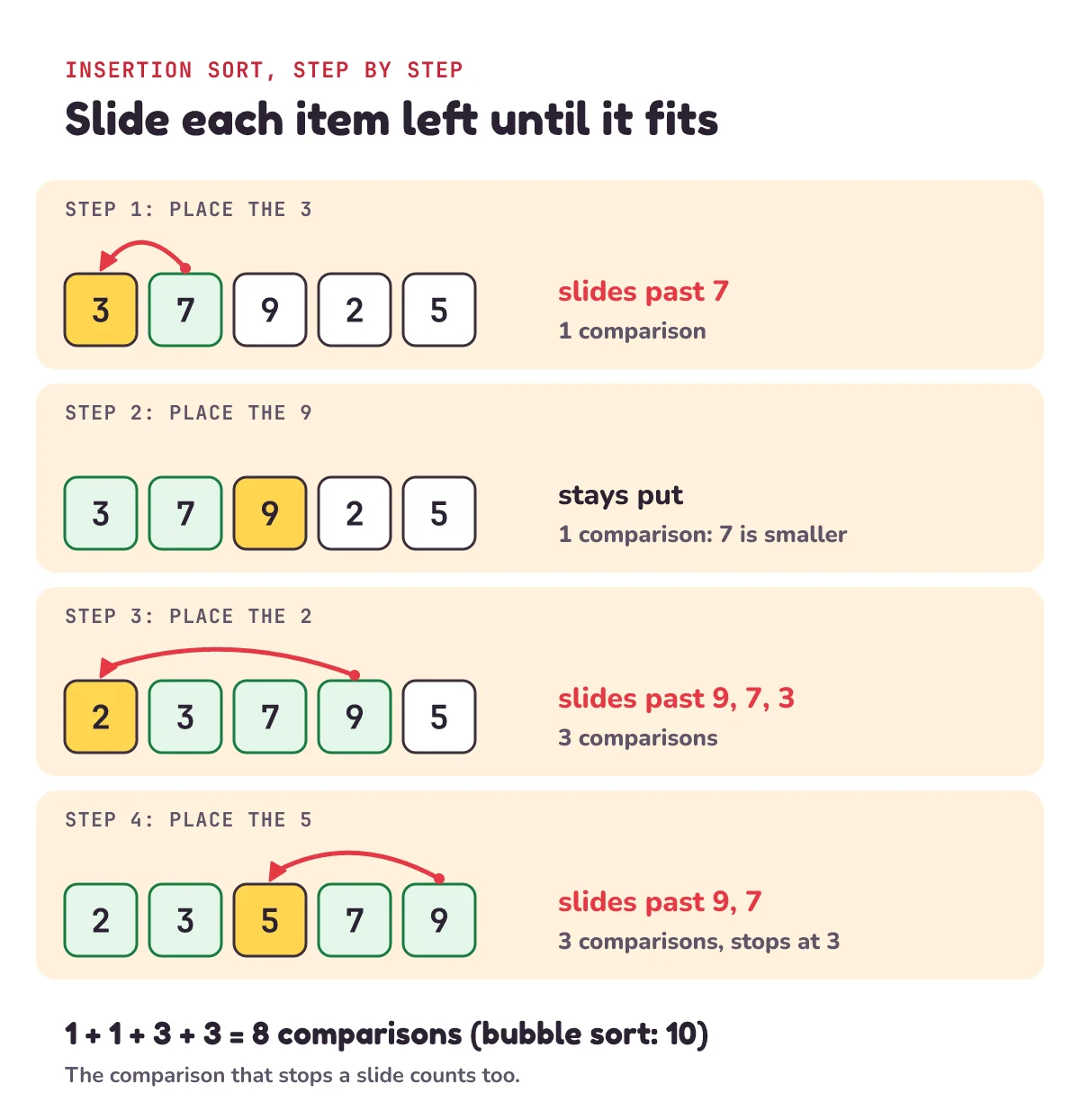
Pick up playing cards one at a time and you probably slide each new card left until it sits in the right place. That's insertion sort. The left part of the list is always sorted. Take the next item and slide it left past every bigger item until it fits.
Same five numbers, 7, 3, 9, 2, 5. The 7 on its own is our sorted part to start with:
| Step | Item | Slides past | Comparisons | List after |
|---|---|---|---|---|
| 1 | 3 | 7 | 1 | 3, 7, 9, 2, 5 |
| 2 | 9 | nothing: 7 is smaller | 1 | 3, 7, 9, 2, 5 |
| 3 | 2 | 9, 7, 3 | 3 | 2, 3, 7, 9, 5 |
| 4 | 5 | 9, 7, then stops at 3 | 3 | 2, 3, 5, 7, 9 |
That's 1 + 1 + 3 + 3 = 8 comparisons, two fewer than bubble sort. Count the comparison that stops a slide too: in step 4, "is 3 bigger than 5?" is a real comparison, and the answer "no" is what tells the 5 to stop. The swaps are 1 + 0 + 3 + 2 = 6, exactly the same as bubble sort's.
Insertion sort in Python
def insertion_sort(items):
    for i in range(1, len(items)):
        j = i
        while j > 0 and items[j - 1] > items[j]:
            items[j - 1], items[j] = items[j], items[j - 1]
            j -= 1

numbers = [7, 3, 9, 2, 5]
insertion_sort(numbers)
print(numbers) # [2, 3, 5, 7, 9]iis the item we're placing. It starts at 1, because one item on its own is already sorted.jis where that item is right now. It starts atiand moves left as the item slides.- The
whilekeeps going while there's something to the left (j > 0) and that something is bigger. - Each step swaps the item one place left and moves
jwith it. - As soon as the item to the left is smaller or equal, the loop stops early. That's why a list that's already sorted takes only one comparison per item: n − 1 in total.
j > 0. Without it, when an item reaches the front, j becomes 0 and Python reads items[-1], which is the last item, not an error. The loop wraps round, swaps the wrong items, and ends with IndexError. On our five numbers it crashes. In fact it only survives when the smallest item happens to be first. Keep j > 0 first, too: and stops at the first False, so we never read items[-1] at all.Bubble sort vs insertion sort: what's the difference?
Both sorts swap only neighbours that are out of order, and every such swap fixes exactly one out-of-order pair. So they always make the same number of swaps: one per pair that starts in the wrong order (7, 3, 9, 2, 5 has six such pairs). The difference is how many comparisons they waste finding them:
| Bubble sort | Insertion sort | |
|---|---|---|
| Comparisons, list already sorted | n(n − 1)/2 (499,500 for 1,000 items); n − 1 with the early exit | n − 1 (999 for 1,000 items) |
| Comparisons, list in reverse order | n(n − 1)/2 | n(n − 1)/2 |
| Comparisons, random list of 1,000 | 499,500 | about 250,000 |
| Swaps | one per out-of-order pair | the same |
| Extra memory | none: it sorts in place | none: it sorts in place |
| Keeps equal items in their original order (stable) | yes | yes |
So insertion sort usually wins: on random data it makes about half the comparisons, and on a list that's nearly sorted it's close to one pass. That's why insertion sort, not bubble sort, is the simple sort that real libraries, Python's included, still use on small pieces. Both stay stable only because they swap on >. Change it to >= and equal items start swapping past each other.
Why are bubble sort and insertion sort O(n²)?
On n items, bubble sort's first pass makes n − 1 comparisons, the next n − 2, and so on down to 1. Stack those rows up and you get a triangle, about half of an n by n square:
(n − 1) + (n − 2) + … + 2 + 1 = n(n − 1)/2
For our five numbers that's 5 × 4 / 2 = 10, just like the trace. Insertion sort on a reversed list hits the same total, because every item has to slide all the way to the front.
| Items (n) | Bubble sort, any list; insertion sort, reversed | Insertion sort, sorted list |
|---|---|---|
| 5 | 10 | 4 |
| 1,000 | 499,500 | 999 |
| 2,000 | 1,999,000 | 1,999 |
| 1,048,576 | 549,755,289,600 | 1,048,575 |
Now back to your prediction. Double the list, and the triangle gets twice as wide and twice as tall: four times the work, not two. So if 1,000 numbers take 1 second, 2,000 take about 4 seconds. And a million numbers have a thousand times more items, so about a million times more work: a million seconds, or about 11.6 days. Programmers write this growth as O(n²).
For the curious: count every comparison yourself
You don't have to trust the table. Wrap each number in a small class that counts every time it's compared, then run the real sort functions on it. Run this after the three functions above:
class Counted:
    """A number that counts every comparison made on it."""
    comparisons = 0

    def __init__(self, value):
        self.value = value

    def __gt__(self, other):
        Counted.comparisons += 1
        return self.value > other.value

    def __lt__(self, other):
        Counted.comparisons += 1
        return self.value < other.value


def count(sort, values):
    Counted.comparisons = 0
    sort([Counted(v) for v in values])
    return Counted.comparisons


print(count(bubble_sort, [7, 3, 9, 2, 5]))        # 10
print(count(insertion_sort, [7, 3, 9, 2, 5]))     # 8
print(count(insertion_sort, range(1000)))         # 999: already sorted
print(count(insertion_sort, range(1000, 0, -1)))  # 499500: reversed
print(count(bubble_sort, range(1000)))            # 499500: even when sorted
print(count(bubble_sort_early_exit, range(1000)))      # 999: one pass, no swaps, stop
print(count(bubble_sort_early_exit, [7, 3, 9, 2, 5]))  # 10: no saving here
Python calls __gt__ whenever it evaluates a > b, so every comparison inside the sort goes through our counter. Our sorts only use >; __lt__ is there for Python's own sort, which uses <.
How do real programs sort so fast?
So how does a spreadsheet sort a million rows without waiting days? Not like this. Let's count Python's built-in sort on a full column of random numbers with the same count function from the box above:
import random

rng = random.Random(1)
rows = [rng.random() for _ in range(1_048_576)]
print(count(sorted, rows))       # 19651111
print(1_048_576 * 1_048_575 // 2)  # 549755289600: bubble sort, the same rows
About 20 million comparisons against 550 billion: roughly 28,000 times fewer. (We ran it on Python 3.13; another version may give a slightly different count.) That's close to n × log2(n) = 1,048,576 × 20 = 20,971,520. Practical sorts grow like this, written O(n log n): double the data and the work only a little more than doubles.
Python's sort, called Timsort, is built on merging. It walks the list looking for stretches that are already in order, called runs, and merges them together, which is much cheaper than comparing everything with everything. We'll build merge sort ourselves later in the series.
But the slow sorts aren't useless. When a run is too short, Python's sort lengthens it with binary insertion sort: insertion sort that finds each item's place with a binary search instead of sliding one step at a time. And if the whole list has fewer than 64 items, it finds the first run and binary-insertion-sorts the rest into it. On a few items, insertion sort is hard to beat.
Bubble sort has no such job. Wikipedia sums up why: other simple sorts like insertion sort "generally run faster than bubble sort, and are no more complex". Donald Knuth wrote that it "seems to have nothing to recommend it, except a catchy name and the fact that it leads to some interesting theoretical problems". And in 2007, when Google's then CEO Eric Schmidt asked presidential candidate Barack Obama the best way to sort a million integers, Obama answered: "I think the bubble sort would be the wrong way to go."
Bubble sort and insertion sort for GCSE: pseudocode and exam questions
OCR's GCSE Computer Science specification (J277) lists three sorting algorithms: bubble sort, merge sort and insertion sort. You need to understand the main steps, apply each one to a list of data and recognise it from its code. You don't have to remember the code. In the exam, the code comes in OCR's own pseudocode: "All programming code given in examination papers will be presented using the OCR Exam Reference Language." So let's read both sorts in it.
Bubble sort in OCR Exam Reference Language
array items = [7, 3, 9, 2, 5]
n = 5    // items still unsorted
do
    swaps = 0
    for i = 0 to n - 2
        if items[i] > items[i + 1] then
            temp = items[i]
            items[i] = items[i + 1]
            items[i + 1] = temp
            swaps = swaps + 1
        endif
    next i
    n = n - 1
until swaps == 0 OR n == 1
for i = 0 to n - 2...next iincludes its last value, n − 2. Python'srange(end)stops one beforeend; the exam language'stodoesn't. So the last pair compared isitems[n - 2]anditems[n - 1].- Arrays start at index 0, like Python lists.
- The swap uses a third variable,
temp, to hold one value while the other is copied over it. do...untilruns a pass first and checks afterwards. It stops after a pass with no swaps, or when only one item is left. That's the optimised bubble sort from above.
Insertion sort in OCR Exam Reference Language
array items = [7, 3, 9, 2, 5]
for i = 1 to 4    // item 0 on its own is already sorted
    j = i
    while j > 0
        if items[j - 1] > items[j] then
            temp = items[j]
            items[j] = items[j - 1]
            items[j - 1] = temp
            j = j - 1
        else
            j = 0    // it fits: stop sliding
        endif
    endwhile
next i
for i = 1 to 4places items 1 to 4 of our five, one at a time.- The
whileslides the item left while there's something to its left. When the item on the left isn't bigger,j = 0ends the loop: the item has found its place. - Why not
while j > 0 AND items[j - 1] > items[j], like the Python? Python'sandstops at the first False, but OCR's specification doesn't say whetherANDdoes. If it didn't,j = 0would readitems[-1], the same trap as in the warning above. Two separate tests are safe either way.
We turned both listings into Python line by line and ran them: they sort every list we tried with exactly the same comparisons as the Python functions above.
Exam-style questions with mark-scheme answers
These are our own questions in the style of a GCSE paper, not real OCR questions.
Q1 (4 marks). The list 5, 1, 4, 2, 8 is sorted into ascending order with the bubble sort above. Show the list after each pass, and explain why the algorithm stops.
Mark scheme
After pass 1: 1, 4, 2, 5, 8 [1]
After pass 2: 1, 2, 4, 5, 8 [1]
After pass 3: 1, 2, 4, 5, 8 [1]
It stops after pass 3 because that pass made no swaps [1].
Write pass 3 even though nothing changed: the algorithm only knows the list is sorted after a pass with no swaps.
Q2 (4 marks). The list 12, 7, 15, 3, 10 is sorted into ascending order with insertion sort. Show the list after each item is inserted.
Mark scheme
After inserting 7: 7, 12, 15, 3, 10 [1]
After inserting 15: 7, 12, 15, 3, 10 (15 is already in place, but the row still counts) [1]
After inserting 3: 3, 7, 12, 15, 10 [1]
After inserting 10: 3, 7, 10, 12, 15 [1]
1) Bubble-sort 12, 5, 18, 9, 3, 15 into ascending order. Write the list after the first two passes. How many comparisons does pass 1 make?
2) Four runners' race times are 14, 11, 15 and 12 seconds. Sort them fastest first with insertion sort, writing the list after each step. How many comparisons in total?
3) The list 2, 3, 5, 7, 9, 1 is nearly sorted. How many comparisons do the optimised bubble sort and insertion sort make on it?
Show the answers
1) Pass 1: 5, 12, 9, 3, 15, 18 (5 comparisons). Pass 2: 5, 9, 3, 12, 15, 18 (4 comparisons).
2) 11, 14, 15, 12 (1 comparison), then 11, 14, 15, 12 again (1: 15 stays, but you still write the row), then 11, 12, 14, 15 (3). That's 5 comparisons.
3) Optimised bubble sort: 5 + 4 + 3 + 2 + 1 = 15, no saving at all. The 1 moves only one place left per pass, so every pass makes a swap and the early exit never happens. Insertion sort: 1 + 1 + 1 + 1 + 5 = 9. The first four items take one comparison each, then the 1 slides all the way to the front. Check both with count from the "For the curious" box.
Questions people ask
Which is faster, bubble sort or insertion sort?
Insertion sort, almost always. Both make the same swaps, but insertion sort stops each slide as soon as the item fits, so it makes about half the comparisons on random data (about 250,000 against 499,500 for 1,000 items) and only n − 1 on a sorted list. On a reversed list they tie at n(n − 1)/2.
What is the time complexity of bubble sort and insertion sort?
Both are O(n²) in the worst and the average case. In the best case, an already sorted list, insertion sort is O(n). Bubble sort as written above is still O(n²) there, because it always makes n(n − 1)/2 comparisons; with the early exit (the optimised version above) it drops to O(n), one pass of n − 1.
Do I need to memorise bubble sort code for GCSE?
Not for OCR GCSE Computer Science (J277). Its specification says you need to understand the main steps, apply the algorithm to a data set and identify it from its code, pseudocode or Exam Reference Language. Remembering the code is listed as not required. Other exam boards may differ, so check your own specification.
Why does bubble sort's inner loop use range(end) and not range(n)?
The loop compares items[i] with items[i + 1], so i must stop one short of the last position or items[i + 1] runs off the end with IndexError. And everything after end is already in its final place, so there's no need to look at it again.
Does Python use insertion sort?
Yes, for small pieces. Python's sort (Timsort) merges runs, and it uses binary insertion sort to build short runs up to a minimum length. A list with fewer than 64 items is sorted with just that run check and binary insertion sort.
Are bubble sort and insertion sort stable?
Yes, as written here. Stable means equal items keep their original order. Both only swap when the left item is strictly bigger (>), so two equal items never pass each other. Python's own sorted() is guaranteed stable too.
What's the difference between sort() and sorted() in Python?
list.sort() sorts the list in place and returns None, like our two functions. sorted() builds a new sorted list and leaves the original alone. Sorting in place has a surprise: every name that points at the list sees the change.
a = [3, 1, 2]
b = a
a.sort()
print(b)  # [1, 2, 3]: b is the same list as a

c = [3, 1, 2]
d = sorted(c)
print(c, d)  # [3, 1, 2] [1, 2, 3]
Keep going
- Watch the full lesson, Bubble Sort and Insertion Sort in Python, Explained, and the rest of the letsBug Code series on YouTube.
- Once a list is sorted, you can search a million items in 20 checks: binary search in JavaScript and Python, letsBug Code episode 1.
- Need only the biggest item, not a sorted list? One pass does it: largest and smallest number in an array, without sorting at all.
- The same sorts in C and JavaScript, plus merge sort and quick sort: sorting algorithms in C and JavaScript.
Checked on 20 October 2026 against the 7 sources below.
Sources
- Microsoft: Excel specifications and limits (1,048,576 rows)
- Python documentation: Sorting Techniques (sort vs sorted, stability, Timsort)
- CPython source: listsort.txt, how Python's list sort works (runs, merging, binary insertion sort)
- Wikipedia: Bubble sort (complexity, the Knuth and Obama quotes)
- Wikipedia: Insertion sort (best and worst cases, sorting a hand of cards)
- OCR: GCSE Computer Science J277 specification (section 2.1.3 sorting algorithms, section 3c Exam Reference Language)
- University of San Francisco: comparison sorting, visualised (watch both sorts step by step)
Every code sample in this post was run in Python 3.13 before publishing.