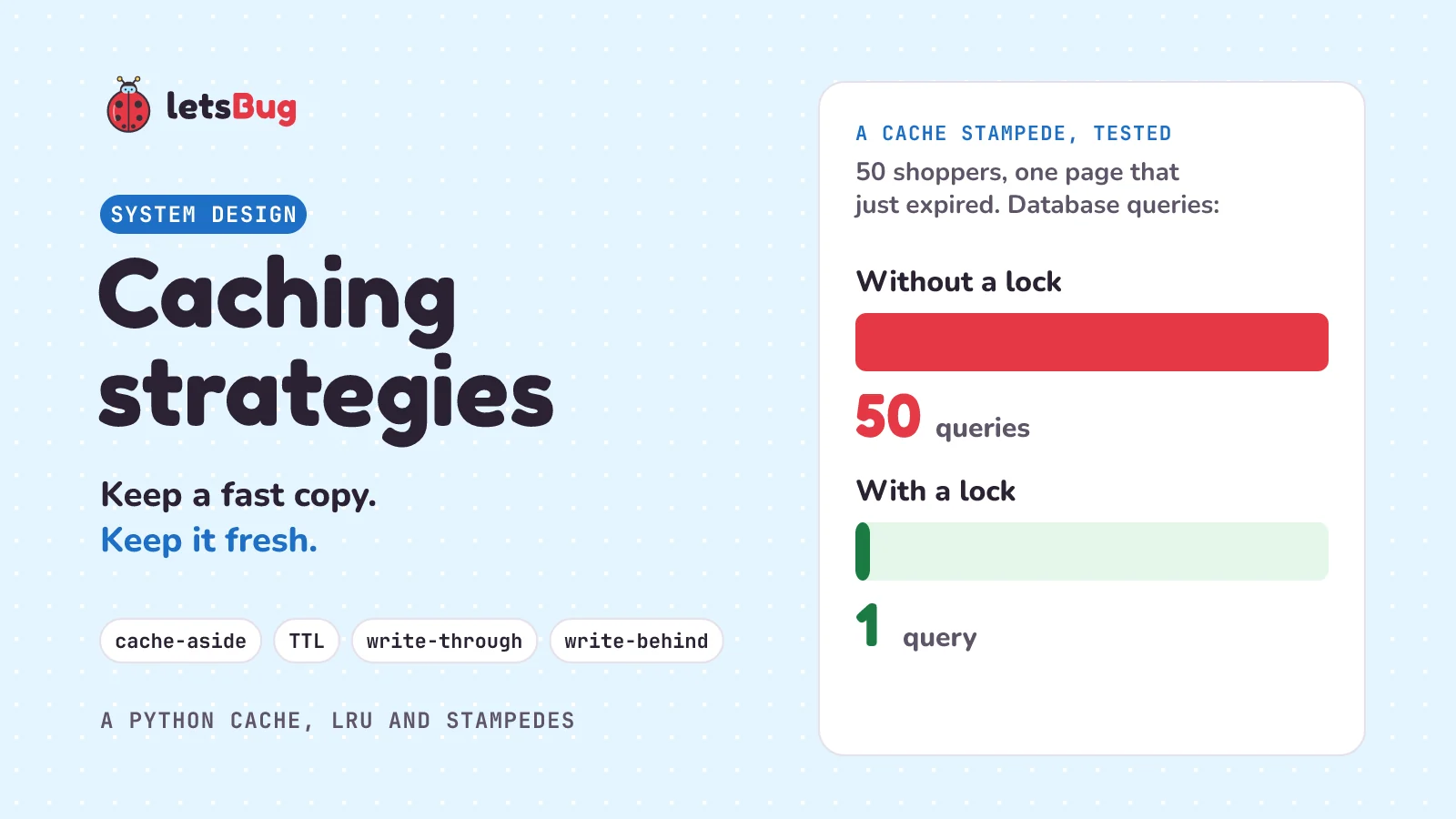
A cache is a fast copy of data kept close to the app, so it doesn't ask the slow database every time. Caching strategies are the rules for keeping that copy useful: cache-aside fills it on a miss, a TTL makes old copies expire, and write-through updates it whenever the data changes.
In this post we stay with the shop from the connection pooling post. Its product pages are busy, and the same prices are read from the database thousands of times a minute. First we see why a cache helps, using the counter of a small shop. Then we go through the four main strategies (cache-aside, read-through, write-through and write-behind), what a TTL does, and what happens when the cache is full. We build a small cache in plain Python, catch it showing an old price, and fix it. Then we start a cache stampede on purpose, 50 shoppers at once, and stop it with a lock. We finish with where caches live, the mistakes beginners make, and when not to cache at all.
A few words first. A database is the program that stores the shop's data for good, on disk. A query is one question the app sends it, such as "what does the kettle cost?". Memory (RAM) is the computer's fast working space; reading from it takes far less time than a trip to a database over the network. A key is the name a piece of cached data is stored under, such as kettle, and the value is the data itself, such as 1499.
Key takeaways
- A cache hit means the data was in the cache. A miss means it wasn't, so the app asks the database. In our first test, 5 page views made 1 database read and 4 hits.
- Cache-aside (also called lazy loading) is the most widely used strategy: look in the cache, and on a miss read the database and keep a copy. When the data changes, write the database first, then delete the copy.
- A TTL (time to live) is how many seconds a copy may stay in the cache. When it runs out, the next read goes to the database. A TTL limits how old a copy can get; it doesn't make the copy always right.
- Write-through updates the database and the cache in the same write, so the next reader normally sees the new value at once. Write-behind writes to the cache now and to the database later, which is fast but risky.
- A cache has a size limit. When it's full, it evicts (removes) entries, usually the least recently used one (LRU).
- A cache stampede is many requests missing the same key at the same moment and all asking the database. In our test: 50 identical queries without a lock, 1 with a lock.
What is caching in simple words?
Picture a small shop. The stock lives in a storeroom at the back, along with the price list. When a customer asks for a kettle, the shopkeeper could walk to the storeroom every time, find the kettle and look up its price. That works, but it's slow, and on a busy day there's a queue. So the shopkeeper keeps the things people ask for most on the counter, each with a price label. Most customers are served from the counter in seconds, and the walk to the storeroom happens only for things that aren't on it.
That counter is a cache, and the storeroom is the database. When a customer asks for something that's on the counter, that's a cache hit. When it isn't, that's a miss: the shopkeeper walks to the storeroom, and while they're there, puts one on the counter for the next customer.
The counter brings three problems with it, and they're the whole subject of this post. The price list in the storeroom can change while the old label is still on the counter: the counter is now stale (out of date). The counter has limited room, so something has to go when a new item arrives. And if the counter is suddenly empty, 50 customers asking at once could send the shopkeeper on 50 separate walks. Microsoft's guide to caching describes the first problem: "Think of a cache as a snapshot of the original data at some point in the past."
What problem does a cache solve?
Every page in the shop asks the database something. On a quiet day that's fine. On a sale day the same few questions arrive thousands of times a minute ("what does the kettle cost?", "what are today's top products?"), and the database answers each one from scratch, even though the answer hasn't changed. Three things break:
- Pages get slow. Each query is a trip over the network plus work for the database. A cache in the app's memory answers without either.
- The database gets busy. Every repeated question takes a connection and some of the database's time. In the connection pooling post we saw that a database can only work on so much at once; when it's busy with the same question 1,000 times, the questions that matter, such as placing an order, wait.
- Costs grow. The usual answer to a busy database is a bigger database server. A cache can take many of the repeated reads off it instead.
Before you add a cache, check that the query itself is fast. A slow query with a missing database index is better fixed with the index: a cache would hide the slow query on hits, and every miss would still be slow.
What are the main caching strategies?
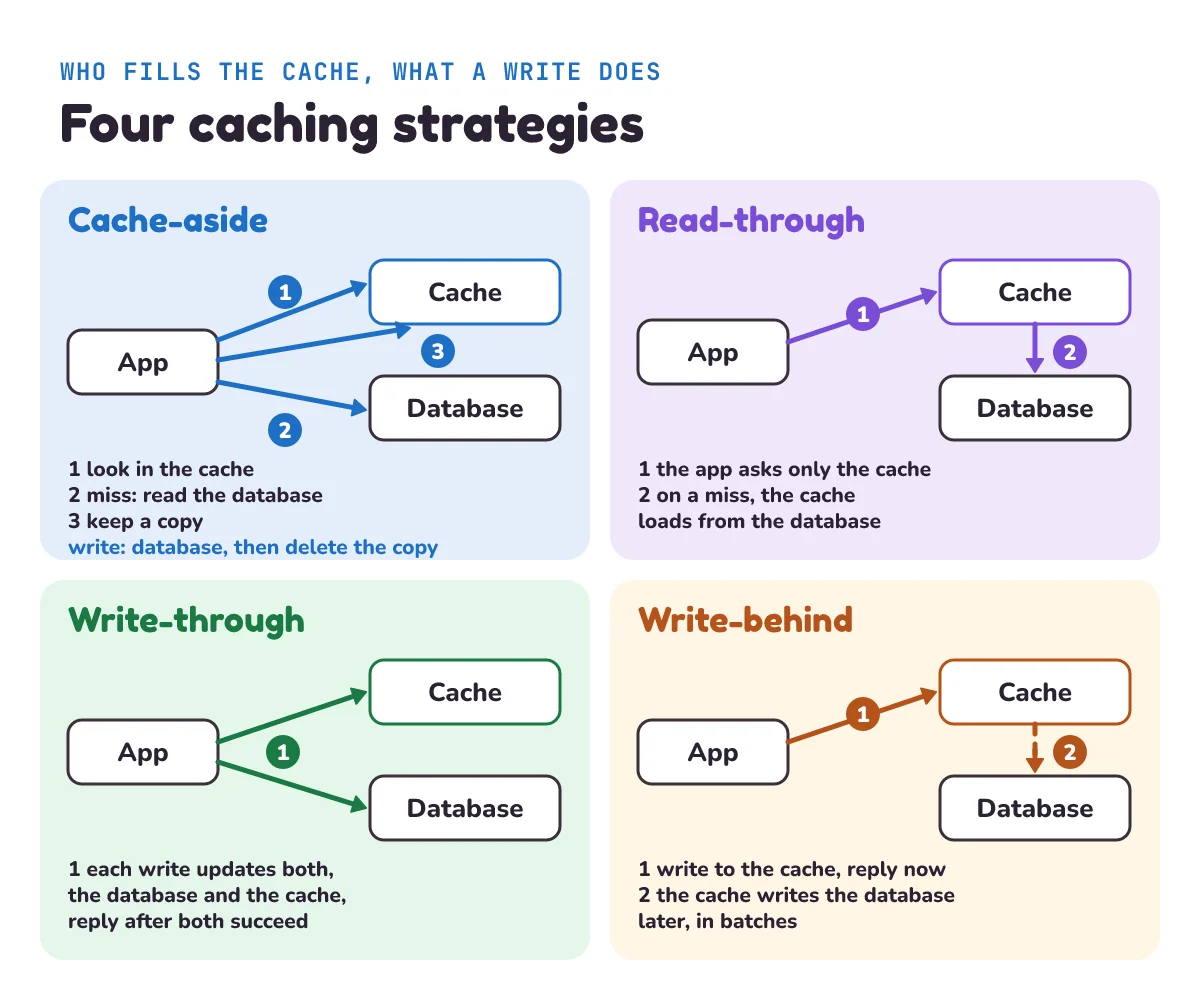
A caching strategy answers two questions: how does data get into the cache, and what happens to the cache when the data changes? There are four common answers.
1. Cache-aside (lazy loading). The app is in charge. It looks in the cache first. On a miss, it reads the database, puts a copy in the cache, and returns it. Amazon's ElastiCache guide describes it: "As the name implies, lazy loading is a caching strategy that loads data into the cache only when necessary." When the data changes, the app updates the database and deletes the cached copy, so the next read fetches the new value. Microsoft's Cache-Aside pattern says the same: "When an application updates information, it writes the change to the data store and then invalidates the corresponding item in the cache." (To invalidate a cached item means to mark it as no longer good, usually by deleting it.)
Its strengths: only data someone asked for is cached, and if the cache server goes down, the app still works, just more slowly, because every read falls through to the database. As Amazon's guide puts it, a failed cache node (one cache server) isn't fatal for the app. Its weakness: the first read of anything is a miss, and if a change ever forgets to delete the copy, the cache serves old data. The guide again: "If data is written to the cache only when there is a cache miss, data in the cache can become stale."
2. Read-through. The same idea, but the cache does the loading instead of the app. The app only ever asks the cache, and on a miss, the cache itself reads the database. Oracle's Coherence documentation, for a cache that works this way: "When an application asks the cache for an entry, for example the key X, and X is not in the cache, Coherence automatically delegates to the CacheStore and asks it to load X from the underlying data source." The app's code is simpler, but you need a cache product that can talk to your database, and many caches can't. Microsoft's Cache-Aside pattern exists for those: "For caches that don't provide this functionality, the applications that use the cache must maintain the data." That's why cache-aside is the one you'll meet most. AWS's caching best practices page says: "Lazy caching, also called lazy population or cache-aside, is the most prevalent form of caching."
3. Write-through. At the shop, that's changing the price list and the counter label at the same time. Every write goes to the database and the cache together. Amazon's guide: "The write-through strategy adds data or updates data in the cache whenever data is written to the database." Microsoft's guide adds: "Update the data store and the cache as part of the same write operation, and return the write response only after both updates succeed." So a reader who comes straight after a write normally sees the new value. The costs: every write does two jobs, and you fill the cache with data that may never be read, which Amazon's guide calls a waste of resources. Write-through is usually paired with cache-aside reads and a TTL, so data that isn't read eventually leaves the cache.
4. Write-behind (write-back). At the shop, that's relabelling the counter now and fixing the price list at closing time. Writes go to the cache only, and the cache writes them to the database later, in batches. Oracle's documentation: "In the Write-Behind scenario, modified cache entries are asynchronously written to the data source after a configured delay, whether after 10 seconds, 20 minutes, a day, a week or even longer." (Asynchronously means later, in the background, without making the user wait.) Writes are fast, and ten changes to the same record can become one database write, because a change already waiting in the queue is, in Oracle's word, "replaced" by the newer one. The catch is that until the delayed write happens, the newest copy of the change lives only in the cache, and the database is behind. The same documentation spells out what that demands: "This implies that the database transactions must never fail; if this cannot be guaranteed, then rollbacks must be accommodated." (A transaction is a group of database changes that succeed or fail together, and a rollback undoes a change that couldn't finish.) Use it for data you can afford to lose a few seconds of, such as view counters, not for orders or payments.
| Strategy | A write does | Good at | Watch out for |
|---|---|---|---|
| Cache-aside | Database, then delete the copy | Caching only what's read; survives a dead cache | First read is a miss; a forgotten delete serves old data |
| Read-through | (paired with one of the write strategies) | Simpler app code | Needs a cache that can load from your database |
| Write-through | Database and cache together | New value usually visible straight after a write | Slower writes; caches data nobody reads |
| Write-behind | Cache now, database later | Very fast writes, fewer database writes | Database lags; a failed delayed write needs handling |
What is TTL in caching?
TTL stands for time to live. Amazon's guide: "Time to live (TTL) is an integer value that specifies the number of seconds until the key expires." In Redis, the EXPIRE command sets it, and its docs say: "Set a timeout on key. After the timeout has expired, the key will automatically be deleted." Amazon's ElastiCache guide adds what happens next: "When an application attempts to read an expired key, it is treated as though the key is not found."
Back at the shop, a TTL is a rule like "every price label on the counter is thrown away after an hour, and the next customer who asks gets a fresh one from the price list". It's a safety net. Even if someone forgets to tell the counter about a price change, the wrong label can't stay up for more than an hour. Amazon's guide is clear about what that does and doesn't promise: "This approach doesn't guarantee that a value isn't stale. However, it keeps data from getting too stale and requires that values in the cache are occasionally refreshed from the database."
Picking a TTL is a trade. A short one (a few seconds) keeps data fresh but sends more reads to the database. A long one (hours) takes more load off the database, but a stale copy can live longer. Ask: how wrong can this be, and for how long, before anyone is hurt? A product description can be an hour old. A "top products" list can be a minute old. Stock left at checkout shouldn't come from the cache at all. Browsers use the same idea for whole pages: the HTTP caching standard, RFC 9111, defines a Cache-Control directive for it (an instruction the server sends with the page): "The max-age response directive indicates that the response is to be considered stale after its age is greater than the specified number of seconds."
What happens when a cache is full?
A cache lives in memory, and memory runs out. When it's full and a new item arrives, the cache evicts an old one. Microsoft's guide: "Cache services typically evict data on a least-recently-used (LRU) basis, but you can usually override this policy and prevent items from being evicted." Least recently used means the item nobody has asked for in the longest time goes first, like the shopkeeper clearing the item that's sat untouched on the counter longest. Redis lets you pick the policy; one of them is "allkeys-lru: Evict the least recently used (LRU) keys.", and its docs call it the place to start: "allkeys-lru is a good default option if you have no reason to prefer any others". Another policy, noeviction, doesn't evict at all: "noeviction: Keys are not evicted but the server will return an error when you try to execute commands that cache new data."
How do you build a cache-aside cache in Python?
Let's build one. First the cache itself: a store of keys and values, each with a time it expires, and a size limit with LRU eviction. Python's OrderedDict remembers the order its keys were added, and can move a key to the end, which is all an LRU needs. Python's own docs suggest it: "An OrderedDict would also be useful for implementing variants of @functools.lru_cache". Everything here is in Python's standard library, so there's nothing to install.
# cache.py
"""A small in-memory cache. Each entry lives for a set time (its TTL), and when the
cache is full, the entry nobody has used for the longest goes first (LRU)."""
from collections import OrderedDict


class Cache:
    def __init__(self, max_items, clock):
        self.max_items = max_items
        self.clock = clock                       # a function that returns the time now, in seconds
        self.items = OrderedDict()               # key -> (value, expires_at), least recently used first
        self.hits = self.misses = 0

    def get(self, key):
        entry = self.items.get(key)
        if entry is None or entry[1] <= self.clock():    # not there, or its time is up
            self.items.pop(key, None)
            self.misses += 1
            return None
        self.items.move_to_end(key)              # just used: move it to the "recent" end
        self.hits += 1
        return entry[0]

    def set(self, key, value, ttl):
        self.items[key] = (value, self.clock() + ttl)
        self.items.move_to_end(key)
        if len(self.items) > self.max_items:
            self.items.popitem(last=False)       # full: drop the least recently used

    def delete(self, key):
self.items.pop(key, None)- Each entry stores its value and the moment it expires: the time it was stored plus its TTL.
gettreats an expired entry exactly like a missing one, and throws it away. move_to_endkeeps the most recently used key at the end. Python's docs: "Move an existing key to either end of an ordered dictionary." So the key at the front is always the one used longest ago, andpopitem(last=False)removes it when the cache is over its limit.- The cache takes a
clockfunction instead of reading the real time, so the test below can jump forward 60 seconds without waiting. Real code would passtime.monotonic, a clock that only ever moves forward. getreturnsNonefor a miss, so this cache can't storeNoneas a value. That's fine here: a missing product should be an error, not a cached "nothing".
Now the shop. A pretend database counts how many times it's asked, and three ways to change a price show what each strategy does to the cache:
# shop.py
"""The shop's prices: a slow database, a cache in front of it, and the ways to keep the two in step."""
from cache import Cache


class Clock:
    """A pretend clock that we move forward by hand, so we don't have to wait for a TTL to run out."""
    now = 0

    def __call__(self):
        return self.now


class Database:
    def __init__(self):
        self.prices = {"kettle": 1499, "lamp": 899, "mug": 249, "fan": 2199}
        self.reads = 0

    def read_price(self, product):
        self.reads += 1                          # a real query: a trip over the network, and work for the database
        return self.prices[product]

    def write_price(self, product, price):
        self.prices[product] = price


clock, db = Clock(), Database()
cache = Cache(max_items=3, clock=clock)
TTL = 60                                         # seconds


def get_price(product):                          # cache-aside: look in the cache, else ask the database
    price = cache.get(product)
    if price is None:                            # a miss
        price = db.read_price(product)
        cache.set(product, price, TTL)           # keep a copy for next time
    return price


def update_price_forgetful(product, price):      # the bug: the cache never hears about it
    db.write_price(product, price)


def update_price(product, price):                # cache-aside write: the database first, then delete the copy
    db.write_price(product, price)
    cache.delete(product)


def update_price_write_through(product, price):  # write-through: the database and the cache together
    db.write_price(product, price)
    cache.set(product, price, TTL)


if __name__ == "__main__":
    print("1) Five shoppers open the kettle page")
    print("   prices shown:", [get_price("kettle") for _ in range(5)])
    print(f"   database reads: {db.reads}, cache hits: {cache.hits}, misses: {cache.misses}")

    print("2) At 10 s the kettle drops to 1299, and nobody tells the cache")
    clock.now = 10
    update_price_forgetful("kettle", 1299)
    print("   at 10 s the page shows:", get_price("kettle"))
    clock.now = 61
    print("   at 61 s the page shows:", get_price("kettle"))

    print("3) The kettle drops to 1199; this time the copy is deleted")
    update_price("kettle", 1199)
    print("   straight away the page shows:", get_price("kettle"))

    print("4) Write-through: the kettle drops to 1099")
    before = db.reads
    update_price_write_through("kettle", 1099)
    print(f"   straight away the page shows: {get_price('kettle')}, database reads: {db.reads - before}")

    print("5) The cache holds 3 products. Shoppers open lamp, mug, kettle, then fan")
    for product in ("lamp", "mug", "kettle", "fan"):
        get_price(product)
    print("   in the cache now, oldest use first:", list(cache.items))
Make a new folder and save both files in it, each under the name in its first line. Open a terminal (a command-line window) in that folder and run it. In the output blocks, a line starting with $ is what you type, without the $; the lines under it are what it prints:
$ python shop.py
1) Five shoppers open the kettle page
   prices shown: [1499, 1499, 1499, 1499, 1499]
   database reads: 1, cache hits: 4, misses: 1
2) At 10 s the kettle drops to 1299, and nobody tells the cache
   at 10 s the page shows: 1499
   at 61 s the page shows: 1299
3) The kettle drops to 1199; this time the copy is deleted
   straight away the page shows: 1199
4) Write-through: the kettle drops to 1099
   straight away the page shows: 1099, database reads: 0
5) The cache holds 3 products. Shoppers open lamp, mug, kettle, then fan
   in the cache now, oldest use first: ['mug', 'kettle', 'fan']
Let's read it step by step:
- Cache-aside works. The first shopper missed, so the database was asked once; the other four were hits. On a real site with thousands of views a minute, that's thousands of queries the database never sees.
- Stale data, and the TTL saving us. The price changed at 10 s, but nothing told the cache, so the page still showed 1499, the old price. The copy had been stored at 0 s with a TTL of 60, so it expired at 60 s. At 61 s it was a miss, and the page showed 1299. For 50 seconds, from 10 s until the copy expired at 60 s, every shopper would have seen the wrong price. With a TTL of a day, it could have been up to a day.
- Invalidation fixes it.
update_pricewrites the database, then deletes the cached copy. The next read misses and fetches 1199 straight away. - Write-through skips the miss. The write put 1099 in the cache too, so the next read was a hit, with 0 database reads.
- LRU eviction. The cache holds 3. After lamp and mug it held kettle, lamp and mug. Opening the kettle moved it to the "recent" end. Then fan arrived, the cache was over its limit, and the least recently used item went: the lamp, not the kettle, even though the kettle was cached first.
What is a cache stampede, and how do you stop it?
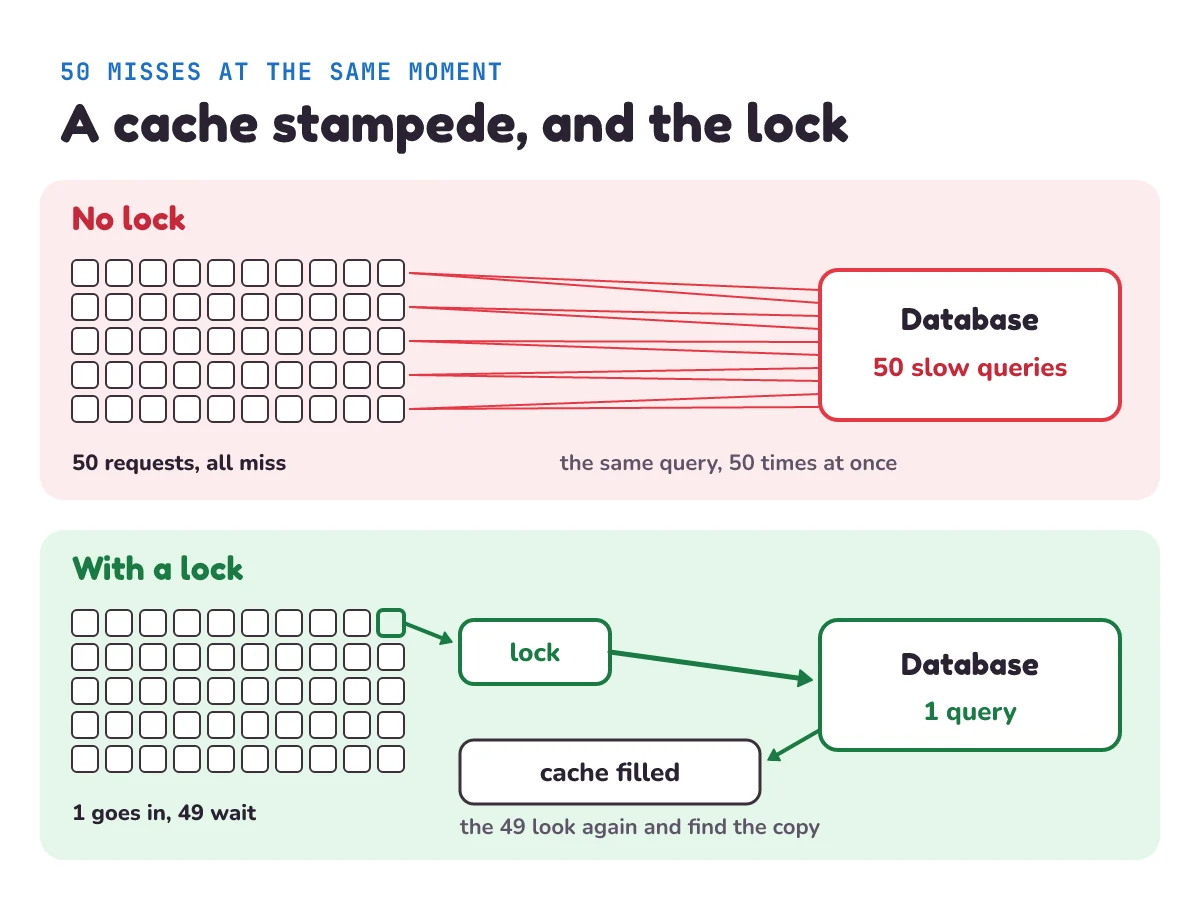
Back to the counter. It's 10 a.m. on sale day, and the label for the most popular item has just been thrown away (its TTL ran out). Fifty customers ask for it in the same second. Each one hears "not on the counter", and the shopkeeper makes 50 separate walks to the storeroom to look up the same price. That's a cache stampede. AWS's caching best practices page calls it the thundering herd: "Also known as dog piling, the thundering herd effect is what happens when many different application processes simultaneously request a cache key, get a cache miss, and then each hits the same database query in parallel." (An application process is one running copy of the app.) The slower the query, the worse it gets, because more requests pile up while the first one is still waiting.
Let's cause one. The shop's home page shows "top products", a slow query that takes 200 ms. Fifty threads (lines of work inside one program that run at the same time), one per shopper, open the home page at the same moment, just after the cached copy ran out:
# stampede.py
"""50 shoppers open the home page at the same moment, just after its cached copy ran out."""
import threading
import time

cache = {}
reads = 0
count_lock = threading.Lock()


def top_products():                              # the slow query behind the home page
    global reads
    with count_lock:
        reads += 1
    time.sleep(0.2)                              # 200 ms of work for the database
    return ["kettle", "fan", "lamp"]


def get_no_lock(key):
    if key not in cache:                         # every shopper sees a miss...
        cache[key] = top_products()              # ...and every one of them asks the database
    return cache[key]


locks = {}                                       # one lock for each key (a real app would remove them too)
locks_lock = threading.Lock()


def get_with_lock(key):
    if key in cache:
        return cache[key]
    with locks_lock:                             # make sure everyone gets the same lock for this key
        lock = locks.setdefault(key, threading.Lock())
    with lock:                                   # one shopper at a time past this line
        if key not in cache:                     # look again: someone may have filled it while we waited
            cache[key] = top_products()
    return cache[key]


def rush(get, shoppers=50):
    global reads
    cache.clear()
    reads = 0
    start = threading.Barrier(shoppers)          # holds every thread until all of them are ready

    def shopper():
        start.wait()
        get("home:top-products")

    threads = [threading.Thread(target=shopper) for _ in range(shoppers)]
    for t in threads:
        t.start()
    for t in threads:
        t.join()
    return reads


print(f"without a lock, database reads: {rush(get_no_lock)}")
print(f"with a lock, database reads:    {rush(get_with_lock)}")
$ python stampede.py
without a lock, database reads: 50
with a lock, database reads: 1Without a lock, all 50 threads checked the cache in the same instant, all 50 saw a miss, and the database ran the same slow query 50 times. With a lock, the first thread to reach with lock: goes in and runs the query; the other 49 wait at that line. When the first one is done, each of the others gets in, looks at the cache again, finds the answer and leaves. That second look (if key not in cache inside the lock) is the important line: without it, the 49 would each still run the query, just one at a time.
Even Python's built-in cache, functools.lru_cache, has this gap. Its docs: "It is possible for the wrapped function to be called more than once if another thread makes an additional call before the initial call has been completed and cached."
Our lock only works inside one program. A real shop runs many app servers, each with its own threads, so the lock has to live somewhere they all share. With Redis, a common way is to try to create a lock key with the SET command's NX option ("NX Only set the key if it does not already exist.") and an EX expiry ("EX seconds Set the specified expire time, in seconds (a positive integer)."). Only one server succeeds and runs the query. Unlike our with lock:, the others don't wait on their own: they pause a moment and look in the cache again. The expiry means a server that crashes while holding the lock can't block everyone for ever. Redis's docs point to a sturdier method, the Redlock algorithm, for locks that must never fail: "The following pattern is discouraged in favor of the Redlock algorithm which is only a bit more complex to implement, but offers better guarantees and is fault tolerant." A stampede lock only saves work, so if it fails now and then, the cost is one extra query.
NGINX, when it caches pages in front of an app, has a setting for exactly this, proxy_cache_lock: "When enabled, only one request at a time will be allowed to populate a new cache element identified according to the proxy_cache_key directive by passing a request to a proxied server."
A second kind of stampede comes from TTLs that all end together. If the shop fills its cache when it opens and gives every entry the same TTL, everything expires in the same second. The same AWS page warns: "If you use the same TTL length (say 60 minutes) consistently, then many of your cache keys might expire within the same time window, even after prewarming your cache." Its fix: "One strategy that's easy to implement is to add some randomness to your TTL", for example an hour plus up to two minutes, so the expiries spread out. (Prewarming means filling the cache before the traffic arrives, so the first shoppers don't all miss.)
Where can a cache live?
- In the app's own memory. The fastest, with no network trip. Our
Cacheclass is one, and Python has one built in:functools.lru_cache, a "Decorator to wrap a function with a memoizing callable that saves up to the maxsize most recent calls." (A decorator wraps a function to add behaviour; memoizing means remembering the answer for each set of arguments.) It has no TTL, so it suits answers that never change. The catch, in Microsoft's words: "But a local cache is private, so different application instances can each have a copy of the same cached data." Delete the kettle's copy on server 1, and server 2 still shows the old price until its TTL runs out. - In a shared cache server. Redis or Memcached run as their own servers, and every app server talks to the same one, so a delete is seen by everyone. Each read is a network trip, so it's slower than the app's own memory, but the cache server only has to look up a key, not run a query. This is where cache-aside and TTLs (
EXPIRE) usually live. LRU eviction too, but only once you set a memory limit (maxmemory) and a policy. Redis's docs say of a limit of zero, meaning no limit: "This is the default behavior for 64-bit systems, while 32-bit systems use an implicit memory limit of 3GB." With no limit, Redis never evicts, and keeps growing until the server runs out of memory. - In front of the app. A reverse proxy (a server that sits in front of the app and answers for it) such as NGINX can cache whole responses; its
proxy_cachedirective "Defines a shared memory zone used for caching." (We met NGINX in How NGINX works.) Further out, a CDN (content delivery network) keeps copies of files on servers near each reader, and the reader's browser keeps its own copies too. The HTTP caching standard, RFC 9111, covers all of them: "An HTTP "cache" is a local store of response messages and the subsystem that controls storage, retrieval, and deletion of messages in it." A browser obeys the headers the server sends, such asCache-Control: max-age=3600.
These layers can stack: a request the browser can't answer may be answered by the CDN, then by the page cache, then by Redis, and only what's left reaches the database.
What mistakes do beginners make with caching?
1. Deleting the cached copy before writing the database. It looks harmless: delete the old copy, then save the new price. But between those two steps, a shopper can open the page, miss, read the old price from the database (it hasn't changed yet), and put it back in the cache. Then the database changes, and the cache holds the old price until its TTL runs out. Microsoft's Cache-Aside pattern spells out the order: "Update the data store before removing the item from the cache." And why: "If you remove the cached item first, there's a small window of time when a client might fetch the item before the data store is updated." Our update_price does it in the right order. Writing first makes the race much rarer, not impossible: a read that started before the write can still put the old price back just after the delete. That's one more reason every entry keeps a TTL. Forgetting the delete altogether is the same mistake made bigger, and step 2 of shop.py showed what it costs.
2. A cache key that leaves out who's asking. Say the "My orders" page is cached under the key my-orders. Asha opens it first, and her orders are cached. Then Ravi opens it, gets a hit, and sees Asha's orders. The key has to include everything the answer depends on: my-orders:user:42, and in an app that serves many shops, the shop too, as we saw in the multi-tenancy post. Microsoft's Cache-Aside pattern warns about shared caches: "Storing data in a cache might be inappropriate, especially when multiple applications or users share the cache."
3. No TTL and no size limit. A plain Python dictionary used as a cache grows for ever, until the server runs out of memory. And with no TTL, a copy that missed its invalidation stays wrong for ever. Give every entry a TTL, even a long one, and give the cache a limit with an eviction policy.
When shouldn't you use a cache?
- When the answer must be exactly right, right now. Showing "only 3 left" on a product page can come from the cache. Deciding at checkout whether the last kettle is still in stock must read the database. Use the cache for showing things, and the database for decisions that cost money.
- When most requests would miss. If every shopper looks at a different thing once, the cache is checked, misses, and stores something nobody reads again. Microsoft's Cache-Aside pattern: "In this situation, the overhead of checking the cache and loading data into it might outweigh the benefits of caching."
- When the data changes more often than it's read. A cache pays off when one copy serves many reads. Data rewritten every second and read once a minute gains nothing.
- When the real problem is a slow query. Fix the query first, with an index or a better query. A cache on top of a slow query still has slow misses, and a stampede on it hurts more.
- When it's sensitive data in a shared cache. Passwords and other people's private details don't belong in a cache many parts of the system can read. If you keep login sessions in a cache, limit who and what can read it.
1) In shop.py, swap the two lines inside update_price, so it deletes the cached copy first and writes the database second. Describe how two people, the shop owner changing the kettle's price and a shopper opening its page, could leave the old price in the cache.
2) In stampede.py, change shoppers=50 to shoppers=200 and run it again. What do the two lines print?
3) The shop fills its cache with 10,000 product pages when it opens at 9:00, every one with a TTL of 3,600 seconds. What happens at 10:00? Add one import and change one line in cache.py to fix it.
Show the answers
1) Here is one bad order of events. The owner's request deletes the kettle's copy. Before it writes the database, the shopper opens the page: a miss, so the shopper's request reads the database, which still says 1499, and stores 1499 in the cache. Now the owner's request writes 1299 to the database. The database says 1299, the cache says 1499, and every shopper sees 1499 until the TTL runs out. With the database written first, a read in the gap can show the old price once, but the delete that follows removes it from the cache.
2) It prints:
$ python stampede.py
without a lock, database reads: 200
with a lock, database reads:    1
Without the lock, the damage grows with the crowd: one query per shopper. With it, it stays at 1, however many shoppers arrive.
3) At 10:00, all 10,000 entries expire in the same second, and the next shoppers send a wave of misses to the database at once. Add some randomness to each TTL, so the expiries spread out. Add import random at the top of cache.py, and in set change the first line to:
self.items[key] = (value, self.clock() + ttl + random.uniform(0, ttl / 10))Now each entry lives between 3,600 and 3,960 seconds, so the 10,000 expiries are spread over 6 minutes instead of landing in one second. If you run shop.py after this change, step 2 can show the old price at 61 s too, because the kettle's copy may now live up to 66 seconds: the price of spreading expiries is that a copy can be a little older.
Questions people ask
What is caching in simple words?
Caching means keeping a copy of data somewhere fast, usually in memory, so the app doesn't fetch it from the slow source every time. When the copy is there, that's a cache hit and the answer is quick. When it isn't, that's a miss: the app reads the source, such as a database, and keeps a copy for next time.
What is the difference between cache-aside and write-through?
They differ in what happens on a write. With cache-aside, the app writes the database and deletes the cached copy, and the next read fills the cache again. With write-through, the app writes the database and the cache together, so the next read is usually already a hit with the new value. Write-through costs a slower write and caches data that may never be read.
What is a good TTL for a cache?
It depends on how stale the data can safely be. A product description can live for an hour, a "top products" list for a minute, and stock at checkout shouldn't be cached at all. Shorter TTLs mean fresher data and more database reads. Add a little randomness so many keys don't expire together.
What is a cache stampede?
A cache stampede, also called a thundering herd or dog piling, happens when many requests miss the same cache key at the same moment, often just after it expires, and all of them run the same database query. A lock per key, so only one request refills the cache while the others wait, stops the stampede on one popular key. Adding randomness to TTLs stops many keys expiring in the same second.
What is the difference between Redis and an in-memory cache?
An in-memory cache lives inside one app process, so it's the fastest, but each server has its own copy, and a change on one server isn't seen by the others. Redis is a separate cache server that every app server shares, so one delete clears the copy for everyone, at the cost of a short network trip for each read.
Keep going
- Previous in this System Design series: "How a CDN works", how copies of a site's files are kept on servers close to each reader.
- Next: "API versioning", how to change an API without breaking the apps that already use it.
- Related: Connection pooling, the other way to take load off a busy database, and Database indexing, the fix to try before you cache a slow query.
Checked on 22 November 2026 against the 12 sources below.
Sources
- Amazon ElastiCache User Guide: Caching strategies (lazy loading, write-through, TTL)
- AWS: Caching best practices (the thundering herd, randomised TTLs)
- Microsoft Azure Architecture Center: Cache-Aside pattern
- Microsoft Azure Architecture Center: Caching guidance (write-through, eviction)
- Oracle Coherence documentation: Caching Data Sources (read-through, write-behind)
- Redis documentation: EXPIRE
- Redis documentation: Key eviction
- Redis documentation: SET (NX and EX)
- Python documentation: functools (lru_cache)
- Python documentation: collections (OrderedDict)
- IETF: RFC 9111, HTTP Caching
- nginx documentation: ngx_http_proxy_module (proxy_cache, proxy_cache_lock)
Every Python sample in this post was run in Python 3.13 before publishing, on 22 November 2026.