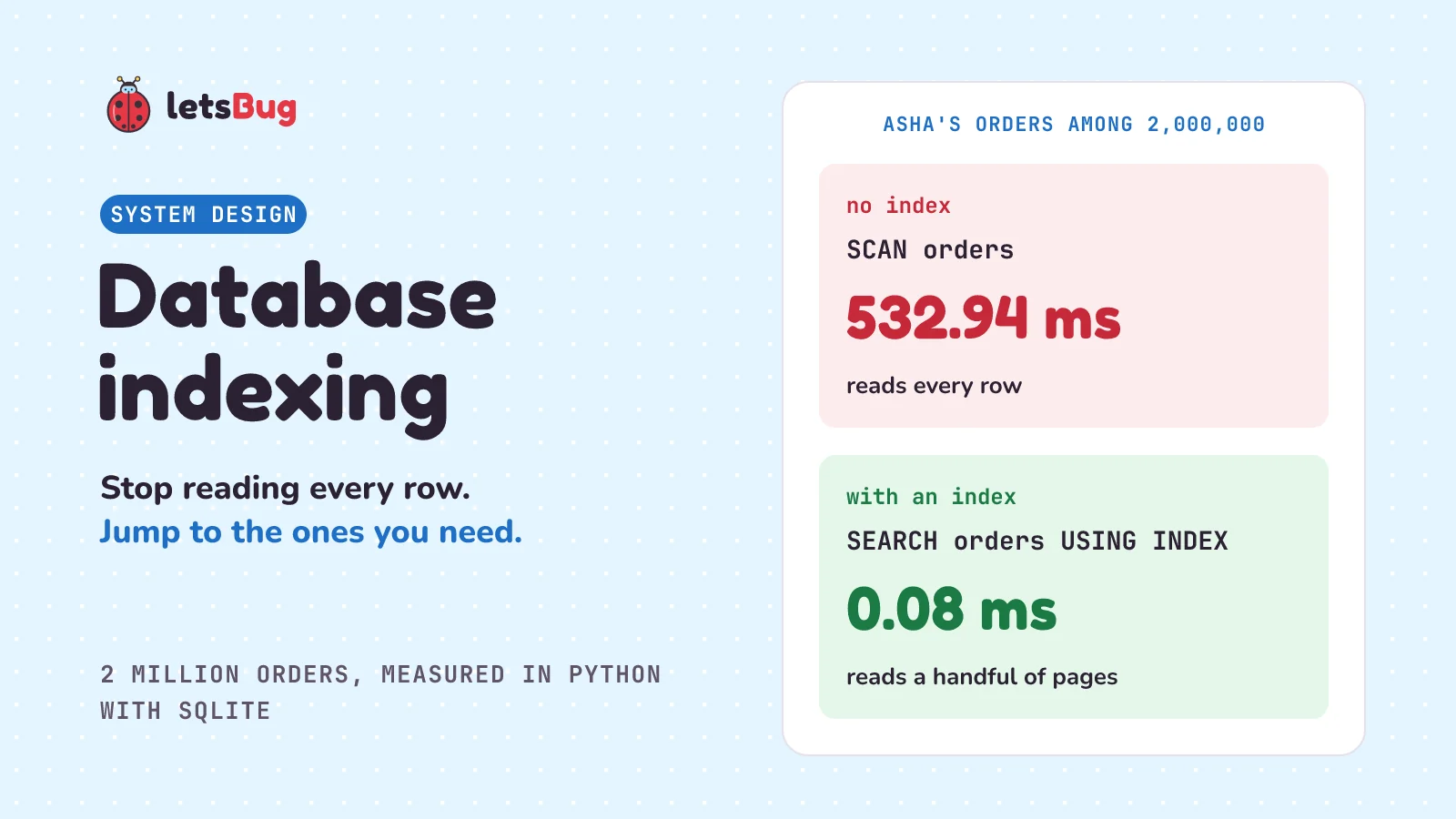
A database index is a separate, sorted list of one or more columns that points to the full rows. The database searches that smaller sorted list instead of reading every row. In our test, an index cut a lookup among 2 million rows from 533 ms to 0.08 ms, at the cost of extra space and slower writes.
In this post we stay with the shop app from the webhooks post, where order 101 got marked paid. The shop has grown to 2 million orders, and Asha's "My orders" page has become slow. First we see why, then how an index fixes it, using a shopkeeper's notebook and then the real structure, a B-tree. Then we build the 2 million orders in plain Python with SQLite and measure a full scan against an index, with SQLite telling us which one it chose. We finish with two-column indexes, what indexes cost, when an index makes a query slower, and the beginner mistake that makes a good index useless.
A few words first. A database is a program that stores data and answers questions about it. A table is a grid inside it, like a spreadsheet: each row is one record (one order), and each column is one field (the amount). SQL is the language you ask in. One question is a query, such as SELECT amount FROM orders WHERE id = 101: "give me the amount from the row whose id is 101". A primary key is a column that identifies each row, so no two rows share a value. SQLite is the small database that comes with Python. And ms means millisecond, a thousandth of a second.
Key takeaways
- Without an index, the database reads every row to answer a question. That's a full table scan, and it gets slower as the table grows.
- An index is a sorted copy of a column with a pointer to each row. Most are B-trees, which stay shallow: our index of 2 million entries is only 3 levels deep.
- Ask the database what it will do:
EXPLAIN QUERY PLANin SQLite,EXPLAINin PostgreSQL.SCANmeans every row;SEARCH ... USING INDEXmeans the index is being used, which is usually, but not always, faster. - In a two-column index, order matters. An index on
(customer_id, created_at)helps a search by customer, but not a search by date alone. - Indexes aren't free. Each one takes space and must be changed whenever rows are added, removed, or changed in its columns. On SQLite's small default cache, four indexes made adding 100,000 orders more than 50 times slower.
- An index usually doesn't help when a query matches most of the table. In our runs it usually made such a query slower.
- The classic mistake: wrapping the column in a function, as in
WHERE date(created_at) = .... The database can't use the index oncreated_at, so it reads every row.
What is a database index in simple words?
Picture a shopkeeper with a thick order register. Every sale goes on the next free line, so the register is in the order things happened. A customer asks, "What did I buy from you this year?" The shopkeeper has to start at page 1 and read every line of every page, looking for her name. Most of that reading is wasted.
So he starts a small notebook. It lists customer names in alphabetical order, and next to each name, the register pages where that customer appears. Now he flips to "Asha", reads off six page numbers, and goes straight to them.
That notebook is an index. It doesn't replace the register, and it holds only the name and where to find the rest. The PostgreSQL docs use the same picture: "A similar approach is used in most non-fiction books". Terms are listed at the back, so a reader can "flip to the appropriate page(s), rather than having to read the entire book".
The notebook has two costs, and they matter later. It takes paper. And every new sale now has to be written twice: once in the register, and once in the right spot in the notebook.
What problem does a database index solve?
Our shop keeps its orders in a table. Each order has an id, the customer who placed it, a status, an amount, and when it was created. When Asha (customer 87214) opens "My orders", the shop runs this:
SELECT id, amount, status FROM orders WHERE customer_id = 87214;(In a real app, a query like this usually sits behind a repository.) With a few hundred orders, nobody notices anything. With 2 million it hurts, because nothing in the table says where Asha's orders are. They were added over the year, mixed in with everyone else's. So the database has no choice. The PostgreSQL docs describe it: "the system would have to scan the entire test1 table, row by row, to find all matching entries." (test1 is their example table.) The SQLite docs call this "a full table scan since the entire content of the table must be read and examined in order to find the one row of interest."
The work grows with the table. Twice the orders, twice the reading, for the same six results. And every customer opening the page at the same time asks for that same full read.
How does a database index work?
You tell the database which column to index:
CREATE INDEX idx_orders_customer ON orders (customer_id);The database then builds a second structure, sorted by customer_id. Each entry holds a customer id and a pointer to the full row. In SQLite that pointer is the rowid, the number that identifies a row in its table (here, the order id). The index works like this:
- Find the first match. Because the entries are sorted, the database doesn't read them one by one. It uses binary search: look in the middle, decide which half the answer is in, and repeat.
- Walk along the matches. Asha's six entries sit next to each other, because the list is sorted.
- Fetch the rows. For each entry, follow the pointer to the full row in the table. SQLite does a second quick search there.
The SQLite docs say this of a binary search by rowid, and each search in an index grows the same way: the time "is proportional to logN rather than being proportional to N as in a full table scan." Here N is the number of rows, and log N (log base 2) is how many times you can halve N before reaching 1. The Big O post has more on why that grows so slowly. For 2 million rows, that's about 21 steps instead of 2 million. Double the table to 4 million and it's about 22.
And an index never changes which rows you get back, though their order can change, so use ORDER BY if order matters. In SQLite's words ("indices" is another plural of "index"), "indices should never change the answer, only help SQLite to get to the answer more quickly".
The real structure is a B-tree, the kind most database indexes use. A database stores data in fixed-size blocks called pages (4,096 bytes each in our SQLite file), and reading one page is the unit of work. A B-tree is a tree of pages. The top page (the root) tells you which page to read next, and so does each page in the middle, until you reach a bottom page (a leaf), where nearly all the entries are (SQLite keeps a few in the upper pages too).
Each page holds hundreds of entries, so the tree is very wide and very shallow. We read the page headers of the index we build below (with a short script not shown here). It holds 2 million entries in just 3 levels: the root, a middle page, and a leaf. That's why the search stays fast as the table grows. The 21 steps and the 3 levels are the same search counted two ways: about 21 comparisons in total, spread over just 3 page reads, with a quick binary search inside each page. Fetching Asha's six rows then takes one more short search each.
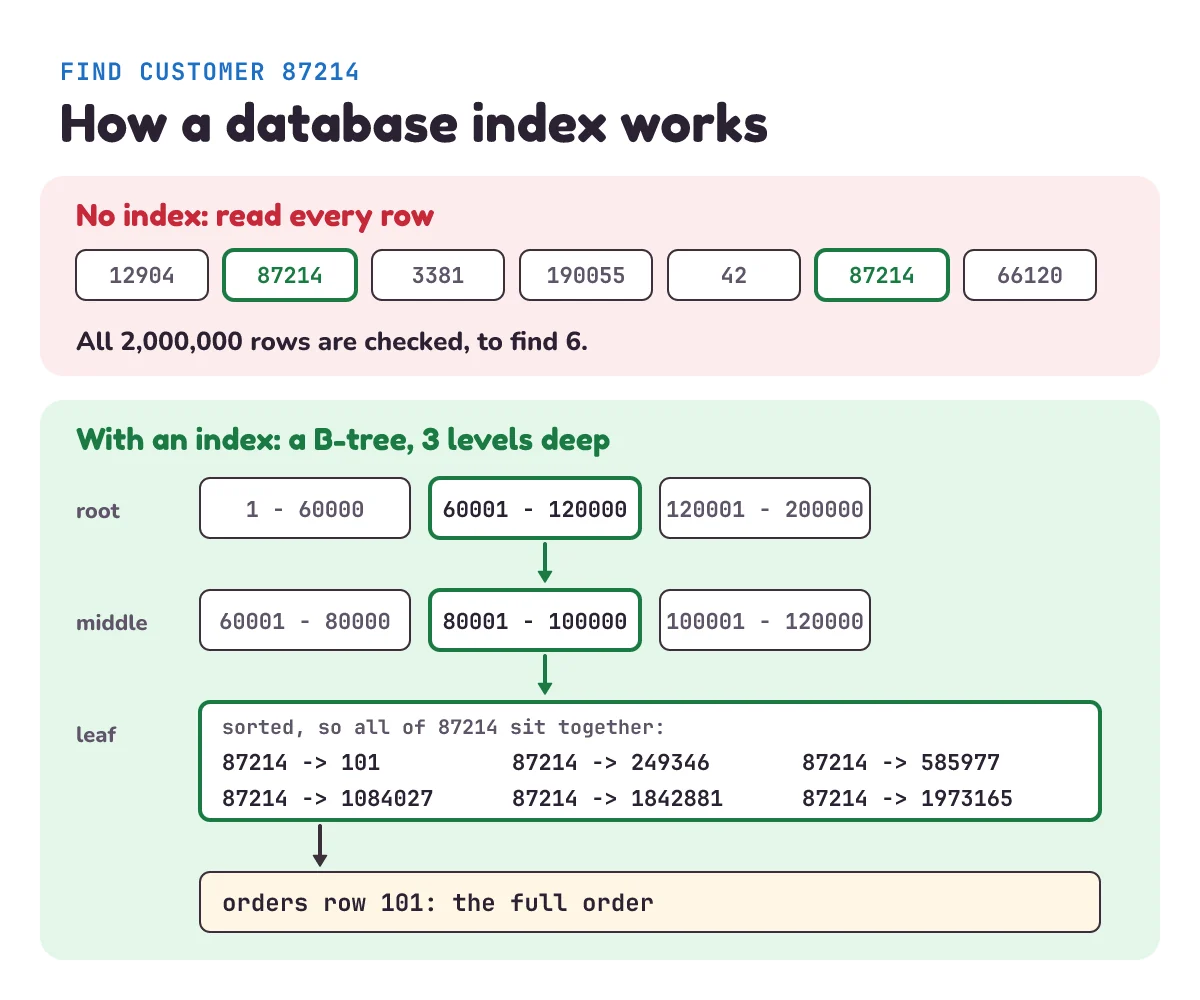
B-trees are the usual choice. PostgreSQL's docs: "By default, the CREATE INDEX command creates B-tree indexes, which fit the most common situations." They suit equal-to checks and also ranges and sorting, because the entries are in order. There are other kinds for special jobs. A hash index, for example, stores a fingerprint of each value, so, in PostgreSQL's words, "such indexes can only handle simple equality comparisons." Start with a B-tree.
And you already have one index without asking. A primary key is indexed for you, because the database needs a fast way to check that no two rows share a value, and looking up by id is common anyway. PostgreSQL: "PostgreSQL automatically creates a unique index when a unique constraint or primary key is defined for a table." (A constraint is a rule the database enforces.) In SQLite, the table itself is stored in order of its integer primary key.
How much faster is a query with an index?
In our test, thousands of times faster: 533 ms down to 0.08 ms on 2 million rows. Let's measure it. First, a file that makes the shop's 2 million orders, plus a few helpers the later scripts share:
# shop_db.py
import random
import sqlite3
import time
from pathlib import Path

DB = "shop.db"
ORDERS = 2_000_000
CUSTOMERS = 200_000


def make_orders():
    """Yield fake orders. A fixed seed means every run makes the same ones."""
    rng = random.Random(15)
    days = [f"2025-{month:02}-{day:02}" for month in range(1, 13) for day in range(1, 29)]
    for order_id in range(1, ORDERS + 1):
        yield (order_id,
               rng.randint(1, CUSTOMERS),
               "delivered" if rng.random() < 0.9 else "paid",
               rng.randint(100, 5000),
               f"{rng.choice(days)} {rng.randrange(24):02}:{rng.randrange(60):02}")


def open_db():
    return sqlite3.connect(DB)


def drop_indexes(db):
    names = db.execute("SELECT name FROM sqlite_master WHERE type = 'index'").fetchall()
    for (name,) in names:
        db.execute(f"DROP INDEX {name}")


def size_mb(db):
    used = db.execute("PRAGMA page_count").fetchone()[0] - db.execute("PRAGMA freelist_count").fetchone()[0]
    return used * db.execute("PRAGMA page_size").fetchone()[0] / 1_000_000


def show(db, title, sql, args=(), tries=5):
    """Print how SQLite will run this query, then run it and print its best time."""
    plan = db.execute("EXPLAIN QUERY PLAN " + sql, args).fetchall()
    best = float("inf")
    for _ in range(tries):
        start = time.perf_counter()
        rows = db.execute(sql, args).fetchall()
        best = min(best, time.perf_counter() - start)
    print(title)
    print("  plan:", "; ".join(step[3] for step in plan))
    print(f"  rows: {len(rows):,}, best time: {best * 1000:.2f} ms")


if __name__ == "__main__":
    Path(DB).unlink(missing_ok=True)
    db = open_db()
    db.execute("""CREATE TABLE orders (id INTEGER PRIMARY KEY, customer_id INTEGER,
                                       status TEXT, amount INTEGER, created_at TEXT)""")
    start = time.perf_counter()
    with db:
        db.executemany("INSERT INTO orders VALUES (?, ?, ?, ?, ?)", make_orders())
print(f"Made {ORDERS:,} orders in {time.perf_counter() - start:.1f} s; the database is {size_mb(db):.1f} MB")make_ordersis a generator (a function that produces its results one at a time withyield), so 2 million orders never sit in memory at once.random.Random(15)starts the random numbers from a fixed point, so your orders match ours.drop_indexesremoves every index, so each script starts clean (sqlite_masteris SQLite's own list of tables and indexes). The primary key isn't listed there, because anINTEGER PRIMARY KEYlike ours is the table itself. Index names can't be placeholders, so it builds that SQL as text; the names come from the database, not from a user.size_mbcounts the pages in use and multiplies by the page size. A PRAGMA is a SQLite command for reading settings like these.showfirst asksEXPLAIN QUERY PLANhow SQLite means to run the query. Then it runs the query a few times and keeps the best time, so one random pause on your computer doesn't skew it.- The
?in the SQL is a placeholder: the value goes in separately, so it can't be mistaken for SQL.
Now the experiment. It looks up Asha's orders with no index, builds the index, and looks them up again:
# speed.py
import time

from shop_db import drop_indexes, open_db, show, size_mb

ASHA = 87214      # Asha's customer id
QUERY = "SELECT id, amount, status FROM orders WHERE customer_id = ?"

db = open_db()
drop_indexes(db)
before = size_mb(db)
show(db, "No index on customer_id", QUERY, (ASHA,))

start = time.perf_counter()
db.execute("CREATE INDEX idx_orders_customer ON orders (customer_id)")
print(f"Built the index in {time.perf_counter() - start:.1f} s; "
      f"the database grew from {before:.1f} MB to {size_mb(db):.1f} MB")

show(db, "With the index", QUERY, (ASHA,))
show(db, "Order 101 by its primary key", "SELECT * FROM orders WHERE id = ?", (101,))
Save each code block under the name in its first line. Put both files in a new folder (shop_db.py deletes any shop.db it finds) and open a terminal (a command-line window) there. Run python shop_db.py once; the later scripts all reuse the database it makes:
Made 2,000,000 orders in 20.9 s; the database is 83.4 MBThen python speed.py. Run each later script the same way, such as python two_columns.py:
No index on customer_id
  plan: SCAN orders
  rows: 6, best time: 532.94 ms
Built the index in 4.5 s; the database grew from 83.4 MB to 107.2 MB
With the index
  plan: SEARCH orders USING INDEX idx_orders_customer (customer_id=?)
  rows: 6, best time: 0.08 ms
Order 101 by its primary key
  plan: SEARCH orders USING INTEGER PRIMARY KEY (rowid=?)
  rows: 1, best time: 0.06 ms
The same six orders, thousands of times faster. These are real numbers from one run (the best of 5 tries for each query) on a laptop with other work going on. Your times will differ, but the gap will be huge. And look at the third result: order 101, found by its primary key in 0.06 ms with no index of ours. We didn't create anything for that: SQLite stores the table itself in id order, so the primary key works like a built-in index.
The plan line is the most useful part. SQLite's docs explain the two words. SCAN "is used for a full-table scan, including cases where SQLite iterates through all records in a table in an order defined by an index." SEARCH "indicates that only a subset of the table rows are visited." The docs do warn that this output is "intended for interactive debugging only", so read it yourself, but don't write code that depends on its exact wording. Other SQLite versions may word the plan a little differently.
PostgreSQL's command is EXPLAIN, and its words are different. These two lines are from its documentation, for a table named tenk1:
Seq Scan on tenk1  (cost=0.00..445.00 rows=10000 width=244)
Index Scan using tenk1_unique1 on tenk1  (cost=0.29..8.30 rows=1 width=244)
They come from two different queries. Ignore the brackets here; they're the database's own estimates. Seq Scan (sequential scan) means every row; Index Scan means the index was used. PostgreSQL's EXPLAIN ANALYZE goes further: it runs the query and reports the real time. Because it really does run it, an UPDATE or DELETE under it will change your data.
| SQLite | PostgreSQL | |
|---|---|---|
| Reads every row | SCAN | Seq Scan |
| Uses an index, then the table | SEARCH ... USING INDEX | Index Scan or Bitmap Heap Scan |
| Answers from the index alone (more below) | SEARCH ... USING COVERING INDEX | Index Only Scan |
(Bitmap Heap Scan uses an index to find where the rows are, then fetches them.)
Who decides? A part of the database called the query planner. You say what you want, and, as SQLite puts it, "The task of figuring out the how is delegated to the query planner subsystem within the SQL database engine." You add the index; the planner chooses whether to use it. PostgreSQL's docs say the system "will use the index in queries when it thinks doing so would be more efficient than a sequential table scan."
How do you index more than one column?
Asha's page really wants her latest orders first. That's a search by customer, then a sort by date. One index can do both, if it has both columns:
# two_columns.py
from shop_db import drop_indexes, open_db, show

ASHA = 87214
db = open_db()
drop_indexes(db)
db.execute("CREATE INDEX idx_orders_customer_date ON orders (customer_id, created_at)")

show(db, "Asha's latest 5 orders",
     "SELECT id, amount FROM orders WHERE customer_id = ? ORDER BY created_at DESC LIMIT 5", (ASHA,))
show(db, "Only the second column", "SELECT id, amount FROM orders WHERE created_at = ?", ("2025-06-15 10:00",))
show(db, "Every column it needs is in the index", "SELECT created_at FROM orders WHERE customer_id = ?", (ASHA,))
Asha's latest 5 orders
plan: SEARCH orders USING INDEX idx_orders_customer_date (customer_id=?)
rows: 5, best time: 0.18 ms
Only the second column
plan: SCAN orders
rows: 4, best time: 535.32 ms
Every column it needs is in the index
plan: SEARCH orders USING COVERING INDEX idx_orders_customer_date (customer_id=?)
rows: 6, best time: 0.07 msIn the SQL, ORDER BY created_at DESC sorts newest first, and LIMIT 5 keeps five rows. Three results, three lessons.
The first search needed no sort. The entries are sorted by customer, and within each customer, by date. Asha's orders are already in date order inside the index, so the database just reads the last five backwards. If it had to sort, the plan would say so (USE TEMP B-TREE FOR ORDER BY).
The second search got no help. Think of a phone book sorted by surname, then first name. It's great for finding "Sharma, Asha" and useless for finding everybody called Asha, who are scattered through the whole book. PostgreSQL's docs put it this way: "the index is most efficient when there are constraints on the leading (leftmost) columns." So put the column you always filter on first. (SQLite and recent PostgreSQL versions have a trick called a skip scan that can sometimes use a later column, when the first has only a few different values. Don't plan around it.)
The third search didn't touch the table. The query asks only for created_at, and the index already holds it. SQLite calls this a covering index: "Because all of the information needed is in the covering index, SQLite never needs to consult the original table".
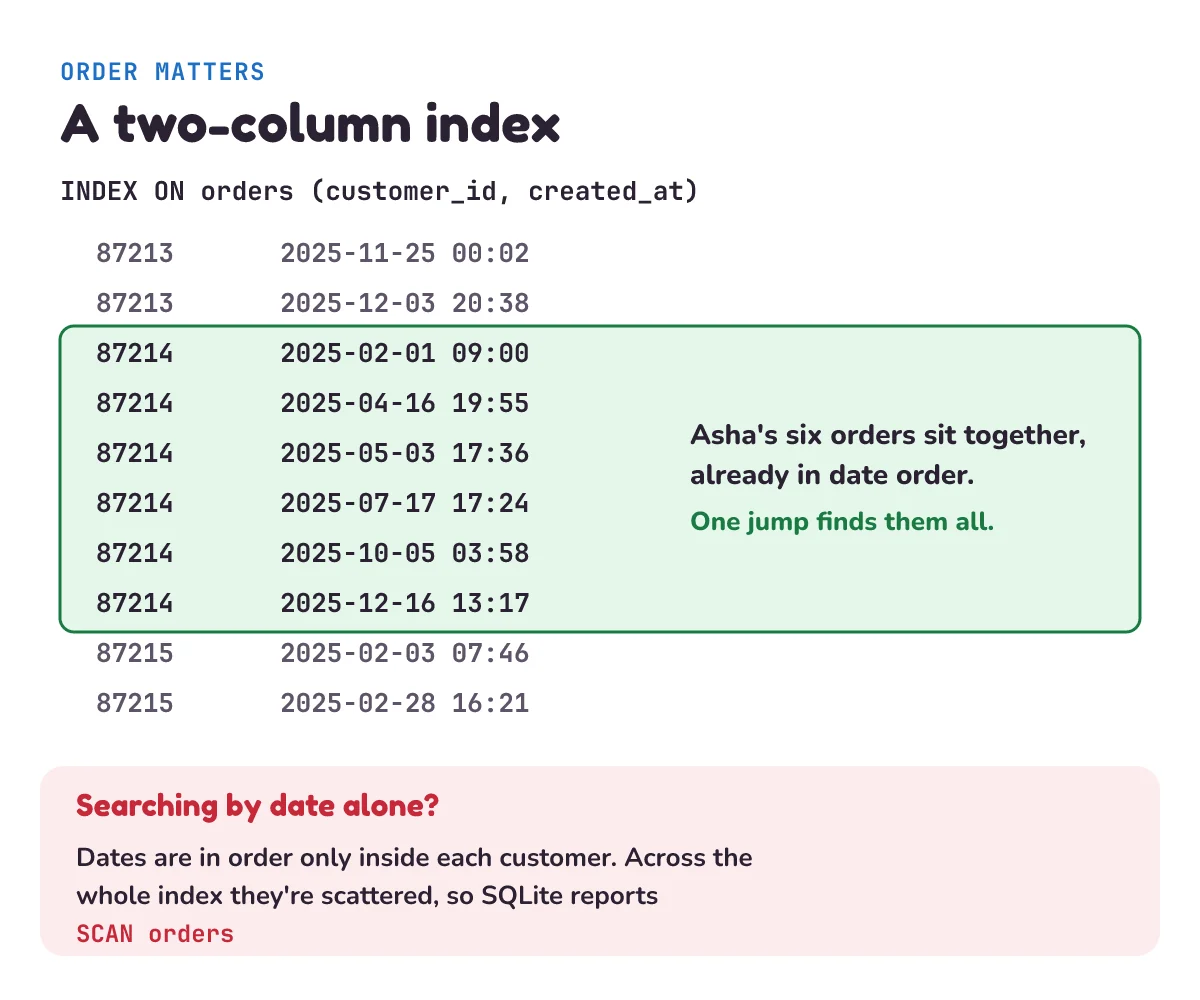
A useful result of this: an index on (customer_id, created_at) also does the job of an index on customer_id alone. So don't keep both, unless the shorter one enforces UNIQUE (no two rows may share a value). SQLite's docs: "Hence, a good rule of thumb is that your database schema should never contain two indices where one index is a prefix of the other." (The schema is the set of tables and indexes, and a prefix here is the first columns of a longer index.)
What does an index cost?
Back to the notebook: every sale is now written twice. PostgreSQL's docs: "After an index is created, the system has to keep it synchronized with the table. This adds overhead to data manipulation operations." In other words, inserts, updates and deletes get extra work. We saw the space cost already: one index took the database from 83.4 MB to 107.2 MB. Here's the time cost, adding 100,000 orders to the table with 0, 1 and 4 indexes (writes.py prints nothing until each round ends, so give it a minute):
# writes.py
import itertools
import time

from shop_db import ORDERS, drop_indexes, make_orders, open_db

NEW = [(None, *order[1:]) for order in itertools.islice(make_orders(), 100_000)]   # None: SQLite picks each id

db = open_db()
drop_indexes(db)
for columns in ([], ["customer_id"], ["customer_id", "status", "amount", "created_at"]):
    for column in columns:
        db.execute(f"CREATE INDEX idx_orders_{column} ON orders ({column})")
    start = time.perf_counter()
    db.executemany("INSERT INTO orders VALUES (?, ?, ?, ?, ?)", NEW)
    db.commit()                                                  # saved to disk: this is part of the cost
    seconds = time.perf_counter() - start
    drop_indexes(db)                                             # then remove them, so every round starts the same
    db.execute("DELETE FROM orders WHERE id > ?", (ORDERS,))
    db.commit()
    print(f"Indexes on the table: {len(columns)}. Time to add 100,000 orders: {seconds:.2f} s")
Indexes on the table: 0. Time to add 100,000 orders: 0.40 s
Indexes on the table: 1. Time to add 100,000 orders: 5.14 s
Indexes on the table: 4. Time to add 100,000 orders: 22.30 sThe table alone just adds to the end of the file. Each index has to put every new order in its sorted place. Those customer ids arrive in random order, so nearly every insert lands on a different page, and that page often isn't in the cache, the small part of the file SQLite keeps in memory, so it has to be read again. Treat the size of this gap as a warning, not a rule. This is one run on SQLite's small default cache ("limited to 2048000 bytes of memory"), and a bigger cache should narrow it. But for inserts, the direction is the same: more indexes, slower writes.
This leads to two everyday rules.
- Loading a lot of data? Add indexes afterwards. PostgreSQL's docs: "Creating an index on pre-existing data is quicker than updating it incrementally as each row is loaded."
- Remove indexes nobody uses. They cost you on every write and give nothing back. PostgreSQL: "Therefore indexes that are seldom or never used in queries should be removed."
There's also a cost when you first add one. On a big table in a running app, building the index takes time, and in PostgreSQL it blocks writes by default. PostgreSQL's docs: "Normally PostgreSQL locks the table to be indexed against writes and performs the entire index build with a single scan of the table." And "Very large tables can take many hours to be indexed". So PostgreSQL has another way: CREATE INDEX CONCURRENTLY lets writes carry on, though it does more work and takes longer. That's the sort of thing the next post in this series is about.
When should you not add an index?
- When the table is small. Reading a hundred rows costs almost nothing. PostgreSQL's docs: "selecting 1 out of 100 rows will hardly be" a candidate for an index, "because the 100 rows probably fit within a single disk page, and there is no plan that can beat sequentially fetching 1 disk page."
- When nobody searches that column. Add an index for a query you actually run, not for every column just in case.
- When the column has few different values and the query wants the common one. This one surprises people, so let's measure it.
90% of our orders are delivered. Say we want the total amount of all delivered orders (SUM adds the values up):
# low_variety.py
from shop_db import drop_indexes, open_db, show

QUERY = "SELECT SUM(amount) FROM orders WHERE status = 'delivered'"

db = open_db()
drop_indexes(db)
show(db, "No index on status", QUERY, tries=3)
db.execute("CREATE INDEX idx_orders_status ON orders (status)")
show(db, "With an index on status", QUERY, tries=3)
db.execute("ANALYZE")
show(db, "After ANALYZE", QUERY, tries=3)
No index on status
plan: SCAN orders
rows: 1, best time: 784.59 ms
With an index on status
plan: SEARCH orders USING INDEX idx_orders_status (status=?)
rows: 1, best time: 952.09 ms
After ANALYZE
plan: SEARCH orders USING INDEX idx_orders_status (status=?)
rows: 1, best time: 1247.15 msThe index made it slower here, and in 8 of the 9 times we ran this script. The laptop was busy, so times jump around between runs. The third result has the same plan as the second, so its extra time is that noise, not ANALYZE (a command explained below). The query needs 1.8 million of the 2 million rows. (rows: 1 is the one line of output, the total; to get it, SQLite still has to read them all.) So the index saves almost no reading. It only adds work: for each of those rows, a jump from the index back to the table. Reading the table straight through is better.
A planner is meant to weigh this, but it needs numbers to do it. ANALYZE is the command that collects statistics about your data, and PostgreSQL's docs warn: "In absence of any real statistics, some default values are assumed, which are almost certain to be inaccurate." SQLite had no statistics for the second run. Even with them, in the third run on SQLite 3.45.3, it still took the index, so a plan shows what the database chose, not whether that was wise. Measure with your own data. As PostgreSQL's docs say: "A good deal of experimentation is often necessary."
So where does an index usually belong? On columns you search with WHERE, columns you sort by, and columns you join tables on. A join combines rows from two tables, and a foreign key is a column that points to a row in another table, as customer_id would be if the shop had a customers table. Those are worth checking, because PostgreSQL won't index them for you: "the declaration of a foreign key constraint does not automatically create an index on the referencing columns."
What mistake do beginners make with indexes?
Wrapping the indexed column in a function. You add an index on created_at, then write what feels natural to get one day's orders: WHERE date(created_at) = '2025-06-15'. The query works, so nothing tells you it's wrong:
# mistakes.py
from shop_db import drop_indexes, open_db, show

db = open_db()
drop_indexes(db)
db.execute("CREATE INDEX idx_orders_created ON orders (created_at)")

show(db, "A function around the column", "SELECT id, amount FROM orders WHERE date(created_at) = '2025-06-15'")
show(db, "Same question, column left alone",
     "SELECT id, amount FROM orders WHERE created_at >= '2025-06-15' AND created_at < '2025-06-16'")
A function around the column
plan: SCAN orders
rows: 5,866, best time: 675.78 ms
Same question, column left alone
plan: SEARCH orders USING INDEX idx_orders_created (created_at>? AND created_at<?)
rows: 5,866, best time: 104.90 ms(SQLite's plan writes > even for >=. And our dates are text in year-month-day form, so text order is also date order.) Same 5,866 rows. But the index is sorted by created_at, not by date(created_at). To know what the function gives for each row, the database has to work it out for every row, so it scans. SQLite's docs list what an index can serve: "To be usable by an index a term must usually be of one of the following forms", and each form has the bare column on one side of the comparison. The fix is to leave the column alone and move the work to the value, as the second query does.
If you really do need to search by a calculated value, you can index the calculation itself. SQLite calls this an index on an expression: "an index can also be formed on expressions involving table columns". PostgreSQL's example is finding names in any case with lower(col1): "This query can use an index if one has been defined on the result of the lower(col1) function".
The same trap has a text version. A search like WHERE name LIKE '%sha' (names ending in "sha") can't use a normal index either, because a sorted list can't jump to an ending. It's the phone book again: you can find names that start with "As", not names that end in "sha". PostgreSQL's docs give the same rule: a B-tree can serve a fixed start, like 'foo%', but not '%bar'. SQLite's: "The string literal must not begin with a wildcard" (a wildcard is a symbol such as % that stands for any text).
One catch: even LIKE 'As%' only uses an index built with matching text-comparison rules, and a plain index often isn't, so check the plan before relying on it.
A second slip: adding an index and assuming it worked. Run EXPLAIN QUERY PLAN (in PostgreSQL, EXPLAIN) to see whether the index is used, then time the query to see whether it helped.
1) With an index on (customer_id, created_at), predict which of these three WHERE conditions use the index, and how far: customer_id = 87214 AND created_at >= '2025-06-01'; created_at >= '2025-06-01'; customer_id = 87214 AND amount > 1000. Then run the code in the answers to check.
2) Binary search takes about log2 N steps. About how many steps is that for 2 million rows? For 4 million?
3) A table has an index on (customer_id, created_at) and another on customer_id. Which one would you drop, and why?
Show the answers
1) Save this as try_it.py in the same folder and run it:
# try_it.py
from shop_db import drop_indexes, open_db

db = open_db()
drop_indexes(db)
db.execute("CREATE INDEX idx_orders_customer_date ON orders (customer_id, created_at)")

for where in ("customer_id = 87214 AND created_at >= '2025-06-01'",
              "created_at >= '2025-06-01'",
              "customer_id = 87214 AND amount > 1000"):
    plan = db.execute(f"EXPLAIN QUERY PLAN SELECT amount FROM orders WHERE {where}").fetchall()
    print(plan[0][3])
SEARCH orders USING INDEX idx_orders_customer_date (customer_id=? AND created_at>?)
SCAN orders
SEARCH orders USING INDEX idx_orders_customer_date (customer_id=?)The first uses both columns: the customer, then a range of dates inside that customer. The second can't start, because the first column isn't given. The third finds the customer through the index, then checks amount on each of Asha's rows, because amount isn't in the index.
2) About 21 for 2 million, since log2 2,000,000 is about 20.9. And about 22 for 4 million: doubling the table adds just one step.
3) Drop the one on customer_id alone. Its column is the first column of the longer index, so the longer index can already do its job (unless the shorter one enforces UNIQUE). Dropping it saves space and makes writes cheaper.
Questions people ask
What is an index in a database in simple words?
An index is a sorted list of the values in one or more columns, each with a pointer to its full row. It works like the index at the back of a book: the database looks up the value in the sorted list and goes straight to the matching rows, instead of reading the whole table.
Does an index make every query faster?
No. An index helps a query that picks out a small part of a table. It usually doesn't help when the query needs most of the table, and it can make that query slower. Every index also adds work to inserts, deletes and updates of its columns, though an update or delete that finds its rows through an index can be faster overall.
How many indexes should a table have?
As few as your real queries need. There is no fixed number. Add an index for a query that's actually slow, check with EXPLAIN QUERY PLAN (EXPLAIN in PostgreSQL) that it gets used, and remove indexes that nothing uses. A table that is written to constantly should have fewer than one that's mostly read.
Is a primary key an index?
A primary key is a rule (each value is unique and identifies one row), and the database enforces it with an index. PostgreSQL creates a unique index for every primary key. So you don't need to add your own index on a primary key column.
What is the difference between SCAN and SEARCH in SQLite?
In EXPLAIN QUERY PLAN output, SCAN means SQLite goes through all the rows of a table, and SEARCH means it visits only some of them, usually by using an index or the primary key. If a query on a big table says SCAN, look for a missing index or a condition that can't use one.
Keep going
- Previous in this System Design series: Rate limiting, how a server says "slow down" to a client that sends too many requests.
- Next: "Database migrations", how to change a live database's tables (and add indexes like these) without breaking the app.
- Where order 101 got paid: What is a webhook?
- Where queries like these usually live in code: The repository pattern.
Checked on 9 November 2026 against the 16 sources below.
Sources
- SQLite documentation: Query Planning (full scans, indexes, covering indexes)
- SQLite documentation: EXPLAIN QUERY PLAN
- SQLite documentation: The SQLite Query Optimizer Overview
- SQLite documentation: Database File Format (B-tree pages)
- SQLite documentation: PRAGMA statements (the default cache size)
- SQLite documentation: Indexes On Expressions
- PostgreSQL documentation: Indexes: Introduction
- PostgreSQL documentation: Index Types
- PostgreSQL documentation: Multicolumn Indexes
- PostgreSQL documentation: Unique Indexes
- PostgreSQL documentation: Indexes on Expressions
- PostgreSQL documentation: Examining Index Usage
- PostgreSQL documentation: Using EXPLAIN
- PostgreSQL documentation: CREATE INDEX (building indexes concurrently)
- PostgreSQL documentation: Populating a Database
- PostgreSQL documentation: Constraints (foreign keys)
Every Python sample in this post was run in Python 3.13 with SQLite 3.45.3 before publishing.