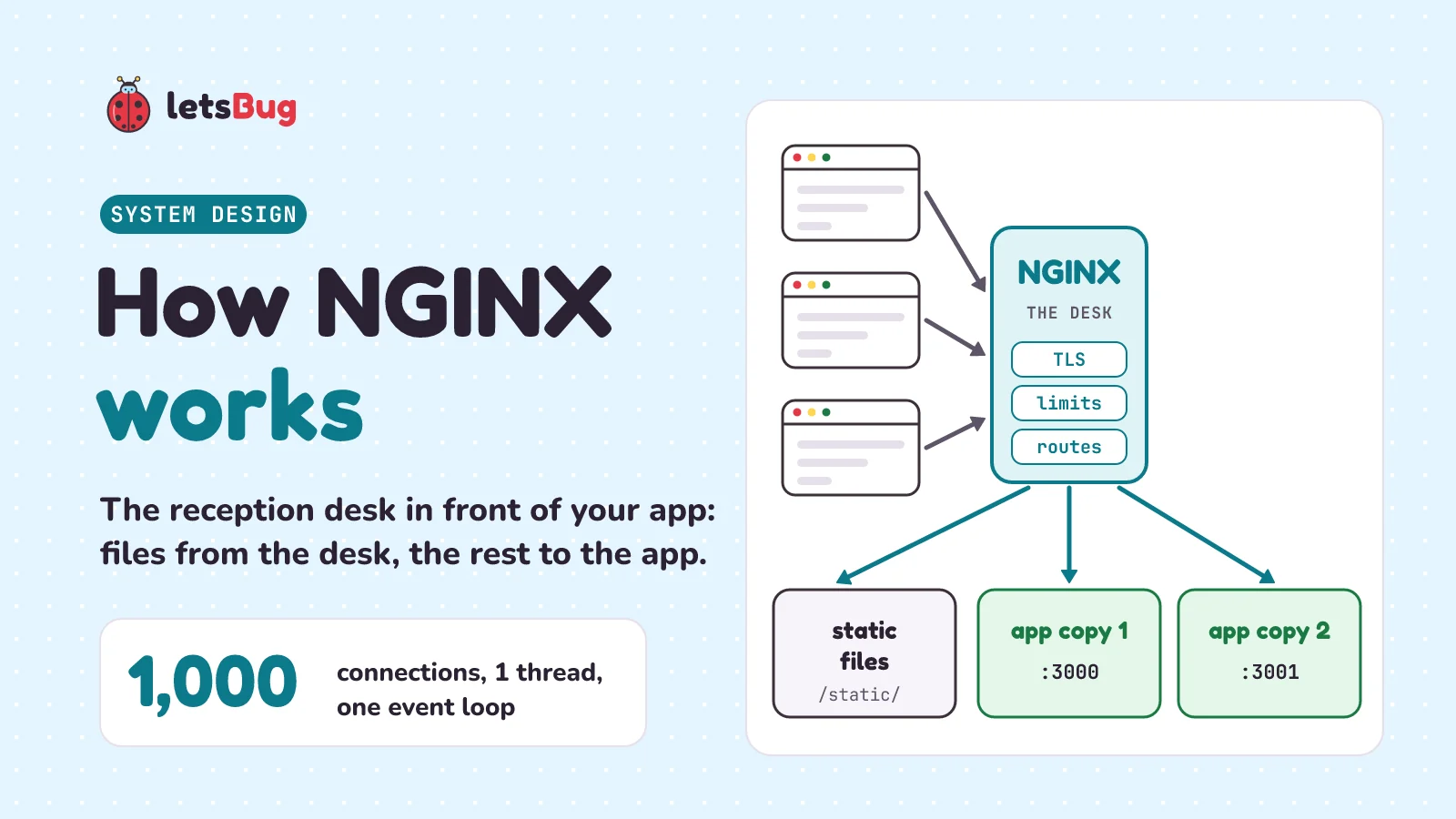
NGINX (say "engine x") is a web server that sits in front of your app. It answers simple requests itself, such as images and CSS files, and passes the rest to your app as a reverse proxy. A few worker processes each run an event loop, so one worker can handle thousands of connections without a thread for each.
In this post we start with a hotel reception desk, then look inside NGINX: the master and worker processes, and the event loop that lets one worker juggle thousands of visitors. We run a small Python program that answers 1,000 connections with one thread. Then we walk through what NGINX does for a real app: static files, reverse proxying, load balancing, HTTPS and rate limiting. Last, we read a minimal nginx.conf line by line, with every directive checked against the official docs.
Key takeaways
- NGINX is a web server (it sends files) and a reverse proxy (it passes requests on to your app and brings the answers back).
- One master process reads the config and looks after the workers. The worker processes do the real work, usually one per CPU core.
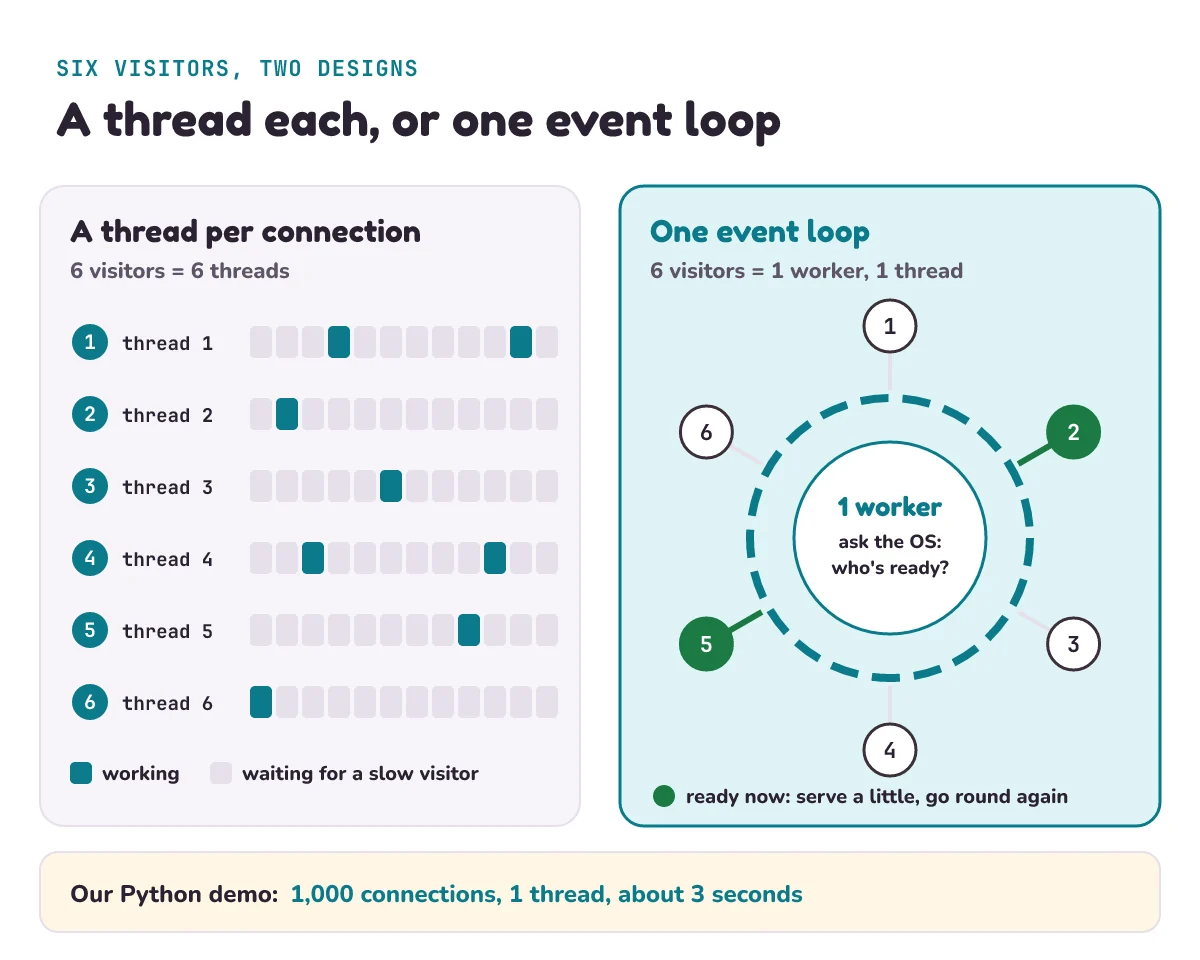
- Each worker runs an event loop: it never waits on one slow visitor. It asks the operating system which connections are ready and serves those, over and over.
- Our Python demo answered 1,000 connections, each needing 1 second of waiting, in about 3 seconds with 1 thread. One at a time, that would take 1,000 seconds.
- In front of an app, NGINX can serve static files, share requests between copies of the app (round-robin by default), handle HTTPS, and limit how fast one visitor can send requests.
- Test every config change with
nginx -tbefore you reload, and watch out foradd_header: one in alocationcancels all the ones above it.
What is NGINX, and what is a web server?
A web server is a program that waits for requests from browsers and sends back answers. Your browser and the server talk in HTTP, the language of the web: the browser asks "GET /index.html" and the server answers with the file, or with "404 Not Found". MDN, Mozilla's web documentation, puts it this way: a static web server consists of a computer "with an HTTP server (software)", and it's called static "because the server sends its hosted files as-is to your browser".
Most real sites also need a dynamic part: an app that builds each page from a database, like a Python (Django, Flask) or Node.js (Express) program. That app is often called the application server, or upstream in NGINX's words. NGINX's home page lists what it can be: "an HTTP web server, reverse proxy, content cache, load balancer, TCP/UDP proxy server, and mail proxy server." In this post we use three of them: web server, reverse proxy and load balancer.
What problem does NGINX solve?
You can put your app straight on the internet. Express or Flask will happily answer requests on their own. But then your app has to do every job itself: send every image, deal with HTTPS certificates, survive a visitor who sends 1,000 requests a second, and keep going while you restart it. And the moment one copy of the app isn't enough, you need something in front to share the work.
The other problem is waiting. Many visitors are on slow phone networks. A simple server gives each connection its own thread (a separate line of work the operating system runs) or its own process (a separate running program). NGINX's own article on its design says that's the common way, but "it does not scale when the application needs to handle thousands of simultaneous connections". Each thread costs memory, and most of them sit idle, waiting for a slow phone to send its next few bytes.
How does NGINX work? The hotel reception desk
Picture a busy hotel. Guests walk up to the reception desk all day. The desk answers simple questions itself: "Here's a map", "Breakfast is at 7". Anything else, it sends to the right room: the kitchen for food, the manager for a complaint. The desk doesn't cook and the kitchen doesn't greet guests.
Now the clever part. A good receptionist never stands frozen while one guest fills in a long form. They hand over the form, help the next guest, and come back when the first guest says "done". One person serves a whole queue that way.
| At the hotel | In NGINX |
|---|---|
| Guests arriving at the desk | Browsers sending HTTP requests |
| Answering "here's a map" from the desk | Serving static files: images, CSS, JavaScript |
| Sending the guest to the kitchen | Reverse proxying to your app |
| Two kitchens, sharing the orders | Load balancing across copies of the app |
| The hotel showing its licence, and talking behind a closed door | HTTPS (TLS): the site proves who it is, and the talk is private |
| "One request at a time, please" | Rate limiting |
| The receptionist who never waits on one guest | A worker's event loop |
What are the NGINX master and worker processes?
When NGINX starts, you get a small family of processes. The Beginner's Guide on nginx.org says: "nginx has one master process and several worker processes." It goes on: "The main purpose of the master process is to read and evaluate configuration, and maintain worker processes." And: "Worker processes do actual processing of requests."
So the master is the hotel manager: it reads the rules, opens the doors (the network ports), and hires the staff. The workers stand at the desk. The usual setting is one worker per CPU core (the parts of the processor that run code at the same time). The docs say that when in doubt, setting it to the number of cores "would be a good start", and worker_processes auto; does that for you.
The family also makes changes safe. Run nginx -s reload and the master checks the new config first. If it's fine, the master starts new workers with it and asks the old ones to finish up: the guide says old workers "stop accepting new connections and continue to service current requests until all such requests are serviced." If the new config is broken, the master keeps the old one. Visitors already connected finish normally.
How can one NGINX worker handle thousands of connections?
With an event loop. An event is something that happened: a new visitor connected, some bytes arrived, there's room to send more. The loop goes round and round:
- Ask the operating system: "Which of my connections have something ready?" On Linux, NGINX uses a fast way of asking called
epoll, which the docs describe as an "efficient method used on Linux 2.6+". - For each ready connection, do the little bit of work that's possible right now: read what arrived, send what's ready. Never wait.
- Go back to step 1.
The "Inside NGINX" article on the NGINX blog explains that "Each worker process handles multiple connections in a nonblocking fashion, reducing the number of context switches." Nonblocking means the worker never stops to wait for one connection. A context switch is the operating system swapping one thread off a core and another on, which takes time. The article says this design lets NGINX "scale to hundreds of thousands of concurrent connections on modern hardware".
Can you see an event loop in Python?
Yes. Python's asyncio module, which comes with Python, has an event loop. Its docs say: "The event loop is the core of every asyncio application." This program starts a tiny server, the "desk", and 1,000 visitors, the "guests", all in one Python program with one thread.
Each guest connects and sends one line. The desk then waits 1 second before it answers, standing in for a slow app or a slow phone network. If the desk served guests one at a time, that would take 1,000 seconds, nearly 17 minutes.
Some new words first. async def makes a function that can pause. await marks the pause: "start this, and while it's waiting, let the loop run something else." asyncio.gather starts many of them together and collects all their answers. asyncio.run starts the event loop.
import asyncio
import threading
import time

GUESTS = 1000


async def desk(reader, writer):
    await reader.readline()                  # wait for the guest's request
    await asyncio.sleep(1)                   # a slow app: 1 second per answer
    writer.write(b"HTTP/1.1 200 OK\r\nContent-Length: 2\r\n\r\nok")
    await writer.drain()
    writer.close()


async def guest(port, n):
    reader, writer = await asyncio.open_connection("127.0.0.1", port)
    writer.write(f"GET /room/{n} HTTP/1.1\r\n".encode())
    reply = await reader.read()              # read until the desk hangs up
    writer.close()
    return reply.endswith(b"ok")


async def main():
    server = await asyncio.start_server(desk, "127.0.0.1", 0, backlog=GUESTS)
    port = server.sockets[0].getsockname()[1]
    start = time.perf_counter()
    async with server:
        answers = await asyncio.gather(*(guest(port, n) for n in range(GUESTS)))
    seconds = time.perf_counter() - start
    print(f"{sum(answers)} of {GUESTS} answered in {seconds:.1f} s")
    print("threads:", threading.active_count())


asyncio.run(main())
Port 0 asks the operating system for any free port, and getsockname() tells us which one we got. backlog is how many new connections can queue at the door before the desk picks them up. Here's one run on our Windows laptop:
1000 of 1000 answered in 3.5 s
threads: 1
All 1,000 guests got their answer, in 2.7 to 3.5 seconds across three runs, with one thread. Your time will be a little different, but it'll be seconds, not 17 minutes. While each guest's 1 second of waiting ticks by, the loop is busy with the others. That's the receptionist who hands over a form and serves the next guest.
Under the hood, asyncio does what an NGINX worker does. Its docs describe SelectorEventLoop as "based on the selectors module", Python's wrapper for asking the operating system which connections are ready (epoll on Linux). On Windows, asyncio uses ProactorEventLoop, which "uses “I/O Completion Ports” (IOCP)", Windows' own way of doing the same job. NGINX is written in C and is far faster than this, but the idea is the same.
How does NGINX serve static files?
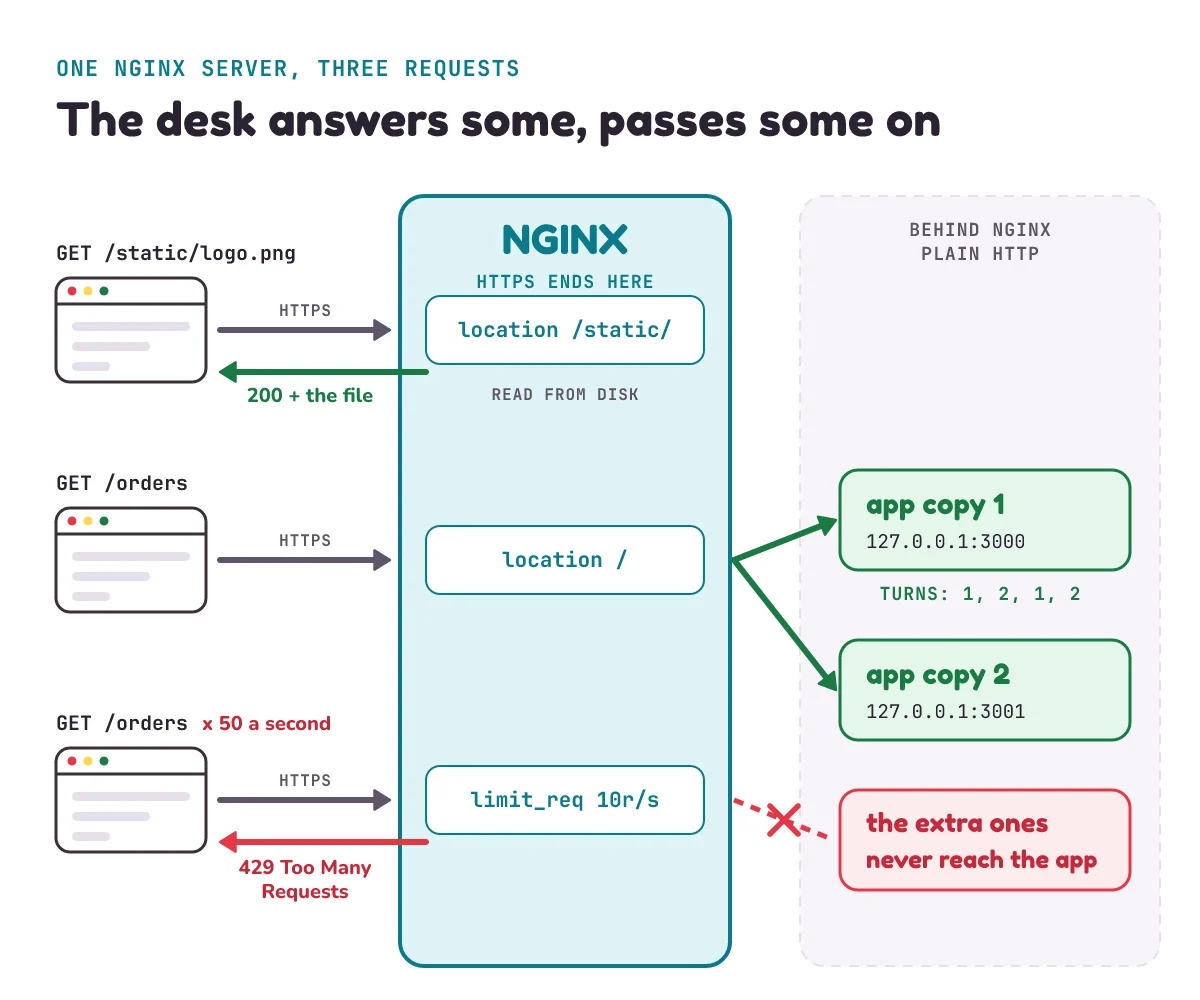
Static files are files sent exactly as they are on disk: images, CSS, JavaScript, fonts, plain HTML. NGINX's Beginner's Guide calls serving them "An important web server task". You tell NGINX which folder to look in with root:
location /static/ {
    root /var/www;
}
A location block matches the start of the address. For matching requests, the guide says, "the URI will be added to the path specified in the root directive". So /static/logo.png becomes the file /var/www/static/logo.png. If the file isn't there, NGINX answers 404. Your app never hears about it, so it's free for the work only it can do.
When several location blocks match, NGINX "selects the one with the longest prefix". /static/ is longer than /, so it wins for every file under /static/.
What is a reverse proxy, and how does NGINX do it?
A proxy is a go-between. MDN describes two kinds. A forward proxy works for the visitors: think of a school network that sends every student's browsing through one machine. A reverse proxy works for the website: MDN calls it "A reverse proxy taking requests from the Internet and forwarding them to servers in an internal network."
NGINX's guide describes the same job: a proxy is "a server that receives requests, passes them to the proxied servers, retrieves responses from them, and sends them to the clients." Your app then answers only NGINX, say on port 3000, and never faces the internet directly. One line does it:
location / {
    proxy_pass http://127.0.0.1:3000;
}
127.0.0.1 means "this same machine", also called localhost. Only programs running on the server itself can reach it. So your app must listen there too. In Express that's app.listen(3000, "127.0.0.1"). With plain app.listen(3000), Node.js's docs say the server accepts connections on "the unspecified IPv4 address (0.0.0.0)" (or its IPv6 twin): every network address the machine has. Then anyone could go round NGINX, straight to port 3000, and skip HTTPS and the rate limit. If the app runs on a different machine, use that machine's private address and a firewall instead.
There's a catch. Your app now sees every request coming from NGINX, not from the visitor. So NGINX adds notes to the request with proxy_set_header: which site the visitor asked for (Host), their real IP address, the number that identifies a device on the internet, like a phone number (X-Forwarded-For), and whether they used HTTPS (X-Forwarded-Proto). By default, the proxy module's docs say, NGINX sets Host to $proxy_host, the address in proxy_pass. That's why the config below passes the visitor's own $host instead.
Your app also has to be told to trust these notes. Express's guide warns that, behind a reverse proxy, the parts of Express that show the visitor's IP address "may instead show an internal IP address of the reverse proxy". Its fix is app.set("trust proxy", "loopback"): believe the notes only when they come from NGINX on the same machine. A visitor who sends a made-up X-Forwarded-For of their own then can't fake their address.
How does NGINX load balancing work?
When one copy of your app isn't enough, run two or three, on different ports or machines, and list them in an upstream block. proxy_pass then points at the group's name instead of one address. This is load balancing: sharing the requests between copies, like three kitchens sharing the orders.
upstream app {
    zone app 64k;
    server 127.0.0.1:3000;
    server 127.0.0.1:3001;
}
The nginx.org load-balancing guide says: "When the load balancing method is not specifically configured, it defaults to round-robin." Round-robin means taking turns: request 1 to the first copy, request 2 to the second, request 3 back to the first. Add least_conn; inside the block and NGINX picks the copy with the fewest open connections, which is fairer when some requests take much longer than others.
One catch we hit when we ran this config: NGINX starts several worker processes (12 on our test machine), and without help each one keeps its own turn. On a quiet site every worker starts at the first copy, so copy 1 can get every request. Our six test requests went 3000, 3000, 3000, 3000, 3000, 3000. The line zone app 64k; fixes it. nginx.org says it keeps "the group’s configuration and run-time state that are shared between worker processes", so all workers share one turn. With it, the same six requests went 3000, 3001, 3000, 3001, 3000, 3001.
NGINX also notices when a copy is down. The guide: "If the response from a particular server fails with an error, nginx will mark this server as failed, and will try to avoid selecting this server for subsequent inbound requests for a while." By default one failure is enough, and the copy rests for 10 seconds (max_fails and fail_timeout on the upstream module's page).
What is TLS termination in NGINX?
HTTPS is HTTP sent through TLS, the layer that encrypts the connection and proves the site is really who it says it is (see what happens when you type a URL for the handshake). TLS termination means the encrypted connection ends at NGINX. NGINX holds the certificate (a file, signed by a company browsers trust, that proves the site's name), decrypts each request, and passes it to your app as plain HTTP, on the same machine or over a private network. Your app needs no certificates at all.
The nginx.org guide to HTTPS servers says you need listen 443 ssl; plus the certificate and its key. "The server certificate is a public entity": every visitor gets a copy. The key is the secret, and "should be stored in a file with restricted access". You don't have to pick TLS versions yourself either: recent versions of NGINX use ssl_protocols TLSv1.2 TLSv1.3 by default, and the guide adds that "configuring them explicitly is generally not needed". TLS 1.3 joined that default in NGINX 1.23.4, so on an older server, or one whose ready-made nginx.conf lists TLSv1 or TLSv1.1, set the line yourself.
How do you rate limit and add security headers in NGINX?
Rate limiting means capping how many requests one visitor can send per second, so one script can't flood your app. NGINX's limit_req module does it, and its docs say "The limitation is done using the “leaky bucket” method": requests pour in at any speed, but leave at a steady rate. Two lines set it up:
limit_req_zone $binary_remote_addr zone=perip:10m rate=10r/s;
limit_req zone=perip burst=20 nodelay;
The first, in the http block, makes a 10-megabyte memory area called perip that counts requests per visitor IP address, allowing 10 a second on average. People on the same college Wi-Fi or mobile network can share one address, so don't set it too low. The docs say one megabyte holds "about 8 thousand 128-byte states" on 64-bit systems, so 10 MB tracks about 80,000 addresses. The second line, in a location, uses it: up to 20 extra requests in a burst are let through at once (nodelay), and anything beyond that is turned away. By default the refusal is 503; limit_req_status 429; sends the clearer "429 Too Many Requests" instead. We'll build a rate limiter in code, with the token bucket, later in this series.
Security headers are extra lines NGINX adds to every response that tell the browser to be careful. Two simple ones:
Strict-Transport-Security(HSTS) "informs browsers that the host should only be accessed using HTTPS", says MDN.max-age=31536000means remember that for 31,536,000 seconds: 365 days. While you're testing, start small, likemax-age=300(5 minutes): once a browser has seen the header, it won't use plain HTTP for your site until the time runs out.X-Content-Type-Options: nosnifftells the browser that the file types the server announces "should be respected and not changed", so a text file can't be run as a script.
Add them with add_header. Put always on the end: without it, NGINX only adds headers to responses such as 200 OK and redirects like 301, and the docs say with always "the header field will be added regardless of the response code", error pages included.
What does a minimal nginx.conf look like?
Here's everything above in one file: two copies of an app on ports 3000 and 3001, static files from /var/www/static, HTTPS, a rate limit and two security headers. Swap example.com and the certificate paths for your own.
worker_processes auto;

events {
    worker_connections 1024;
}

http {
    include mime.types;
    limit_req_zone $binary_remote_addr zone=perip:10m rate=10r/s;

    upstream app {
        zone app 64k;
        server 127.0.0.1:3000;
        server 127.0.0.1:3001;
    }

    server {
        listen 80;
        server_name example.com;
        return 301 https://example.com$request_uri;
    }

    server {
        listen 443 ssl;
        server_name example.com;
        ssl_certificate     /etc/nginx/certs/example.com.crt;
        ssl_certificate_key /etc/nginx/certs/example.com.key;

        add_header Strict-Transport-Security "max-age=31536000" always;
        add_header X-Content-Type-Options nosniff always;

        location /static/ {
            root /var/www;
        }

        location / {
            limit_req zone=perip burst=20 nodelay;
            limit_req_status 429;
            proxy_pass http://app;
            proxy_set_header Host $host;
            proxy_set_header X-Forwarded-For $proxy_add_x_forwarded_for;
            proxy_set_header X-Forwarded-Proto $scheme;
        }
    }
}
Two grammar rules first. A directive is one instruction: a name, its settings, and a semicolon at the end. A block is a directive with more directives inside braces { }, such as http, server and location; the guide calls such a block "a context". Words that start with $ are variables, which NGINX fills in for each request: $host is the site name the visitor asked for, $scheme is http or https, $binary_remote_addr is the visitor's IP address in a compact form, and $proxy_add_x_forwarded_for is any X-Forwarded-For the request already had, with the visitor's address added on the end. Now line by line:
worker_processes auto;starts one worker per CPU core.events { worker_connections 1024; }lets each worker hold up to 1,024 connections at once. The docs warn that this "includes all connections (e.g. connections with proxied servers, among others), not only connections with clients". So 4 workers hold 4,096 connections, and each request being passed to the app uses 2 of them: one to the visitor, one to the app.http { ... }holds everything about web traffic.include mime.types;pulls in the file, shipped with NGINX, that maps endings like.cssto types liketext/css, so browsers know what each file is.limit_req_zone ...creates the rate-limit memory area, as above.upstream app { zone ...; server ...; server ...; }names the two copies of the app;zone app 64k;lets every worker share one round-robin turn. Thisserveris a different directive from theserver { }block below: insideupstreamit means "one copy of the app".- The first
server { }block listens on port 80, plain HTTP, andreturn 301sends every visitor to the HTTPS address. 301 means "moved permanently";$request_urikeeps the rest of the address, like/orders?page=2. - The second
server { }block is the real site.listen 443 ssl;takes HTTPS on port 443,server_namesays which site name it answers to, and the twossl_lines point at the certificate and its key. - The two
add_headerlines add the security headers to every response from this server. location /static/ { root /var/www; }serves files straight from disk.location / { ... }catches everything else: it applies the rate limit, answers 429 to visitors who go over, passes the request to theappgroup, and adds the three notes about the visitor.
We checked every directive name and the block it may appear in against its page on nginx.org, and every $variable against the docs' lists. Before you use a config on a real server, run nginx -t: the docs say NGINX "checks the configuration for correct syntax, and then tries to open files referred in the configuration". Then run nginx -s reload.
When don't you need NGINX?
- On a hosting platform that already does the job. Services like Render, Vercel or a cloud load balancer usually handle HTTPS and share traffic between copies for you. Adding NGINX behind them is one more thing to configure and debug. See how we deploy a React app and an Express API with no NGINX at all.
- On your own laptop while you build. Run the app directly. Add NGINX when you set up a real server.
- When it's the only reason for a second server. A small app with few visitors doesn't need a proxy for speed. Use NGINX when you need what it gives: HTTPS in one place, static files, several copies of the app, or limits.
What mistake do beginners make with NGINX?
The classic one is add_header inside a location. Say you want browsers to keep your static files for a day, so you write:
location /static/ {
    root /var/www;
    add_header Cache-Control "max-age=86400";
}
It works, and your images now come with Cache-Control. But the HSTS and nosniff headers have quietly vanished from every file under /static/. The docs explain why: add_header directives "are inherited from the previous configuration level if and only if there are no add_header directives defined on the current level." One add_header in the location cancels all of the ones in server.
location that adds its own header. NGINX 1.29.3 and later also has add_header_inherit merge;, which keeps the ones from above. proxy_set_header and limit_req follow the same "only if there are none here" rule.The second classic: editing the config and reloading without nginx -t. Reload is safe: if the new config is broken, the master keeps the old one running. But some problems only show up in NGINX's error.log file, so it's easy to think your change is live when it isn't. nginx -t prints every problem on screen. Test first, every time.
1) A server has 2 CPU cores. With worker_processes auto; and worker_connections 512;, how many connections can NGINX hold at once, and about how many requests can it be passing to an app at the same moment?
2) With location /static/ { root /var/www; }, which file does NGINX send for /static/css/site.css?
3) In our Python program, change asyncio.sleep(1) to asyncio.sleep(2). About how long will 1,000 guests take now, and how long would they take one at a time?
Show the answers
1) 2 workers × 512 = 1,024 connections. Each request being passed to the app uses 2 (one to the visitor, one to the app), so about 512 at once.
2) /var/www/static/css/site.css. root adds the whole address, /static/ included, to the folder.
3) About 1 second longer than before, so roughly 4 to 5 seconds on our laptop, still with 1 thread. One at a time it would be 2,000 seconds, over 33 minutes.
Questions people ask
What is NGINX in simple words?
A program that sits between the internet and your app. It sends files like images straight from disk, passes everything else to your app, and handles HTTPS. It's built to handle many thousands of visitors at once with very little memory.
What is a reverse proxy in simple words?
A go-between that works for the website. Visitors talk to it, and it passes their requests to the real servers behind it and brings the answers back. Visitors never talk to those servers directly.
What is the difference between a forward proxy and a reverse proxy?
A forward proxy sits in front of the visitors, for example a school or office network that sends all browsing through one machine. A reverse proxy sits in front of the servers, taking requests from the internet and passing them to the servers inside. NGINX is usually used as a reverse proxy.
Why is NGINX so fast?
Because of its event loop. Each worker handles thousands of connections without a thread for each, and never sits waiting on one slow visitor. That keeps memory use low and avoids the cost of the operating system swapping thousands of threads on and off the CPU.
Is NGINX free?
Yes. The open-source NGINX from nginx.org is distributed under the 2-clause BSD licence, so you can use it for free, including at work. F5, the company behind it, also sells enterprise versions, support and training.
What port does NGINX listen on?
In a normal setup, port 80 for plain HTTP and port 443 for HTTPS. You choose them with listen, as in listen 443 ssl;. Your app usually listens on another port, such as 3000, on 127.0.0.1 so only NGINX can reach it.
How do I check nginx.conf for errors?
Run nginx -t. It checks the syntax and tries to open every file the config mentions, such as certificates. If it says the test is successful, apply the change with nginx -s reload.
Keep going
- Previous in the System Design series: What is MVC architecture? Model, view, controller explained, post 1.
- Next in the series: What is an API gateway? Load balancer vs reverse proxy, and how to tell the three apart.
- Build the app that sits behind NGINX: a REST API in Express.js, which listens on port 3000.
- See the whole trip a request makes before it reaches NGINX: what happens when you type a URL.
Checked on 26 October 2026 against the 23 sources below.
Sources
- nginx.org: nginx home page (what nginx is, 2-clause BSD licence)
- nginx.org: Beginner's Guide (master and worker processes, reload, contexts, static files, proxy server, longest prefix)
- nginx.org: Core functionality (
worker_processes,events,worker_connections,include) - nginx.org: Connection processing methods (epoll)
- nginx.org: ngx_http_core_module (
http,server,listen,server_name,location,root, variables) - nginx.org: ngx_http_proxy_module (
proxy_pass,proxy_set_header,$proxy_add_x_forwarded_for) - nginx.org: ngx_http_upstream_module (
upstream,zone,server,max_fails,fail_timeout) - nginx.org: Using nginx as HTTP load balancer (round-robin, least-connected, passive health checks)
- nginx.org: Configuring HTTPS servers (certificate and key, default TLS versions)
- nginx.org: ngx_http_ssl_module (
ssl_certificate,ssl_certificate_key) - nginx.org: ngx_http_limit_req_module (leaky bucket,
limit_req_zone,limit_req,limit_req_status) - nginx.org: ngx_http_headers_module (
add_header,always, inheritance,add_header_inherit) - nginx.org: ngx_http_rewrite_module (
return) - nginx.org: Command-line parameters (
nginx -t) - NGINX Community Blog: Inside NGINX: How We Designed for Performance & Scale, Owen Garrett, 2015 (thread per connection, nonblocking workers)
- MDN: What is a web server?
- MDN: Proxy server (forward and reverse proxies)
- MDN: Strict-Transport-Security
- MDN: X-Content-Type-Options
- Express: Express behind proxies (
trust proxy,loopback) - Node.js documentation: net (
server.listen()with no host) - Python documentation: Event loop (SelectorEventLoop, ProactorEventLoop)
- Python documentation: Streams (
start_server,open_connection)
The Python sample was run in Python 3.13 before publishing. NGINX itself wasn't run for this post: the config was checked directive by directive against the nginx.org pages above.