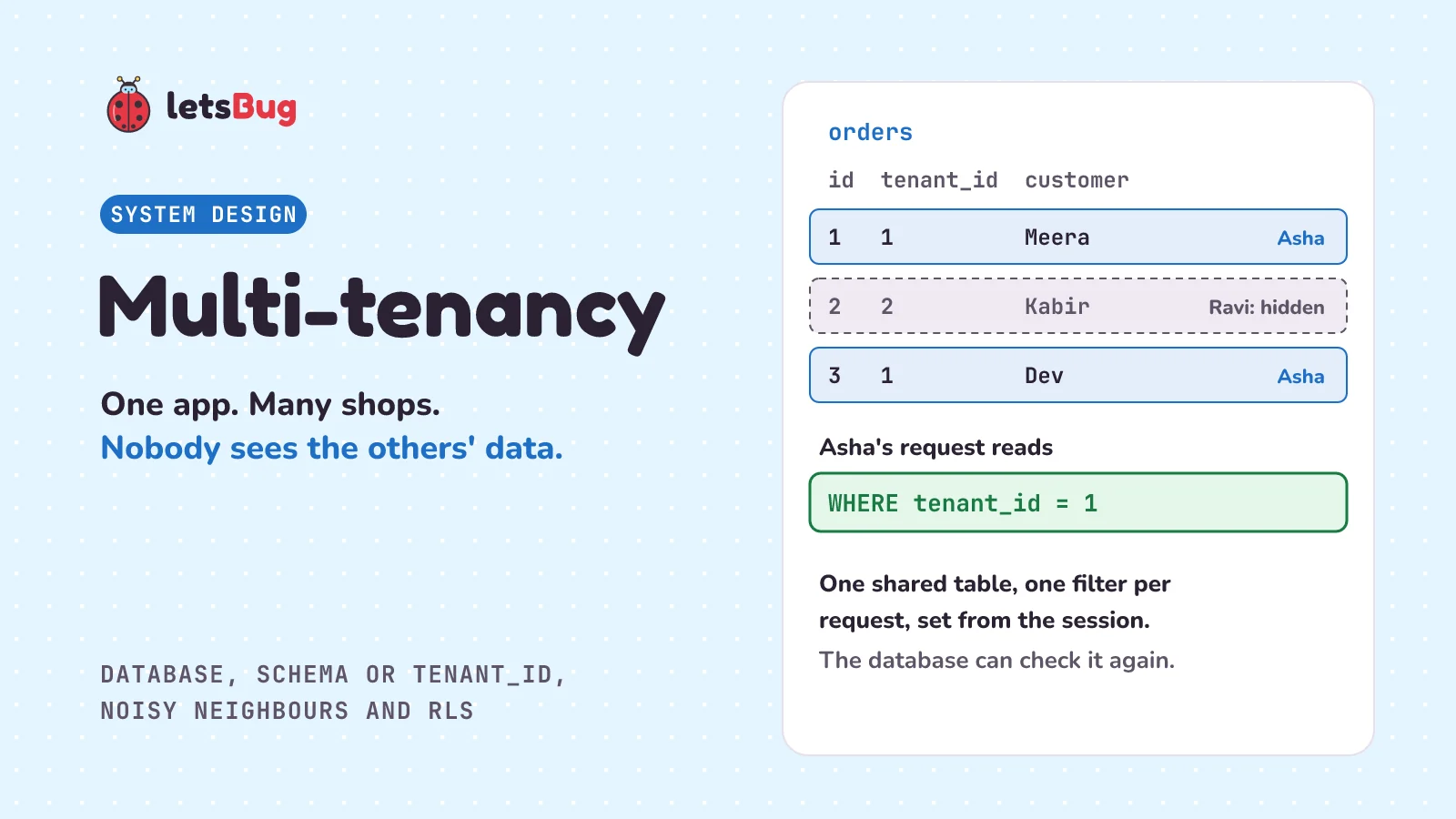
Multi-tenancy means one app and one set of servers serve many separate customers, called tenants, while each tenant sees only its own data. You can give each tenant its own database, its own schema, or share the tables and mark every row with a tenant_id. Sharing is cheapest, and the easiest to leak from.
In this post the shop app from the last few posts grows up. It's now a billing app that many small shops use, such as Asha's bakery and Ravi's bookshop. We start with an apartment building, then compare the three ways to store each tenant's data, and the noisy neighbour problem. Then we build a leak in plain Python with SQLite, where one missing filter shows Ravi's order to Asha, and fix it with one helper that every query goes through. We finish with PostgreSQL's row-level security as a second lock.
A few words first. A tenant is one customer of the app, usually a whole company or shop with its own staff, not one person. SaaS (software as a service) is software you use in the browser and pay for monthly, instead of installing your own copy. A query is a request to the database, such as "give me order 2". A schema is a named group of tables inside one database, like a folder. A session is the app's record that you are signed in, and a token is the secret string the browser sends with every request to prove it. Isolation means one tenant can't see or change another tenant's data.
Key takeaways
- Multi-tenancy is one app serving many tenants. It's cheaper than a copy of the app per customer, because they share servers, code and upgrades.
- There are three common models: a database per tenant (strongest walls, most work to run), a schema per tenant (in between), and a shared table with a tenant_id column (cheapest, but every query must filter).
- A noisy neighbour is a tenant whose heavy use slows everyone else down. Shared models feel it most. Per-tenant limits, or moving a big tenant to its own database, help.
- In a shared table, one query without
WHERE tenant_id = ?leaks another customer's data. In our example, Asha opens/orders/2and sees Ravi's order. - Fix it in one place: set the tenant once per request, from the signed-in session (never from the URL or a form), and send every query through one helper that adds the filter itself.
- Add PostgreSQL row-level security as a second lock: the database filters every row by tenant, even when the app's query forgets. The app must never connect as a superuser or a BYPASSRLS role, and not as the table's owner unless the table has
FORCE ROW LEVEL SECURITY, or the policy does nothing.
What is multi-tenancy in simple words?
Picture an apartment building. One building, one set of foundations, one lift, one water tank, and many flats. Each family has its own flat and its own lock. A building is much cheaper than a separate house for every family, because they share the walls, the lift and the guard at the gate.
The sharing brings two worries. First, one family's key must never open another family's door. Second, a family that runs every tap at once shouldn't leave the others with a trickle of water.
Software works the same way. A company builds one app, say a billing app for small shops, and sells it to many shops. Each shop is a tenant, a family in the building. They all use the same code on the same servers. Multi-tenancy is the building. Tenant isolation is the locks. And the family running every tap is the noisy neighbour.
There's one more character we'll meet in the code: a careless caretaker. The building keeps every family's parcels in one room. Someone walks up and says "parcel number 2, please", and the caretaker hands it over without asking which flat they live in. That's the leak we'll build, and then fix.
Why not give every customer their own copy of the app?
You could. Each shop would get its own server, its own database and its own copy of the code. With 5 shops, that works. With 5,000, it means 5,000 servers to pay for, 5,000 copies to upgrade every time you fix a bug, and 5,000 places to check when something breaks at night. Most of those servers would sit idle, because a small bakery doesn't need a whole server.
So SaaS apps share. One copy of the code runs for everyone, and new shops are added by creating a row, not a server. The risk is the one from the building: once tenants share, the walls between them are only as strong as your code. AWS's SaaS guide says it plainly: "Crossing this boundary in any form would represent a significant and potentially unrecoverable event for a SaaS business." A shop that finds a competitor's sales in its dashboard won't stay a customer.
What are the three multi-tenancy models?
The big choice is where each tenant's data lives. There are three common answers, from the most separate to the most shared.
1. A database per tenant. Each shop gets its own database: shop_1, shop_2 and so on. In the building, that's a separate house for each family. The app connects to the right database for each request, and a query on that connection can only see that shop's tables, so a forgotten filter can't leak. You can back up, restore, move or delete one shop on its own. The cost is running many databases: 5,000 shops means 5,000 databases to create, back up and watch. Every migration (a change to the tables) runs 5,000 times. And each database needs its own connections, so the connection pool (the few open connections an app shares between requests) is split 5,000 ways.
2. A schema per tenant. One database, with a schema for each shop: shop_1.orders, shop_2.orders. That's a flat for each family in one building. PostgreSQL's docs give this as the first reason for schemas: "There are several reasons why one might want to use schemas: To allow many users to use one database without interfering with each other." The app picks the shop's schema for each request with the search path: "The system determines which table is meant by following a search path, which is a list of schemas to look in." So a query for orders finds shop_1.orders. It's simpler to run than thousands of databases, but every migration still runs once per schema, and a search path left pointing at the wrong schema shows the wrong shop's tables. With a connection pool, a search path set for one request can stay on the connection for the next, so set it inside each request's transaction with set_config('search_path', 'shop_1', true). The true makes it end with the transaction, the same trick we use for the tenant setting further down.
3. A shared table with a tenant_id column. One database, one orders table for every shop, and each row says which shop owns it in a tenant_id column. That's one big shared storeroom where every shelf is labelled with a flat number. It's the cheapest to run: one migration, one pool, and a new shop is one new row in a tenants table. The price is that every query must say WHERE tenant_id = ?, and one that forgets shows every shop's data. Put tenant_id first in indexes that look up one shop's rows, so the database finds them fast. An index is a sorted list the database keeps to find rows fast; the database indexing post shows why.
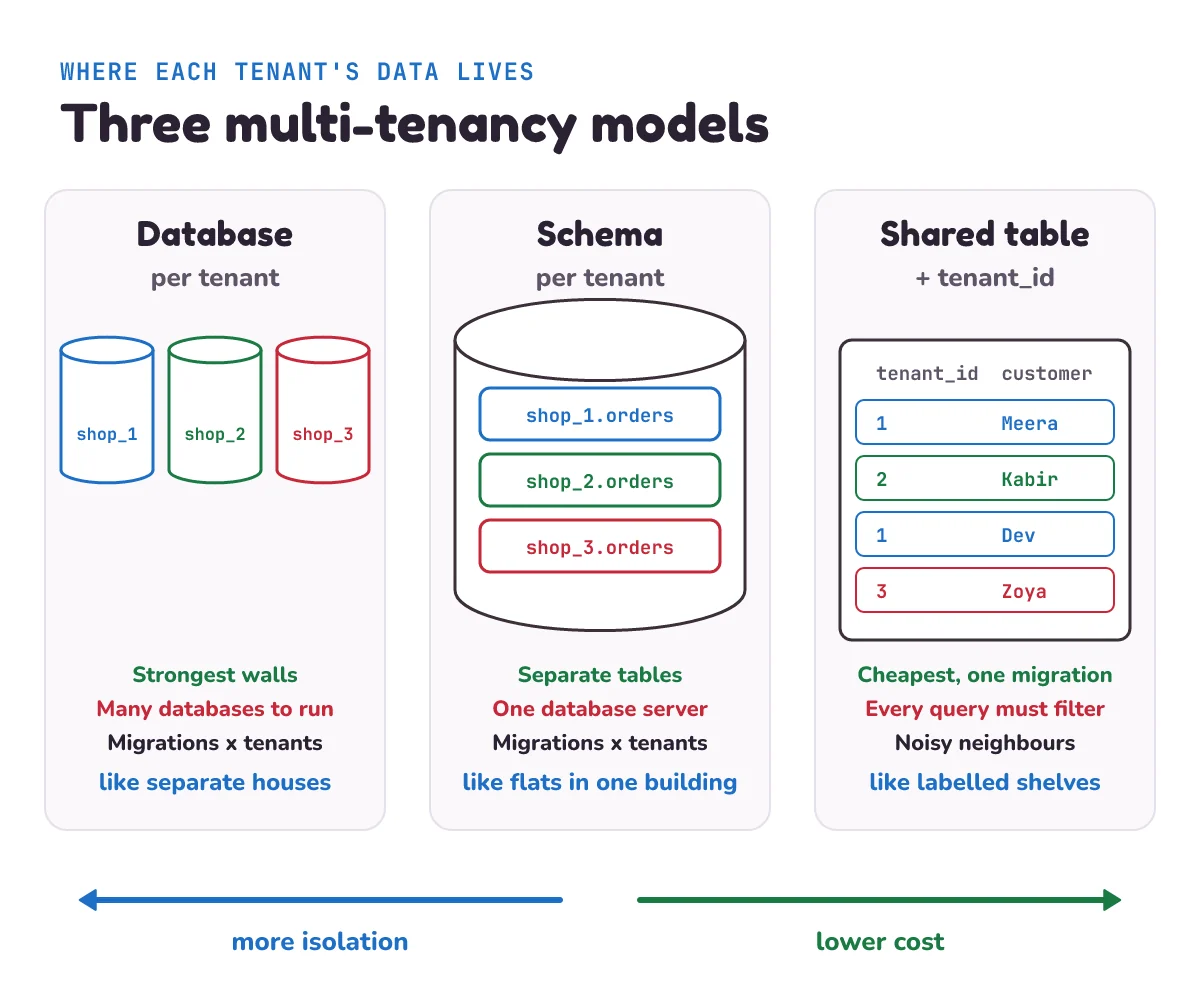
AWS's SaaS guide uses three other names for these ideas. "The silo model refers to an architecture where tenants are provided dedicated resources." A database per tenant is a silo. "In contrast, the pool model of SaaS refers to a scenario where tenants share resources." The shared table is a pool. And: "Bridge is meant to acknowledge the reality that SaaS businesses aren't always exclusively silo or pool." In a bridge, some parts of the system are siloed and others pooled. Apps also mix the models by tenant, for example small shops pooled in shared tables and one big customer in its own database.
| Database per tenant | Schema per tenant | Shared table + tenant_id | |
|---|---|---|---|
| Isolation | Strongest: separate databases | Separate tables, same database | Only the filter in each query |
| A forgotten filter | Can't leak, if the app connects to the right database | Can't leak, if the search path is right | Leaks every tenant's rows |
| Cost with many small tenants | Highest | Medium | Lowest |
| A migration runs | Once per tenant | Once per tenant | Once |
| Back up or delete one tenant | Easy: the whole database | Easy: the whole schema | Harder: DELETE ... WHERE tenant_id = ? in every table |
| Noisy neighbours | Fewest, if on separate servers | Share one database server | Share everything |
There's no best model, only the right one for your tenants. A new SaaS with many small customers often starts with the shared table, because it's cheapest. The rest of this post is about making that choice safe.
What is the noisy neighbour problem?
In AWS's words: "The idea behind noisy neighbor is that a user of a system could place load on the system's resources that could have an adverse effect on other users of the system." Back in the building, it's the family running every tap.
In our app, say Ravi uploads his whole catalogue, 20,000 books and five years of sales, at 11 in the morning. The import uses the database's disk and CPU, the app server's CPU, and holds connections from the shared pool. Asha's bakery hasn't done anything different, but her billing page now takes ten seconds to load, during her busiest hour. In a shared table, every tenant shares everything, so one heavy tenant can slow the rest.
The usual fixes:
- Limit each tenant, not just the whole app. A rate limit keyed by tenant (say, 100 requests a second per shop) stops one shop from taking the whole server.
- Cap each tenant's share of the pool, so one shop's slow import can't hold every database connection.
- Move heavy work out of the request. A catalogue import can run as a background job, one tenant's job at a time, while normal page loads carry on.
- Move the biggest tenant out. If one customer is far bigger than the rest, give it its own database. AWS's guide uses the same reasoning for whole services: "The regulatory profile of a service's data and its noisy neighbor attributes might steer a microservice to a silo model."
How does a missing tenant filter leak data?
Let's build the shared-table model with SQLite, the database that comes with Python. There are two shops (tenants), a sessions table that says which shop each signed-in token belongs to, and one orders table with a tenant_id column. Amounts are in paise (hundredths of a rupee), so 45000 is ₹450.
# tenancy.py
"""One app, many shops, one orders table: how a missed filter leaks, and the fix."""
import sqlite3
from contextvars import ContextVar

db = sqlite3.connect(":memory:")
db.executescript("""
CREATE TABLE tenants (id INTEGER PRIMARY KEY, name TEXT NOT NULL);
CREATE TABLE sessions (token TEXT PRIMARY KEY, tenant_id INTEGER NOT NULL REFERENCES tenants (id));
CREATE TABLE orders (
    id INTEGER PRIMARY KEY,
    tenant_id INTEGER NOT NULL REFERENCES tenants (id),   -- the tenant column: which shop owns this row?
    customer TEXT NOT NULL,
    amount_paise INTEGER NOT NULL
);
CREATE INDEX orders_tenant ON orders (tenant_id);
INSERT INTO tenants VALUES (1, 'Asha Bakery'), (2, 'Ravi Books');
INSERT INTO sessions VALUES ('token-asha', 1), ('token-ravi', 2);
INSERT INTO orders VALUES (1, 1, 'Meera', 45000), (2, 2, 'Kabir', 129900), (3, 1, 'Dev', 20000);
""")


# Before: the query trusts the order id it is given.
def get_order_unsafe(order_id):
    return db.execute("SELECT * FROM orders WHERE id = ?", (order_id,)).fetchone()


# After: one place knows the shop, and all shop data goes through it.
current_tenant = ContextVar("current_tenant")   # set once per request, by handle()


def rows(table, where="TRUE", *args):      # where="TRUE": no extra condition
    """Read rows of the current shop only. The shop filter is added here, every time.
    table and where are written by programmers; values always go in as ? placeholders."""
    tenant = current_tenant.get()            # LookupError if no request set a tenant
    sql = f"SELECT * FROM {table} WHERE tenant_id = ? AND ({where})"
    return db.execute(sql, (tenant, *args)).fetchall()


def add(table, **values):
    """Insert a row for the current shop, whatever tenant_id the caller passed.
    Column names (the keyword names) go into the SQL text: pass only names you wrote, never **form."""
    values["tenant_id"] = current_tenant.get()
    marks = ", ".join("?" * len(values))
    db.execute(f"INSERT INTO {table} ({', '.join(values)}) VALUES ({marks})", tuple(values.values()))


def handle(token, action):
    """One request. The shop comes from the signed-in session, never from the URL or the form."""
    found = db.execute("SELECT tenant_id FROM sessions WHERE token = ?", (token,)).fetchone()
    if found is None:
        raise PermissionError("not signed in")
    reset = current_tenant.set(found[0])
    try:
        return action()
    finally:
        current_tenant.reset(reset)            # the next request starts with no shop
Now a short story. Each handle(...) call stands for one web request: the token says who is signed in, and the lambda (a small function with no name) is the work that request does.
# story.py
"""Two shops share one app. Run: python story.py"""
import tenancy as app

print("1. Asha opens /orders/2, which is Ravi's order")
print("   old query:   ", app.handle("token-asha", lambda: app.get_order_unsafe(2)))
print("   through rows:", app.handle("token-asha", lambda: app.rows("orders", "id = ?", 2)))

print("2. Asha lists her orders")
print("  ", app.handle("token-asha", lambda: app.rows("orders")))

print("3. Asha's form is edited to send tenant_id=2 with a new order")
app.handle("token-asha", lambda: app.add("orders", customer="Isha", amount_paise=30000, tenant_id=2))
print("   Ravi's orders:", app.handle("token-ravi", lambda: app.rows("orders")))
print("   Asha's newest:", app.handle("token-asha", lambda: app.rows("orders", "customer = ?", "Isha")))

print("4. A search with OR: Meera or Kabir")
print("  ", app.handle("token-asha", lambda: app.rows("orders", "customer = ? OR customer = ?", "Meera", "Kabir")))

print("5. A nightly job forgets to set a shop")
try:
    app.rows("orders")
except LookupError:
    print("   refused: no shop set")
Make a new folder, save both files in it under the names in their first lines, and open a terminal (a command-line window) there. In the output block, the line starting with $ is what you type, without the $; the lines under it are what it prints. Each row is (id, tenant_id, customer, amount_paise):
$ python story.py
1. Asha opens /orders/2, which is Ravi's order
   old query:    (2, 2, 'Kabir', 129900)
   through rows: []
2. Asha lists her orders
   [(1, 1, 'Meera', 45000), (3, 1, 'Dev', 20000)]
3. Asha's form is edited to send tenant_id=2 with a new order
   Ravi's orders: [(2, 2, 'Kabir', 129900)]
   Asha's newest: [(4, 1, 'Isha', 30000)]
4. A search with OR: Meera or Kabir
   [(1, 1, 'Meera', 45000)]
5. A nightly job forgets to set a shop
   refused: no shop set
Step 1 is the leak. Asha is signed in, properly, as the bakery. She changes the number in the address bar from her own order to 2, and get_order_unsafe hands her Ravi's order: his customer's name and the ₹1,299 they paid. That's the careless caretaker. The query asked "which order is number 2?" and never asked "does it belong to this shop?"
This bug is common enough to have a name. OWASP, a non-profit that lists the most common security risks in web apps, puts it under broken access control: "Permitting viewing or editing someone else's account by providing its unique identifier (insecure direct object references)". IDOR for short: the app uses an id from the request without checking who owns it. OWASP's example is the same trick: "An attacker can simply modify the browser's 'acct' parameter to send any desired account number." And it's the top risk on the 2025 list: "Maintaining its position at #1 in the Top Ten, 100% of the applications tested were found to have some form of broken access control."
Notice that signing in didn't help. Asha's token was real, and the app knew exactly who she was. AWS's guide makes the same point: "In fact, a user could be authenticated and authorized, and still access the resources of another tenant." Knowing who someone is (authentication) and checking what their role may do (authorization) don't stop the leak on their own. Every query has to be limited to the tenant.
How do you enforce tenant isolation in one place?
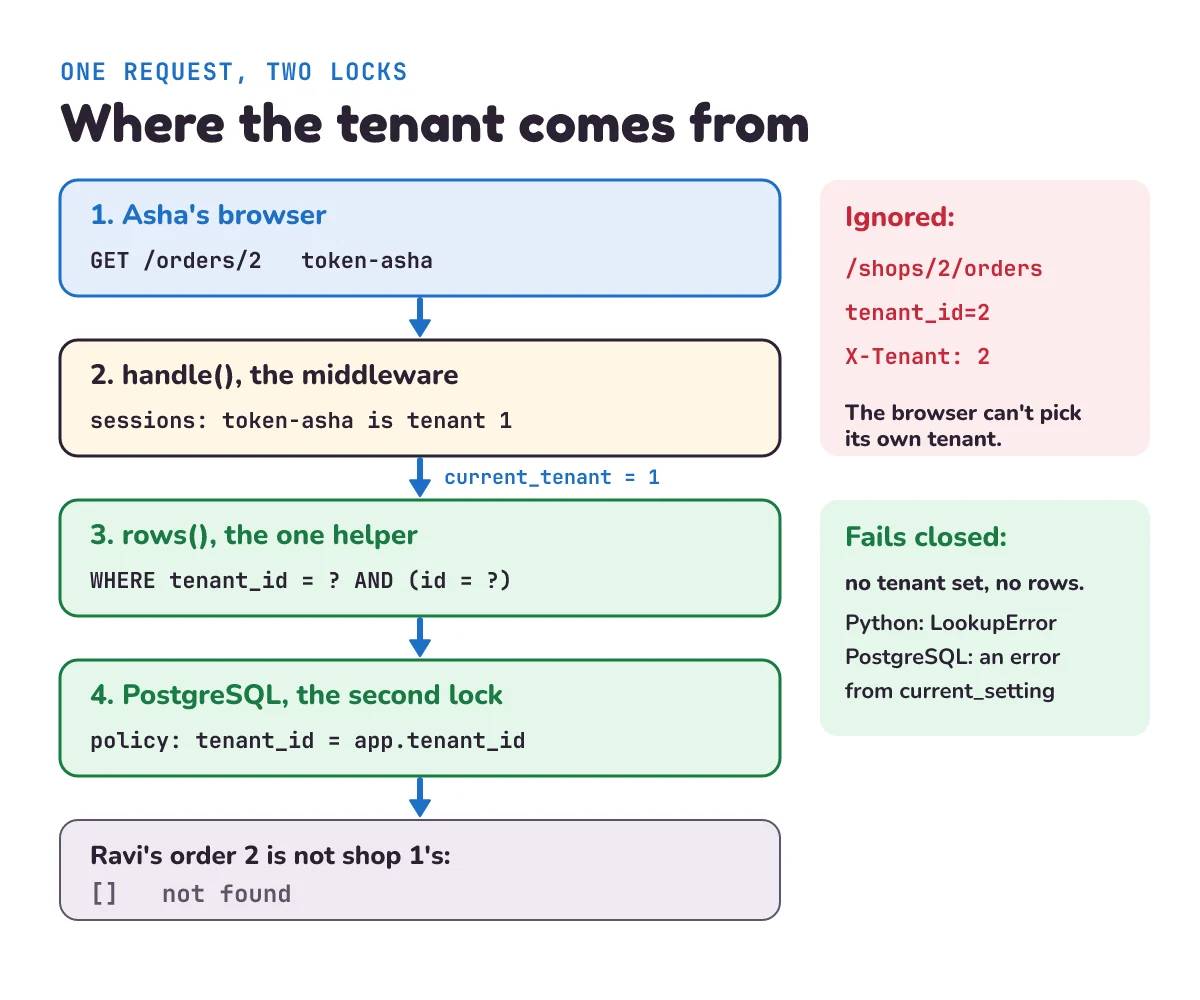
The lazy fix is to remember AND tenant_id = ? in every query by hand. It works until someone writes a new report in a hurry. The safer fix is to make the right query the only easy one. tenancy.py does it with three pieces:
current_tenantis a context variable, from Python's standardcontextvarsmodule: "This module provides APIs to manage, store, and access context-local state." Think of it as a sticky note that belongs to one request. It works withasyncio, Python's way of handling many requests at once: "Context variables are natively supported in asyncio and are ready to be used without any extra configuration." The docs' own example is a small server that keeps each client's address in a context variable, so code handling one client never sees another's. Our shop number works the same way.handleruns at the start of every request. In a web framework this is middleware, code that runs before every page. It looks up the shop from the token in thesessionstable, which only the server writes, and setscurrent_tenant. It never reads a shop number from the URL, the form or a header the browser sends. When the request ends,resetclears it, so nothing carries over to the next one.rowsandaddare the only way app code touches shop data.rowsaddstenant_id = ?to every read, andaddoverwritestenant_idon every insert. The caller never passes a shop, so the caller can't pass the wrong one. A real app addschangeandremovehelpers that put the sametenant_id = ?filter on everyUPDATEandDELETE, where an unfilteredWHERE id = ?does the most damage. If your code already sends queries through a repository, that's the place for these filters.
Now the other steps make sense. In step 1, the same request through rows gets [], nothing, so the app can answer "not found". Step 2 lists only the bakery's orders. In step 3, someone edits Asha's form to send tenant_id=2, hoping to drop an order into Ravi's books; add ignores it and files the order under shop 1. Step 4 is about brackets, which we come back to in the mistakes section. And in step 5, code with no request around it, such as a nightly report, calls rows without setting a shop. current_tenant.get() raises LookupError instead of returning every shop's orders. That's called failing closed: when in doubt, show nothing. A real nightly job loops over the shops and sets current_tenant for each one in turn.
Only the table name, the where text and add's column names are pasted into the SQL. All three must be written by programmers, so never call add("orders", **form) with a form's fields. Every value, the shop included, goes in through a ? placeholder, so a strange customer name can't change the query.
How does PostgreSQL row-level security add a second lock?
The helper is the first lock, and it lives in your code. Code changes: a new developer writes a quick script that reads orders directly, or a report tool connects to the database on its own. PostgreSQL can enforce the filter inside the database too, with row-level security (RLS). Its docs: "tables can have row security policies that restrict, on a per-user basis, which rows can be returned by normal queries or inserted, updated, or deleted by data modification commands." A policy is a rule saying which rows a query may see.
We didn't run a PostgreSQL server for this post. The commands below follow the PostgreSQL 18 docs, which we quote for each step, so test them on your own database before you rely on them. First, once, when you create the table:
ALTER TABLE orders ENABLE ROW LEVEL SECURITY;
ALTER TABLE orders FORCE ROW LEVEL SECURITY;    -- the table's owner obeys the policy too
CREATE POLICY tenant_isolation ON orders
    USING (tenant_id = current_setting('app.tenant_id')::int);
Then, on every request, the app tells the database which shop it's working for, inside a transaction (a group of statements that succeed or fail together):
BEGIN;
SELECT set_config('app.tenant_id', '1', true);   -- true: only until this transaction ends
SELECT * FROM orders WHERE id = 2;               -- Ravi's order: the policy hides it
COMMIT;
In the app, the '1' comes from the session, sent as a placeholder value like every other value, never typed into the SQL. Here's what each part does, from the docs:
- The policy runs before your query's own conditions. "This expression will be evaluated for each row prior to any conditions or functions coming from the user's query." So even
SELECT * FROM orders, with noWHEREat all, only returns shop 1's rows. - It checks new rows too. Our policy has only a
USINGpart, and for a policy like this one, which covers every command, "the USING expression will be used both to determine which rows are visible (normal USING case) and which new rows will be allowed to be added ( WITH CHECK case)." So an insert withtenant_id = 2, as in step 3, is refused while the setting says shop 1. app.tenant_idis a setting you make up. "Custom options have two-part names: an extension name, then a dot, then the parameter name proper", and "PostgreSQL will accept a setting for any two-part parameter name."current_settingreads it back as text, and::intturns the text into a whole number.- No shop set, an error instead of rows. On a connection that has never set it: "If there is no such setting, current_setting throws an error unless missing_ok is supplied and is true". The query fails instead of returning every shop's orders, so the database fails closed too. Test the pooled case as well: on a connection an earlier request used, run a query without setting a shop and check it fails. And if row security is on but there's no policy at all: "If no policy exists for the table, a default-deny policy is used, meaning that no rows are visible or can be modified."
- The
trueinset_configmatters with a pool. "If is_local is true, the new value will only apply during the current transaction." A connection pool lends the same connection to request after request. Withfalse, Asha's shop number could stay on the connection and be used by whoever borrows it next.
The catch is who the policy applies to. A role is PostgreSQL's word for a database user, a superuser is the all-powerful admin role, and BYPASSRLS is a flag that lets a role skip every policy. "Superusers and roles with the BYPASSRLS attribute always bypass the row security system when accessing a table." And: "Table owners normally bypass row security as well, though a table owner can choose to be subject to row security with ALTER TABLE... FORCE ROW LEVEL SECURITY." Many apps connect as the user that created the tables, which is the owner. Without FORCE, the policy then does nothing for the app, and nothing warns you. So keep FORCE, or better, have the app connect as its own ordinary user that owns nothing and isn't a superuser, and test it: as shop 1, ask for order 2 and check you get no rows.
When shouldn't you use a shared table?
- When a customer or a law needs separate storage. A bank or a hospital may require its data in its own database, or in a particular country. That's a silo, at least for that customer.
- When you have a few very large tenants. Ten big customers, each with millions of rows and heavy use, fit better in ten databases. You lose little in cost, and they stop being each other's noisy neighbours.
- When tenants need to be moved or restored on their own often. "Restore the bakery to yesterday" is one database restore in the silo model. In a shared table, it's a careful job across every table, touching only that shop's rows.
- When there's only ever one customer. An internal tool for one company doesn't need tenants at all. Don't add a
tenant_idcolumn to every table for a second customer who may never come.
Otherwise, for many small or medium tenants, the shared table with one helper and row-level security behind it is a good default. Move a tenant to its own database when it outgrows the pool.
What mistake do beginners make with multi-tenancy?
Trusting the tenant the browser sends. The app has a URL like /shops/1/orders, or a hidden form field tenant_id=1, and the server uses that number in its queries. Anyone can change it to 2, as OWASP's example and our step 3 show. The browser can say which order it wants; the server alone decides which shop the request belongs to, from the session.
Forgetting the brackets. Step 4 looks harmless: Asha searches for orders from Meera or Kabir. rows wraps the search in brackets, so the SQL is tenant_id = ? AND (customer = ? OR customer = ?), and she gets only Meera. Without the brackets, it becomes (values written in, to make it easier to read):
SELECT * FROM orders WHERE tenant_id = 1 AND customer = 'Meera' OR customer = 'Kabir';SQL does AND before OR, the way maths does multiplication before addition (SQLite's operator table lists AND above OR). So this reads as "(shop 1 and Meera) or (Kabir, from any shop)", and Ravi's order for Kabir comes back. We ran it: two rows, one of them Ravi's.
Testing only as the owner. Everything works when the developer tests as the table's owner (without FORCE) or a superuser, because they see every row anyway. Then nobody notices that row-level security isn't on. Write one test that signs in as shop 1, asks for shop 2's order by its id, and checks the answer is empty. Run it on every change.
1) After the story has run, Asha's page calls rows("orders", "amount_paise >= ? OR customer = ?", 30000, "Kabir"). Which rows does she get? Which would she get if rows left out the brackets around where?
2) Your app has 5,000 shops with a schema each, and a migration takes 2 seconds per schema. How long does one migration take across all shops? And in the shared-table model?
3) Your app connects to PostgreSQL as shop_app, the user that created the orders table. You ran ENABLE ROW LEVEL SECURITY and CREATE POLICY, but not FORCE. Shop 1's request runs SELECT * FROM orders. What comes back?
Show the answers
1) With the brackets: [(1, 1, 'Meera', 45000), (4, 1, 'Isha', 30000)], the bakery's two orders of ₹300 or more. Kabir's order belongs to shop 2, so it's filtered out. Without the brackets the SQL reads "(shop 1 and at least 30000) or Kabir", so Ravi's order (2, 2, 'Kabir', 129900) comes back too: three rows.
2) 5,000 × 2 seconds = 10,000 seconds, about 2 hours 47 minutes, and the shops are on different versions of the tables while it runs. In the shared-table model the migration runs once, on one table. It may take longer than one small schema, because the table holds every shop's rows, but there's only one.
3) Every shop's orders. shop_app owns the table, and "Table owners normally bypass row security as well". The policy exists but doesn't apply to this user. Fix it with ALTER TABLE orders FORCE ROW LEVEL SECURITY, or connect as a separate user that doesn't own the table, isn't a superuser and doesn't have BYPASSRLS.
Questions people ask
What is multi-tenancy in simple terms?
Multi-tenancy means one app, running on shared servers, serves many separate customers, called tenants, and each tenant sees only its own data. It's like an apartment building: one building, many flats, a separate lock on each door. It's how most SaaS apps keep costs down.
What is a tenant in SaaS?
A tenant is one customer of a SaaS app, usually a whole company or shop with its own staff and data, not a single user. A billing app used by 5,000 shops has 5,000 tenants, and each shop's staff are users inside one tenant.
Which multi-tenancy model should I choose?
For many small customers, a shared table with a tenant_id column is usually cheapest, as long as every query goes through one helper that adds the tenant filter, ideally with PostgreSQL row-level security behind it. Choose a database per tenant for customers who need separate storage, or are big enough to slow others down.
What is the noisy neighbour problem?
A noisy neighbour is a tenant whose heavy use, such as a huge import, slows the app down for the other tenants sharing the same servers or database. Per-tenant rate limits, a cap on each tenant's database connections, background jobs, and moving the biggest tenants to their own database all help.
What is row-level security in PostgreSQL?
Row-level security (RLS) lets PostgreSQL decide, row by row, which rows a query may see or change, using a policy such as tenant_id = current_setting('app.tenant_id')::int. The database applies it to every query, even one that forgets the filter. Superusers and BYPASSRLS roles always skip it, and so do table owners unless the table has FORCE ROW LEVEL SECURITY, so connect the app as an ordinary user that owns nothing.
Keep going
- Previous in this System Design series: Soft delete, why many apps mark a row as deleted instead of removing it, and why a forgotten filter there leaks too.
- Next: "Access token vs refresh token", how a signed-in user proves who they are on every request, which is where the app learns their tenant.
- Two posts that help with noisy neighbours: Rate limiting, and Connection pooling, which explains why a setting shouldn't outlive one transaction.
Checked on 16 November 2026 against the 12 sources below.
Sources
- PostgreSQL documentation: Row Security Policies (default deny, owners and BYPASSRLS, FORCE)
- PostgreSQL documentation: CREATE POLICY (USING also checks new rows)
- PostgreSQL documentation: System Administration Functions (set_config, current_setting)
- PostgreSQL documentation: Customized Options (two-part setting names)
- PostgreSQL documentation: Schemas (search path)
- AWS Well-Architected SaaS Lens: Silo, Pool, and Bridge Models
- AWS Well-Architected SaaS Lens: Noisy Neighbor
- AWS Well-Architected SaaS Lens: Tenant Isolation
- AWS whitepaper, SaaS Architecture Fundamentals: Tenant isolation
- Python documentation: contextvars, Context Variables
- OWASP Top 10:2025: A01 Broken Access Control
- SQLite documentation: SQL Language Expressions (operator precedence)
Every Python sample in this post was run in Python 3.13 with SQLite 3.45.3 before publishing. The PostgreSQL commands follow the PostgreSQL 18 documentation and were not run for this post.