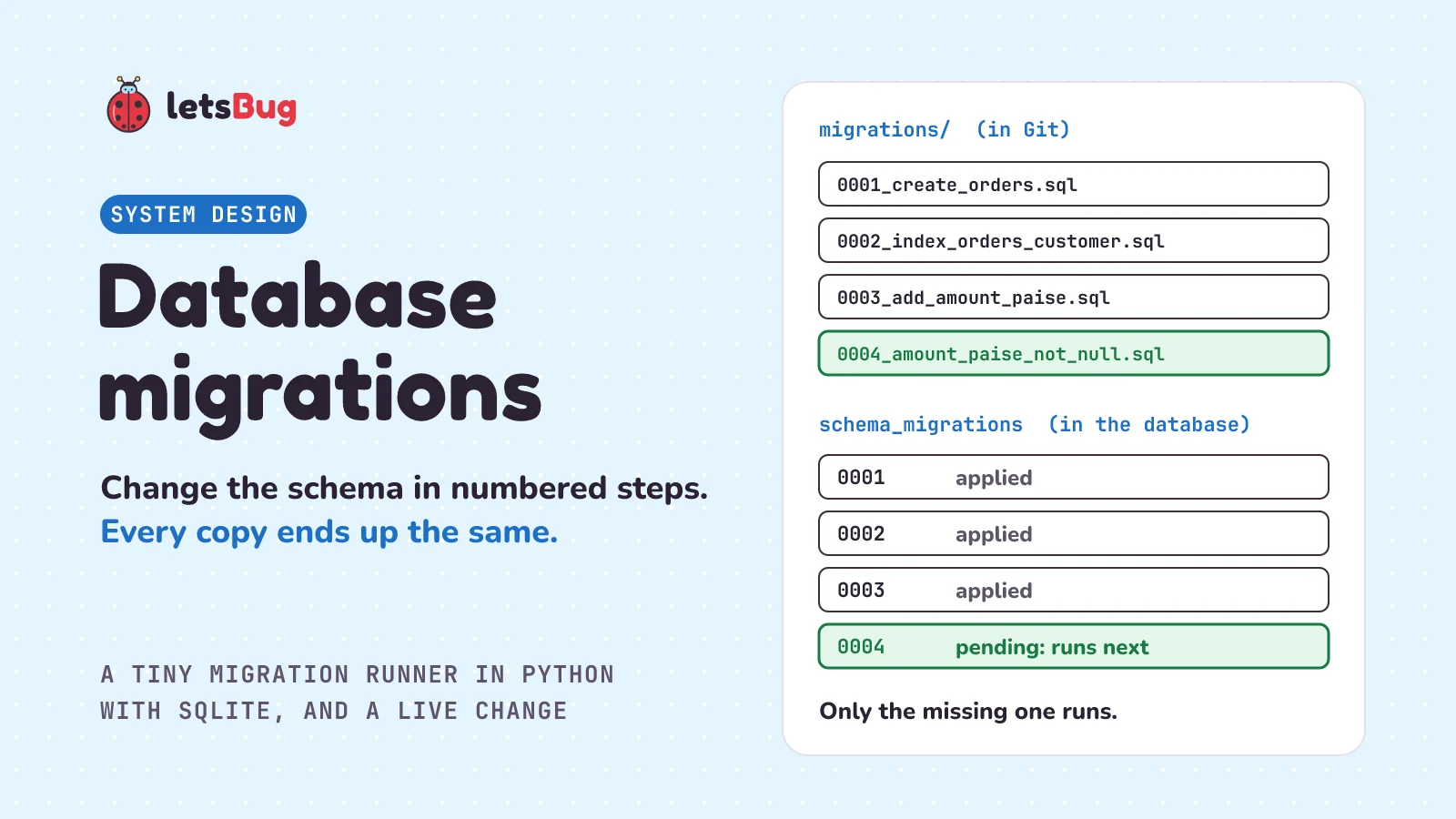
A database migration is a small, numbered file that changes a database's structure, such as adding a column, and is kept in the code repository with the app. A migration tool records in a table which migrations have run, then runs only the new ones, in order, so every copy of the database ends up the same.
In this post we stay with the shop from the database indexing post and its orders table. The shop now needs to change that table while customers keep buying. First we see what goes wrong when people change databases by hand, then how a migration tool keeps track, using a school notice board and then the real thing. Then we build a small migration runner in plain Python with SQLite, with up and down steps, and use it to change the orders table in safe stages. We finish with the same change on PostgreSQL, when you don't need all the steps, and the beginner mistake every migration tool is built to stop.
A few words first. The schema is the shape of a database: its tables, their columns, and their indexes. ALTER TABLE is the SQL command that changes a table that already exists. NULL means "no value here". A column that allows it is nullable, and a NOT NULL rule means the column must always have a value. A transaction is a group of changes the database treats as one: all of them are saved, or none are. And production is the live system, with real customers and real data.
Key takeaways
- A migration is one numbered change to the schema, saved as a file next to the code and kept in Git with it. Git then holds the history of the database's shape as well as the code's.
- The tool keeps a small table of applied versions inside each database (the migration tools Alembic and Flyway call it
alembic_versionandflyway_schema_history). On every run, it compares that table with the files and runs only what's missing, in order. - Up makes the change; down undoes it. Some changes can't be undone without losing data, so many teams fix forward with a new migration instead.
- Never edit a migration that has already run somewhere that matters. The other databases won't run it again, so they'd quietly differ. Some tools, such as Flyway, store a checksum of each file to catch this. Write a new migration instead.
- On a live database, break a risky change into safe steps: add a nullable column, fill it in small batches, then add the NOT NULL rule. This is called expand and contract: add the new thing first, remove the old thing last.
- In PostgreSQL, most
ALTER TABLEforms take a lock that blocks every other query on the table, even while the change is still waiting to start. Prefer changes that hold it only for a moment, and setlock_timeoutso a waiting change gives up quickly instead of stalling the app.
What is a database migration in simple words?
Picture a school with forty classrooms, each with a copy of the timetable pinned to its wall. When something changes, the office doesn't send someone to scribble on forty copies. It writes a numbered notice: "Notice 7: Maths moves to room 12." Each class teacher applies the notices in order and writes the last number applied in the corner of the timetable. A new classroom opens in June. It starts from the original timetable and applies notices 1 to 7, and now it matches every other room.
Two rules make this work. Notices are applied in order, because notice 8 might move the Maths class again, from the room notice 7 put it in. And once a notice is pinned up, the office never rewrites it. If notice 7 was wrong, it writes notice 8 to fix it. Rewriting notice 7 would fix only the rooms that hadn't read it yet. The rooms that already applied it would never see the change, and the timetables would quietly drift apart.
Migrations work the same way. Each notice is a migration file. Each classroom is a copy of the database: yours, your teammate's, the test server's and production. The number in the corner is a small table inside each database that records which migrations have run. Django, a Python web framework with migrations built in, describes them in its docs as "Django's way of propagating changes you make to your models (adding a field, deleting a model, etc.) into your database schema." (A model is the class in your code that describes a table.)
What problem do database migrations solve?
Without migrations, schema changes happen by hand. Someone opens a database console on production and types ALTER TABLE orders ADD COLUMN .... It works. But the test server never gets the change, so the tests run against an old shape. A new teammate builds a fresh database from an old script and gets a different shape again. Months later, nobody can say which commands ran where, or in what order. Then the new code expects a column that isn't there, and the app crashes in front of customers.
The fix is to treat the schema like code. Each change goes in a file, and the file goes in Git, the version control tool most teams use. Git keeps every version of the code in a repository, and each saved version is called a commit. Then a tool applies the files the same way everywhere. Django's docs put it this way: "You should think of migrations as a version control system for your database schema." And they say to "commit the migration and the models change to your version control system as a single commit", so whoever gets the code also gets the database change it needs.
How does a migration tool work?
Every tool has the same three parts:
- Numbered files. Each migration has a version, such as
0003, and a short name. The docs of Flyway, a migration tool that runs plain SQL files, put it this way: "Versioned migrations are applied to a target database in order exactly once." - A table of applied versions, inside each database. Alembic, the migration tool for the Python database library SQLAlchemy, describes its first run in its tutorial: "Alembic first checked if the database had a table called alembic_version, and if not, created it." Flyway's table does the same job: "The flyway_schema_history table tracks which versioned migrations have already been applied and stores the checksum to make sure they haven't changed." (A checksum is a short fingerprint calculated from the file's text. Change one character and the fingerprint changes.)
- A runner that compares the two lists and runs the missing files, oldest first. Where the database allows it, each migration runs in a transaction, so a failure leaves nothing half-done. Django: "On databases that support DDL transactions (SQLite and PostgreSQL), all migration operations will run inside a single transaction by default." (DDL means the commands that change the schema, such as
CREATE TABLEandALTER TABLE.)
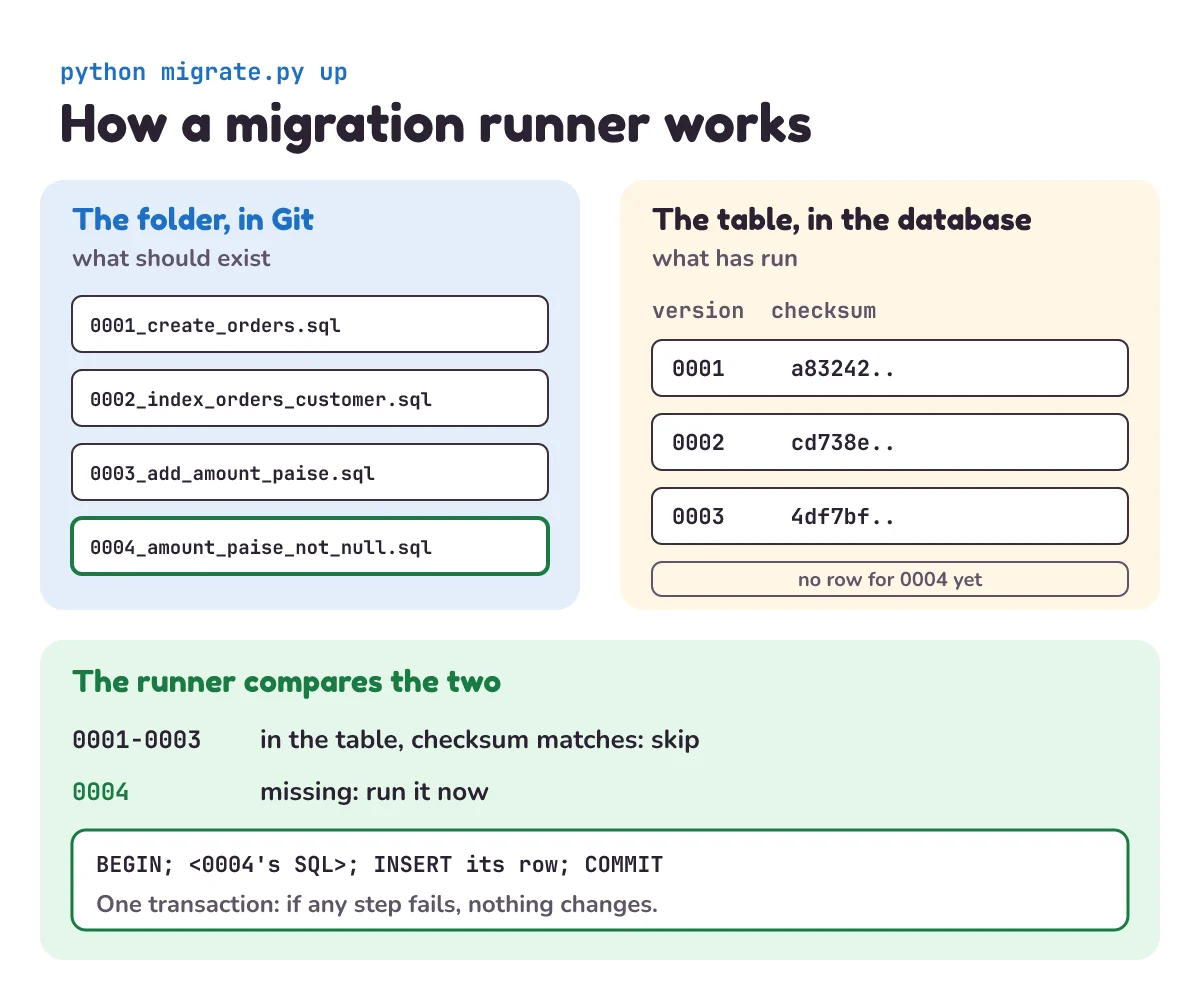
Most tools also give each migration two halves. Up makes the change. Down undoes it, so you can step back. Alembic writes each migration as a Python file with "empty upgrade() and downgrade() functions" for you to fill in.
How do you build a migration runner in Python?
Let's build one with SQLite, the small database that comes with Python. Our runner reads SQL files from a migrations folder. Each file holds the up step, then a line -- down, then the down step. (In SQL, -- starts a comment, so that line does nothing when the file runs.) The runner records each applied file in a table called schema_migrations, with its checksum.
# migrate.py
"""A tiny migration runner. Run: python migrate.py up | down | status"""
import hashlib
import sqlite3
import sys
from datetime import datetime, timezone
from pathlib import Path

DB = "shop.db"
FOLDER = Path("migrations")


def load():
    """Every migration file, oldest first, as (version, name, up_sql, down_sql, checksum)."""
    found = []
    for path in sorted(FOLDER.glob("*.sql")):
        text = path.read_text(encoding="utf-8")
        up, _, down = text.partition("\n-- down")
        checksum = hashlib.sha256(text.encode()).hexdigest()
        found.append((int(path.name[:4]), path.name, up, down, checksum))
    return found


def connect():
    db = sqlite3.connect(DB, isolation_level=None)      # no hidden transactions: we write BEGIN and COMMIT
    db.execute("""CREATE TABLE IF NOT EXISTS schema_migrations (
                      version INTEGER PRIMARY KEY, name TEXT NOT NULL,
                      checksum TEXT NOT NULL, applied_at TEXT NOT NULL)""")
    return db


def applied(db):
    return {version: checksum for version, checksum in db.execute("SELECT version, checksum FROM schema_migrations")}


def run(db, sql, bookkeeping, args):
    """The migration and its line in schema_migrations, in one transaction: all of it, or none."""
    try:
        db.executescript("BEGIN;\n" + sql)
        db.execute(bookkeeping, args)
        db.execute("COMMIT")
    except sqlite3.Error:
        if db.in_transaction:
            db.execute("ROLLBACK")
        raise


def up(db):
    done = applied(db)
    ran = 0
    for version, name, up_sql, _, checksum in load():
        if version in done:
            if done[version] != checksum:
                sys.exit(f"{name} was changed after it was applied. Put it back, and write a new migration instead.")
            continue
        now = datetime.now(timezone.utc).isoformat(timespec="seconds")
        try:
            run(db, up_sql, "INSERT INTO schema_migrations VALUES (?, ?, ?, ?)", (version, name, checksum, now))
        except sqlite3.Error as e:
            sys.exit(f"{name} failed and was rolled back: {e}")
        print("ran", name)
        ran += 1
    if not ran:
        print("nothing to run")


def down(db):
    done = applied(db)
    if not done:
        sys.exit("nothing to undo")
    version = max(done)
    _, name, _, down_sql, _ = next(m for m in load() if m[0] == version)
    if not down_sql.strip():
        sys.exit(f"{name} has no down step. Write a new migration to change it.")
    run(db, down_sql, "DELETE FROM schema_migrations WHERE version = ?", (version,))
    print("undid", name)


def status(db):
    done = applied(db)
    for version, name, *_ in load():
        print("applied" if version in done else "pending", name)


if __name__ == "__main__":
    command = sys.argv[1] if len(sys.argv) > 1 else "status"
{"up": up, "down": down, "status": status}[command](connect())loadreads the files in name order, which is version order because the names start with four digits. It splits each file at-- downand takes a SHA-256 checksum of the whole text (SHA-256 is a standard fingerprint function in Python'shashlib).connectopens the database withisolation_level=None. Python's docs: "If isolation_level is set to None, no transactions are implicitly opened at all." That lets us start and end each transaction ourselves.runis the important part.executescriptruns every statement in a file, but it manages no transactions for you: in Python's words, "any transaction control must be added to sql_script." So we putBEGINin front. The migration and its row inschema_migrationsthen commit together (both are saved), or roll back together (both are undone). This "commit" is the database's, not Git's. The table can never say a migration ran when it didn't.upskips applied versions after checking their checksums, and runs the rest in order. It stops at the first failure, so later migrations never run on top of a broken one.downundoes only the newest applied migration, one step at a time.
It's kept short on purpose. A real tool also checks file names, handles a failed down step as kindly as a failed up step, and copes when two people add migrations at once (see "Try it").
Now the first two migrations. The first creates the orders table. The second adds the two-column index from the indexing post, now written down so every copy of the database gets it:
-- migrations/0001_create_orders.sql
CREATE TABLE orders (
    id INTEGER PRIMARY KEY,
    customer_id INTEGER NOT NULL,
    status TEXT NOT NULL,
    amount INTEGER NOT NULL,          -- whole rupees
    created_at TEXT NOT NULL
);
-- down
DROP TABLE orders;
-- migrations/0002_index_orders_customer.sql
CREATE INDEX idx_orders_customer_date ON orders (customer_id, created_at);
-- down
DROP INDEX idx_orders_customer_date;And a stand-in for the shop app. Each run adds 10,000 orders, the way customers would. It knows only the columns the table has today:
# add_orders.py
"""The shop app, version 1: it knows only the amount column. Adds 10,000 orders."""
import random
import sqlite3

rng = random.Random(16)
db = sqlite3.connect("shop.db")
with db:
    for _ in range(10_000):
        db.execute("INSERT INTO orders (customer_id, status, amount, created_at) "
                   "VALUES (?, 'paid', ?, datetime('now'))",
                   (rng.randint(1, 200_000), rng.randint(100, 5000)))
print(f"{db.execute('SELECT COUNT(*) FROM orders').fetchone()[0]:,} orders in the shop")
Make a new folder with a migrations folder inside it. Save each code block under the name in its first line (the SQL files go in migrations). Open a terminal (a command-line window) in the outer folder, and run these. In the output blocks, a line starting with $ is what you type, without the $; the lines under it are what it prints:
$ python migrate.py status
pending 0001_create_orders.sql
pending 0002_index_orders_customer.sql
$ python migrate.py up
ran 0001_create_orders.sql
ran 0002_index_orders_customer.sql
$ python migrate.py up
nothing to run
$ python add_orders.py
10,000 orders in the shop
The second up does nothing, because the table says both have run. That's the whole idea: you can run up as often as you like, on any copy of the database. Running it twice has the same effect as running it once, which makes it idempotent. Every deploy (putting a new version of the app on the servers customers use) can run it, and each database gets exactly the migrations it's missing.
What are up and down migrations?
The shop now sells things like a ₹499.50 phone case, and whole rupees can't hold 50 paise. So it will store amounts in paise, the hundredth part of a rupee, as whole numbers: ₹499.50 becomes 49950. The first step is a new column. Save this as the third migration:
-- migrations/0003_add_amount_paise.sql
ALTER TABLE orders ADD COLUMN amount_paise INTEGER;      -- empty (NULL) for every old order
-- down
ALTER TABLE orders DROP COLUMN amount_paise;
Run it, undo it, and run it again:
$ python migrate.py up
ran 0003_add_amount_paise.sql
$ python migrate.py down
undid 0003_add_amount_paise.sql
$ python migrate.py status
applied 0001_create_orders.sql
applied 0002_index_orders_customer.sql
pending 0003_add_amount_paise.sql
$ python migrate.py up
ran 0003_add_amount_paise.sql
Down is handy on your own laptop: you try a migration, see it's wrong, undo it, fix the file, and run it again. On production it's riskier. A down step that drops a column also drops every value people saved in it since the up step ran. Some changes can't be undone at all. Django's docs: "A migration is irreversible if it contains any irreversible operations." So many teams treat down as a laptop tool, and fix production by moving forward. Flyway's docs say the same: "It's best to create a new versioned migration script and roll forward any necessary changes."
Notice that adding the column was cheap. SQLite only changes the stored text of the table's definition. Its docs: "No changes are made to table content for renames or column addition without constraints." So such commands "will run as quickly on a table with 10 million rows as on a table with 1 row." But the column is empty for every old order. Making it required is the hard part.
How do you change a live database without downtime?
Downtime is time when the app is down for customers. Why not do it all in one migration: add amount_paise as NOT NULL, fill it, and drop amount? Because the app doesn't update at the same instant as the database. In a rolling deploy, servers switch to the new code one by one, and for a while old code and new code run side by side. The old code writes only amount. If amount is gone, or amount_paise is required, every order the old code tries to save fails.
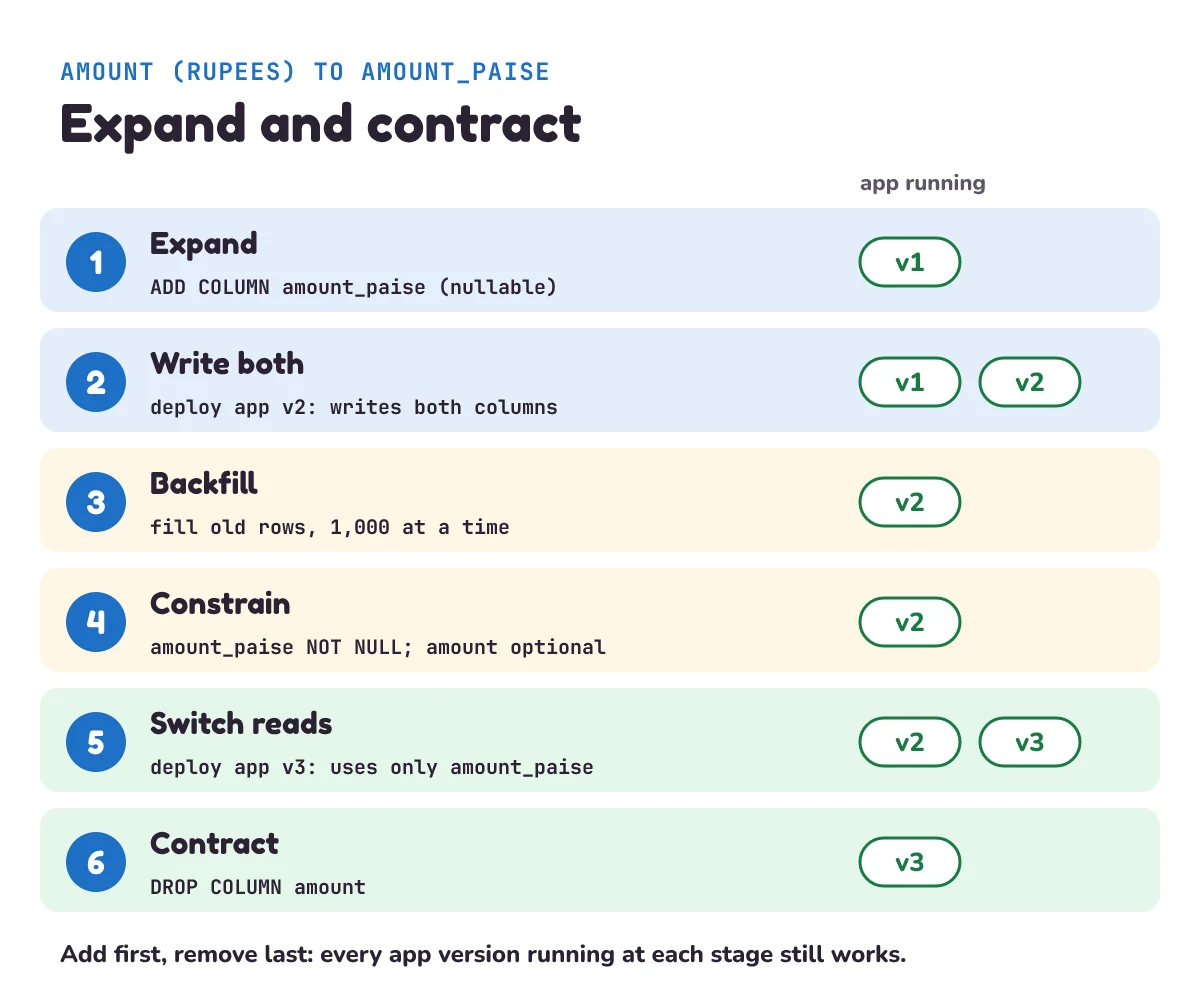
So the change goes in stages, and at each stage both the old code and the new code still work. This is expand and contract. Martin Fowler's site describes the general pattern: "Parallel change, also known as expand and contract, is a pattern to implement backward-incompatible changes to an interface in a safe manner, by breaking the change into three distinct phases: expand, migrate, and contract." And for databases: "Most database refactorings follow the parallel change pattern, where the migrate phase is the transition period between the original and the new schema, until all database access code has been updated to work with the new schema." For our shop, that means six steps:
- Expand. Add the new column as nullable, so old code that doesn't know about it can still insert rows. (Migration 0003, done.)
- Write both. Deploy app version 2, which writes the amount in both columns.
- Backfill. Fill the new column for the old rows, a small batch at a time. To backfill is to fill in values for rows that already exist.
- Constrain. Add the NOT NULL rule to the new column, now that no row breaks it. (A rule like this, which the database enforces on every row, is called a constraint.) Remove the NOT NULL rule from
amount, so the next version can stop writing it. - Switch reads. Deploy a version that reads only
amount_paiseand no longer usesamount. - Contract. Drop the old column, once no running code uses it.
Here is app version 2. It's the same as version 1, except it writes both columns:
# add_orders_v2.py
"""The shop app, version 2: writes the amount in both columns. Adds 10,000 orders."""
import random
import sqlite3

rng = random.Random(16)
db = sqlite3.connect("shop.db")
with db:
    for _ in range(10_000):
        rupees = rng.randint(100, 5000)
        db.execute("INSERT INTO orders (customer_id, status, amount, amount_paise, created_at) "
                   "VALUES (?, 'paid', ?, ?, datetime('now'))",
                   (rng.randint(1, 200_000), rupees, rupees * 100))
print(f"{db.execute('SELECT COUNT(*) FROM orders').fetchone()[0]:,} orders in the shop")
The backfill runs as a separate script, not inside a migration. It moves through the table by id, 1,000 rows at a time, and commits after each batch. Each batch is a short transaction, so the app's own writes never wait long behind it:
# backfill.py
"""Fill amount_paise for old orders, 1,000 at a time."""
import sqlite3

BATCH = 1_000
db = sqlite3.connect("shop.db")
last_id = db.execute("SELECT MAX(id) FROM orders").fetchone()[0]
filled = batches = 0
for start in range(0, last_id, BATCH):
    with db:                                     # one short transaction per batch
        filled += db.execute("UPDATE orders SET amount_paise = amount * 100 "
                             "WHERE id > ? AND id <= ? AND amount_paise IS NULL",
                             (start, start + BATCH)).rowcount
    batches += 1
empty = db.execute("SELECT COUNT(*) FROM orders WHERE amount_paise IS NULL").fetchone()[0]
print(f"filled {filled:,} orders in {batches} batches; still empty: {empty}")
It reads the highest id once, at the start. Orders added after that come from version 2, which already writes both columns, so the backfill doesn't need to chase them. That's why version 2 goes out before the backfill runs.
Then the constrain step. SQLite can't add NOT NULL to a column a table already has, unless you have version 3.53.0 or newer: "The ability to set or drop NOT NULL constraints from a column using the ALTER TABLE ALTER COLUMN syntax was added in SQLite 3.53.0 (2026-04-09)." For older versions, SQLite's docs give a recipe: "applications can make other arbitrary changes to the format of a table using a simple sequence of operations." You make a new table in the shape you want, copy the rows across, drop the old table, rename the new one, and rebuild its indexes. (The full recipe in SQLite's docs also covers foreign keys, triggers and views, which our table doesn't have.) It works on every version, so we use it:
-- migrations/0004_amount_paise_not_null.sql
-- SQLite's recipe for changes ALTER TABLE can't make: build the new shape, copy, swap
CREATE TABLE new_orders (
    id INTEGER PRIMARY KEY,
    customer_id INTEGER NOT NULL,
    status TEXT NOT NULL,
    amount INTEGER,                   -- no longer required: version 3 will stop writing it
    amount_paise INTEGER NOT NULL,
    created_at TEXT NOT NULL
);
INSERT INTO new_orders (id, customer_id, status, amount, amount_paise, created_at)
    SELECT id, customer_id, status, amount, amount_paise, created_at FROM orders;
DROP TABLE orders;
ALTER TABLE new_orders RENAME TO orders;
CREATE INDEX idx_orders_customer_date ON orders (customer_id, created_at);
-- down
Its down step is empty on purpose. Our runner will refuse to undo it, as you'll see in "Try it". Now play it out. Old code is still running somewhere, the new version ships, and someone runs the constrain migration a step too early:
$ python add_orders.py
20,000 orders in the shop
$ python add_orders_v2.py
30,000 orders in the shop
$ python migrate.py up
0004_amount_paise_not_null.sql failed and was rolled back: NOT NULL constraint failed: new_orders.amount_paise
$ python migrate.py status
applied 0001_create_orders.sql
applied 0002_index_orders_customer.sql
applied 0003_add_amount_paise.sql
pending 0004_amount_paise_not_null.sql
Three lessons in four commands. First, version 1 kept working after the expand step: old code can't tell that a nullable column was added. Second, the constrain step failed, because 20,000 rows were still empty: the 10,000 from version 1 earlier, and 10,000 more just now. Third, the failure left nothing behind. The new table it had started to fill was rolled back with everything else, and 0004 is still pending. That's the transaction in run doing its job. Now backfill, and try again:
$ python backfill.py
filled 20,000 orders in 30 batches; still empty: 0
$ python migrate.py up
ran 0004_amount_paise_not_null.sql
$ python add_orders.py
Traceback (most recent call last):
  ...
sqlite3.IntegrityError: NOT NULL constraint failed: orders.amount_paise
$ python add_orders_v2.py
40,000 orders in the shop
The migration worked. And version 1 now fails, which is exactly why the order matters: the NOT NULL rule may go on only after every server runs version 2. In a real deploy, you'd check that no server still runs version 1 first.
The last two stages follow the same idea. Version 3 of the app reads and writes only amount_paise. Once every server runs it, a final migration drops amount. ("Try it" has that migration.) A caution for real systems: rebuilding a table copies every row, and SQLite "will only allow one writer at any instant in time", so other writers wait. Python's sqlite3 doesn't wait long. Its docs describe the timeout setting as "How many seconds the connection should wait before raising an OperationalError when a table is locked." And the default is short: "Default five seconds." So a slow copy makes the app's writes fail with "database is locked". Our 30,000 rows copy in a blink. A table with 2 million rows takes longer, so pick a quiet moment, or use a database that can make the change without a copy.
How do you add a NOT NULL column in PostgreSQL safely?
Most live apps use a database server such as PostgreSQL, and there the danger is locks. A lock is the database's way of stopping two commands from changing the same thing at once. PostgreSQL's ALTER TABLE docs: "An ACCESS EXCLUSIVE lock is acquired unless explicitly noted." And of that lock: "This mode guarantees that the holder is the only transaction accessing the table in any way." So while it's held, even a plain SELECT on the table must wait. Fine for a fraction of a second; a problem for a minute.
Worse, a command waiting for that lock blocks the queries that come after it. We tested this on PostgreSQL 18.6 in Docker (a tool that runs programs in isolated containers), with three connections to a 1,000-row orders table:
| Time | Connection | What it ran | What happened |
|---|---|---|---|
| 0 s | A, a slow report | Opened a transaction, read the table, and stayed open for 6 seconds | Held a read lock |
| 1 s | B, the migration | ALTER TABLE orders ADD COLUMN | Waited for A |
| 3 s | C, a customer's page | A plain SELECT count(*) FROM orders, with a 2-second limit | Timed out |
C doesn't conflict with A at all, since two readers can share a table. It timed out because it was waiting behind B. One slow query plus one waiting migration had stalled every new query on the table. When we ran it again with lock_timeout set to 1 second, B gave up with canceling statement due to lock timeout, and C ran normally.
So the goal is to hold that lock only for a moment at each step, and never to wait long for it. Here are the same stages for PostgreSQL, run on the same test setup:
SET lock_timeout = '2s';

-- 1. Expand: add the column with no default. No table rewrite.
ALTER TABLE orders ADD COLUMN amount_paise bigint;

-- 2. Backfill a batch at a time. Read MAX(id) first, then repeat, moving the id range, until you pass it.
UPDATE orders SET amount_paise = amount * 100
WHERE id > 0 AND id <= 1000 AND amount_paise IS NULL;

-- 3. Constrain the new column without a long lock, and loosen the old one.
ALTER TABLE orders ADD CONSTRAINT amount_paise_not_null
    CHECK (amount_paise IS NOT NULL) NOT VALID;          -- new rows checked from now on
ALTER TABLE orders VALIDATE CONSTRAINT amount_paise_not_null;   -- old rows checked; writes carry on
ALTER TABLE orders ALTER COLUMN amount_paise SET NOT NULL;      -- no scan: the valid CHECK proves it
ALTER TABLE orders DROP CONSTRAINT amount_paise_not_null;
ALTER TABLE orders ALTER COLUMN amount DROP NOT NULL;           -- so version 3 can stop writing it

-- 4. Contract, once no running code uses the old column.
ALTER TABLE orders DROP COLUMN amount;
Line by line:
lock_timeoutlimits how long a command waits for its lock. PostgreSQL: "Abort any statement that waits longer than the specified amount of time while attempting to acquire a lock on a table, index, row, or other database object." If a long query is using the table, theALTER TABLEgives up after 2 seconds, and you try again later. Keep it short: every query that arrives while the migration waits has to wait too.- Adding a nullable column is quick. PostgreSQL's docs: "If no column constraints are specified, NULL is used as the DEFAULT. In neither case is a rewrite of the table required." (The "neither" also covers a fixed default value, such as
DEFAULT 0.) Some defaults do force a rewrite: "Adding a column with a volatile DEFAULT (e.g., clock_timestamp()), a stored generated column, an identity column, or a column with a domain data type that has constraints will cause the entire table and its indexes to be rewritten." (A volatile default is one that can give a different value each time, like the current time.) - A
CHECKconstraint is a rule each row must pass, here "amount_paise is not NULL". Added normally, it has to check every existing row while holding the lock: "Scanning a large table to verify new foreign-key, check, or not-null constraints can take a long time, and other updates to the table are locked out until the ALTER TABLE ADD CONSTRAINT command is committed." (A foreign key is a column that points to a row in another table.)NOT VALIDskips that check, so the lock is brief. New and changed rows are checked from that moment on. VALIDATE CONSTRAINTthen checks the old rows with a weaker lock: "The validation step does not need to lock out concurrent updates, since it knows that other transactions will be enforcing the constraint for rows that they insert or update; only pre-existing rows need to be checked."SET NOT NULLwould normally read the whole table too. But "if a valid CHECK constraint exists (and is not dropped in the same command) which proves no NULL can exist, then the table scan is skipped." On our test run, PostgreSQL's debug log said so:existing constraints on column "orders.amount_paise" are sufficient to prove that it does not contain nulls. Then theCHECKhas done its job and can go.
One catch, and it matters. The NOT VALID trick only helps if that step commits before the validation starts. PostgreSQL's docs: "With NOT VALID, the ADD CONSTRAINT command does not scan the table and can be committed immediately." Our test ran each line as its own transaction. But a migration tool usually wraps a whole migration in one transaction, like our runner does. Then the lock from ADD CONSTRAINT is held until the end, the full check in VALIDATE runs under it, and you're back to the long lock. So put ADD CONSTRAINT ... NOT VALID in one migration and VALIDATE CONSTRAINT in the next, or tell the tool not to use a transaction for that migration (more on that below).
PostgreSQL 18 also allows NOT VALID on a not-null constraint itself (version 17 allowed it only for foreign keys and CHECK), so two lines replace the four CHECK lines (we ran these too):
ALTER TABLE orders ADD CONSTRAINT amount_paise_not_null NOT NULL amount_paise NOT VALID;
ALTER TABLE orders VALIDATE CONSTRAINT amount_paise_not_null;
The same rule applies: commit the first line before running the second.
The indexing post mentioned CREATE INDEX CONCURRENTLY, which builds an index while writes carry on. It has one catch for migration tools: "a regular CREATE INDEX command can be performed within a transaction block, but CREATE INDEX CONCURRENTLY cannot." So a migration that uses it must be told not to wrap itself in a transaction. In Django: "You can prevent a migration from running in a transaction by setting the atomic attribute to False." Keep such a migration to that one statement, since nothing will roll it back for you.
When don't you need all these steps?
- When the table is new or empty. If no code reads or writes it yet and it holds no rows, add the column as NOT NULL straight away. There's no old data to fill and no old code to break.
- When you can stop the app. A college project, a tool your team uses only in office hours, or a shop that can show "back in 5 minutes" at 3 a.m. can stop, run every step at once, and start again. Expand and contract is the price of never stopping. Pay it when you need it.
- When the table is small, some steps can merge. Checking or rebuilding a few thousand rows takes a moment, so the backfill and the constrain step can go in one migration. But the order still matters while old code runs: add first, and drop or rename last. A small table doesn't stop an old server from asking for a column you just removed.
- When the "migration" is really a one-off data fix that only production needs, such as correcting one customer's address. Many teams still run these through the migration tool, so they're recorded and repeatable. Keep data fixes and schema changes in separate migrations, so a slow data fix never holds up a schema change.
What you should still do, always, is keep the change in a migration file. Even a solo project gains from it: a new laptop, a test database and production all get built the same way.
What mistake do beginners make with migrations?
Editing a migration that has already run. Say you notice that the index in 0002 should also include status. The natural thing is to open 0002_index_orders_customer.sql, change (customer_id, created_at) to (customer_id, status, created_at), and save. On your laptop, nothing happens: 0002 is already in schema_migrations, so the runner won't run it again. Production won't either. A brand-new database will, so new copies get the new index and old ones keep the old one. That's the drift from the notice board, and it can stay hidden for months.
That's why our runner stores a checksum. Make that edit and run up:
$ python migrate.py up
0002_index_orders_customer.sql was changed after it was applied. Put it back, and write a new migration instead.
Real tools do the same. Flyway's docs: "The checksum is there to detect accidental changes." And: "It is best practice not to make changes to existing versioned migrations once they have been applied to a permanent downstream environment." (Here, a downstream environment is any database past your own laptop, such as test or production.) So undo the edit and write migration 0005 that drops the old index and creates the new one. The one exception: a migration that has only ever run on your own laptop. Run down, edit it, run up. No one else has it yet.
Two more slips to watch for:
- Renaming or dropping a column in one step on a live app. The old code still running on some servers asks for the old name and fails. Use expand and contract: add, copy, switch, then drop.
- Backfilling a big table inside the migration. One huge
UPDATEis one long transaction. In PostgreSQL, anUPDATElocks each row it changes, and those locks "block only writers and lockers to the same row" but last until the end: "Row-level locks are released at transaction end". So the app can't change any of those orders until the whole update finishes. Keep migrations small and fast, and backfill in batches from a separate script, as we did.
1) Right after 0004 ran, what do you think python migrate.py down prints? Why might its author have left the down step empty?
2) Write migration 0005, the contract step that drops amount. What must be true before you run it, and what happens to add_orders_v2.py afterwards?
3) A teammate merges a migration numbered 0004 on the same day you merge yours, also numbered 0004. What goes wrong, and what's a simple way to avoid it?
Show the answers
1) It refuses, because the down step is empty:
$ python migrate.py down
0004_amount_paise_not_null.sql has no down step. Write a new migration to change it.
Undoing the rebuild means another full copy of the table, and any paise (like the 50 in ₹499.50) would be lost going back to whole rupees. A forward fix is safer than a down step nobody has tested.
2) Save this, after deploying version 3, which no longer uses amount:
-- migrations/0005_drop_amount.sql
ALTER TABLE orders DROP COLUMN amount;
-- down
$ python migrate.py up
ran 0005_drop_amount.sql
$ python add_orders_v2.py
Traceback (most recent call last):
...
sqlite3.OperationalError: table orders has no column named amountBefore running it, no running code may read or write amount. Version 2 still writes it, so it breaks, just as version 1 broke at step 4. (SQLite's DROP COLUMN also refuses if the column is in an index; its docs list "The column is indexed." as one reason it can fail. Ours isn't.)
3) Our runner keys everything on the number, so it stops, but with an unhelpful message. On a fresh database, the first 0004 runs, then the second fails when it adds a second row for version 4, and it's rolled back: failed and was rolled back: UNIQUE constraint failed: schema_migrations.version. On a database that already ran your teammate's 0004, the runner says your file was changed after it was applied, which is misleading. Real tools catch this properly. Django's docs describe the case, two developers who "have both committed a migration to the same app at the same time, resulting in two migrations with the same number". Django notices the clash: "When this happens, Django will prompt you and give you some options." Simple fixes: agree who takes the next number before merging, or put the date and time in the version, such as 20261111_1800. Flyway's docs: "Flyway Desktop generates a timestamp as part of the version by default when generating migrations as it helps to avoid conflicts if two team members simultaneously add migrations".
Questions people ask
What is a database migration in simple words?
A migration is a numbered file that makes one change to a database's structure, such as adding a table, a column or an index. The files are kept with the code in Git. A migration tool records which ones each database has run and runs the missing ones in order, so every copy of the database ends up with the same shape.
What is the difference between up and down migrations?
The up step makes the change, such as adding a column. The down step undoes it, such as dropping that column. Down steps are most useful on your own laptop while you work on a change. On production, undoing can delete data saved since the change, so teams often fix problems with a new migration instead.
Can I edit a migration after it has run?
Not once it has run anywhere beyond your own laptop. Databases that already ran it won't run it again, so they'd keep the old version while new databases get the edited one. Tools like Flyway store a checksum of each file to catch this. Write a new migration that makes the extra change.
How do I rename a column without downtime?
Use expand and contract. Add the new column, deploy code that writes to both columns, copy the old values across in batches, deploy code that reads only the new column, and finally drop the old one in a later migration. A one-step rename breaks any old code still running during the deploy.
Which migration tool should I use?
Usually the one that fits your framework: Django has its own migrations, and Python apps built on SQLAlchemy usually use Alembic, which is built on it. Flyway runs plain SQL files, so it suits any language. They all follow the same ideas as the runner in this post: numbered files, a table of applied versions, and transactions where the database allows them.
Keep going
- Previous in this System Design series: Database indexing, how an index finds one customer's orders among 2 million rows, and what it costs.
- Next: "Connection pooling", why an app keeps a few database connections open and shares them, instead of opening a new one for every request.
- Where the shop's queries usually live in code: The repository pattern.
Checked on 10 November 2026 against the 12 sources below.
Sources
- SQLite documentation: ALTER TABLE (adding and dropping columns, the table rebuild recipe, SET NOT NULL in 3.53.0)
- SQLite documentation: Appropriate Uses For SQLite (one writer at a time)
- Python documentation: sqlite3 (transaction control, executescript)
- PostgreSQL documentation: ALTER TABLE (locks, adding columns, NOT VALID, SET NOT NULL)
- PostgreSQL 17 documentation: ALTER TABLE (which constraints allow NOT VALID)
- PostgreSQL documentation: Explicit Locking
- PostgreSQL documentation: Client Connection Defaults (lock_timeout)
- PostgreSQL documentation: CREATE INDEX (building indexes concurrently)
- Django documentation: Migrations
- Alembic documentation: Tutorial
- martinfowler.com (Danilo Sato): ParallelChange (expand and contract)
- Redgate Flyway documentation: Versioned migrations
Every Python sample in this post was run in Python 3.13 with SQLite 3.45.3 before publishing, and the PostgreSQL steps on PostgreSQL 18.6 (the lock test was re-run on 11 November).