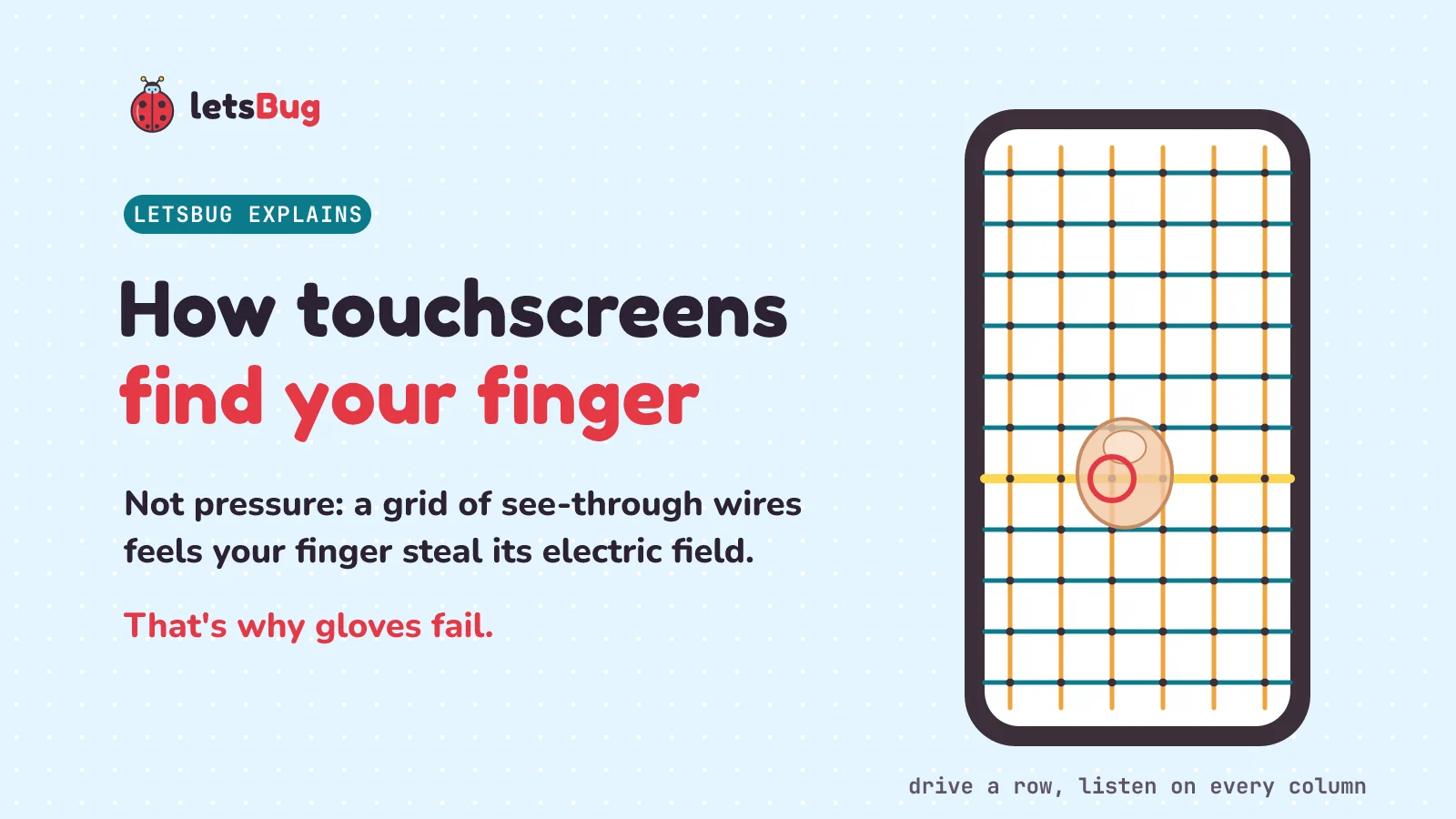
A phone touchscreen finds your finger by electricity, not pressure. Under the glass is a grid of see-through wires, and an electric signal reaches across from row to column at each crossing. Your finger conducts electricity, so it takes some of that signal, and a chip notices the drop. A woolly glove keeps your finger too far away to count.
In this post we look at two kinds of touchscreen, meet the capacitor, and count the crossings under a screen. Then we scan a made-up screen in Python that you can run, find a finger between two wires, catch the ghost touches of a simpler design, and see why gloves fail.
Key takeaways
- A resistive screen has two layers with a thin gap. Pressing pushes them together, so a finger, a glove or a pen all work. Phones use capacitive screens, which sense electricity instead.
- A capacitor is two conductors with an insulator between them. Your body conducts, so a fingertip near a wire under the glass changes its electric field.
- Under the glass is a grid of rows and columns made of indium tin oxide, which conducts but lets light through. Each crossing is a tiny capacitor. With lines 5 mm apart (an example from one patent, a public document about an invention), a 7 cm × 15 cm screen has 14 × 30 = 420 crossings.
- The chip drives one row at a time (sends a pulse along it) and listens on every column. A finger lowers the signal at the crossings under it.
- Weighing the neighbours, called interpolation, places a finger between the lines. If one column loses 3 units and the next, 5 mm away, loses 1, the finger is a quarter of the way across: 1.25 mm past the first.
- Measuring only whole rows and whole columns gives ghosts: two fingers give four crossing points. Measuring every crossing on its own, called mutual-capacitance sensing, tracks several fingers at once.
- In a flat-plate capacitor, C = εA/d (C is the capacitance, A the plate area, d the gap, ε a number for the insulator): double the gap, and the capacitance halves. A thick glove adds distance, so the change is too small. Pressing harder barely helps. Gloves with conductive thread in the fingertips do.
This post goes with letsBug Explains, episode 7. Watch it, or read on: the post adds a grid scan in Python that you can run, the maths for finding a finger between the lines, and practice questions with answers.
Does a touchscreen feel pressure?
Myth or fact: your phone's touchscreen finds your finger by feeling its pressure? Myth. Tap the screen with a fingernail or a plastic pen, and usually nothing happens. Press hard with a woolly glove on, and still nothing. The screen senses electricity, not a push.
The news site GSMArena, reporting figures from the market research company IDC, wrote that "a total of 1.26 billion smartphones were shipped in 2025". (Shipped means sent out by the makers to be sold.) Every one of them has to find your finger, over and over, many times a second.
There is a kind of screen that does use pressure: the resistive touchscreen. Wikipedia's Touchscreen article describes its two most important layers: "two transparent electrically resistive layers facing each other with a thin gap between them." (Transparent means see-through. Resistive means the layers conduct electricity, but not very well.) Press on the top layer, and "the two layers touch to become connected at that point." The screen then works out where they touched. So anything firm works. Wikipedia says resistive screens work with gloves on, or with anything stiff, because enough pressure is all they need.
Phones moved to a different idea, the capacitive touchscreen. Wikipedia: "the first mobile phone to feature a capacitive touchscreen was the LG Prada, released in May 2007, shortly before the first iPhone."
One twist. Some screens can also sense how hard you press. Wikipedia says that "In April 2015, the Apple Watch introduced consumer force-sensitive displays, allowing screens to sense how hard a user is touching the surface in addition to tracking multi-touch points." (Multi-touch points are several fingers at once.) Even then, the screen still tracks where your fingers are, as the quote says. Finding them is what this post is about.
What is a capacitor, and why does a touchscreen need one?
First, two words. A conductor is a material that lets electric charge flow through it, like copper. An insulator is one that doesn't, like glass, plastic or air.
Wikipedia's Capacitor article: "A capacitor consists of two conductors separated by a non-conductive region." That region can be empty space or an insulator, which it calls a dielectric. Connect a battery, and "an electric field develops across the dielectric, causing a net positive charge to collect on one plate and net negative charge to collect on the other plate." (The two conductors are often flat plates. Net positive charge means more positive charge than negative.) An electric field is the push and pull that charges feel around other charges. You can't see it, but it fills the gap between the plates.
We met a capacitor before, smoothing out a bouncy button, in our post on switch debouncing.
Voltage is the electric push that makes charge move, the number written on a battery. Its unit is the volt. How much charge a capacitor holds for each volt across it is its capacitance. Wikipedia's Capacitance article writes it as "C = charge / voltage".
Now the finger. Your body conducts electricity, a little. So when your fingertip comes near a charged wire under the glass, some of the wire's electric field reaches out into your finger. Wikipedia's Touchscreen article puts it this way: "As the human body is also an electrical conductor, touching the surface of the screen results in a distortion of the screen's electrostatic field, measurable as a change in capacitance." (A distortion is a change of shape. An electrostatic field is the field of charges that are sitting still.) So the screen doesn't feel your finger. It measures a capacitance that changes when your finger is there.
That also explains the plastic pen. Plastic is an insulator, so it doesn't pull the field the way skin does. Wikipedia's Capacitive sensing article: "A standard stylus cannot be used for capacitive sensing, but special capacitive styli, which are conductive, exist for the purpose." (A stylus is a pen for touchscreens. Styli is the plural.)
What is under the glass of a touchscreen?
Wikipedia's Touchscreen article: "A capacitive touchscreen panel consists of an insulator, such as glass, coated with a transparent conductor, such as indium tin oxide (ITO)." Indium tin oxide, or ITO, is a material that conducts electricity but lets light through. Wikipedia's Indium tin oxide article says "It is transparent and colorless in thin layers", and that "a thin film can have an optical transmittance of greater than 80%". (Optical transmittance is the share of light that gets through.) That's why it is used in phone touchscreens.
The ITO is shaped into lines called electrodes: conductors that carry a signal in or out. The lines are etched: part of the layer is eaten away, leaving a pattern. One set of lines runs across, in rows. Another runs down, in columns. Wikipedia's Capacitive sensing article calls them "perpendicular lines or tracks to form the grid" (perpendicular means at right angles). This kind of grid is called projected capacitance, because the field it makes reaches up (projects) through the glass to your finger.
Where a row crosses a column, the two make a tiny capacitor. The same article says there is "a capacitor at each intersection of each row and each column" (an intersection is a crossing). Its example: a 12-by-16 grid has 12 × 16 = 192 crossings, so 192 tiny capacitors.
How far apart are the lines? A patent is a public document that describes an invention, so that others can't copy it for some years. One touch-panel patent, first owned by Maxim Integrated and now by Qualcomm, gives one example: "the pitch 112 between adjacent sensor electrodes 110 may be about five millimeters (5 mm) center-to-center." The pitch is the distance from one line to the next, measured from the middle of one line to the middle of the next (center-to-center). (The numbers 112 and 110 just label parts of the patent's drawing. Adjacent means next to each other.)
The patent also says the 5 mm is "provided by way of example only". The chip maker Microchip gives the same number in its design guide for touch sensors: "The ideal electrode pitch is approximately 5 mm for a user touch area of 8 mm." (A touch area of 8 mm means a fingertip pressed flat is about 8 mm across.) It explains that with this spacing, a fingertip placed anywhere overlaps "at least two sensor electrodes in each dimension", which "enables the best interpolation of the touch position". So a fingertip covers at least two lines across and two lines down. We'll meet interpolation below.
Let's count the crossings on a made-up screen, 7 cm wide and 15 cm tall, with lines 5 mm apart. The numbers are easy on purpose. The first line is at the left edge, at 0 mm, and the last is at 65 mm, so 70 mm gives 14 lines, one for each 5 mm strip (think of each line as sitting at the left side of its own strip). To run the code, paste each block into one file, one after another, and run it with Python 3.
PITCH = 5                                  # mm from one line to the next
COLS, ROWS = 70 // PITCH, 150 // PITCH     # a 7 cm x 15 cm screen: 70 mm across, 150 mm down
print(COLS, "columns x", ROWS, "rows =", COLS * ROWS, "crossings")
14 columns x 30 rows = 420 crossingsThe second line sets two variables (named values) at once: COLS gets the first value and ROWS the second. // divides and drops any remainder: 70 ÷ 5 = 14 columns and 150 ÷ 5 = 30 rows. That's 14 × 30 = 420 crossings, 420 tiny capacitors, each one measured on its own.
How does a touchscreen find your finger?
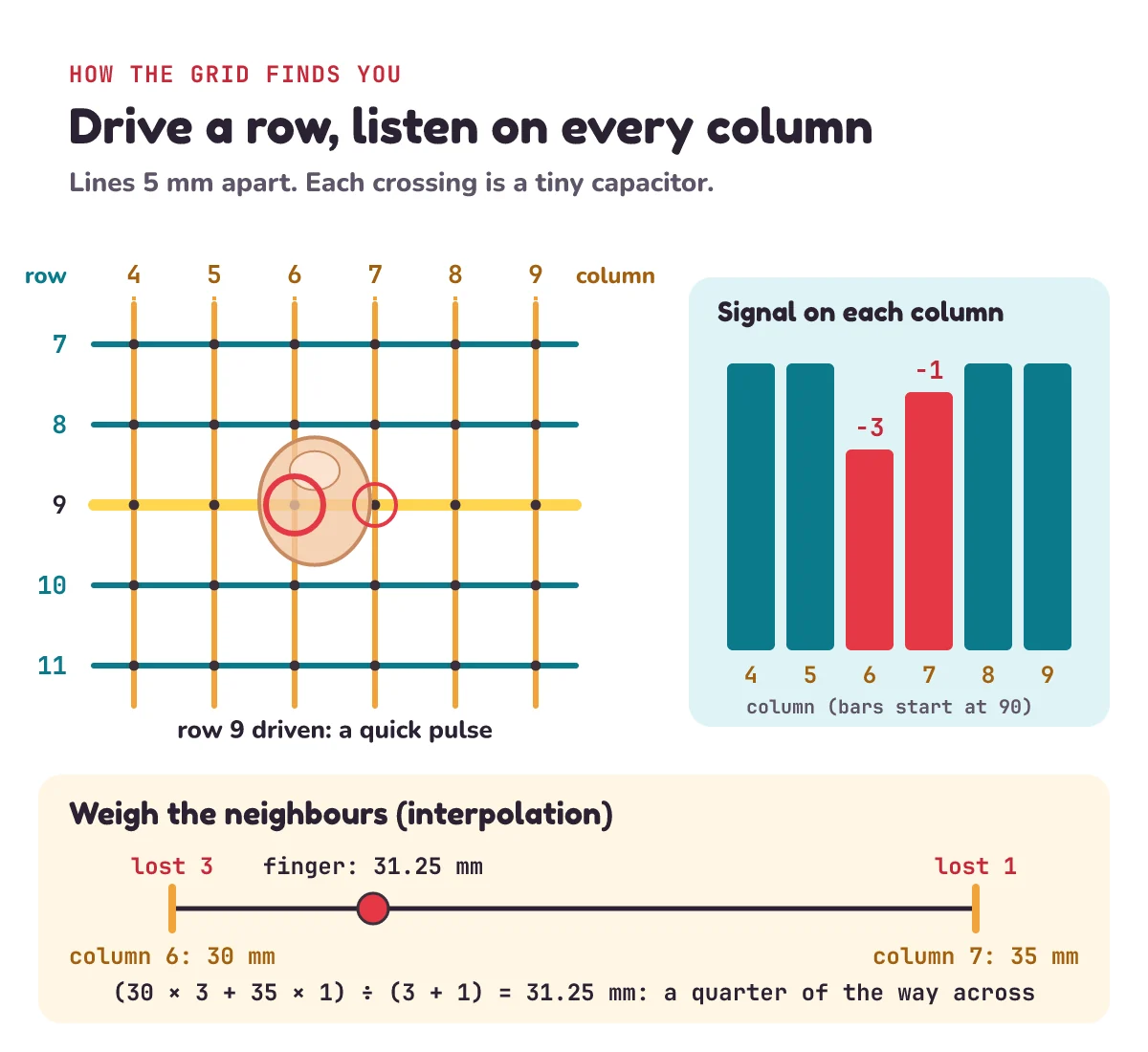
The chip, built from tiny switches called transistors, scans the grid: it measures the crossings one row at a time. It drives one row: it sends a quick pulse of voltage along that row, and listens on every column. One set of lines sends, and the other listens. Wikipedia's Touchscreen article says "The horizontal traces may be transmitters while the vertical traces are sensors, or vice versa." (A trace is a thin conducting line. Vice versa means the other way round.) Microchip's Capacitive Touch Sensor Design Guide calls the two sets "X (transmit) and Y (receive) electrodes". Transmit means send, and receive means listen.
At each crossing, a little of the pulse reaches across from the row to the column. That link between a row and a column is the mutual capacitance. Now put your finger there. Microchip's guide: "the user’s fingertip interacts with the electric field between the X (transmit) and Y (receive) electrodes." Your finger gives some of the charge another path, to your body, "which reduces the amount of charge transferred from X to Y". So less of the pulse reaches that column. In the guide's words, "a touch contact usually causes a reduction in mutual capacitance". The chip sees the signal drop, and moves on to the next row.
Here is that scan in Python, on our made-up screen. The signal numbers are made up too: 100 units reach a column when nobody touches it, and a finger right over a crossing takes 4. Add this under the code above:
BASE = 100                                 # signal that reaches a column when nobody touches (made-up units)

def stolen(x, y, fx, fy):
    """How much signal a finger at (fx, fy) steals at the crossing at (x, y). All in mm. A made-up model."""
    near_x = max(0, 1 - abs(x - fx) / PITCH)    # 1 right under the finger, 0 one line away or more
    near_y = max(0, 1 - abs(y - fy) / PITCH)
    return 4 * near_x * near_y

def scan(fingers):
    """Drive each row in turn and listen on every column. Return the signal at every crossing."""
    grid = []
    for r in range(ROWS):                  # drive one row at a time
        row = []
        for c in range(COLS):              # listen on every column
            x, y = c * PITCH, r * PITCH    # where this crossing is, in mm
            row.append(BASE - sum(stolen(x, y, fx, fy) for fx, fy in fingers))
        grid.append(row)
    return grid

grid = scan([(31.25, 45)])                 # one finger, 31.25 mm across and 45 mm down
for r in range(ROWS):
    for c in range(COLS):
        if grid[r][c] < BASE:
            print(f"row {r}, column {c}: {grid[r][c]:g}")
row 9, column 6: 97
row 9, column 7: 99Line by line:
- Python counts from 0, so column 0 is at the left edge, at 0 mm, and column
cisc * PITCHmm across. Rowrisr * PITCHmm down. Column 6 is at 30 mm, column 7 at 35 mm, and row 9 at 45 mm. stolen()is our made-up finger.abs(x - fx)is how far the crossing is from the finger, across.near_xis 1 when the finger is right over that column, and falls to 0 one whole line away.max(0, ...)stops it going below 0.near_ydoes the same up and down.scan()does the chip's job. The outer loop drives each row in turn. The inner loop listens on every column, and stores what's left of the 100 units:BASEminus what the fingers took.sum(... for fx, fy in fingers)adds up what every finger took, so it works for two fingers too.- The last loop prints only the crossings that lost signal. An
fbefore the quotes lets Python put values inside{ }, and{grid[r][c]:g}prints the number without extra zeros.
Our made-up finger is narrow, to keep the numbers small: it only reaches the lines within 5 mm of its middle. A real fingertip changes several crossings in each direction.
Our finger is at 31.25 mm, a quarter of the way from column 6 to column 7. So column 6 lost 3 units and column 7 lost 1. The biggest drop is at row 9, column 6, so that's roughly where the finger is. But "roughly" isn't good enough for typing.
How does a touchscreen find a finger between the lines?
Lines 5 mm apart are too far apart to place a finger exactly. If the screen only picked the column with the biggest drop, the spot the phone thinks you touched would jump in steps of 5 mm. Instead, it weighs the neighbours. A fingertip covers several crossings at once, and the closer a line is to the middle of your fingertip, the more signal it loses. One simple way, and the one we'll use, is a weighted average: each line's position counts as many times as the units it lost. This is called interpolation: working out a value between two that you measured. Add this:
def centre(positions, losses):
    """Weigh each line's position by the signal it lost: a weighted average."""
    return sum(p * d for p, d in zip(positions, losses)) / sum(losses)

print(centre([30, 35], [3, 1])) # column 6 is at 30 mm, column 7 at 35 mm31.25zip() pairs each position with its loss: (30, 3) and (35, 1). So the sum is (30 × 3 + 35 × 1) ÷ (3 + 1) = 125 ÷ 4 = 31.25 mm. That's exactly where we put the finger. The video does the same sum measured from the left column: (0 × 3 + 5 × 1) ÷ (3 + 1) = 1.25 mm past column 6, a quarter of the way across. The bigger loss is on the left, so the finger is closer to the left.
Our made-up finger was built so that this sum comes out exact. Real fingers and real chips are messier, but the idea is the same. Microchip's guide describes the same idea: "The measured touch deltas are combined to determine the position of a touch contact with an increased resolution by interpolation between the sensors." (A touch delta is how much one reading changed. Resolution here means how finely the position is known.) The Qualcomm patent also shapes its electrodes for "a signal that is suitable for interpolation".
Pause and try this one before you read on. The columns are 5 mm apart. Your finger cuts the signal on column 4 by 1 unit, and on column 5 by 3 units. Where is your finger?
The bigger drop is on column 5, so most of your fingertip is there. Measured from column 4: (0 × 1 + 5 × 3) ÷ (1 + 3) = 15 ÷ 4 = 3.75 mm past column 4, three quarters of the way to column 5. A common slip is to say "column 5" and stop. That's the 5 mm jump again.
Why can't a simple touchscreen track two fingers?
Here's a simpler idea that goes wrong when you use two fingers. Don't measure every crossing. Measure each whole row and each whole column. On our screen, that's 14 + 30 = 44 measurements instead of 420. This is called self-capacitance: each line's own capacitance to your finger is measured, not the link between a row and a column. The Capacitive sensing article: "Self-capacitance sensors can have the same X-Y grid as mutual capacitance sensors, but the columns and rows operate independently."
One finger makes one row and one column lose signal. We'll say they light up. They cross at one point. Easy. But put down two fingers, and you get two rows and two columns. Those cross at four points. Here it is in Python. We pretend we already know which crossings the fingers are on, and ask what the simpler design can see:
def rows_and_columns(touched):
    """The simpler idea: only ask which whole rows, and which whole columns, lost signal."""
    rows = sorted({r for r, c in touched})
    cols = sorted({c for r, c in touched})
    return [(r, c) for r in rows for c in cols]   # every place a lit row crosses a lit column

print(rows_and_columns([(9, 6)]))
print(rows_and_columns([(9, 6), (20, 3)]))
[(9, 6)]
[(9, 3), (9, 6), (20, 3), (20, 6)]Each touch is a pair (row, column), and r, c takes the two parts. {r for r, c in touched} makes a set of the row numbers, which keeps each one only once. sorted() puts them in order. The last line pairs every lit row with every lit column.
Two fingers, four answers. Two are your fingers: (9, 6) and (20, 3). The other two, (9, 3) and (20, 6), are ghosts, and the chip can't tell which is which. Wikipedia says self-capacitance "produces a stronger signal than mutual capacitance sensing, but it is unable to resolve accurately more than one finger" (to resolve is to tell apart). It calls the result ghosting: "misplaced location sensing".
Measuring every crossing on its own has no ghosts. Our scan() already does that. Add this:
grid = scan([(30, 45), (15, 100)])         # two fingers, each right over a crossing
print([(r, c) for r in range(ROWS) for c in range(COLS) if grid[r][c] < BASE])
[(9, 6), (20, 3)]That one line goes through every row and column and keeps the crossings that lost signal. Just the two real fingers. That's why measuring every crossing matters for phones, which need to follow two or more fingers. The Capacitive sensing article: "Mutual capacitance allows multi-touch operation where multiple fingers, palms or styli can be accurately tracked at the same time." It's what lets you pinch to zoom.
| Feature | Self-capacitance | Mutual capacitance |
|---|---|---|
| What it measures | Each whole row and each whole column | Every crossing |
| Measurements on our screen | 14 + 30 = 44 | 14 × 30 = 420 |
| Signal | Stronger | Weaker |
| Two fingers | 4 points: 2 fingers and 2 ghosts | 2 points: just the fingers |
With one finger, or a single button, measuring each line on its own works fine. The ghosts only appear with two or more fingers.
Why don't touchscreens work with gloves?
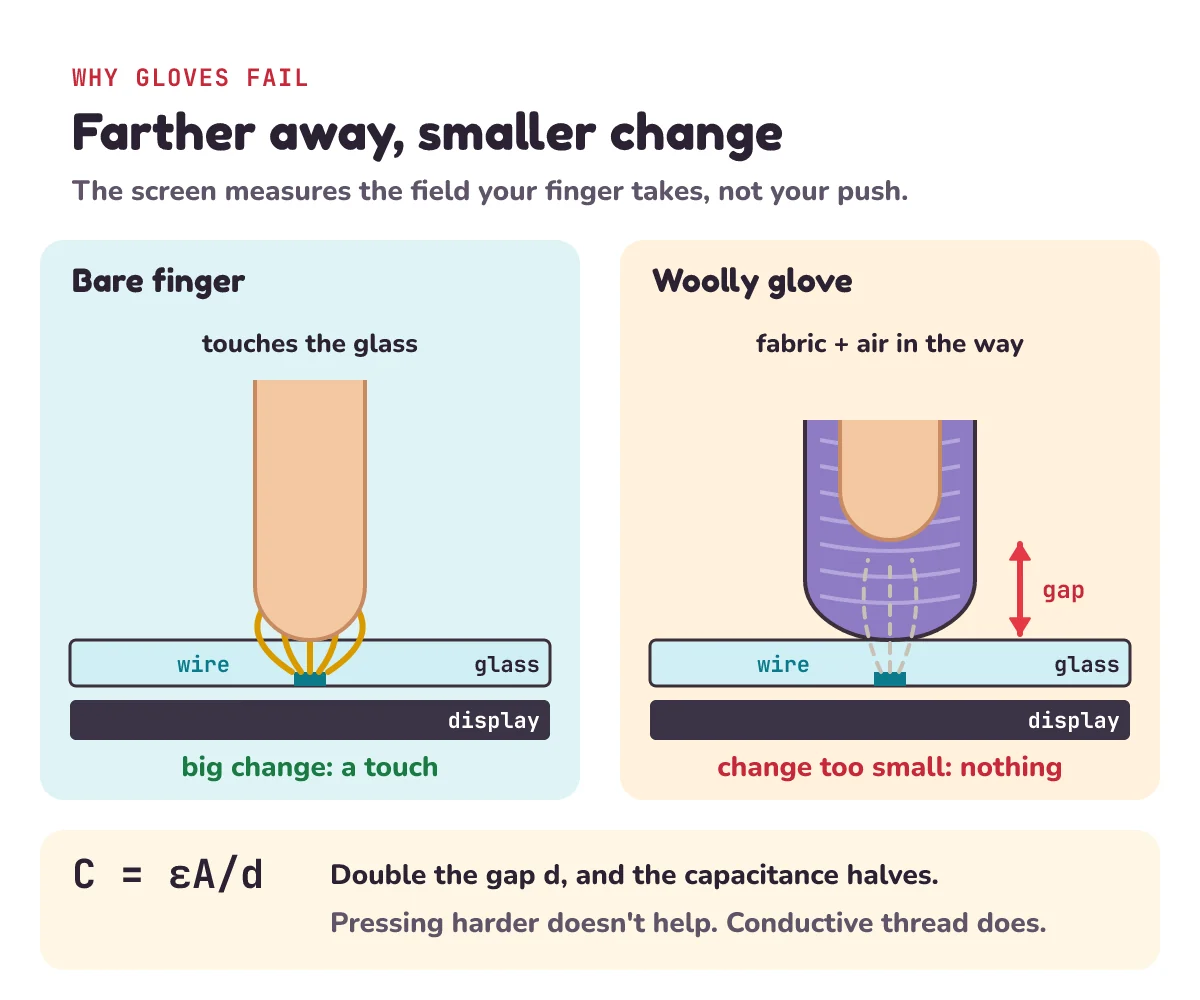
A capacitor's capacitance is bigger when its two conductors are close. Here, think of the two conductors as your fingertip and the wire under the glass. The glass, and any glove, is the insulator between them. The bigger this finger-to-wire capacitance, the more of the row's field your finger can take, and the bigger the drop the chip sees.
Wikipedia's Capacitance article: "The closer the sheets are to each other, the greater the capacitance." For two flat plates, it gives the formula C = εA/d:
- C is the capacitance.
- A is the area where the plates overlap.
- d is the distance between them.
- ε (the Greek letter epsilon) is the permittivity, a number for the insulator in between. The bigger it is, the more charge the plates hold for each volt.
Georgia State University's HyperPhysics pages give the same formula.
Wikipedia's Capacitance article says capacitance is "inversely proportional to the separation" (when one doubles, the other halves). So make d twice as big, and C halves, because εA/(2d) is half of εA/d. Make d three times as big, and C drops to a third.
A real fingertip over a grid is not two flat plates. Microchip's guide warns that for these sensors, "The parallel plate approximation is not applicable". So C = εA/d is a model, not an exact answer. But the guide states the same rule for real touch sensors: "A thicker touch cover increases the distance between the user’s fingertip and the sensor electrode. This causes reduced capacitance between the user and the sensor electrode and a proportional decrease in touch sensitivity." (The touch cover is the glass or plastic you touch. Sensitivity is how big a change one touch makes.) A glove works like an extra, thicker cover.
The screen is set up for a bare finger on thin glass. A woolly glove adds a thick layer of fabric and air between your skin and the glass. Fabric and air don't conduct, so the glove can't carry your skin's effect down to the glass. All it does is add distance. Your finger sits much farther away, and the change is too small for the chip to count as a touch. Wikipedia's Touchscreen article: "Unlike a resistive touchscreen, some capacitive touchscreens cannot be used to detect a finger through electrically insulating material, such as gloves."
Pressing harder doesn't help much. The screen isn't measuring pressure, and squashing the wool only shrinks the gap a little, not nearly enough.
A thin glove is different. Wikipedia's Touchscreen article says projected capacitive screens "can detect a finger which is near the screen without necessarily touching it", and that this "allows sensing through light gloves". The Capacitive sensing article explains why it varies from phone to phone: "Gloved fingers may not be sensed, depending on the implementation and gain settings." (The implementation is how that maker built it. Gain is how much the chip boosts the tiny signal.)
Touchscreen gloves fix it a different way. Wikipedia says the glove problem "can be overcome with a special capacitive stylus, or a special-application glove with an embroidered patch of conductive thread allowing electrical contact with the user's fingertip." (A special-application glove is one made for this job. Embroidered means sewn on.) The thread conducts, so it carries your finger's effect right to the glass.
Does a touchscreen work with a knuckle or through paper?
Try it on your own phone. You can test all of this quickly. Results vary from phone to phone, so here is what usually happens, and why:
- A fingernail: usually nothing. The nail holds your skin a little way above the glass, so the change is small. On some phones a nail still works.
- A knuckle: it usually works. It's still skin, so it still conducts.
- Through one thin sheet of paper: it often still works, because the gap is tiny.
- Through a thick glove: usually nothing, however hard you press.
Back to the myth
So, your phone doesn't find your finger by feeling pressure. Many times a second, it measures how much electric field your finger takes at the crossings of a see-through grid, and weighs the neighbours to find the middle of your fingertip. Gloves fail because they keep your finger too far away, not because you aren't pressing hard enough.
1) The lines are 4 mm apart on a screen 6 cm wide and 12 cm tall. How many crossings are there?
2) Column 2 drops by 2 units and column 3 drops by 2 units. They are 5 mm apart. Where is the finger?
3) A glove doubles the distance between your finger and the wire. In the simple model, C = εA/d, what happens to the capacitance?
4) A screen measures only whole rows and whole columns. Three fingers touch it, each on a different row and a different column. How many points could the chip report, and how many of them are ghosts?
Show the answers
1) 6 cm = 60 mm and 12 cm = 120 mm, so 60 ÷ 4 = 15 columns and 120 ÷ 4 = 30 rows, so 15 × 30 = 450 crossings.
2) The drops are equal, so the finger is halfway: (0 × 2 + 5 × 2) ÷ (2 + 2) = 2.5 mm past column 2.
3) It halves: εA/(2d) is half of εA/d.
4) 3 lit rows × 3 lit columns = 9 points. Three are fingers, so 6 are ghosts.
Questions people ask
How does a touchscreen know where you touch?
Under the glass is a grid of see-through wires in rows and columns, and each crossing is a tiny capacitor. The chip drives one row at a time and listens on every column. Your finger takes some of the electric field, so the signal drops at the crossings under it. The chip weighs the neighbouring drops to find the middle of your fingertip.
Why doesn't my touchscreen work with gloves?
A capacitive screen senses the electric field your finger takes, and that effect shrinks as your finger gets farther away. A thick glove adds fabric and air, so the change is too small to count. Pressing harder doesn't help much: the screen doesn't measure pressure, and squashing the glove barely shrinks the gap. Some screens can sense through light gloves.
What is the difference between resistive and capacitive touchscreens?
A resistive screen has two layers with a thin gap. Pressing pushes them together, so it works with a glove, a pen or anything firm. A capacitive screen senses the change a conductor, like your finger, makes to an electric field. It doesn't need a push, but it doesn't notice most insulators.
Why doesn't my touchscreen work properly when it's wet?
Water changes the field too, but not the way a finger does. Microchip's touch design guide says "With mutual capacitance sensors, moisture droplets on an isolated sensor node will not cause accidental touch detection." A lone drop makes the reading move the opposite way to a touch. Water can still confuse some screens: Wikipedia notes that some capacitive touchscreens "can fail to sense correctly with even a small amount of water on the screen". Dry the screen, and it should work again.
Do touchscreen gloves really work?
Yes. They have patches of conductive thread in the fingertips. The thread connects your skin to the glass, so the screen sees your finger's effect much as it would a bare finger.
Can a touchscreen tell how hard you press?
Finding where you touch doesn't need force: the grid senses where a conductor is. Some devices add force sensing on top. Wikipedia says the Apple Watch brought force-sensitive displays to consumers in April 2015.
Keep going
- Watch the full lesson, How Do Touchscreens Work? And Why They Ignore You in Gloves, and its Short, Your Phone Screen Doesn't Feel Pressure. So How Does Touch Work? Then see the rest of letsBug Explains on YouTube.
- Another way a chip reads a knob you turn: how does a rotary encoder work?, letsBug Explains episode 4.
- The tiny switches inside the chip: how a transistor works as a switch.
- The episode before this one: switch debouncing explained (why one press can count as 7).
- The next episode: how a capacitive touch button works, a button with no moving parts.
Checked on 14 November 2026 against the 9 sources below.
Sources
- Wikipedia: Touchscreen (capacitive panels and ITO; the body as a conductor; resistive layers and gloves; LG Prada, May 2007; force-sensitive displays, April 2015; gloves and conductive thread; light gloves; rows that send and columns that listen)
- Wikipedia: Capacitive sensing (the X-Y grid; a capacitor at each crossing, 12 by 16 = 192; self-capacitance and ghosting; multi-touch; styli; gain settings; water)
- Wikipedia: Capacitor (two conductors and a dielectric; opposite charges and the field)
- Wikipedia: Capacitance (C = charge / voltage; C = εA/d; closer sheets, greater capacitance)
- HyperPhysics, Georgia State University: Parallel plate capacitor (capacitance = k × ε0 × area / separation)
- Wikipedia: Indium tin oxide (transparent in thin layers; over 80% of light through; used in touchscreens)
- US patent 9,116,582 B2, assigned to Qualcomm: Capacitive touch panel having protrusions formed between drive and/or sensor electrodes (5 mm pitch as an example; signals suitable for interpolation)
- Microchip Technology: AN2934, Capacitive Touch Sensor Design Guide, 2020 (X lines driven, Y lines measured; a touch lowers the mutual capacitance; 5 mm electrode pitch; interpolation; thicker cover, less sensitivity; water droplets; the parallel-plate warning)
- GSMArena: IDC: Smartphone shipments up 2.3% in Q4 2025, 14 January 2026 (1.26 billion smartphones shipped in 2025)
Every code sample in this post was run in Python 3.13 before publishing.