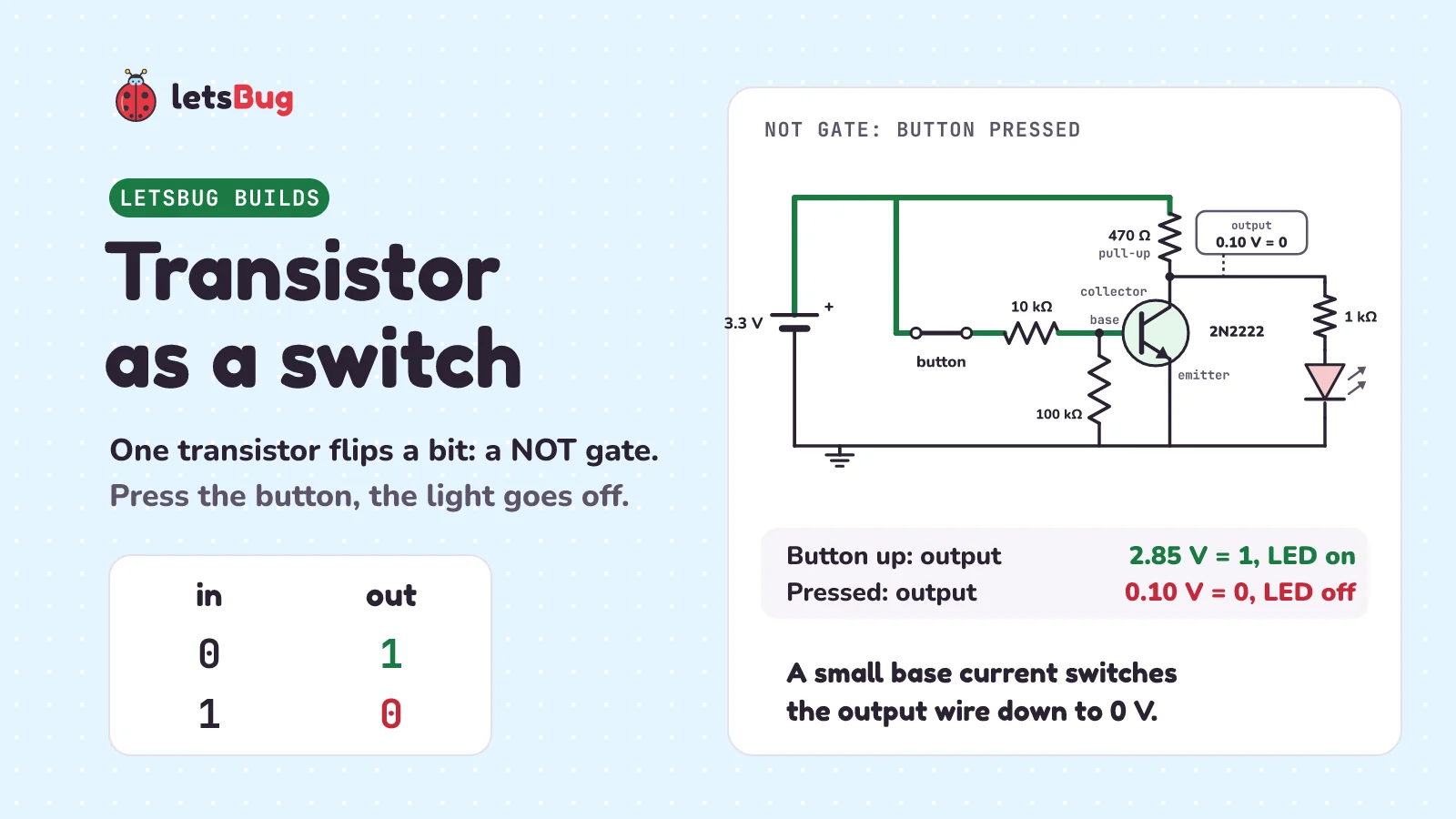
A transistor works as a switch with no moving parts. A small current into its base (the control leg) switches on a bigger current between its collector and emitter (the two ends of the switch). So a tiny base current can switch one more than 20 times bigger. Add one resistor and it flips a bit: a NOT gate.
In this post, let's meet the 2N2222 transistor, wire it so a button switches an LED, work out the base current with Ohm's law, see why an ESP32 pin needs a transistor for bigger currents, and then turn one transistor into a NOT gate. You can click every circuit in a free browser simulator.
Key takeaways
- A transistor is a switch flipped by electricity instead of a finger. It has three legs: the base is the control, and the collector and emitter are the two ends of the switch.
- With 3.3 V on a 10 kΩ (10,000-ohm) base resistor, the base current is (3.3 V − 0.7 V) ÷ 10,000 Ω ≈ 0.26 mA (milliamps: thousandths of an amp). It switches about 6 mA through the LED: more than 20 times bigger.
- Always use a base resistor. Without one, nothing limits the base current, and the transistor can get hot.
- An ESP32 pin gives about 40 mA (a typical figure, not a target). A 2N2222 is rated for up to 600 mA, 15 times more. So the pin drives the base, and the transistor carries the big current.
- Put a pull-up resistor (one that ties a wire to the supply, so it reads 1 until something pulls it down) on the collector and take the output there, and one transistor is a NOT gate: input 0 gives output 1, input 1 gives output 0.
This post goes with letsBug Builds, episode 3. Watch it, or read on: everything in the video is here, plus the working in Python, the circuit text for the simulator, and practice questions with answers.
What is a transistor?
In the last Builds post, we made AND and OR gates from switches. They worked, but every switch needed a finger to flip it. A transistor is a switch with no moving parts, and it's flipped by electricity instead. Wikipedia's Transistor article says it in one sentence: "A small current at the base terminal, flowing between the base and the emitter, can control or switch a much larger current between the collector and emitter."
Ours is a 2N2222, a cheap and common transistor of the type called NPN. It has three legs:
- The collector and the emitter are the two ends of the switch. Current goes in at the collector and out at the emitter.
- The base is the control. Push a small current into the base, and the path from collector to emitter switches on. No base current, and it's off.
Which leg is which depends on the maker, so always check the datasheet: the document where the maker lists a part's legs and limits. The one we used is onsemi's P2N2222A datasheet. In its small plastic package with three legs (called TO-92), pin 1 is the collector, pin 2 the base and pin 3 the emitter. Another maker's 2N2222 may use a different order.
How do you use a transistor as a switch?
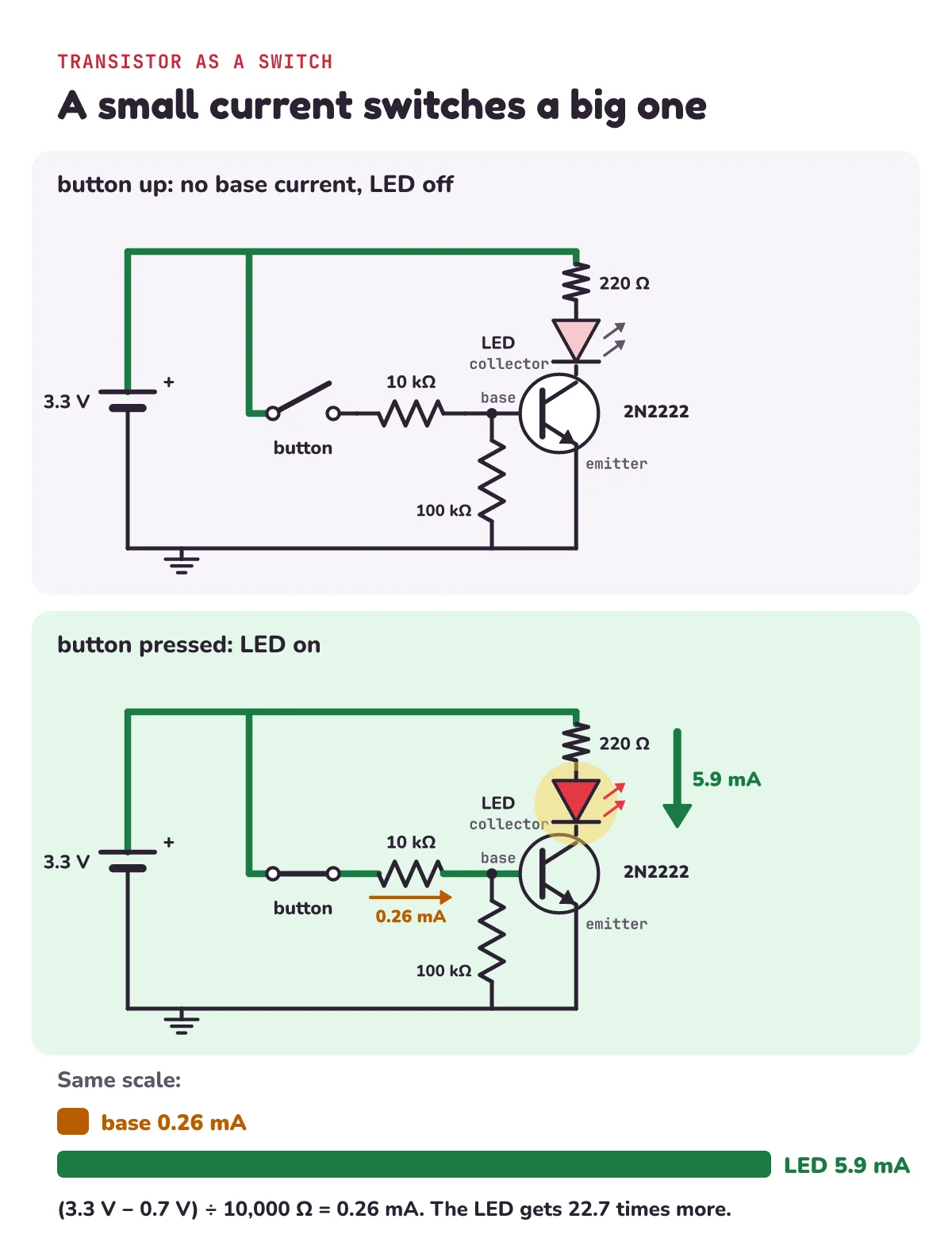
Start with the LED circuit from Builds episode 1: a 3.3 V supply, a 220 Ω resistor and a red LED. Now change where the LED's bottom end goes:
- The LED's bottom end goes to the transistor's collector, and the emitter goes to ground (0 V).
- The button never touches the LED. It feeds the base, through a 10 kΩ resistor. (kΩ means kilohms, thousands of ohms, so 10 kΩ is 10,000 ohms.)
- One more part: a 100 kΩ resistor from the base to ground. While the button is up, it holds the base at 0 V, so the base never "floats" at some in-between voltage. A resistor that holds a wire low like this is called a pull-down.
Press the button: a little current flows into the base, the transistor switches on, and the LED lights. Let go, and it's dark.
How much base current does a transistor need?
Let's work it out, like the video's "pause and try". The button puts 3.3 V on one end of the 10 kΩ resistor. The base sits at about 0.7 V. So the resistor has 3.3 V − 0.7 V = 2.6 V across it. Ohm's law gives the current:
2.6 V ÷ 10,000 Ω = 0.00026 A = 0.26 mA, about a quarter of a milliamp. (A milliamp, mA, is a thousandth of an amp.)
Now the LED side. A red LED takes about 1.9 V, and a transistor that's fully on takes about 0.1 V between collector and emitter. That leaves 3.3 V − 1.9 V − 0.1 V = 1.3 V for the 220 Ω resistor: 1.3 V ÷ 220 Ω ≈ 5.9 mA, about 6 mA. So a quarter of a milliamp is switching a current more than 20 times bigger. Here's the same working in Python:
supply, v_base = 3.3, 0.7             # volts: the button's supply, and the base
r_base = 10_000                       # ohms: the 10 kΩ base resistor
i_base = (supply - v_base) / r_base   # Ohm's law: current = voltage / resistance
print(round(i_base * 1000, 2), "mA into the base")

v_led, v_ce, r_led = 1.9, 0.1, 220    # red LED, transistor when fully on, LED resistor
i_led = (supply - v_led - v_ce) / r_led
print(round(i_led * 1000, 1), "mA through the LED")
print(round(i_led / i_base, 1), "times bigger")
0.26 mA into the base
5.9 mA through the LED
22.7 times biggerWhere does 0.7 V come from? Between the base and the emitter, a transistor behaves like a diode: a one-way valve for current that opens once it has about 0.7 V across it. Datasheets give a range, not one exact number: onsemi's datasheet for the BC547, another small transistor, gives the base-emitter voltage as 0.55 V to 0.7 V with 2 mA flowing into the collector, and the P2N2222A datasheet gives 0.6 V to 1.2 V with a much bigger 150 mA. When we ran this circuit in the Falstad simulator, its base sat at 0.64 V.
And the 100 kΩ pull-down? It takes 0.7 V ÷ 100,000 Ω = 0.007 mA, a tiny share of the 0.26 mA.
Is 0.26 mA enough to switch it fully on?
Yes. A transistor's current gain (written hFE) says how many times bigger the collector current can be than the base current. The P2N2222A datasheet's minimum gain is 50 with 1 mA of collector current and 75 with 10 mA. Even at 50, our 0.26 mA could allow 50 × 0.26 mA = 13 mA. The LED only needs 5.9 mA, so the transistor is fully on. Engineers call that saturated: the switch is closed as far as it goes.
Why does an ESP32 pin need a transistor?
In the ESP32 LED blink post, we said never to drive a motor straight from an ESP32 pin. Here's why, in two numbers:
- An ESP32 pin can give about 40 mA. That's the datasheet's typical figure with the pin set to its strongest drive, and it's not a target.
- A 2N2222 is rated for up to 600 mA of collector current: the P2N2222A datasheet lists "Collector Current - Continuous" as 600 mA.
That's 600 ÷ 40 = 15 times more. So the pin drives the base through a resistor, and the transistor carries the big current. Fans, buzzers and LED strips need more current than a pin can give, so they are often switched by a transistor like this one. A motor or a relay (a switch moved by a small electromagnet) needs a few more parts than this post shows, so don't wire one up from this post alone.
How do you make a NOT gate with one transistor?
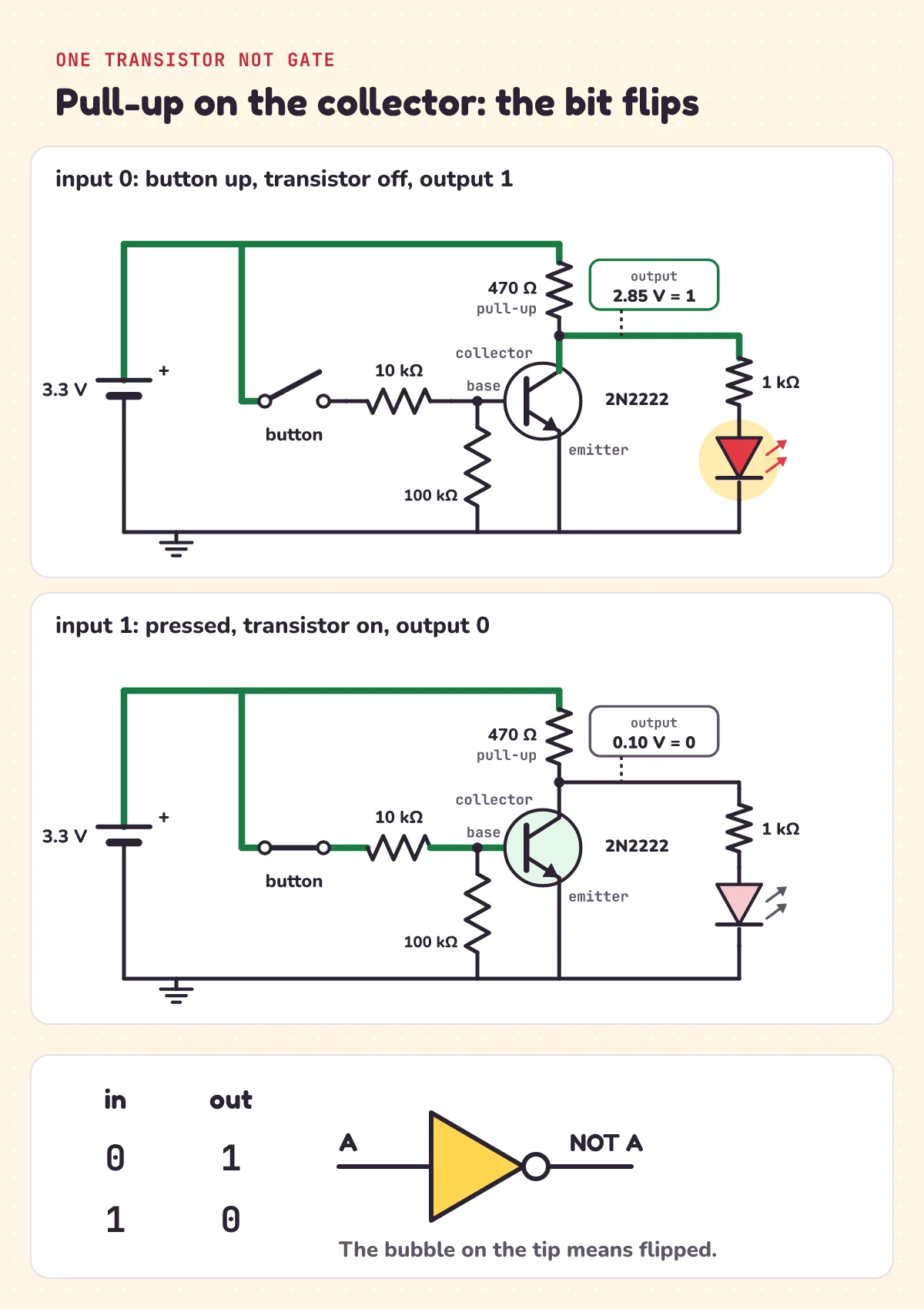
Now let's flip the bit. Take the LED and its 220 Ω resistor out of the collector. Put a 470 Ω resistor there instead, from the collector up to the 3.3 V supply. The wire at the collector is our output.
That 470 Ω resistor is a pull-up: a resistor that connects a wire to the supply, so the wire sits high (a 1) when nothing else pulls it down. The transistor is the thing that can pull it down:
- Button up: no base current, so the transistor is off. Nothing pulls the output down, and the pull-up holds it high. That's a 1.
- Button pressed: the transistor switches on and connects the output to ground. The output drops to about 0.1 V. That's a 0. About (3.3 V − 0.1 V) ÷ 470 Ω ≈ 6.8 mA now flows through the pull-up and the transistor.
To see the output, connect an LED to it through a 1 kΩ resistor. The 1 kΩ keeps the LED's current small, so it doesn't pull the output down. With the transistor off, about (3.3 V − 1.9 V) ÷ (470 Ω + 1,000 Ω) ≈ 0.95 mA flows through the pull-up and the LED. The pull-up drops 470 Ω × 0.95 mA ≈ 0.45 V, so the output still sits near 3 V: 3.3 V − 0.45 V ≈ 2.85 V.
So: button up, output 1, LED on. Press, output 0, LED off. Press the button, and the light goes off. Zero in, one out. One in, zero out. That's a NOT gate: a logic gate with one input that flips it. Wikipedia's article on resistor-transistor logic says the same: "A bipolar transistor switch is the simplest RTL gate (inverter or NOT gate) implementing logical negation." (RTL is short for resistor-transistor logic, the 2N2222 is a bipolar transistor, and logical negation is the NOT rule.)
What is the NOT gate truth table and symbol?
A truth table lists every input and the output for each one. A NOT gate has one input, so its table has just two rows:
| Input (button) | Output | Output LED |
|---|---|---|
| 0 (up) | 1 | on |
| 1 (pressed) | 0 | off |
Or, as Wikipedia's Inverter article puts it: "The NOT gate outputs 0 when given 1, and outputs 1 when given 0." The same rule in Python, run after the code above:
def not_gate(a):
    """One transistor and a pull-up: input 1 pulls the output down to 0."""
    return 0 if a == 1 else 1

for a in (0, 1):
    print("in", a, "out", not_gate(a))
in 0 out 1
in 1 out 0On circuit diagrams, a NOT gate is drawn as a triangle touching a small circle, called the bubble. The bubble means flipped. A NOT gate is also called an inverter, because it inverts (flips) its input.
Inside a phone chip, each inverter is made from two tiny transistors of a different kind, called MOSFETs, instead of one transistor and a resistor. And there are a lot of them: Wikipedia's transistor count list gives Apple's A17 chip (2023) about 19 billion transistors. To see how gates like these add numbers, read how computers add numbers.
Try it free in Falstad
Falstad is a free circuit simulator that runs in your browser, made by Paul Falstad, with a JavaScript version by Iain Sharp. Both circuits from the video open with one click:
- Transistor switch: the button, the 10 kΩ base resistor, the 2N2222 and the LED.
- NOT gate: the same transistor with the pull-up, the output LED, and a logic probe on the input and on the output.
How to use it:
- Click the button once to press it, and again to let go. In the simulator it's a click switch that stays where you leave it.
- Green wires are at a positive voltage, grey ones are at ground, and the moving yellow dots are current.
- Hover over a part: the box in the lower right corner shows its current. With the button pressed in the first circuit, the base resistor shows about a quarter of a milliamp (0.27 mA when we ran it), and the LED about 6 mA (6.2 mA).
- In the NOT gate, the 0 or 1 boxes are logic probes. They show 1 when the wire is at 2.5 V or more. Click the button and watch both numbers flip.
The simulator's numbers come out a little different from ours (0.27 mA, not 0.26 mA) because its transistor puts the base at 0.64 V, not 0.7 V, and its LED takes 1.84 V, not 1.9 V. When we ran the NOT gate, the output read 2.80 V with the button up and 0.094 V pressed.
If a link ever stops working, open the simulator and paste the text into File > Import From Text. The transistor switch:
$ 1 0.000005 10.20027730826997 50 5 50 5e-11
v 96 400 96 112 0 0 40 3.3 0 0 0.5
w 96 112 208 112 0
w 208 112 400 112 0
s 208 112 208 192 0 1 false
w 208 192 208 288 0
r 208 288 304 288 0 10000
w 304 288 352 288 0
r 304 288 304 400 0 100000
t 352 288 400 288 0 1 0 0 100 default
r 400 112 400 176 0 220
162 400 176 400 240 0 1 0 0
w 400 240 400 272 0
w 400 304 400 400 0
w 96 400 304 400 0
w 304 400 400 400 0
g 96 400 96 432 0 0
x 236 160 300 160 0 20 button (click)
x 420 214 480 214 0 18 LED
x 420 300 520 300 0 20 2N2222
And the NOT gate:
$ 1 0.000005 10.20027730826997 50 5 50 5e-11
v 96 400 96 112 0 0 40 3.3 0 0 0.5
w 96 112 208 112 0
w 208 112 400 112 0
s 208 112 208 192 0 1 false
w 208 192 208 288 0
r 208 288 304 288 0 10000
w 304 288 352 288 0
r 304 288 304 400 0 100000
t 352 288 400 288 0 1 0 0 100 default
M 208 288 144 288 6 2.5
r 400 112 400 208 0 470
w 400 208 400 272 0
w 400 208 512 208 0
r 512 208 512 272 0 1000
162 512 272 512 336 0 1 0 0 0.002
M 512 208 576 208 6 2.5
w 400 304 400 400 0
w 512 336 512 400 0
w 96 400 304 400 0
w 304 400 400 400 0
w 400 400 512 400 0
g 96 400 96 432 0 0
x 236 160 300 160 0 20 button (click)
x 128 320 170 320 0 22 IN
x 560 180 620 180 0 22 OUT
x 250 460 400 460 0 24 NOT gate
Each line is one part. v is the 3.3 V supply, s the button (the 1 means it starts open, and false means it stays where you click it), r a resistor with its value in ohms, t the transistor (the 1 means NPN, and 100 is its gain), 162 an LED (1 0 0 makes it red), M a logic probe with its 2.5 V threshold, w a wire, g ground and x a text label.
Why does my transistor get hot? Check the base resistor
Here's a classic mistake: leave out the base resistor and wire the button straight to the base. Remember, the base and emitter act like a diode that opens at about 0.7 V. Give it 3.3 V with nothing to limit the current, and the current rises very fast. Wikipedia's article on the bipolar junction transistor (the 2N2222's kind) explains how fast: "an increase in VBE by approximately 60 mV increases the emitter current by a factor of 10". (VBE is the voltage from the base to the emitter, and 60 mV is 0.06 V.)
- In Falstad, the numbers grow too big for the simulator, and it stops. When we tried it, the supply current read 1.3 × 1045 A before it stopped.
- On a real bench, the transistor can get hot, and the pin or supply driving it can be damaged.
So if your transistor is hot, check the base resistor first.
Practice questions
1) With a 4.7 kΩ base resistor instead of 10 kΩ, on 3.3 V, about how much base current flows?
2) The NOT gate's input is 1. What is its output? Is the output LED on or off?
3) The P2N2222A's gain is at least 50. What is the smallest base current that could switch 6 mA? Is our 0.26 mA enough?
4) Which pin of onsemi's P2N2222A is the base?
5) The video's challenge: feed this NOT gate's output into a second NOT gate, built the same way, with its own LED. When you press the button, what does the second LED do?
Show the answers
1) (3.3 V − 0.7 V) ÷ 4,700 Ω ≈ 0.553 mA, about twice as much as with 10 kΩ.
2) Output 0, so the output LED is off.
3) 6 mA ÷ 50 = 0.12 mA. Our 0.26 mA is more than twice that, so yes.
4) Pin 2 (pin 1 is the collector and pin 3 the emitter). Another maker's part may differ: check its datasheet.
5) The second LED turns on. Press: the first gate's output is 0, and the second gate flips that 0 back to 1. Two NOT gates in a row give back the input: NOT (NOT A) = A. Using not_gate from above:
print(not_gate(not_gate(1)))   # 1: press, and LED 2 is on
print(not_gate(not_gate(0)))   # 0: let go, and LED 2 is off
Questions people ask
How does a transistor work as a switch?
A small current into the base (the control leg) switches on a much bigger current from the collector to the emitter (the two ends of the switch). No base current, and the switch is off. In our circuit, 0.26 mA into the base switches about 6 mA through an LED.
Why does a transistor need a base resistor?
Between the base and the emitter, a transistor acts like a diode that opens at about 0.7 V. Above that, the current rises very fast, so the base resistor is what limits it. Without one, the transistor can get hot and the pin driving it can be damaged.
How do you work out the base current?
Take the supply voltage, subtract about 0.7 V for the base, and divide by the base resistor: (3.3 V − 0.7 V) ÷ 10,000 Ω = 0.26 mA. Then check it's enough: the collector current you need, divided by the transistor's minimum gain, should be less than this.
What is a NOT gate?
A NOT gate, also called an inverter, is a logic gate with one input that flips it: input 0 gives output 1, and input 1 gives output 0. Its symbol is a triangle with a small circle, the bubble, on its tip.
What is a pull-up resistor?
A pull-up resistor connects a wire to the supply, so the wire reads high (1) when nothing else pulls it down. In the one-transistor NOT gate, a 470 Ω pull-up holds the output high until the transistor switches on and pulls it down to about 0.1 V.
Which leg of a 2N2222 is the base?
It depends on the maker, so check your part's datasheet. On onsemi's P2N2222A in the TO-92 package, pin 1 is the collector, pin 2 the base and pin 3 the emitter.
How much current can a 2N2222 switch?
The P2N2222A datasheet rates its continuous collector current at up to 600 mA. That's 15 times the roughly 40 mA an ESP32 pin can give, which is why a pin drives bigger currents through a transistor.
Keep going
- Watch the full lesson, Transistor as a Switch: Build a NOT Gate Using One Transistor, or the Short, press the button, the light goes off. More in the letsBug Builds series on YouTube.
- Builds episode 1, with the same 3.3 V, 220 Ω resistor and LED: ESP32 LED blink, and the resistor you need.
- Builds episode 2, where switches in series and in parallel make AND and OR: what is a bit and a byte?
- From gates to arithmetic, with XOR and a half adder: how do computers add numbers?
Checked on 28 October 2026 against the 10 sources below. Every number in this post was checked with a Python script, every Python sample was run, and both Falstad links were decoded and compared, line by line, with the circuit text above.
Sources
- onsemi: P2N2222A datasheet (NPN; TO-92 pins 1, 2, 3 = collector, base, emitter; 600 mA continuous collector current; minimum gain 50 at 1 mA and 75 at 10 mA; base-emitter saturation voltage 0.6 V to 1.2 V at 150 mA)
- onsemi: BC546/BC547/BC548 datasheet (base-emitter on voltage 0.55 V to 0.7 V at 2 mA)
- Espressif: ESP32 Series Datasheet (typical source current of a pin, 40 mA, with the drive strength at its maximum)
- Wikipedia: Transistor (a small base current switches a much larger collector-emitter current; transistors as on/off switches in logic gates)
- Wikipedia: Bipolar junction transistor (saturation as a closed switch; 60 mV more base-emitter voltage, 10 times the current)
- Wikipedia: Inverter (logic gate) (the truth table; the triangle and bubble; inverters from two complementary transistors)
- Wikipedia: Resistor-transistor logic (one transistor switch with a base resistor is the simplest NOT gate)
- Wikipedia: Transistor count (Apple A17, 2023: 19,000,000,000 transistors)
- Falstad: Circuit Simulator Applet (colours, clicking a switch, hovering shows a part's current in the lower right corner)
- GitHub: circuitjs1 source (the circuit text format: NPN flag and gain, LED colour, switch, logic probe threshold)