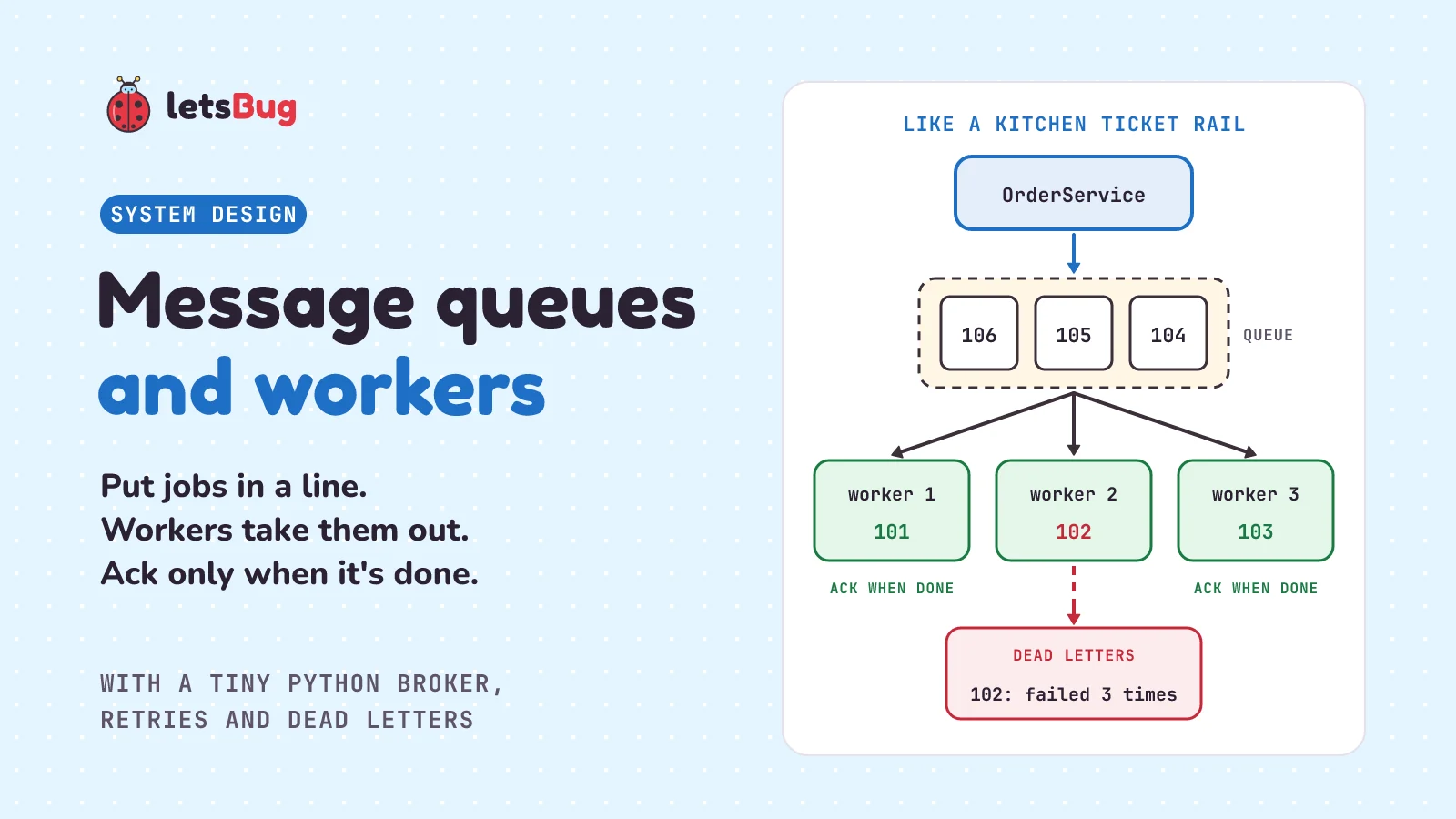
A message queue is a waiting line for jobs. One program, the producer, puts a message in, such as "email the customer about order 101", and carries on. Another program, the worker, takes the message out later and does the job. The queue keeps each message safe until a worker says the job is done.
In this post we go back to the dosa restaurant's ticket rail from the event-driven architecture post and add more cooks. Then we build a tiny message broker in plain Python, with the same shop app and its slow confirmation emails. We share one queue between several workers, see why a worker should say "done" only after the work is done, retry jobs that fail, and park the ones that keep failing in a dead-letter queue. We finish with what happens when workers can't keep up, when a queue is the wrong tool, and the beginner mistake that quietly loses jobs.
A few words first. A message is one piece of data sent from one program to another, here one job to do. The producer is the program that sends it. The consumer takes it and acts on it; when its whole job is taking jobs off a queue, we call it a worker. The message broker is the service in the middle that holds the queue. A thread is a second line of work inside one program. In standard Python, threads take turns running Python code, but while one waits, say for a slow mail server, another gets on with its work, so several waiting jobs overlap.
Key takeaways
- A message queue sits between a producer, which puts jobs in, and workers, which take them out. Neither waits for the other.
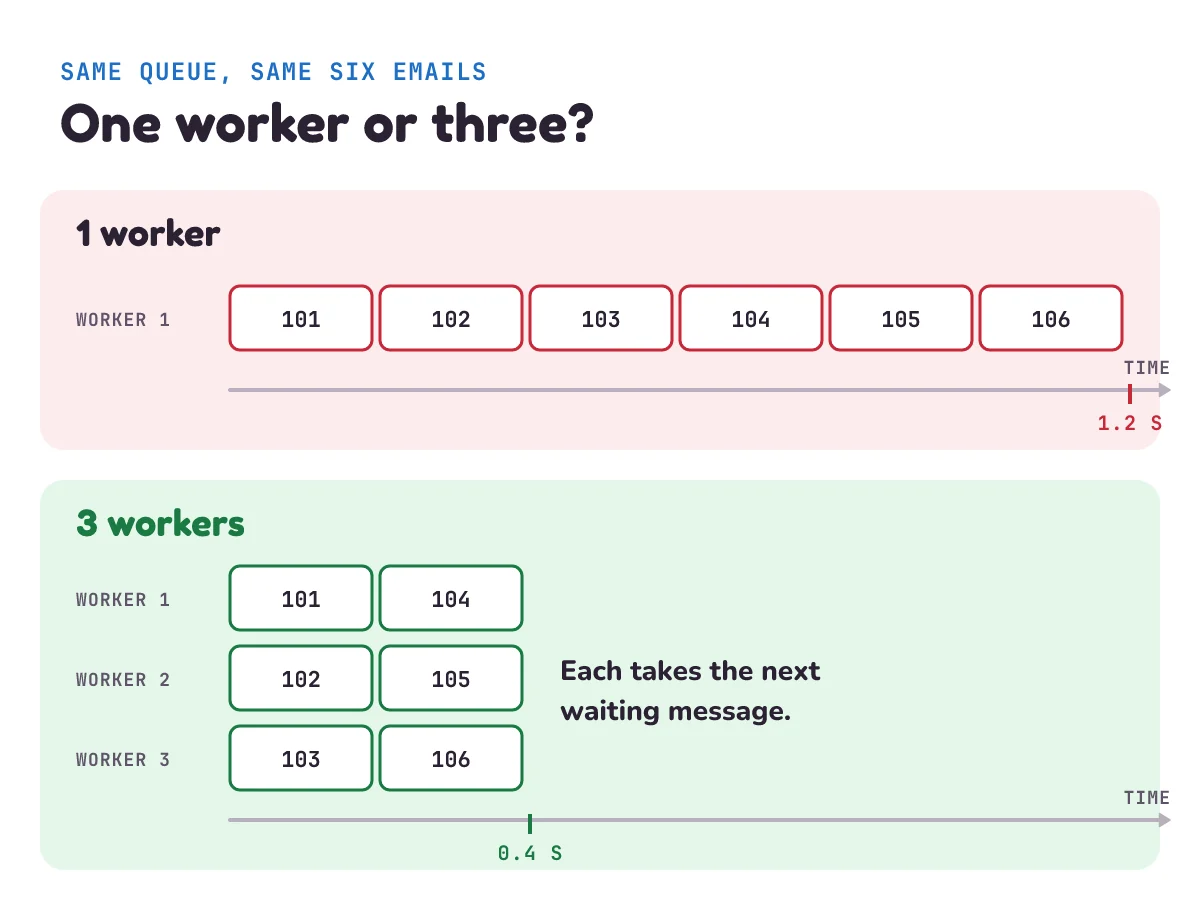
- Several workers can share one queue. Each message goes to one of them, so three workers clear a line of slow, waiting jobs (like our emails) about three times faster.
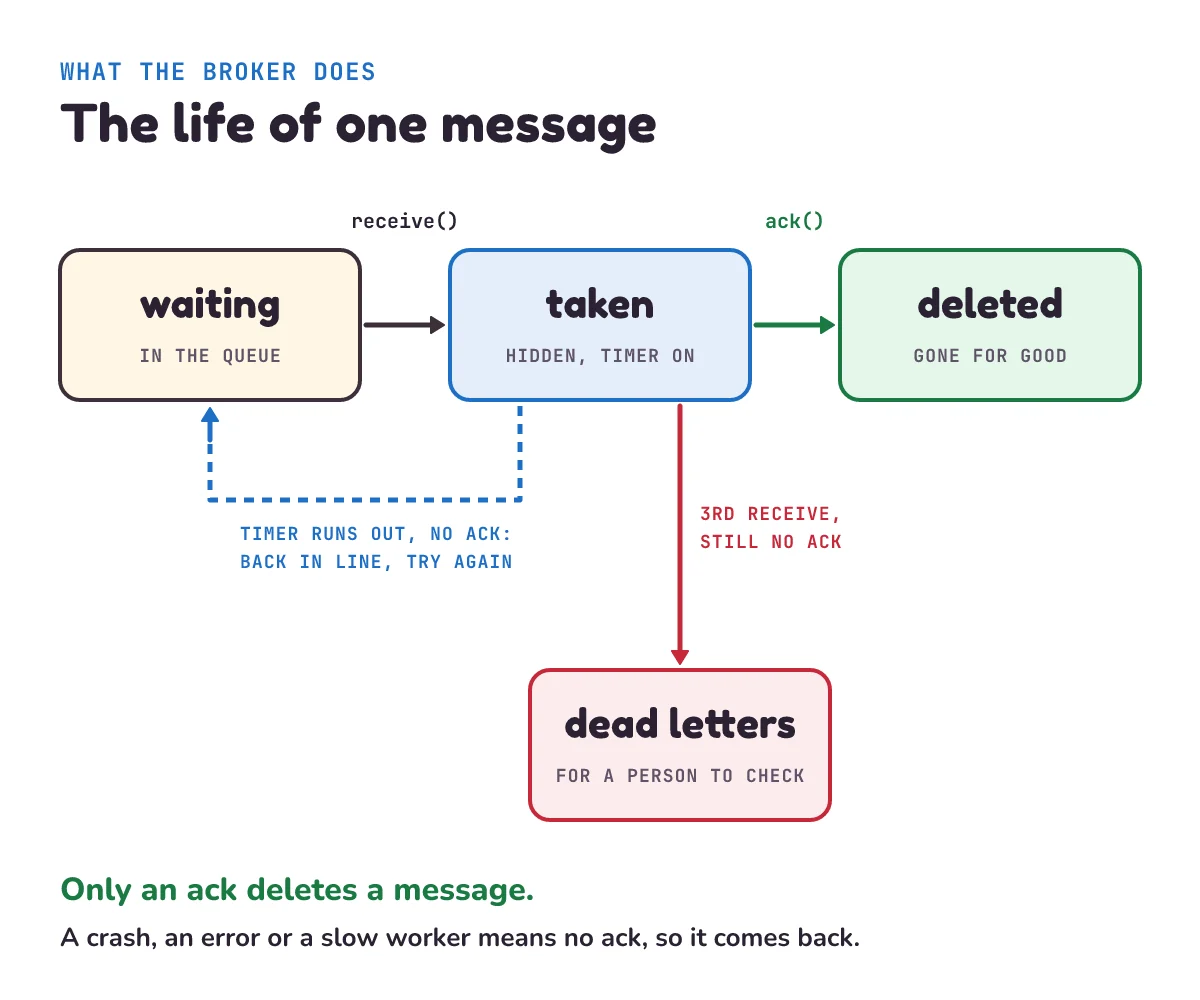
- A worker acknowledges a message (says "done") only after the work is done. Until then the broker keeps it, hidden for a while (the visibility timeout), and hands it out again if no "done" arrives.
- Because a message can be handed out again, a job can run twice. Workers must be safe to run twice (idempotent).
- A job that fails gets retried. One that fails every time goes to a dead-letter queue for a person to look at, instead of coming back forever and wasting workers' time.
- If jobs arrive faster than workers finish them, the queue grows. Watch its length, add workers, or push back on the producer (backpressure).
- Skip the queue when the caller needs the answer now, or when the app is tiny.
What is a message queue in simple words?
Back to the busy dosa restaurant. The waiter clips each order ticket to the rail by the kitchen window and goes back to the tables. Last time the kitchen had one cook, and at lunchtime the tickets pile up. So the owner puts three cooks on. All three take tickets off the same rail. Each ticket goes to one cook, whoever is free next, and the line of tickets moves three times as fast.
The owner also adds two rules. First, a cook doesn't throw a ticket away when he takes it. He keeps it on his station, and only puts it on the "done" pile once the dosa has gone out. If he cuts his hand and leaves halfway, the manager sees an old ticket that never reached the pile and clips it back on the rail for another cook. Second, if a ticket fails three times (say it asks for a dish the kitchen doesn't make), the manager stops sending it round and puts it in a tray for the head chef to sort out.
That's a message queue. The waiter is the producer, the tickets are messages, the rail is the queue, the cooks are workers, and the manager is the broker. The "done" pile is the acknowledgement, the manager's rule about old tickets is the visibility timeout, and the head chef's tray is the dead-letter queue. (Last time we called the whole rail the broker. Now we split it: the rail is the queue, and the manager who runs it is the broker.) The rest of this post puts these ideas into code.
What problem do message queues and workers solve?
In the last post we built a tiny event bus. The order service put an "order placed" event in a Python queue.Queue and replied to the customer at once, and one worker thread sent the slow email later. That fixed the waiting. But it left three problems:
- One worker can't keep up. Each email took 2 seconds, so one worker sends at most 30 a minute. At lunchtime the line just gets longer.
- A crash loses the job.
queue.Queue.get()takes the item out of the queue for good. If the worker dies halfway through the email, nobody knows the email was never sent. - A job that always fails has nowhere to go. The last post's bus wrote the error to the log and moved on, so the job was simply dropped. Trying it again could help when the mail server had a short hiccup, but not when the email address has a typo.
RabbitMQ, a message broker you can install and run yourself, puts the main idea of a work queue like this: "The main idea behind Work Queues (aka: Task Queues) is to avoid doing a resource-intensive task immediately and having to wait for it to complete." (A resource-intensive task is one that takes a lot of time or computer power.) This post is about doing that well: many workers, no lost jobs, and a plan for the jobs that fail.
How does a message queue work?
RabbitMQ's tutorial names the three parts in three short sentences: "A producer is a user application that sends messages. A queue is a buffer that stores messages. A consumer is a user application that receives messages." (A buffer is a place that holds data for a while.)
The important part is what happens between "receives" and "done". When a worker takes a message, the broker doesn't delete it. It hides it. The Amazon SQS (Simple Queue Service) docs put it like this: "When you receive a message from an Amazon SQS queue, it remains in the queue but becomes temporarily invisible to other consumers." The time it stays hidden is the visibility timeout. When the worker finishes the job, it tells the broker so, and the broker deletes the message. Telling the broker "done" is called acknowledging the message, or ack for short. (In SQS the worker deletes the message itself, which is its way of saying "done".)
The SQS docs say what happens if no ack arrives in time: "If you don't delete it before the timeout expires, the message becomes visible again in the queue and can be retrieved by another consumer." And: "The default visibility timeout for a queue is 30 seconds, but you can adjust this to match the time your application needs to process and delete a message."
Other brokers do the same job in their own way. RabbitMQ notices when the worker has gone. "If a consumer dies (its channel is closed, connection is closed, or TCP connection is lost) without sending an ack, RabbitMQ will understand that a message wasn't processed fully and will re-queue it." (A channel and a TCP connection are the links a worker keeps open to RabbitMQ.) Google Cloud Pub/Sub, where a worker is called a subscriber, calls its timer the ack deadline: "The subscriber has a configurable, limited amount of time, known as the ackDeadline, to acknowledge the outstanding message." Three brokers, one rule: a message isn't deleted just because a worker took it. It stays until a worker says the job is done.
| Amazon SQS | RabbitMQ | Pub/Sub | |
|---|---|---|---|
| How a worker says "done" | Deletes the message | Sends an ack | Sends an ack |
| How a lost worker is noticed | The visibility timeout runs out | Its connection drops, or no ack in time | The ack deadline runs out |
| Time limit | 30 seconds by default, adjustable | 30 minutes by default, a safety net for stuck workers | The ackDeadline, which you can configure |
How do you build a message queue with workers in Python?
We'll write our own small broker so you can see every rule at work. It's a teaching model that lives in one program's memory, like last post's bus; a real broker runs as its own service. First the slow job, the email from the last post, now taking 0.2 seconds so the demos stay short. It also refuses an address with no @ in it, which we'll need later:
# listeners.py
import time


def send_email(order):
    if "@" not in order["email"]:
        raise ValueError(f"bad address {order['email']!r}")
    time.sleep(0.2)  # the slow mail server again (0.2 s, to keep the demo short)
    print(f"Email to {order['email']}: order {order['id']} confirmed")
raise stops the function with an error, and !r prints the address with quotes around it. Now the broker:
# broker.py
import threading
import time
from collections import deque


class Broker:
    """A toy message broker. A message stays in it until a worker says the work is done."""

    def __init__(self, visibility_timeout=1.0, max_receives=3):
        self.visibility_timeout = visibility_timeout  # seconds a taken message stays hidden
        self.max_receives = max_receives              # tries before it goes to dead_letters
        self.waiting = deque()                        # messages ready to hand out, oldest first
        self.taken = {}                               # id -> (message, when it comes back)
        self.dead_letters = []                        # messages that failed too many times
        self.lock = threading.Lock()                  # several worker threads share one broker
        self.last_id = 0

    def send(self, body):
        with self.lock:
            self.last_id += 1
            self.waiting.append({"id": self.last_id, "body": body, "receives": 0})

    def receive(self):
        """Hand out the oldest waiting message, or None. It is hidden, not deleted."""
        with self.lock:
            self._bring_back_late_ones()
            if not self.waiting:
                return None
            msg = self.waiting.popleft()
            msg["receives"] += 1
            self.taken[msg["id"]] = (msg, time.monotonic() + self.visibility_timeout)
            return dict(msg)  # the worker's own copy: "receives" says which hand-out it is

    def ack(self, delivery):
        """The work is done, so the message can go for good."""
        with self.lock:
            msg, _ = self.taken.get(delivery["id"], (None, None))
            if msg and msg["receives"] == delivery["receives"]:  # a late ack from an older hand-out is ignored
                del self.taken[delivery["id"]]

    def size(self):
        with self.lock:
            self._bring_back_late_ones()
            return len(self.waiting) + len(self.taken)

    def _bring_back_late_ones(self):
        now = time.monotonic()
        for msg_id, (msg, due) in list(self.taken.items()):
            if now >= due:  # nobody acked in time: the worker crashed, failed or is too slow
                del self.taken[msg_id]
                if msg["receives"] >= self.max_receives:
                    self.dead_letters.append(msg)
                else:
self.waiting.append(msg)waitingis the line of messages. Adequeis a list that's quick to add to at one end and take from at the other; the Python docs say the name is short for "double-ended queue".sendis the producer's side. It wraps the job (the body) in a message with an id and a count of how many times it has been handed out.receiveis the worker's side. It takes the oldest message, adds 1 to its count, and moves it totakenwith a time when it comes back.time.monotonic()is a clock that only ever moves forward, good for measuring time. The message is now hidden from other workers, but not gone. The worker gets a copy, and the copy'sreceivesnumber says which hand-out it is.ackdeletes the message for good, but only for its latest hand-out. If the message's time ran out and it went back in line, or out to another worker, an ack from the older copy is ignored (we'll see why below). Nothing else deletes a message._bring_back_late_onesruns on everyreceiveandsize. Any taken message whose time is up goes back in line, or, if it has already been handed outmax_receivestimes, todead_letters.- The lock makes sure only one thread at a time changes the broker's lists. Without it, two threads could both move the same late message back into line, or two sends could get the same id.
The worker is a loop: take a message, do the job, ack:
# worker.py
import time


def work(broker, handle):
    """Take messages until the broker is empty. Ack each one only after handle() succeeds."""
    while broker.size() > 0:
        msg = broker.receive()
        if msg is None:
            time.sleep(0.01)  # nothing to take right now: wait a moment, ask again
            continue
        try:
            handle(msg["body"])
        except Exception as error:
            print(f"Order {msg['body']['id']} failed on try {msg['receives']}: {error}")
            continue          # no ack: the broker hands it out again after the timeout
        broker.ack(msg)       # only now is the job really done
Look at where broker.ack(msg) sits: after the job, and only if it didn't fail. If handle raises an error, the worker skips the ack, and the message comes back after the timeout. Our worker stops when the broker is empty so the demo can end; a real worker loops forever, waiting for new messages.
Finally main.py, which plays the order service (the producer) and starts the workers:
# main.py
import sys
import threading
import time

from broker import Broker
from listeners import send_email
from worker import work

broker = Broker()
for order_id, name in enumerate(["asha", "ravi", "meera", "sam", "li", "omar"], start=101):
    broker.send({"id": order_id, "email": f"{name}@example.com"})  # the producer's side

count = int(sys.argv[1])  # how many workers: python main.py 3
start = time.perf_counter()
workers = [threading.Thread(target=work, args=(broker, send_email)) for _ in range(count)]
for w in workers:
    w.start()
for w in workers:
    w.join()  # wait for every worker to finish
print(f"{count} worker(s): 6 orders done in {time.perf_counter() - start:.1f} s")
It sends six orders, then starts as many worker threads as you ask for. enumerate(..., start=101) numbers the names 101, 102 and so on, sys.argv[1] is the number you type after python main.py, and time.perf_counter() is a stopwatch. join() does what the Python docs say: "Wait until the thread terminates." Put the four files in one folder and run python main.py 1:
Email to asha@example.com: order 101 confirmed
Email to ravi@example.com: order 102 confirmed
Email to meera@example.com: order 103 confirmed
Email to sam@example.com: order 104 confirmed
Email to li@example.com: order 105 confirmed
Email to omar@example.com: order 106 confirmed
1 worker(s): 6 orders done in 1.2 s
One worker, six emails, one after another: 6 × 0.2 = 1.2 seconds.
How do several workers share one queue?
Now run python main.py 3:
Email to asha@example.com: order 101 confirmed
Email to ravi@example.com: order 102 confirmed
Email to meera@example.com: order 103 confirmed
Email to sam@example.com: order 104 confirmed
Email to li@example.com: order 105 confirmed
Email to omar@example.com: order 106 confirmed
3 worker(s): 6 orders done in 0.4 s
Same six emails, a third of the time. Each worker takes a message, and because a taken message is hidden, the next worker gets the next one. So the three workers send orders 101, 102 and 103 together, then 104, 105 and 106: two rounds of 0.2 seconds. Nothing in broker.py or worker.py changed; we only started more workers. That's the main reason to use a queue: when the line gets long, you add workers, and the producer never knows.
When you run it, the email lines may come out in a different order. Three workers finish at almost the same instant, and whichever prints first, prints first. Once several workers share a queue, jobs can finish in a different order from the one they went in.
Our broker hands the next message to whichever worker asks first. RabbitMQ sends messages to its workers in turn instead: "By default, RabbitMQ will send each message to the next consumer, in sequence. On average every consumer will get the same number of messages." It calls this round-robin, taking turns in a circle, the same way NGINX shares requests by default. Whichever way the next worker is picked, each message goes to just one worker, and that is the difference between a queue and the publish/subscribe pattern from the last post. The RabbitMQ tutorial again: "The assumption behind a work queue is that each task is delivered to exactly one worker." In publish/subscribe, every subscriber gets its own copy.
Python's own queue module shares work the same way inside one program, each item going to one thread: "The queue module implements multi-producer, multi-consumer queues." (Several threads can put in, and several can take out.) We wrote our own broker here only because queue.Queue has no visibility timeout, no count of tries and no dead-letter queue: get() removes the item at once. The next section shows why that matters.
Why acknowledge a message only after the work is done?
Because a worker can die halfway through. Its program crashes, its machine restarts, or its network cable comes loose. Let's act that out step by step, with one message and a visibility timeout of 0.2 seconds:
import time

from broker import Broker
from listeners import send_email

broker = Broker(visibility_timeout=0.2)
broker.send({"id": 101, "email": "asha@example.com"})

msg = broker.receive()                 # worker A takes order 101...
print("Worker A took order", msg["body"]["id"])
                                       # ...and crashes here, before it can ack
print("Straight after:", broker.receive())
time.sleep(0.3)                        # wait out the visibility timeout
msg = broker.receive()
print("Worker B took order", msg["body"]["id"], "on try", msg["receives"])
send_email(msg["body"])
broker.ack(msg)
print("Left in the broker:", broker.size())
Worker A took order 101
Straight after: None
Worker B took order 101 on try 2
Email to asha@example.com: order 101 confirmed
Left in the broker: 0Worker A took order 101 and never acked. Straight after, nobody else could see it (None), so two workers didn't do it at once. Once the 0.2 seconds were up, the message came back, worker B took it on its second try, sent the email and acked it. The crash cost a short wait, not a lost email.
Why workers must be safe to run twice. A broker that works by timer, like SQS, Pub/Sub or ours, can't tell a dead worker from a slow one. If worker A is only slow, the message still comes back after the timeout, and then two workers do the same job. The same happens if a worker sends the email and then crashes just before its ack. Acking after the work means a job is never lost, but it can be done twice. Brokers call this at-least-once delivery. Here's the slow worker, with a visibility timeout of 1 second:
import time

from broker import Broker
from listeners import send_email

broker = Broker(visibility_timeout=1.0)
broker.send({"id": 101, "email": "asha@example.com"})

msg_a = broker.receive()      # worker A takes order 101, but today it's very slow...
time.sleep(1.1)               # ...slower than the visibility timeout
msg_b = broker.receive()      # so the broker gives order 101 to worker B as well
send_email(msg_a["body"])     # worker A finally gets there
broker.ack(msg_a)             # but A's hand-out is old, so this ack is ignored
print("After A's ack:", broker.size())
send_email(msg_b["body"])     # worker B sends it too
broker.ack(msg_b)
print("After B's ack:", broker.size())
Email to asha@example.com: order 101 confirmed
After A's ack: 1
Email to asha@example.com: order 101 confirmed
After B's ack: 0Asha gets two emails. Look at the line after A's ack: the broker still holds 1 message. A's hand-out was old, so our ack ignored it and kept the copy B was still busy with. If A's ack had deleted it, and B's email had then failed, nothing would be left to retry. SQS does the same with a receipt handle, a code you get with each hand-out: "If you receive a message more than once, each time you receive it, you get a different receipt handle." Its docs add: "You must provide the most recently received receipt handle when you request to delete the message (otherwise, the message might not be deleted)."
Real brokers warn about repeats too. Google Cloud's Pub/Sub docs say: "If Pub/Sub doesn't receive an acknowledgment within the acknowledgment deadline, a message might be delivered more than once." So set the visibility timeout longer than your slowest normal job, and still expect the odd repeat. The AWS SQS docs give the rule: "Design your applications to be idempotent (they should not be affected adversely when processing the same message more than once)." An idempotent worker gives the same result whether a message reaches it once or three times. How to build one is the next post in this series, Idempotency.
What is a dead-letter queue?
Our worker already retries: a job that fails isn't acked, so it comes back after the timeout and gets another try. That's right for a short hiccup, like a mail server that timed out once. But some messages fail every time. An email address with a typo will be just as wrong on the hundredth try. A message like that is sometimes called a poison message: retried forever, it wastes a worker's time on every round.
So brokers count the tries. After too many, the message moves to a separate queue, the dead-letter queue (DLQ), where it waits for a person to look at it. The SQS docs say: "Amazon SQS supports dead-letter queues (DLQs), which source queues can target for messages that are not processed successfully." The limit is a setting: "The maxReceiveCount is the number of times a consumer can receive a message from a source queue before it is moved to a dead-letter queue." Our broker's max_receives is the same idea. Here are two orders, one with a typo in the address:
from broker import Broker
from listeners import send_email
from worker import work

broker = Broker(visibility_timeout=0.1, max_receives=3)
broker.send({"id": 101, "email": "asha@example.com"})
broker.send({"id": 102, "email": "ravi.example.com"})  # a typo: no @
work(broker, send_email)
print("Dead letters:", [msg["body"]["id"] for msg in broker.dead_letters])
Email to asha@example.com: order 101 confirmed
Order 102 failed on try 1: bad address 'ravi.example.com'
Order 102 failed on try 2: bad address 'ravi.example.com'
Order 102 failed on try 3: bad address 'ravi.example.com'
Dead letters: [102]Order 101 went through. Order 102 failed, came back after 0.1 seconds, failed again, and once the timer after its third try ran out, it went to the dead letters and the worker stopped. In a real shop, someone fixes the address and sends the message back to the main queue. The SQS docs list both steps: "Analyze the contents of messages moved to the dead-letter queue to diagnose application issues." and "Move messages out of the dead-letter queue using dead-letter queue redrive." (Redrive is their word for sending the messages back.)
Don't set the limit too low. The same SQS page: "For example, if the maxReceiveCount is set to a low value such as 1, one failure to receive a message would cause the message to move to the dead-letter queue." Then a single mail-server hiccup sends a good order to the dead letters. Google Cloud Pub/Sub has the same feature under another name: "To manage undeliverable messages that subscribers can't acknowledge, Pub/Sub can forward them to a dead-letter topic (also known as a dead-letter queue)." (A topic is Pub/Sub's name for a named channel that messages are published to.)
What happens when workers are too slow?
A queue doesn't make work disappear; it makes it wait. With our 0.2-second email, one worker finishes 5 orders a second. Suppose the lunchtime rush brings 8 orders a second. Every second, 3 more orders join the line than leave it. After one minute, 180 orders are waiting, and a new order waits 36 seconds (180 ÷ 5) before any worker even starts it. The queue keeps growing for as long as the rush lasts.
RabbitMQ's tutorial warns about exactly this: "If all the workers are busy, your queue can fill up. You will want to keep an eye on that, and maybe add more workers, or use message TTL." (TTL, time to live, is a time limit after which a waiting message is thrown away.) Google Cloud says the same for Pub/Sub: "The traffic spikes can overwhelm subscribers unless you're prepared for it." So there are three things you can do:
- Watch the queue's length. A line that keeps growing is the early warning. Brokers report it: RabbitMQ's tutorial, for example, lists each queue's waiting messages with
rabbitmqctl list_queues. - Add workers. Two workers finish 10 orders a second, more than the 8 that arrive, so the line shrinks again.
- Push back on the producer. When the line is full, refuse new work or slow it down, instead of letting the line grow forever. This is called backpressure: the pressure of too much work is passed back to whoever is sending it.
Python's queue.Queue has backpressure built in. Give it a maxsize, and the docs say: "Insertion will block once this size has been reached, until queue items are consumed." put_nowait doesn't wait at all; it raises queue.Full, the "Exception raised when non-blocking put() (or put_nowait()) is called on a Queue object which is full." Here it is:
import queue

inbox = queue.Queue(maxsize=3)  # room for 3 orders, no more
for order_id in range(101, 106):
    try:
        inbox.put_nowait(order_id)
        print("Queued order", order_id)
    except queue.Full:
        print("Queue full: order", order_id, "gets 'busy, try again soon'")
Queued order 101
Queued order 102
Queued order 103
Queue full: order 104 gets 'busy, try again soon'
Queue full: order 105 gets 'busy, try again soon'Nobody took anything out here, so the fourth order found the line full. A shop would tell that customer "we're busy, please try again in a minute" rather than accept an order it can't send for an hour. Brokers also protect the workers themselves. RabbitMQ's tutorial uses its prefetch setting, prefetch_count=1, so a busy worker isn't handed more: "Or, in other words, don't dispatch a new message to a worker until it has processed and acknowledged the previous one." Pub/Sub's client libraries (the code packages your program uses to talk to it) have a similar setting they call flow control, and their docs say what needing it means: "The need for flow control indicates that messages are being published at a higher rate than they are being consumed."
When should you not use a message queue?
- The caller needs the answer now. A queue only promises "we'll get to it". Charging the customer's card, or checking that a coupon is valid, has to finish before you reply, because the reply depends on the answer. Putting that through a queue means the customer still waits for a worker, plus the trip through the broker. Call it directly and wait. Use the queue for the jobs that only need to happen soon, like the email.
- The app is tiny. A shop with ten orders a day can send the email inside the request, or use an in-program queue like last post's bus. A broker is one more service to run, watch and pay for, and it brings the costs we've just seen: repeats, dead letters and a queue to keep an eye on. Add it when one slow job really is making people wait, or a lost job really would hurt.
What mistake do beginners make with message queues?
Acknowledging the message before the work is done. It feels tidy to say "got it" the moment you take a message. Here's that worker, the same as ours with the ack moved up:
# worker_wrong.py
import time


def work(broker, handle):
    while broker.size() > 0:
        msg = broker.receive()
        if msg is None:
            time.sleep(0.01)
            continue
        broker.ack(msg)       # "got it!" ...before doing anything
        try:
            handle(msg["body"])
        except Exception as error:
            print(f"Order {msg['body']['id']} failed on try {msg['receives']}: {error}")
Now let the mail server time out once, then work again:
from broker import Broker
from listeners import send_email
from worker_wrong import work

tries = []


def send_email_flaky(order):
    tries.append(order["id"])
    if len(tries) == 1:  # the mail server times out once, then works again
        raise ConnectionError("mail server timed out")
    send_email(order)


broker = Broker(visibility_timeout=0.1)
broker.send({"id": 101, "email": "asha@example.com"})
work(broker, send_email_flaky)
print("Left in the broker:", broker.size())
Order 101 failed on try 1: mail server timed out
Left in the broker: 0The email failed, and yet the broker is empty. The ack had already deleted the message, so there was nothing left to retry. Asha never hears about her order, and nothing in the queue says so. A crash halfway through the job loses it the same way. RabbitMQ's tutorial describes its own version of this, a setting where the broker counts a message as done the moment it hands it out: "In this case, if you terminate a worker, the message it was just processing is lost."
Change the import to from worker import work, our real worker, and run it again:
Order 101 failed on try 1: mail server timed out
Email to asha@example.com: order 101 confirmed
Left in the broker: 0
The first try fails, the message comes back, and the second try sends the email. Do the work, then ack. The opposite slip, never acking at all, causes trouble too. RabbitMQ's tutorial warns: "It's a common mistake to miss the basic_ack. It's an easy error, but the consequences are serious." (basic_ack is its ack call.) The messages come back every time the worker quits, and the broker can never let go of them, so it uses more and more memory.
1) Run python main.py 6, then python main.py 12. How long does each take, and why?
2) In the dead-letter example, change max_receives=3 to max_receives=1. What does it print?
3) The shop runs a sale, and 12 orders a second arrive. Each email still takes 0.2 seconds. How many workers do you need, at least, so the queue doesn't grow?
Show the answers
1) Both print 6 orders done in 0.2 s. With six workers, each takes one order and all six emails go out together, in one round of 0.2 seconds. With twelve workers, six of them find nothing to take. You can't split one email between two workers, so 0.2 seconds is as fast as it gets.
2) It prints:
Email to asha@example.com: order 101 confirmed
Order 102 failed on try 1: bad address 'ravi.example.com'
Dead letters: [102]
Order 102 goes to the dead letters after one failure. That's fine for a typo, but a good order would go there too after one mail-server hiccup, which is why the SQS docs tell you to "set the maxReceiveCount high enough to allow for sufficient retries."
3) Three. One worker finishes 5 orders a second (1 ÷ 0.2). Two finish 10, fewer than the 12 that arrive, so the line still grows by 2 a second. Three finish 15, so the line shrinks.
Questions people ask
What does a message queue do?
A waiting line for jobs between two programs. One program puts a message in, such as "email the customer about order 101", and carries on. A worker takes it out later and does the job. The queue keeps the message until the worker says the job is done.
What is a worker in a message queue?
A worker is a program (in our demo, a thread inside one) whose only job is to take messages off a queue and do what they say: send the email, resize the photo, make the PDF. You can run as many workers on one queue as you need, and each message goes to one of them.
What is the difference between a message queue and publish/subscribe?
In a queue, each message goes to one worker, so the workers share the work. In publish/subscribe, every subscriber gets its own copy of each message, so the email service and the stock service both hear about every order. Many brokers do both: Google Cloud Pub/Sub gives each subscription (a named stream of copies, usually one for each service) its own copy, and the workers on one subscription share it.
What is a visibility timeout?
The time a message stays hidden after a worker takes it. If the worker acknowledges it in that time, the message is deleted. If not, the broker assumes the worker failed or got stuck, and hands the message out again. In Amazon SQS it's 30 seconds unless you change it.
What is a dead-letter queue used for?
It holds messages that failed too many times, such as an order with a broken email address. Moving them aside stops them wasting workers' time, and keeps them safe for a person to check, fix and send back.
Keep going
- Previous in this System Design series: Event-driven architecture, where the order service first stopped waiting for the email, with one in-memory worker.
- Next: "Idempotency", how to make a worker that's safe to run twice, so a repeated message doesn't send two emails or charge a card twice.
- Where the order service's listeners started: Observer pattern, the same idea inside one program.
- Why workers often run as separate programs: Monolith vs microservices.
Checked on 3 November 2026 against the 12 sources below.
Sources
- RabbitMQ: Work Queues (tutorial 2, Python), round-robin, acknowledgements, prefetch, queue size
- RabbitMQ: Publish/Subscribe (tutorial 3, Python), producer, queue, consumer
- AWS documentation: Amazon SQS visibility timeout
- AWS documentation: Using dead-letter queues in Amazon SQS
- AWS documentation: Amazon SQS queue and message identifiers (receipt handles)
- AWS documentation: Amazon SQS at-least-once delivery
- Google Cloud documentation: Overview of the Pub/Sub service (ack deadline, repeat deliveries)
- Google Cloud documentation: Dead-letter topics (Pub/Sub)
- Google Cloud documentation: Handle transient spikes with flow control (Pub/Sub)
- Python documentation: queue: a synchronized queue class (
maxsize,queue.Full) - Python documentation: threading (
Thread.join, threads and waiting jobs) - Python documentation: collections (
deque)
Every Python sample in this post was run in Python 3.13 before publishing.