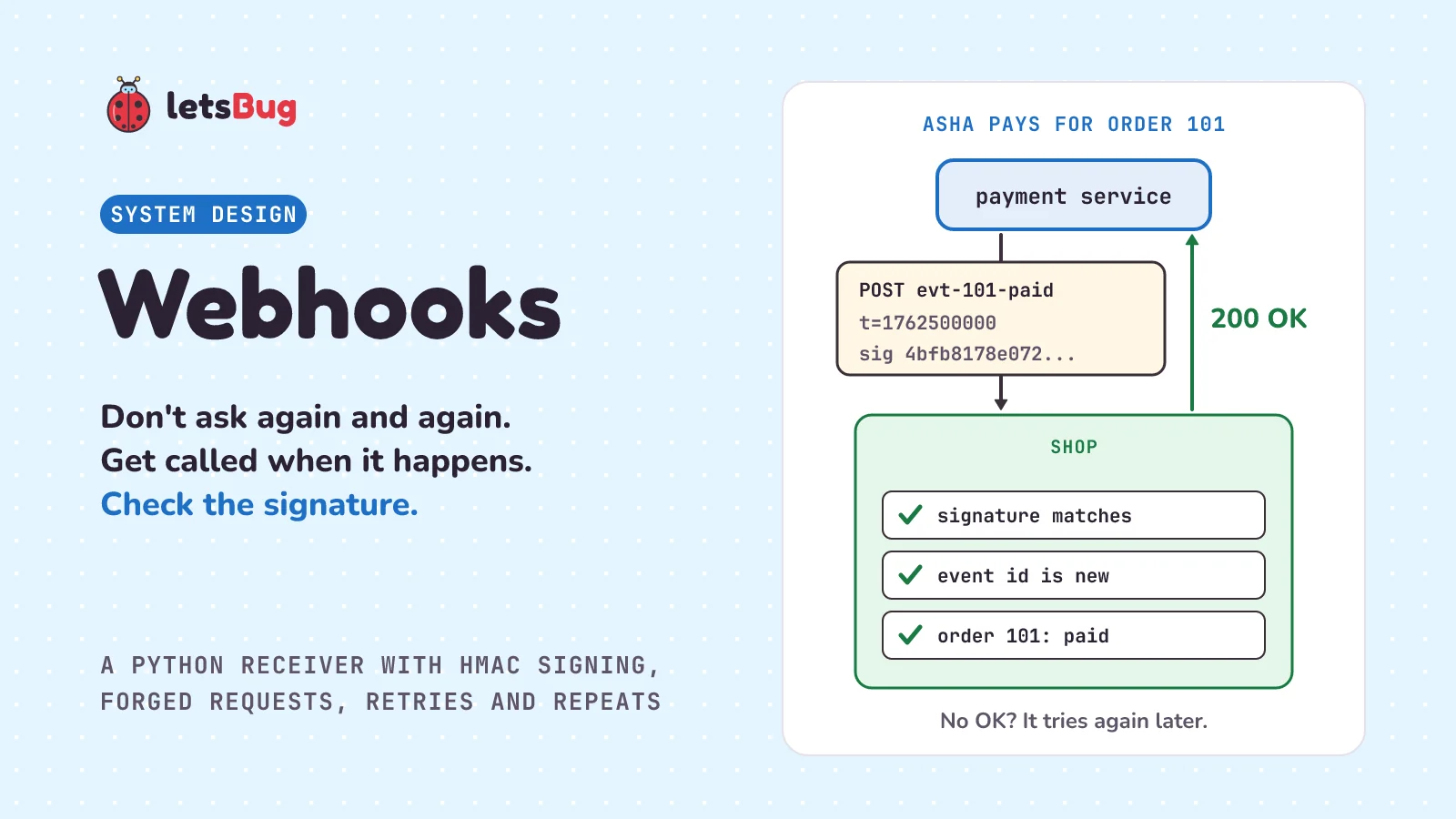
A webhook is a message one service sends to another when something happens, by calling a web address the receiver gave it. Instead of an online shop asking its payment service "paid yet?" every few seconds, the payment service calls the shop when the payment goes through. The shop checks the call is genuine, saves the news, and says OK.
In this post we stay with the shop app from the idempotency post, where Asha pays Rs 450 for order 101. First we see why asking again and again (polling) wastes effort, and how a webhook turns the question around. Then we learn how the shop can tell a real webhook from a fake one, using a signature made with a shared secret, and build a webhook receiver and sender in plain Python. We send it forged and replayed requests, make it slow so the sender retries, and see why the receiver must be safe to run twice. We finish with when a webhook is the wrong tool, and the beginner mistake that makes real webhooks fail their check.
A few words first. A URL is a web address, such as https://shop.example/webhooks/payments. A server is a program that waits for requests and answers them. An HTTP request is one message to a server; a POST request carries data in its body, and headers are labelled lines sent along with it, such as Content-Type: application/json. Every answer has a status code: 200 means "OK", and any code from 200 to 299 (written 2xx) means success; 400 means "bad request". JSON is a common text format for data, like {"order": 101}. An event is a record of something that happened, such as "payment for order 101 succeeded", and an API is the set of requests a service accepts. A bit is a single 0 or 1, and a byte is 8 bits; a request's body travels as a row of bytes. HTTPS is HTTP with encryption, so nobody on the way can read or change a request. And a web framework is a library, such as Django or Flask, that receives requests and hands them to your code.
Key takeaways
- A webhook is an HTTP POST that one service sends to a URL you registered with it, when an event happens. You don't ask; it tells you.
- The other way is polling: asking again and again. It costs far more requests, and the news arrives late.
- Anyone can POST to your URL, so the sender signs each webhook: an HMAC of the body (Stripe adds a timestamp), made with a secret only you and the sender know. Check it before you trust anything in the body.
- Compare signatures with
hmac.compare_digest, not==. If the sender signs a timestamp, refuse old ones (Stripe's libraries allow 5 minutes) so a copied request can't be replayed later. - If you don't answer 2xx in time, many senders retry, often with longer and longer waits (Stripe keeps going for up to three days; GitHub leaves redelivery to you). So the same webhook can arrive twice: note each event id and skip repeats, then still answer 200.
- Answer fast, and hand slow work to a queue.
- The classic mistake: checking the signature against the body after a framework has parsed and re-encoded it. Same data, different bytes, and the check fails. Sign and check the raw bytes.
What is a webhook in simple words?
You leave a shirt with the tailor to be altered. You could phone him every hour: "Is it ready?" "Not yet." "Is it ready?" "Not yet." That's a lot of calls for one answer. Or you leave your phone number, and he calls you once, when it's ready. That second way is a webhook: you give your number once, and the news comes to you.
It raises three questions. First, how do you know the caller really is your tailor? Anyone can ring and say "your shirt is ready, please pay the balance to this account." So the two of you agree a secret when you drop the shirt off, and he proves he knows it on every call, without ever saying it aloud. Second, what if you miss the call? He tries again later, and waits longer each time. Third, what if the line drops just after he gives you the news, before you say "OK"? He calls again, and you hear the news twice. That's fine, as long as you don't go and pay twice.
Those are the three parts of a webhook done properly: a callback URL (your phone number), a signature (the proof), and retries (calling back), with a receiver that's safe when the news comes twice.
What problem do webhooks solve?
Back at the shop. Asha taps "Pay Rs 450" for order 101, and her UPI app opens (UPI is India's instant bank-to-bank payment system). The money moves between banks, and the payment service hears back, but none of that happens inside the shop. The shop's page just says "waiting for payment". How does the shop find out?
It could poll: ask the payment service "is order 101 paid?" every 5 seconds. If Asha takes 2 minutes to finish, that's 24 questions, and nearly every one gets "not yet". Now multiply by every customer paying at once. And the news is up to 5 seconds late. GitHub's docs sum it up: "Webhooks require less effort and less resources than polling an API."
A webhook turns this around. The shop gives the payment service a URL once, and the payment service sends an HTTP request to it when the payment succeeds. GitHub's docs put it this way: "Webhooks let you subscribe to events happening in a software system and automatically receive a delivery of data to your server whenever those events occur." And they name the alternative: "Webhooks are used to receive data as it happens, as opposed to polling an API (calling an API intermittently) to see if data is available."
Payments are the classic case, because the answer often comes later, from outside. Stripe, a payment company, says: "Receiving webhook events helps you respond to asynchronous events, such as when a customer's bank confirms a payment, a customer disputes a charge or a recurring payment succeeds." (Asynchronous means it happens later, not while you wait.)
How does a webhook work?
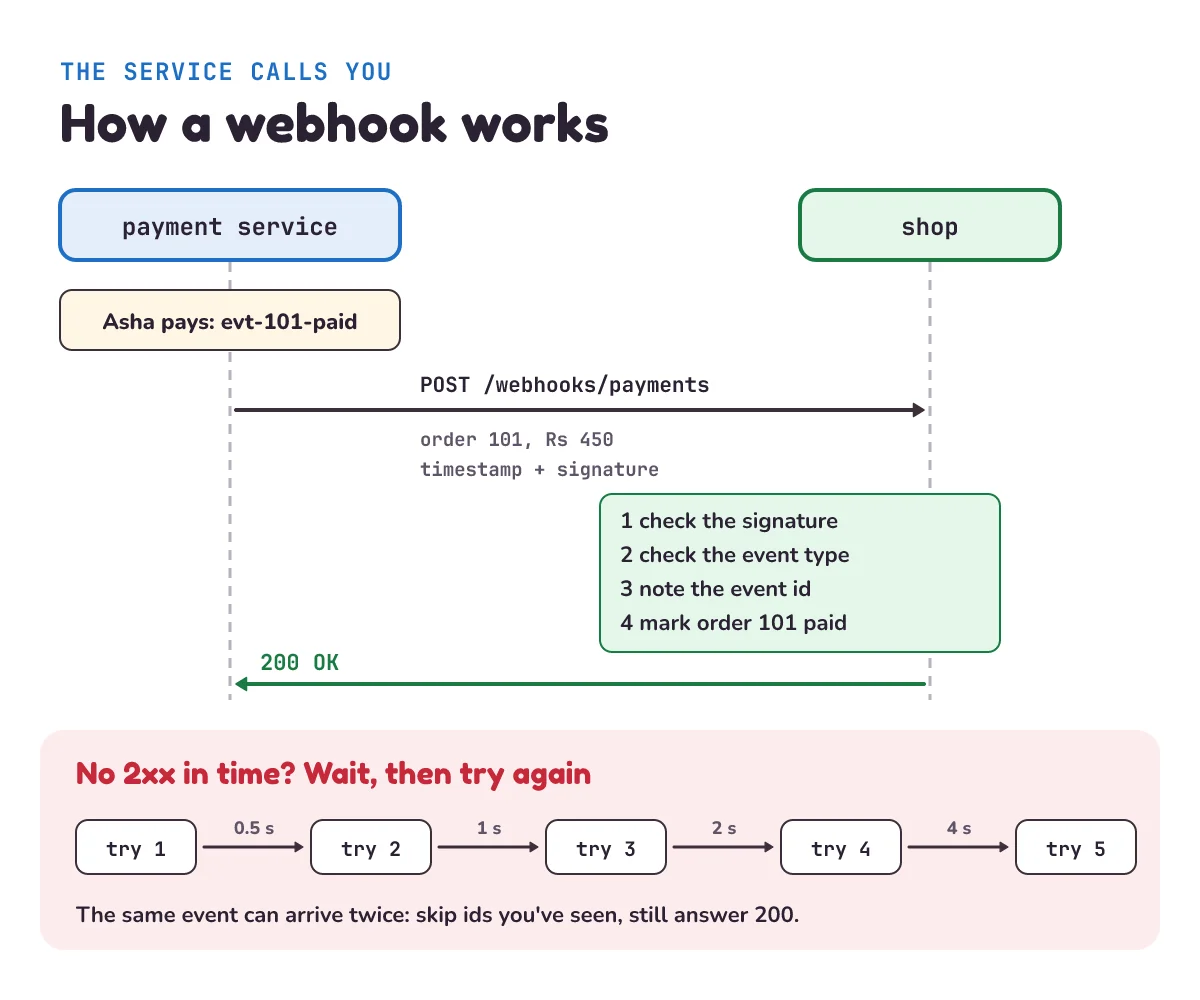
- The receiver registers a URL. The shop tells the payment service, "send payment events to
https://shop.example/webhooks/payments." That URL is called the webhook endpoint (your phone number in the tailor story). The two also share a secret, a long random string, once, at setup. - An event happens. Asha's payment succeeds. The payment service writes it down as an event with its own id, such as
evt-101-paid. - The sender POSTs the event. The body is JSON, often called the payload:
{"id": "evt-101-paid", "type": "payment.succeeded", "order": 101, "amount": 450}. The headers carry a timestamp and a signature. - The receiver checks, saves, and answers. It checks the signature and the event type, notes the event id, marks order 101 paid, and answers 200.
- No 2xx, no delivery. If the answer is an error, or doesn't come in time, the sender counts it as failed, and many senders try again later.
Notice that a webhook is just an ordinary HTTP request. What makes it a webhook is the direction: the service you'd normally call is calling you.
How do you know a webhook is real?
The shop's webhook URL is on the public internet, so anyone can send it a POST that says "order 101 is paid". Stripe spells out the danger: "Without verification, an attacker could send fake webhook events to your endpoint to trigger actions like fulfilling orders, granting account access or modifying records." GitHub's rule: "To ensure that your server only processes webhook deliveries that were sent by GitHub and to ensure that the delivery was not tampered with, you should validate the webhook signature before processing the delivery further." (Tampered with means changed on the way.)
The signature is built from a hash. A hash function turns any input into a short, fixed-size fingerprint. SHA-256, the one used here, always gives 256 bits, written as 64 hexadecimal characters (the digits 0-9 and the letters a-f). The same input always gives the same fingerprint, change one character and the fingerprint changes completely, and you can't work backwards from a fingerprint to the input. But a plain hash proves nothing: a faker can hash a fake message too.
So webhooks use an HMAC, a hash mixed with a secret key. RFC 2104, the standard that defines it (an RFC is an official internet standards document), opens: "This document describes HMAC, a mechanism for message authentication using cryptographic hash functions." Only someone who has the secret can make the right HMAC for a message. Stripe: "Stripe generates signatures using a hash-based message authentication code (HMAC) with SHA-256." Python has it built in; the hmac docs say: "This module implements the HMAC algorithm as described by RFC 2104."
Here is the scheme Stripe uses. Our code works the same way, with its own header names:
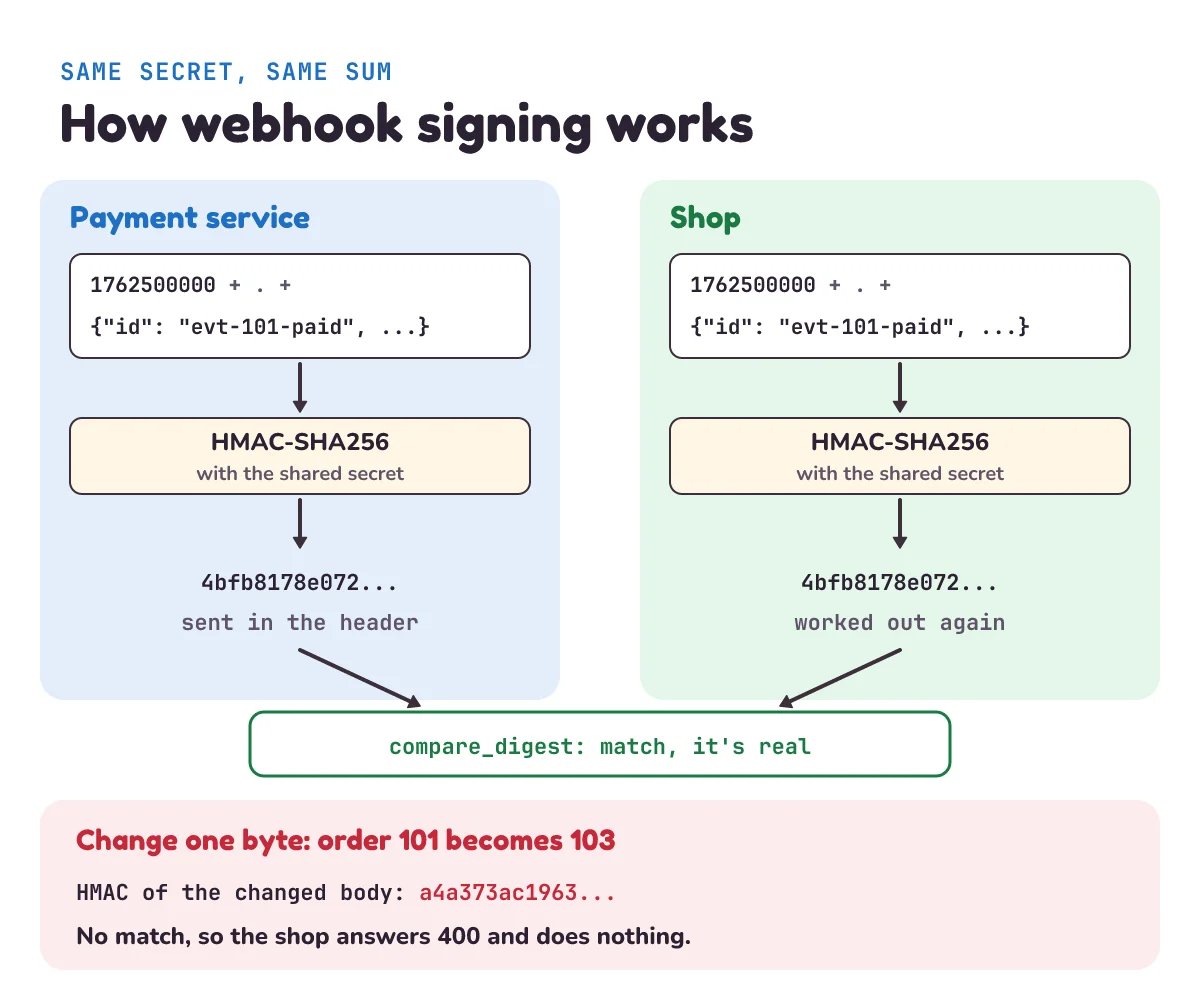
- The sender takes the current time as a timestamp (a whole number of seconds since 1 January 1970, the usual way computers count time, such as
1762500000), then a dot, then the exact bytes of the body. Stripe's docs: the signed text "is created by concatenating" the timestamp, the character., and "the request body". (Concatenating means joining end to end.) - It makes an HMAC-SHA256 of that text with the shared secret, and sends the result in a header along with the timestamp. The secret itself never travels.
- The receiver does the same sum with its own copy of the secret, and compares its answer with the header. If they match, the sender knew the secret, and not one byte of the timestamp or body was changed.
Compare in constant time, taking the same time whether the first character is wrong or the last. An ordinary == can stop at the first character that differs. So a guess with a right first character takes a tiny bit longer to reject than a guess with a wrong one. With enough tries and a good stopwatch, an attacker could find a valid signature one character at a time. That's called a timing attack. Stripe: "To protect against timing attacks, use a constant-time-string comparison to compare the expected signature to each of the received signatures." (Stripe can send more than one, while you switch to a new secret.) GitHub is blunter: "Never use a plain == operator." Python's hmac.compare_digest is made for this: "This function uses an approach designed to prevent timing analysis by avoiding content-based short circuiting behaviour, making it appropriate for cryptography." (Short circuiting means stopping early.)
Check the timestamp. A signature proves a request is real, but not that it's new. Stripe: "A replay attack is when an attacker intercepts a valid payload and its signature, then re-transmits them." (Intercepts means catches on the way.) HTTPS makes catching one hard, but copies still leak, from a log file or a test server without HTTPS, so some senders, Stripe among them, add a second lock. Because the timestamp is inside the signed text, it can't be changed without breaking the signature. So the receiver refuses anything too old: "Our libraries have a default tolerance of 5 minutes between the timestamp and the current time."
Make the secret properly. GitHub: "When creating a secret token, you should choose a random string of text with high entropy." (High entropy means very random, so nobody can guess it.) Python's secrets module "is used for generating cryptographically strong random numbers suitable for managing data such as passwords, account authentication, security tokens, and related secrets"; secrets.token_hex(32) gives 32 random bytes as 64 hex characters. And keep it out of your code. GitHub: "Never hardcode a token into an application or push a token to any repository."
Not every sender does it the same way. Here are two big ones side by side:
| Stripe | GitHub | |
|---|---|---|
| Signature header | Stripe-Signature | X-Hub-Signature-256: sha256=... |
| What's signed | Timestamp, a dot, then the body | The body |
| Old copies | Refused after 5 minutes (library default) | No timestamp; each delivery's X-GitHub-Delivery id spots repeats |
| Slow answer | Counts as failed ("took too long to respond") | Failed after 10 seconds |
| Retries | Up to three days, with exponential backoff (live mode) | None automatic; you redeliver |
Stripe: "Stripe signs every webhook event by including a signature in the Stripe-Signature header." GitHub: "The hash signature will appear in each delivery as the value of the X-Hub-Signature-256 header." And since GitHub signs no timestamp: "To protect against replay attacks, you can use the X-GitHub-Delivery header to ensure that each delivery is unique per event." Whichever sender you use, read its docs for exactly what it signs.
How do you build a webhook receiver in Python?
Let's build both sides with Python's standard library: the shop's receiver, and a payment service that sends to it. First, the signing code that both sides share:
# signing.py
import hashlib
import hmac
import os

# The shared secret. The payment service and the shop each keep a copy; nobody else has it.
# Make a real one with secrets.token_hex(32) and keep it out of your code, in an environment variable.
SECRET = os.environ.get("WEBHOOK_SECRET", "demo-secret-change-me").encode()


def sign(secret, timestamp, body):
    """The signature: an HMAC-SHA256 of "<timestamp>.<body>", made with the shared secret."""
    message = str(timestamp).encode() + b"." + body
    return hmac.new(secret, message, hashlib.sha256).hexdigest()


def verify(secret, timestamp, signature, body, now, tolerance=300):
    """True only if the signature fits this exact body and timestamp, and the timestamp is recent."""
    try:
        sent_at = int(timestamp)
    except ValueError:
        return False                                   # no timestamp, or not a number
    expected = sign(secret, timestamp, body)
    if not hmac.compare_digest(expected.encode(), signature.encode()):
        return False                                   # wrong secret, or the body or timestamp was changed
return abs(now - sent_at) <= tolerance # within 5 minutes: an old, copied request is refusedos.environ.getreads the secret from an environment variable (a setting the system passes to the program), and falls back to a demo value so the example runs as it is.hmac.new(secret, message, hashlib.sha256)makes the HMAC, and.hexdigest()writes it as 64 hex characters. Theb"."is a dot as bytes, because the body arrives as bytes, not text.verifyrefuses a missing timestamp, then a wrong signature, then an old one.tolerance=300is 300 seconds, 5 minutes.absalso refuses a timestamp from far in the future.
Next, the shop. It's a small web server, built on Python's http.server, that listens for POSTs and keeps orders in SQLite (the small database that comes with Python):
# shop.py
import json
import sqlite3
import sys
import time
from http.server import BaseHTTPRequestHandler, ThreadingHTTPServer
from pathlib import Path

from signing import SECRET, verify

DB = "shop.db"
SLOW = 2 if sys.argv[1:] == ["slow"] else 0   # python shop.py slow: 2 seconds of work before replying


def open_db():
    db = sqlite3.connect(DB, timeout=5)
    db.executescript("""
        CREATE TABLE IF NOT EXISTS orders (id INTEGER PRIMARY KEY, status TEXT);
        CREATE TABLE IF NOT EXISTS processed (event_id TEXT PRIMARY KEY);
        INSERT OR IGNORE INTO orders VALUES (101, 'awaiting payment');
    """)
    return db


class Webhook(BaseHTTPRequestHandler):
    def do_POST(self):
        body = self.rfile.read(int(self.headers.get("Content-Length", 0)))   # the raw bytes, exactly as sent
        if not verify(SECRET, self.headers.get("Webhook-Timestamp", ""),
                      self.headers.get("Webhook-Signature", ""), body, time.time()):
            print("Refused a request: bad or old signature")
            return self.reply(400, "bad signature")
        event = json.loads(body)
        if event["type"] != "payment.succeeded":
            return self.reply(200, "ignored")  # not a type this endpoint acts on; 200 so it isn't sent again
        db = open_db()
        try:
            with db:  # the "done" note and the change are saved together, or neither is
                db.execute("INSERT INTO processed (event_id) VALUES (?)", (event["id"],))
                db.execute("UPDATE orders SET status = 'paid' WHERE id = ?", (event["order"],))
            print(f"{event['id']}: order {event['order']} marked paid")
            time.sleep(SLOW)  # slow work before replying, such as printing the invoice (the fix comes later)
        except sqlite3.IntegrityError:  # its id is already in processed
            print(f"{event['id']}: seen before, skipped")
        finally:
            db.close()
        self.reply(200, "ok")  # 200 for a repeat too, so the sender stops retrying

    def reply(self, code, text):
        try:
            self.send_response(code)
            self.end_headers()
            self.wfile.write(text.encode())
        except ConnectionError:
            pass  # the sender stopped waiting

    def log_message(self, *args):
        pass  # keep the demo's output short


Path(DB).unlink(missing_ok=True)  # a demo: start with an empty database on each run
open_db().close()
server = ThreadingHTTPServer(("127.0.0.1", 8765), Webhook)
print("Shop listening on http://127.0.0.1:8765")
try:
    server.serve_forever()
except KeyboardInterrupt:  # Ctrl+C stops it
passdo_POSTruns for every POST request.sys.argv[1:], near the top, is the list of words typed afterpython shop.py.self.rfile.read(...)reads exactlyContent-Lengthbytes, the size of the body the sender declared. These raw bytes are what we check; we only parse them (read them into a Python dictionary) withjson.loadsafter the signature passes.- Only
payment.succeededmarks an order paid. A sender has many event types (a failed payment, a refund), so check the type before acting, and answer 200 to types you don't handle, so they aren't sent again. - The
processedtable is the done list from the idempotency post. ItsPRIMARY KEYmeans an event id can be saved once. A second insert of the same id fails withsqlite3.IntegrityError, so a repeat is skipped.with db:makes the note and the order change one transaction: both are saved, or neither is. replysends the answer:send_responsethe status code,end_headersthe end of the headers, andwfile.writethe body. If the sender has stopped waiting, there's no one to answer, so we let it go.ThreadingHTTPServerhandles each request in its own thread (a separate line of work), so a slow request doesn't block the next one. Each request opens its own database connection.127.0.0.1means "this computer only", and 8765 is the port, the door number the server listens on. Python's docs warn: "http.server is not recommended for production." It's fine for learning; a real shop would use a full web framework and HTTPS.
And the payment service, which sends one event and retries until it gets a 2xx. The service that sends webhooks is often called the webhook provider, hence the file name:
# provider.py
import json
import time
import urllib.error
import urllib.request

from signing import SECRET, sign

URL = "http://127.0.0.1:8765/webhooks/payments"   # the URL the shop registered


def deliver(event, tries=5, wait=0.5):
    """POST the event until the shop answers 2xx, waiting longer after each failed try."""
    body = json.dumps(event).encode()
    for attempt in range(1, tries + 1):
        timestamp = str(int(time.time()))     # a fresh timestamp and signature on every try
        request = urllib.request.Request(URL, data=body, method="POST", headers={
            "Content-Type": "application/json",
            "Webhook-Timestamp": timestamp,
            "Webhook-Signature": sign(SECRET, timestamp, body)})
        try:
            with urllib.request.urlopen(request, timeout=1) as reply:
                print(f"Try {attempt}: {reply.status}, delivered")
                return True
        except urllib.error.HTTPError as error:              # the shop answered, but not with a 2xx
            print(f"Try {attempt}: got {error.code}")
        except OSError:                                      # no connection, no answer within 1 second, or cut off
            print(f"Try {attempt}: no answer")
        if attempt < tries:
            time.sleep(wait)
            wait *= 2                                         # exponential backoff: 0.5 s, 1 s, 2 s, 4 s
    print("Giving up for now; keeping the event to send later")
    return False


deliver({"id": "evt-101-paid", "type": "payment.succeeded", "order": 101, "amount": 450})urllib.request.urlopensends the request.timeout=1means "wait at most 1 second for an answer"; real senders wait longer (GitHub allows 10 seconds).- A non-2xx answer raises
HTTPError. No connection, no answer in time, or a dropped line raises another kind ofOSError(Python's family of input and output errors). Either way the try failed. - After each failure it waits, then doubles the wait. That's exponential backoff: a shop that's down or busy gets more and more breathing room.
Put the three files in one folder and open two terminals (command-line windows) there. In the first, run python shop.py. In the second, run python provider.py:
Try 1: 200, deliveredAnd the shop's terminal:
Shop listening on http://127.0.0.1:8765
evt-101-paid: order 101 marked paid
One request, one answer, and order 101 is paid. No polling.
What happens if someone sends a fake webhook?
Let's attack our own shop. Save this script as forge.py in the same folder and, with the shop still running, run python forge.py in the second terminal. It sends four requests a thief might try. To have something real to copy, it uses the secret to make a genuine signed event for order 102; a real thief would have found one that leaked, say in a log file.
# forge.py
import json
import time
import urllib.error
import urllib.request

from signing import SECRET, sign

URL = "http://127.0.0.1:8765/webhooks/payments"


def post(body, timestamp, signature):
    request = urllib.request.Request(URL, data=body, method="POST", headers={
        "Webhook-Timestamp": str(timestamp), "Webhook-Signature": signature})
    try:
        with urllib.request.urlopen(request, timeout=5) as reply:
            return reply.status
    except urllib.error.HTTPError as error:
        return error.code


now = int(time.time())
# A real, signed event for order 102. We make it with the secret; a thief would find one that leaked.
real = json.dumps({"id": "evt-102-paid", "type": "payment.succeeded", "order": 102, "amount": 990}).encode()
fake = real.replace(b'"order": 102', b'"order": 103')   # the thief's edit: a different order

print("Made-up signature:", post(fake, now, "0" * 64))
print("Signed with a guessed secret:", post(fake, now, sign(b"password123", now, fake)))
print("Real signature, order changed:", post(fake, now, sign(SECRET, now, real)))
print("Real request, sent 10 min later:", post(real, now - 600, sign(SECRET, now - 600, real)))
Made-up signature: 400
Signed with a guessed secret: 400
Real signature, order changed: 400
Real request, sent 10 min later: 400All four are refused, and the shop prints "Refused a request: bad or old signature" four times. Look at each:
- Made-up signature: 64 zeros look like a signature but aren't the HMAC of anything here.
- Guessed secret: the HMAC is real, but made with the wrong key, so it can't match the shop's.
- Real signature, order changed: the thief changed one character, 102 to 103. The signature was made for the old bytes, so it no longer fits.
- Replayed 10 minutes later: the signature is perfect, but the timestamp is 600 seconds old, past our 300-second limit.
What about a copy replayed within the 5 minutes? The signature and timestamp both pass, but the event id is already in processed (if the real one arrived first), so the shop skips it. If the copy wins the race, it's the same genuine event, so the real one is skipped instead, and the order is still handled once. The two checks cover each other: the timestamp limits how long a copy is useful, and the done list makes a copy harmless.
What happens when a webhook delivery fails?
The shop might be down, restarting, or slow. Senders deal with this in different ways. Stripe: "Stripe attempts to deliver events to your destination for up to three days with an exponential backoff in live mode." GitHub doesn't retry by itself: "GitHub does not automatically redeliver failed deliveries." You redeliver by hand or with a script. And a slow answer counts as a failure. GitHub: "Your server should respond with a 2XX response within 10 seconds of receiving a webhook delivery." Then: "If your server takes longer than that to respond, then GitHub terminates the connection and considers the delivery a failure."
Here's the catch. A slow answer doesn't mean the work wasn't done. Stop the shop with Ctrl+C and start it again with python shop.py slow, which does 2 seconds of work after marking the order paid and before answering. Our sender waits only 1 second. Run python provider.py again:
Try 1: no answer
Try 2: 200, delivered
And the shop's terminal:
Shop listening on http://127.0.0.1:8765
evt-101-paid: order 101 marked paid
evt-101-paid: seen before, skipped
The first try did the work, but the answer came too late, so the payment service sent the same event again, with a fresh timestamp and signature. Stripe does the same: "then we generate a new signature and timestamp for the new delivery attempt." Setting the status to paid twice would be harmless on its own: it's a "set" (the same result however many times it runs), from the last post. But the work that follows, the invoice and the courier booking, isn't. Without the done list, order 101 would get two invoices and two couriers. With it, the repeat is skipped. This is normal, not a bug. Stripe: "Webhook endpoints might occasionally receive the same event more than once." Its fix is the one from the last post: "You can guard against duplicated event receipts by logging the event IDs you've processed, and then not processing already-logged events."
And answer a repeat with 200, not an error. Any non-2xx tells the sender "failed, try again". Stripe: "When your endpoint receives an event you've already processed, skip it and return a 200 response to stop further retries."
The real fix is to answer fast. Save the event and answer 200 straight away; do the slow part afterwards. Stripe says to answer quickly, "before any complex logic that could cause a timeout." It also says: "Configure your handler to process incoming events with an asynchronous queue." That's the message queue from two posts ago: the endpoint puts a job on the queue and answers, and a worker prints the invoice and books the courier. The queue may deliver the job twice too, so the worker keeps its own done list.
One more surprise: order. Stripe: "Stripe doesn't guarantee the delivery of events in the order that they're generated." A retried "payment pending" could arrive after "payment succeeded". Our shop is safe here, because only "succeeded" changes anything. A shop that handles several types should move an order's status forward only, never back, so an older event can't undo a newer one.
When should you not use a webhook?
- When you need the answer right now. Checking a coupon code while the customer waits is a normal request: ask, get the answer. A webhook is for news that comes later.
- When the receiver can't be reached from the internet. Stripe: "Registered webhook endpoints must be publicly accessible HTTPS URLs." A phone app, or a program on a laptop at home, has no public URL for a webhook to call. It has to ask instead, or go through a server that can be reached.
- When you need the data rarely. GitHub: "If you only need information once or intermittently, or only want to get information from a small set of resources with no plans to scale up, you can call the API when you need the relevant information."
And don't rely on webhooks alone for money. A delivery can be lost for good: GitHub doesn't retry, and Stripe stops after three days. Keep a slow check on a schedule, say once an hour, that asks the payment service for its recent events and catches any the shop missed. Stripe's list of events has a limit to keep in mind: "Stripe only returns events created in the last 30 days." With the done list in place, events the shop already has are simply skipped.
What mistake do beginners make with webhooks?
Checking the signature against a body that's been parsed and turned back into bytes. Many web frameworks read the JSON for you and hand your code a ready-made object. It's tempting to turn that back into text and check the signature against it. But JSON can be written in more than one way: with or without spaces after : and ,, with the keys in another order. The signature was made from the exact bytes that were sent. This runs in the same folder:
import hmac
import json

from signing import sign

secret, timestamp = b"demo-secret-change-me", "1762500000"
raw = b'{"id": "evt-101-paid", "order": 101, "amount": 450}'   # the bytes that arrived
signature = sign(secret, timestamp, raw)                         # the signature that came with them

again = json.dumps(json.loads(raw), separators=(",", ":")).encode()   # parsed, then turned back into bytes
print("Same data?", json.loads(again) == json.loads(raw))
print("Same bytes?", again == raw)
print("Raw body passes:", hmac.compare_digest(sign(secret, timestamp, raw), signature))
print("Re-encoded body passes:", hmac.compare_digest(sign(secret, timestamp, again), signature))
Same data? True
Same bytes? False
Raw body passes: True
Re-encoded body passes: FalseSame order, same amount, but the spaces are gone, so the bytes differ and the signature fails. Real webhooks get refused, and the tempting "fix" is to switch the check off, which lets every fake one in. Stripe warns about exactly this: "Stripe requires the raw body of the request to perform signature verification." And: "Any manipulation to the raw body of the request causes the verification to fail." GitHub says the same: "Make sure that the payload and headers are not modified before verification." That's why shop.py reads self.rfile itself and parses only after the check. In a framework, look for its "raw body" option.
A second slip: comparing with ==. It gives the right answer, so tests pass, but it leaks timing. Use hmac.compare_digest.
1) Stop the shop with Ctrl+C, then run python provider.py. What does it print, and how long does it wait in total between tries?
2) GitHub's docs give a test you can check your HMAC code against: the secret It's a Secret to Everybody and the payload Hello, World!. Using hmac and hashlib, compute the HMAC-SHA256 hex digest of that payload with that secret. What do you get?
3) The shop answers 200 to an event it has already seen, even though it did nothing. Why not answer 409 ("conflict") or 400?
Show the answers
1) Every try fails to connect:
Try 1: no answer
Try 2: no answer
Try 3: no answer
Try 4: no answer
Try 5: no answer
Giving up for now; keeping the event to send later
It waits 0.5 + 1 + 2 + 4 = 7.5 seconds between tries, plus the time each failed connection takes. Start the shop within those seconds and a later try gets through. A real sender keeps the event and keeps trying for much longer: up to three days for Stripe.
2) This runs anywhere:
import hashlib
import hmac

print(hmac.new(b"It's a Secret to Everybody", b"Hello, World!", hashlib.sha256).hexdigest())757107ea0eb2509fc211221cce984b8a37570b6d7586c22c46f4379c8b043e17That's the value GitHub's docs give, so your HMAC is right. GitHub sends it in the X-Hub-Signature-256 header as sha256=757107ea..., so a GitHub receiver compares the header with "sha256=" + hexdigest, prefix included. Our sign() would give a different answer for the same secret, because it signs the timestamp, a dot and the body, not the body alone. Each sender documents exactly what it signs.
3) Because any answer outside 2xx tells the sender "that failed". It would keep sending the same event: for up to three days with Stripe. The repeat is already handled, so the honest answer is "OK, got it". Stripe says to "skip it and return a 200 response to stop further retries."
Questions people ask
What is a webhook in simple words?
A webhook is a service calling your URL to tell you something happened, instead of you asking it again and again. You register the URL once; when the event happens, such as a payment succeeding, the service sends an HTTP POST with the details, and your server answers 200.
What is the difference between a webhook and an API?
With an API call, you ask and the service answers. With a webhook, the service sends the request and you answer. A webhook is still an HTTP request; your webhook endpoint is a small API that the other service calls. Many services offer both: a webhook for news as it happens, and an API to look things up.
How does webhook signing work?
The sender and receiver share a secret. The sender makes an HMAC-SHA256 of the request (often the timestamp plus the body) with the secret and sends it in a header. The receiver makes the same HMAC from what arrived and compares the two with a constant-time comparison such as Python's hmac.compare_digest. A match means the sender knew the secret and nothing was changed.
Why do I get the same webhook twice?
Because the sender didn't get a 2xx from you in time, so it sent the event again (Stripe does this by itself; with GitHub, someone redelivers it), even if the first try did the work. Repeats are how senders make sure nothing is lost, so every receiver should save each event id it handles, skip ids it has seen, and still answer 200.
What status code should a webhook endpoint return?
A 2xx, usually 200, as soon as the event is safely saved, and quickly (GitHub allows 10 seconds). Return 200 for a repeat you skipped too. Return a 4xx (a code from 400 to 499, meaning the request was refused), such as 400, when you refuse the request, for example a bad signature. If you couldn't save the event, say the database is down, return a 5xx (a code from 500 to 599, meaning the server failed, such as 500, "internal server error"), so the sender tries again later.
Keep going
- Previous in this System Design series: Idempotency, where the done list that makes a repeated webhook harmless comes from.
- Next: "Rate limiting", how a server says "slow down" to a client that sends too many requests, with a token bucket in code.
- Where the slow work goes: Message queues and workers.
- How Asha's money moves before the webhook fires: How does UPI work?
Checked on 5 November 2026 against the 10 sources below.
Sources
- GitHub Docs: About webhooks
- GitHub Docs: Validating webhook deliveries (signatures, the test values)
- GitHub Docs: Best practices for using webhooks (the 10-second limit)
- GitHub Docs: Handling failed webhook deliveries
- Stripe documentation: Receive Stripe events in your webhook endpoint (signatures, replay attacks, retries, duplicates)
- Stripe documentation: Manage webhook endpoints (undelivered events)
- IETF: RFC 2104, HMAC: Keyed-Hashing for Message Authentication
- Python documentation: hmac (
compare_digest) - Python documentation: secrets (
token_hex) - Python documentation: http.server
Every Python sample in this post was run in Python 3.13 before publishing.