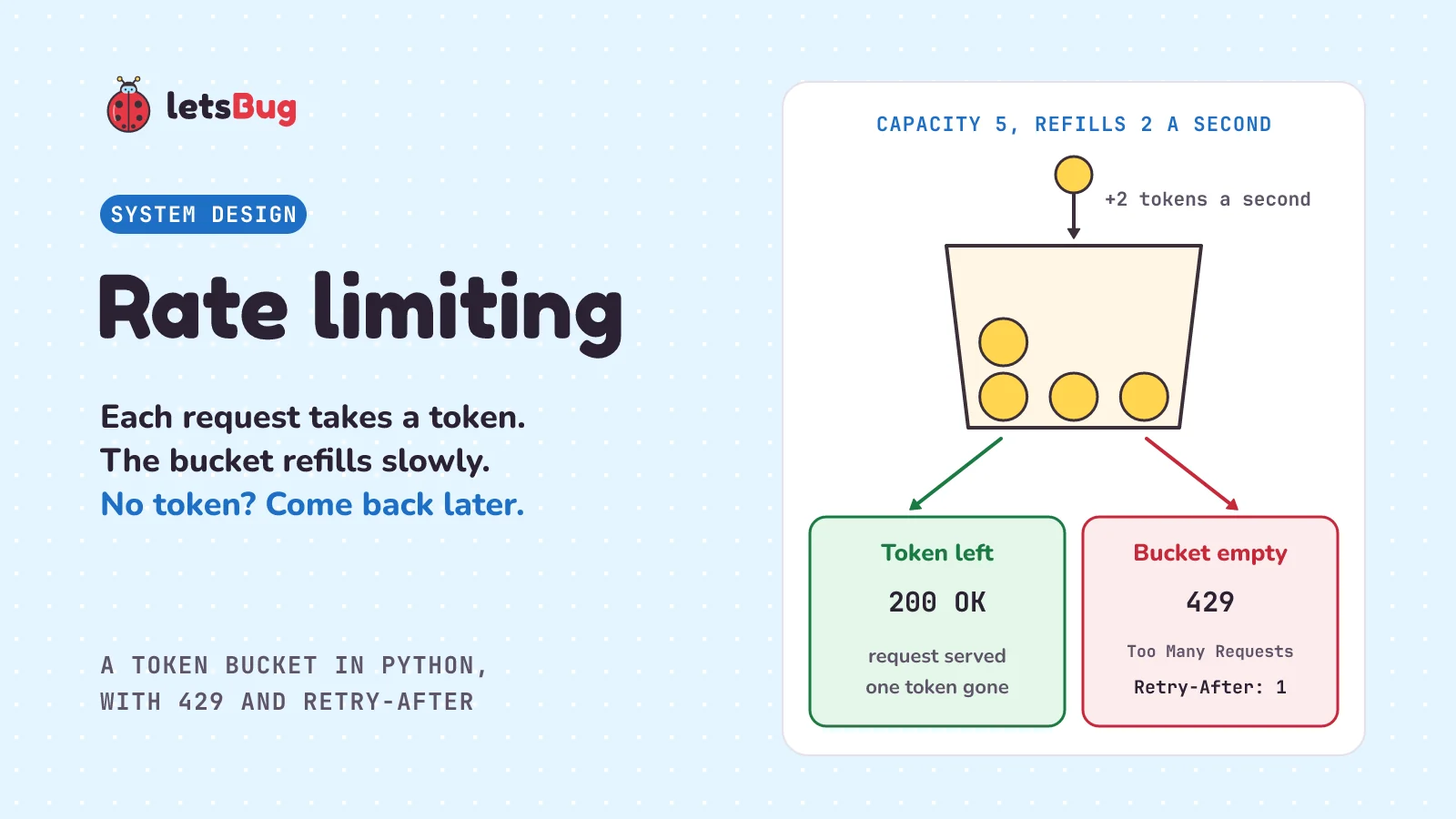
Rate limiting is a rule that caps how many requests a client can make in a given time. When a client goes over the cap, the server refuses the extra requests, usually with status 429, and may say when to try again. That stops one greedy or broken client from slowing everyone else down.
In this post we go back to the shop app from the webhooks post, where Asha paid Rs 450 for order 101. This time a script floods the shop's coupon check, and Asha's checkout crawls. We learn the token bucket with a jar of tokens at a dosa stall, see what breaks without a limit, and build a rate limiter in plain Python, with a server that answers 429 and a client that waits when it's told to. Then we compare the token bucket with the leaky bucket and the fixed window, set the same limit in NGINX (a popular web server), and finish with when a rate limit is the wrong tool and the beginner mistake that quietly doubles your limit.
A few words first. A client is whatever sends a request: a browser, a phone app or a script. A server is a program that waits for requests and answers them. An HTTP request is one message to a server, and headers are labelled lines sent along with it. Every answer has a status code: 200 means "OK", and any code from 200 to 299 (written 2xx) means success. An API is the set of requests a service accepts, and a URL is a web address. A webhook is a message one service sends to another when something happens, by calling a web address the receiver gave it. An algorithm is a fixed set of steps. An IP address is the number that identifies a device or network on the internet. And a burst is a lot of requests arriving close together.
Key takeaways
- Rate limiting caps how many requests each client can make in a given time, so one client can't use up what everyone shares.
- A token bucket holds up to a set number of tokens and gains new ones at a steady speed. Each request takes one token. No token, no service. The size of the bucket is the biggest burst; the refill speed is the long-run limit.
- You don't need a timer to add tokens. When a request arrives, work out how many tokens the time since the last request has earned.
- Refuse with status 429 Too Many Requests and a Retry-After header, in whole seconds, that says how long to wait.
- Clients should obey Retry-After. If there isn't one, wait longer after each failure and add some randomness, so a crowd of clients doesn't retry at the same moment.
- A fixed window counter is simple, but can let through double the limit around the moment it resets. A leaky bucket lets requests out at a steady speed. NGINX uses one, and its
nodelayoption turns the spacing off. - The classic mistake: keeping the count in each server's own memory. Run two copies of the server and the limit doubles. Keep the count in one shared place.
What is rate limiting in simple words?
Picture a busy dosa stall at lunchtime. The cook can only make so many dosas, however long the line gets. So the stall keeps a small jar of tokens for each office nearby. To order, you take a token from your office's jar. No token, you're told to come back later.
Each jar holds at most 5 tokens. A helper drops a new one into every jar at a steady pace, a pace set so that one office can't swamp the kitchen. If nobody from an office has come for a while, its jar fills up and the helper's extra tokens go nowhere: 5 is the most it holds. So 5 colleagues arriving together all get a token at once, and none of them notices any limit. But a sixth colleague has to come back for the next token, and someone trying to order 50 dosas can only order at the helper's pace.
Notice what the jar does. It allows a short rush, because real people do arrive in groups. It holds each office to a steady long-run speed. And it's fair: one office can only empty its own jar, so the office next door still gets served. That's a token bucket, and a token-bucket rate limiter is just this jar, kept in code, with one jar for each customer.
What problem does rate limiting solve?
Back at the shop. Its checkout page has a box for a coupon code, and each time someone types a code, the app sends a request to check it. That's the kind of "ask, and get the answer now" request we met at the end of the webhooks post.
Now someone writes a script that tries thousands of coupon codes, hoping to find one that works. Say the server can check 100 coupons a second, and the script sends 300 a second. The extra requests have to wait in line, and the line grows by 200 every second. After 10 seconds, there are 2,000 requests ahead of anyone who arrives next. That's 20 seconds of work. Asha only wants to apply her coupon, and her page hangs for 20 seconds. The script didn't need to break anything to do this. It just asked too often.
It doesn't even need bad intent. A bug that calls an API in a loop looks exactly the same. OWASP, a respected web security project, lists this among its top API risks and says: "It's common to find APIs that do not limit client interactions or resource consumption." Its advice is direct: "Implement a limit on how often a client can interact with the API within a defined timeframe (rate limiting)." It also says to limit sensitive operations one by one: "Limit/throttle how many times or how often a single API client/user can execute a single operation (e.g. validate an OTP, or request password recovery without visiting the one-time URL)." (To throttle means to slow something down on purpose. An OTP is a one-time password, usually sent by SMS; a 6-digit OTP can be guessed if nothing limits the guesses.)
Big API services do this. Stripe, a payment company: "Stripe uses rate limiting to maximise API stability and prevent abuse, so treat limits as maximums and avoid unnecessary load." GitHub: "The primary rate limit for unauthenticated requests is 60 requests per hour." (Unauthenticated means not logged in.) Log in, and the limit is much bigger: "All of these requests count towards your personal rate limit of 5,000 requests per hour."
How does the token bucket algorithm work?
A token bucket has just two settings. AWS, Amazon's cloud service, uses this method in its API Gateway (a service in front of your API that handles shared jobs like limits), and describes the two exactly: "You can specify a throttling rate, which is the rate, in requests per second, that tokens are added to the token bucket." And: "You can also specify a throttling burst, which is the capacity of the token bucket." (Capacity is how much it can hold.) Its docs also say what a token is: "API Gateway throttles requests to your API using the token bucket algorithm, where a token counts for a request."
- The bucket starts full. Ours holds 5 tokens and gains 2 tokens every second.
- A request arrives. First, add the tokens earned since the last request, without going over 5.
- Is there a whole token? If so, take it away and serve the request.
- If not, refuse the request, and work out how long until a token is ready.
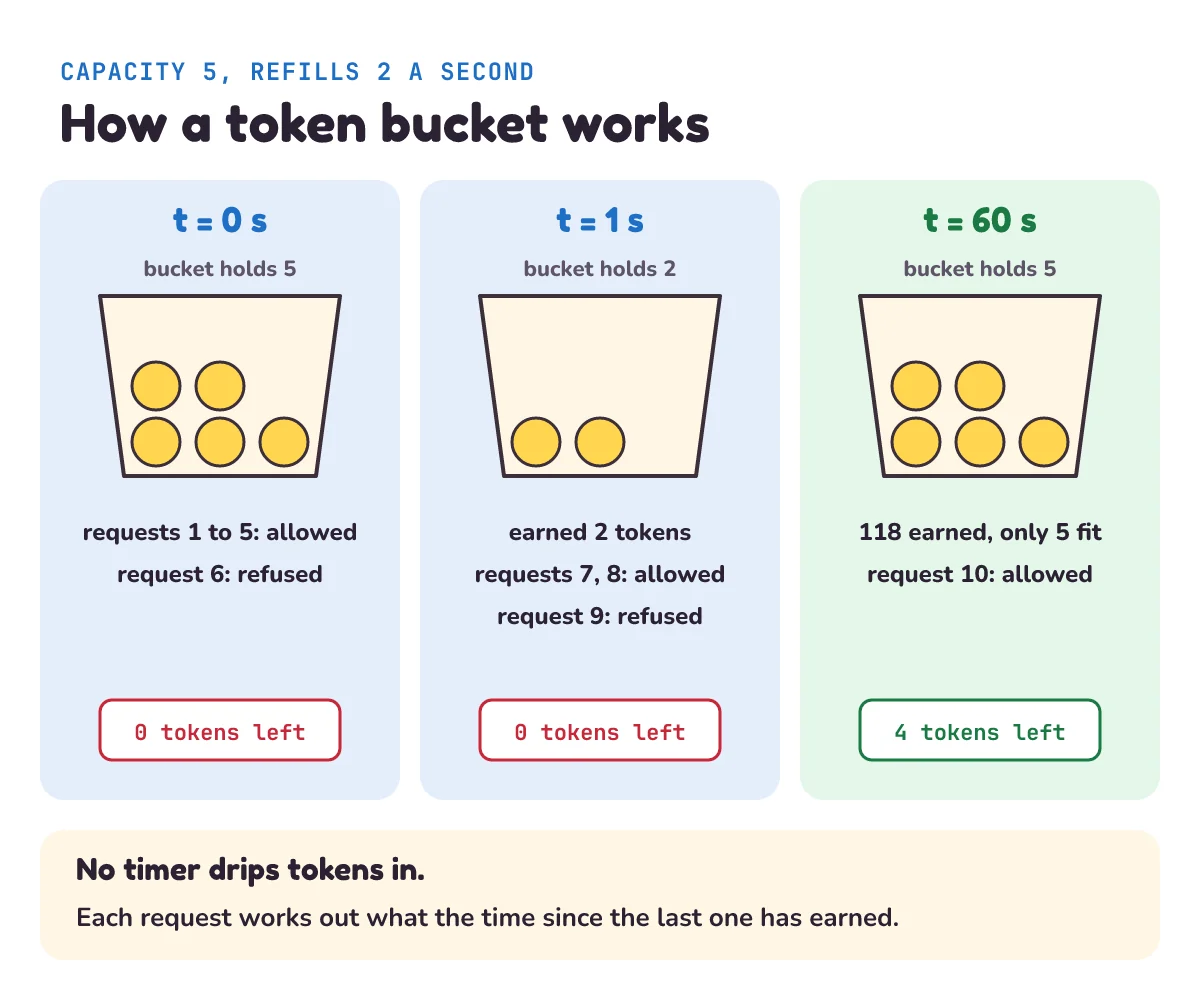
The clever part is step 2. Our dosa stall needed a helper walking round the jars. Code doesn't: there's no background timer dropping tokens in every half second. With a million customers, that would be a million timers, or one loop visiting a million buckets. Instead each bucket stores just two numbers: how many tokens it had and when. When the next request comes, the bucket multiplies the seconds passed by the rate. If 3 seconds went by at 2 tokens a second, it earned 6 tokens, capped at the 5 it can hold.
How do you build a rate limiter in Python?
Let's build it with Python's standard library (the tools that come with Python). First, the bucket:
# bucket.py
import threading
import time


class TokenBucket:
    """Allows a burst of up to `capacity` requests, and `rate` requests a second over time."""

    def __init__(self, capacity, rate, clock=time.monotonic):
        self.capacity = capacity          # the most tokens it can hold: the biggest burst
        self.rate = rate                  # tokens added per second: the long-run speed
        self.clock = clock
        self.tokens = capacity            # it starts full
        self.updated = clock()            # when we last added tokens
        self.lock = threading.Lock()      # only one thread at a time may change the count

    def allow(self):
        """Take one token. Returns (True, 0), or (False, seconds until a token is ready)."""
        with self.lock:
            now = self.clock()
            earned = (now - self.updated) * self.rate
            self.tokens = min(self.capacity, self.tokens + earned)   # a full bucket stays full
            self.updated = now
            if self.tokens >= 1:
                self.tokens -= 1
                return True, 0
            return False, (1 - self.tokens) / self.rate
min(self.capacity, ...)is the top of the jar: extra tokens go nowhere.(1 - self.tokens) / self.rateis how long until a whole token is ready. With 0 tokens at 2 a second, that's half a second.time.monotonicis a clock made for measuring gaps. Python's docs: "Return the value (in fractional seconds) of a monotonic clock, i.e. a clock that cannot go backwards." And: "The clock is not affected by system clock updates." The ordinary wall clock can jump when the computer corrects its time, and a jump backwards would give a negative number of tokens earned.clock=lets us pass a pretend clock, so we can test the bucket without waiting.threading.Lockis there because our server (ThreadingHTTPServer, coming up) handles many requests at once, each in its own thread (a separate line of work). Without the lock, two threads could both see "1 token left" and both take it. That's called a race condition: the answer depends on which thread gets there first.with self.lock:makes the other threads wait their turn.
Let's watch it work, using a pretend clock so that time is exactly what we say. Save this next to bucket.py and run python simulate.py:
# simulate.py
from bucket import TokenBucket

now = 0.0
bucket = TokenBucket(capacity=5, rate=2, clock=lambda: now)   # a pretend clock; lambda makes a tiny unnamed function

for number, now in enumerate([0, 0, 0, 0, 0, 0, 1, 1, 1, 60], start=1):
    allowed, wait = bucket.allow()                            # each pass sets now, which moves the pretend clock
    result = f"allowed, {bucket.tokens:g} left" if allowed else f"refused, wait {wait:g} s"
    print(f"t={now:>2} s  request {number:>2}: {result}")
t= 0 s request 1: allowed, 4 left
t= 0 s request 2: allowed, 3 left
t= 0 s request 3: allowed, 2 left
t= 0 s request 4: allowed, 1 left
t= 0 s request 5: allowed, 0 left
t= 0 s request 6: refused, wait 0.5 s
t= 1 s request 7: allowed, 1 left
t= 1 s request 8: allowed, 0 left
t= 1 s request 9: refused, wait 0.5 s
t=60 s request 10: allowed, 4 leftFive requests pass at once, which is the burst. The sixth is refused. One second later the bucket has earned 2 tokens, so two more pass, and the next is refused. Then after nearly a minute of quiet the bucket is full, but only up to 5. The 59 seconds since request 9, at 2 a second, would be 118 tokens, and the cap throws away all but 5. So you can't save up a huge burst by staying quiet.
Now the shop. It's a small web server that gives each customer their own bucket:
# shop.py
import math
import threading
from http.server import BaseHTTPRequestHandler, ThreadingHTTPServer

from bucket import TokenBucket

CAPACITY, RATE = 5, 2             # a burst of 5, then 2 requests a second
buckets = {}                      # one bucket per customer. A demo: this never shrinks
buckets_lock = threading.Lock()


def bucket_for(customer):
    with buckets_lock:
        if customer not in buckets:
            buckets[customer] = TokenBucket(CAPACITY, RATE)
        return buckets[customer]


class Shop(BaseHTTPRequestHandler):
    def do_GET(self):
        customer = self.headers.get("X-Customer", "anonymous")   # a stand-in for the logged-in user
        allowed, wait = bucket_for(customer).allow()
        if not allowed:
            print(f"{customer}: refused")
            self.send_response(429)
            self.send_header("Retry-After", str(math.ceil(wait)))   # whole seconds only
            self.end_headers()
            self.wfile.write(b"Too many requests. Please slow down.")
            return
        print(f"{customer}: served")
        self.send_response(200)
        self.end_headers()
        self.wfile.write(b"Coupon checked.")

    def log_message(self, *args):
        pass                      # keep the demo's output short


server = ThreadingHTTPServer(("127.0.0.1", 8771), Shop)
print("Shop listening on http://127.0.0.1:8771")
try:
    server.serve_forever()
except KeyboardInterrupt:         # Ctrl+C stops it
passdo_GETruns for every GET request (a GET asks for something, and doesn't change it). Asking the bucket comes first, before any real work, because refusing has to be cheap.- The
X-Customerheader is how our demo tells customers apart, because everything here comes from your own computer. Anyone can type any value into a header, so a real shop must use the id from the login session (the server's record of who is logged in) instead. Otherwise the script just sends a new name each time and gets a new bucket. math.ceilrounds up to a whole number.Retry-Aftermust be whole seconds, and we'll see why rounding up matters in a moment.- The
bucketsdictionary (Python's key-and-value lookup table) only ever grows. That's fine for a demo. A real limiter removes customers who've gone quiet, or keeps its counts in a database that deletes them by itself. 127.0.0.1means "this computer only", and 8771 is the port, the door number the server listens on. Python's docs warn: "http.server is not recommended for production." (Production means the real, live service.) It's fine for learning.
And a client, with two behaviours: a flood that ignores the limit, and a polite one that waits when it's told to.
# client.py
import random
import sys
import time
import urllib.error
import urllib.request

URL = "http://127.0.0.1:8771/coupons/check?code=SAVE10"


def call(customer):
    """One request. Returns the status code and the Retry-After header (None if there isn't one)."""
    request = urllib.request.Request(URL, headers={"X-Customer": customer})
    try:
        with urllib.request.urlopen(request, timeout=5) as reply:
            return reply.status, None
    except urllib.error.HTTPError as error:       # an error answer, such as 429, lands here
        return error.code, error.headers.get("Retry-After")


def flood():
    """A script that ignores the limit, and then one ordinary customer."""
    for number in range(1, 9):
        status, retry_after = call("bot")
        note = f", told to wait {retry_after} s" if retry_after else ""
        print(f"bot, request {number}: {status}{note}")
    print("asha, request 1:", call("asha")[0])


def polite():
    """Eight requests from a client that waits when it is told to."""
    for number in range(1, 9):
        backoff = 0.5
        for attempt in range(6):                  # never retry for ever
            status, retry_after = call("app")
            if status != 429:
                print(f"Request {number}: {status}")
                break
            # Use the server's number if it sent one; if not, back off with some randomness.
            delay = int(retry_after) if retry_after else backoff + random.uniform(0, backoff)
            print(f"Request {number}: 429, waiting {delay:g} s")
            time.sleep(delay)
            backoff *= 2
        else:                                     # the loop ended with no break: every try got 429
            print(f"Request {number}: gave up")


if sys.argv[1:] == ["polite"]:
    polite()
else:
    flood()
Put the files in one folder and open two terminals (command-line windows) there. In the first, run python shop.py. In the second, run python client.py:
bot, request 1: 200
bot, request 2: 200
bot, request 3: 200
bot, request 4: 200
bot, request 5: 200
bot, request 6: 429, told to wait 1 s
bot, request 7: 429, told to wait 1 s
bot, request 8: 429, told to wait 1 s
asha, request 1: 200
The bot gets its burst of 5, then gets refused. Asha has her own bucket, so the bot's flood doesn't touch her. That's the whole point. (On a very slow computer, a token might drip in partway through and one more request gets through. The limiter is working from real time.)
Now run python client.py polite:
Request 1: 200
Request 2: 200
Request 3: 200
Request 4: 200
Request 5: 200
Request 6: 429, waiting 1 s
Request 6: 200
Request 7: 200
Request 8: 429, waiting 1 s
Request 8: 200
All eight went through. The client took the burst, waited when told to, and carried on. Each 1-second wait earned 2 tokens, which is why two requests pass after the first wait.
What does 429 Too Many Requests mean?
429 is the status code made for this. RFC 6585, the standard that defines it (an RFC is a numbered document from the internet's standards bodies), says: "The 429 status code indicates that the user has sent too many requests in a given amount of time ("rate limiting")." It adds that the response "MAY include a Retry-After header indicating how long to wait before making a new request."
The Retry-After value is a number of seconds, or a date. MDN, a widely used web reference, defines the seconds form as: "A non-negative decimal integer indicating the seconds to delay after the response is received." Whole numbers only, so Retry-After: 0.5 isn't valid. That's why shop.py uses math.ceil. Our bucket's wait was 0.5 seconds, which rounds up to 1. If it rounded down to 0, the client would be told to retry at once, too soon, and get refused again.
The standard leaves the counting to you: "Note that this specification does not define how the origin server identifies the user, nor how it counts requests." (The origin server is the one that actually holds the content.) That's why services differ so much:
| How it limits | When you go over | |
|---|---|---|
| GitHub API | Requests per hour, per user or per IP address | 403 or 429, and x-ratelimit-remaining is 0 |
| Stripe | Usually requests per second, per account | 429 |
| AWS API Gateway | Token bucket | 429 |
| NGINX | Leaky bucket (explained below), counted by a value you choose, such as the IP address | 503 by default; set it to 429 |
GitHub: "If you exceed your primary rate limit, you will receive a 403 or 429 response, and the x-ratelimit-remaining header will be 0." That x-ratelimit-remaining header is worth copying: on every response, it tells the client how much of its limit is left, so a careful client can slow down before it's refused.
What should a client do when it gets a 429?
Wait. Then try again, and don't let that retry run for ever.
If the server sent Retry-After, use it. GitHub: "If the retry-after response header is present, you should not retry your request until after that many seconds has elapsed." Our polite function does this. Our server only sends seconds. A client calling someone else's API needs two more checks. It should handle the date form ("A date after which to retry."), where the int() in our client would fail. And for GitHub it should treat a 403 (normally "Forbidden") with x-ratelimit-remaining at 0 like a 429, then wait until the time in the x-ratelimit-reset header, when the window starts again. A few seconds of backoff won't help against a limit counted per hour.
If there's no header, wait longer after each failure. That's the exponential backoff from the webhooks post: 0.5 s, then 1 s, then 2 s. Add some randomness too, which is called jitter, so that not every client comes back at the same moment. Stripe: "Follow an exponential backoff schedule to reduce request volume when necessary, and add randomness to the backoff schedule to avoid a thundering herd effect." (A thundering herd is what happens when lots of clients that were all waiting retry at the same time, and knock the server over again.) That's the random.uniform(0, backoff) in polite.
Better still, slow down before you get refused. A token bucket works in the client too. Stripe suggests it: "A common technique for controlling API usage is to implement a client-side token bucket rate-limiting algorithm." You could put our TokenBucket in front of your own API calls, and if it says no, sleep for the wait it returns.
What is the difference between token bucket, leaky bucket and fixed window?
The token bucket is one of a few common methods. You'll meet two others.
Picture the dosa stall with a simpler rule: 50 orders per office each hour, with the tally wiped clean on the hour. That's a fixed window, the simplest method of all: count the requests in each block of time, and refuse once the count reaches the limit. Redis, a popular database that keeps its data in memory, documents this pattern for its INCR command, which adds 1 to a counter: "The rate limiter pattern is a special counter that is used to limit the rate at which an operation can be performed." Its example counts per second: "Both examples limit API calls to a maximum of ten requests per second per IP address." GitHub also counts over a time window: its header reports what's "remaining in the current rate limit window".
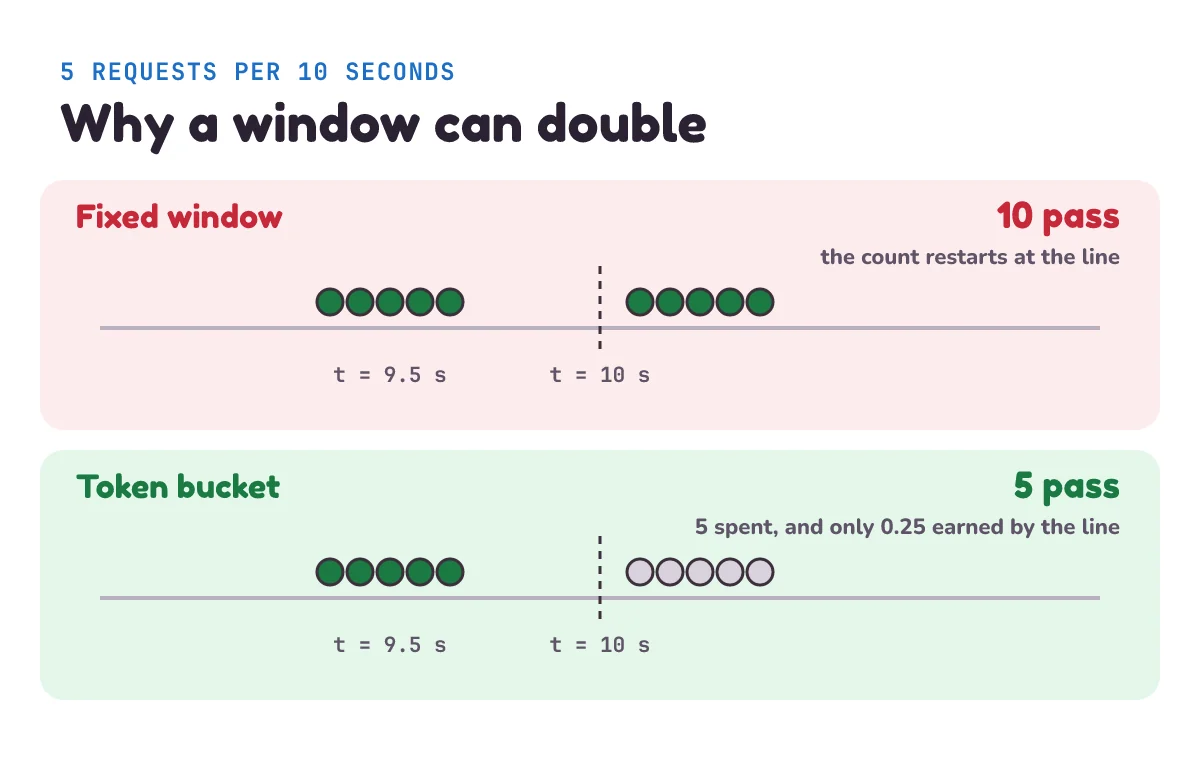
But a fixed window has a weak spot, right where one block ends and the next begins. At the stall, an office could place 50 orders at 12:59 and 50 more at 1:00. Let's test it with a limit of 5 requests per 10 seconds, sending 5 requests just before the 10-second line and 5 more exactly on it:
# compare.py
from bucket import TokenBucket


class FixedWindow:
    """At most `limit` requests in each block of `seconds`; the count restarts every block."""

    def __init__(self, limit, seconds):
        self.limit, self.seconds = limit, seconds
        self.window, self.count = None, 0

    def allow(self, now):
        window = now // self.seconds              # which block of time are we in?
        if window != self.window:
            self.window, self.count = window, 0   # a new block: the count starts again
        if self.count < self.limit:
            self.count += 1
            return True
        return False


# The limit is 5 requests per 10 seconds. Send 5 just before the line and 5 exactly on it.
times = [9.5] * 5 + [10.0] * 5

window = FixedWindow(limit=5, seconds=10)
print("Fixed window allowed:", sum(window.allow(t) for t in times))

now = 0.0
bucket = TokenBucket(capacity=5, rate=0.5, clock=lambda: now)
allowed = 0
for now in times:
    allowed += bucket.allow()[0]
print("Token bucket allowed:", allowed)
Fixed window allowed: 10
Token bucket allowed: 5The fixed window let through 10 requests in half a second, double the limit, because the count went back to zero on the line. The token bucket with the same long-run speed (5 requests per 10 seconds is 0.5 a second) let through 5, and refused the rest.
A leaky bucket is the token bucket's cousin. Imagine a bucket with a small hole in it: requests pour in at any speed, and leak out at a steady speed. NGINX, the web server from how NGINX works, uses it: "The limitation is done using the "leaky bucket" method." If the bucket fills up, new requests spill over and are refused. In NGINX, the size of that bucket is the burst setting. Requests over the rate wait in line, up to that many: "Excessive requests are delayed until their number exceeds the maximum burst size in which case the request is terminated with an error." With no burst set, they're refused at once.
| Fixed window | Token bucket | Leaky bucket | |
|---|---|---|---|
| What it stores | A count for each window | Tokens and a time | A queue or level |
| A burst | Can reach double the limit at a reset | Allowed, up to the size you set | Smoothed out to a steady pace |
| Good for | Simple counts per hour or day | APIs, where people arrive in groups | Protecting a server that needs a steady pace |
A token bucket allows bursts as well, of course. Unlike a fixed window's accidental double, the burst is a size you chose. It isn't a strict "5 in any 10 seconds", though: over any stretch of time it can pass its capacity plus what it earns. The bucket in compare.py could pass 5 at once and then 1 every 2 seconds, so 10 within 10 seconds. What it can't do is pass 10 in half a second.
Where should you put rate limiting?
As early as you can, so refused requests cost almost nothing. Often that's the program in front of your app: a reverse proxy (a program that receives requests and passes them to your app) or an API gateway (a reverse proxy that also handles shared jobs like limits). Here's the same limit in NGINX, counted per IP address to keep the example simple:
limit_req_zone $binary_remote_addr zone=coupons:10m rate=2r/s;

server {
    listen 80;

    location /coupons/ {
        limit_req zone=coupons burst=4 nodelay;
        limit_req_status 429;
        proxy_pass http://127.0.0.1:8000;
    }
}
This goes inside NGINX's http block. proxy_pass hands allowed requests to your app, so something must be listening on port 8000; we used a small test server.
We ran this in NGINX and sent it 10 requests at the same moment: 5 got 200 and 5 got 429. That's one request within the rate, plus a burst of 4, so 5 at once, the same as our Python bucket. Three things in that file are worth knowing:
2r/smeans 2 requests a second, andzone=couponsis the name that joins the two limit lines.$binary_remote_addrmeans each client's IP address gets its own limit, and10mis 10 megabytes of memory for the counts, shared by NGINX's worker processes (the copies of NGINX that handle requests).nodelayserves the burst straight away, instead of spacing it out. NGINX: "If delaying of excessive requests while requests are being limited is not desired, the parameter nodelay should be used".limit_req_status 429is needed because NGINX answers 503 ("Service Unavailable") by default, which doesn't tell the client it went too fast. In our test NGINX sent noRetry-Afterwith it, so clients fall back to backoff.
What do you count by? The standard gives examples: "Likewise, it might identify the user by its authentication credentials, or a stateful cookie." (Authentication credentials are the proof of who you are, such as a login. A cookie is a small note the browser stores and sends back with each request.) Use the logged-in user or API key (a secret string that identifies the caller) whenever you have one. Use the IP address only for visitors who aren't logged in, which is what GitHub does: "Unauthenticated requests are associated with the originating IP address, not with the user or application that made the request."
IP addresses are a blunt tool, because whole offices and mobile networks can share one. RFC 6269, about shared addresses, gives a login example: "one user who fails a number of login attempts may block out other users who have not made any previous attempts but who will now fail on their first attempt."
When should you not use rate limiting?
- When the work can wait. A rate limiter says "no". If the work just needs to happen eventually, such as sending 10,000 emails, use a message queue: it accepts everything and works through it at its own speed.
- On calls you want to arrive, like webhooks. In the last post, any answer outside 2xx told the payment service "failed, try again". If you rate limit your own webhook endpoint (the URL that receives webhooks), you turn a burst of real payment news into a pile of retries. Save the event quickly instead, and let a queue set the pace.
- As your only defence against a real flood. Even a refusal costs some work. RFC 6585: "When a server is under attack or just receiving a very large number of requests from a single party, responding to each with a 429 status code will consume resources." It says "it may be more appropriate to just drop connections, or take other steps." So against a huge flood, a polite 429 isn't enough.
- As your only limit on total load. Each customer's bucket is separate, so together they don't cap the total. 1,000 customers each at 2 requests a second add up to 2,000 a second, far more than the 100 our shop can check. You need an overall limit too, or more capacity.
- As a replacement for proper security. A limit slows down guessing, but it doesn't check who someone is. You still need logins and permission checks.
What mistake do beginners make with rate limiting?
Keeping the count in each server's own memory, then running more than one server. Our buckets dictionary lives inside one running program. When the shop grows, it runs two or more copies behind a load balancer (a program that shares requests among identical copies of an app). Each copy has its own dictionary, so each one gives the customer a full bucket. This runs next to bucket.py:
from bucket import TokenBucket

now = 0.0
clock = lambda: now


def send(servers, requests=20):
    """Send every request at the same moment; a load balancer takes turns between the servers."""
    allowed = 0
    for number in range(requests):
        allowed += servers[number % len(servers)].allow()[0]
    return allowed


print("One server allowed:", send([TokenBucket(5, 2, clock)]))
print("Two servers allowed:", send([TokenBucket(5, 2, clock), TokenBucket(5, 2, clock)]))
One server allowed: 5
Two servers allowed: 10Same customer, same moment, double the limit. Run ten copies and the limit is ten times what you wrote. It works perfectly in testing, on one machine.
The fix is to keep the count in one place that every copy shares, such as Redis, or to do the limiting at the one program all requests pass through, such as NGINX or an API gateway. (One caution: NGINX's counts are shared across its worker processes, but not between separate NGINX machines. NGINX's own feature for keeping those in step, the sync parameter, needs its paid subscription.) In a shared store, the check and the update have to happen as one step, for the same reason our bucket has a lock. Redis's docs raise the same kind of risk for one of their counter patterns: "An alternative implementation uses a single counter, but is a bit more complex to get it right without race conditions."
A second slip: limiting by a value the client controls, such as our X-Customer header or a made-up "real IP" header. Change the value and you get a new, full bucket. Only count by something the client can't fake.
1) A client sends requests non-stop for 10 seconds to a bucket that starts full, with capacity 5 and rate 2. About how many get through? Try it with a pretend clock.
2) Our wait was 0.5 seconds. Why does shop.py use math.ceil(wait), and not round(wait)?
3) You want to allow 120 requests a minute, with bursts of up to 20. What should capacity and rate be?
Show the answers
1) 25: the 5 it started with, plus 2 a second for 10 seconds. This runs next to bucket.py, trying 16 times a second:
from bucket import TokenBucket

now = 0.0
bucket = TokenBucket(capacity=5, rate=2, clock=lambda: now)
allowed = 0
for tick in range(161):
    now = tick / 16
    allowed += bucket.allow()[0]
print(allowed)252) Because Python's round(0.5) gives 0 (it rounds exact halves to the nearest even number), and Retry-After: 0 tells the client to try again straight away, before any token is ready. It would be refused again. math.ceil(0.5) gives 1, which is safe: waiting slightly too long costs almost nothing.
3) capacity=20 and rate=2. 120 requests a minute is 2 a second, and the capacity is the biggest burst.
Questions people ask
What does rate limiting mean?
Rate limiting is a cap on how many requests a client can make in a given time, such as 60 an hour. Requests over the cap are refused, usually with status 429. It protects a service from being swamped by one client, on purpose or by accident, and keeps it fair for everyone else.
What does error 429 mean?
429 Too Many Requests means you've sent more requests than the server allows in a given time. Stop and wait. If the response has a Retry-After header, wait that many seconds; if not, wait longer after each failure and add some randomness.
How does a token bucket limit requests?
A bucket holds up to a fixed number of tokens and gains new ones at a steady speed. Each request takes one token, and a request with no token left is refused. The bucket's size sets the biggest burst, and the refill speed sets the long-run limit.
What is the difference between token bucket and leaky bucket?
A token bucket serves a burst straight away if it has enough tokens, then holds clients to the refill speed. A leaky bucket lets requests out at a steady speed, so a burst waits in line instead. NGINX's limit_req uses the leaky bucket, and its nodelay option serves the burst at once.
Should I rate limit by IP address or by user?
By user or API key whenever you have one. IP addresses can be shared by whole offices and mobile networks, so one person's limit can block others. Use the IP address only for visitors who aren't logged in.
Keep going
- Previous in this System Design series: Webhooks, where the same shop learns to hear about payments, and the payment service retries with backoff.
- Next: "Database indexing", how a database finds one row among millions without reading them all.
- Where a limit often lives: What is an API gateway?
- When the work can wait instead: Message queues and workers.
Checked on 9 November 2026 against the 13 sources below.
Sources
- IETF: RFC 6585, Additional HTTP Status Codes (429)
- IETF: RFC 9110, HTTP Semantics (the names of 403 and 503)
- IETF: RFC 6269, Issues with IP Address Sharing
- MDN Web Docs: Retry-After
- NGINX documentation: ngx_http_limit_req_module
- AWS documentation: Throttle requests to your REST APIs (token bucket)
- Stripe documentation: Rate limits
- GitHub Docs: Rate limits for the REST API
- OWASP: API4:2023 Unrestricted Resource Consumption
- Redis documentation: INCR (rate limiter patterns)
- Python documentation: time (
monotonic) - Python documentation: threading (
Lock) - Python documentation: http.server
Every Python sample in this post was run in Python 3.13 before publishing, and the NGINX config was tested in NGINX 1.27.