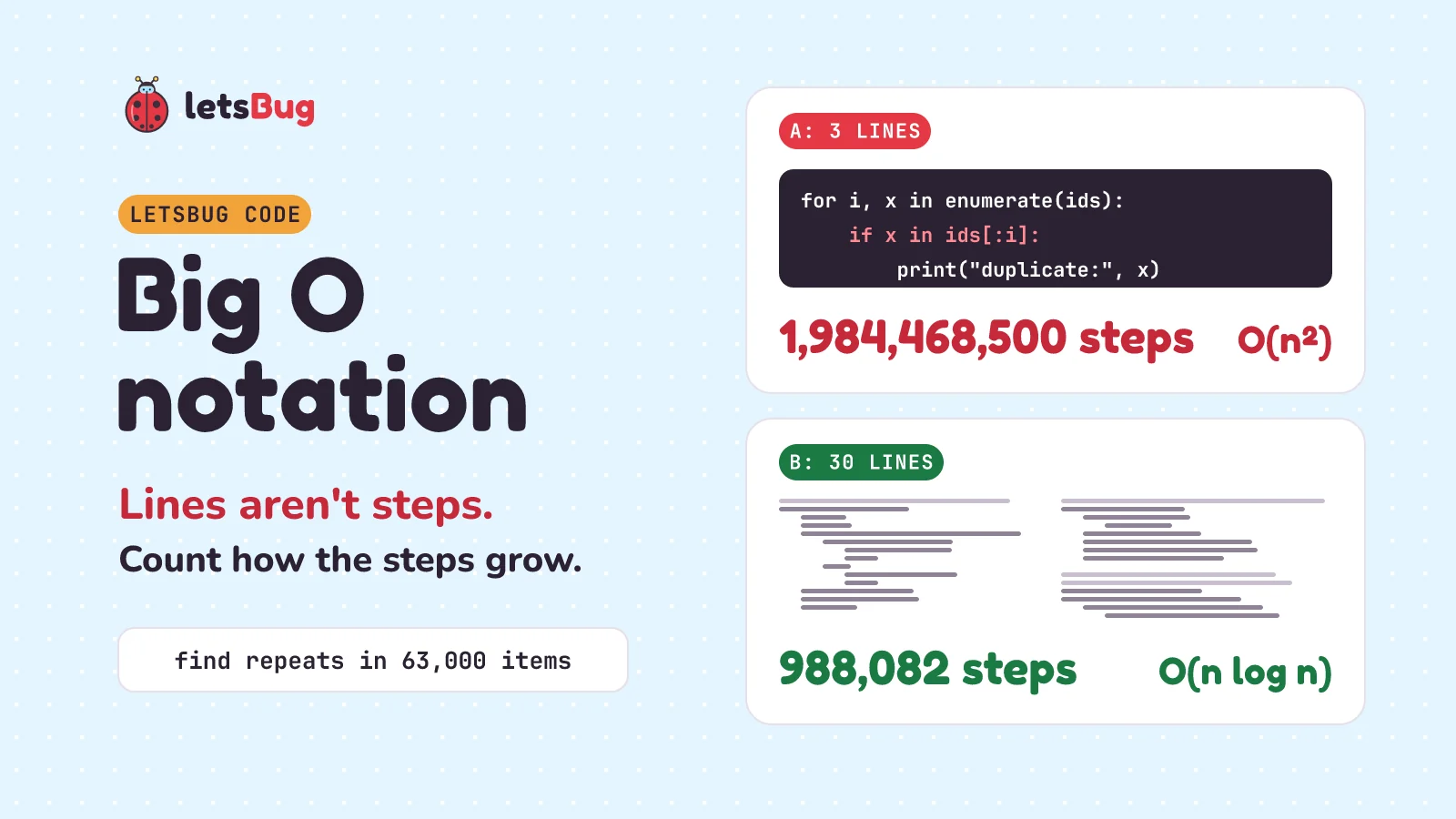
Big O notation describes how the number of steps a program takes grows as its input grows. It counts steps, not lines. A 3-line Python duplicate finder with x in a_list inside a loop is O(n²): about 2 billion comparisons on 63,000 items. A 30-line version that sorts first is O(n log n): about 1 million.
In this post we race two real Python programs that find repeated numbers in a list: one is 3 lines long, the other 30. We count every step they take, with a small program that counts for us. Then we turn the counts into Big O, find the Python lines that hide a loop, and fix the short program with a set. The story starts with a video game that took six minutes to load.
A few words first. The input is the data a program works on, here a list of item numbers. We call its size n: a list of 63,000 items has n = 63,000. A comparison is one check of two values, like "is 7 equal to 12?". A loop is code that repeats, here once for each item in the list. How a program's steps grow with its input is called its time complexity, and Big O is how we write it down.
Key takeaways
- Lines aren't steps. A line inside a loop runs once per item, and some lines hide a loop of their own.
- In Python,
x in a_list,count,index,remove,insert(0, x)and slicing all walk through the list. Inside another loop, that's about n × n steps. - Checking each item against every item before it takes 0 + 1 + 2 + … + (n − 1) = n(n − 1)/2 comparisons. For 63,000 items that's 1,984,468,500.
- Big O keeps only the part that grows fastest. n(n − 1)/2 becomes O(n²): double the list, and the work goes up four times.
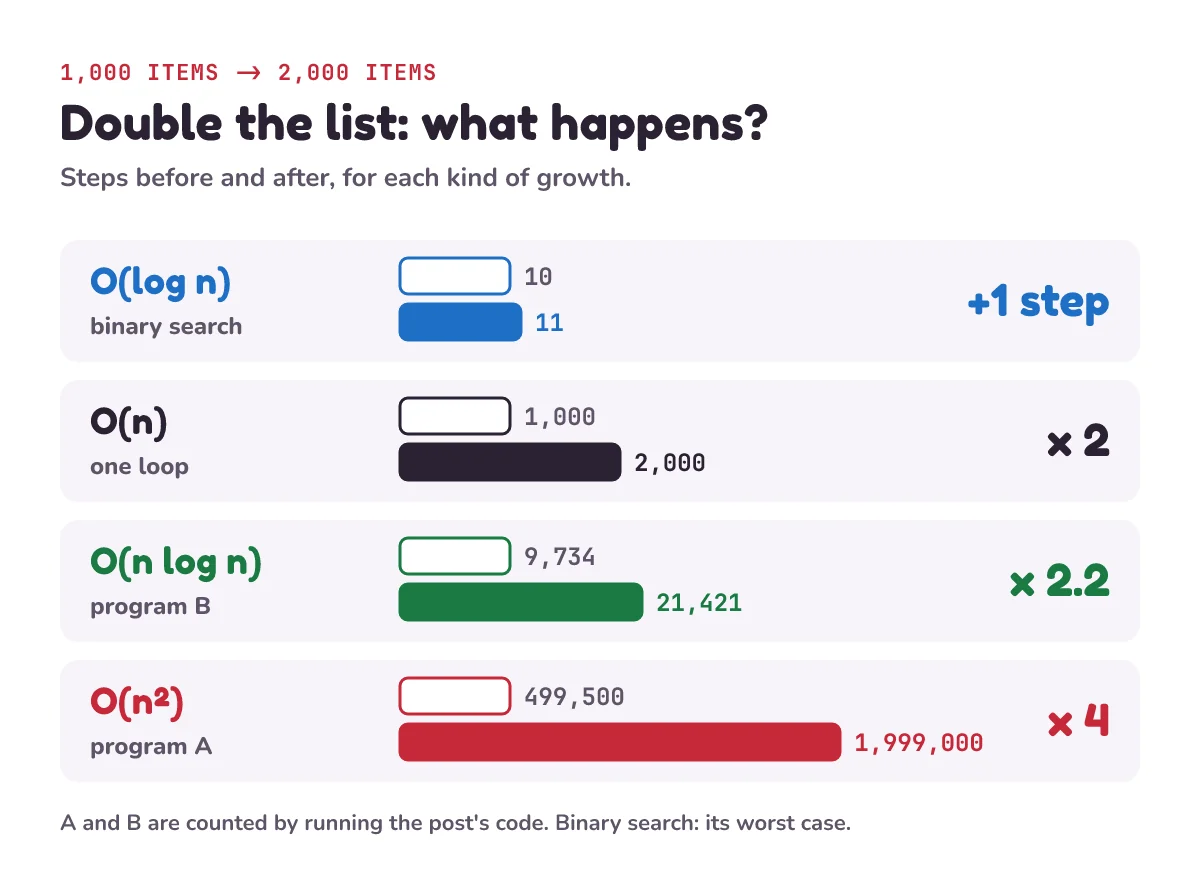
- Doubling rules: O(log n) adds one step, O(n) doubles, O(n log n) a bit more than doubles, O(n²) is four times.
x in a_settakes about one step on average, however big the set is. With a set, finding repeats is O(n): 63,000 lookups for 63,000 items.- Until a player found it in 2021, GTA Online made about 2 billion checks like this while loading. Fixing that and one other slow step cut loading from about 6 minutes to 1 minute 50 on one player's PC.
This post goes with letsBug Code, episode 5. Watch it first, or read on: everything in the video is here, plus a step counter you can run yourself and practice questions with answers.
Why did GTA Online take 6 minutes to load?
In 2021, GTA Online was known for loading slowly. The write-up opens: "Infamous for its slow loading times." A player who writes as t0st timed it on their own PC. The write-up says: "Online mode load time: ~6m flat". That's about six minutes. So t0st went looking for the reason.
t0st found the game reading a big file of shop data: "A whopping 10 megabytes worth of JSON with some 63k item entries". JSON is a common text format for storing data. So the list held about 63,000 items. The write-up says it seems to be "a list of all the possible items and upgrades you can buy in GTA Online": the game's shop catalogue.
The slow part came after reading each item. Before storing it, the game checked whether it was already stored. The write-up says: "It checks the entire array, one by one, comparing the hash of the item to see if it's in the list or not." An array is a list kept in the computer's memory. A hash is a number worked out from an item, used here like an ID. So each new item was compared with every item already stored, one at a time.
t0st counted the checks: "(n^2+n)/2 = (63000^2+63000)/2 = 1984531500 checks". That's about 2 billion. And none of them found anything: "all of the items in the JSON are unique!"
There were two slow parts, so t0st fixed them one at a time and timed the game again:
| What was fixed | Loading time |
|---|---|
| Nothing (the original game) | about 6 min |
| Only the duplicate check | 4 min 30 s |
| Only the slow JSON reading | 2 min 50 s |
| Both | 1 min 50 s |
That is 69.4% less time. The write-up's advice to the game's maker was: "You could either switch to a hashmap for the de-duplication or completely skip it on startup as a faster fix." A hash map is a way of storing items so the computer can jump straight to one, instead of checking them one by one. Rockstar, the company that makes the game, released an update with a fix on 16 March 2021. It also paid t0st $10,000 as a bug bounty, a reward for reporting a problem in its software.
No single line of that code was wrong. The problem was how the number of steps grows as the list gets longer. Measuring that growth is what Big O notation is for.
Is shorter code faster in Python?
Here's a puzzle. Two Python programs both find the repeated item numbers in a game shop's list. Program A is 3 lines long. Program B is 30. Which one is faster on 63,000 items? Many people pick the short one, because shorter code looks like less work. Make your guess, then let's test it.
Here is program A, run on a small list with some repeats:
ids = [12, 7, 31, 7, 5, 12, 7]   # item numbers, with repeats

for i, x in enumerate(ids):
    if x in ids[:i]:
        print("duplicate:", x)
duplicate: 7
duplicate: 12
duplicate: 7Read it in plain words. enumerate(ids) gives each item x together with its position i (0 for the first item, 1 for the second, and so on). ids[:i] is a slice: a copy of the items before position i. And x in ids[:i] asks, "is x one of the earlier items?" If it is, x is a repeat. 7 shows up three times, so the second and third 7 are both repeats.
And this is program B, all 30 lines, on the same list:
# step 1: merge two sorted lists into one
def merge(left, right):
    out = []
    i = j = 0
    while i < len(left) and j < len(right):
        if left[i] <= right[j]:
            out.append(left[i])
            i += 1
        else:
            out.append(right[j])
            j += 1
    out.extend(left[i:])
    out.extend(right[j:])
    return out

# step 2: sort by splitting in half (merge sort)
def merge_sort(items):
    if len(items) <= 1:
        return items
    mid = len(items) // 2
    left = merge_sort(items[:mid])
    right = merge_sort(items[mid:])
    return merge(left, right)

# step 3: repeats end up side by side,
# so compare each item with its neighbour
ordered = merge_sort(ids)
for k in range(1, len(ordered)):
    if ordered[k] == ordered[k - 1]:
        print("duplicate:", ordered[k])
duplicate: 7
duplicate: 7
duplicate: 12Program B works in three steps. merge takes two lists that are already sorted and joins them into one sorted list, always taking the smaller front item next. merge_sort sorts a list by cutting it in half, sorting each half the same way, and merging the two halves. A list of one item is already sorted, so the cutting stops there. Once the list is sorted, equal numbers sit side by side, so the last loop only compares each item with the one just before it.
Both programs find the same repeats: two extra 7s and one extra 12. Program B finds them in sorted order. So which is faster? To answer that, we count.
How do you find the time complexity of Python code?
Start by counting. Don't count lines. Count steps. In this post, one step is one comparison of two item numbers. Then ask how many times each step runs.
In program A, the line if x in ids[:i]: looks like one step. It isn't. x in on a list hides a loop: Python compares x with the earlier items one by one, from the front, until it finds a match or runs out. When there are no repeats, it never finds a match, so it checks every earlier item. That's the worst case, the input that makes the most steps, and it is what happened in GTA, where every item was different. The slice ids[:i] hides a second loop too: it copies all i earlier items first. We count only comparisons, so the real work is even bigger.
So the first item checks nothing. The second item checks 1 item. The third checks 2. With 10 items and no repeats, that's 0 + 1 + 2 + … + 9 = 45 comparisons.
There's a shortcut for that sum. Pair the numbers from the two ends: 0 + 9, 1 + 8, 2 + 7, 3 + 6, 4 + 5. That's 5 pairs, and each pair adds up to 9, so the total is 5 × 9 = 45. For n items there are n/2 pairs that each add up to n − 1, so:
0 + 1 + 2 + … + (n − 1) = n(n − 1)/2
For 63,000 items: 63,000 × 62,999 / 2 = 1,984,468,500 comparisons. Nearly 2 billion, the same mistake as GTA. The GTA write-up's count, (n² + n)/2 = 1,984,531,500, is 63,000 bigger, because it adds up 1 + 2 + … + n instead of 0 + 1 + … + (n − 1), as if each item were also checked against itself. Both are about 2 billion, and you'll see below that Big O treats them as the same.
You don't have to trust the sums. Let Python count. This program makes item numbers that add 1 to a counter every time they're compared. It uses a class, a recipe for making your own kind of value, here called Num. A method is a function that belongs to a class. When Python checks ==, it calls the value's __eq__ method (eq is short for equal), and x in a_list uses == on each item. For <=, which merge sort uses, it calls __le__ (less than or equal). Paste it below programs A and B, in the same file (it reuses merge_sort, and program B uses the ids list from program A), and run it:
import random

class Num:
    """An item number that counts every comparison it takes part in."""
    steps = 0

    def __init__(self, v):
        self.v = v

    def __eq__(self, other):
        Num.steps += 1
        return self.v == other.v

    def __le__(self, other):
        Num.steps += 1
        return self.v <= other.v

    def __hash__(self):
        return hash(self.v)


def make_ids(n):
    """n different item numbers (no repeats), shuffled."""
    # 1_000_000 is one million: the _ is just for reading
    return [Num(v) for v in random.Random(5).sample(range(1_000_000), n)]


def program_a(ids):
    for i, x in enumerate(ids):
        if x in ids[:i]:
            print("duplicate:", x)


def program_b(ids):
    ordered = merge_sort(ids)
    for k in range(1, len(ordered)):
        if ordered[k] == ordered[k - 1]:
            print("duplicate:", ordered[k])


def count_steps(program, n):
    Num.steps = 0
    program(make_ids(n))
    return Num.steps


for n in [10, 1_000, 2_000]:
    a, b = count_steps(program_a, n), count_steps(program_b, n)
    # :, puts commas in big numbers
    print(f"{n:,} items: A {a:,} steps, B {b:,} steps")

n = 63_000
a = n * (n - 1) // 2
b = count_steps(program_b, n)
print(f"{n:,} items: A {a:,} steps (the formula), B {b:,} steps")
Num.steps = 0
merge_sort(make_ids(n))
print(f"the sort alone: {Num.steps:,} steps")
10 items: A 45 steps, B 32 steps
1,000 items: A 499,500 steps, B 9,734 steps
2,000 items: A 1,999,000 steps, B 21,421 steps
63,000 items: A 1,984,468,500 steps (the formula), B 988,082 steps
the sort alone: 925,083 stepsprogram_a and program_b are the same code as before, inside functions so we can run them on lists of any size. make_ids makes n different numbers in a random order, the same order every time you run it. (Other Python versions may shuffle differently, so B's counts can come out slightly different.) For 63,000 items, program A uses the formula instead of running: that would mean two billion calls to __eq__, and the formula has already been checked on the smaller lists. The counted values for 10 and 1,000 items match the formula exactly: 10 × 9 / 2 = 45 and 1,000 × 999 / 2 = 499,500.
How many steps does merge sort take?
Program B spends most of its steps sorting. Merge sort cuts the list in half, then in half again, until every piece holds one item. How many times can you halve 63,000 before you reach 1? 215 = 32,768 is too small and 216 = 65,536 is big enough, so it takes 16 rounds of halving.
Then it merges the pieces back together, round by round. In each round, every item is placed once, and placing an item costs at most one comparison. So each round costs at most about one step per item: 16 rounds × 63,000 items = 1,008,000 steps at most. The counter above says the sort really made 925,083. The neighbour check adds one comparison for each item after the first, 62,999. Together: 925,083 + 62,999 = 988,082. About one million.
Is O(n log n) faster than O(n²)?
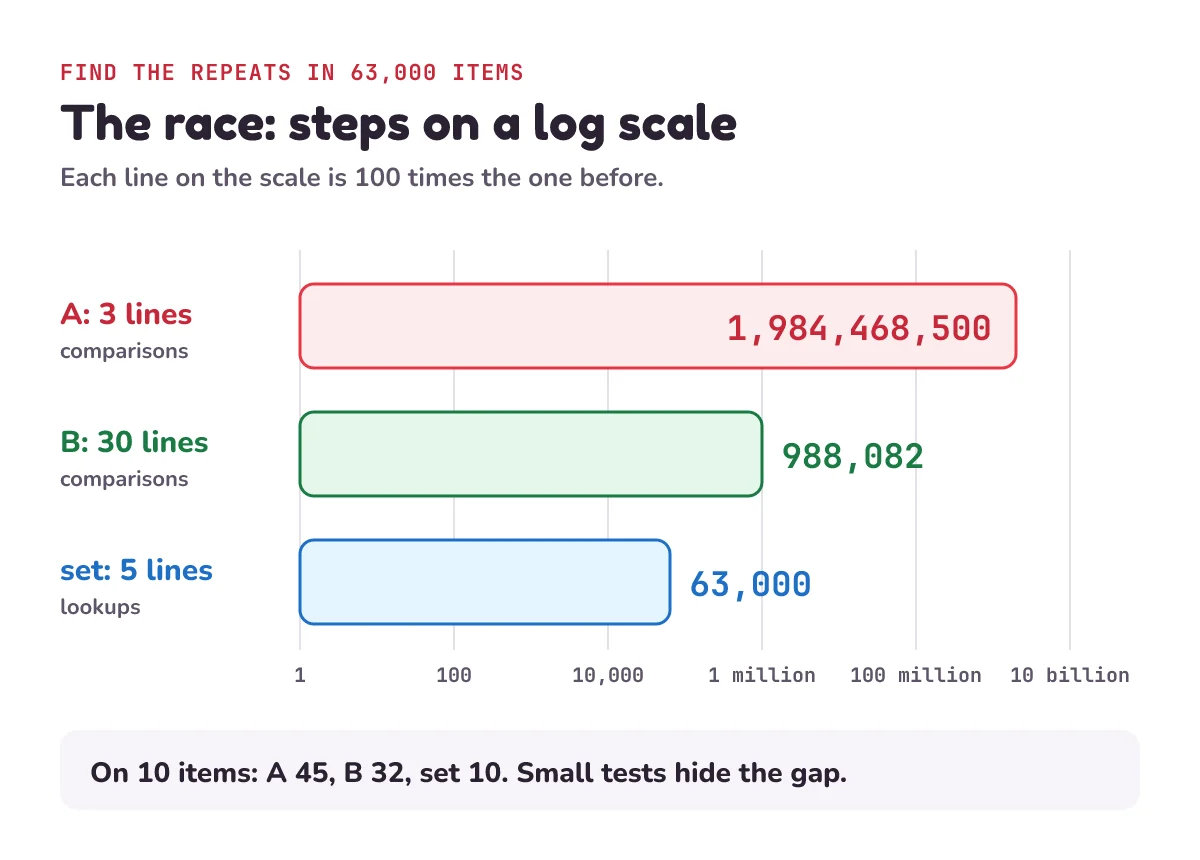
For big inputs, yes, by a lot: program A makes far more steps than program B, and the gap grows with the list. This is why the 3-line program is the slow one. The race, from the counter above:
| Items | A (3 lines) | B (30 lines) |
|---|---|---|
| 10 | 45 | 32 |
| 1,000 | 499,500 | 9,734 |
| 63,000 | 1,984,468,500 | 988,082 |
On 10 items the two are close: 45 steps against 32. If you only test on small lists, you'd never notice. On 1,000 items, A does 51 times the work. On 63,000 items, A does about 2,000 times the work of B.
Steps aren't seconds, so we also timed the three programs once, on 63,000 plain numbers (no counter), on our laptop in Python 3.13. Program A took about 34 seconds. Program B took about 0.2 seconds, and the set version about 0.01 seconds. The time gap, about 170 times, is smaller than the step gap. That's because each of A's comparisons runs inside Python's fast built-in code, while B's run as slower Python code. Still, the longer program wins by a lot, and the bigger the list, the more it wins by.
What does O(n²) mean in Big O notation?
That growth is what Big O notation describes. The Python documentation puts it like this: "We use Big O notation to describe how the running time of an operation grows with the size of its inputs."
To get the Big O, take the step count and keep only the part that grows fastest. Program A makes n(n − 1)/2 steps, which is n²/2 − n/2. For 63,000 items, n²/2 is 1,984,500,000 and n/2 is only 31,500. The small part hardly matters, so drop it. Then drop the "divided by 2" too, because it doesn't change how the count grows: halved or not, double the list and you get four times the work. What's left is O(n²), said "order n squared". The GTA write-up's (n² + n)/2 gives O(n²) as well.
Program B is O(n log n). Here log n means how many times you can halve n until you reach 1: about 16 for 63,000. Merge sort does about n steps in each of about log n rounds.
The easiest way to feel the difference is to double the list:
| Big O | Double the list, and the steps… | Example |
|---|---|---|
| O(1) | stay the same | x in a_set (on average) |
| O(log n) | go up by 1 | binary search |
| O(n) | double (× 2) | one loop over the list |
| O(n log n) | a bit more than double | merge sort, program B |
| O(n²) | go up four times (× 4) | program A |
Binary search finds an item in a sorted list by checking the middle item and throwing away the half that can't hold it. Bubble sort is another O(n²) example: it also makes n(n − 1)/2 comparisons.
Our counter shows it. Going from 1,000 to 2,000 items, program A goes from 499,500 to 1,999,000 steps: × 4.0. Program B goes from 9,734 to 21,421: × 2.2, a bit more than double.
What is the time complexity of Python list operations?
Many of them hide a loop. Program A's mistake is easy to make, because the loop hides inside one short line. These list operations all walk through the list, or copy part of it:
| Code | What Python does | Steps |
|---|---|---|
x in items | compares x with the items one by one, from the front | O(n) |
items.count(x) | checks every item, to count the matches | O(n) |
items.index(x) | searches from the front for the first match | O(n) |
items.remove(x) | searches for the first match, then moves every item after it back one place | O(n) |
items.insert(0, x) | moves every item one place along to make room at the front | O(n) |
items[a:b] | copies the b − a items in the slice | O(b − a) |
items.append(x) | adds x at the end: nothing moves | O(1) on average |
The costs for in, insert, slices and append come from the Python documentation's table of costs. That table is for CPython, the standard Python that most people install. The Python tutorial explains why the front of a list is slow: "doing inserts or pops from the beginning of a list is slow (because all of the other elements have to be shifted by one)". The table doesn't list count, index and remove, but each one has to search through the list for the value, so each is O(n) too. append is O(1) on average: once in a while the list has to move into a bigger space, and that one append copies everything.
One of these on its own is fine. The trap is putting one inside a loop over the same list. Then a line that looks like one step is really n steps, n times over: about n × n.
Why is a set faster than a list in Python?
A set is Python's container for checking whether something is in a group. The Python tutorial says: "A set is an unordered collection with no duplicate elements. Basic uses include membership testing and eliminating duplicate entries." Membership testing means asking "is x in here?"
A set doesn't search item by item. Python works out each value's hash (a number made from the value) and uses it to decide where to store the value. Python's FAQ explains this for dictionaries, which work in a similar way to sets: "The hash code is then used to calculate a location in an internal array where the value will be stored." To check x in a_set, Python works out x's hash and looks in that one place. It doesn't matter whether the set holds 10 items or 63,000.
So the fix for program A is five lines. Keep a set of the numbers you've seen. For each item, if it's already in the set, it's a repeat. Then add it:
seen = set()
for x in ids:
    if x in seen:
        print("duplicate:", x)
    seen.add(x)
duplicate: 7
duplicate: 12
duplicate: 7On 63,000 items, that's 63,000 lookups, one per item, and each lookup takes about one step. A lookup isn't a comparison: it's working out a hash and looking in one place. Here we count each lookup as one step. That's O(n): shorter than program B, and the fastest of the three. It's the fix the GTA write-up pointed to: a hash map instead of checking one by one.
"About one step" is an average. The Python documentation says a set lookup is O(1), and warns: "In the worst case, when every key hashes to the same value, each of the O(1) operations below instead takes O(n) time." The table's average costs "assume the hash function for the objects is sufficiently robust to make collisions uncommon". In plain words: they assume that different values rarely get the same hash.
1) A school's sign-up system checks 2,000 student IDs for repeats, the way program A does. There are no repeats. How many comparisons does it make? How many lookups would the set version make?
2) Program A takes 1 second on 10,000 items. About how long will it take on 20,000 items?
3) Change one thing. Suppose the item numbers already arrive sorted. Change one line of program B so it still works but does less. How many comparisons does it make on 63,000 items, and what's its Big O?
4) What is the Big O of this duplicate finder, and why?
for x in ids:
    if ids.count(x) > 1:
        print("duplicate:", x)
Show the answers
1) Each ID is compared with every ID before it: 0 + 1 + 2 + … + 1,999 = 2,000 × 1,999 / 2 = 1,999,000 comparisons. The set version makes 2,000 lookups, one per ID.
2) About 4 seconds. Program A is O(n²): double the list, and the work goes up four times.
3) Replace ordered = merge_sort(ids) with ordered = ids. Only the neighbour check is left: one comparison for each item after the first, so 62,999 comparisons. That's O(n).
4) O(n²). count checks every item in the list, and it runs once for every item, so that's about n × n steps. It also prints every copy of a repeated number, not just the extra ones: on our list it prints 12, 7, 7, 12, 7.
Questions people ask
What is Big O notation in simple terms?
A way to describe how the number of steps a program takes grows as its input gets bigger. You count how often each step runs, then keep only the part that grows fastest. A program that makes n(n − 1)/2 comparisons on n items is O(n²).
What does O(n²) mean?
The steps grow with the square of the input size. Double the input and the work goes up four times; make it 10 times bigger and the work goes up about 100 times. It usually means a loop inside a loop, sometimes hidden, like x in a_list inside a for loop.
What is log n in Big O?
How many times you can halve n before you reach 1. For 63,000 it's about 16. Binary search is O(log n): it halves the list it's searching at every step, so doubling the list adds just one step.
Why is x in a list slow in Python?
Python has to compare x with the list's items one by one until it finds a match, so it's O(n). On its own that's fine. Inside a loop over the same list, it becomes O(n²). For lots of "is it in here?" checks, use a set: x in a_set is O(1) on average.
Does Big O tell you how many seconds code takes?
No. It tells you how the work grows, not how long one step takes. That depends on the computer and on what each step does. In this post we count comparisons. Our one timing (A about 34 seconds, B about 0.2) was on one laptop, and the GTA times were measured on one player's PC.
Should I write my own merge sort in Python?
Only to learn how it works. In real code, use sorted(ids) or ids.sort(). The Python documentation lists sorting as O(n log n), and says "Sorting is adaptive and input that is already sorted or reverse-sorted takes only O(n) comparisons."
Why did GTA Online take so long to load?
One player found two slow parts in 2021. The game read its shop catalogue, about 63,000 items, slowly. And before storing each item, it checked it against every item already stored, about 2 billion checks. With both fixed, loading on that player's PC went from about 6 minutes to 1 minute 50. Rockstar released a fix in March 2021 and paid a $10,000 bug bounty.
Keep going
- Watch the full lesson, Big O Notation in Python, Explained: Why 3 Lines Can Be Slower Than 30, its one-minute Short, and the rest of the letsBug Code series on YouTube.
- O(log n) in action, about 20 checks for a million items: binary search in JavaScript and Python.
- Another O(n²) algorithm, with every comparison counted by hand: bubble sort and insertion sort in Python.
- The episode before this one: debugging in Python with trace tables, print() and breakpoint().
Checked on 31 October 2026 against the 4 sources below.
Sources
- t0st: How I cut GTA Online loading times by 70%, 28 February 2021, with updates from 15 and 16 March 2021 (the load times, about 63,000 items, the one-by-one check and its count, the fix, the $10,000 bounty)
- Python documentation: Time complexity of operations on built-in types (Big O, the costs of list and set operations in CPython, the worst case for sets, sorting)
- Python tutorial: Data Structures (what
count,indexandremovedo, why inserting at the front is slow, what sets are for) - Python documentation: Design and History FAQ (how hash tables find where a value is stored)
Every code sample in this post was run in Python 3.13 before publishing, and every step count was counted by running it.