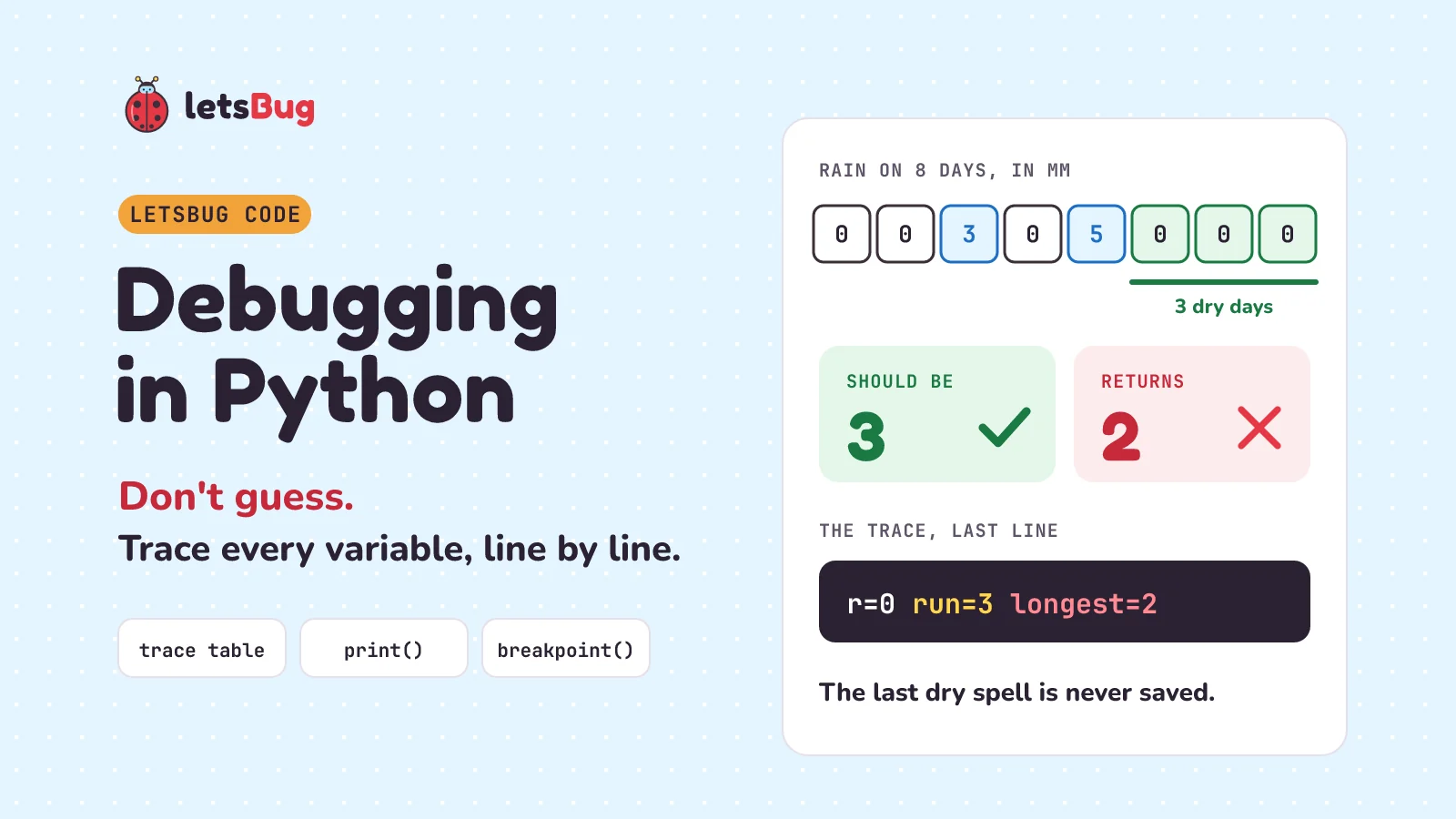
To debug Python code, don't guess. Predict what each variable should hold, then watch its real value change, line by line: by hand in a trace table, with print(f"{x=}"), or by pausing the program with breakpoint(). The bug is the first place where what you expected and what you got are different. Fix that line.
In this post we debug a real beginner bug step by step. A short Python function should find the longest dry spell in some rain readings. It should say 3, and it says 2. There is no error message and no crash (the program stopping with an error), just a wrong number. We try the tempting "guess" fix and watch it fail, trace the code by hand, find the bug, fix it, and test the fix. Then we let Python write the trace for us with print(), and pause the program with breakpoint() to look inside it.
A few words first. A bug is a mistake in code. Debugging means finding the mistake and fixing it. A variable is a named box that holds a value, and a loop is code that repeats, here once for each reading. The fixed function, which you'll understand fully by the end:
def longest_dry(readings):
    longest, run = 0, 0
    for r in readings:
        if r == 0:
            run += 1
        else:
            longest = max(longest, run)
            run = 0
    return max(longest, run)   # the fix: also save the last run

print(longest_dry([0, 0, 3, 0, 5, 0, 0, 0]))  # 3
Key takeaways
- Code can be wrong without crashing. NASA lost the Mars Climate Orbiter in 1999 because one file gave numbers in the wrong unit. Read in the expected unit, every push looked 4.45 times too small. The software ran; the values were wrong.
- Guess-and-change isn't debugging. Adding 1 to a wrong answer of 2 makes one test pass and breaks another.
- A trace table has one column per variable and one row each time the loop runs. Predict each row, then check it.
- The bug is the first place where expected and actual are different. Here: the last dry spell is never saved, because nothing comes after it.
print(f"{run=}")prints the name and the value, likerun=3. It works in Python 3.8 and later.breakpoint()pauses the program and opens pdb, Python's debugger. Typep runto see a value,nfor the next line,cto keep going.- Test a fix on several inputs, not just the one that failed.
This post goes with letsBug Code, episode 4. Watch it first, or read on: everything in the video is here, plus the full printed trace, a real pdb session and practice questions with answers.
Why did the Mars Climate Orbiter fail?
On 23 September 1999, NASA's Mars Climate Orbiter started its engine to go into orbit around Mars. NASA's investigation report says the engine start came at 09:00:46 UTC. Then the craft went behind Mars, out of radio contact, as planned. The report says: "Signal was not reacquired". Its radio signal never came back, and the spacecraft was never heard from again.
The plan was for its closest pass to be 226 km above Mars. The report says the lowest pass the craft could survive was 80 km. Working it out afterwards, the team found that its lowest point had been about 57 km above Mars: far too low.
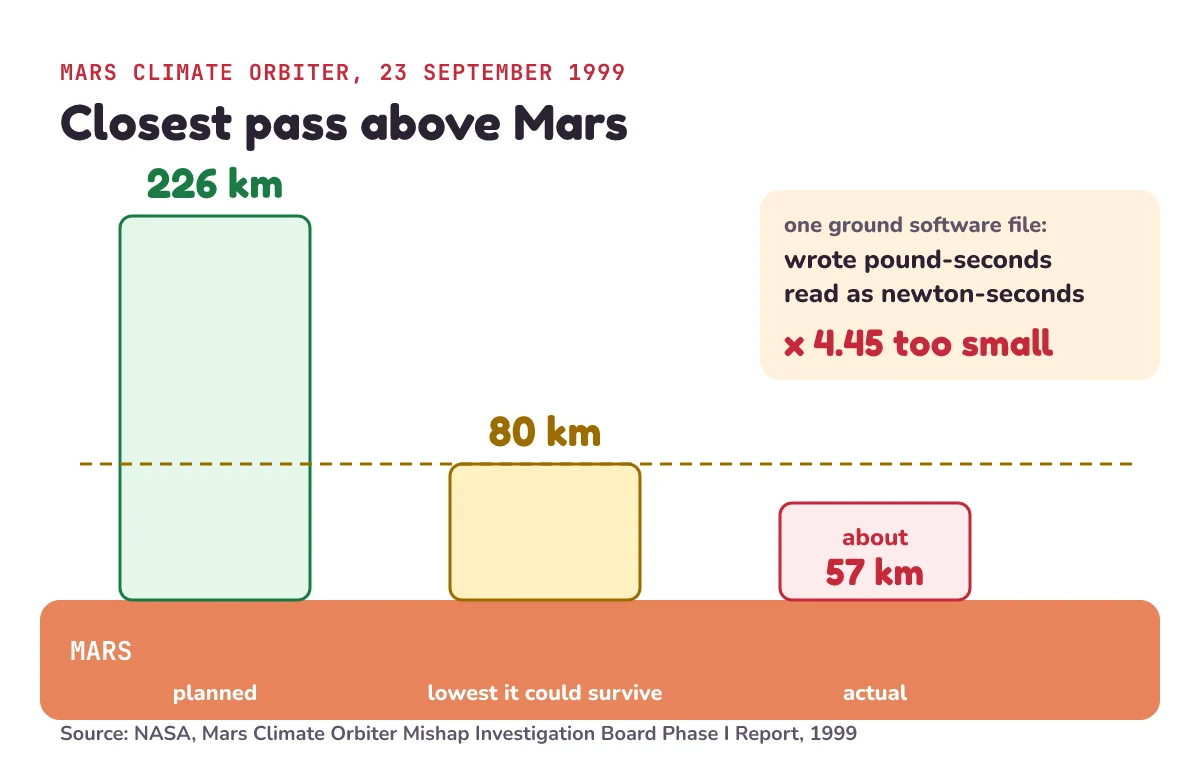
The report names one file as the root cause: "the failure to use metric units in the coding of a ground software file", a file called Small Forces. A program on the ground wrote down the small pushes from the spacecraft's thrusters (little rocket jets). The rules said those numbers had to be in newton-seconds, a metric unit. The report says: "Instead, the data was reported in English units of pound-seconds (lbf-s)." One pound-second is about 4.45 newton-seconds. So when the navigation software read the numbers as newton-seconds, it "underestimated the effect of the thruster firings on the spacecraft trajectory by a factor of 4.45". Trajectory means the path through space. Every push looked 4.45 times smaller than it really was.
The software never crashed: no error message, no program stopping. The numbers just looked fine. And there were clues. The team worked out the craft's path in more than one way. One way, called "Doppler-only", used just one kind of radio measurement. The report says: "The Doppler-only solutions consistently indicated a flight path insertion closer to the planet. These discrepancies were not resolved." In plain words: one method kept saying the craft would pass closer to Mars than the other methods said. The answers didn't agree, and nobody found out why.
The skill that finds a bug like that is simple to say: watch every value change, line by line, and compare it with what it should be. That is called tracing.
Why does this Python function return 2 instead of 3?
Here is our bug. Climate scientists track dry spells: the longest run of days in a row with less than 1 mm of rain. It's one of the standard climate indices (measures that scientists around the world agree to calculate the same way). The international list of indices calls it CDD, consecutive dry days. To keep things simple, our function counts only 0 mm as a dry day. Practice question 3 at the end uses the real rule.
Here is a function for it: a named recipe that takes a list (values in square brackets) of rain readings in millimetres and gives back one number. max(a, b) gives back the bigger of two numbers. run += 1 means "add 1 to run".
def longest_dry(readings):
    longest, run = 0, 0
    for r in readings:
        if r == 0:
            run += 1
        else:
            longest = max(longest, run)
            run = 0
    return longest

rain = [0, 0, 3, 0, 5, 0, 0, 0]   # mm of rain on 8 days
print(longest_dry(rain))  # 2
Read it in plain words. run counts the dry days in the current spell. longest keeps the longest spell so far. The loop takes each reading r in turn. On a dry day (0 mm), the run grows by one. On a wet day, the function saves the longest run so far, then starts the run again at zero.
Now look at eight days of readings from one weather station: 0, 0, 3, 0, 5, 0, 0, 0. The last three days are dry, so the answer should be 3. The function returns 2. There's no error message. Like the orbiter, the code runs and gives a number that looks fine.
Why is guessing a fix not debugging?
The tempting fix is to guess. The answer is one too small, so add one:
def longest_dry_guess(readings):
    longest, run = 0, 0
    for r in readings:
        if r == 0:
            run += 1
        else:
            longest = max(longest, run)
            run = 0
    return longest + 1

print(longest_dry_guess(rain))       # 3
print(longest_dry_guess([0, 0, 5]))  # 3, but the answer is 2
On our eight days it now says 3. Fixed? Try another list: 0, 0, 5. The longest dry spell there is two days, and the guess says 3. Guessing made one test pass and broke another. Changing code until the output looks right isn't debugging. It hides the bug, and the bug is still there.
How do you make a trace table?
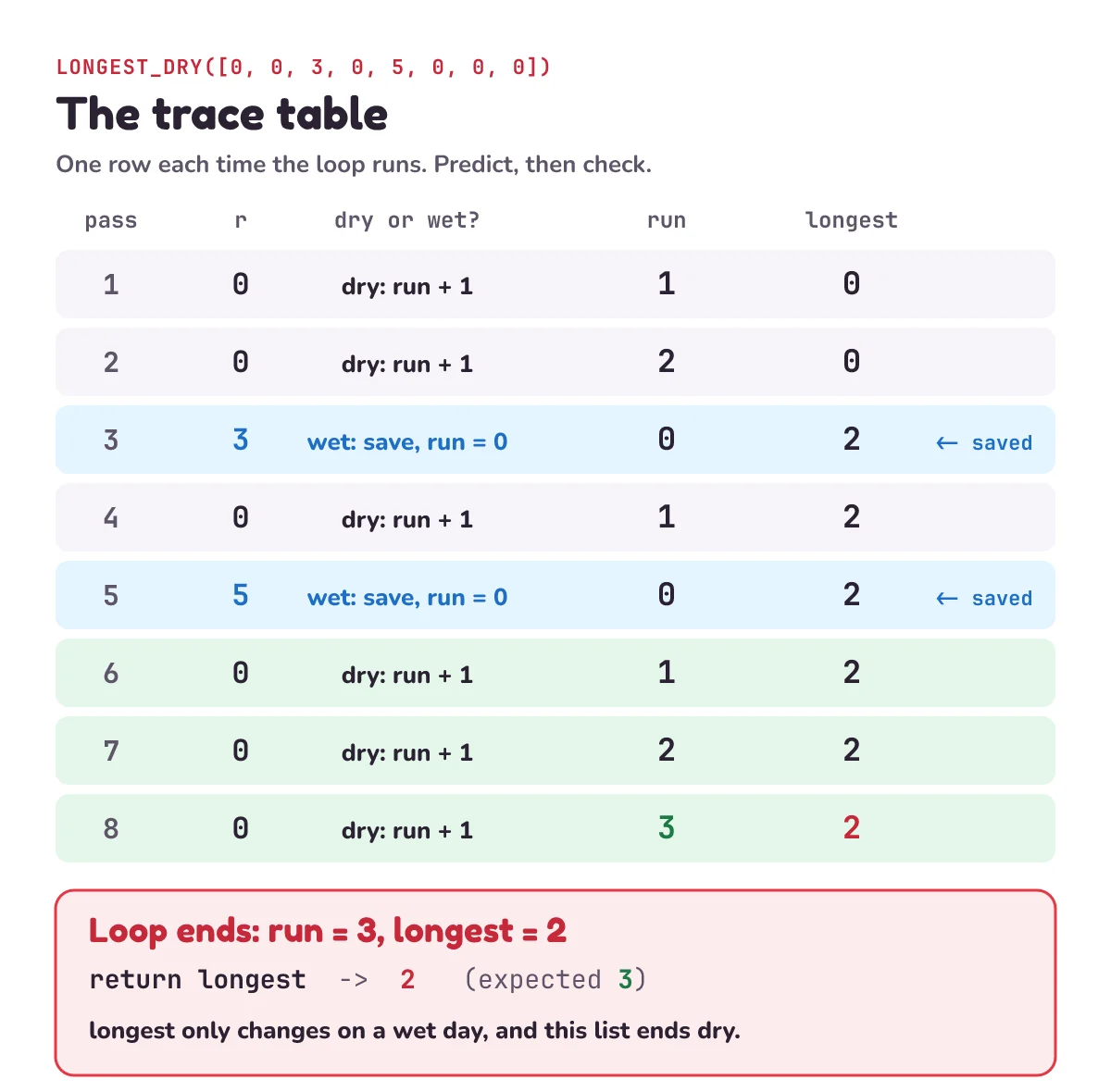
So trace it instead. A trace table is a table where you write down what every variable holds as the program runs, like a referee writing down the score after every point. It has one column per variable, and one row each time the loop runs (each run is called a pass). Before you fill in each row, predict what should happen. Then check what the code really does.
| Pass | r (mm) | Dry or wet? | What the code does | run | longest |
|---|---|---|---|---|---|
| 1 | 0 | dry | run + 1 | 1 | 0 |
| 2 | 0 | dry | run + 1 | 2 | 0 |
| 3 | 3 | wet | save, run = 0 | 0 | 2 |
| 4 | 0 | dry | run + 1 | 1 | 2 |
| 5 | 5 | wet | save, run = 0 | 0 | 2 |
| 6 | 0 | dry | run + 1 | 1 | 2 |
| 7 | 0 | dry | run + 1 | 2 | 2 |
| 8 | 0 | dry | run + 1 | 3 | 2 |
Walk through it. The first two readings are dry, so run goes to 1, then 2. Then 3 mm: wet, so longest becomes 2 and run goes back to 0. Next, a dry day: run 1. Then 5 mm: wet again. Longest stays 2, because 2 is bigger than 1, and run goes back to 0. Then the last three dry days: run climbs to 1, 2, 3.
And the loop ends. Here we expect longest to be 3, because we have just seen three dry days in a row. But run is 3, and longest is still 2, and the function returns longest. That is the first difference. That's the whole method: predict, then check, one row at a time.
How do you find the bug from a trace table?
Look for the first place where what you expected and what you got are different. We expected longest to be 3 at the end. It's 2, while run holds the 3.
Why? Longest only changes on a wet day, in the else part. If the dry spell runs to the end of the list, no wet day comes after it, so it's never saved. The last pass of a loop isn't like the others: nothing comes after it.
The fix is one line. When the loop ends, return the bigger of longest and run:
def longest_dry(readings):
    longest, run = 0, 0
    for r in readings:
        if r == 0:
            run += 1
        else:
            longest = max(longest, run)
            run = 0
    return max(longest, run)

print(longest_dry(rain))       # 3
print(longest_dry([0, 0, 5]))  # 2
print(longest_dry([0] * 7))    # 7
print(longest_dry([]))         # 0
Now test the fix on more than the input that failed. Our eight days give 3. The list 0, 0, 5, which broke the guess, gives 2. [0] * 7 is a list of seven zeros, a week with no rain at all, and it gives 7. An empty list [], with no days, gives 0, as it should. A fix that only passes the test that failed isn't finished.
How do you print variables for debugging in Python?
Tracing by hand works for small loops. For bigger ones, let Python write the table for you. Add one print line inside the loop, at the end of each pass:
def longest_dry_printed(readings):
    longest, run = 0, 0
    for r in readings:
        if r == 0:
            run += 1
        else:
            longest = max(longest, run)
            run = 0
        print(f"{r=} {run=} {longest=}")
    return longest

longest_dry_printed(rain)
The text inside f"..." is an f-string: a piece of text where anything in curly brackets { } is replaced by its value. The equals sign inside the brackets is a trick added in Python 3.8. Python's "What's New" page says an f-string such as f'{expr=}' "will expand to the text of the expression, an equal sign, then the representation of the evaluated expression". In plain words: it prints the variable's name, then =, then its value. Run it, and you get one line per pass:
r=0 run=1 longest=0
r=0 run=2 longest=0
r=3 run=0 longest=2
r=0 run=1 longest=2
r=5 run=0 longest=2
r=0 run=1 longest=2
r=0 run=2 longest=2
r=0 run=3 longest=2
It's the same trace table, written by the computer. The last line reads r=0 run=3 longest=2: the bug, in one line. When you've found the bug, delete the print line again.
How do you use breakpoint() and pdb in Python?
Or you can pause the program and look around. A debugger is a tool that lets you stop a program, look at its variables and run it one line at a time. Python's own is called pdb. Put breakpoint() on the line before the return. Python's documentation says it "drops you into the debugger at the call site", that is, at the line where you wrote it. By default, breakpoint() starts pdb for you. It was added in Python 3.7.
Save this as dry.py and run python dry.py in a terminal (the text window where you type commands):
def longest_dry(readings):
    longest, run = 0, 0
    for r in readings:
        if r == 0:
            run += 1
        else:
            longest = max(longest, run)
            run = 0
    breakpoint()
    return longest

print(longest_dry([0, 0, 3, 0, 5, 0, 0, 0]))
The program runs the loop, then stops and shows the prompt (Pdb), waiting for you to type. Here is a real session. The lines after (Pdb) are what we typed:
> dry.py(9)longest_dry()
-> breakpoint()
(Pdb) p run
3
(Pdb) p longest
2
(Pdb) n
> dry.py(10)longest_dry()
-> return longest
(Pdb) c
2
Read it line by line:
> dry.py(9)longest_dry()says where the program stopped: filedry.py, line 9, insidelongest_dry. On your computer, the folder the file is in comes before the name. The->line shows that line of code. Since Python 3.13 it stops on thebreakpoint()line itself; older versions stop on the line after it.p runmeans "print run". The pdb documentation sayspwill "Evaluate expression in the current context and print its value". Run is 3, longest is 2: the real values, right where it goes wrong.n(next) runs one more line and stops again, now at line 10,return longest.c(continue) lets the program run to the end. It prints 2.
No guessing: you see the real values at the exact line where you need them. When you're done, remove the breakpoint() line.
Which debugging method should a beginner use?
All three show the same thing, the real values, line by line. Pick by the size of the problem:
| Method | Good for | How |
|---|---|---|
| Trace table by hand | Short loops, and learning what code really does | One column per variable, one row per pass. Predict, then check. |
print(f"{x=}") | Longer loops, when you want the whole history | One print line inside the loop. Delete it when you're done. |
breakpoint() and pdb | Looking at one moment closely | Stop at a line, then p, n, c. |
Whichever you use, the steps are the same. When the output is wrong, don't guess. Predict what each variable should be. Trace the real values. Find the first line where they're different, and fix that. Then test the fix on several inputs.
1) A station sends nine days: 4, 0, 0, 0, 1, 0, 0, 0, 0. Trace both versions. What does the buggy one (return longest) return, and what does the fixed one return?
2) Why is return longest + 1 not a fix?
3) Change one thing. Climate scientists count a dry day as any day with less than 1 mm of rain. Change one line so longest_dry uses that rule. What should it return for 0, 0.4, 3, 0.2, 0, 0.8, 6, 0?
Show the answers
1) Buggy: 3. Fixed: 4. The first dry spell is three days, and the wet day after it (1 mm) saves it. The last spell is four days, and then the list ends, so the buggy version never saves it.
2) It only works when the last spell happens to be exactly one longer than the saved one. For [0, 0, 5] it gives 3, but the longest dry spell is 2.
3) 3. Change if r == 0: to if r < 1:. Then 0.2, 0 and 0.8 count as three dry days in a row. With == 0, every dry spell in that list is one day long, so it returns 1.
def longest_dry_1mm(readings):
    longest, run = 0, 0
    for r in readings:
        if r < 1:   # a dry day: less than 1 mm
            run += 1
        else:
            longest = max(longest, run)
            run = 0
    return max(longest, run)

week = [0, 0.4, 3, 0.2, 0, 0.8, 6, 0]
print(longest_dry_1mm(week))  # 3
print(longest_dry(week))      # 1
Questions people ask
What is debugging in Python?
Finding and fixing a mistake (a bug) in your code. The reliable way is to predict what each variable should hold, look at the real values as the program runs (with a trace table, print or the debugger), and fix the first place where they're different.
What is a trace table?
A table with one column for each variable and one row each time the loop runs (or each time a value changes). You fill it in by following the code one line at a time. It shows you what the program really does, not what you think it does.
How do I fill in a trace table in a GCSE computer science exam?
Use the columns the question gives you. Go through the code one line at a time, as the computer would. Write a new value only when a line changes it, and check each loop's condition before the loop runs again. Watch the last pass and what happens after the loop ends: that's where the bug in this post hides.
What does f"{x=}" do in Python?
It prints the name of the variable, an equals sign, then its value, so print(f"{run=}") shows run=3. It was added in Python 3.8, so it won't work in older versions.
What does breakpoint() do in Python?
It pauses your program at that line and opens pdb, Python's debugger, so you can look at the variables. It was added in Python 3.7. Type p and a variable's name to see its value, n to run the next line and c to keep going.
What is the difference between n and c in pdb?
n (next) runs one line and stops again, so you can watch the program step by step. c (continue) runs on and only stops at the next breakpoint, or runs to the end if there isn't one.
Is print debugging bad?
No. Printing the values is a quick way to trace a loop, and f"{x=}" makes the output easy to read. What matters is that you look at the real values instead of guessing. Remove the print lines once the bug is fixed.
Why was the Mars Climate Orbiter lost?
One ground software file gave the thrusters' pushes in pound-seconds where newton-seconds were expected, so the navigation software took their effect to be 4.45 times smaller than it was. Its lowest point was about 57 km above Mars, below the 80 km it could survive, instead of the planned 226 km.
Keep going
- Watch the full lesson, Debugging in Python for Beginners: Trace Tables, print() and breakpoint(), its one-minute Short, and the rest of the letsBug Code series on YouTube.
- The episode before this one, with another trace table and four classic bugs: sentinel values in Python and the Rainfall problem.
- More tracing, one comparison at a time: bubble sort and insertion sort in Python.
- What really happens when Python runs your code: what happens when you run Hello World.
Checked on 27 October 2026 against the 5 sources below.
Sources
- NASA: Mars Climate Orbiter Mishap Investigation Board Phase I Report, 10 November 1999 (the date, the root cause, pound-seconds and newton-seconds, the factor of 4.45, 226 km, 80 km and 57 km, the unresolved navigation results)
- ETCCDI: list of 27 core climate indices (CDD: consecutive days with less than 1 mm of rain)
- Python documentation: What's New in Python 3.8 (
=in f-strings) - Python documentation: Built-in functions (
breakpoint(), added in 3.7) - Python documentation: pdb, the Python debugger (
p,n,c, and stopping on thebreakpoint()line since 3.13)
Every code sample in this post was run in Python 3.13 before publishing.