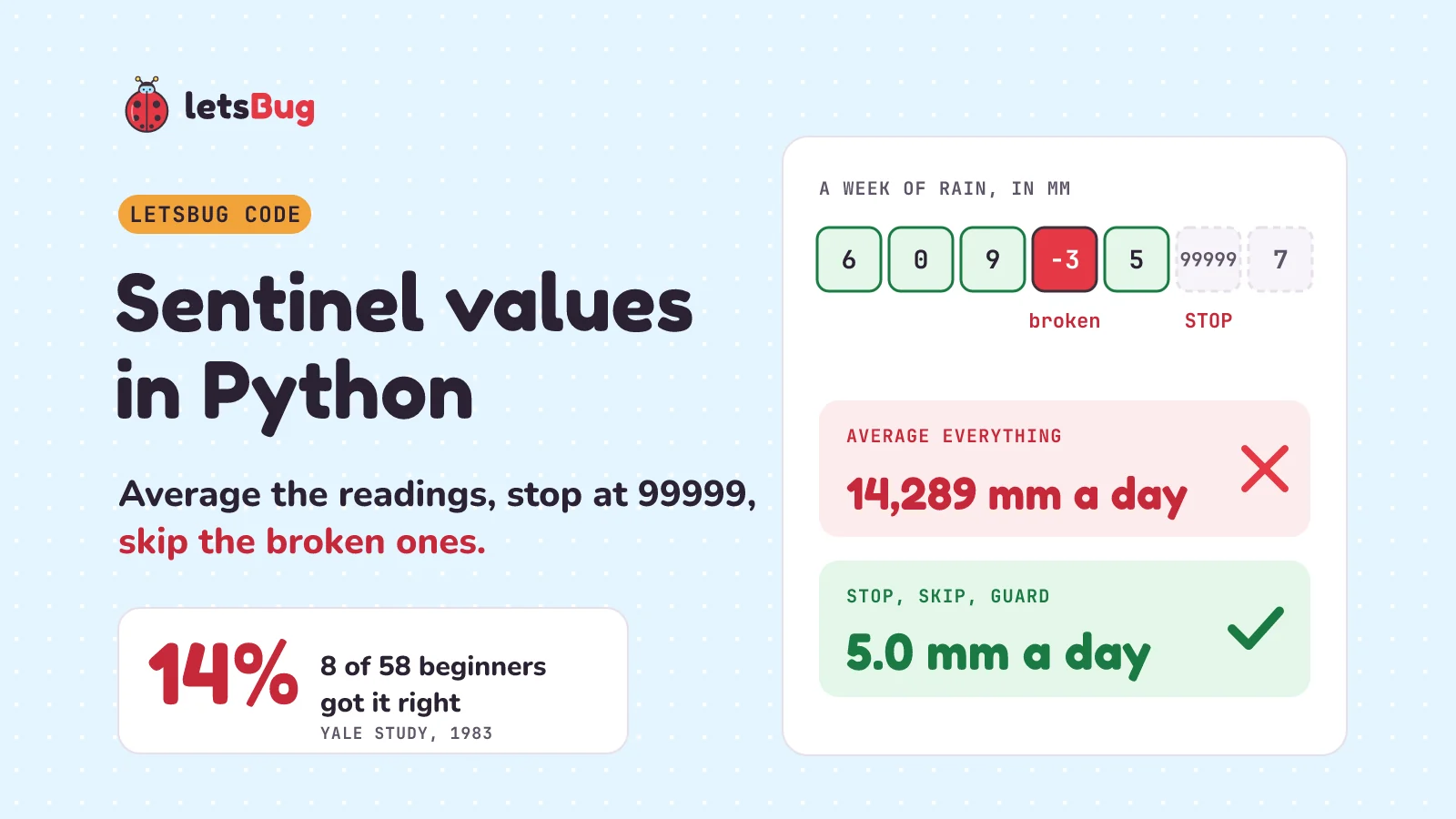
A sentinel value is a stop value such as 99999 that marks the end of the data but isn't data, like the "The End" card that closes a film. To average numbers up to a sentinel in Python, go through them one by one, stop at the sentinel, add and count only valid ones, and never divide by zero.
In this post we use that on a famous beginner puzzle, the Rainfall problem. We write it the way most beginners do, catch four classic bugs (mistakes in code) on real numbers, fix each one, trace the fixed version by hand (follow it step by step, like checking a receipt line by line), shrink it to six lines, and test it with five small cases. Then we read numbers typed at the keyboard until the user types the stop value.
The quick answer is a function: a named recipe that takes a list of readings (values in square brackets, like eggs in a carton) and hands back their average. Inside it, a loop repeats once per reading, like a cashier scanning items one at a time. total and days are variables, named boxes that hold numbers. break means "leave the loop now", return hands back the answer, None is Python's "nothing here", like a blank box on a form, and print shows a result on screen:
def rainfall(readings):
    total, days = 0, 0
    for r in readings:
        if r == 99999:      # the sentinel: stop here
            break
        if r >= 0:          # skip broken readings
            total += r
            days += 1
    if days == 0:           # nothing valid: no average
        return None
    return total / days

print(rainfall([6, 0, 9, -3, 5, 99999, 7]))  # 5.0
Key takeaways
- A sentinel value is a stop value, not data. Never add it, count it or average it.
- Check first, then use. Test for the sentinel before you add a reading. Add first and the 99999 sneaks into your total.
- Keep readings that are zero or more (
>= 0), not only those above zero (> 0). A dry day with 0 mm of rain is a real reading. - Guard the division: check before you divide, like looking both ways before you cross. If no valid readings are left, return
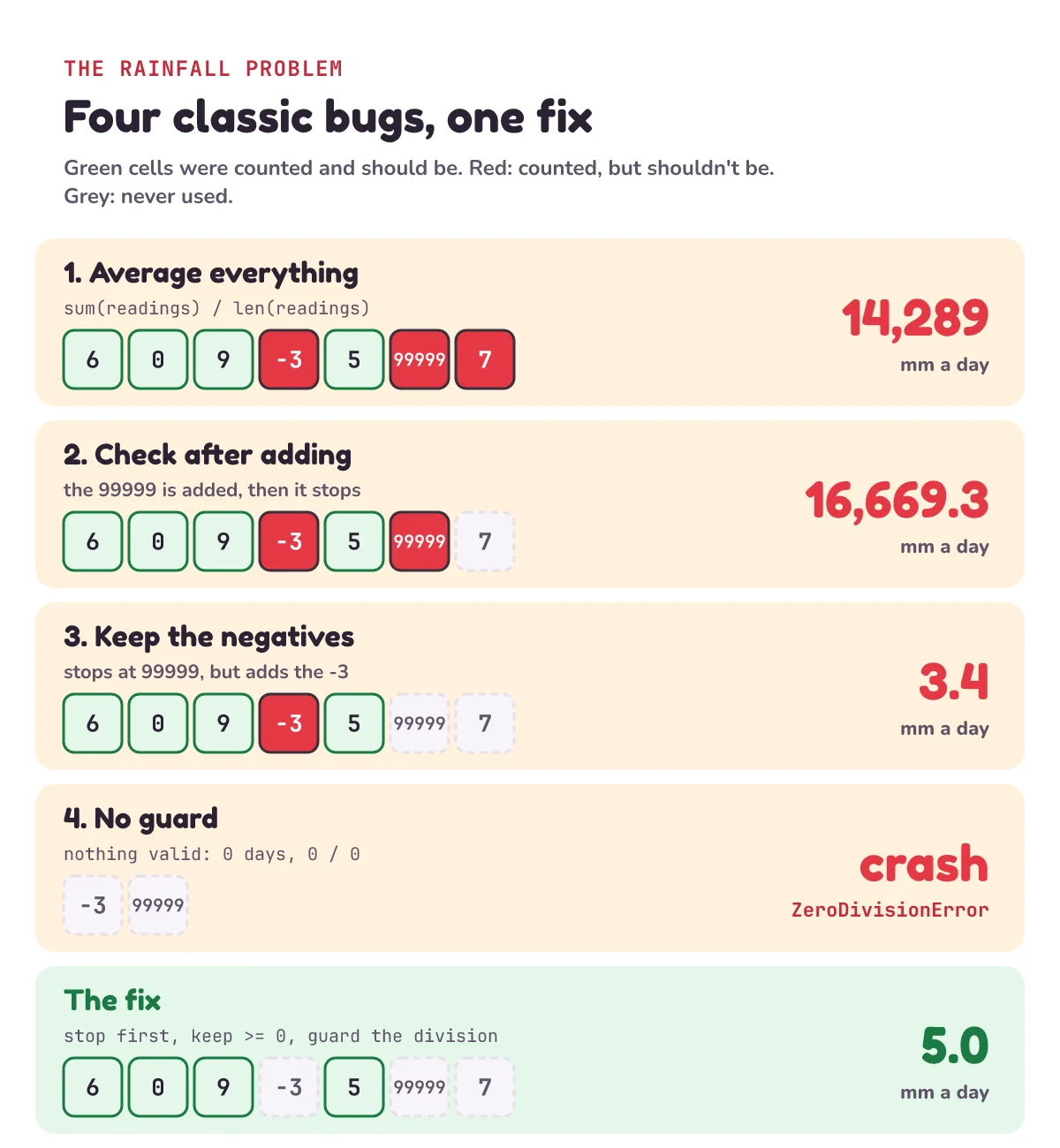
Noneinstead of crashing withZeroDivisionError, Python's error for dividing by zero. - On the week 6, 0, 9, -3, 5, 99999, 7, three classic bugs give 14,289, 16,669.3 and 3.4 mm a day. The right answer is 5.0. The fourth bug crashes when no reading is valid.
- In one 1983 Yale study, only 8 of 58 first-course students using standard Pascal (14%) solved this problem. Later studies range from none of 149 fully correct to 186 of 218 mostly correct.
- Five small tests catch every bug here. The easy one to forget is the empty list.
This post goes with letsBug Code, episode 3. Watch it first, or read on: everything in the video is here, plus the keyboard version, Python's own built-in sentinel tools and practice questions.
What is a sentinel value in Python?
A sentinel value is a value you agree on in advance to mean "stop here" or "nothing here". It's picked so it can never be a real piece of data. Nobody gets 99999 mm of rain in a day, so 99999 can safely mean "end of the readings".
Real data is full of them. The US weather agency NOAA keeps daily records from weather stations around the world, a data set called GHCN-Daily. Its readme (the help file that comes with the data) says rain is stored as "PRCP = Precipitation (tenths of mm)", so 600 means 60 mm, and a missing reading is written as -9999. Every month gets 31 slots, even short ones. For April, the readme says plainly: "VALUE31 = -9999". April has no 31st day, so that slot always holds the missing code.
Say an April station recorded 60 mm of rain over the month's 30 days: 600 in tenths. Average all 31 slots without thinking and you get (600 + -9999) / 31 = about -303 tenths, or -30 mm a day. Rain doesn't fall upwards. The -9999 was a sentinel, and it got treated as data. Cleaning data like this is everyday programming work, and it's what makes a climate graph of monthly rainfall trustworthy.
What is the Rainfall problem?
In the early 1980s, Elliot Soloway's team at Yale University gave beginners a short task. In his 1986 article, as quoted by Kathi Fisler in 2014, it reads: "Write a program that will read in integers and output their average. Stop reading when the value 99999 is input." Integers are whole numbers such as 6, 0 or -3, like when you count people: there's no half a person. The 99999 is the sentinel.
Later versions added a twist. Fisler notes that some added negative numbers "that the programmer should treat as input errors". In our story, a negative rain reading means a broken rain gauge, so we skip it.
Our Python version gets the readings in a list: a row of values in square brackets, like eggs in a carton, each in its own slot. We write a function, a named recipe that takes the list and hands back an answer. The job: average the readings that are zero or more, up to the first 99999, and ignore everything after it.
Here's the week we'll use all the way through, in millimetres:
week = [6, 0, 9, -3, 5, 99999, 7]
The -3 is a fault, the 99999 is the sentinel, and the 7 comes after the sentinel, so it never counts. The valid readings are 6, 0, 9 and 5: 20 mm over 4 days, so the answer is 5.0 mm a day.
How many beginners get the Rainfall problem right?
Fewer than you'd think, at least in the early studies. Soloway, Bonar and Ehrlich published the best-known numbers in 1983. Their students wrote in Pascal, and one later study used C# (say "C sharp"): both are programming languages, just as Hindi and English are spoken ones. Here are those numbers and some later ones, mostly from a 2015 review of Rainfall studies by Seppälä and colleagues:
| Study | Who | Solved it |
|---|---|---|
| Soloway, Bonar & Ehrlich, Yale (1983) | First programming course, normal Pascal | 8 of 58 (14%) |
| Same study | First course, Pascal with an exit in the middle of the loop | 14 of 58 (24%) |
| Same study | Second course (normal Pascal / exit in the middle) | 36% / 61% |
| Simon (2013) | 149 first-course students, C#, exam conditions | none fully correct |
| Fisler (2014) | 218 students who had learned list tools early | 186 mostly correct |
| Seppälä et al. (2015) | Three first courses (their own study) | at least about half |
The second version, called Pascal L, had no normal while loop. Instead its loop had an "exit when" line you could put in the middle, which is what Python's break lets you do (more on that below). A summary of the 1983 paper says 80% of students planned it the natural way: read a number first, then process it. And across the study, 52% wrote correct programs with the exit-in-the-middle loop against 33% with normal Pascal.
A teacher note in Runestone's Computer Science Principles book adds that only 69% of third- and fourth-year students solved it. We couldn't open the original paper to check this figure: its publisher's site blocked our download.
So is it hopeless? No. The 2015 review calls the overall picture "mixed", and found that most bugs came from failing "to handle invalid or missing input". That's the pattern you'll see below: the averaging is easy. Every bug is about the sentinel, the bad readings or the empty case.
Mistake 1: why does averaging the whole list give 14,289 mm?
The quickest answer is one line: add up the list and divide by its length. sum() adds up every value in a list and len() counts how many there are, like a till's total and its item count.
def average_everything(readings):
    return sum(readings) / len(readings)

week = [6, 0, 9, -3, 5, 99999, 7]
print(sum(week))                  # 100023
print(average_everything(week))  # 14289.0
That's 100,023 divided by 7 readings: 14,289 mm of rain a day, over 14 metres. The sentinel went into the average, and so did the -3 and the 7 after it. A sentinel is a signal, so it has to be handled by the program's logic, never by the arithmetic.
Mistake 2: why must you check for the sentinel first?
So we need a loop: a piece of code that repeats, once for each reading, like a cashier scanning items one at a time. We also need variables: names for boxes that hold a value. total holds the rain so far and days counts the readings we've used. total += r means "add r to what's in the total box".
To stop at the sentinel, Python has break. The Python tutorial says it "breaks out of the innermost enclosing for or while loop": it walks straight out of the loop, like leaving a queue. A common first try adds and counts each reading, and only then checks for the sentinel:
def rainfall_late_check(readings):
    total, days = 0, 0
    for r in readings:
        total += r
        days += 1
        if r == 99999:  # too late: it's already been added
            break
    return total / days

print(rainfall_late_check(week))  # 16669.333333333332
Follow it through. 6, 0, 9, -3 and 5 are added. Then 99999 is added and counted too, and only then does the loop stop. That's 100,016 over 6 days: still more than 16,000 mm a day. The rule: check a value before you use it. That is the "read, check, then use" plan most of Soloway's students wanted to write, and break lets you write it in that order.
Mistake 3: why is 3.4 wrong when it looks fine?
Move the check to the top of the loop and break before adding:
def rainfall_negatives_in(readings):
    total, days = 0, 0
    for r in readings:
        if r == 99999:
            break
        total += r
        days += 1
    return total / days

print(rainfall_negatives_in(week))  # 3.4
Now the 99999 stops the loop and the 7 after it is never read. The total is 17 over 5 days: 3.4 mm. That looks perfectly reasonable, which makes it the most dangerous bug so far. A crazy number like 14,289 gets noticed. A believable wrong number gets published.
The problem is the -3. It's a broken gauge, and it's dragging the average down. So add one more test: only add and count readings that are zero or more, r >= 0.
>= 0, not > 0. A dry day with 0 mm of rain is a real reading. With r > 0 our week loses its dry day and gives 20 / 3 = 6.67 mm, another believable wrong answer.How do you trace a sentinel loop?
Here is the fixed loop, so far without a guard (a check before a risky step) for a list with no valid readings:
def rainfall_no_guard(readings):
    total, days = 0, 0
    for r in readings:
        if r == 99999:
            break
        if r >= 0:
            total += r
            days += 1
    return total / days

print(rainfall_no_guard(week))  # 5.0
To be sure it's right, trace it. A trace table is a table where you write down what the program does at each step and what every variable holds afterwards, like a referee's scoresheet. One row per reading:
| r | What happens | total | days |
|---|---|---|---|
| 6 | add | 6 | 1 |
| 0 | add (a real dry day) | 6 | 2 |
| 9 | add | 15 | 3 |
| -3 | skip | 15 | 3 |
| 5 | add | 20 | 4 |
| 99999 | break | 20 | 4 |
The 7 never gets a row: the loop has already stopped. 20 over 4 is 5.0 mm a day, the right answer. But we're not done.
Mistake 4: how do you avoid ZeroDivisionError?
What if the station sends nothing useful? Say the list is just [-3, 99999]. The loop skips the -3 and stops at the 99999. Total 0, days 0, and 0 / 0 has no answer.
print(rainfall_no_guard([-3, 99999]))
# ZeroDivisionError: division by zero
ZeroDivisionError is the error Python raises when you divide by zero. Its documentation: "Raised when the second argument of a division or modulo operation is zero." The second argument is the number you divide by, modulo (written %) gives the remainder, and "raised" means Python stops and reports the error. Think of sharing 0 sweets among 0 friends: there's no sensible answer, so Python stops the program instead of making one up.
The fix is a guard, an if that checks before the risky step. If no valid days are left, there's no average to give, so return None: Python's value for "nothing here", like a blank box on a form. That's the quick-answer version at the top of this post:
print(rainfall([-3, 99999]))  # None
print(rainfall([]))           # None
In the early studies this was one of the most missed steps. In Simon's 2013 study of 149 beginners, Fisler's comparison table shows 0% guarded the division. The 2015 review saw it too: handling missing input was the step its students most often left out or got wrong, and one common bug was a program that "crashed on all-negative input".
How do you average numbers before a sentinel in fewer lines?
Python's built-in tools let you clean the data first and average it after, in six lines:
def rainfall_clean(readings):
    stop = readings.index(99999) if 99999 in readings else len(readings)
    rain = [r for r in readings[:stop] if r >= 0]
    if not rain:
        return None
    return sum(rain) / len(rain)

print(rainfall_clean(week))                # 5.0
print(week.index(99999))                   # 5
print([r for r in week[:5] if r >= 0])  # [6, 0, 9, 5]
Line by line, with every new word:
readings.index(99999)gives the index of the first 99999: its position number, counted from 0, like floors in a building where the ground floor is 0. In our week it's 5. If the value isn't there,index()raisesValueError, Python's error for "that value isn't here". So we check99999 in readingsfirst and use the whole length when there's no sentinel.A if test else Bmeans "A when the test is true, otherwise B", like "walk if it's dry, else take the bus".readings[:stop]is a slice: a copy of the firststopitems, like tearing the front strip off a ticket roll. Everything from the sentinel onwards is left behind.[r for r in ... if r >= 0]is a list comprehension: a one-line recipe for a new list, read as "r, for every r in the slice, if r is zero or more". It works like a sieve that keeps only the good readings.if not rainis true when the list is empty. That's the guard.
This is the "clean first" plan. In her 2014 study, Fisler looked at 218 students whose courses worked with lists from the early weeks (in other languages, with tools much like these), and 186 had a mostly correct solution. In 2026 that paper won the Lasting Impact Award at ICER, a yearly conference on teaching computing. Looking back, she told Brown University's news team that the key was "the set of built-in and library operations that students knew", rather than the style of language.
What about Python's own average? The statistics module is a toolbox of ready-made maths functions that comes with Python. statistics.mean() works on the cleaned list, but its documentation warns: "If data is empty, StatisticsError will be raised." So you still need the guard.
How do you test a sentinel loop?
One example proves almost nothing. Write small tests before you trust it. An assert is a line that says "this must be true". If it isn't, Python stops with AssertionError, like a smoke alarm going off. Five cases cover everything here. The first line runs the same five tests on both functions, like giving two students the same quiz:
for f in (rainfall, rainfall_clean):
    assert f([6, 0, 9, -3, 5, 99999, 7]) == 5.0  # our week
    assert f([6, 0, 9]) == 5.0                   # no sentinel at all
    assert f([-3, 99999]) is None                # nothing valid
    assert f([]) is None                         # an empty list
    assert f([99999, 6]) is None                 # the sentinel comes first
print("all 5 tests pass")  # all 5 tests pass
We ran all six versions from this post against those five tests. Both correct versions pass all five. Every wrong version fails at least three:
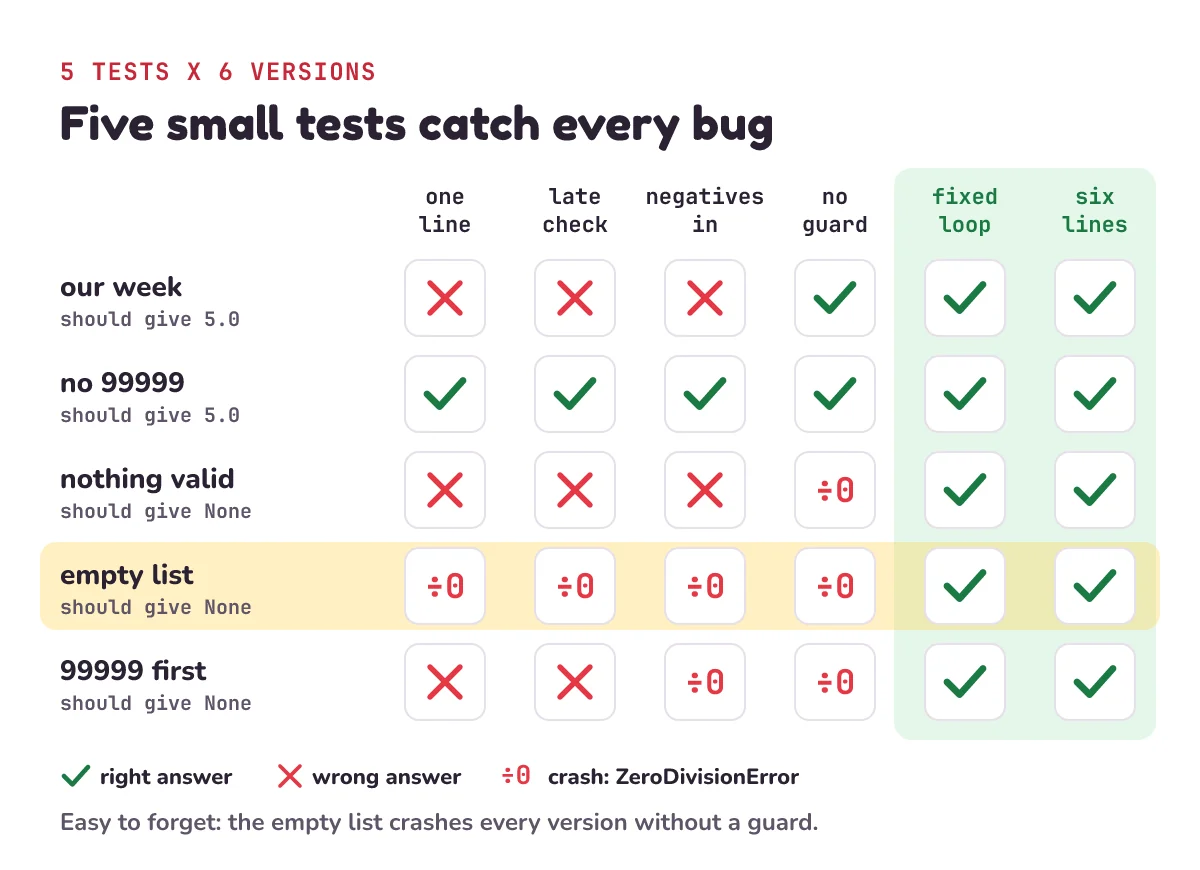
The empty list is easy to forget, and it's the one that crashes every version without a guard.
How do you read numbers until the user types a sentinel?
The original Rainfall problem read numbers typed at the keyboard. That's a sentinel-controlled loop: a loop that doesn't know in advance how many times it will run, and keeps going until the stop value arrives. input() shows a message, waits for the user to type a line and press Enter, and gives back what they typed as text. int() turns that text, like "6", into the number 6.
total, days = 0, 0
while True:
    r = int(input("Rain today in mm (99999 to stop): "))
    if r == 99999:
        break
    if r >= 0:
        total += r
        days += 1
if days == 0:
    print("No valid readings")
else:
    print("Average:", total / days)
while True means "repeat forever", so the only way out is the break. That's the "read, check, then use" order again. A run, with the user typing our week:
Rain today in mm (99999 to stop): 6
Rain today in mm (99999 to stop): 0
Rain today in mm (99999 to stop): 9
Rain today in mm (99999 to stop): -3
Rain today in mm (99999 to stop): 5
Rain today in mm (99999 to stop): 99999
Average: 5.0
Python even has the sentinel idea built in. iter() makes a one-at-a-time reader, like a ticket machine that gives one ticket per press. Give it a function and a sentinel, and its documentation says it keeps calling the function until "the value returned is equal to sentinel". input() gives back text, so the sentinel here is the text "99999", not the number:
readings = [int(line) for line in iter(input, "99999")]
print(rainfall(readings))  # 5.0 after typing 6, 0, 9, -3, 5, 99999
It reads lines until one is exactly 99999, then stops. Doing the same in JavaScript, the language web pages run? Our Node.js terminal input post keeps asking until the user types exit, which is the same pattern.
1) A station sends 3, 0, 14, -9999, 0, 7, 99999, 21. What does rainfall return?
2) Which of these inputs crash rainfall_no_guard: [6, 0, 9], [-3, 99999], [99999, 6]?
3) Change one thing: write wettest(readings), which returns the largest valid reading before the sentinel, or None if there isn't one. What does it return for our week?
Show the answers
1) 4.8. The -9999 missing code is negative, so it's skipped. The 21 comes after the sentinel, so it's never read. That leaves 3, 0, 14, 0 and 7: 24 mm over 5 days.
2) [-3, 99999] and [99999, 6]. Neither has a valid reading before the sentinel, so days stays 0 and the division crashes. [6, 0, 9] has no sentinel at all, and still gives 5.0.
3) 9. Same loop, but keep the biggest instead of a total. For more ways to find the biggest value, see largest and smallest number in an array.
def wettest(readings):
    best = None
    for r in readings:
        if r == 99999:
            break
        if r >= 0 and (best is None or r > best):
            best = r
    return best

print(wettest(week))          # 9
print(wettest([-3, 99999]))  # None
Questions people ask
What is a sentinel value in Python?
A value that means "stop" or "nothing here" instead of being data, such as 99999 at the end of rain readings, -1 for "no more marks", or an empty line for "no more input". Pick one that can never be a real value, check for it before using each value, and never include it in your results.
What is a sentinel-controlled loop?
A loop that runs until it meets the sentinel, rather than a fixed number of times. In Python it's usually while True: with an if value == SENTINEL: break at the top, or a for loop over a list with the same break. A counter-controlled loop, like for i in range(10) (the numbers 0 to 9), knows its number of steps before it starts.
How do I find the average of numbers in Python until the user enters 0?
Use the keyboard loop above with 0 as the sentinel: if r == 0: break. Add and count every other number, and check that the count isn't 0 before dividing. But if 0 can be a real value, like a dry day, choose a different sentinel. That's why the Rainfall problem uses 99999.
Why use 99999 or -9999 as a sentinel?
Because no real reading can have that value. Daily rain is never 99999 mm, and NOAA's records never hold a real -9999. A sentinel that could also be real data, like 0 for rain, makes the program throw away genuine readings.
Should a function return None or 0 when there's no data?
None. An average of 0 says "it was dry", which is a claim about the weather. None says "there's nothing to average", which is the truth. The code that uses the result can then check if result is None and show a message.
Does Python have a built-in sentinel?
Two kinds. iter(function, sentinel) keeps calling a function until it returns the sentinel, as in the keyboard example above. And Python 3.15 added a built-in sentinel() that makes a one-of-a-kind marker, like a bookmark that can never be mistaken for a page, such as one meaning "this input to the function wasn't given". The documentation says sentinel objects "compare equal only to themselves". That's a different job from a stop value in data, and the code in this post doesn't need it.
What is the Rainfall problem?
A beginner programming task from Elliot Soloway's research at Yale in the early 1980s: average a series of numbers, stopping at the sentinel 99999. Later versions also skip negative numbers. Each part is easy; putting the parts together in the right order is what trips people up.
Keep going
- Watch the full lesson, Sentinel Values in Python: The Rainfall Problem Most Beginners Get Wrong, its one-minute Short, and the rest of the letsBug Code series on YouTube.
- Episode 2's challenge, answered: bubble sort with a "swapped" flag makes 999 comparisons on 1,000 numbers already in order. See bubble sort and insertion sort in Python.
- More tracing, one step at a time: binary search in JavaScript and Python, letsBug Code episode 1.
- Rain data in the real world: how to read a climate graph.
Checked on 25 October 2026 against the 12 sources below.
Sources
- Queen's University: synopsis of Soloway, Bonar & Ehrlich, "Cognitive strategies and looping constructs", Communications of the ACM 26(11), 1983 (Pascal L, 80% read-then-process, 52% vs 33%)
- Seppälä, Ihantola, Isohanni, Sorva & Vihavainen: "Do we know how difficult the Rainfall Problem is?", Koli Calling 2015 (the 1983 success rates, Simon 2013, the review's own results)
- Kathi Fisler: "The Recurring Rainfall Problem", ICER 2014, author's copy (Soloway's 1986 wording, negative inputs, the comparison with Simon)
- Kathi Fisler & Francisco Enrique Vicente Castro: "Sometimes, Rainfall Accumulates", ICER 2017, author's copy (186 of 218)
- Brown University Computer Science: Kathi Fisler receives the 2026 ICER Lasting Impact Award (27 August 2026)
- Runestone Academy: Teacher Note: The Rainfall Problem (Yale, 1983, 69%)
- NOAA NCEI: GHCN-Daily readme (rain in tenths of mm, missing = -9999, VALUE31 for April)
- Python documentation: More control flow tools (
break) - Python documentation: Built-in functions (
input,iterwith a sentinel,sentinel()in 3.15) - Python documentation: Built-in exceptions (
ZeroDivisionError) - Python documentation: Data structures (
list.indexandValueError) - Python documentation: statistics (
meanon an empty list)
Every code sample in this post was run in Python 3.13 before publishing.