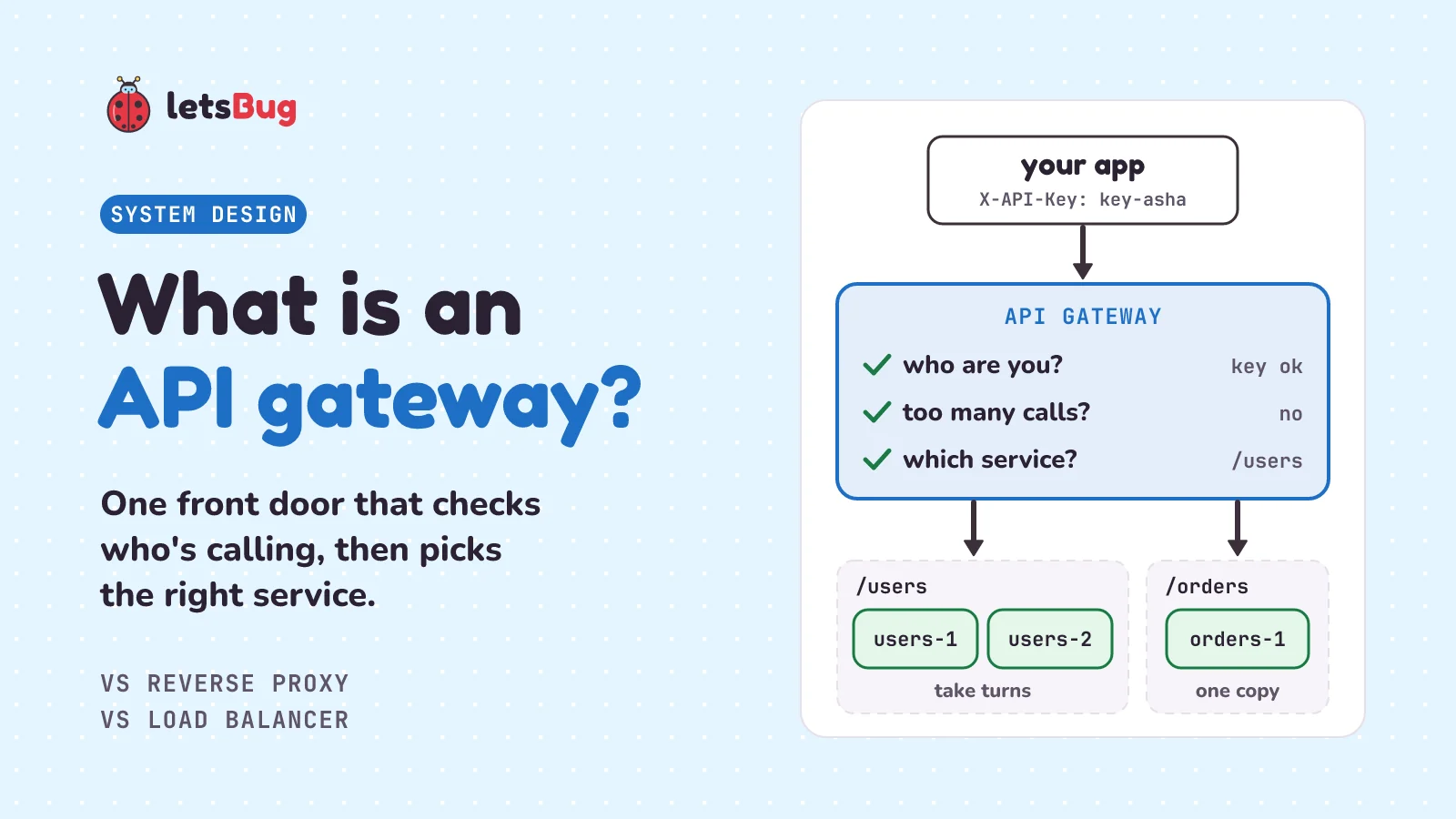
An API gateway is a single front door for all of an app's APIs. Every request reaches it first. It checks who is calling, usually with an API key or a token, turns away clients who call too often, and sends each request to the right service by its path, such as /users or /orders.
In this post we start with an office building's front desk, lift lobby and security desk, then meet the three machines they stand for: a reverse proxy, a load balancer and an API gateway. We see where they overlap (NGINX can do all three jobs), write the three common ways a load balancer picks a server, and build a tiny working gateway in Python, with nothing to install.
First, four words we'll use a lot. A server is a computer program that waits for requests and answers them, like a shop counter. A client is whatever asks: a phone app, a website, another program. An API (application programming interface) is the list of requests a server accepts, like a restaurant menu: you can order what's on it, in the way it says. A request is one order, such as "give me user 7".
Key takeaways
- A reverse proxy stands in front of your servers. Clients only ever talk to it, so the servers behind it stay hidden.
- A load balancer spreads requests over several copies of the same app, so no single copy gets swamped.
- An API gateway is a reverse proxy that also checks who is calling, limits how often each client can call, and routes by path or version to different services.
- The jobs overlap. NGINX can do all three. Big systems often split them across separate tools.
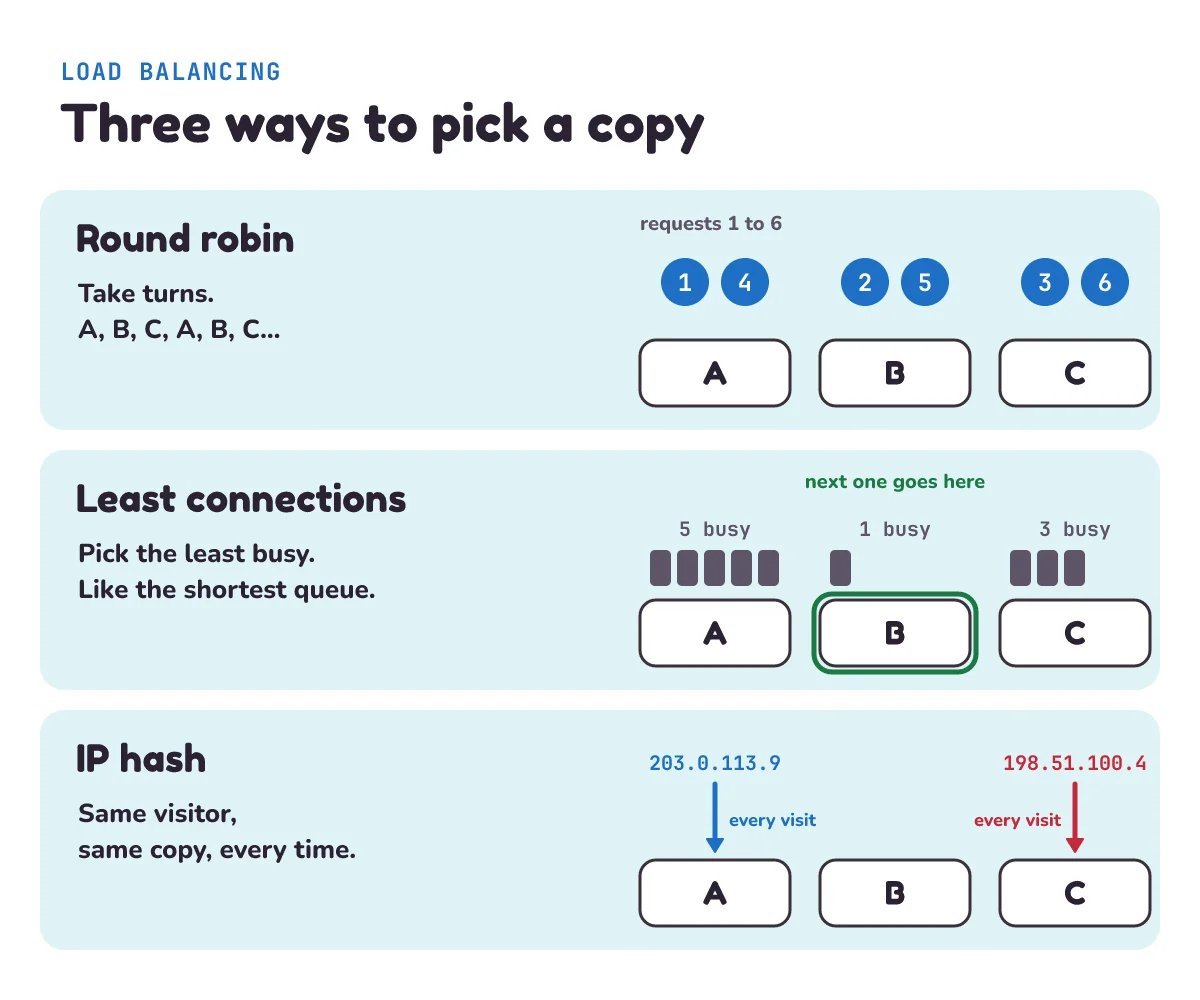
- Three common ways to pick a server: round robin (take turns), least connections (the least busy one) and IP hash (the same visitor always goes to the same copy).
- One app on one server doesn't need a gateway. Add one when you have several services, or outside developers calling your API with keys.
What problem does an API gateway solve?
Picture a shopping app. In the early days it's one program on one server. As it grows, the team splits it into smaller programs that each do one job: a users service for accounts, an orders service, a payments service. Each runs on its own and can be changed on its own. Splitting an app like this is called microservices, and our next post weighs it up against keeping one big app.
Now the phone app has a problem. Without anything in front, it has to talk to every service directly. Microsoft's architecture guide lists what goes wrong. The app must know every address: "Clients must track multiple endpoints and handle failures resiliently." Every service has to check logins and limits for itself, so the same code gets written three times. And every service is open to the internet: "Public endpoints increase the potential attack surface and require hardening." In plain words, more open doors means more doors to guard.
The fix is to put one program in front of them all. Clients talk only to it, and it talks to the services. Depending on what that program does, we call it a reverse proxy, a load balancer or an API gateway.
What is an API gateway like in real life?
Think of a big office tower in an IT park. Three spots near the entrance do three different jobs.
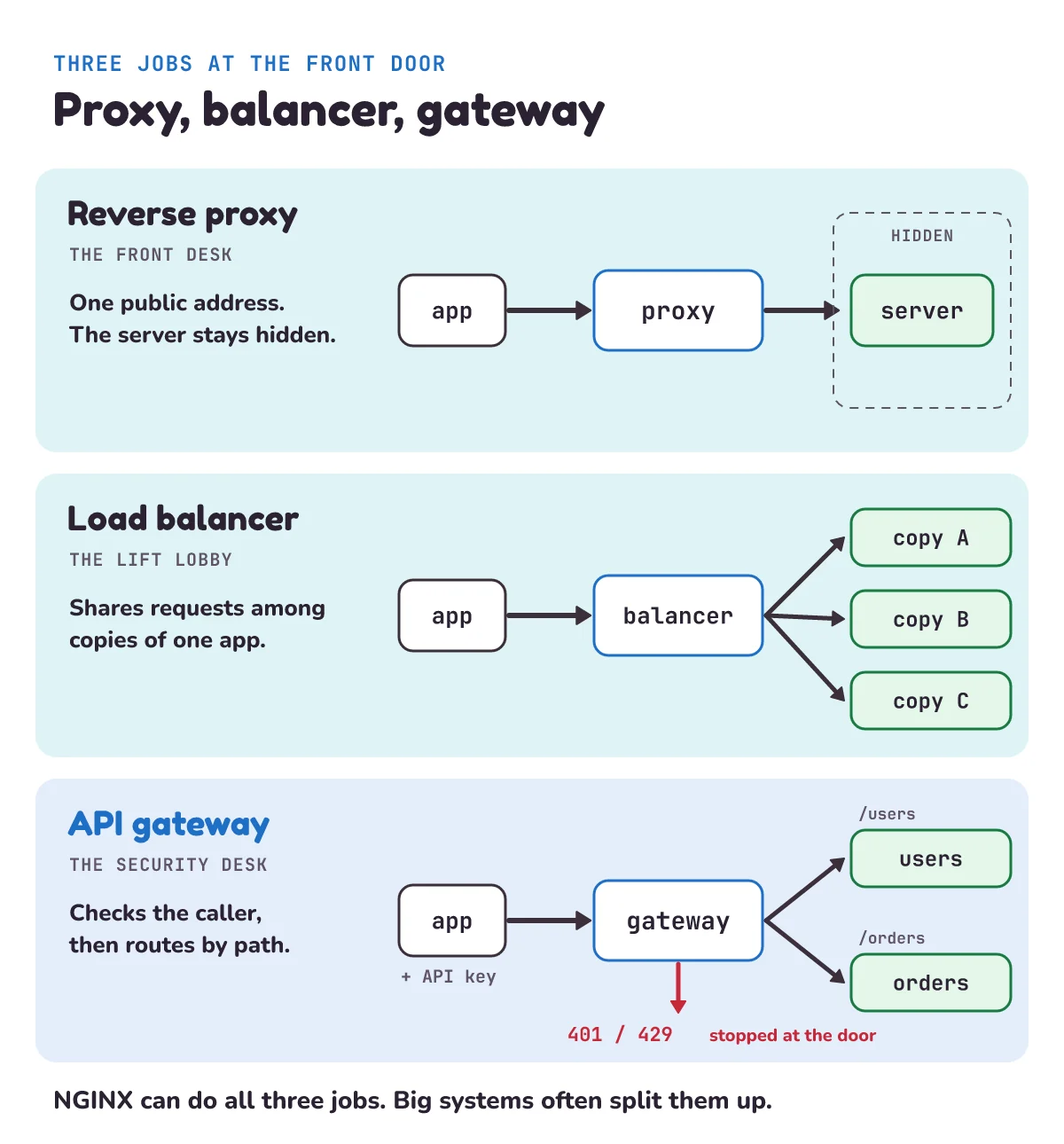
- The front desk is the reverse proxy. Couriers don't walk into offices. They hand the parcel to the front desk, which passes it inside and brings the reply back out. People outside only know the building's address, not who sits where.
- The lift lobby is the load balancer. Six identical lifts go to the same floors. A screen tells each person which lift to take, so no lift is packed while another runs empty.
- The security desk is the API gateway. The guard checks your ID against the visitor list, turns away someone who has already come in 20 times today, tells you "Accounts is on floor 3, HR on floor 5", and gives you a badge with your name, so each office knows who you are without checking again.
In a small office, one person at one desk does all three jobs. In a big tower, they're three different teams. Software works the same way, and that's why the three names get mixed up.
What is a reverse proxy?
A proxy is something that acts on someone else's behalf, like a friend who stands in a queue for you. A normal (forward) proxy acts for the clients: a school network might send every student's web traffic through one. A reverse proxy acts for the servers. MDN, Mozilla's web documentation, puts the difference in one line: "Forward proxies can hide the identities of clients whereas reverse proxies can hide the identities of servers."
Because every request passes through it, a reverse proxy is a handy place for jobs the servers would rather not do. MDN lists load balancing, caching static content (keeping copies of pictures so the server isn't asked again) and compression (shrinking responses so they download faster). A reverse proxy often handles HTTPS too: it unlocks the encrypted connection from the browser, so the servers behind it don't have to.
Here's the surprise: the HTTP standard itself uses "gateway" and "reverse proxy" as two names for the same thing. (There, "gateway" is the general HTTP term, not an API gateway product.) RFC 9110, the document that defines how HTTP works, says: "A "gateway" (a.k.a. "reverse proxy") is an intermediary that acts as an origin server for the outbound connection but translates received requests and forwards them inbound to another server or servers." In plain words: to the client it looks like the real server, but it quietly passes each request on to the servers behind it. So if the names feel blurry, that's because they are.
What is a load balancer?
When one copy of your app can't keep up, you run two or more identical copies, often on different machines. Each running copy is called an instance. A load balancer sits in front and shares the requests among them, like the lift lobby screen.
It also notices when a copy breaks. The NGINX docs describe its simple version: "If the response from a particular server fails with an error, nginx will mark this server as failed, and will try to avoid selecting this server for subsequent inbound requests for a while." That's a passive health check: it learns from real requests that fail, and stops sending people to the lift that's out of order for a while.
A load balancer doesn't care who you are. It only asks, "Which copy should take this one?" We'll see three ways to answer that further down.
What is an API gateway in microservices?
Microsoft's guide to microservices defines it like this: "An API gateway provides a centralized entry point for managing interactions between clients and application services. It acts as a reverse proxy and routes clients requests to the appropriate services." So a gateway is a reverse proxy, with extra jobs. The same guide names some: "It can also perform various cross-cutting tasks such as authentication, SSL termination, mutual TLS, and rate limiting." Cross-cutting means "needed by every service", like the security check every visitor goes through whichever floor they want.
Here is what a gateway adds, in plain words:
- Authentication: who are you? The caller sends an API key, a long secret string that works like a password for an app, or a login token. The gateway checks it once, at the door. Amazon's API Gateway docs say their usage plans use "API keys to identify API clients and who can access the associated API stages for each key." Our gateway below answers a wrong key with 401, HTTP's "I don't know who you are". For how tokens work inside an app, see our JWT login API in Node and Express.
- Rate limits per client: not so fast. A rate limit caps how many requests a client may send in a second, minute or day. Because the gateway knows who is calling, it can give each customer their own limit, not just each IP address, the number that shows where a request comes from on the internet, like 203.0.113.9. Limits by address are rough: a whole college can share one IP address on its Wi-Fi. Over the limit, AWS says, "Clients may receive 429 Too Many Requests error responses at this point."
- Routing by path or version: which service? The path is the part of a web address after the domain, like
/users/7. The gateway sends/users/...to the users service and/orders/...to the orders service. It can also route by version, sending/v2/...to a new release. Microsoft lists this as a reason for gateway routing: "You want to implement a deployment strategy where clients access multiple versions of the service at the same time." - Request shaping: tidy the request on the way. The gateway can change a request before passing it on: remove the API key, add a header (a label on the request, like the address on an envelope) saying who the caller is, or rename fields for an old service. Some gateways also merge calls: "You can use the API gateway to aggregate multiple client requests into a single request."
Products built for this job include Amazon API Gateway and Azure API Management. You can also set up NGINX to do a lot of it, as we'll see.
Load balancer vs reverse proxy vs API gateway: what's the difference?
The short version: a reverse proxy asks "which server is behind me?", a load balancer asks "which copy is free?", and an API gateway asks "who are you, are you allowed, and which service do you want?"
| Reverse proxy | Load balancer | API gateway | |
|---|---|---|---|
| Main job | One public front for hidden servers | Share requests among copies of one app | Check the caller, then route to the right service |
| Everyday picture | Front desk | Lift lobby | Security desk |
| Decides by | The address and path asked for | Turn, how busy each copy is, or the visitor's IP address | API key or token, request count, path or version |
| Typical extras | HTTPS, caching, compression | Health checks | Per-client limits, request shaping, logs per client |
| Examples | NGINX, HAProxy | NGINX, HAProxy, Azure Application Gateway | Amazon API Gateway, Azure API Management |
The lines blur both ways. Azure's Application Gateway has "gateway" in its name, yet Microsoft describes it as a load balancer: "Application Gateway is a managed load balancing service." And a gateway product isn't always a load balancer: "API Management doesn't perform any load balancing, so you should use it with a load balancer". Read what a product does, not what it's called.
Can NGINX be a reverse proxy, a load balancer and an API gateway?
Yes. NGINX is a free web server that many sites put in front of their apps, and our previous post, How NGINX works, looks inside it. Microsoft's guide lists it as a ready-made option: "Nginx and HAProxy are open-source reverse proxy offerings. They support features such as load balancing, SSL termination, and layer-7 routing." Layer-7 routing means deciding by what's inside the HTTP request, such as its path. Here is one small config file that does all three jobs:
events {}

http {
    # gateway job 1: who are you? Turn the API key into a client name
    map $http_x_api_key $client {
        default    "";
        "key-asha" asha;
        "key-ravi" ravi;
    }

    # gateway job 2: at most 10 requests a second for each client
    limit_req_zone $client zone=per_client:10m rate=10r/s;
    limit_req_status 429;

    # load balancer job: two copies of users, the less busy one gets it
    upstream users {
        least_conn;
        server 10.0.0.11:8000;
        server 10.0.0.12:8000;
    }
    upstream orders {
        server 10.0.0.21:8000;
    }

    # reverse proxy job: one public address, the services stay hidden
    server {
        listen 80;
        if ($client = "") { return 401; }
        limit_req zone=per_client burst=20 nodelay;
        proxy_set_header X-Client $client;
        proxy_set_header X-API-Key "";
        location /users/  { proxy_pass http://users; }
        location /orders/ { proxy_pass http://orders; }
    }
}
Reading it from the top:
mapis the visitor list. It "Creates a new variable whose value depends on values of one or more of the source variables": here it reads theX-API-Keyheader (NGINX calls it$http_x_api_key) and sets$clientto the client's name, or to nothing for an unknown key. Further down,if ($client = "") { return 401; }turns away anyone not on the list.limit_req_zoneandlimit_reqare the rate limit. The module "is used to limit the request processing rate per a defined key". Our key is$client, so each customer gets their own limit, not each IP address.10mis 10 megabytes of memory to keep count in, and10r/smeans 10 requests a second on average.burst=20 nodelaylets a quick burst of up to 20 extra requests straight through, then refuses the rest. NGINX refuses with 503 unless you tell it otherwise, solimit_req_status 429makes it say "too many requests" plainly.upstreamnames a group of servers, andleast_connpicks the method. That's the load balancer job.proxy_set_headeris request shaping. It addsX-Clientwith the caller's name and removes the key, because "If the value of a header field is an empty string then this field will not be passed to a proxied server".proxy_passis the reverse proxy job: it "Sets the protocol and address of a proxied server", meaning where to send the request on to. Eachlocationblock matches a path, so this is also routing by path.
We checked the file with nginx -t, NGINX's own syntax test, and then ran it for real in Docker in front of three tiny Python services. Asha's three /users calls went to users-1, users-2, users-1. A missing or wrong key got 401. Ravi fired 40 requests at once: 21 or a few more got through (1, plus the burst of 20, plus one for each tenth of a second the requests took to arrive) and the rest got 429, while Asha's next request still went through, because each client has its own limit. And when Ravi sent a fake X-Client: admin header, the service still saw ravi.
So NGINX can do a gateway's basic jobs. Where dedicated gateway products such as Amazon API Gateway earn their keep is the paperwork around keys: handing out and replacing keys for thousands of customers, and usage plans that set a limit for each key, without editing a config file each time.
How does a load balancer choose a server?
The NGINX docs list three methods. Here they are in Python, with three copies called A, B and C:
import zlib

servers = ["A", "B", "C"]

turn = 0
def round_robin():               # take turns: A, B, C, A, B, ...
    global turn
    server = servers[turn % len(servers)]
    turn += 1
    return server

busy = {"A": 5, "B": 1, "C": 3}  # requests in progress right now
def least_connections():         # the least busy server
    return min(servers, key=busy.get)

def ip_hash(ip):                 # same visitor, same server
    return servers[zlib.crc32(ip.encode()) % len(servers)]

visitor, other = "203.0.113.9", "198.51.100.4"
print([round_robin() for _ in range(5)])  # ['A', 'B', 'C', 'A', 'B']
print(least_connections())                # B
print(ip_hash(visitor), ip_hash(visitor), ip_hash(other)) # A A C- Round robin: take turns. Like dealing cards around a table. NGINX: "requests to the application servers are distributed in a round-robin fashion".
%gives the remainder after dividing, soturn % 3goes 0, 1, 2, 0, 1, 2. It's the default: "When the load balancing method is not specifically configured, it defaults to round-robin." - Least connections: the least busy. Like joining the shortest queue at the supermarket. The "next request is assigned to the server with the least number of active connections". B has 1 request in progress, so B gets the next one. NGINX says this is fairer "in a situation when some of the requests take longer to complete": with round robin, a copy stuck on three slow reports still gets its turn.
- IP hash: same visitor, same copy. Every request arrives from an IP address, such as 203.0.113.9. A hash turns any text into a number in a fixed, repeatable way, like a code that always gives the same answer for the same word. Take that number's remainder by 3 and you get a server. NGINX: "This method ensures that the requests from the same client will always be directed to the same server except when this server is unavailable." It's useful when a copy keeps something about the visitor in its own memory, such as a half-filled form. The catch: everyone behind one shared address, like a whole college, lands on the same copy.
Why zlib.crc32 and not Python's built-in hash()? crc32 is a checksum, a fixed recipe that gives the same number for the same text on every computer, every time. hash() of a string changes each time Python starts: the docs say these values "are not predictable between repeated invocations of Python." Run two copies of a load balancer with hash() and they'd disagree about where each visitor goes. (Real NGINX hashes only part of the address: "The first three octets of the client IPv4 address, or the entire IPv6 address, are used as a hashing key." Octets are the four numbers of an address like 203.0.113.9, and IPv6 is the newer, longer kind of address. So 203.0.113.9 and 203.0.113.50 land on the same server.)
How do you build an API gateway in Python?
Let's build the security desk for real, using only Python's standard library (the tools that come with Python). Three small services stand behind it: two copies of users and one of orders. Each service just answers with its own name and the name of the caller, so we can see where each request went. Save the three parts below into one file, gateway.py, and run python gateway.py.
Part 1 is the services. A port is a numbered door on a computer: one machine can run many servers, each listening on its own port, like flats in one building. 127.0.0.1 means "this computer only", so nothing outside can reach them.
import itertools, json, threading
from http.server import BaseHTTPRequestHandler, ThreadingHTTPServer
from urllib.error import HTTPError
from urllib.request import Request, urlopen


class Handler(BaseHTTPRequestHandler):
    def reply(self, status, data):       # send a JSON answer
        body = json.dumps(data).encode()
        self.send_response(status)
        self.send_header("Content-Type", "application/json")
        self.send_header("Content-Length", str(len(body)))
        self.end_headers()
        self.wfile.write(body)

    def log_message(self, *args):        # don't print a line per request
        pass


def start(handler, port):                # run a server in the background
    server = ThreadingHTTPServer(("127.0.0.1", port), handler)
    threading.Thread(target=server.serve_forever, daemon=True).start()


def backend(name):                       # a tiny service that names itself
    class Backend(Handler):
        def do_GET(self):
            client = self.headers["X-Client"]
            self.reply(200, {"from": name, "client": client})
    return Backend


start(backend("users-1"), 8081)          # two copies of the users service
start(backend("users-2"), 8082)
start(backend("orders-1"), 8083)         # one copy of the orders service
JSON is a plain-text way to send data, like {"from": "users-1"}. A thread lets the program do several things at once, like a cook watching several pots, so all four servers can run inside one script.
Part 2 is the gateway itself, on port 8080. It does the four jobs of the security desk, in order:
ROUTES = {                               # path -> the copies that serve it
    "/users": itertools.cycle(["http://127.0.0.1:8081",
                               "http://127.0.0.1:8082"]),
    "/orders": itertools.cycle(["http://127.0.0.1:8083"]),
}
API_KEYS = {"key-asha": "asha", "key-ravi": "ravi"}


class Gateway(Handler):
    def do_GET(self):
        # 1. who are you?
        client = API_KEYS.get(self.headers["X-API-Key"])
        if client is None:
            return self.reply(401, {"error": "unknown API key"})
        # 2. which service?
        prefix = "/" + self.path.split("/")[1]
        if prefix not in ROUTES:
            return self.reply(404, {"error": "no route"})
        # 3. which copy? take turns
        upstream = next(ROUTES[prefix])
        # 4. pass it on with the caller's name, bring the answer back
        inner = Request(upstream + self.path, headers={"X-Client": client})
        with urlopen(inner, timeout=5) as answer:
            self.reply(answer.status, json.loads(answer.read()))


start(Gateway, 8080)API_KEYSis the visitor list. A wrong or missing key gets 401 and never reaches a service.self.path.split("/")[1]takes the first part of the path, so/users/7gives/users. That's routing by path. An unknown path gets 404, HTTP's "not found".itertools.cycleis round robin in one line: it hands out the list's items in order and, in the docs' words, "Repeats indefinitely."next()takes the next one.- The inner request (step 4) carries only an
X-Clientheader with the caller's name. That's request shaping: the key stays at the gateway, and the services learn who is calling without checking keys themselves. Because the gateway builds a fresh request, a caller can't sneak in a fakeX-Clientof their own.
Part 3 plays the phone app. urlopen sends a request and reads the answer. It raises HTTPError for error answers like 401, so we catch that and return its code too.
def get(path, key="key-asha"):           # what a phone app would do
    url = "http://127.0.0.1:8080" + path
    request = Request(url, headers={"X-API-Key": key})
    try:
        with urlopen(request) as answer:
            return answer.status, json.loads(answer.read())
    except HTTPError as error:           # 4xx and 5xx answers raise
        return error.code, json.loads(error.read())


for path in ["/users/7", "/users/7", "/users/7", "/orders/42"]:
    print(path, get(path))
print(get("/users/7", key="key-ravi"))
print(get("/users/7", key="wrong"))
print(get("/payments/1"))
Run it and you get:
/users/7 (200, {'from': 'users-1', 'client': 'asha'})
/users/7 (200, {'from': 'users-2', 'client': 'asha'})
/users/7 (200, {'from': 'users-1', 'client': 'asha'})
/orders/42 (200, {'from': 'orders-1', 'client': 'asha'})
(200, {'from': 'users-2', 'client': 'ravi'})
(401, {'error': 'unknown API key'})
(404, {'error': 'no route'})
Read it line by line. The three /users calls take turns between users-1 and users-2: that's the load balancer. /orders goes to a different service: that's routing by path. Ravi's call goes to users-2, because the turn moves on with every /users request, whoever sends it. The wrong key is stopped with 401 and the unknown path with 404. Neither reaches a service, so neither uses up a turn. And every service knows the caller's name, though none of them ever saw a key.
When don't you need an API gateway?
When you have one app on one server. Your app already checks logins, there's only one place for requests to go, and a gateway would just be one more program to run and keep safe. Microsoft's own pattern guide says gateway routing "might not be suitable when you have a simple application that uses only one or two services."
A gateway also costs something on every request. "The gateway adds a network hop to every request": one more stop, which adds a little delay. And everything depends on it: "The gateway service can introduce a single point of failure." If the security desk shuts, nobody gets into the building, so real setups run at least two copies of the gateway, often behind a load balancer.
A sensible order for a growing app:
- One app, one server: put a reverse proxy such as NGINX in front for HTTPS. That's often all you need.
- Too much traffic for one copy: run two or more copies and let the same NGINX load-balance them.
- Several services, or outside developers using your API with keys: now a gateway earns its place.
What mistakes do beginners make with an API gateway?
Leaving the services open behind it. A gateway only protects services that can't be reached any other way. If the users service is also open to the internet, anyone can skip the security desk and walk in through the loading bay. It's worse than no gateway at all in our example: the services trust the X-Client header, so a caller who reaches them directly could claim to be anyone. That's why our services listen on 127.0.0.1. In a real system they sit on a private network that only the gateway can reach.
Putting business logic in the gateway. Business logic means the rules of your app: what an order costs, who can cancel it. It's tempting to add "just one check" to the gateway, then another. Microsoft's guide is blunt: "Never offload business logic to the gateway." The security guard checks badges; they don't approve invoices. Keep the gateway to jobs every service shares.
1) After our demo has run, the app calls get("/users/1") twice more. Which copies answer?
2) Add version routing: start a new service called users-v2 on port 8084 and send every path starting /v2 to it. What does get("/v2/users/7") return?
3) In the load-balancing code, change busy to {"A": 2, "B": 2, "C": 4}. Which server does least_connections() pick, and why?
Show the answers
1) users-1, then users-2. Four /users calls have gone through (users-1, users-2, users-1, users-2), so the turn is back at users-1. The 401 and 404 calls never reached the round robin.
2) Add these lines at the end of the file. The gateway reads ROUTES fresh on every request, so a new route works straight away:
start(backend("users-v2"), 8084)
ROUTES["/v2"] = itertools.cycle(["http://127.0.0.1:8084"])
print(get("/v2/users/7"))  # (200, {'from': 'users-v2', 'client': 'asha'})
3) A. A and B tie on 2, and min() returns the first smallest one it finds. Real load balancers break ties in their own ways, but least connections would never pick C here: it's the busiest.
Questions people ask
What is an API gateway in simple words?
It's the security desk for your app's APIs. Every request goes to it first. It checks who is calling, stops anyone calling too often, and sends the request to the right service, then passes the answer back. The services behind it never face the internet directly.
Is an API gateway the same as a reverse proxy?
Every API gateway is a reverse proxy, but not every reverse proxy is a gateway. A reverse proxy passes requests to hidden servers. A gateway does that and also checks keys, applies a limit for each client and routes by path or version. The HTTP standard, RFC 9110, even uses "gateway" and "reverse proxy" as two names for the same thing, though its "gateway" is the general HTTP term, not an API gateway product.
What is the difference between a load balancer and an API gateway?
A load balancer shares requests among copies of the same app and doesn't care who sent them. An API gateway cares a lot about who sent them, and sends different paths to different services. Big systems often use both: the gateway decides which service, and a load balancer decides which copy of it.
Do I need an API gateway for microservices?
Usually, once you have several services that outside apps call. Without one, every app must know every service's address and every service must check logins itself. With one app on one server, you don't: a reverse proxy in front is enough.
Which load balancing method should I use?
Start with round robin, NGINX's default. Switch to least connections when some requests take much longer than others, such as reports or uploads. Use IP hash only when each copy keeps a visitor's data in its own memory. Better still, store that data somewhere shared, so any copy can serve anyone.
What are some examples of API gateways?
Amazon API Gateway and Azure API Management are hosted products. NGINX and HAProxy are free reverse proxies that can be set up to do many gateway jobs, as in the config above. Our tiny Python gateway is an example too, but only for learning.
Keep going
- Previous in this System Design series: How NGINX works, the reverse proxy from this post, from the inside.
- Next: "Monolith vs microservices vs modular monolith", or when splitting an app into services is worth it.
- Build the service that sits behind a gateway: a REST API with Express.js, then add JWT login.
- What happens before a request even reaches the front door: how the internet works.
Checked on 26 October 2026 against the 16 sources below.
Sources
- IETF: RFC 9110, HTTP Semantics, section 3.7 Intermediaries (gateway, a.k.a. reverse proxy)
- MDN Web Docs: Proxy servers and tunneling (forward and reverse proxies, their uses)
- nginx documentation: Using nginx as HTTP load balancer (round robin, least connected, IP hash, health checks)
- nginx documentation: ngx_http_upstream_module (
upstream,least_conn,ip_hashkey) - nginx documentation: ngx_http_proxy_module (
proxy_pass,proxy_set_header) - nginx documentation: ngx_http_limit_req_module (
limit_req_zone,limit_req,limit_req_status) - nginx documentation: ngx_http_map_module (
map) - Microsoft Learn: API gateways, Azure Architecture Center (definition, gateway jobs, NGINX and HAProxy, Application Gateway, API Management)
- Microsoft Learn: Gateway Routing pattern (versions, single point of failure, when not to use it)
- Microsoft Learn: Gateway Offloading pattern (business logic, the extra network hop)
- AWS documentation: Usage plans and API keys for REST APIs in API Gateway
- AWS documentation: Throttle requests to your REST APIs in API Gateway (429 Too Many Requests)
- Python documentation: http.server (not for production)
- Python documentation: itertools (
cycle) - Python documentation: zlib (
crc32) - Python documentation: Data model (
__hash__of strings changes between runs)
Every Python sample in this post was run in Python 3.13, and the NGINX config was tested with nginx -t and run in Docker (NGINX 1.29), before publishing.