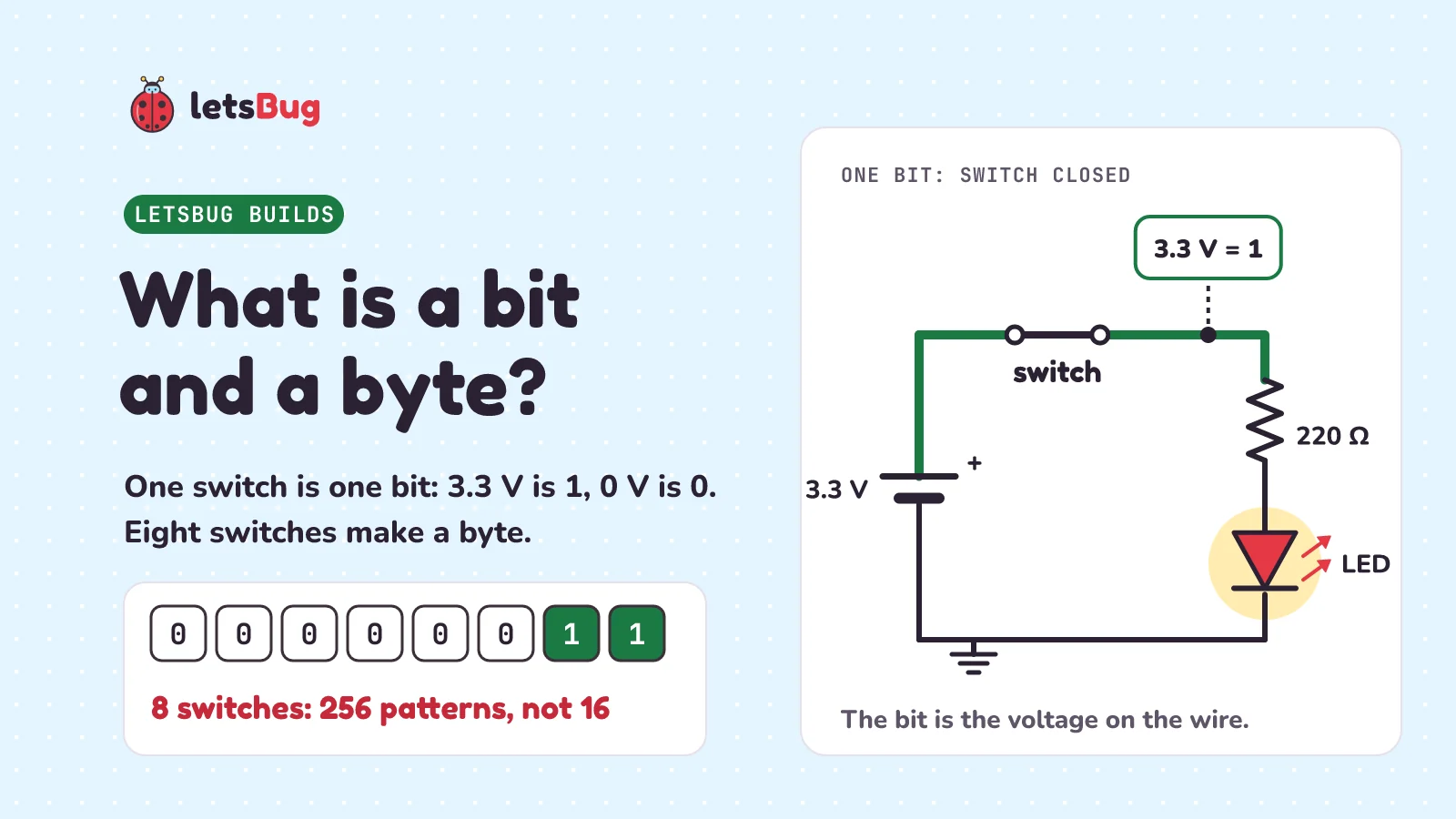
A bit is one binary digit, 0 or 1, like a switch that is off or on. In a circuit, the bit is the voltage on a wire: 3.3 V for 1, 0 V for 0. A byte is eight bits. Each bit doubles the patterns, so a byte has 256 of them: any whole number from 0 to 255.
In this post, let's build one bit from a switch, a resistor and an LED, find out why eight switches make 256 patterns and not 16, read the byte your keyboard sends for Ctrl, Shift and Alt, and wire two switches into AND and OR logic gates you can click in a free browser simulator.
Key takeaways
- A bit (short for binary digit) has one of two values: 0 or 1, off or on.
- In a circuit the bit is a voltage: switch closed, the wire is at 3.3 V (1); switch open, 0 V (0). The LED only lets you see it.
- Each switch you add doubles the patterns: 2, 4, 8 … 8 switches give 28 = 256, not 2 × 8 = 16.
- A byte is 8 bits: any whole number from 0 to 255. A USB keyboard packs Ctrl, Shift, Alt and the Windows key, left and right, into one byte.
- Two switches in series make an AND gate (both must be closed). Two switches in parallel make an OR gate (either one will do).
This post goes with letsBug Builds, episode 2. Watch it, or read on: everything in the video is here, plus the circuit text for the simulator, the keyboard's byte decoded in Python, and practice questions with answers.
What is a bit? One switch, one LED
Here's the whole circuit, one loop: a 3.3 V supply, a switch, a 220 Ω resistor and a red LED, then back to the supply. It's the same 3.3 V an ESP32 pin gives, and the same resistor and LED as in our ESP32 LED blink build, where the resistor holds the current to about 5.9 mA.
- Switch open: there's a gap, so the loop isn't complete. No current flows and the LED is dark.
- Switch closed: the loop is complete. Current flows and the LED lights.
Two states, nothing in between. Call off 0 and on 1, and that's a bit. The word is short for "binary digit": John Tukey shortened it in a Bell Labs memo in January 1947. A bit can live in anything that has two clear states, and Wikipedia's list includes "two positions of an electrical switch" and "two distinct voltage or current levels allowed by a circuit". Our circuit has both.
Where does the bit live? In the voltage, not the LED
Put a probe on the wire just after the switch. Switch closed: it reads 3.3 V. Switch open: 0 V. That voltage is the bit. The LED is only there so we can see it.
A computer never looks at a light. It checks whether a wire is high or low, and in binary logic high generally stands for 1 and low for 0. That's why the same idea works on a chip with no LEDs at all.
Why won't my LED light? Check which way round it is
Here's a classic mistake. Put the LED in backwards and close the switch: the probe still says 1, but the LED stays dark. Nothing is broken. The closed switch still ties the wire to 3.3 V, so the bit is there. But an LED is a diode, a one-way street for current. As SparkFun's LED guide puts it, LEDs "will only allow current to flow in one direction. And when there's no current-flow, there's no light."
Turn it round (the long leg goes towards the supply's + side) and it lights. So if your LED won't light, check which way round it is first. A backwards LED doesn't get damaged at 3.3 V: SparkFun says "you can't break an LED by plugging it in backwards. Rather, it just won't work."
How many patterns can 8 switches make?
One switch has two settings: off or on. Put a second switch-and-LED loop next to it and count the patterns: both off, left off and right on, left on and right off, both on. That's four.
Now the question from the video: how many patterns can eight switches make? A common first guess is 16: two settings each, times eight switches. Let's check by adding one switch at a time. A third switch can be off or on under each of the four patterns, so four becomes eight. Each switch you add doesn't add two more patterns. It doubles them:
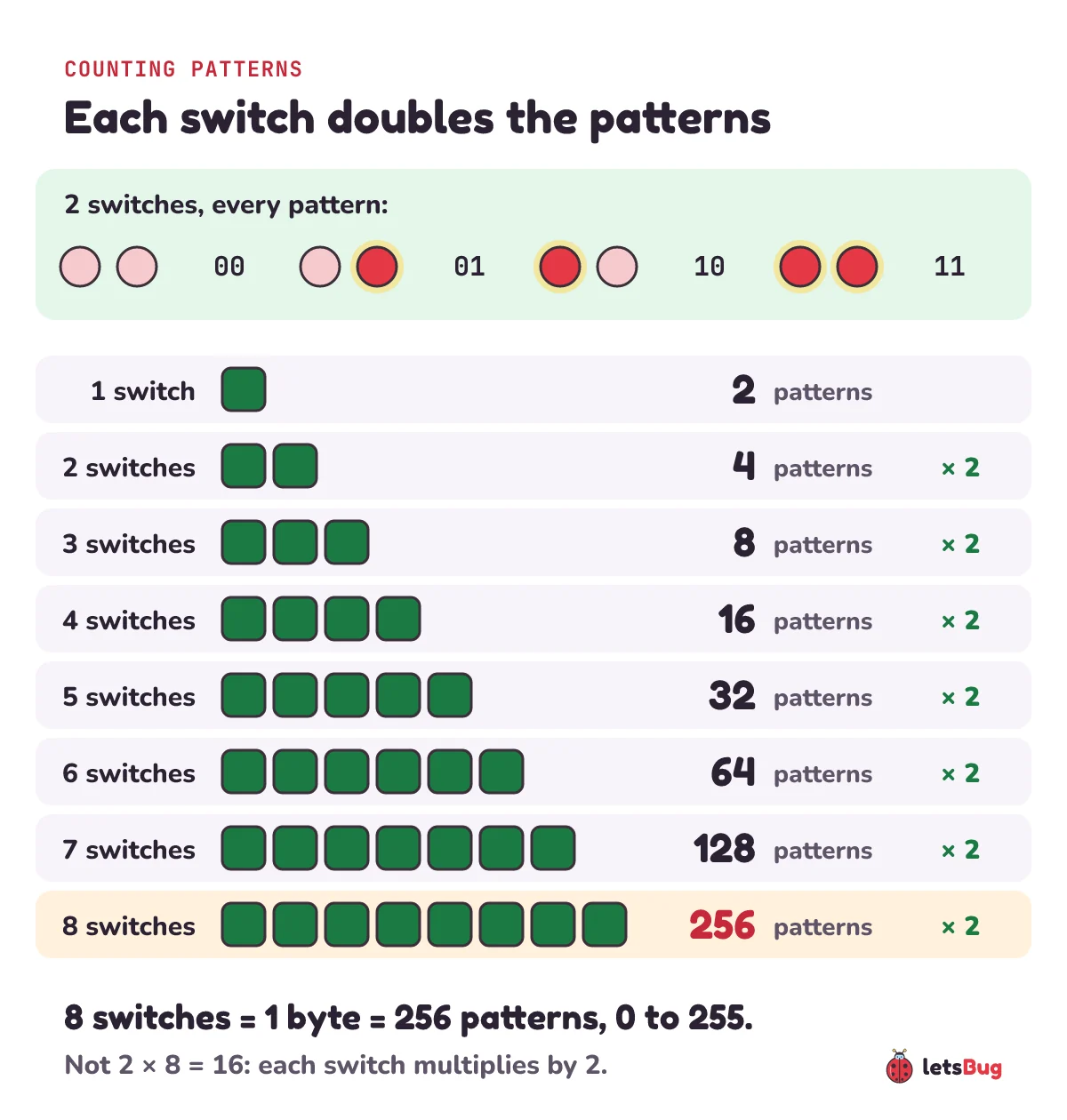
So 8 switches make 2 × 2 × 2 × 2 × 2 × 2 × 2 × 2 = 28 = 256 patterns. With n switches you get 2n. That fast doubling is why binary search needs at most 20 checks to find one item in a million: 220 = 1,048,576. Python can list every pattern and count them for you:
from itertools import product

for n in range(1, 9):
    patterns = list(product((0, 1), repeat=n))  # every off/on combination of n switches
    print(n, "switches:", len(patterns))

print(list(product((0, 1), repeat=2)))  # [(0, 0), (0, 1), (1, 0), (1, 1)]
1 switches: 2
2 switches: 4
3 switches: 8
4 switches: 16
5 switches: 32
6 switches: 64
7 switches: 128
8 switches: 256
[(0, 0), (0, 1), (1, 0), (1, 1)]product((0, 1), repeat=n) makes every combination of n values that are each 0 or 1: exactly the patterns of n switches.
What is a byte? 8 bits, 0 to 255
A byte is a group of bits that today almost always means eight. Eight bits give 256 patterns, so a byte can stand for any whole number from 0 to 255: 256 values, starting at 0. Wikipedia's Byte article puts it this way: eight bits is "a convenient power of two permitting the binary-encoded values 0 through 255 for one byte, as 2 to the power of 8 is 256."
| Name | Bits | Patterns | Symbol |
|---|---|---|---|
| Bit | 1 | 2 | bit (or lowercase b) |
| Nibble | 4 | 16 | |
| Byte | 8 | 256 | B (capital) |
Watch the case of the letter: a lowercase b means bits and a capital B means bytes, so 8 b and 1 B are the same amount. How do the 256 patterns map to the numbers 0 to 255? In binary each switch is given a place value: 1, 2, 4, 8 and so on, doubling. Our how computers add numbers post counts in binary that way, and decimal to binary in JavaScript converts any number.
How does a keyboard use a byte?
Every key on a keyboard is a switch. In a membrane keyboard, pressing a key pushes the top layer down until it "bridges the top and bottom conductive contact pads, allowing current to transfer". The keys are wired in a grid called a switch matrix, with a switch where the wires cross.
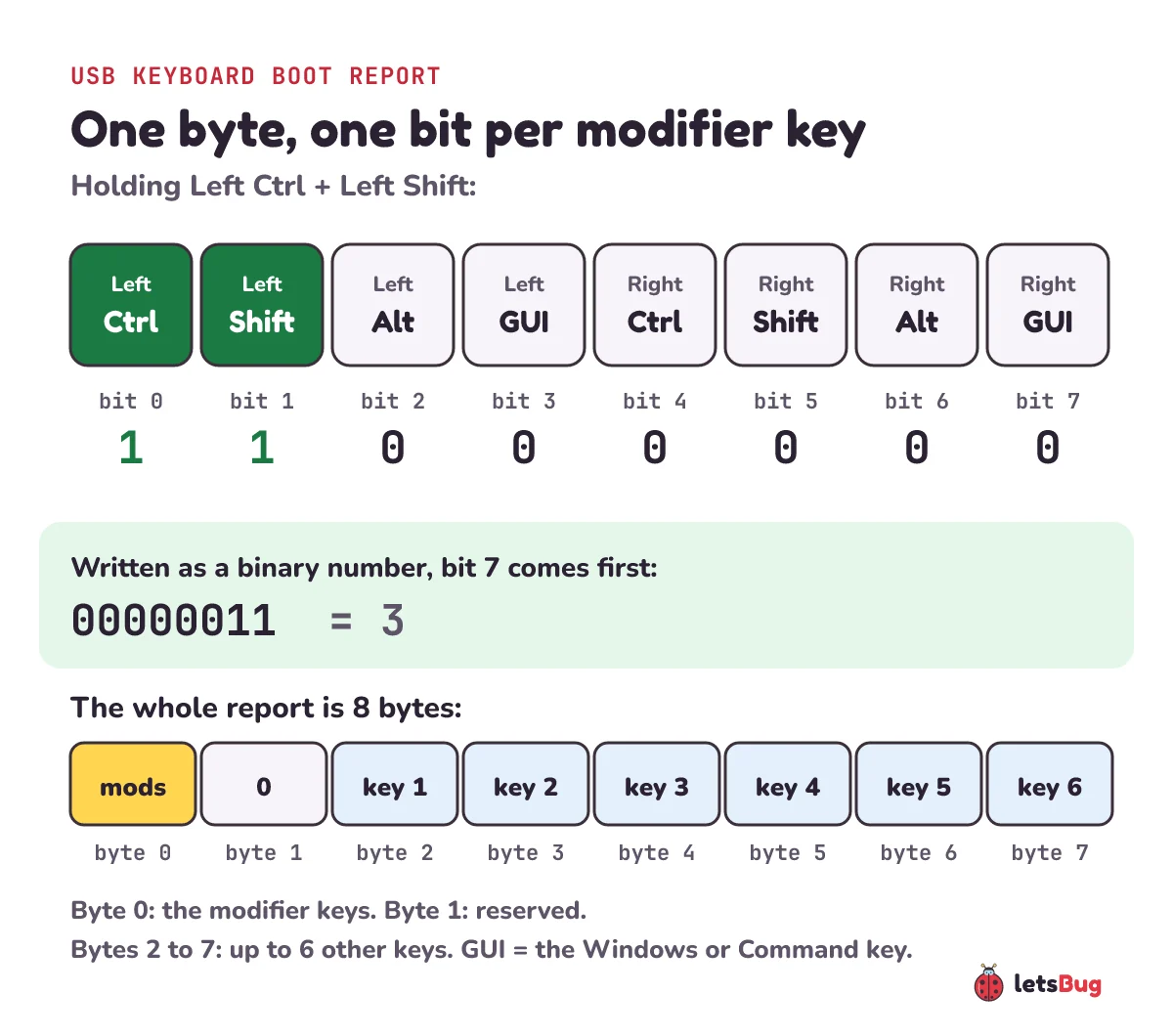
When a USB keyboard tells the computer what you're pressing, it can use a simple 8-byte format called the boot report, defined in the USB HID specification (HID means human interface device). The BIOS, the built-in program that starts a PC before the operating system loads, reads keys in this format, and standard USB keyboards support it in boot mode. Its first byte belongs to the eight modifier keys, one bit each:
| Bit | Key |
|---|---|
| 0 | Left Ctrl |
| 1 | Left Shift |
| 2 | Left Alt |
| 3 | Left GUI (the Windows or Command key) |
| 4 | Right Ctrl |
| 5 | Right Shift |
| 6 | Right Alt |
| 7 | Right GUI |
The second byte is reserved, and the last six bytes hold the codes of up to six other keys pressed at the same time. When a byte is written as a binary number, bit 7 comes first and bit 0 last. So Left Ctrl + Left Shift is 00000011. The spec's own example is someone typing Ctrl + Alt + Del: pressing Left Alt sends a modifier byte of 00000100, and adding Right Ctrl makes it 00010100. Here's a small decoder:
KEYS = ["Left Ctrl", "Left Shift", "Left Alt", "Left GUI",
        "Right Ctrl", "Right Shift", "Right Alt", "Right GUI"]

def held(modifiers):
    """Names of the modifier keys whose bit is 1 (bit 0 is Left Ctrl)."""
    return [KEYS[bit] for bit in range(8) if (modifiers >> bit) & 1]

print(held(0b00000011))  # ['Left Ctrl', 'Left Shift']
print(held(0b00010100))  # ['Left Alt', 'Right Ctrl']: the spec's Ctrl + Alt + Del
print(0b00000011)        # 3: the same byte as a number
0b tells Python the number is written in binary. (modifiers >> bit) & 1 shifts the byte right by bit places and keeps the last digit: that's the one switch we're asking about.
How do you make an AND gate with switches?
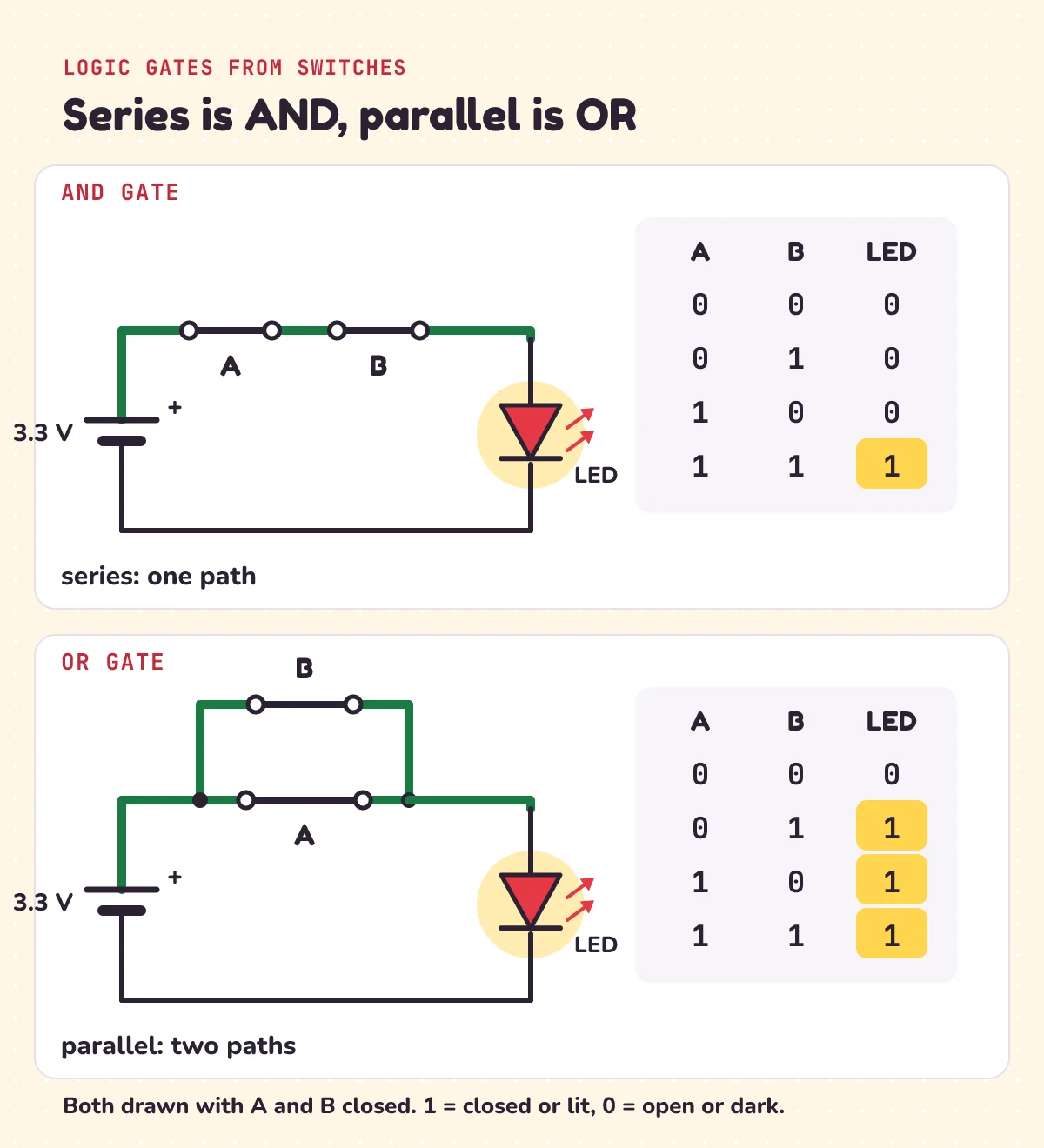
Now let's make bits do logic. Put two switches, A and B, one after the other in the same loop. That's called series. Current has only one path, so it has to get through A and through B.
- Close only A: the LED stays dark.
- Close only B: still dark.
- Close both: the LED lights.
The output is 1 only when A and B are both 1. That's an AND gate, built from two switches. Electronics Tutorials describes the same circuit: the lamp is on "when BOTH switch, A AND switch, B are pressed and closed".
How do you make an OR gate with switches?
Now put the switches side by side, on two separate paths. That's parallel.
- Close only A: the LED lights, through A's path.
- Close only B: it lights through B's path.
- Close both: still lit. Only when both are open is it dark.
The output is 1 if A or B is 1 (or both). That's an OR gate.
What do the AND and OR truth tables look like?
A truth table lists every input pattern and the output for each one. Two inputs have four patterns, so each table has four rows:
| A | B | Series: A AND B | Parallel: A OR B |
|---|---|---|---|
| 0 | 0 | 0 | 0 |
| 0 | 1 | 0 | 1 |
| 1 | 0 | 0 | 1 |
| 1 | 1 | 1 | 1 |
The same rules in Python, run after the pattern code above. Series needs all the switches closed, and parallel needs any of them:
def series(*switches):
    """One path: current needs every switch closed (AND)."""
    return int(all(switches))

def parallel(*switches):
    """Separate paths: one closed switch is enough (OR)."""
    return int(any(switches))

for a, b in product((0, 1), repeat=2):
    print(a, b, "AND:", series(a, b), "OR:", parallel(a, b))
0 0 AND: 0 OR: 0
0 1 AND: 0 OR: 1
1 0 AND: 0 OR: 1
1 1 AND: 1 OR: 1Inside a chip the switches are transistors, and a third gate, XOR, joins AND to add two bits. That's the next step, in how computers add numbers.
Try it free in Falstad
Falstad is a free circuit simulator that runs in your browser, made by Paul Falstad and ported to JavaScript by Iain Sharp. Both circuits from the video open with one click:
- One bit: a 3.3 V supply, a switch, a 220 Ω resistor, a red LED and a logic probe.
- AND and OR: the series and parallel circuits side by side, ready to click.
How to read the screen:
- Click a switch to open or close it.
- Green wires are at a positive voltage, grey ones are at ground (0 V), and the moving yellow dots are current.
- The 0 or 1 on the wire after the switches is a logic probe. It shows 1 when the wire is at 2.5 V or more, and 0 below that.
Fill in both truth tables by clicking through all four patterns. Then break it on purpose: right-click the LED in the one-bit circuit and choose Swap Terminals to turn it round. Close the switch: the probe still reads 1, but the LED stays dark.
If a link ever stops working, copy the circuit text below, open the simulator, and paste it into File > Import From Text. Here's the one-bit circuit:
$ 1 0.000005 10.20027730826997 50 5 50 5e-11
v 160 352 160 160 0 0 40 3.3 0 0 0.5
r 448 160 448 256 0 220
162 448 256 448 352 0 1 0 0
w 448 352 160 352 0
g 160 352 160 384 0 0
M 448 160 512 160 6 2.5
w 160 160 240 160 0
s 240 160 352 160 0 1 false
w 352 160 448 160 0
x 270 116 330 116 0 20 switch
And the AND and OR circuits:
$ 1 0.000005 10.20027730826997 50 5 50 5e-11
v 96 352 96 160 0 0 40 3.3 0 0 0.5
r 384 160 384 256 0 220
162 384 256 384 352 0 1 0 0
w 384 352 96 352 0
g 96 352 96 384 0 0
M 384 160 448 160 6 2.5
w 96 160 128 160 0
s 128 160 224 160 0 1 false
s 224 160 320 160 0 1 false
w 320 160 384 160 0
x 166 116 200 116 0 24 A
x 262 116 300 116 0 24 B
x 150 420 300 420 0 24 AND (series)
v 560 352 560 160 0 0 40 3.3 0 0 0.5
r 848 160 848 256 0 220
162 848 256 848 352 0 1 0 0
w 848 352 560 352 0
g 560 352 560 384 0 0
M 848 160 912 160 6 2.5
w 560 160 624 160 0
s 624 160 720 160 0 1 false
w 624 160 624 80 0
s 624 80 720 80 0 1 false
w 720 80 720 160 0
w 720 160 848 160 0
x 662 116 700 116 0 24 A
x 662 40 700 40 0 24 B
x 620 420 800 420 0 24 OR (parallel)
Each line is one part. v is the 3.3 V supply, r the 220 Ω resistor, 162 the red LED, s a switch (the 1 near the end means it starts open), M the logic probe with its 2.5 V threshold, w a wire, g ground and x a text label. To add a switch of your own, use Draw > Passive Components > Add Switch, then drag between two points.
Who first linked switches and logic?
In 1937, Claude Shannon, a master's student at MIT, showed that circuits of switches follow the rules of Boolean algebra, the maths of true and false (1 and 0). His thesis, A Symbolic Analysis of Relay and Switching Circuits, was published in 1938. He wasn't alone: Akira Nakashima in Japan and Victor Shestakov in the Soviet Union reached the same idea independently.
Chip designers still use that algebra. As Wikipedia's Boolean algebra article says, "all modern general-purpose computers perform their functions using two-value Boolean logic". The AND and OR you just built from two switches follow the same rules as the logic inside every processor.
Our switches still need a finger, though. Next in the series: a transistor, a switch flipped by electricity, and the first gate that flips a bit, the NOT gate.
Practice questions
1) How many patterns can 5 switches make? And 16 switches?
2) Two switches are in series. A is closed and B is open. Is the LED on? What if the same two switches were in parallel?
3) An LED is in backwards and the switch is closed. What does the logic probe on the wire after the switch read, and is the LED on?
4) A keyboard's modifier byte is 01000001 (written bit 7 first). Which keys are held down?
5) The video's challenge: add a third switch in series with the AND circuit. Of the 8 patterns of three switches, how many light the LED? And with three switches in parallel?
Show the answers
1) 2 × 2 × 2 × 2 × 2 = 32. With 16 switches, 216 = 65,536.
2) No: in series, the open switch B leaves a gap, and AND needs both. In parallel, yes: current goes through A's path, and OR needs only one.
3) The probe reads 1 (3.3 V), because the closed switch still connects the wire to the supply. The LED stays dark: it only lets current through one way.
4) Bit 0 (the last digit) and bit 6 (the second digit) are 1: Left Ctrl and Right Alt.
5) In series, 1 of 8: only when all three are closed. In parallel, 7 of 8: every pattern except all three open. Using series and parallel from above:
print(held(0b01000001))                                     # ['Left Ctrl', 'Right Alt']
print(sum(series(*p) for p in product((0, 1), repeat=3)))   # 1
print(sum(parallel(*p) for p in product((0, 1), repeat=3))) # 7
Questions people ask
What is a bit and a byte?
A bit is a single binary digit: 0 or 1, like a switch that is off or on. A byte is a group of 8 bits. Because each bit doubles the number of patterns, a byte has 28 = 256 patterns and can hold any whole number from 0 to 255.
How many values can a byte hold?
256, from 0 to 255. Eight bits make 2 × 2 × 2 × 2 × 2 × 2 × 2 × 2 = 256 patterns, and counting starts at 0, so the biggest value is 255 (11111111 in binary).
Why is a byte 8 bits?
Historically it wasn't always: the size of a byte used to vary between computers. Today eight bits is the standard, documented in ISO/IEC 2382-1:1993. It's a convenient power of two: 28 = 256 patterns, the values 0 to 255.
What is the difference between b and B?
A lowercase b means bits and a capital B means bytes. One byte (1 B) is 8 bits (8 b), so a capital B is eight times as much as a lowercase b.
How do you make an AND gate with switches?
Put two switches in series, one after the other in the same loop as the lamp or LED. Current has only one path, so the LED lights only when switch A and switch B are both closed.
How do you make an OR gate with switches?
Put two switches in parallel, on two separate paths to the lamp or LED. The LED lights when switch A or switch B is closed, or both. It's dark only when both are open.
Is the bit the LED?
No. The bit is the voltage on the wire: 3.3 V for 1 and 0 V for 0 in our circuit. The LED just shows it. With the LED in backwards, the wire is still at 3.3 V and the bit is still 1, even though the LED stays dark.
Keep going
- Watch the full lesson, What Is a Bit? Build Logic Gates Using Switches: AND and OR, or the Short, 8 switches: how many on/off patterns? More in the letsBug Builds series on YouTube.
- The episode before this one, with the same 3.3 V, resistor and LED: ESP32 LED blink, and the resistor you need.
- From AND and OR to adding numbers with an XOR gate and a half adder: how do computers add numbers?
- Turn any number into bits in code: decimal to binary in JavaScript.
Checked on 21 October 2026 against the 13 sources below. Every number in this post was checked with a Python script, every code sample was run in Python 3.13, and both Falstad links were decoded and compared, line by line, with the circuit text shown above.
Sources
- Wikipedia: Bit (two values; binary digit; Tukey, 1947; a switch or a voltage can store one; bit and b symbols; the nibble)
- Wikipedia: Byte (commonly eight bits; 0 through 255; 2 to the power of 8 is 256; ISO/IEC 2382-1:1993)
- Wikipedia: Logic level (logical high and low as 1 and 0)
- Falstad: Circuit Simulator Applet (green, grey and yellow dots; click a switch; Iain Sharp's JavaScript port)
- GitHub: circuitjs1 source (the logic probe's 2.5 V threshold, switch positions, Import From Text and Add Switch menus)
- SparkFun: Light-Emitting Diodes (current in one direction only; a backwards LED just won't work)
- Electronics Tutorials: Switching theory (switches in series as AND, in parallel as OR; open = 0, closed = 1)
- Wikipedia: Keyboard technology (membrane contacts; the switch matrix)
- USB-IF: Device Class Definition for HID 1.11 (section 8.3, the modifier byte and the Ctrl + Alt + Del example; Appendix B, the 8-byte boot keyboard report)
- Embassy: embassy-usb-host KeyboardReport (all standard USB keyboards support the boot layout; up to 6 key codes)
- Wikipedia: A Symbolic Analysis of Relay and Switching Circuits (Shannon's master's thesis, MIT, 1937; published 1938)
- Wikipedia: Switching circuit theory (Nakashima, Shannon and Shestakov)
- Wikipedia: Boolean algebra (computers use two-value Boolean logic)