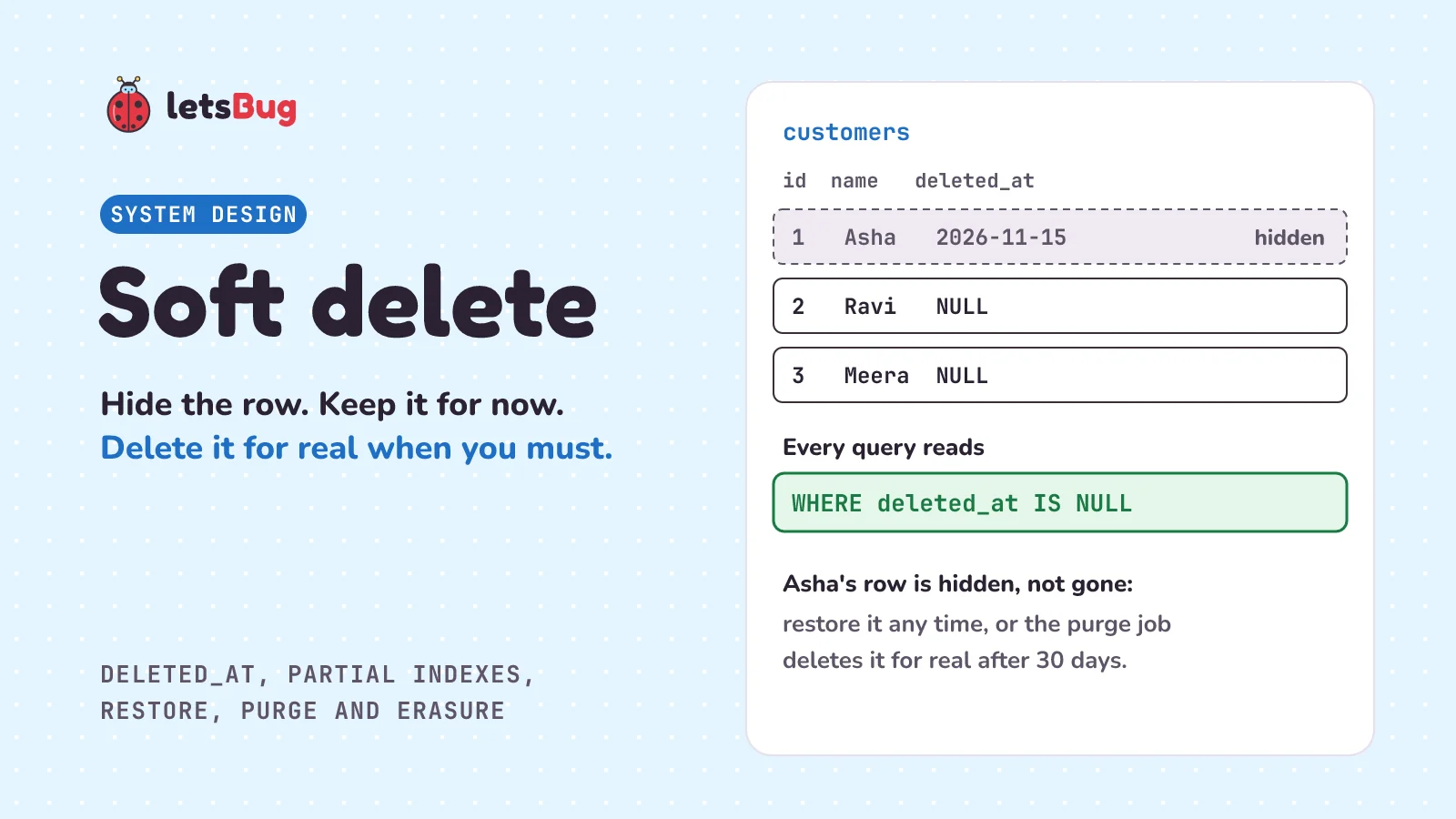
Soft delete means marking a row as deleted instead of removing it. You add a column such as deleted_at, set it to the date (or time) of the deletion, and make every query skip rows where it is set. The row can be restored later, but it still takes space, and some laws require a real delete.
In this post we stay with the shop from the database migrations post, with its orders table and its amounts in paise (hundredths of a rupee). Now customers want to close their accounts, and staff want to remove a test order. First we see what goes wrong with a plain delete, and how soft delete works, using a shop register and then the real thing. Then we build it in plain Python with SQLite: closing an account, restoring it, keeping emails unique, and a clean-up job that deletes for real. We finish with what soft delete costs, and when the law says the data must really go, under the EU's GDPR and India's DPDP Act.
A few words first. A row is one record in a table, such as one customer. DELETE is the SQL command that removes rows, and UPDATE is the one that changes values in rows that already exist. NULL means "no value here". A query is a request to the database, such as "give me Asha's orders". An index is a sorted list the database keeps to find rows fast. A constraint, such as UNIQUE, is a rule the database checks every time a row is written. And personal data is information about a person who can be identified from it, such as a name or an email address.
Key takeaways
- A hard delete runs
DELETE, and the row is gone. A soft delete runs anUPDATEthat setsdeleted_atto the date, and the row stays, hidden. - Every query must skip deleted rows with
WHERE deleted_at IS NULL. One forgotten filter puts deleted data back on screen or into a report. A view, a saved query you read like a table, can hold the filter so the safe query is the easy one. - A plain
UNIQUErule on email stops a customer who closed an account from signing up again. A partial unique index, an index with... WHERE deleted_at IS NULLon the end, checks only the live rows. - Restoring is one
UPDATEthat setsdeleted_atback to NULL. It can fail if a new live row has taken the same email since. - Soft-deleted rows still take space and still hold personal data. Run a purge job, a scheduled task that deletes them for real 30 days after they were deleted (or whatever grace period you choose).
- The EU's GDPR (Article 17) and India's DPDP Act (section 12) let people ask for their personal data to be erased. Unless an exception applies, such as another law that says you must keep it, that needs a real delete (or overwriting the personal fields), not a soft one. After a real delete, check the bytes are gone from the database file too.
What is soft delete in simple words?
Picture a shopkeeper with a paper register of customers. A customer, Ravi, says he's moving away and wants his account closed. The shopkeeper could tear the page out. That's quick, but the page is gone forever. If Ravi comes back next week and says "I changed my mind", there's nothing to bring back. And the order book still says "Ravi owes for the rice", about a customer the register no longer knows.
So the shopkeeper does something else. He draws a line through Ravi's entry and writes the date next to it: "closed, 15 Nov". Everyone at the counter knows to skip crossed-out lines. If Ravi comes back, the shopkeeper writes "reopened" and carries on. Once a month, he copies the register onto fresh pages and leaves out lines crossed out more than a month ago.
Tearing out the page is a hard delete. The line and the date are a soft delete. The monthly copy that leaves old crossed-out lines behind is a purge. In a database, the line and the date become one column, usually called deleted_at. It's empty (NULL) for a live row, and holds the date or time of the deletion for a deleted one. "Skip crossed-out lines" becomes WHERE deleted_at IS NULL in every query.
What is the difference between hard delete and soft delete?
A hard delete is the plain SQL command:
DELETE FROM customers WHERE id = 2;The row is gone, and nothing in the table can bring it back. Three things can go wrong:
- Mistakes are final. A customer who clicked "close account" by accident, or a staff member who removed the wrong order, can't be undone without a backup.
- Other rows lose their partner. Ravi's orders hold his customer id in a foreign key, a column that points to a row in another table. If the database checks foreign keys, it refuses the delete, or does whatever the foreign key says should happen to the orders. SQLite only checks them if you ask: "Foreign key constraints are disabled by default (for backwards compatibility), so must be enabled separately for each database connection." We tried both. With the check on, deleting a customer who has orders failed with
FOREIGN KEY constraint failed. With it off, the delete worked and left an order pointing at a customer who no longer exists. - History disappears. The shop's sales for last month change when an old customer is removed, if their orders go too.
A soft delete is an UPDATE instead:
UPDATE customers SET deleted_at = '2026-11-15' WHERE id = 2;The row stays, with its foreign keys and its history. It's only hidden. The price is that "hidden" is now your job, in every query, for as long as the row is there.
| Hard delete | Soft delete | |
|---|---|---|
| The SQL | DELETE | UPDATE |
| Can it be undone? | Only from a backup | Yes, set the date back to NULL |
| Space | Freed for reuse | Still used until a purge |
| Every query needs a filter? | No | Yes |
| Orders pointing at it | Blocked, changed or left dangling | Still point at a real row |
| Answers an erasure request? | Yes, once the bytes and other copies are gone too | No |
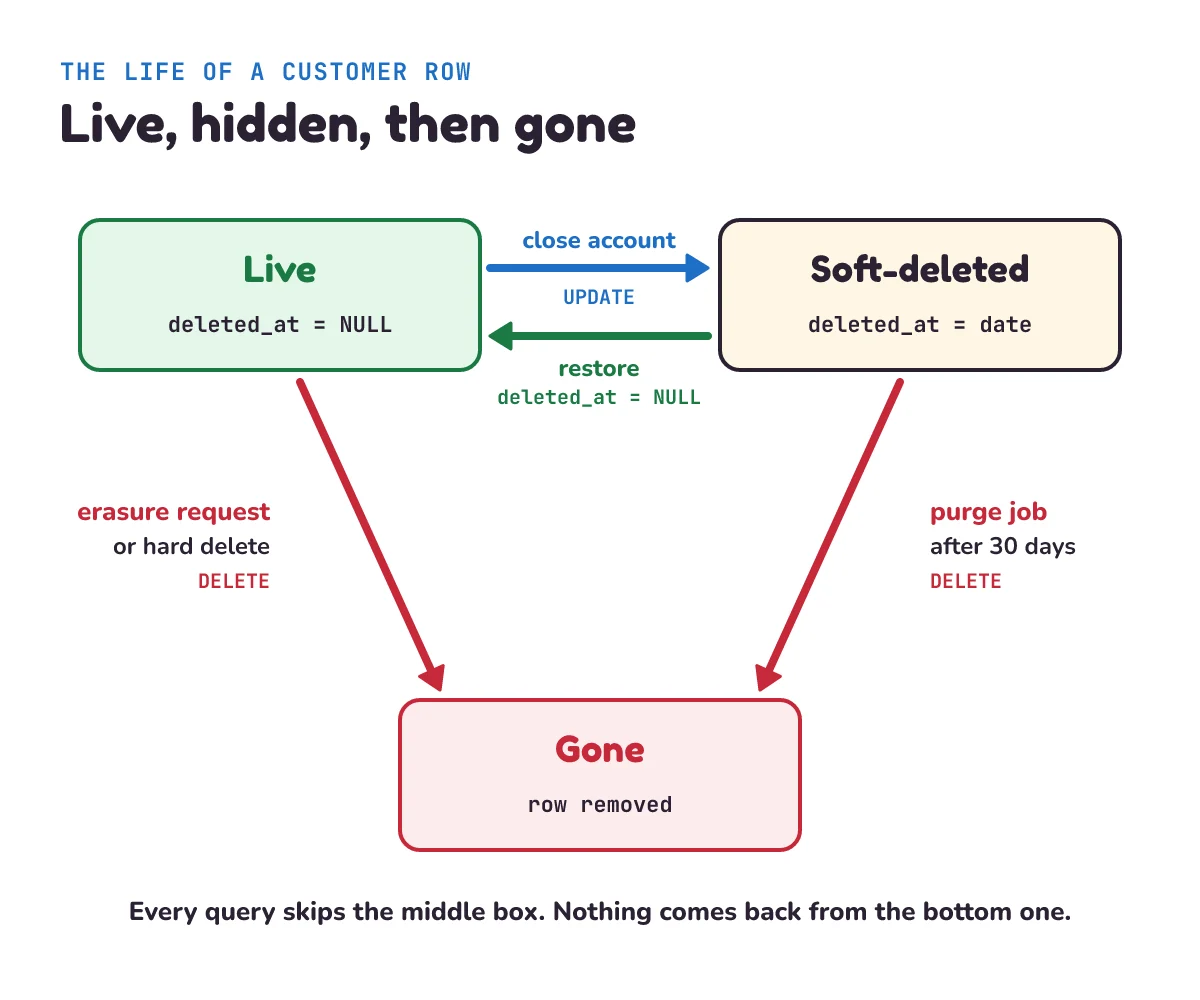
Why a date and not a simple yes/no column such as is_deleted? Because the date answers two questions with one column. NULL or not NULL tells you whether the row is deleted. The date tells you when, which the purge job needs to know which rows have waited long enough.
How do you build soft delete in Python with SQLite?
Let's build a small copy of the shop with SQLite, the database that comes with Python. It has a customers table and an orders table, each with a deleted_at column, and six small functions:
# soft_delete.py
"""Soft delete with SQLite: hide rows, restore them, and delete for real when you must."""
import sqlite3
from pathlib import Path

DB = Path("shop.db")
DB.unlink(missing_ok=True)                        # a fresh shop on every run
db = sqlite3.connect(DB, isolation_level=None)    # autocommit: each statement is saved at once
db.execute("PRAGMA foreign_keys = ON")            # SQLite leaves foreign keys off unless you ask
db.execute("PRAGMA secure_delete = ON")           # a real DELETE overwrites the old bytes with zeros
db.executescript("""
CREATE TABLE customers (
    id INTEGER PRIMARY KEY,
    email TEXT NOT NULL,
    name TEXT NOT NULL,
    deleted_at TEXT                   -- NULL: live. A date: deleted on that day.
);
-- One live account per email. Deleted accounts don't count.
CREATE UNIQUE INDEX customers_email_live ON customers (email) WHERE deleted_at IS NULL;

CREATE TABLE orders (
    id INTEGER PRIMARY KEY,
    customer_id INTEGER REFERENCES customers (id) ON DELETE SET NULL,
    amount_paise INTEGER NOT NULL,
    deleted_at TEXT
);
-- The app reads these views, not the tables, so it can't forget the filter.
CREATE VIEW live_customers AS SELECT * FROM customers WHERE deleted_at IS NULL;
CREATE VIEW live_orders AS SELECT * FROM orders WHERE deleted_at IS NULL;
""")


def sign_up(email, name):
    try:
        return db.execute("INSERT INTO customers (email, name) VALUES (?, ?)", (email, name)).lastrowid
    except sqlite3.IntegrityError:
        return None                   # a live account already has this email


def close_account(customer_id, today):
    db.execute("UPDATE customers SET deleted_at = ? WHERE id = ? AND deleted_at IS NULL", (today, customer_id))


def restore_account(customer_id):
    """True if a closed account came back; False if it was never closed, was purged, or its email is taken."""
    try:
        sql = "UPDATE customers SET deleted_at = NULL WHERE id = ? AND deleted_at IS NOT NULL"
        return db.execute(sql, (customer_id,)).rowcount == 1
    except sqlite3.IntegrityError:
        return False                  # someone has signed up with this email since


def delete_order(order_id, today):
    db.execute("UPDATE orders SET deleted_at = ? WHERE id = ? AND deleted_at IS NULL", (today, order_id))


def purge(today, keep_days=30):
    """The real delete: accounts closed keep_days or more ago."""
    return db.execute("DELETE FROM customers WHERE deleted_at <= date(?, ?)",
                      (today, f"-{keep_days} days")).rowcount


def erase(customer_id):
    """The right to erasure: remove the person now. Their orders stay for the accounts, linked to no one."""
    db.execute("DELETE FROM customers WHERE id = ?", (customer_id,))


def one(sql, *args):
    """Run a query that returns one value, and return it."""
    return db.execute(sql, args).fetchone()[0]
deleted_at TEXTholds a date as text, such as2026-11-15. Written as year-month-day with leading zeros (2026-01-05, not2026-1-5), dates sort in date order, so<=compares them correctly.- The views. A view is a saved query with a name, which you can read like a table. SQLite's docs: "The CREATE VIEW command assigns a name to a pre-packaged SELECT statement."
live_customersis "customers, minus the deleted ones". Code that reads the view can't forget the filter, because the filter is inside it. - The unique index has a
WHEREat the end, which makes it a partial index: it only holds the rows that match. We come back to it below. ON DELETE SET NULLtells the database what to do with an order when its customer is really deleted: keep the order, and set itscustomer_idto NULL. SQLite's docs: "the child key columns of all rows in the child table that mapped to the parent key are set to contain SQL NULL values." It only acts on a realDELETE, never on our soft delete, which is just anUPDATE.AND deleted_at IS NULLinclose_accountanddelete_ordermeans deleting twice keeps the first date, so the purge timer doesn't restart.purgeanderaseare the only two functions that runDELETE.date(?, ?)is SQLite's date function:date('2026-12-16', '-30 days')gives2026-11-16.rowcountis the number of rows a statement changed. Inrestore_account, 1 means the account came back, and 0 means there was nothing to restore: it was live already, or purged.lastrowidinsign_upis the id SQLite gave the new row.- Every value goes in through a
?placeholder, never pasted into the SQL text, so a strange email can't change the query.
Now a short story that uses it. Two customers sign up and place orders, and a staff member places a ₹50,000 test order to check that big payments work:
# story.py
"""Five things that happen to the shop's data. Run: python story.py"""
import soft_delete as shop

asha = shop.sign_up("asha@example.com", "Asha")
ravi = shop.sign_up("ravi@example.com", "Ravi")
shop.db.executemany("INSERT INTO orders (customer_id, amount_paise) VALUES (?, ?)",
                    [(asha, 49950), (asha, 120000), (ravi, 89900), (None, 5000000)])   # order 4: a staff test


def rupees(sql):
    return f"Rs {shop.one(sql) / 100:,.2f}"


def can_sign_in(email):
    return shop.one("SELECT COUNT(*) FROM live_customers WHERE email = ?", email) == 1


print("1. Staff delete test order 4")
shop.delete_order(4, "2026-11-15")
print("   rows in orders:", shop.one("SELECT COUNT(*) FROM orders"),
      "| live orders:", shop.one("SELECT COUNT(*) FROM live_orders"))
print("   sales from the table:", rupees("SELECT SUM(amount_paise) FROM orders"))
print("   sales from the view: ", rupees("SELECT SUM(amount_paise) FROM live_orders"))

print("2. Asha closes her account, then changes her mind")
shop.close_account(asha, "2026-11-15")
print("   can sign in:", can_sign_in("asha@example.com"),
      "| her orders kept:", shop.one("SELECT COUNT(*) FROM orders WHERE customer_id = ?", asha))
print("   restored:", shop.restore_account(asha), "| can sign in:", can_sign_in("asha@example.com"))

print("3. Ravi closes his account, then signs up again")
shop.close_account(ravi, "2026-11-15")
ravi_new = shop.sign_up("ravi@example.com", "Ravi")
print("   new account id:", ravi_new, "| restore the old one:", shop.restore_account(ravi))

print("4. A month later, the purge job runs")
print("   accounts purged:", shop.purge("2026-12-16"),
      "| Ravi's old order now belongs to:", shop.one("SELECT customer_id FROM orders WHERE id = 3"))

print("5. Ravi asks the shop to erase his data")
shop.erase(ravi_new)
print("   rows with his email:", shop.one("SELECT COUNT(*) FROM customers WHERE email = ?", "ravi@example.com"),
      "| his email in the file:", b"ravi@example.com" in shop.DB.read_bytes())
The script prints Rs rather than ₹, so the output is plain text that works in any terminal or file. Make a new folder, save both files in it under the names in their first lines, and open a terminal (a command-line window) there. In the output block, the line starting with $ is what you type, without the $; the lines under it are what it prints:
$ python story.py
1. Staff delete test order 4
   rows in orders: 4 | live orders: 3
   sales from the table: Rs 52,598.50
   sales from the view:  Rs 2,598.50
2. Asha closes her account, then changes her mind
   can sign in: False | her orders kept: 2
   restored: True | can sign in: True
3. Ravi closes his account, then signs up again
   new account id: 3 | restore the old one: False
4. A month later, the purge job runs
   accounts purged: 1 | Ravi's old order now belongs to: None
5. Ravi asks the shop to erase his data
   rows with his email: 0 | his email in the file: False
Each of the five steps shows one idea, and the rest of this post walks through them. Step 1 is the filter, step 3 the unique index, steps 2 and 3 restoring, step 4 the purge, and step 5 the real delete the law can ask for.
How do you hide soft-deleted rows from every query?
Look at step 1 again. The test order is still in the table: 4 rows, 3 live. Any query that reads orders directly counts it. The sales report that forgot the filter says ₹52,598.50. The true figure, from the view, is ₹2,598.50. One missing WHERE made the shop's sales look twenty times bigger.
That's the main danger of soft delete. A hard delete can't leak: a removed row can't show up in any query. A soft delete leaks quietly: every query that forgets the filter shows deleted data, and nothing warns you. The fixes, from weakest to strongest:
- Remember to write it. Add
WHERE deleted_at IS NULLto every query by hand. It works until someone writes a new report in a hurry. - Put the filter in one place in the code. If all queries for a table go through one class, such as a repository, the filter lives in that class and new code gets it without extra work.
- Put the filter in the database. Make the app read a view, as our code does. Some teams go further and rename the table (say, to
customers_all) and give the view the old name, so even old code gets the filter. Writes then have to go to the real table: SQLite's docs say "Views are read-only in SQLite."
Whichever you choose, a few places should still read the whole table on purpose: the purge job, the restore screen for staff, and audits. Give those code paths a clear name, so readers can tell the missing filter is deliberate.
Joins need care too. A join combines rows from two tables, such as each order with its customer's name. Each table in a join needs its own filter. And decide what a deleted parent means for its children. In step 2, Asha's two orders stayed in live_orders while her account was closed. For sales, that's right: the sales happened. For a "recent orders" list on a staff screen, maybe not. A database's ON DELETE CASCADE, which deletes the children with the parent, won't help here: it only runs on a real DELETE. If closing an account should also hide its orders, your code has to set their deleted_at too.
How do unique constraints work with soft delete?
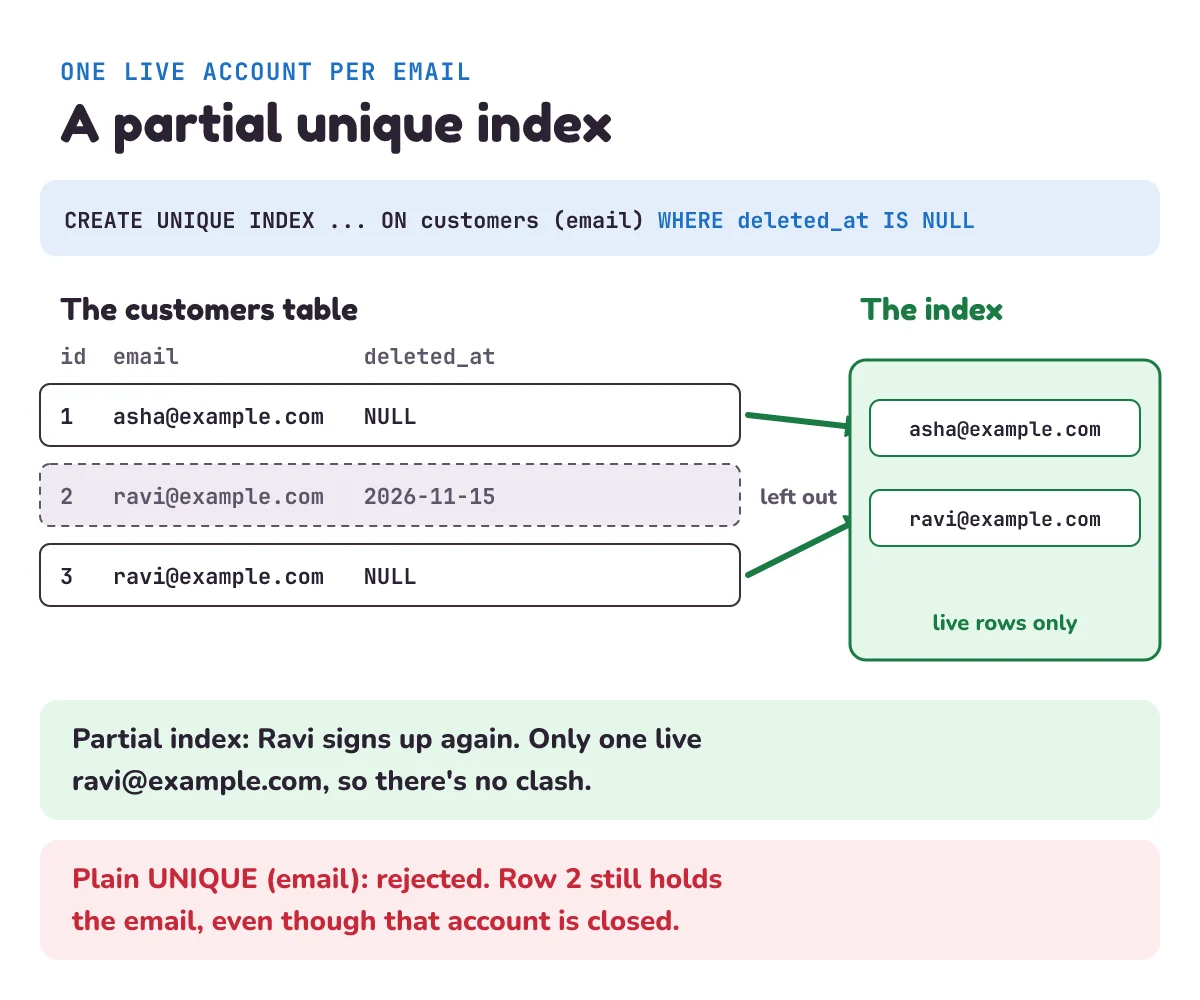
Step 3: Ravi closes his account, then signs up again with the same email. With a plain UNIQUE rule on email, the sign-up fails. His old, closed row still holds that email, and a UNIQUE rule doesn't know about deleted_at. To the customer, it looks like the shop is saying "this email is taken" about an account they closed.
The fix is a partial unique index. An index is a sorted list the database keeps to find rows fast (the database indexing post builds one). A partial index only lists the rows that match its WHERE. SQLite's docs: "A partial index is an index over a subset of the rows of a table." Add UNIQUE, and SQLite checks uniqueness among those rows only: "This provides a mechanism for enforcing uniqueness across some subset of the rows in a table."
CREATE UNIQUE INDEX customers_email_live ON customers (email) WHERE deleted_at IS NULL;So "one live account per email", which is the rule the shop really wants. Old closed rows can share an email with each other and with the new live one. PostgreSQL has the same feature, with an example of the same idea in its docs: "This enforces uniqueness among the rows that satisfy the index predicate, without constraining those that do not." (The predicate is the index's WHERE condition.)
The partial index has a second use. It finds rows fast, just like a normal index, when the query's WHERE includes the index's condition. SQLite's rule is strict: "The terms in W and X must match exactly." (W is the query's WHERE, X is the index's.) We asked SQLite how it would run the sign-in check, with EXPLAIN QUERY PLAN. Through the view, which adds deleted_at IS NULL, it said SEARCH customers USING INDEX customers_email_live (email=?). On the bare table, with only WHERE email = ?, it said SCAN customers: every row, one by one. One more reason to read through the view.
A tempting shortcut is UNIQUE (email, deleted_at): one live row (with NULL) and any number of deleted ones (each with its own date). It doesn't work, because of how NULL behaves. SQLite's docs: "For the purposes of UNIQUE constraints, NULL values are considered distinct from all other values, including other NULLs." Two live rows both have NULL in deleted_at, and two NULLs never count as equal, so the database lets both in. PostgreSQL behaves the same by default: "By default, two null values are not considered equal in this comparison." PostgreSQL has an option, NULLS NOT DISTINCT, to change that. The partial index works in both SQLite and PostgreSQL, so it's the one to learn. Not every database has partial indexes, so check yours.
We ran these rules on PostgreSQL 18.6 too. With the partial unique index, Ravi's second sign-up worked, and restoring his old account failed with duplicate key value violates unique constraint "customers_email_live", just as in SQLite. UNIQUE (email, deleted_at) let two live rows with the same email in. With NULLS NOT DISTINCT added, the second one was refused.
How do you restore a soft-deleted row?
Restoring is the main reason to choose soft delete, and it's one statement: set deleted_at back to NULL. In step 2, Asha closed her account and came back, and nothing was lost: her name, her email and both her orders were all still there.
Step 3 shows the catch. Ravi's old account can't come back, because a new live account has his email, and the partial unique index refuses a second live row. Our restore_account catches the error and returns False. A real shop would then show staff both accounts and let them decide, or merge them.
Three more things to settle before you offer a restore button:
- Restore what was deleted together. If closing an account also soft-deleted its addresses, restoring it should bring back the addresses that were deleted at that moment, and not ones the customer removed on purpose a year ago. Some teams store a shared id for everything deleted in one action, for this reason.
- Restore has a deadline. Once the purge job has run, there's nothing left to restore. Tell people how long they have, such as "you can reopen your account for 30 days".
- Record who did it. You can add a
deleted_bycolumn next todeleted_at, so staff can tell later whether the customer closed the account or a staff member did.
What does soft delete cost?
- Tables and indexes keep growing. Nothing ever leaves until you purge. A table where most rows are deleted makes every scan read rows nobody sees, and every normal index holds entries for them. A partial index with
WHERE deleted_at IS NULLkeeps an index small. SQLite's docs say partial indexes "can result in smaller database files and improvements in both query and write performance." - Every query carries the filter, and one that forgets it shows the wrong data, as step 1 did. It's the cost that's easiest to miss.
- Constraints get harder. Every
UNIQUErule needs the partial-index treatment, and foreign keys still point at hidden rows. The database can't tell "hidden" from "live" unless you tell it. - The data is still there. A customer who pressed "delete my account" probably thinks their data is gone. With soft delete, it isn't, until the purge. That's the next section.
So the purge job isn't optional. Run it every day, and have it delete rows soft-deleted 30 days or more ago (or your own grace period). Our purge only clears customers, to keep it short. A real one runs for every table with a deleted_at, such as orders, where the deleted test order is still waiting. Our purge("2026-12-16") in step 4 removed Ravi's old account, closed 31 days earlier. Notice what happened to his order: ON DELETE SET NULL kept it, linked to no customer. The shop's sales figures stay right, and the order no longer points to a person.
When does the law say you must really delete data?
Data protection laws give people the right to have their personal data erased. Two examples, quoted from the official texts:
- The EU's GDPR (General Data Protection Regulation), Article 17, "Right to erasure": "The data subject shall have the right to obtain from the controller the erasure of personal data concerning him or her without undue delay". The data subject is the person, and the controller is whoever decides how the data is used: here, the shop. The grounds include "the personal data are no longer necessary in relation to the purposes for which they were collected or otherwise processed". Article 12 sets the clock for answering such a request: "within one month of receipt of the request", which can be extended by up to two more months in complex cases.
- India's DPDP Act (Digital Personal Data Protection Act, 2023), section 12: "upon receipt of such a request, the Data Fiduciary shall erase her personal data unless retention of the same is necessary for the specified purpose or for compliance with any law for the time being in force." A Data Fiduciary is the Act's word for the controller: "any person who alone or in conjunction with other persons determines the purpose and means of processing of personal data". Section 8 adds that it must erase personal data once the person withdraws consent "or as soon as it is reasonable to assume that the specified purpose is no longer being served, whichever is earlier".
The DPDP Act's duties are being brought in step by step. The government notified the DPDP Rules, 2025 on 14 November 2025, and its explainer says: "The Rules introduce an eighteen-month period for phased compliance." So check which duties already apply to your app, and from when.
A soft-deleted row is not erased: the email and the name are still in the table, a single UPDATE away from coming back. So an erasure request needs a real DELETE, or for the personal fields to be overwritten. Our erase in step 5 does a real DELETE.
Both laws also say when you may keep data. GDPR's Article 17 doesn't apply where keeping it is needed "for compliance with a legal obligation which requires processing by Union or Member State law to which the controller is subject". GDPR lists a few other exceptions too, such as defending a legal claim. The DPDP Act gives an example in an illustration under section 8: a bank customer closes her account, but "Y is required by law applicable to banks to maintain the record of the identity of its clients for a period of ten years beyond closing of accounts." That's why our shop keeps Ravi's orders (rules on tax and accounts often require sales records) and removes only the link to him. Which records your business must keep, and for how long, is a question for a lawyer, not a blog post. This section explains the idea; it isn't legal advice.
Is the data really gone after DELETE?
Not always. SQLite's page on VACUUM: "When content is deleted from an SQLite database, the content is not usually erased but rather the space used to hold the content is marked as being available for reuse." So the old bytes stay in the file until something reuses that space. And: "This can allow deleted content to be recovered by a hacker or by forensic analysis."
That's why soft_delete.py turns on secure_delete. SQLite's docs: "When secure_delete is on, SQLite overwrites deleted content with zeros." And it's usually off: "The default setting for secure_delete is determined by the SQLITE_SECURE_DELETE compile-time option and is normally off." Step 5 searched the raw file for Ravi's email and didn't find it. We ran the same story again with the secure_delete line removed. The row was still gone from every query, but the bytes ravi@example.com were still in shop.db. The other cleaner is VACUUM, which rebuilds the whole file: "Running VACUUM will clean the database of all traces of deleted content, thus preventing an adversary from recovering deleted content."
PostgreSQL works in a similar way. Its docs: "In PostgreSQL, an UPDATE or DELETE of a row does not immediately remove the old version of the row." Its VACUUM command later frees that space for reuse, and a feature called autovacuum, which the docs call "optional but highly recommended", runs it for you. So in PostgreSQL too, a real delete isn't instant at the byte level.
And the table isn't the only copy. Backups, log files, analytics exports, search indexes and copies sent to other services may hold the same data. Write down where each copy lives, and how long it lasts before it's replaced, so you can answer "is it gone?" honestly. The DPDP Act's section 8 says the Data Fiduciary must also "cause its Data Processor to erase any personal data that was made available by the Data Fiduciary for processing to such Data Processor" (a data processor is a company that handles the data for you, such as an email service).
When shouldn't you use soft delete?
- When nobody will ever restore it. Log lines, expired sessions and old one-time login codes have no "undo" button. Delete them for real, or let them expire, and skip the filter in every query.
- When the reason to delete is that the data must go. An erasure request, an API key pasted into a message by mistake, a photo uploaded to the wrong place. Hiding these isn't deleting them. Delete for real, straight away.
- When what you need is history, not undo. If the question is "who changed what, and when?", an audit log, a separate table that records every change, answers it better than a
deleted_atcolumn, which only remembers the last delete. - When a status says it better. A cancelled order isn't deleted: the customer still sees it as cancelled, and the money was refunded. That's
status = 'cancelled', a normal value the app shows, not a hidden row.
Soft delete is worth it for things people delete by mistake and want back: accounts, documents, messages, products in a shop's catalogue. Use it there, with a purge job, and use a plain delete everywhere else.
What mistake do beginners make with soft delete?
Adding the column and forgetting the filter somewhere. The first version is careful: the main pages all say WHERE deleted_at IS NULL. Then a new report goes in, or a search box, or a "forgot password" form that looks people up by email. It reads the table directly. Now a closed account gets a password reset email, or a deleted test order inflates the sales report, as in step 1. Nothing crashes, so nobody notices for weeks.
The fixes from the filter section apply, and one more catches what they miss: a test that creates a deleted row and checks that every screen and report leaves it out.
Two more slips:
- Keeping a plain
UNIQUEon email. See step 3: use a partial unique index from day one. - Calling soft delete "deleted" to the customer. If the button says "delete my data", the data has to go. Say "close account" for the soft version, and tell people how long it can be reopened.
1) A teammate replaces the partial index with UNIQUE (email, deleted_at) on the table. Two people sign up with a@example.com. What happens, and why?
2) Asha closes her account on 2026-11-15. The purge job runs every day with a 30-day grace period. On 2026-12-14, is her account purged? On 2026-12-15?
3) The shop adds a page that lists every live order with its customer's name, using a join. Write the query so that deleted orders and closed accounts both stay out, but orders whose customer was purged (customer_id NULL) are still listed.
Show the answers
1) Both sign-ups succeed, and the shop now has two live accounts with the same email. Both rows have NULL in deleted_at, and for a UNIQUE rule two NULLs are never equal, so the two (a@example.com, NULL) pairs count as different from each other. Here it is in the sqlite3 command-line shell (or run the same three statements with db.execute in Python):
sqlite> CREATE TABLE c (email TEXT NOT NULL, deleted_at TEXT, UNIQUE (email, deleted_at));
sqlite> INSERT INTO c (email) VALUES ('a@example.com'), ('a@example.com');
sqlite> SELECT COUNT(*) FROM c WHERE deleted_at IS NULL;
2
2) On 2026-12-14, date('2026-12-14', '-30 days') is 2026-11-14, and '2026-11-15' <= '2026-11-14' is false, so she stays. On 2026-12-15 the cut-off is 2026-11-15, the comparison is true, and the account is purged. So she gets 30 calendar days, counting the day she closed it.
3) Read both views, and use a LEFT JOIN, which keeps an order even when no customer matches:
SELECT o.id, o.amount_paise, c.name
FROM live_orders AS o
LEFT JOIN customers AS c ON c.id = o.customer_id
WHERE o.customer_id IS NULL OR c.deleted_at IS NULL;
Joining live_customers with a plain JOIN would also drop the purged customer's orders, and a LEFT JOIN to live_customers would keep orders of closed accounts with a blank name. The WHERE keeps orders with no customer and orders whose customer is live. On our shop after step 5, it lists Asha's two orders and Ravi's old order (with no name), and leaves out the deleted test order.
Questions people ask
What is soft delete in a database?
Soft delete means marking a row as deleted instead of removing it, usually by setting a deleted_at column to the date (or time) of the deletion. Queries skip rows where that column is set, so the row looks deleted to users but can be restored. A clean-up job deletes old soft-deleted rows for real later.
Is deleted_at better than an is_deleted flag?
Usually, yes. A deleted_at date tells you both whether a row is deleted (it isn't NULL) and when, which a purge job needs to find rows past their grace period. An is_deleted true/false column only tells you whether, so you'd need a second column for the date anyway.
How do I keep an email unique with soft delete?
Use a partial unique index: CREATE UNIQUE INDEX ... ON customers (email) WHERE deleted_at IS NULL. It checks uniqueness only among live rows, so a customer who closed an account can sign up again. Don't use UNIQUE (email, deleted_at): two NULLs never count as equal, so it lets duplicate live rows in.
Does soft delete meet GDPR or the DPDP Act?
Not for an erasure request. A soft-deleted row still holds the personal data. The EU's GDPR (Article 17) and India's DPDP Act (section 12) let people ask for their personal data to be erased. Unless an exception applies, such as another law that requires you to keep it, delete the personal data for real (or overwrite it), and remember the copies in backups and logs.
Does soft delete slow a database down?
It can, as deleted rows pile up: scans read them and normal indexes hold entries for them. Two habits keep it fast: partial indexes with WHERE deleted_at IS NULL, which only list live rows, and a daily purge job that removes rows deleted 30 days or more ago (or your own grace period).
Keep going
- Previous in this System Design series: Connection pooling, why an app keeps a few database connections open and shares them, instead of opening a new one for every request.
- Next: "Multi-tenancy", how one app and one database serve many separate customers, such as many shops, without any of them seeing the others' data.
- How the shop changed its tables safely while customers kept buying: Database migrations. And how an index, like our partial one, finds rows fast: Database indexing.
Checked on 14 November 2026 against the 12 sources below.
Sources
- SQLite documentation: Partial Indexes (partial and unique partial indexes, when a query can use one)
- SQLite documentation: Foreign Key Support (off by default, ON DELETE SET NULL)
- SQLite documentation: CREATE TABLE (NULLs in UNIQUE constraints)
- SQLite documentation: CREATE VIEW
- SQLite documentation: PRAGMA statements (secure_delete)
- SQLite documentation: VACUUM (traces of deleted content)
- PostgreSQL documentation: Partial Indexes
- PostgreSQL documentation: Constraints (NULLs in unique constraints)
- PostgreSQL documentation: Routine Vacuuming
- Regulation (EU) 2016/679, the General Data Protection Regulation, official text on EUR-Lex (Articles 12 and 17)
- The Digital Personal Data Protection Act, 2023 (No. 22 of 2023), Gazette of India copy on meity.gov.in (sections 2, 8 and 12)
- Press Information Bureau, Government of India: DPDP Rules, 2025 Notified (17 November 2025; the phased start)
Every Python sample in this post was run in Python 3.13 with SQLite 3.45.3 before publishing, and the PostgreSQL unique-index tests on PostgreSQL 18.6.