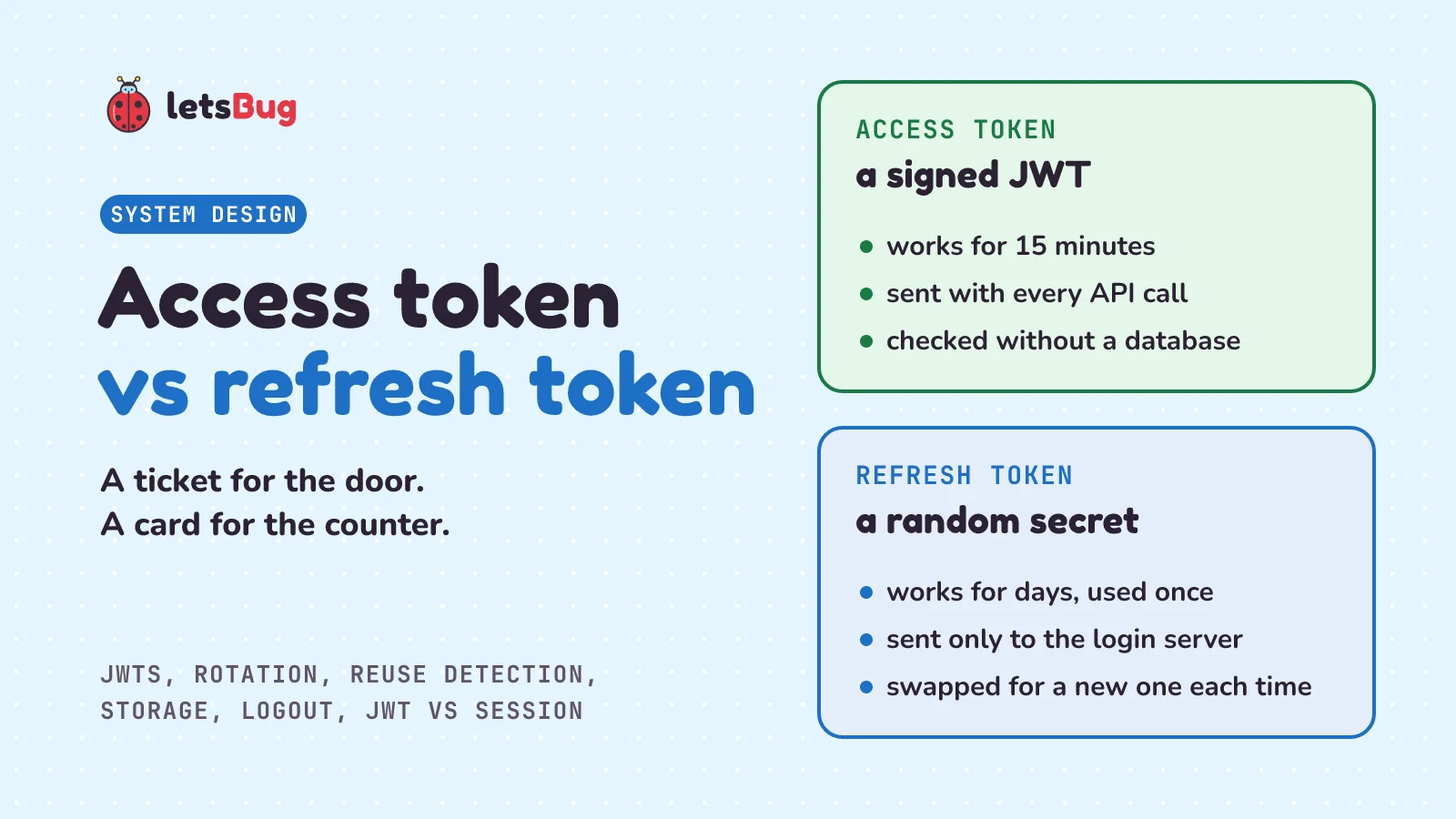
An access token is a short-lived pass, often a signed JWT, that an app sends with every request to an API. A refresh token is a longer-lived secret that the app sends only to the login server, to get a new access token when the old one expires. Keeping access tokens short limits what a stolen one can do.
In this post we start with a cinema ticket and a membership card, then open up a JWT to see what's inside. We build both tokens in plain Python: signing and checking a JWT by hand, watching it expire, and rotating refresh tokens so that a stolen old one gets caught. Then we look at where to keep each token in a browser, and why logging out with a JWT is harder than it sounds. We finish with the question many people ask first: JWT or a plain server session, and when to use which.
A few words first. A token is a string an app holds to prove something, here "this person has logged in". An API is the part of a server that apps send requests to, such as "give me my orders". The login server checks passwords and hands out tokens (the OAuth standard calls it the authorization server, and calls the API the resource server). A session is the server's own record that someone is logged in. A cookie is a small piece of text the browser stores for a website and sends back with every request to it. JWT stands for JSON Web Token, and JSON is the text format for data such as {"sub": "asha"}.
Key takeaways
- The access token goes with every API request and is checked on the spot. The refresh token goes only to the login server, and its one job is to get a new access token.
- A JWT is signed, not encrypted. Anyone holding one can read what's inside, but nobody can change it without the secret key, because the signature would no longer match.
- An API that only checks the signature and the expiry time accepts a stolen access token until it expires. That's why access tokens live minutes, not days. Ours lives 15 minutes.
- Refresh token rotation: every refresh hands out a new refresh token and marks the old one used. If a used one ever comes back, someone has a copy, so the server revokes the whole family of tokens from that login.
- In a browser, keep tokens out of
localStorage, where any script on the page can read them. Keep the access token in memory and the refresh token in anHttpOnly,Secure,SameSitecookie, or keep tokens on your server entirely. - JWT vs session: for one website with its own server, a plain server session is simpler and logs out at once. JWT access tokens pay off when many separate APIs or apps must check logins without asking one central store.
What is the difference between an access token and a refresh token?
Picture a cinema with a membership scheme. At the counter, you show your membership card, and the staff print you a ticket for the 6 pm show. At the door of the screen, an usher looks at the ticket: right film, right time, the cinema's stamp. The usher doesn't phone the counter or look you up anywhere. The ticket is enough, and that's why the queue at the door moves fast. After the show, the ticket is worth nothing. For the next film, you go back to the counter with your card and get a new ticket.
Now suppose someone picks your ticket up off the floor. They can see one film, today, and that's all. Losing your membership card would be worse, so the card never goes to the door. You show it only at the counter, where the staff check it against their list of members, and where they can cancel it if you report it lost.
The ticket is the access token: short-lived, shown at every door (every API request), and checked on the spot without looking anything up. The membership card is the refresh token: it lasts longer, it's shown only at the counter (the login server), and its only job is to get you a new ticket. The cinema's stamp is the token's signature, which proves the cinema printed it.
The OAuth 2.0 standard, RFC 6749, defines both in two short sentences. (An RFC is an official internet standards document, and OAuth 2.0 is the standard most "log in and get a token" systems follow.) "Access tokens are credentials used to access protected resources." And: "Refresh tokens are credentials used to obtain access tokens." It keeps them apart, just like the cinema: "Unlike access tokens, refresh tokens are intended for use only with authorization servers and are never sent to resource servers."
Strictly, OAuth is about permission, not identity. RFC 6749: "An access token is a string representing an authorization issued to the client." (The client is the app.) OpenID Connect, a layer built on top of OAuth, adds a separate ID token that says who the person is. For a login to your own app, like ours, the access token carries both: who you are (sub) and that you may call the API. What you may do once you're in is the next post's topic.
| Access token | Refresh token | |
|---|---|---|
| Job | Proves you're allowed in, on each API request | Gets a new access token |
| Sent to | Every API | Only the login server |
| Lives | Minutes (15 in our example) | Days (14 in our example), and used once |
| Looks like | Often a JWT the API can read | A random string that means nothing on its own |
| Checked by | Signature and expiry time, no lookup | A lookup in the login server's database |
| If stolen | Works until it expires | With rotation, caught as soon as both the thief and the real app use it |
Why not just use one token?
Because one token forces a bad choice. If the one token lasts a month, a thief who copies it gets a month of access. And if the API checks it only by its signature, there's no list to remove it from: the server can't cancel it. If the one token lasts 15 minutes instead, the thief gets 15 minutes, but every user has to type their password every 15 minutes, all day.
Two tokens give you both. The token that travels everywhere, and so is most likely to leak, lives only minutes. The token that lives long travels to one place only, the login server, which looks it up every time and can cancel it. RFC 6749 says the same thing in passing: "access tokens may have a shorter lifetime and fewer permissions than authorized by the resource owner" (the resource owner is the user).
What is inside a JWT?
RFC 7519, the JWT standard, opens: "JSON Web Token (JWT) is a compact, URL-safe means of representing claims to be transferred between two parties." A claim is one fact in the token, such as "the user is asha" or "this expires at 6:15 pm". A JWT is three parts joined by dots:
header.payload.signature- The header says how the token is signed:
{"alg":"HS256","typ":"JWT"}. HS256 means HMAC with SHA-256, explained below. - The payload holds the claims. Ours:
sub(the subject, who the token is about),iat(issued at),exp(expires at) andjti(the JWT's id). Times are seconds (usually whole ones) counted from 1 January 1970, the usual way computers store a moment. - The signature is an HMAC of the first two parts. An HMAC is a fingerprint of a message mixed with a secret key: change one character of the message, and the HMAC comes out completely different. Only someone with the key can make the right one. The webhooks post shows how webhook senders sign their messages with the same tool.
"Each part contains a base64url-encoded value." Base64url writes any bytes using only letters, digits, - and _, so the token is safe inside a web address or a header. The JWS standard (RFC 7515), which defines how JWTs are signed, uses it "with all trailing '=' characters omitted".
Base64url is a way of writing, not a lock. Anyone can turn it back into the JSON. OWASP, the non-profit behind the best-known web security guides, says in its JWT cheat sheet: "The payload is only base64url encoded, not encrypted, so anyone who obtains the token can read every claim." So never put a password, a card number or anything secret in a JWT. The signature doesn't hide the claims. It stops anyone from changing them.
One more thing about HS256: the same secret key both makes and checks the signature, so every service that can check a token could also make one. When many separate services check tokens, teams switch to a public-key signature (such as RS256 or ES256): the login server signs with a private key that never leaves it, and each API checks with a public key. OWASP: "The audience of the token only need public information to validate the token authenticity which removes the risk of secret leakage by the audience." (The audience is whoever receives and checks the token.) We use HS256 below because Python's standard library has HMAC built in.
How do access and refresh tokens work together?
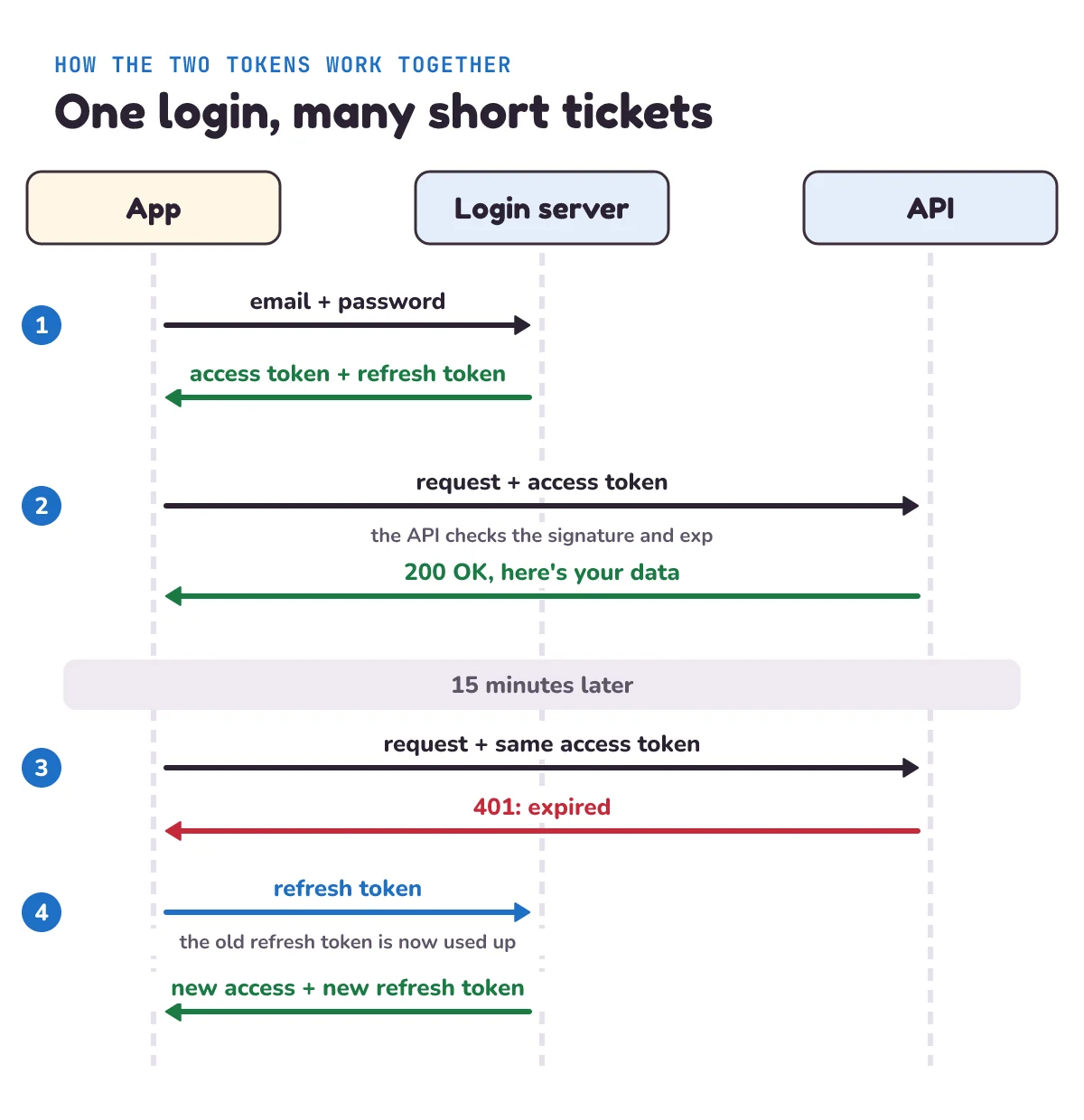
- Log in. The app sends the email and password to the login server once. If they're right, it gets back an access token and a refresh token.
- Use the API. Every request carries the access token, usually in a header:
Authorization: Bearer <token>. The API checks the signature and the expiry time and answers. It doesn't call the login server or any database to do it. Real APIs also check two more claims:iss, who issued the token, andaud, who it's for, so a token made for one API isn't accepted by another. RFC 7519: "If the principal processing the claim does not identify itself with a value in the "aud" claim when this claim is present, then the JWT MUST be rejected." Our demo has one server, so it skips them. - The ticket runs out. After 15 minutes, the API refuses the token with 401, the HTTP status code for "you're not logged in" (or "your proof has expired").
- Refresh. The app sends the refresh token to the login server and gets a new pair. The user sees nothing; the app retries the request with the new access token.
How do you build access and refresh tokens in Python?
Let's build both with only Python's standard library: hmac and hashlib for the signature, base64 and json for the token's parts, and secrets for random values. In a real app, you'd use a well-tested library for JWTs. Building one by hand once is the best way to see that there's no magic inside.
# tokens.py
"""Access tokens (signed JWTs) and refresh tokens (rotated, with reuse detection), standard library only."""
import base64
import hashlib
import hmac
import json
import secrets

ACCESS_SECONDS = 15 * 60              # an access token works for 15 minutes
REFRESH_SECONDS = 14 * 24 * 60 * 60   # a refresh token works for 14 days, or until it is used


class InvalidToken(Exception):
    pass


def b64url(data):
    """Bytes to base64url text, without the = padding (the form JWTs use)."""
    return base64.urlsafe_b64encode(data).rstrip(b"=").decode()


def unb64url(text):
    return base64.urlsafe_b64decode(text + "=" * (-len(text) % 4))


def sign_jwt(claims, key):
    header = b64url(json.dumps({"alg": "HS256", "typ": "JWT"}, separators=(",", ":")).encode())
    payload = b64url(json.dumps(claims, separators=(",", ":")).encode())
    signature = hmac.new(key, f"{header}.{payload}".encode(), hashlib.sha256).digest()
    return f"{header}.{payload}.{b64url(signature)}"


def verify_jwt(token, key, now):
    """Return the claims if the signature is right and the token hasn't expired; raise InvalidToken if not."""
    try:
        header, payload, signature = token.split(".")
        expected = b64url(hmac.new(key, f"{header}.{payload}".encode(), hashlib.sha256).digest())
        if not hmac.compare_digest(signature.encode(), expected.encode()):
            raise InvalidToken("bad signature")
        if json.loads(unb64url(header)).get("alg") != "HS256":
            raise InvalidToken("wrong algorithm")
        claims = json.loads(unb64url(payload))
    except ValueError:                # not three parts, not base64url, not JSON
        raise InvalidToken("not a JWT") from None
    if now >= claims.get("exp", 0):   # RFC 7519: not accepted "on or after" exp
        raise InvalidToken("expired")
    return claims


class AuthServer:
    def __init__(self, key):
        self.key = key
        self.refresh = {}             # sha256 of a refresh token -> its record
        self.dead_families = set()    # families revoked by logout or reuse
        self.denylist = {}            # jti of a logged-out access token -> its exp

    def _issue(self, user, family, now):
        access = sign_jwt({"sub": user, "jti": secrets.token_hex(8), "iat": now,
                           "exp": now + ACCESS_SECONDS}, self.key)
        refresh = secrets.token_urlsafe(32)            # random, means nothing on its own
        self.refresh[sha256(refresh)] = {"user": user, "family": family,
                                         "expires": now + REFRESH_SECONDS, "used": False}
        return access, refresh

    def log_in(self, user, now):
        """After the password check: a new family of refresh tokens starts."""
        return self._issue(user, secrets.token_hex(8), now)

    def use_refresh(self, refresh, now):
        """Swap a refresh token for a new access token AND a new refresh token (rotation)."""
        record = self.refresh.get(sha256(refresh))
        if record is None or now >= record["expires"] or record["family"] in self.dead_families:
            raise InvalidToken("log in again")
        if record["used"]:                             # an old one came back: someone has a copy
            self.dead_families.add(record["family"])
            raise InvalidToken("reused, so the whole family is revoked")
        record["used"] = True
        return self._issue(record["user"], record["family"], now)

    def log_out(self, refresh, access, now):
        record = self.refresh.get(sha256(refresh))
        if record:
            self.dead_families.add(record["family"])
        try:
            claims = verify_jwt(access, self.key, now)
        except InvalidToken:
            return                                     # expired or not ours: nothing to deny
        self.denylist[claims["jti"]] = claims["exp"]   # can go once exp passes: dead anyway

    def check_access(self, access, now):
        """What an API runs if it keeps a denylist: signature, expiry, and 'not logged out'."""
        claims = verify_jwt(access, self.key, now)
        if claims["jti"] in self.denylist:
            raise InvalidToken("logged out")
        return claims


def sha256(text):
return hashlib.sha256(text.encode()).hexdigest()sign_jwtwrites the header and the payload as compact JSON, base64url-encodes each, and signsheader.payloadwith HMAC-SHA256.rstrip(b"=")drops the padding, as JWTs do, andunb64urladds it back before decoding.verify_jwtworks out the signature again from the first two parts and compares it with the one in the token. It only reads the claims after the signature matches.hmac.compare_digestcompares in constant time, so an attacker can't learn the right signature one character at a time from how long each wrong guess takes to be refused (the webhooks post explains this timing attack).now >= expfollows RFC 7519 to the letter: "The "exp" (expiration time) claim identifies the expiration time on or after which the JWT MUST NOT be accepted for processing." A token with noexpcounts as expired.- The refresh token is
secrets.token_urlsafe(32): 32 random bytes, written as 43 characters. It means nothing on its own; the login server looks it up. - The server stores a hash of each refresh token, never the token. A hash is a one-way fingerprint: you can't turn it back into the token. If someone copies the database, they get fingerprints that won't work as tokens.
familyis an id shared by every refresh token that came from one login.dead_familiesis the list of logins that have been cancelled.denylistis for logging out, and we come back to it below. Each entry can be deleted once its token'sexphas passed, because after that the token is refused anyway. If the access token has already expired,log_outhas nothing to add.
As a check against the standard, we gave verify_jwt the example JWT printed in RFC 7519, section 3.1, with the key printed in RFC 7515, Appendix A.1. It returned the example's claims, {'iss': 'joe', 'exp': 1300819380, 'http://example.com/is_root': True}, one second before exp, and refused the token as expired at exp. So the hand-made version agrees with the standard.
Now a story that uses it. Asha logs in, someone tries to forge a token, time passes, and a thief tries an old refresh token:
# story.py
"""Asha logs in, a token expires, a thief replays an old refresh token, and Asha logs out. Run: python story.py"""
import json
from tokens import AuthServer, InvalidToken, b64url, unb64url, verify_jwt

server = AuthServer(key=b"demo key: use secrets.token_bytes(32) in a real app")
now = 1_800_000_000                   # the time, in seconds since 1 Jan 1970; we move it by hand


def api(token):
    """What a stateless API does with each request: check the signature and the expiry, nothing else."""
    try:
        return "accepted, user " + verify_jwt(token, server.key, now)["sub"]
    except InvalidToken as e:
        return f"refused ({e})"


print("1. Asha logs in")
access, refresh = server.log_in("asha", now)
header, payload, signature = access.split(".")
claims = json.loads(unb64url(payload))
print("   header: ", unb64url(header).decode())
print("   payload:", {k: claims[k] for k in ("sub", "iat", "exp")})
print("   API:", api(access))

print("2. Someone edits the payload to say admin")
forged = dict(claims, sub="admin")
fake = header + "." + b64url(json.dumps(forged, separators=(",", ":")).encode()) + "." + signature
print("   API:", api(fake))

print("3. 15 minutes later")
now += 15 * 60
print("   API:", api(access))

print("4. The app swaps the refresh token for new ones")
access2, refresh2 = server.use_refresh(refresh, now)
print("   new refresh token is different:", refresh2 != refresh)
print("   API:", api(access2))

print("5. A thief replays the old refresh token")
for who, token in (("thief", refresh), ("Asha's app", refresh2)):
    try:
        server.use_refresh(token, now)
        print(f"   {who}: got new tokens")
    except InvalidToken as e:
        print(f"   {who}: refused ({e})")

print("6. Asha logs in again, then logs out")
access3, refresh3 = server.log_in("asha", now)
server.log_out(refresh3, access3, now)
print("   API without a denylist:", api(access3))
try:
    server.check_access(access3, now)
except InvalidToken as e:
    print(f"   API with a denylist: refused ({e})")
Make a new folder, save both files in it under the names in their first lines, and open a terminal (a command-line window) there. In the output block, the line starting with $ is what you type, without the $; the lines under it are what it prints:
$ python story.py
1. Asha logs in
   header:  {"alg":"HS256","typ":"JWT"}
   payload: {'sub': 'asha', 'iat': 1800000000, 'exp': 1800000900}
   API: accepted, user asha
2. Someone edits the payload to say admin
   API: refused (bad signature)
3. 15 minutes later
   API: refused (expired)
4. The app swaps the refresh token for new ones
   new refresh token is different: True
   API: accepted, user asha
5. A thief replays the old refresh token
   thief: refused (reused, so the whole family is revoked)
   Asha's app: refused (log in again)
6. Asha logs in again, then logs out
   API without a denylist: accepted, user asha
   API with a denylist: refused (logged out)
Step 1 shows what an API sees: the header and the claims, readable by anyone. Step 2 changes sub to admin and keeps the old signature. The signature no longer matches, so the forgery fails, and it would fail just the same with any other change. Steps 3 to 6 are the rest of this post: expiry, rotation, reuse and logout.
Why are access tokens short-lived?
Look at step 3. Nothing changed on the server: the token just got old. The API refused it because its exp had passed, and that's the only way a plain JWT stops working. The API that checks only the signature and exp has no list to look in, which is what makes it fast, and also what makes a stolen token hard to stop. Whoever holds the token can use it until exp.
So the lifetime is the worst case for a stolen access token. OWASP's JWT cheat sheet: "Token reuse can be mitigated by using short expiration time in the JWT." Pick a lifetime you'd accept as that worst case. Ours is 15 minutes. A banking app might choose less, and a game's leaderboard API might accept more.
Clocks on different servers drift apart slightly, so RFC 7519 allows a little slack: "Implementers MAY provide for some small leeway, usually no more than a few minutes, to account for clock skew." Our code has none, to keep it simple. If you add some, keep it to seconds or a minute or two, not hours.
What is refresh token rotation and reuse detection?
A refresh token lives for days, so it's the one worth stealing. Rotation makes a stolen one easy to spot. RFC 9700, the current list of OAuth security best practices, describes it: "the authorization server issues a new refresh token with every access token refresh response. The previous refresh token is invalidated, but information about the relationship is retained by the authorization server."
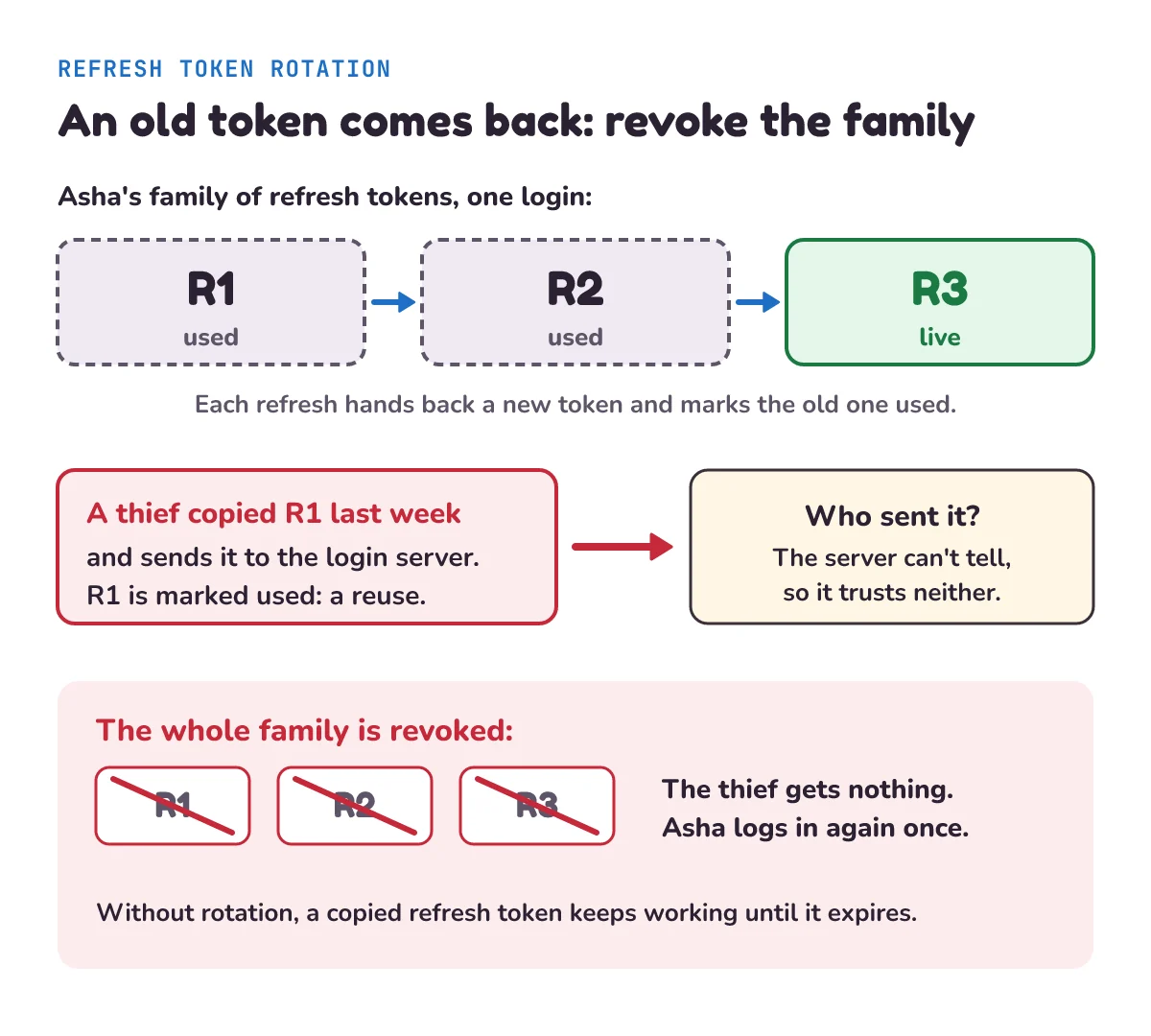
That's step 5 of our story. Asha's app had already swapped the first refresh token for a new one, so the first one was marked used. When the thief sent it, the server knew a copy existed.
RFC 9700: "If a refresh token is compromised and subsequently used by both the attacker and the legitimate client, one of them will present an invalidated refresh token, which will inform the authorization server of the breach." It can't know which of the two is the thief: "The authorization server cannot determine which party submitted the invalid refresh token, but it will revoke the active refresh token." So our use_refresh adds the family to dead_families, and Asha's own newest token is refused too. The price is stated plainly: "This stops the attack at the cost of forcing the legitimate client to obtain a fresh authorization grant." In plain words, Asha logs in once more, and the thief is locked out.
For apps that run on the user's device, RFC 9700 makes this a rule: "Refresh tokens for public clients MUST be sender-constrained or use refresh token rotation as described in Section 4.14." A public client is an app that can't keep a secret, because it runs where the user (or an attacker) can look inside it, such as a browser app or a phone app. RFC 6749 defines them as "Clients incapable of maintaining the confidentiality of their credentials". (Sender-constrained means the token is tied to a key that only the real app holds, which is a bigger topic.)
Three more rules for refresh tokens:
- Expire them when idle. RFC 9700: "Refresh tokens SHOULD expire if the client has been inactive for some time, i.e., the refresh token has not been used to obtain fresh access tokens for some time." Ours expire 14 days after they're handed out, so a phone left in a drawer for a month has to log in again. Each new refresh token gets a fresh 14 days, so a family that keeps refreshing never ends on its own. You can also set a hard limit on the whole family, such as 90 days, after which the user logs in again however active they are.
- Revoke them on big events. RFC 9700: "Authorization servers MAY revoke refresh tokens automatically in case of a security event, such as:" a password change or a logout. When Asha changes her password, cancel every family she has, on every device.
- Clean up. Used and expired refresh token rows pile up. Delete them for real with a daily job. Nobody will ever restore an expired token, which is one of the cases where the soft delete post says to skip soft delete. And limit how often one user or one address can call the login and refresh endpoints, as in the rate limiting post.
Where should you store access and refresh tokens?
Short answer: in a browser, keep the access token in memory and the refresh token in an HttpOnly cookie, never in localStorage. On a phone, use the platform's secure storage (Keychain on iPhone, Keystore on Android). Never write tokens into logs or put them in a web address. The browser is the hard case, because of two attacks.
XSS (cross-site scripting) is when an attacker manages to run their own JavaScript on your page, for example through a comment box that doesn't clean what people type. That script can read anything your own scripts can, including localStorage, the browser's built-in storage for each website. OWASP's HTML5 cheat sheet: "Do not store session identifiers in local storage as the data is always accessible by JavaScript." It goes on: "Cookies can mitigate this risk using the httpOnly flag." A token is a session identifier in this sense: whoever holds it is logged in.
A cookie with the HttpOnly attribute is sent with requests, but scripts can't read it. OWASP's Session Management cheat sheet: "The HttpOnly cookie attribute instructs web browsers not to allow scripts (e.g. JavaScript or VBscript) an ability to access the cookies via the DOM document.cookie object." It's honest about the limit too: "The HttpOnly cookie only protects the confidentiality of the cookie; the attacker cannot use it offline, outside of the context of an XSS attack."
In plain words, a script running on your page can still make requests while the page is open, but it can't carry the cookie away to use later. There's a limit to know: with the setup below, such a script can still call the refresh address and read the new access token that comes back, or catch the access token as your app sends it. What it can't take is the long-lived refresh token, so the damage ends within 15 minutes of the page closing. HttpOnly shrinks the damage of XSS. It doesn't replace fixing XSS.
CSRF (cross-site request forgery) is the opposite problem. Because the browser attaches cookies by itself, another website can make your browser send a request to your app, with your cookie on it. OWASP's CSRF cheat sheet: "Since browser requests automatically include all cookies including session cookies, this attack works unless proper authorization is used". The SameSite cookie attribute tells the browser when to leave the cookie off requests that come from other sites. OWASP's session cheat sheet: "SameSite=Strict excludes cross-site requests, while SameSite=Lax permits top-level cross-site navigations that use safe HTTP methods." In plain words, Strict never sends it from another site, and Lax still sends it when someone follows a link to your site. And: "Treat SameSite as defense in depth against CSRF, not as a replacement for a CSRF token."
A CSRF token is a random value the page sends in the request body or a header, which another website can't read and so can't copy. Our PHP login post builds one. The access token is safe from CSRF: it travels in the Authorization header, which the browser never adds by itself. Only cookies need CSRF protection.
Putting it together, a common setup for a browser app:
| Token | Where | Why |
|---|---|---|
| Access token | In memory: a JavaScript variable | Not saved anywhere, so it doesn't survive a reload or wait for a script to find it later. The app gets a new one with the refresh token. A script running on the page can still catch it, so keep it short-lived. |
| Refresh token | An HttpOnly, Secure, SameSite=Strict cookie, limited to the login server's addresses (/auth) | Scripts can't read it, it's sent only over HTTPS, not on requests from other sites, and only to the endpoints that need it. |
| Either one | Not in localStorage, not in a web address, not in logs | Any script can read localStorage, and addresses and logs get copied and shared. |
The login server sets that cookie with one response header:
Set-Cookie: refresh=<token>; HttpOnly; Secure; SameSite=Strict; Path=/auth; Max-Age=1209600Secure: "The Secure cookie attribute instructs web browsers to only send the cookie through an encrypted HTTPS (SSL/TLS) connection." Path: "The Path cookie attribute instructs web browsers to only send the cookie to the specified directory or subdirectories (or paths or resources) within the web application." So the browser sends the refresh token only to addresses under /auth, such as /auth/refresh and /auth/logout, and nowhere else. The logout address needs it too, to cancel the family. Max-Age=1209600 is 14 days in seconds, the same lifetime as our refresh tokens. On logout, the server clears the cookie by sending it again with Max-Age=0. Check a CSRF token, or the request's Origin header (the browser fills it in with the site the request came from), on those endpoints too.
The safest setup keeps tokens out of the browser altogether: your own server holds them and gives the browser a plain session cookie. OWASP's session cheat sheet says to "prefer an HttpOnly cookie or a backend that holds tokens when the browser does not need to handle them." That's the server session, and it's where this post ends up.
How do you log out when you use JWTs?
Look at step 6. Asha logs out. The server cancels her refresh token's family, so no new access tokens can come from it. But the API that checks only the signature and exp still says accepted, user asha for her old access token. Nothing about the token changed: its signature is still right and it hasn't expired. If someone copied it, they can use it until exp.
The app should of course delete its own copy of the tokens. That logs the user out on that screen. To make the server refuse a token before it expires, there are two choices:
- Keep access tokens short, and accept that a logged-out token can still work for up to 15 minutes.
- Keep a denylist: a list of tokens refused early. Our
log_outadds the token'sjtito it, andcheck_accessrefuses any token on the list, which is the last line of step 6. RFC 7519: "The "jti" (JWT ID) claim provides a unique identifier for the JWT." OWASP warns against keying the denylist on the whole token, or a hash of it: that "might expose the application to denylist bypass through JWT malleability": a revoked token can sometimes be rewritten into a different string that still passes the signature check.
The denylist has a cost, and OWASP names it: "However, if you use JWTs for user sessions, you will need a solution for managing session invalidation. This can be achieved using a deny list of revoked sessions/tokens. If your application implements such a deny list, user sessions won't be completely stateless anymore which might defeat the benefits of stateless sessions." (Stateless means the API remembers nothing between requests.) Every API now has to check a shared list on every request, which is the lookup JWTs were meant to avoid. A list that holds only tokens logged out in the last 15 minutes stays small, so it's often an acceptable cost.
Compare a server session. OWASP's session cheat sheet: "the web application must invalidate the session at least on server side." With a session, that's one delete in the session store, and the very next request is refused.
JWT vs session: which should you use?
A server session keeps the login on the server: the browser holds a random session id in a cookie, and the server looks it up on every request. A JWT keeps the login in the token: the server checks the signature and reads the claims, with no lookup.
| Server session | JWT access token | |
|---|---|---|
| Where the login lives | In the server's session store | Inside the token |
| Each request | One lookup in the store | One signature check, no lookup |
| Log out | Delete the session: refused at once | Works until exp, unless you keep a denylist |
| Many separate APIs | Each must reach the same store | Each checks the signature alone |
| What the browser holds | A short random id, meaningless on its own | Claims anyone holding the token can read |
A plain rule:
- One website with its own server (most student projects, and many real products): use a server session in an
HttpOnly,Secure,SameSitecookie, plus a CSRF token on forms. It's simpler, logout is instant, and the cookie holds nothing readable. OWASP's JWT cheat sheet suggests it: "You might want to consider using a plain session system and follow the advices from the dedicated session management cheat sheet." - Many separate services, phone apps calling your API, or other companies' apps acting for your users: use short JWT access tokens with rotating refresh tokens. Each service can check a token alone, and the refresh token gives you a place to cancel logins.
Notice what our AuthServer really is: a dictionary of refresh token records, looked up and cancelled on the server. That's a session store. The two-token design isn't "JWT instead of sessions". It's a session at the counter, with short JWT tickets for the doors.
When shouldn't you use JWTs and refresh tokens?
- When you have one app and one server. A session does the same job with less code and instant logout. Two tokens, rotation and a denylist solve problems you don't have yet.
- When you need instant logout everywhere, such as a bank cutting off a stolen account at once. A denylist works, but by then every request is checking a server-side list anyway. Sessions do that directly.
- As a place to store data. A JWT isn't a free database. Big payloads go with every request, and the data can't be updated until the token is replaced. Put an id in the token, and keep the rest on the server.
- As a long-lived token with no refresh. A JWT that lasts 30 days is a 30-day password that can't be cancelled. If you can't refresh, use a session.
What mistakes do beginners make with tokens?
Reading the JWT without checking it. Most JWT libraries have one function that only decodes a token and another that checks it. A beginner reads sub from the decoded payload and trusts it. That's step 2 of our story without the signature check: anyone can write "sub": "admin". Always verify the signature, and check exp, before using any claim.
Four more slips:
- Storing tokens in
localStoragebecause the tutorial did. One XSS bug and every visitor's token can be read and sent away. - Accepting whatever algorithm the header names. Pin the one you use, as our
verify_jwtdoes with HS256. Some JWT libraries once accepted"alg": "none", meaning no signature at all, which let anyone forge a token. OWASP's advice is short: "Make sure that "alg":"none" is not accepted by your JWT parser." - Comparing signatures with
==instead ofhmac.compare_digest, which leaks timing. - Two browser tabs refreshing at the same moment. Both send the same refresh token, the second looks like a reuse, and the user is logged out for no reason. A lost network reply does the same: the app never sees its new token and retries with the old one. Let one tab do the refreshing and share the result with the others, and treat a failed refresh as "log in again" rather than retrying it in a loop.
To see the server side built step by step, with password hashing and a middleware that checks the token on each request, read our Node.js JWT authentication API post.
1) An access token has "exp": 1800000900. The API checks it at 1800000899 and again at 1800000900. Is it accepted each time?
2) A thief copies Asha's refresh token and uses it before her app does. The thief gets a new pair. A minute later, Asha's app sends the same refresh token. What happens to Asha, and what does the thief still have?
3) A JWT's payload part is eyJzdWIiOiJhc2hhIiwicm9sZSI6InN0dWRlbnQifQ. Decode it with our unb64url. What does it say, and what does that tell you about putting a password in a JWT?
Show the answers
1) At 1800000899, yes: now >= exp is false. At 1800000900, no: RFC 7519 says a JWT must not be accepted "on or after" its exp, and verify_jwt refuses it as expired.
2) Asha's app now sends a token that is already marked used, so the server sees a reuse and revokes the whole family. That includes the new refresh token the thief got, so the thief can't refresh again, and Asha's app is refused and asks her to log in. But the thief still has the access token from their refresh, and it keeps working until its exp, up to 15 minutes. Rotation stops the stealing from going on. The short access token limits what was already taken. Here it is with our code:
from tokens import AuthServer, InvalidToken, verify_jwt
server = AuthServer(b"k")
access, r1 = server.log_in("asha", 0)
thief_access, thief_r2 = server.use_refresh(r1, 60)        # the thief goes first
try:
    server.use_refresh(r1, 120)                            # then Asha's app
except InvalidToken as e:
    print("Asha:", e)
try:
    server.use_refresh(thief_r2, 180)
except InvalidToken as e:
    print("thief refreshes:", e)
print("thief's access token:", verify_jwt(thief_access, b"k", 180)["sub"])
Asha: reused, so the whole family is revoked
thief refreshes: log in again
thief's access token: asha3) unb64url("eyJzdWIiOiJhc2hhIiwicm9sZSI6InN0dWRlbnQifQ") gives b'{"sub":"asha","role":"student"}'. No key was needed, so anyone who sees the token can read it. A password in a JWT would be readable by every server, log and browser extension the token passes through.
Questions people ask
What is the difference between an access token and a refresh token?
An access token is a short-lived pass, often a JWT, sent with every API request and checked on the spot. A refresh token lives longer, is sent only to the login server, and is used to get a new access token when the old one expires. Keeping the access token short limits the harm if it's stolen.
How long should an access token last?
Minutes, not days. An API that checks only the signature accepts a stolen access token until it expires, so its lifetime is the worst case you're choosing. Our example uses 15 minutes. RFC 7519 allows a little leeway for clock differences between servers, "usually no more than a few minutes".
Should I store a JWT in localStorage?
No. Any JavaScript on the page can read localStorage, so one XSS bug exposes every token. OWASP says not to store session identifiers there. Keep the access token in memory and the refresh token in an HttpOnly, Secure, SameSite cookie, or keep tokens on your server and give the browser a session cookie.
Can you revoke a JWT?
Not by itself. A JWT stays valid until its exp, because the API doesn't look anything up. To refuse one early, keep a denylist of revoked jti values until they expire, which makes the API check server-side state again. Most apps combine short access tokens with refresh tokens they can cancel.
Is JWT better than a session?
Neither is better everywhere. For one website with its own server, a server session in an HttpOnly cookie, with a CSRF token on forms, is simpler and logs out instantly. Short JWT access tokens with rotating refresh tokens suit many separate services, phone apps calling an API, and other companies' apps acting for your users.
Keep going
- Previous in this System Design series: Multi-tenancy, how one app and one database serve many separate customers without any of them seeing the others' data.
- Next: "RBAC vs ABAC", how an app decides what a logged-in user may do: by their role, or by rules about the user, the thing and the situation.
- Build a login API that hands out JWTs: Node.js JWT authentication API with Express 5. And a session-based login with a CSRF token: Username and password login in PHP.
Checked on 16 November 2026 against the 8 sources below.
Sources
- RFC 7519: JSON Web Token (JWT) (the three parts,
aud,exp,jti, clock leeway, the example JWT in section 3.1) - RFC 7515: JSON Web Signature (JWS) (base64url without padding, the example key in Appendix A.1)
- RFC 6749: The OAuth 2.0 Authorization Framework (sections 1.4 and 1.5: access and refresh tokens; section 2.1: public clients)
- RFC 9700: Best Current Practice for OAuth 2.0 Security (sections 2.2.2 and 4.14: refresh token rotation and reuse)
- OWASP Cheat Sheet Series: JSON Web Token Cheat Sheet (formerly the JSON Web Token for Java Cheat Sheet: denylists, short expiry, signed is not encrypted)
- OWASP Cheat Sheet Series: Session Management Cheat Sheet (HttpOnly, Secure, Path, SameSite, server-side logout)
- OWASP Cheat Sheet Series: HTML5 Security Cheat Sheet (local storage)
- OWASP Cheat Sheet Series: Cross-Site Request Forgery Prevention Cheat Sheet
Every Python sample in this post was run in Python 3.13 before publishing.