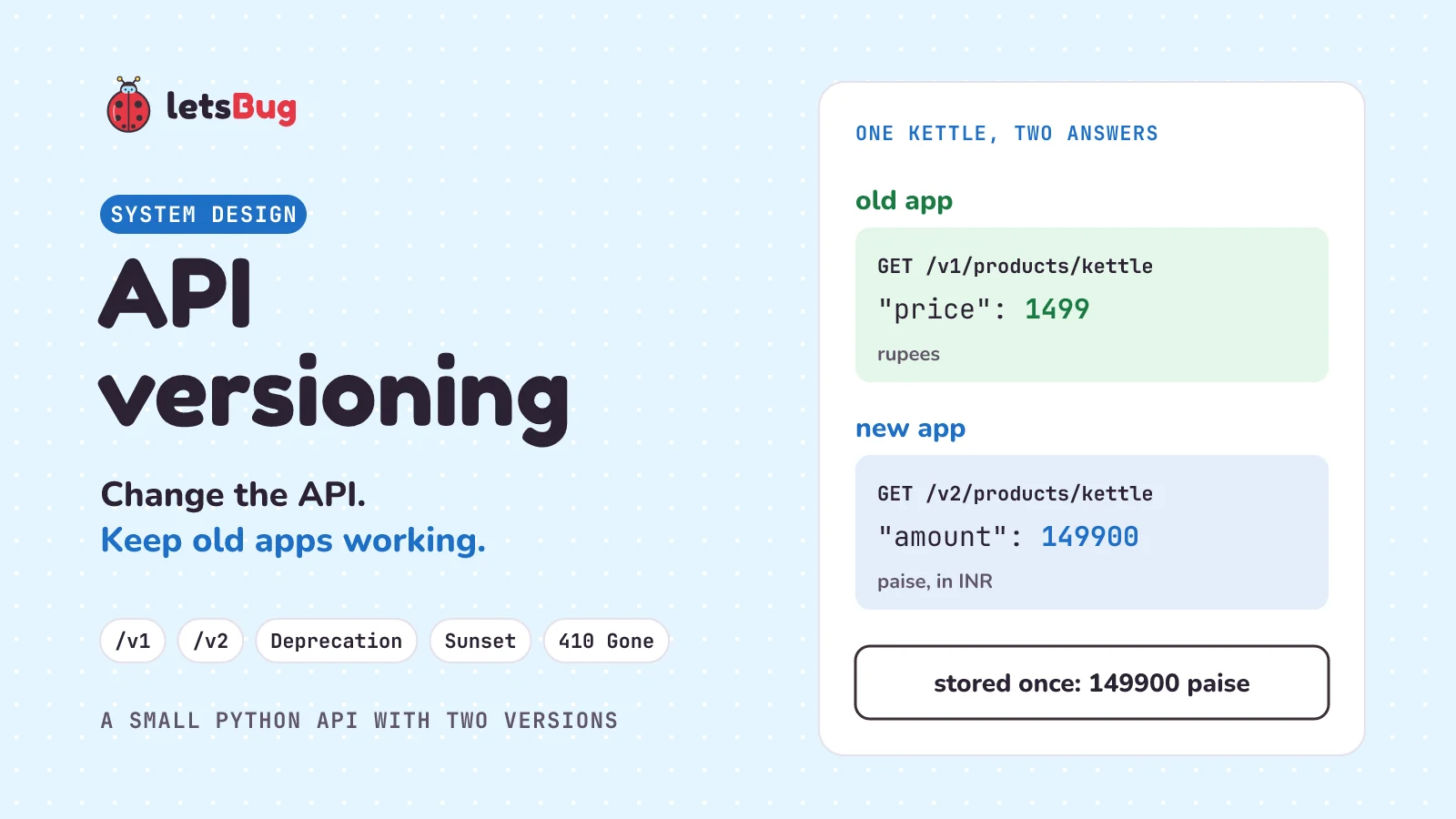
API versioning means giving each shape of an API a version name, such as v1 and v2, so you can change the API without breaking the apps that already use it. Old apps keep calling v1 and get the answers they expect, new apps call v2, and v1 is retired only after a public notice and a date.
In this post we stay with the shop from the caching strategies post. Its phone app asks the shop's server for product prices, and now the team wants to change how a price is sent. First we see why that one change can break thousands of phones, using the menu at a small restaurant. Then we sort changes into safe ones and breaking ones, compare the four common places to put a version (the web address, a query parameter, a header and the media type), and build a small API in plain Python that serves v1 and v2 from the same data. We break an old app on purpose, see why a fussy app breaks even on a safe change, and retire v1 the polite way, with the Deprecation and Sunset headers and a 410 Gone at the end. We finish with the mistakes beginners make, and when you don't need versions at all.
A few words first. An API (application programming interface) is the set of requests one program can send another, and the answers it gets back. Here it's a web API: the app sends a request to a web address such as /v1/products/kettle, and the server answers with data in JSON, a plain-text format of names and values like {"name": "Kettle", "price": 1499}. The app is the client, the program that asks, and each name in the answer, such as price, is a field. An endpoint is one address the API answers, such as /v1/products/kettle. A parameter is an extra value the app sends with a request, such as ?colour=red at the end of the address; a required one must be sent, an optional one can be left out. And every answer starts with a three-digit status code: 200 means OK, 404 means Not Found.
Key takeaways
- An API is a promise to the apps that use it. A breaking change is one that can stop an existing app from working: removing or renaming a field, changing its type, or adding a new required parameter.
- An additive change, such as adding a field or an optional parameter, is usually safe. It goes into the current version, with no new version needed, as long as apps ignore fields they don't know.
- The version can sit in the path (
/v2/products), a query parameter (?version=2), a header (GitHub'sX-GitHub-Api-Version) or the media type. The path is the simplest. The path and the query parameter are both easy to cache; a header needs extra care. - Store the data once and translate it into each version's shape just before the answer goes out. In our Python test, one stored kettle came out as 1499 rupees on v1 and 149900 paise on v2.
- Retire a version in steps: announce it, send a
Deprecationheader and aSunsetdate, then answer410 Gone. GitHub supports an old version for at least 24 months after a new one comes out.
What is API versioning in simple words?
Picture a small restaurant where the regulars order by number. "A number 7, please" gets you masala dosa. One day the owner prints a new menu with new dishes, and the numbers shift: 7 is now pav bhaji. The new customers are happy. The regulars, who have ordered "a number 7" for years without looking, get the wrong food, and some of them leave.
A careful owner does something else. The kitchen stays the same, but there are two menus. Regulars can still ask for the old menu, which now has a note on the front: "This menu is being replaced. From 1 June, please use the new one." New customers get the new menu. On 1 June the old menus go in the bin, and anyone who still asks for one is told politely that it's gone, and handed the new one.
That's API versioning. The menu is the API: the list of things you can ask for and what you get back. The old and new menus are v1 and v2. The kitchen is the server's data, cooked once whichever menu you ordered from. The note on the front is a deprecation notice (to deprecate something means to mark it as on its way out, while it still works), and 1 June is the sunset date, the day it stops working.
What is a breaking change in an API?
Here's the change the shop wants. Today the app asks for the kettle and gets this:
{"name": "Kettle", "price": 1499, "in_stock": true}The price is in whole rupees. That was fine until the shop wanted a kettle at ₹1,499.50 and started selling abroad. So the team wants to send the price in paise (1 rupee is 100 paise), with its currency:
{"name": "Kettle", "price": {"amount": 149900, "currency": "INR"}, "in_stock": true}The trouble is the app already on people's phones. Its code was written for the first shape: it takes price and multiplies it by the number of kettles in the cart. Give it the second shape and that sum fails, because price is no longer a number. The shop can publish a new app, but it can't make everyone install it today. Some phones update in an hour, some in a month, some never. Microsoft's guide to web API design describes the same gap: "The developer who designs and implements a web API has full control over that API, but they don't have the same degree of control over client applications built by partner organizations." Google's API guidelines (its AIPs, API Improvement Proposals) put it more strongly: "APIs are fundamentally contracts with users, and users often write code against APIs that is then launched into a production service with the expectation that it continues to work". (Production means the real, live system that customers use.)
So the first question for any change is: can it break an app that already works? GitHub's REST API documentation gives a clear list. It says: "Breaking changes are changes that can potentially break an integration." (An integration is someone else's program that uses the API.) And: "Additive changes are changes that should not break an integration." Here are some from each of its lists:
| Breaking (needs a new version) | Additive (usually safe in the same version) |
|---|---|
| Removing or renaming a response field | Adding a response field |
| Changing the type of a parameter or response field | Adding an optional parameter |
| Adding a new required parameter | Adding an operation (a new endpoint) |
| Making a previously optional parameter required | Adding a response header |
| Removing an entire operation | Adding enum values (with care, see below) |
Our price change is "changing the type of a response field": a number became an object (a group of named values). It's breaking. Renaming a field is breaking too, even if the meaning is the same; Google's AIP-180 explains why: "Renaming a component is semantically equivalent to "remove and add"."
Adding a field is the friendly kind of change, but it's only safe if the app ignores fields it doesn't know. Microsoft's guide: "Existing client applications might continue to function correctly if they can ignore unrecognized fields." Adding a new value to a fixed list, such as a new order status "refunded", sits in between: GitHub counts it as additive, but an app that only knows "paid" and "shipped" may not know what to show. Stripe's API reference asks apps to plan for it: "When you read an open enum from an API response, your code should include a safe fallback—such as a default branch in a switch statement—to gracefully handle values your integration doesn't yet recognize." (An enum is a field that can only hold one of a fixed set of values.)
A change can also break apps without touching any field: Google's AIP-180 warns that "APIs must not change visible behavior or semantics in ways that are likely to break reasonable user code". If the shop quietly started returning only the first 20 products where it used to return all of them, every field would look the same, and apps would still go wrong.
What are the ways to version an API?
Once a change is breaking, the old shape and the new shape both have to exist for a while, and each request has to say which one it wants. Microsoft's guide lists four places to put that choice:
- In the path (URI versioning). The version is part of the address:
/v1/products/kettleand/v2/products/kettle. Microsoft: "The previously existing URIs should continue to operate normally by returning resources that conform to their original schema." (A URI is a web address, a resource is the thing it names, here the kettle, and a schema is the agreed shape of its data.) Google uses this for its own APIs: every one must have a major version number, "included as the first part of the URI path for REST APIs". - In a query parameter. The path stays the same and the version goes after a question mark:
/products/kettle?version=2. Microsoft adds a rule worth keeping: "The version parameter should default to a meaningful value, like 1, if older client applications omit it." - In a header. A header is a named line of extra information sent with a request or answer, before the data itself. GitHub works this way: "You should use the X-GitHub-Api-Version header to specify an API version." Its versions are dates, such as
2022-11-28, and "Requests without the X-GitHub-Api-Version header will default to use the 2022-11-28 version." Stripe does the same with its own header, and falls back to the version pinned to your Stripe account when the header is missing (curl is a command-line tool for sending web requests, and Workbench is Stripe's dashboard): "Requests made with curl use your Stripe account's default API version (controlled in Workbench) unless you override it by setting the Stripe-Version header." - In the media type. The app already sends an
Acceptheader to say what format it wants, such as JSON. A custom media type can carry the version too:Accept: application/vnd.contoso.v1+json, in Microsoft's example. It keeps addresses clean, but it's the hardest of the four to read and to test by hand.
| Where | Example | Good at | Watch out for |
|---|---|---|---|
| Path | /v2/products/kettle | Easy to see, test in a browser and cache | Every link carries the version |
| Query parameter | ?version=2 | Same path for the same thing; still easy to cache | Needs a default when it's left out |
| Header | X-GitHub-Api-Version: 2022-11-28 | Clean addresses; dated versions | Hidden in the request; caches must know about it |
| Media type | Accept: application/vnd.contoso.v1+json | Clean addresses; format and version in one place | Hard to read and test by hand |
Caching is a real difference. In the caching strategies post we saw that a cache stores answers under a key, usually the address. Microsoft's guide: "The URI versioning and query string versioning schemas are cache-friendly because the same URI or query string combination refers to the same data each time." With a header, a cache that only looks at the address could hand a v2 answer to a v1 app, unless the server names that header in a Vary header. RFC 9110 says Vary "describes what parts of a request message, aside from the method and target URI, might have influenced the origin server's process for selecting the content of this response." In plain words, Vary: X-GitHub-Api-Version tells every cache to keep a separate copy for each value of that header. Media type versioning needs Vary: Accept for the same reason.
If you're starting out, use the path. You can see it, try it in a browser, and an API gateway can route /v1 and /v2 to different services if you ever need it.
How does one server run two versions?
The tempting way is to copy the whole v1 code into a v2 folder and change the copy. Then every bug fix has to be made twice, and by v4 there are four copies drifting apart. The better way is the restaurant's: one kitchen, two menus. The data is stored once, in the shape that suits the shop today (here, the price in paise). Each version is a small function that turns a stored product into that version's answer. A request comes in, the server reads the version from the path, and picks the matching function.
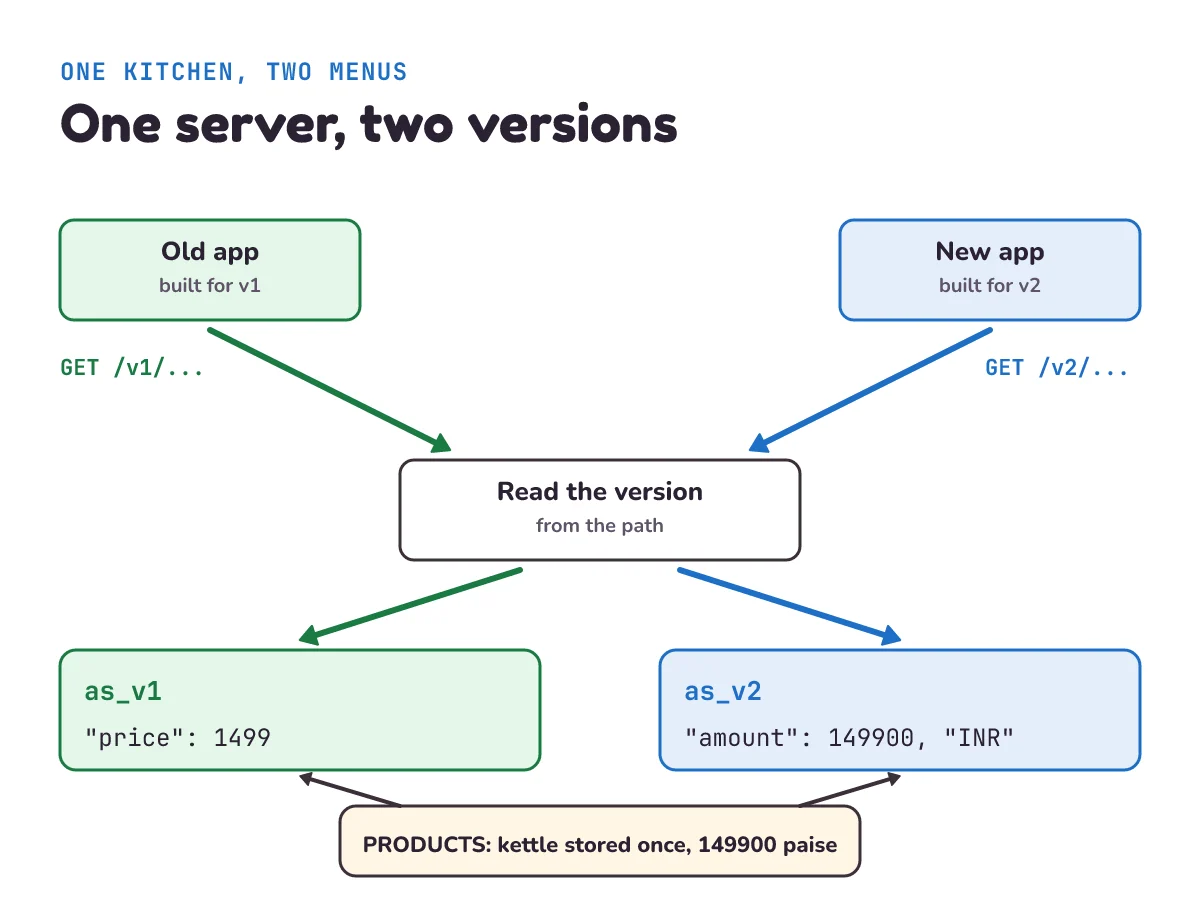
This keeps the cost of an old version small: a few lines that build the old shape. It also shows you when a version is getting expensive. If as_v1 has to fake something the shop no longer stores, that's a sign v1 should be retired soon. Our as_v1 already does: // drops the paise, so a ₹1,499.50 kettle would show as 1499 on v1, and v1 has no way to say a price is in dollars. Products like that are exactly why v1 gets a sunset date.
How do you build a versioned API in Python?
Let's build the shop's API with Python's standard library, so there's nothing to install. Python's docs warn that its built-in web server is for learning, not for real traffic: "http.server is not recommended for production. It only implements basic security checks." That's fine here. First the server:
# shop_api.py
"""The shop's product API. Each product is stored once; each version is one way of showing it."""
import json
from http.server import BaseHTTPRequestHandler

PRODUCTS = {"kettle": {"name": "Kettle", "paise": 149900, "in_stock": True}}


def as_v1(p):                                    # the first shape: the price in whole rupees
    return {"name": p["name"], "price": p["paise"] // 100, "in_stock": p["in_stock"]}


def as_v2(p):                                    # the new shape: the price in paise, with its currency
    return {"name": p["name"], "price": {"amount": p["paise"], "currency": "INR"}, "in_stock": p["in_stock"]}


VERSIONS = {"v1": as_v1, "v2": as_v2}
RETIRED = {"v0"}
NOTICE = {"v1": {"Deprecation": "@1796083200",                  # 1 Dec 2026, 00:00 UTC
                 "Sunset": "Tue, 01 Jun 2027 00:00:00 GMT"}}     # the day v1 stops answering


class Handler(BaseHTTPRequestHandler):
    def do_GET(self):
        parts = self.path.strip("/").split("/")          # "/v1/products/kettle" -> ["v1", "products", "kettle"]
        if len(parts) != 3 or parts[1] != "products":
            return self.reply(404, {"error": "no such page"})
        version, _, product_id = parts
        if version in RETIRED:
            return self.reply(410, {"error": f"{version} has been retired, use v2"})
        if version not in VERSIONS or product_id not in PRODUCTS:
            return self.reply(404, {"error": "no such version or product"})
        self.reply(200, VERSIONS[version](PRODUCTS[product_id]), NOTICE.get(version, {}))

    def reply(self, status, body, headers=None):
        data = json.dumps(body).encode()
        self.send_response(status)
        self.send_header("Content-Type", "application/json")
        self.send_header("Content-Length", str(len(data)))
        for name, value in (headers or {}).items():
            self.send_header(name, value)
        self.end_headers()
        self.wfile.write(data)

    def log_message(self, *args):                        # keep the demo's output quiet
passPRODUCTSis the kitchen: the kettle is stored once, with its price in paise.as_v1andas_v2are the two menus.//is whole-number division, so 149900 paise becomes 1499 rupees.VERSIONSmaps each live version to its function, so adding v3 is one new function and one new line here.- v1 answers carry two headers:
Deprecation, the date v1 is marked as on its way out, andSunset, the date it stops working. We come back to both below. RETIREDlists versions that used to exist. They get410 Gone, while a version that never existed gets404 Not Found. That difference tells a developer "you're late" rather than "you made a typo".
Now the apps. This file starts the server in the background on a free port (a numbered door on the computer that a server listens on), then plays three apps against it: one built for v1, one for v2, and a fussy one:
# apps.py
"""Three apps call the shop's API: one built for v1, one for v2, and a fussy one."""
import json
import threading
import urllib.error
import urllib.request
from http.server import ThreadingHTTPServer

from shop_api import Handler

server = ThreadingHTTPServer(("127.0.0.1", 0), Handler)       # port 0: use any free port
threading.Thread(target=server.serve_forever, daemon=True).start()
BASE = f"http://127.0.0.1:{server.server_port}"


def call(path):
    try:
        with urllib.request.urlopen(BASE + path) as r:
            return r.status, r.headers, json.load(r)
    except urllib.error.HTTPError as e:                       # a 4xx or 5xx answer arrives as an error
        return e.code, e.headers, json.load(e)


def old_app(product):                                         # built for v1, already on people's phones
    return f"2 x {product['name']} = {product['price'] * 2} rupees"


def new_app(product):                                         # built for v2
    price = product["price"]
    return f"2 x {product['name']} = {price['amount'] * 2 / 100:.2f} {price['currency']}"


def strict_app(product):                                      # refuses any field it wasn't told about
    unknown = set(product) - {"name", "price"}
    if unknown:
        raise ValueError(f"unexpected fields {sorted(unknown)}")
    return old_app(product)


status, headers, v1 = call("/v1/products/kettle")
print("1) old app asks /v1:", status, v1)
print("  ", old_app(v1))
print("   Deprecation:", headers["Deprecation"], "| Sunset:", headers["Sunset"])

status, headers, v2 = call("/v2/products/kettle")
print("2) new app asks /v2:", status, v2)
print("  ", new_app(v2))
print("   Deprecation:", headers.get("Deprecation", "(none)"))

print("3) the old app given the v2 shape, as if v1 had been changed in place:")
try:
    old_app(v2)
except TypeError as e:
    print("   TypeError:", e)

print("4) the strict app given v1, which gained in_stock after it was built:")
try:
    strict_app(v1)
except ValueError as e:
    print("   ValueError:", e)

print("5) a retired version and an unknown one:")
for path in ("/v0/products/kettle", "/v9/products/kettle"):
    status, _, body = call(path)
    print("  ", path, status, body)
server.shutdown()
Make a new folder and save both files in it, each under the name in its first line. Open a terminal (a command-line window) in that folder and run it. In the output blocks, a line starting with $ is what you type, without the $; the lines under it are what it prints:
$ python apps.py
1) old app asks /v1: 200 {'name': 'Kettle', 'price': 1499, 'in_stock': True}
   2 x Kettle = 2998 rupees
   Deprecation: @1796083200 | Sunset: Tue, 01 Jun 2027 00:00:00 GMT
2) new app asks /v2: 200 {'name': 'Kettle', 'price': {'amount': 149900, 'currency': 'INR'}, 'in_stock': True}
   2 x Kettle = 2998.00 INR
   Deprecation: (none)
3) the old app given the v2 shape, as if v1 had been changed in place:
   TypeError: unsupported operand type(s) for *: 'dict' and 'int'
4) the strict app given v1, which gained in_stock after it was built:
   ValueError: unexpected fields ['in_stock']
5) a retired version and an unknown one:
   /v0/products/kettle 410 {'error': 'v0 has been retired, use v2'}
   /v9/products/kettle 404 {'error': 'no such version or product'}
Let's read it step by step:
- The old app still works. It asked
/v1and got the price as a plain number, 1499, so its sum worked: 2 kettles cost 2998 rupees. The answer also carried the deprecation notice, which this app ignores. A well-built app would log it so its developers see it. - The new app gets the new shape. Same kettle, same stored price, but as 149900 paise with its currency. It shows 2998.00 INR. There's no
Deprecationheader, because v2 is the current version. - What a change in place would do. If the team had simply changed the
/v1answer to the new shape, every old phone would run this line and fail: Python can't multiply an object (dict) by 2. In a real app that's a crash on the cart page, on every phone that hasn't updated. - A safe change, broken by a fussy app. The
in_stockfield was added to v1 after the strict app was built. That's an additive change, and the old app in step 1 didn't notice it. The strict app checks for fields it doesn't know and refuses the whole answer. The mistake here is in the app, not the API, and we come back to it below. - Retired versus unknown.
/v0existed once, so it gets410 Goneand a hint to use v2./v9never existed, so it gets404 Not Found. The HTTP standard, RFC 9110, defines 410: "The 410 (Gone) status code indicates that access to the target resource is no longer available at the origin server and that this condition is likely to be permanent."
How do you retire an old API version?
Keeping v1 alive for ever has a cost: code to keep, tests to run, and old behaviour that holds the shop back. But switching it off without warning breaks the very apps versioning was meant to protect. So retire it in steps, like the restaurant's note on the old menu:
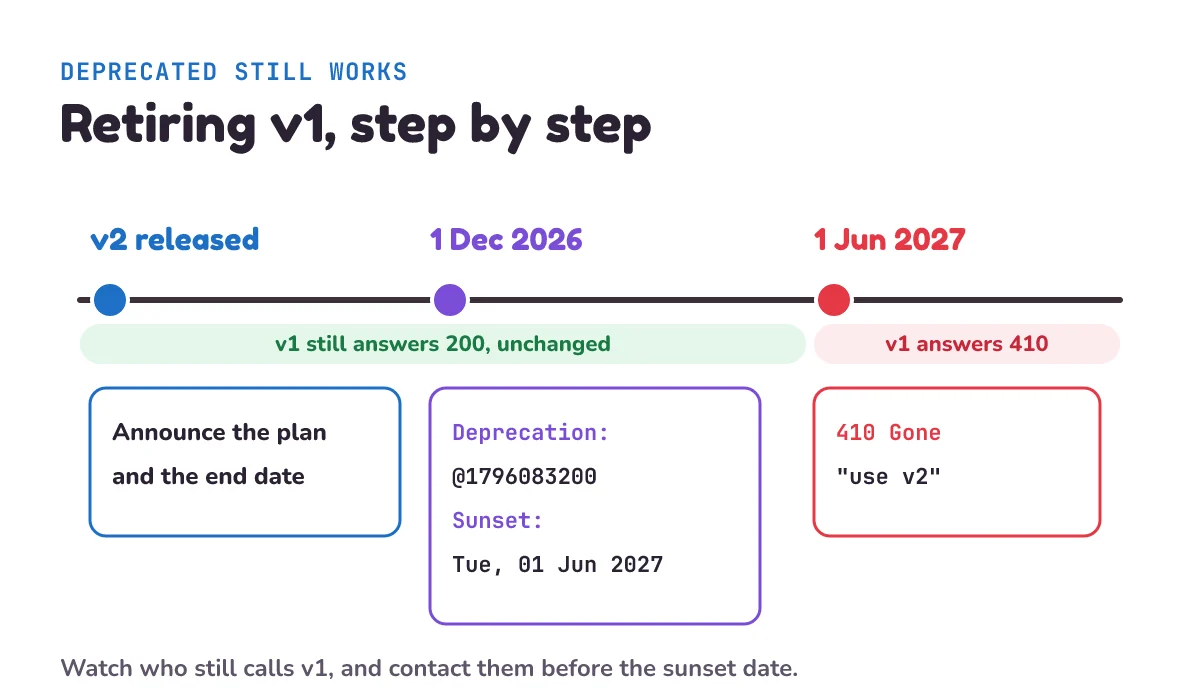
- Release v2 and announce the plan. Say what changed, how to move, and the date v1 will stop. GitHub's policy is a good model: "When a new REST API version is released, the previous API version will be supported for at least 24 more months following the release of the new API version." Google asks for the same care: "An older version must go through a reasonable, well-communicated deprecation period before being shut down." For features in a beta (test) version of its APIs, it suggests how long they stay deprecated before removal: "we recommend 180 days".
- Mark v1 as deprecated in every answer. People don't read every announcement, but their code reads every response. RFC 9745 defines a header for this: "The Deprecation HTTP response header field is used to signal to consumers of a resource (identified by a URI) that the resource will be or has been deprecated." Its value is a date written as seconds since 1 January 1970 (UTC), with an
@in front, so our@1796083200is 1 December 2026, 00:00 UTC. Deprecated doesn't mean broken. The same RFC: "The act of deprecation does not change any behavior of the resource." - Give the end date. RFC 8594 defines the
Sunsetheader, which "indicates that a URI is likely to become unresponsive at a specified point in the future." It's written as an ordinary HTTP date,Tue, 01 Jun 2027 00:00:00 GMT. RFC 9745 explains why the two headers look different: "Please note that for historical reasons the Sunset HTTP header field uses a different data format for date." It also says the end can't come before the warning: "The timestamp given in the Sunset HTTP header field MUST NOT be earlier than the one given in the Deprecation header field." - Watch who's still calling. Count v1 requests in your logs, and contact the biggest callers before the date. If the count isn't near zero, you'll know who is about to break.
- Switch it off with a clear answer. On the sunset date, v1 answers
410 Gonewith a message that points to v2, as our/v0does. GitHub does exactly this: "If you specify an API version that is no longer supported, you will receive a 410 Gone response."
One detail from GitHub is worth copying. When a version is finally switched off, requests that named no version at all don't break; they move up: "Requests that do not specify an API version default to the next oldest supported version, not the closing down version." So apps should send a version on every request. Stripe gives the same advice: "Make sure that you specify the API version that you're integrating against in your code instead of relying on your account's default API version."
Do APIs use semantic versioning?
You may have seen version numbers like 2.4.1 on libraries. That's semantic versioning, and its rule is short. In MAJOR.MINOR.PATCH, you raise the first number for the change that breaks things: "MAJOR version when you make incompatible API changes". You raise the second for new features that don't break anything, and the third for bug fixes. It fits libraries, because each app chooses which copy of the library it installs and upgrades when it's ready.
A web API is different: there's only one server, and everyone is calling the same live copy. So web APIs usually show only the first number, the major version. Google's guidelines say so directly: "For example, Google APIs use v1, not v1.0, v1.1, or v1.4.2." The minor and patch changes still happen, inside v1, because they're additive or fixes and don't break anyone. Stripe and GitHub use dates instead of numbers, which tells you at a glance how old a version is. Stripe changed how it releases versions in 2024: "Starting with the 2024-09-30.acacia release, Stripe follows a new API release process where we release new API versions monthly with no breaking changes." Breaking changes come only twice a year: "Twice a year, we issue a new major release (for example, Basil) that starts with an API version containing breaking changes."
What mistakes do beginners make with API versioning?
1. "It's only a small rename." Renaming price to cost in v1 because it reads better is a breaking change, however small the code change. Every app that reads price now gets nothing. If you want the new name, add cost next to price and keep both until the next major version. Google's AIP-180: "a service may add the new component, but must not remove the existing one." It's the same expand and contract idea from the database migrations post: add the new thing first, remove the old thing last.
2. Building a fussy client. Step 4 of our test showed it: an app that rejects unknown fields turns a safe, additive change into an outage. Martin Fowler calls the better habit a tolerant reader: "My recommendation is to be as tolerant as possible when reading data from a service." Read the fields you need, ignore the rest, and have a fallback for enum values you don't know. When you write the client, you decide how fragile it is.
3. A new version for every change. Shipping v2, v3 and v4 in one year, each for a small additive change, gives every app a reason to migrate and gives you four versions to support. Additive changes go into the current version. Save a new major version for breaking changes you've collected, and make it worth the move.
4. No default and no version on the first release. Launching as /products/kettle with no version means that when the first breaking change comes, the old address has to stay v1 for ever, or you need a new address scheme in a hurry. Start at /v1. If the version comes from a header or a query parameter, decide on day one what happens when it's missing.
5. Forgetting the answers you send out. A version covers more than the requests apps make. If your API sends webhooks, those messages have a shape too, and changing it breaks the apps that receive them. Stripe's API reference says the messages it sends have a version too: "Webhook events also use your account's default API version unless you set an API version during endpoint creation."
When don't you need API versioning?
- When you control every client and release them together. If a website's front end and its API are deployed in the same release, and no one else calls the API, you can change both at once. Microsoft's guide: "This approach is the simplest and can work for some internal APIs." Google's AIP-180 makes the same exception for "an API which is only called by client code written by the same team as the API producer, or deployed in a way which can enforce updates". Mobile apps usually don't count: you release them, but unless the app can force an update, you can't make people install it.
- When the change is additive. A new field, a new optional parameter or a new endpoint goes into the current version, with no new version needed.
- When nobody uses it yet. Before the first real user, change the shape freely. Versioning protects existing users; with none, there's nothing to protect. Still, start the path at
/v1, so you're ready.
1) Breaking or additive? (a) Add an optional colour filter to /v1/products. (b) Rename name to title. (c) Change in_stock from true/false to the words "yes"/"no". (d) Add a new endpoint, /v1/categories.
2) It's 1 June 2027, v1's sunset date. Change two lines in shop_api.py so /v1 answers 410 Gone. What does /v1/products/kettle return now?
3) A v1 answer carries Deprecation: @1796083200. Write one line of Python that turns that number into a date.
Show the answers
1) (a) Additive: adding an optional parameter, and apps that don't send it see no change. (b) Breaking: renaming a field is removing one and adding another, so every app that reads name breaks. (c) Breaking: it changes the field's type, from true/false to text, and an app that checks if product["in_stock"]: would now treat "no" as true, because any text that isn't empty counts as true in Python. (d) Additive: adding an operation.
2) Move "v1" out of VERSIONS and into RETIRED:
VERSIONS = {"v2": as_v2}
RETIRED = {"v0", "v1"}
Now /v1/products/kettle returns status 410 with {'error': 'v1 has been retired, use v2'}, and /v2 works as before. The NOTICE entry for v1 isn't used any more, so you can delete it too.
3) In a terminal:
$ python -c "from datetime import datetime, timezone; print(datetime.fromtimestamp(1796083200, timezone.utc))"
2026-12-01 00:00:00+00:00
That's 1 December 2026 at midnight UTC, which is 5:30 in the morning in India.
Questions people ask
What does API versioning mean?
API versioning means giving each shape of an API a name, such as v1 and v2, so the API can change without breaking the apps that already use it. Old apps keep calling v1 and get the answers they were built for, new apps call v2, and v1 is switched off only after a notice and a date.
Which API changes are breaking?
A breaking change is one that can stop an existing app from working: removing or renaming a field, changing a field's type, adding a required parameter, making an optional one required, or removing an endpoint. Adding a field or an optional parameter is usually not breaking, as long as apps ignore fields they don't know.
Which is better, URL versioning or header versioning?
URL (path) versioning, such as /v2/products, is the simplest: you can see the version, test it in a browser, and caches work by address. Header versioning, as GitHub and Stripe use, keeps addresses clean and suits dated versions, but the version is hidden in the request and caches have to take the header into account. For a first API, the path is a safe choice.
How long should you support an old API version?
Long enough for the apps using it to move. GitHub supports a previous version for at least 24 months after a new one is released, and Google suggests 180 days of deprecation before removing features from a beta version. Announce the date, send Deprecation and Sunset headers, watch who is still calling, and answer 410 Gone after the date.
What is the difference between deprecated and sunset?
Deprecated means the version is on its way out, but it still works exactly as before; it's a warning to move. Sunset is the date it stops working. A deprecated API sends a Deprecation header, and the Sunset header gives the end date, which can't be earlier than the deprecation date.
Keep going
- Previous in this System Design series: "Caching strategies", how a fast copy of data takes load off the database, and how to keep that copy fresh.
- Next: "Cursor pagination", how an API hands out a long list one page at a time without skipping or repeating items.
- Related: Database migrations, the same "add first, remove last" idea for a database, and What is an API gateway?, which can route each version to its own service.
Checked on 29 November 2026 against the 12 sources below.
Sources
- Microsoft Azure Architecture Center: Best practices for RESTful web API design (Implement versioning)
- GitHub Docs: API Versions (breaking and additive changes, the version header, 410 Gone)
- Google API Improvement Proposals: AIP-185, API Versioning
- Google API Improvement Proposals: AIP-180, Backwards compatibility
- Stripe API reference: Versioning (and open enums)
- Stripe documentation: Upgrade your integration
- IETF: RFC 9745, The Deprecation HTTP Response Header Field
- IETF: RFC 8594, The Sunset HTTP Header Field
- IETF: RFC 9110, HTTP Semantics (410 Gone)
- Semantic Versioning 2.0.0
- Martin Fowler: Tolerant Reader
- Python documentation: http.server
Every Python sample in this post was run in Python 3.13 before publishing, on 29 November 2026.