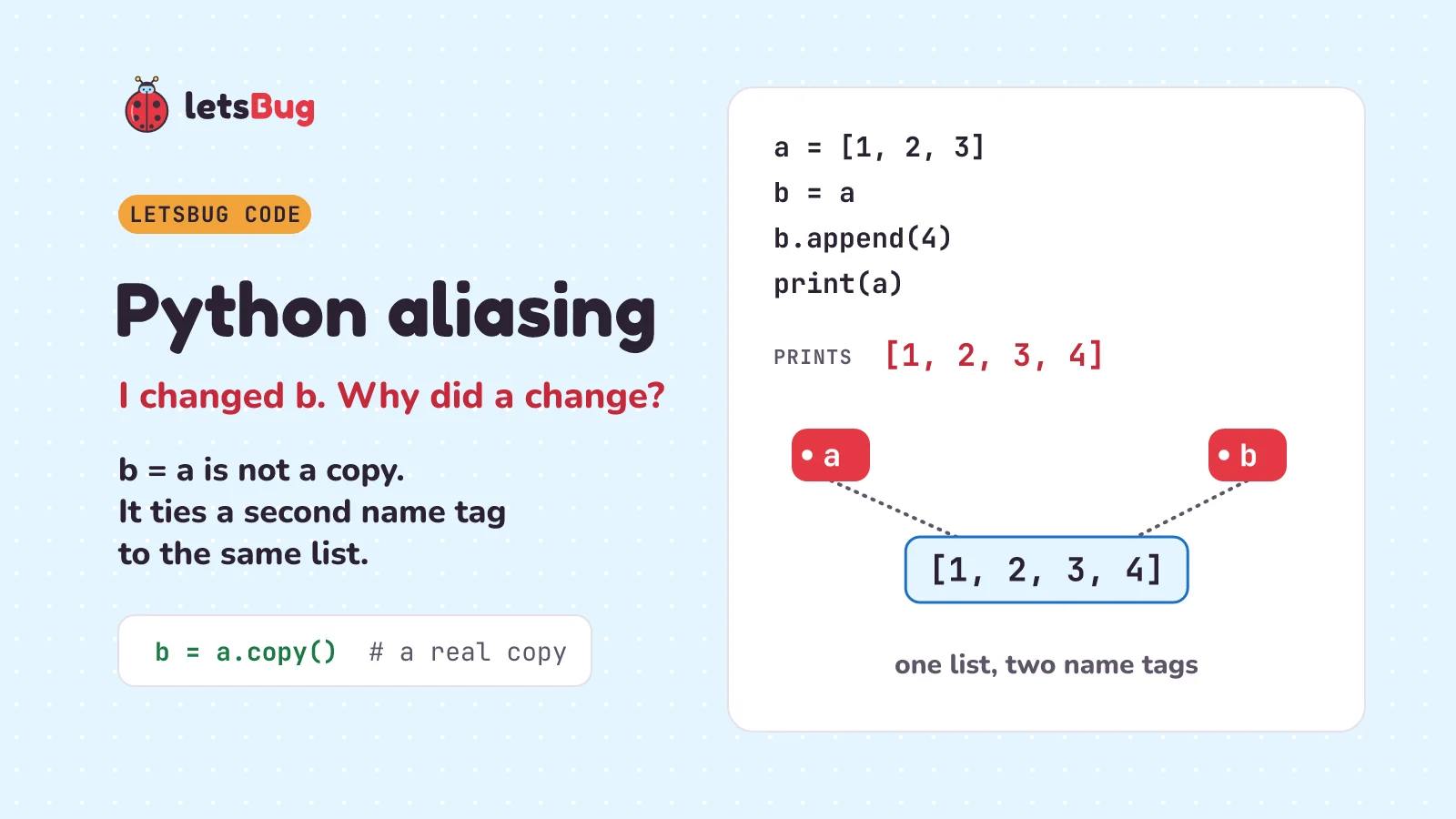
In Python, b = a doesn't copy a list. It gives the same list a second name, so a change through b shows up in a. This is called aliasing. Python variables are name tags tied to objects, not boxes holding values. To get your own list, copy it: b = a.copy(), or copy.deepcopy(a) for lists inside lists.
In this post we start with a shared Google Doc and a four-line puzzle. Then we swap the "box" picture of a variable for a better one, name tags, and prove it with is and id(). We see why numbers seem to follow different rules. We make real copies, shallow and deep. Then we fix two classic alias bugs: a game where every player gets the same sword, and a function whose default list remembers old calls.
A few words first. An object is any piece of data Python keeps in memory: a number, a piece of text, a list. A variable is a name your program uses for an object. A reference is where an object lives in memory, like a note with an address on it. The list append post showed that a list's slots hold references, not the items themselves. That idea is the key to this whole post.
Key takeaways
- A Python variable is a name tag tied to an object, not a box.
b = aties a second tag to the same object. Nothing is copied. - Two names for one object are aliases.
a is bisTruewhen they are, andid(a) == id(b)agrees. - Mutable objects, like lists, can change in place, so a change through one name shows through every name. Immutable ones, like numbers and strings, can't change, so
y += 1givesya different object. b += [4]changes the list in place.b = b + [5]builds a new list. They look alike, but only the first one changesatoo.a.copy(),list(a)anda[:]make a shallow copy: a new outer list that still shares any inner lists.copy.deepcopy(a)copies all the way down.[[]] * 4makes four references to one list. Use[[] for _ in range(4)]for four separate lists.- A default value like
bag=[]is made once, when the function is defined, and every call shares it. Usebag=Noneand make a new list inside.
This post goes with letsBug Code, episode 7. Watch it first, or read on: everything in the video is here, plus every code sample with its real output, and practice questions with answers.
Why does changing b also change a in Python?
Start with something you've probably used: a shared Google Doc. Google's help page says: "You can let up to 100 people with view, edit, or comment permissions work on a Google Docs, Sheets, or Slides file at the same time." Change a word, and everyone sees it, because there's only one document. Everyone just has a link to it. If you want your own version, you choose "Make a copy".
Python works like the share link. Here's the puzzle. Read it and guess what it prints before you look:
a = [1, 2, 3]
b = a
b.append(4)
print(a)
[1, 2, 3, 4]Did you guess [1, 2, 3]? That's the usual guess, because we only changed b. But Python prints [1, 2, 3, 4].
The surprise comes from a picture many of us learned first: a variable is a box that holds a value. In that picture, b = a would copy what's in box a into box b, and changing b would leave a alone. In Python, that picture is wrong for every object. Lists are just where it shows.
Are Python variables boxes or name tags?
Name tags. Python's own FAQ (its page of frequently asked questions) says: "Variables are simply names that refer to objects. Doing y = x doesn't create a copy of the list – it creates a new variable y that refers to the same object x refers to." It goes on: "This means that there is only one object (the list), and both x and y refer to it."
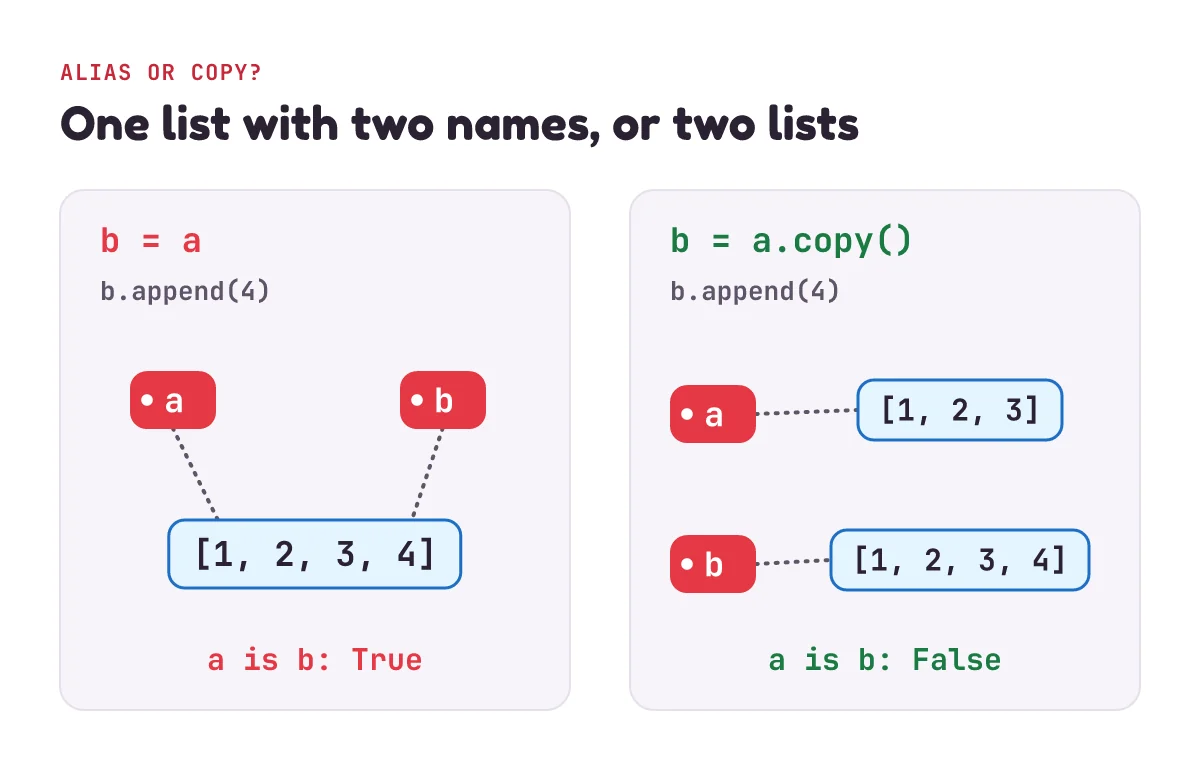
So here's the right picture. The list [1, 2, 3] is an object, living somewhere in memory. a is a name tag tied to it. b = a ties a second tag to the same object. No new list is made. b.append(4) changes that one object, so both names show the change. The docs for Python's copy module put it in one line: "Assignment statements in Python do not copy objects, they create bindings between a target and an object." An assignment is a statement that ties a name to an object, like b = a (or y += 1). The target is the name on the left of the =. A binding is the tie between a name and an object.
Python can prove it. Two tools tell you whether two names are tied to the same object:
a = [1, 2, 3]
b = a
print(a is b)
print(id(a) == id(b))
True
Trueis asks: are these the same object? The language reference (the rule book for Python) says: "x is y is true if and only if x and y are the same object." "If and only if" means exactly when. id() gives each object an identity number. The reference says an object's identity "never changes once it has been created; you may think of it as the object's address in memory." a and b have the same identity, so they're one object.
Two names for the same object have a name of their own. University of Toronto's course notes for its first-year Python course say: "We say that v1 and v2 are aliases when they refer to the same object." a and b are aliases. The same notes explain why aliases confuse people: they allow "mutation at a distance". Mutation means changing an object. At a distance means you change a's list without ever writing a.
Mutable vs immutable: why do numbers seem to work differently?
Try the same thing with a number, and the rule seems to break:
x = 5
y = x
y += 1
print(x, y)
a = [1, 2, 3]
b = a
b += [4]
print(a)
b = b + [5]
print(a, b)
5 6
[1, 2, 3, 4]
[1, 2, 3, 4] [1, 2, 3, 4, 5]x is still 5. Did the rule break? No. After y = x, both names are tied to the same 5. But a number can't be changed. The language reference says: "Objects whose value can change are said to be mutable; objects whose value is unchangeable once they are created are called immutable." And: "numbers, strings and tuples are immutable, while dictionaries and lists are mutable." (A string is a piece of text. A tuple is like a list in round brackets that can't change. A dictionary stores values under names called keys.)
So y += 1 can't turn the 5 into a 6. Instead, y gets a different object, 6, and its tag moves onto it. x is still tied to the 5.
Lists are mutable, so += works differently on them. The FAQ explains that on a list, += does the same as extend, which adds every item of one list to the end of another. It changes the list itself, in place: in the same object. So b += [4] changes the one list, and a sees it.
But b = b + [5] is different. b + [5] builds a brand-new list, and = moves the tag b onto it. a is still tied to the old list, so it doesn't get the 5. Lines that look alike can do different things to the objects. The FAQ warns about exactly this: "Some operations (for example y.append(10) and y.sort()) mutate the object, whereas superficially similar operations (for example y = y + [10] and sorted(y)) create a new object." (Superficially similar means alike on the surface.)
How do you copy a list in Python?
Make a copy on purpose, like "Make a copy" in Google Docs. Any of these three works: a.copy(), list(a) or a[:]. (a[:] is a slice of the whole list: every item from the start to the end.)
a = [1, 2, 3]
b = a.copy()        # or list(a), or a[:]
b.append(4)
print(a, b)
[1, 2, 3] [1, 2, 3, 4]Now b is a new object, and changing it leaves a alone. Python's docs describe copy() like this: "Create a shallow copy of sequence. This is equivalent to writing sequence[:]." (A sequence is an ordered collection, like a list.) We'll see what shallow means in the next section.
A copy has the same items but a different identity. That's the difference between == and is:
a = [1, 2, 3]
c = a.copy()
print(a == c, a is c)
True False== asks: do they hold the same values? The reference says == and the other comparison operators "compare the values of two objects". is asks: are they the same object? A copy is equal, but it isn't the same object.
So which should you use? Use == to compare values, almost always. Use is only to ask "same object?", and to check for None. Python's style guide, PEP 8, says: "Comparisons to singletons like None should always be done with is or is not, never the equality operators." The equality operators are == and !=. A singleton is an object there is only one of, and None is one. Don't write if x is 5: that asks whether x is one particular object, not whether it equals 5.
Here are the four list examples so far in one table:
| Line | Changes the list itself? | Does a see it? |
|---|---|---|
b = a, then b.append(4) | Yes | Yes |
b = a, then b += [4] | Yes | Yes |
b = a, then b = b + [5] | No, it builds a new list | No |
b = a.copy(), then b.append(4) | Only the copy | No |
What is the difference between a shallow copy and a deep copy?
A shallow copy copies only the outer list. A deep copy copies the lists inside it too. It only matters when a list holds other mutable objects, such as a grid stored as a list of rows:
import copy
grid = [[0, 0], [0, 0]]
shallow = grid.copy()
deep = copy.deepcopy(grid)
grid[0][0] = 9
print(shallow[0][0], deep[0][0])
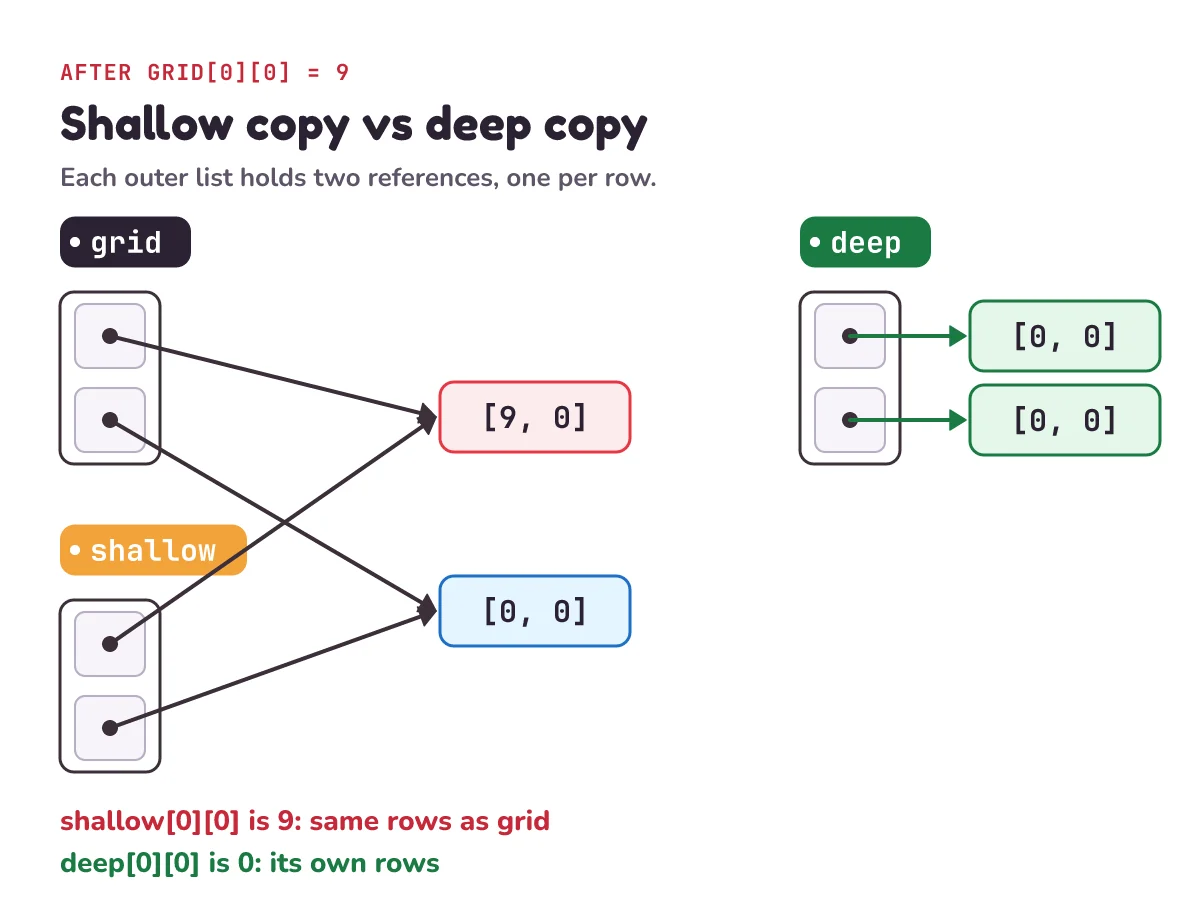
9 0The shallow copy sees the 9. The deep copy keeps its 0. The copy module's docs explain why: "A shallow copy constructs a new compound object and then (to the extent possible) inserts references into it to the objects found in the original." A compound object is one that holds other objects, like a list of lists. So shallow is a new outer list, but its two rows are the very same row lists as grid's. Change a row through grid, and shallow sees it.
The docs go on: "A deep copy constructs a new compound object and then, recursively, inserts copies into it of the objects found in the original." Recursively means it does the same thing again at every level: it copies the rows, and anything inside them, all the way down. So deep shares nothing with grid that can change.
For a flat list of numbers or strings, a shallow copy is enough: those items can't change, so sharing them is safe. Use copy.deepcopy when your list holds lists (or dictionaries) that you plan to change.
Why does [[]] * 4 share one inner list in Python?
Because * repeats references, not lists. Here's a bug that happens in games. Four players each need an inventory, a list of the things they carry. This looks like it makes four empty lists:
inventories = [[]] * 4
inventories[0].append("sword")
print(inventories)
[['sword'], ['sword'], ['sword'], ['sword']]We gave player one a sword, and every player has one. Python's docs explain: "Note that items in the sequence s are not copied; they are referenced multiple times." They show the same bug with 3 lists instead of 4, and say all the elements of [[]] * 3 "are references to this single empty list." Four tags on one bag. The FAQ adds: "replicating a list with * doesn't create copies, it only creates references to the existing objects." And: "Changes to one row will show in all rows, which is almost certainly not what you want."
The fix is to build a fresh list for each player, with a list comprehension: a short way to build a list from a loop, written inside square brackets.
inventories = [[] for _ in range(4)]
inventories[0].append("sword")
print(inventories)
[['sword'], [], [], []]The [] inside runs once on each pass through the loop, so each player gets a new empty list. (_ is a name people use for a loop counter they don't need.)
Why are mutable default arguments shared between calls?
Because a default value is made only once. To see why that matters, start with how functions get their arguments. Functions get name tags too. An argument is the value you pass in when you call a function. Pass a list into a function, and the parameter (the name inside the function) is a new tag on the same list:
def give_map(bag):
    bag.append("map")

mine = []
give_map(mine)
print(mine)['map']The function appended to bag, and the caller's list mine changed. That's often exactly what you want. The Python tutorial says arguments are passed "using call by value (where the value is always an object reference, not the value of the object)". In plain words: the function gets the note with the address on it, not a copy of the list. The FAQ says the same thing in other words: "arguments are passed by assignment in Python". Passing mine to give_map works just like writing bag = mine.
Now the trap. A default value is what a parameter gets when the caller leaves it out, like bag=[] here:
def pack(item, bag=[]):
    bag.append(item)
    return bag

print(pack("map"))
print(pack("torch"))
['map']
['map', 'torch']The second call should have started with an empty bag, but it already holds the map. The FAQ says: "Default values are created exactly once, when the function is defined." Python makes that one empty list when it runs the def line, and every call that leaves out bag gets a tag on that same list. The tutorial marks it "Important warning: The default value is evaluated only once." Evaluated means worked out.
The FAQ's advice: "use None as the default value and inside the function, check if the parameter is None and create a new list/dictionary/whatever if it is." (None is Python's "nothing here" value. The sentinel value post uses None for "nothing here" too: as the answer when there's nothing to give back.)
def pack(item, bag=None):
    if bag is None:
        bag = []
    bag.append(item)
    return bag

print(pack("map"))
print(pack("torch"))
['map']
['torch']Now bag = [] runs inside the function, on every call that leaves out bag, so each of those calls gets its own new list.
How slow is insert(0) for a year of readings in Python?
Very slow: 138,127,417,200 shifts. That was the answer to episode 6's challenge, which opens the video: build a year of readings, 525,600 of them, with insert(0, r) instead of append. Each insert at the front shifts every reading already in the list: 0 + 1 + 2 + … + 525,599 = 138,127,417,200 shifts. That's O(n²), the same count as growing a list one slot at a time. O(n²) means that if you double the list, the work becomes four times as much. The Big O notation post explains it by counting steps. The fix: append instead, or use a deque (said "deck"), a list-like container that is fast at both ends. The list append post times both, with sources, and its question 4 has the full working.
1) A teacher keeps a class register: register = ["Ava", "Ben", "Cal"]. She writes backup = register and spare = register.copy(). Then Ben moves school: register.remove("Ben"). What does print(len(backup), len(spare)) show?
2) x = 5; y = x; y += 1. What is x? And after a = [1]; b = a; b += [2], what is a?
3) The video's challenge: take the buggy inventories = [[]] * 4. Instead of appending, write inventories[0] = ["sword"]. Does every player get a sword?
4) grid = [[0, 0], [0, 0]] and shallow = grid.copy(). Now shallow.append([7, 7]). Does grid get a third row? What about shallow[1].append(5): does grid[1] change?
Show the answers
1) 2 3. backup is just another tag on the same list, so Ben's gone from it too: two names. spare is a real copy, made before the change: still three.
2) x is 5: numbers are immutable, so y += 1 moved y to a new object. a is [1, 2]: lists change in place, and a and b are aliases.
3) No. The output is [['sword'], [], [], []]. inventories[0] = ... doesn't change the shared list. It ties slot 0 to a new list. The other three slots are still tied to the one shared empty list. Appending changes an object; assigning moves a tag.
4) No third row: shallow is its own outer list, so grid still has 2 rows. But yes, grid[1] changes to [0, 0, 5]: the rows are shared in a shallow copy.
Questions people ask
What is aliasing in Python?
Aliasing is when two names refer to the same object. After b = a, a and b are aliases: one list with two names. If the object is mutable, like a list, a change made through one name shows through the other.
Does b = a copy a list in Python?
No. Assignment never copies. It ties the name b to the same list as a. To copy, write b = a.copy(), b = list(a) or b = a[:], or b = copy.deepcopy(a) if the list holds other lists.
What is the difference between is and == in Python?
== checks whether two objects hold equal values. is checks whether they are the same object. A list and its copy are == but not is: a == a.copy() is True, and a is a.copy() is False. Use is only to check for None or to ask "same object?"; compare values with ==.
When should I use deepcopy instead of copy?
When the object holds other mutable objects that you'll change, such as a list of lists, a grid, or a list of dictionaries. A shallow copy would still share those inner objects. For a flat list of numbers or strings, copy() is enough.
Is Python pass by reference or pass by value?
Pass by value means the function gets a copy. Pass by reference means the function gets the caller's variable itself. Python does neither exactly. Its tutorial calls it call by value, where the value is always a reference. Its FAQ calls it pass by assignment. Both mean the same thing: the parameter becomes a new name tag for the caller's object, just like b = a. So a function can change a list you pass in. But if it ties its parameter to a new object, the caller's name doesn't move.
Are strings mutable in Python?
No. Numbers, strings and tuples are immutable: once made, they can't change. Anything that seems to change a string makes a new one. After s = "map"; t = s; s += "s", s is "maps" but t is still "map". That's why aliasing bugs show up with lists and dictionaries, not with strings.
Keep going
- Watch the full lesson, Python Aliasing: I Changed b, Why Did a Change? (Copy vs Deep Copy), and its Short, Python: I Changed b. Why Did a Change Too? More in the letsBug Code series on YouTube. Next in the series: merge sort, sorting a million cards by splitting the pile in half.
- The episode before this one: Python list append time complexity: why it's amortized O(1).
- When a list changes and you can't see why, trace it line by line: debugging in Python with trace tables, print() and breakpoint().
Checked on 10 November 2026 against the 15 sources below.
Sources
- Python FAQ: Why did changing list 'y' also change list 'x'? (variables are names, y = x doesn't copy, += mutates lists, y = y + [10] makes a new object)
- Python FAQ: How do I write a function with output parameters? (arguments are passed by assignment)
- Python FAQ: How do I create a multidimensional list? (* makes references, not copies)
- Python FAQ: Why are default values shared between objects? (defaults are made once; use None)
- Python documentation: copy, Shallow and deep copy operations (assignment doesn't copy; shallow vs deep)
- Python language reference: Objects, values and types (identity, is, id(), mutable and immutable types)
- Python language reference: Comparisons (== compares values, is compares identity)
- Python documentation: Common sequence operations (s * n references items; the [[]] * 3 example)
- Python documentation: Mutable sequence types (copy() is a shallow copy, same as [:]; s += t extends s)
- Python language reference: Augmented assignment statements (+= works in place when possible)
- PEP 8, the Python style guide: Programming recommendations (compare to None with is, never ==)
- Python tutorial: Defining functions (arguments are object references)
- Python tutorial: Default argument values (the default is evaluated only once)
- University of Toronto CSC110/111 course notes: 6.5 Aliasing and mutation (aliases, "mutation at a distance")
- Google Workspace Learning Center: Document sharing basics in Google Docs (up to 100 people in one file at once)
Every code sample in this post was run in Python 3.13.2 before publishing, and every output shown is the real output.