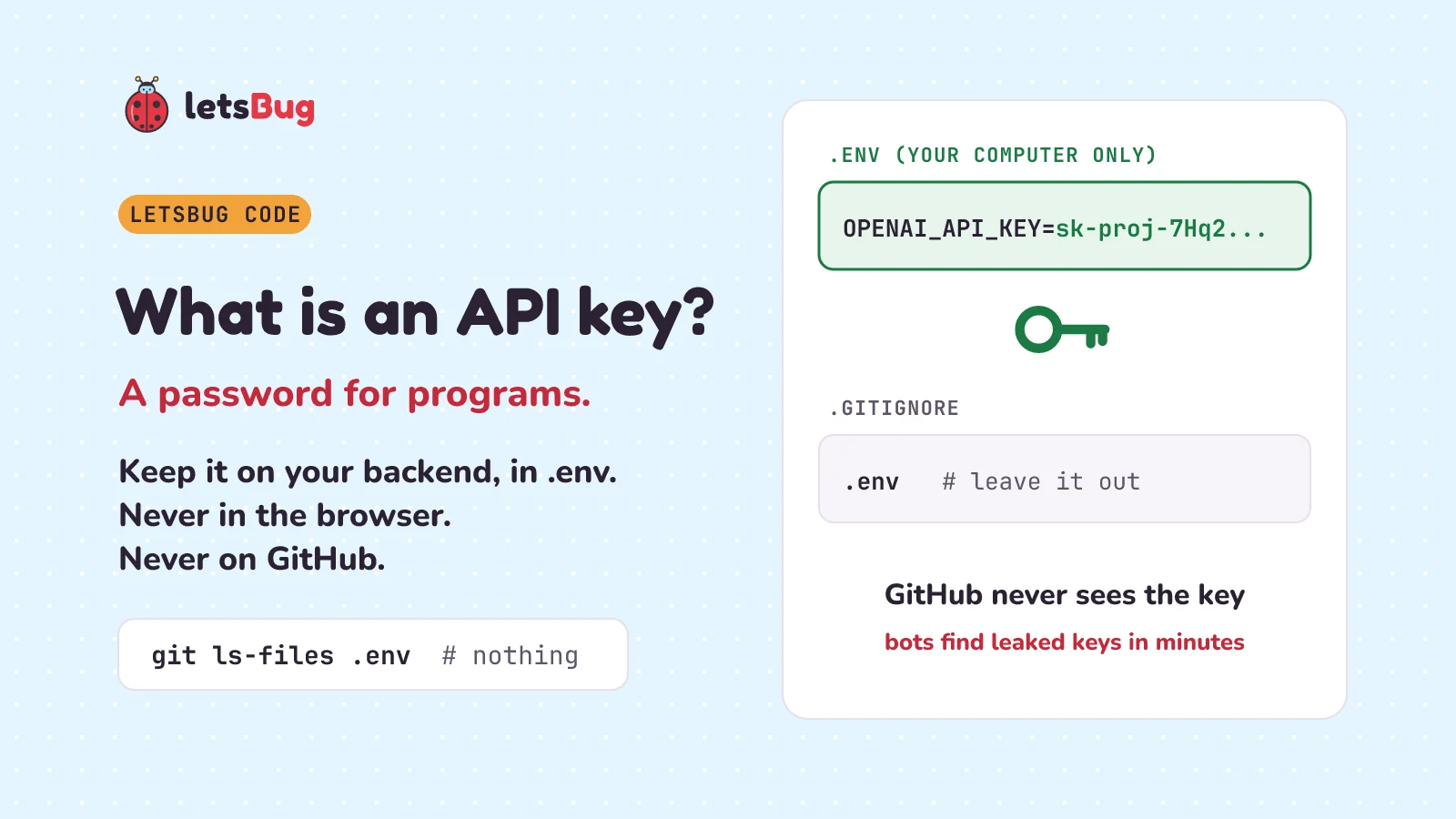
An API key is a long secret string that tells an outside service, like OpenAI, who is asking and which account to charge. It works like a password for programs. Keep it on your backend, in a .env file your code reads by name, and list .env in .gitignore so it never reaches GitHub.
In this post we start with a moment every AI builder knows: the agent says "add your OPENAI_API_KEY to .env". We see what an API key is and why anyone who has it can spend your money. We draw your app as a map and find the one safe place for the key. Then we load it from .env in Python and in Node.js (a tool that runs JavaScript, the language of web pages, on a server), keep it off GitHub with .gitignore, and see the one trap .gitignore can't stop. Last, what happens when a key leaks, what to do first, and three things to tell your agent.
A few words first. GitHub is a website where people keep their code online. Git is the tool on your computer that saves versions of your project. Each saved version is a commit. Sending your commits up to GitHub is a push. A project's folder of code, with all its commits, is a repository (or repo). A public repo can be read by anyone.
Key takeaways
- An API key tells a service like OpenAI who is asking and whom to bill. Whoever holds it can spend your money.
- Everything in the frontend is downloaded to every visitor's browser. So the key lives on the backend, the part that runs on your server.
- The key goes in a
.envfile. The code holds only its name:os.environ["OPENAI_API_KEY"]in Python,process.env.OPENAI_API_KEYin Node.js. - Never give a key a name starting with
NEXT_PUBLIC_(Next.js) orVITE_(Vite). Those names are copied into the code sent to the browser. - Put
.envin.gitignore. But.gitignorecan't stop a file Git already tracks: rungit rm --cached .env, then check thatgit ls-files .envprints nothing. - In 2024, 23.8 million secrets leaked on public GitHub (GitGuardian). In one test, a key on GitHub was used within two minutes (Orca Security).
- Leaked a key? Revoke or rotate it first. Deleting the file isn't enough: the key stays in the history, and in other people's copies.
This post goes with letsBug Code, episode 28, the first "Build with AI" episode. Watch it first, or read on: everything in the video is here, plus every command with its real output, and practice questions with answers.
What is an API key, and how does it work?
Imagine this. You're building a to-do app with an AI agent, such as Claude Code, Cursor or Lovable. You ask for one new button: "split into steps". It should take a big task, like "plan the trip", and break it into small steps. The agent writes the code. Then it says: add your OPENAI_API_KEY to .env. What is that?
Start with the API. An API (application programming interface) is a door that lets one program ask another program for something. Your app asks OpenAI: split this task into steps. OpenAI sends back the steps.
But every answer costs OpenAI money to make, so it must know who is asking, and whom to bill. That's the job of the API key. It's a long, secret string of letters and numbers. Your app sends it with every request. OpenAI reads it and knows: this is your account, charge it. So an API key is a password for programs.
There is one big difference from your login password. You can make several keys for one account: one for your laptop, one for your app, one for testing. You can delete one without touching the others. Google's advice for its own keys even says to do this every so often: "Periodically create new API keys, update your applications to use the new API keys, and delete the old keys."
And there's one big thing a key shares with a password: anyone who has it can use it. Google warns: "Publicly exposing your API keys can lead to unexpected charges on your account or unauthorized access to your data." Unauthorized means without your permission.
Where should an API key go in your app?
On the backend, and nowhere else. To see why, draw your app as a map with three parts:
- The browser: the window on your user's phone or laptop. Inside it runs the frontend, the code that draws the buttons and the list.
- The backend: code that runs on a server, a computer that you control, and your user doesn't.
- The outside API: OpenAI's computers.
When someone taps "split into steps", the frontend asks your backend, and the backend asks OpenAI. The answer comes back the same way.
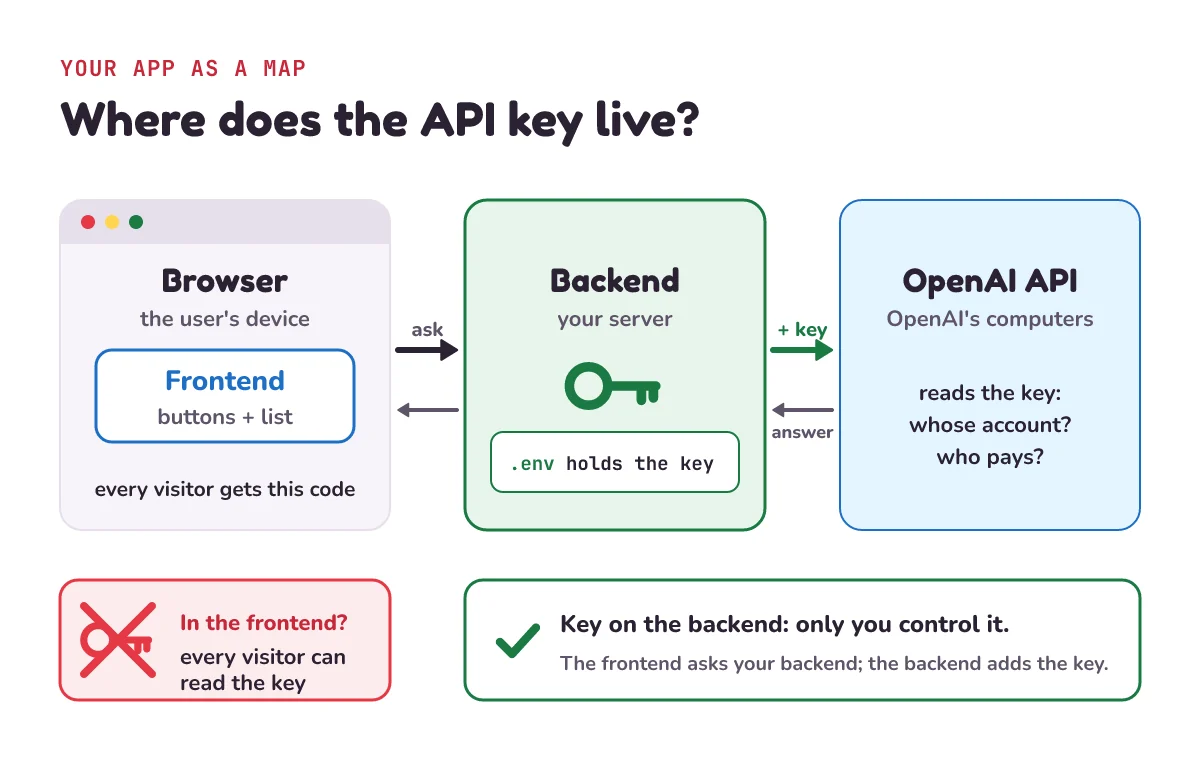
Here's the rule. Everything in the frontend is downloaded to every visitor's browser. Anyone can open the browser's developer tools (a built-in panel that shows a page's code) and read it, key included. So the key never goes in the frontend. It lives on the backend, which only you control.
Google's docs say the same thing. Their advice is headed "Don't include API keys in client code or commit them to code repositories". The client is the user's side: the browser and the frontend. They go on: "The client should pass requests to the server, which can add the credential and issue the request." A credential is anything that proves who you are, like a key or a password.
Watch the names, too. Next.js and Vite are tools for building web apps. They copy settings into the frontend if the name starts with a special prefix:
- Next.js: settings without the prefix "are only available in the Node.js environment, meaning they aren't accessible to the browser". But a setting whose name starts with
NEXT_PUBLIC_"will be inlined into any JavaScript sent to the browser". Inlined means pasted straight into the code when the app is built (turned into the files that go online). - Vite: "Variables prefixed with VITE_ will be exposed in client-side source code after Vite bundling." Bundling is when Vite packs your code into files for the browser. Vite's docs add: "VITE_* variables should not contain sensitive information such as API keys."
So never give a key one of those names. Say your agent writes NEXT_PUBLIC_OPENAI_KEY. Ask it to rename the setting OPENAI_API_KEY, read it only in a server route (code that runs on the backend), and have the frontend call that route. The Vite React and Express deploy guide builds an app with this split: a frontend on Vercel and a backend on Render. (Vercel and Render are hosting services: companies that run your app online.) Each part reads its settings from environment variables, and the guide shows why a secret must never go in a VITE_ variable.
Here is where each piece of the to-do app lives:
| Piece | Where it lives | Who can read it |
|---|---|---|
| The "split into steps" button | Frontend, in the browser | Every visitor |
| The code that calls OpenAI | Backend (backend/main.py) | Only you: it runs on your server |
| The key itself | .env on the backend, or your hosting service's settings | Only you |
The name OPENAI_API_KEY | Backend code | Anyone who sees your code, for example if it's on GitHub. That's fine: it's only a name |
What is a .env file, and how does your code read the key?
Even on the backend, the key doesn't go in the code. The code holds only a name. The key itself goes in a small text file called .env (said "dot env"), with one NAME=value line per setting:
# .env  (stays on your computer, never pushed)
OPENAI_API_KEY=sk-proj-7Hq2vR9xLm4KpT8w
That key is made up for this post. It isn't a real key, and it's kept short so it fits on the page.
When the backend starts, it loads this file into environment variables: settings a program can read by name. Python keeps them in os.environ. Python's docs call it "A mapping object where keys and values are strings that represent the process environment." A mapping is a lookup table: give it a name, get back a value. Here "key" means a name in the table, not your API key. The process environment is the set of settings a running program starts with.
OpenAI's own Python library suggests exactly this setup: "we recommend using python-dotenv to add OPENAI_API_KEY="My API Key" to your .env file so that your API key is not stored in source control." Source control means a tool like Git. A library is ready-made code you add to your project. Here is the backend, using the python-dotenv library. Install it with pip install python-dotenv (pip is Python's tool for installing libraries):
# backend/main.py
import os
from dotenv import load_dotenv

load_dotenv()                       # copies each NAME=value line of .env into os.environ
key = os.environ["OPENAI_API_KEY"]  # the code holds only the name
print("OPENAI_API_KEY" in os.environ, len(key))
True 24It prints the key's length, 24 characters, not the key itself. Never print a real key: program output is often saved in logs (files where a program writes down what it did) that other people can read. The python-dotenv README says what load_dotenv() does: "Look for a .env file in the same directory as the Python script (or higher up the directory tree). Read each key-value pair and add it to os.environ." A directory is a folder. Higher up the tree means the folders that contain it.
The video shows only import os and the key = line. But something has to load .env first. Some tools do that for you. Next.js docs: "Next.js has built-in support for loading environment variables from .env* files into process.env." Vite's docs say "Vite uses dotenv to load additional environment variables from the following files in your environment directory". That directory is usually your project folder. The first file on that list is .env, "loaded in all cases". Plain Python doesn't. Without load_dotenv(), the same code stops with an error:
import os

key = os.environ["OPENAI_API_KEY"]
KeyError: 'OPENAI_API_KEY'That's the last line of the error. A KeyError means the name isn't in the lookup table: the .env file was never loaded. If you see it, the fix is to load .env, not to paste the key into the code.
Node.js can load .env with no library at all. Its docs say the --env-file option "Loads environment variables from a file relative to the current directory, making them available to applications on process.env." Options like this are also called flags. Its history line says: "v24.10.0, v22.21.0 The --env-file flag is no longer experimental." Experimental means still being tested. So from Node.js 24.10 (and 22.21) it's a finished feature.
// server.js  (run it with: node --env-file=.env server.js)
const key = process.env.OPENAI_API_KEY;
console.log("OPENAI_API_KEY" in process.env, key.length);
true 24Two more habits. Make a file called .env.example with the names only, no values, like OPENAI_API_KEY=. It's safe to push, and it tells anyone who downloads the project which settings it needs. And when you put the app online, don't upload .env. Type the key into your hosting service's settings page for environment variables instead. The deploy guide above sets its settings this way on Vercel and on Render.
How do you hide your API key from GitHub?
With a file called .gitignore, which lists the files Git should leave out. Git's docs: "A gitignore file specifies intentionally untracked files that Git should ignore." A file is tracked when Git is saving its versions. Put .env in .gitignore, and the key stays on your computer, even when the rest of the project goes up:
# .gitignore
.env
.env*.local
The second line also leaves out files like .env.local. Next.js uses that name for settings that only exist on your own computer, and its docs say .env*.local files "are intended to be ignored through .gitignore". The Next.js starter project, create-next-app, adds this for you: "The default create-next-app template ensures all .env files are added to your .gitignore." And: "You almost never want to commit these files to your repository."
Let's prove it works. The to-do app's project has four files: backend/main.py, .env, .env.example and the .gitignore above. They're in a folder where we've run git init, which starts a new repo. git add . means "get every file ready for the next commit". Getting a file ready is called staging it. Then we ask Git what it staged:
git add .
git status --short
git check-ignore -v .env
A .env.example
A .gitignore
A backend/main.py
.gitignore:2:.env .envA means added: staged for the next commit. Three files are staged, and .env isn't one of them. The last command asks why. Git's docs say git check-ignore will "check whether the file is excluded by .gitignore" and, with -v, "print the exclude pattern together with the path". Its answer: line 2 of .gitignore (line 1 is the comment), the pattern .env, matches the file .env. When you push, the key stays behind.
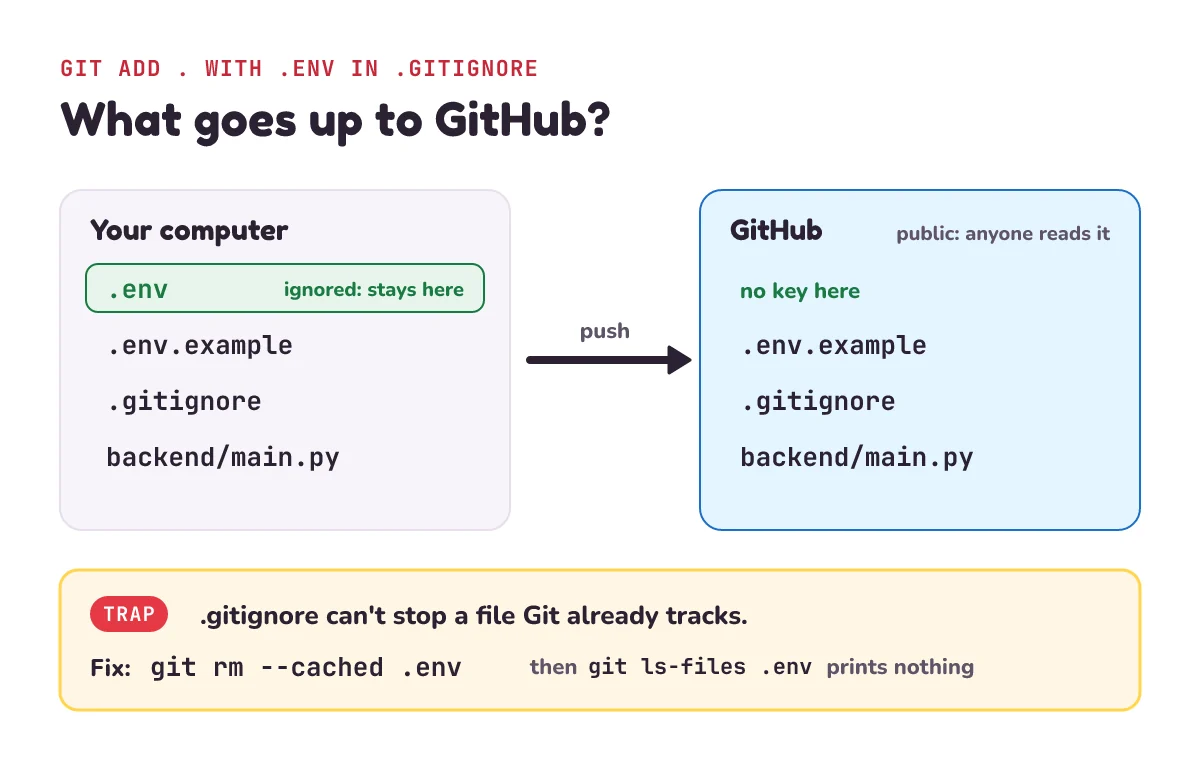
.env stays on your computer.Why doesn't .gitignore work on your .env file?
Because Git already tracks it. Here's the trap. The next sentence in Git's docs says: "Files already tracked by Git are not affected". .gitignore only works for files Git isn't tracking yet.
Say that last week, before you had a .gitignore, you staged and committed .env by mistake. Today you add a .gitignore with .env in it. You also put a new key in .env. Then:
git add .
git status --short
M .env
A .gitignoreM means modified. Git has staged the new key, even though .env is in .gitignore. The next push would send it to GitHub.
The fix comes from the same docs: "To stop tracking a file that is currently tracked, use git rm --cached to remove the file from the index." The index is Git's list of tracked files, with what's staged for the next commit. The --cached part matters. Without it, git rm deletes your file too. With it, says the git-rm page, "Working tree files, whether modified or not, will be left alone." The working tree is the files in your folder.
git rm --cached .envrm '.env'Now commit that (git commit -m "Stop tracking .env") and check. git ls-files lists tracked files: its docs say it can "Show all files cached in Git's index, i.e. all tracked files." Ask it about .env:
git ls-files .env
git check-ignore -v .env
.gitignore:2:.env .envgit ls-files .env printed nothing: Git no longer tracks it. The second line shows .gitignore now protects it. And .env is still in your folder, so your app still works.
One warning. This stops the key from going up in future pushes. If the old commit was ever pushed, the key is already out. Go to what to do if your API key leaks, below.
What happens if you push an API key to GitHub?
Strangers can find it within minutes. Bots, programs that run by themselves, read new public code all day, looking for text shaped like a key. In the test below, "Exposed secrets on GitHub, HTTP, and SSH were all discovered in under five minutes."
In 2023 the security company Orca Security tested this. Between January and May 2023 they set up bait on "nine different cloud environments". "Each contained a secret AWS key." (AWS is Amazon's cloud service: computers you rent over the internet.) GitHub was one of the nine places, and the time it took was different for each place. On GitHub: "Orca observed key usage on GitHub within two minutes, which means that exposed keys were compromised virtually instantly." Compromised means a stranger has it and can use it. Virtually instantly means almost at once.
It happens a lot. GitHub's blog said in February 2024: "In just the first eight weeks of 2024, GitHub has detected over 1 million leaked secrets on public repositories." It adds: "That's more than a dozen accidental leaks every minute." We can check that: eight weeks is 8 × 7 × 24 × 60 = 80,640 minutes, and 1,000,000 ÷ 80,640 = 12.4. A secret here means any key, password or token (another kind of key) that should stay private.
The security company GitGuardian counts leaks every year. Its 2025 report found "23.8 million secrets leaked on public GitHub repositories in 2024, marking a 25% year-over-year increase." That means 25% more than in 2023. And many are never switched off: "70% of secrets leaked in 2022 remain active today". Active means they still worked when the report came out, in early 2025.
GitHub does try to help, in three ways:
- Secret scanning. GitHub's docs: "Public repositories: Secret scanning runs automatically for free." It "scans your entire Git history on all branches of your repository". (A branch is a separate line of commits.)
- Telling the company. For partner companies: "When a partner secret is detected, we notify the provider so they can take action, such as revoking the credential." Revoking means switching it off. GitHub's list of supported patterns marks both "OpenAI API Key" and "Anthropic API Key" as partner secrets. (Anthropic is the company that makes Claude.)
- Push protection. It can block the push itself: "When push protection detects a potential secret during a push attempt, it will block the push and provide a detailed message explaining the reason for the block." For your own GitHub account it "Is enabled by default" and "Stops you from pushing secrets to public repositories on GitHub". The same list marks OpenAI and Anthropic API keys as covered.
But it can miss keys. Push protection only knows key shapes on its list. And GitHub's blog says that when it blocks you, "you will have the option to remove the secret from your commits or, if you deem the secret safe, bypass the block." Deem means judge, and bypass means skip. If you choose to skip the block, the key goes up anyway.
What should you do if your API key leaks?
Revoke or rotate it first. Clean up second. GitHub's guide to removing sensitive data says that when the data is a secret, like a key or a password, "as a first step you need to revoke and/or rotate that secret." Revoke means switch the key off. Rotate means make a new key and delete the old one.
Why first? Because deleting .env in a new commit doesn't remove the key. The old commit still holds it, and anyone can look through a public repo's history. Even rewriting the history (using special Git commands to change old commits) isn't enough. The guide warns that the old commits "may still be accessible elsewhere: In any clones or forks of your repository". A clone is a full copy someone downloaded. A fork is a copy someone made on GitHub. And: "You cannot remove sensitive data from other users' clones of your repository". Once the key is switched off, those copies don't matter: "Once the secret is revoked or rotated, it can no longer be used for access, and that may be sufficient to solve your problem."
In order:
- On the provider's website (the company that gave you the key, like OpenAI), make a new key and delete the old one.
- Put the new key in
.envon your computer, and in your hosting service's settings. - Check the provider's usage page for spending you don't recognise.
- Then clean up: add
.envto.gitignore, rungit rm --cached .env, and commit, as above.
What should you tell your AI coding agent about API keys?
Agents write a lot of code fast, and they don't always remember where keys belong. Copy these three prompts as they are:
- "Keep every API key in .env on the backend and read it with an environment variable. Never put a key in frontend code or in a NEXT_PUBLIC_ or VITE_ variable."
- "Check that .env is listed in .gitignore and that git ls-files .env prints nothing."
- "Before I push, search the whole project, including the git history, for anything that looks like an API key, and list what you find."
A fourth is useful when others will work on the project: "Make a .env.example with the names only, no values, so others know which settings the app needs." And if a key ever leaks: rotate it first, then clean up.
1) The video's pause-and-try. Here are four lines from four files. Which two leak the key? (a) OPENAI_API_KEY=sk-proj-7Hq2... in .env, with .env listed in .gitignore. (b) const key = "sk-proj-7Hq2..."; in frontend/app.js. (c) NEXT_PUBLIC_OPENAI_KEY=sk-proj-7Hq2... in .env. (d) key = os.environ["OPENAI_API_KEY"] in backend/main.py.
2) You added .env to .gitignore today. But git ls-files .env prints .env. Will your next push leave the key behind? What do you run?
3) A friend pushed his key to a public repo an hour ago. He deletes .env in a new commit and pushes again. Is the key safe now? What should he have done first?
4) GitHub found over 1,000,000 leaked secrets in the first eight weeks of 2024. How many is that per hour, to the nearest whole number?
Show the answers
1) (b) and (c). (b) is frontend code, so it's downloaded to every browser, and pushed to GitHub too. (c) looks hidden in .env, but the NEXT_PUBLIC_ name makes Next.js paste the value into the code sent to the browser. That happens as soon as the frontend uses it. (a) is never pushed and is read on the backend. (d) holds only the name.
2) No. .env is tracked, and .gitignore doesn't affect tracked files. Run git rm --cached .env, commit, and check that git ls-files .env now prints nothing. If the key was in an earlier push, rotate it too.
3) No. The key is still in the old commit, in the repo's history, and in any clones or forks. Bots may have found it within minutes. He should have revoked or rotated the key first, on OpenAI's website. Then the leaked copy is useless.
4) Eight weeks is 8 × 7 × 24 = 1,344 hours. 1,000,000 ÷ 1,344 = 744.0, so about 744 an hour.
Questions people ask
Is it safe to keep an API key in a private GitHub repository?
No. Keep keys out of every repo. GitGuardian's 2025 report found that "35% of customers' private repositories contain plaintext secrets". Plaintext means written out in full. A private repo can be shared later, made public by mistake, or copied by anyone with access. GitGuardian's CEO, Eric Fourrier, puts it this way: "Leaked secrets in private repositories must be treated as compromised".
What is the difference between an API key and a password?
A password proves that a person is who they say they are. An API key does the same job for a program. You usually have one password per account, but you can make many API keys and delete one without touching the rest. Both must stay secret: anyone who has your key can use your account.
Can I put an API key in frontend JavaScript?
No. Frontend code is downloaded to every visitor's browser, where anyone can read it. Google's advice is "Don't include API keys in client code or commit them to code repositories". Have the frontend call your own backend, and let the backend add the key.
Does adding .env to .gitignore remove it from GitHub?
No. .gitignore only stops untracked files from being added. If .env is already tracked, run git rm --cached .env and commit. If it was ever pushed, the key is in the history, so rotate the key first.
Does GitHub block API keys automatically?
Sometimes. Push protection is on by default for your account and blocks pushes to public repos that contain key shapes it knows, including OpenAI and Anthropic keys. But you can choose to skip the block, and it can't catch every kind of key. It helps, but keeping keys out of your code is still your job.
Keep going
- Watch the full lesson, What Is an API Key? And How to Hide It From GitHub, and its Short, How to Hide Your API Key: Never Put It in Your Code. More in the letsBug Code series on YouTube.
- See the backend that sits between your app and other services, at scale: what is an API gateway?
- See what often sits in front of a backend server: how NGINX works.
- Write a backend route like the one that calls OpenAI here: a REST API in Express.js, step by step.
Checked on 21 November 2026 against the 18 sources below.
Sources
- GitGuardian: The State of Secrets Sprawl 2025, 11 March 2025 (23.8 million secrets on public GitHub in 2024; 70% of 2022's still active; 35% of customers' private repos)
- Orca Security: 2023 Honeypotting in the Cloud Report, press release, 20 June 2023 (bait AWS keys on GitHub used within two minutes)
- GitHub blog: Keeping secrets out of public repositories, 29 February 2024 (over 1 million leaks in eight weeks; push protection on by default; bypass)
- GitHub Docs: About secret scanning (free on public repos; whole history; partners told)
- GitHub Docs: Supported secret scanning patterns (OpenAI and Anthropic API keys: partner, push protection)
- GitHub Docs: About push protection (blocks the push; on by default for users)
- GitHub Docs: Removing sensitive data from a repository (revoke or rotate first; clones and forks)
- Google Cloud: Best practices for managing API keys (unexpected charges; keys on the server, not the client; rotate)
- OpenAI: openai-python README (put OPENAI_API_KEY in .env with python-dotenv)
- python-dotenv: README (what load_dotenv() does)
- Python documentation: os.environ
- Node.js documentation: Command-line options (--env-file)
- Next.js docs: Environment variables (NEXT_PUBLIC_ values reach the browser; .env files in .gitignore)
- Vite docs: Env variables and modes (VITE_ values reach the browser)
- Git documentation: gitignore (tracked files are not affected; git rm --cached)
- Git documentation: git-rm (--cached leaves your file alone)
- Git documentation: git-ls-files (lists tracked files)
- Git documentation: git-check-ignore (which .gitignore line matches)
Every command and code sample in this post was run before publishing (Python 3.13, Node.js 24, Git 2.53), and every output shown is the real output.