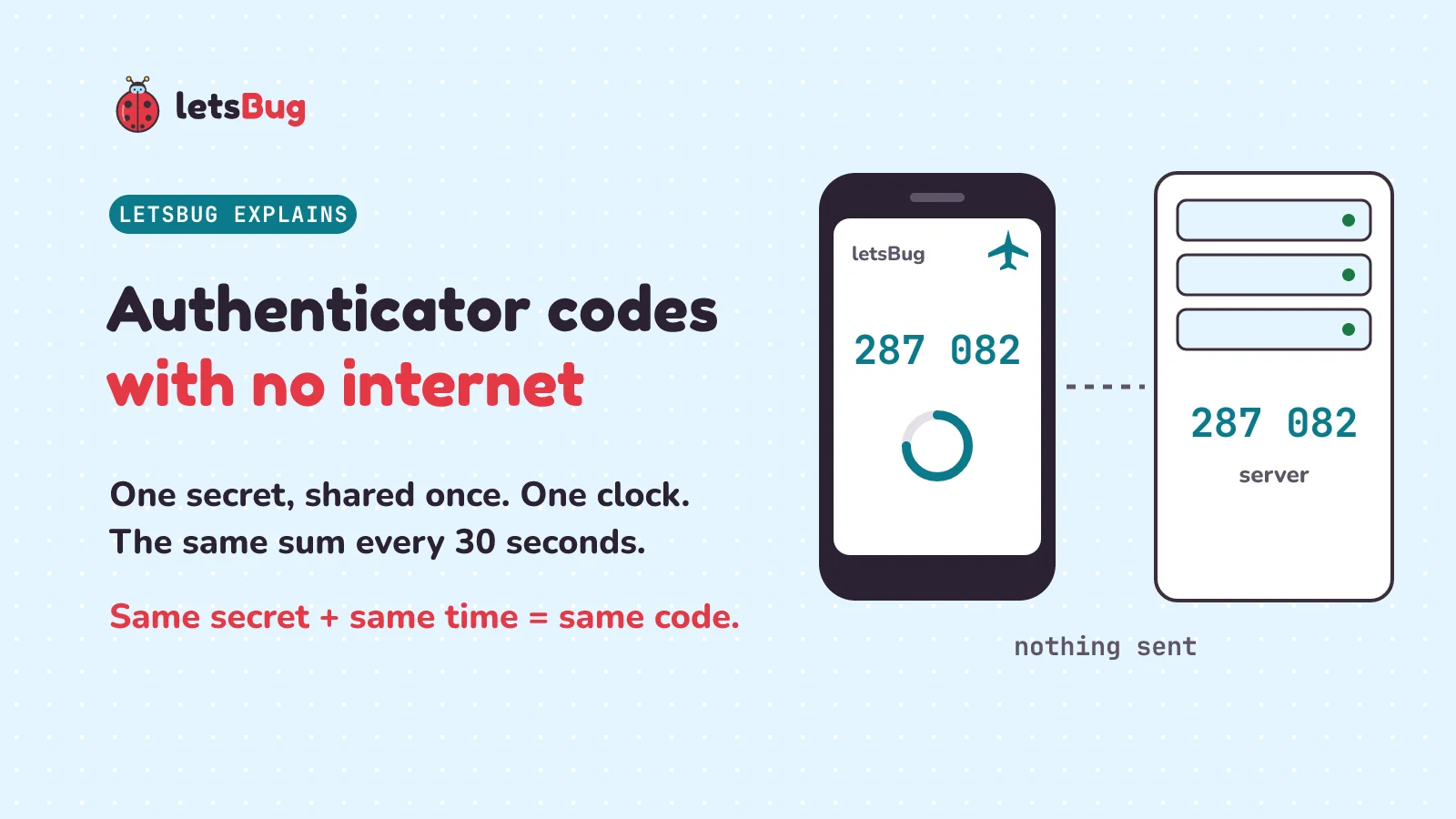
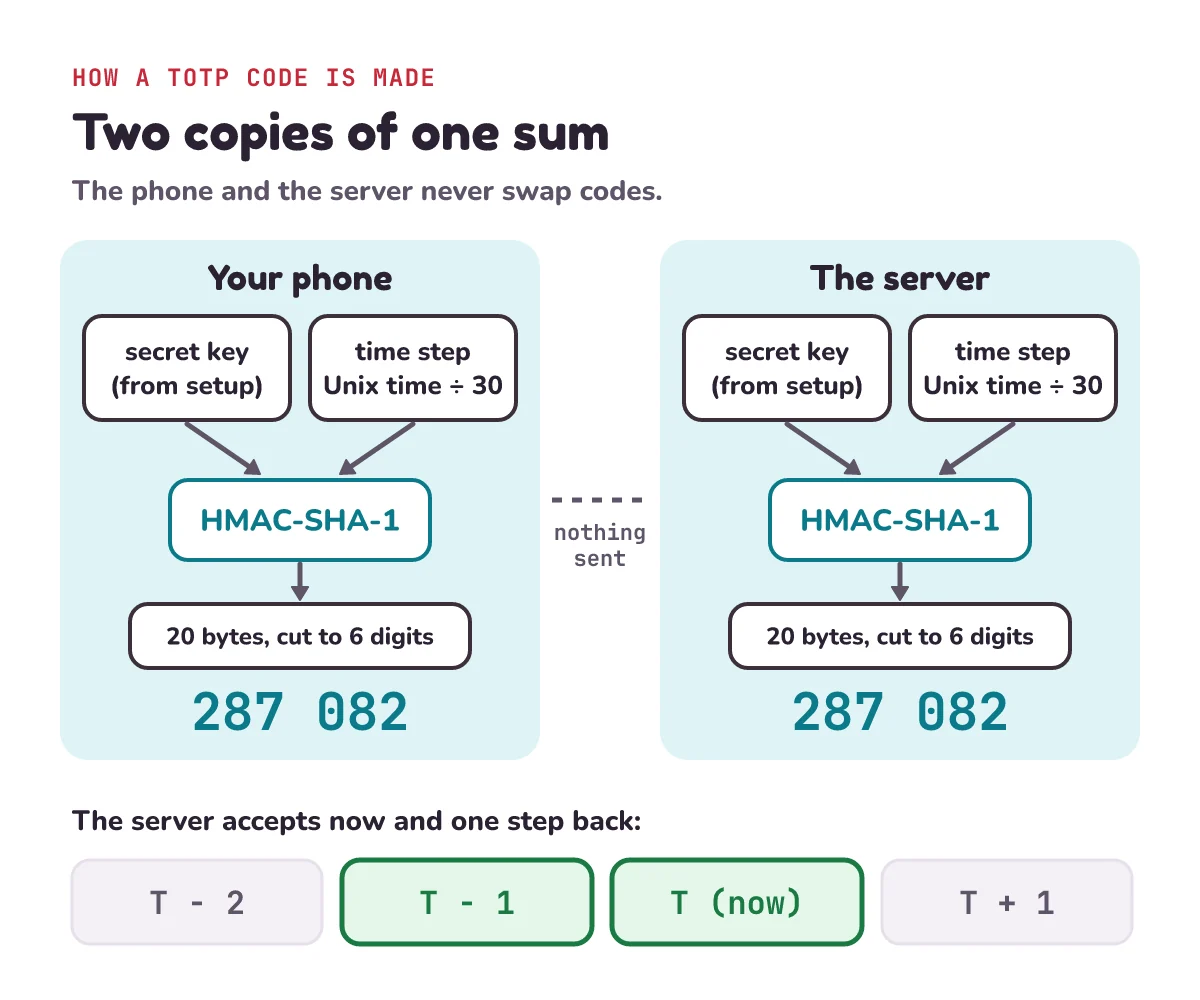
An authenticator app never downloads its codes. At setup, a QR code gives your phone a secret key, and the server keeps a copy. Every 30 seconds, your phone scrambles the time and the secret together in a keyed hash, then keeps six digits. When you sign in, the server does the same sum. Same secret, same time, same code.
In this post, let's open the setup QR code, work out a time step, mix it in a keyed hash, and cut six digits out by hand with the test key from the standard. Then we write the whole thing in about 15 lines of Python, check it against the official test values, and see why a wrong phone clock breaks your codes.
Key takeaways
- The app and the server share a secret key once, at setup, inside the QR code. After that, the secret doesn't need to travel again.
- The second ingredient is the time step: Unix time divided by 30, rounded down. It goes up by one every 30 seconds, and it's the same number on both sides.
- A keyed hash called HMAC-SHA-1 mixes the secret with the time step into 20 bytes. Then four of those bytes are cut out and turned into six digits.
- The server does the same sum and compares. It can also accept the code from one step earlier: the standard says to allow at most one step.
- A phone clock set by hand two minutes slow is four steps behind, so every code is rejected. Keep the time on automatic.
- Six digits give 1,000,000 codes, and the standard tells servers to limit how many tries you get. The real danger is a person who asks you for the code. Never give it to anyone.
This post goes with letsBug Explains, episode 9. Watch it, or read on: the post adds the setup link inside the QR code, a full TOTP in Python checked against the official test values, a server check that accepts one step back, and practice questions with answers.
Does an authenticator app need the internet?
Myth or fact: your authenticator app gets each code from the server, over the internet? Myth. Switch on airplane mode, and the codes keep coming, a new one every 30 seconds. Google's help page for Google Authenticator says: "You can still generate codes without an internet connection or mobile service."
First, some words. An OTP (one-time password) is a code that works for one sign-in and then stops working. Many sites ask for one after your password. That second step is called two-step verification (2SV), or two-factor authentication (2FA). The general name for asking for more than one proof that it's you is MFA, multi-factor authentication. The codes in an authenticator app are a kind called TOTP, a time-based one-time password.
These codes matter. In 2019, Microsoft wrote that "MFA can block over 99.9 percent of account compromise attacks." (Account compromise means someone breaking into your account.) That figure is for MFA in general, not only for authenticator apps. The UK's National Cyber Security Centre (NCSC) lists what an app does better than codes sent by text message: "These apps offer lots of advantages over text messages, such as not needing a mobile signal, or having to wait for a text message to arrive."
So how can your phone and the server agree on a code without talking? They need two things in common: a secret, and the time.
What is inside the setup QR code?
The trick happens once, when you turn the app on for an account. The website shows you a QR code, and you scan it with the app. Inside it is a URI, a link-like line of text. Google's wiki for the Authenticator app explains: "Secret keys may be encoded in QR codes as a URI with the following format:" Here is the wiki's own example of what the QR code holds:
otpauth://totp/Example:alice@google.com?secret=JBSWY3DPEHPK3PXP&issuer=ExamplePiece by piece:
otpauth://totp/says this is a time-based code.Example:alice@google.comis the label: which site, and which account. That's the name you see in the app.secret=JBSWY3DPEHPK3PXPis the secret key. In a real account, it's a random number that only your phone and the server know.
The secret is written in Base32, a way to write any bytes as plain letters and digits so they fit in a link. (A byte is 8 bits, and a bit is one 0 or 1.) Its standard is RFC 4648. (An RFC is a numbered document published for the people who build the internet.) It says the characters "are selected from US-ASCII digits and uppercase letters": A to Z, then 2 to 7. (US-ASCII is the standard list of codes computers use for English letters and digits.) Each character stands for 5 bits. The wiki says this key stands for 10 bytes: the letters of Hello! and then the bytes DE AD BE EF. Those last four are written in hexadecimal, or hex, which writes numbers with 16 symbols, 0 to 9 and a to f. One byte is always two hex digits. Python can decode it for us:
import base64

print(base64.b32decode("JBSWY3DPEHPK3PXP"))
print(len(base64.b32decode("HXDMVJECJJWSRB3HWIZR4IFUGFTMXBOZ")) * 8, "bits")
b'Hello!\xde\xad\xbe\xef'
160 bitsThe second line decodes the secret from the wiki's longer example, which has all the optional settings: algorithm=SHA1&digits=6&period=30. Its 32 Base32 characters hold 32 × 5 = 160 bits, which is 20 bytes. In the first line of output, \xde is Python's way of showing one byte in hex.
How long should a secret be? The standard behind these codes, RFC 4226, says: "The length of the shared secret MUST be at least 128 bits. This document RECOMMENDs a shared secret length of 160 bits." (RFC 4226 and RFC 6238 are the two RFCs that authenticator codes follow. A capital MUST means a rule you have to follow, and a capital RECOMMEND means a strong suggestion.) So the longer example is exactly the recommended size. The wiki's short "Hello!" key is only 80 bits: it's there to show the format, not to be used.
Your phone stores the secret. The server keeps its own copy. After that, the secret doesn't need to travel again (unless you back it up or move it to a new phone). So treat the setup QR code like a password: don't screenshot it, and don't share it. Anyone who scans it can make your codes until the account's two-step setup is reset.
A secret that unlocks something should be guarded like any other key. Our post on what an API key is shows the same idea for programs.
What is the time step in TOTP?
The second ingredient is time. Your phone and the server both count time the same way: Unix time. Wikipedia: "It measures time by the number of non-leap seconds that have elapsed since 00:00:00 UTC on 1 January 1970, the Unix epoch." (Elapsed means passed. UTC is the world's reference time. A leap second is an extra second added from time to time to keep clocks in step with the Earth. Unix time skips them.)
The TOTP standard, RFC 6238, turns Unix time into a time step: "More specifically, T = (Current Unix time - T0) / X, where the default floor function is used in the computation." In plain words:
- X is the length of one step. The default is "X = 30 seconds".
- T0 is where counting starts. Its default is 0, the start of 1970, so you can leave it out.
- The floor function means round down to a whole number. Throw away the remainder.
So the time step is Unix time ÷ 30, rounded down. The RFC gives an example: "For example, with T0 = 0 and Time Step X = 30, T = 1 if the current Unix time is 59 seconds, and T = 2 if the current Unix time is 60 seconds." 59 ÷ 30 = 1.97, which rounds down to 1. In Python, // divides and rounds down in one step:
def time_step(unix_time):
    return unix_time // 30

for t in (59, 60, 1111111109):
    print(t, "->", time_step(t))
59 -> 1
60 -> 2
1111111109 -> 370370361,111,111,109 seconds is a moment in March 2005 that the RFC uses as a test. 1,111,111,109 ÷ 30 = 37,037,036.97…, so the step is 37,037,036. The RFC's table writes it in hex as 00000000023523EC.
Why 30 seconds? RFC 6238: "We RECOMMEND a default time-step size of 30 seconds. This default value of 30 seconds is selected as a balance between security and usability." A longer step gives a thief more time to use a code they've seen. A shorter one gives you less time to type it.
The time step goes up by one every 30 seconds, and it's the same number on the phone and on the server, as long as both clocks are right. The standard puts it simply: "An OTP generated within the same time step will be the same."
What does HMAC do to the secret and the time?
Now mix the two. The app feeds the secret and the time step into a keyed hash called HMAC. Its standard, RFC 2104, is titled "HMAC: Keyed-Hashing for Message Authentication". A hash is a scrambling function: it takes any input and gives a fixed-size output that looks random. HMAC mixes in a key, here our secret, so that only someone who has the key can make the same output.
Three things make a good hash useful here:
- Same input, same output. The phone and the server get the same result from the same secret and time step.
- A tiny change scrambles everything. This is the avalanche effect. Wikipedia: "if an input is changed slightly (for example, flipping a single bit), the output changes significantly (e.g., half the output bits flip)." So the code for one step tells you nothing about the next one.
- You can't run it backwards. Wikipedia's article on cryptographic hash functions: "Given a hash value h, it should be difficult to find any message m such that h = hash(m)." So seeing a code doesn't reveal the secret.
By default, authenticator apps use HMAC with a hash called SHA-1. RFC 4226 writes the whole recipe in one line: "HOTP(K,C) = Truncate(HMAC-SHA-1(K,C))". K is the secret key and C is a counter. TOTP is the same recipe with the time step as the counter. RFC 6238: "TOTP is the time-based variant of this algorithm, where a value T, derived from a time reference and a time step, replaces the counter C in the HOTP computation." (HOTP is the older, counter-based version. Truncate means cut short. We'll see how next.)
Let's try it with the test key from the standard, the 20 characters "12345678901234567890". Add this under the other blocks:
import hashlib
import hmac

SECRET = b"12345678901234567890"

def keyed_hash(secret, step):
    return hmac.new(secret, step.to_bytes(8, "big"), hashlib.sha1).digest()

h1 = keyed_hash(SECRET, 1)
h2 = keyed_hash(SECRET, 2)
print(len(h1), "bytes:", h1.hex(" "))
flipped = bin(int.from_bytes(h1, "big") ^ int.from_bytes(h2, "big")).count("1")
print(flipped, "of", len(h1) * 8, "bits flipped")
20 bytes: 75 a4 8a 19 d4 cb e1 00 64 4e 8a c1 39 7e ea 74 7a 2d 33 ab
88 of 160 bits flippedLine by line:
b"12345678901234567890"is the test key as bytes. Thebin front makes it bytes, not text. Never use this key for a real account: it's printed in the standard for everyone to test with.step.to_bytes(8, "big")writes the time step as 8 bytes, biggest part first, the way the standard does.hmac.new(...).digest()runs HMAC-SHA-1 and gives back the 20 bytes.h1.hex(" ")prints the bytes in hex, with a space between each pair.^compares the two outputs bit by bit and keeps a 1 wherever they differ, and.count("1")counts those.
Those 20 bytes match the RFC 4226 test table for count 1: 75a48a19d4cbe100644e8ac1397eea747a2d33ab. And moving the time step from 1 to 2 changed 88 of the 160 bits, a little over half. That's the avalanche effect.
How are six digits cut out of the hash?
Twenty bytes is far too long to type. RFC 4226: "As the output of the HMAC-SHA-1 calculation is 160 bits, we must truncate this value to something that can be easily entered by a user." It does it with a step called dynamic truncation. In the standard's words:
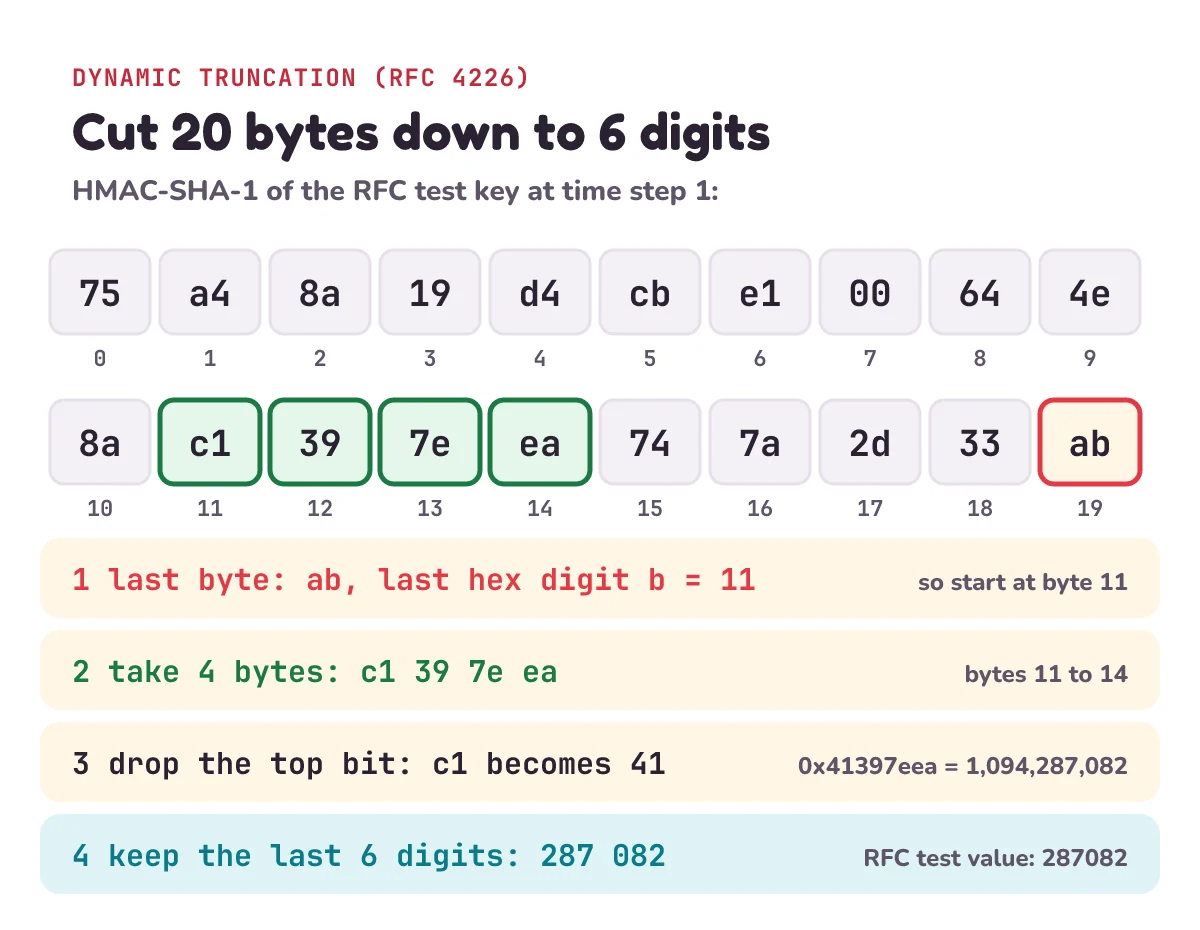
- "Let OffsetBits be the low-order 4 bits of String[19]". Look at the last byte (byte 19, counting from 0). Its lowest 4 bits, its last hex digit, give a number from 0 to 15: the offset, a starting place.
- "Let P = String[OffSet]...String[OffSet+3]". Take the four bytes that start there.
- "Return the Last 31 bits of P". Drop the very top bit of those 32 bits.
- Turn that into a number, and keep its last six digits.
Let's do it by hand with our 20 bytes for time step 1:
- The last byte is
ab. Its last hex digit is b, which is 11. So start at byte 11. - Bytes 11 to 14 are
c1 39 7e ea. - Drop the top bit: c1 becomes 41. (c1 is 1100 0001 in bits; clearing the first bit gives 0100 0001, which is 41.) Now 0x41397eea = 1,094,287,082, a number just over a billion. (0x in front means the number is written in hex.)
- Keep the last six digits: 287 082.
Why drop the top bit? RFC 4226: "The reason for masking the most significant bit of P is to avoid confusion about signed vs. unsigned modulo computations." Some computers treat a number whose top bit is 1 as negative. Clearing it means every computer gets the same answer.
Check the RFC's test table for count 1: "1 41397eea 1094287082 287082". Our answer matches.
Now the cut in Python. Add this under the other blocks:
def code_from_hash(h, digits=6):
    offset = h[19] & 0x0F
    four = h[offset:offset + 4]
    number = int.from_bytes(four, "big") & 0x7FFFFFFF
    return str(number % 10**digits).zfill(digits)

def totp(secret, unix_time, digits=6):
    return code_from_hash(keyed_hash(secret, time_step(unix_time)), digits)

print(totp(SECRET, 59))
for t in (59, 1111111109, 1234567890):
    print(t, totp(SECRET, t, digits=8))
287082
59 94287082
1111111109 07081804
1234567890 89005924Line by line:
h[19] & 0x0Fkeeps only the lowest 4 bits of the last byte: the offset.h[offset:offset + 4]takes the four bytes from there.& 0x7FFFFFFFclears the top bit. 7FFFFFFF in hex is a 0 bit followed by 31 one bits.number % 10**digitsis the remainder after dividing by 1,000,000 (the RFC calls this modulo): the last six digits..zfill(digits)puts back any zeros at the front, so 81804 shows as 081804.totp()joins the three steps: time step, keyed hash, cut.
The standard's TOTP test table uses 8 digits. Its rows for SHA-1 include "| 59 | 1970-01-01 | 0000000000000001 | 94287082 | SHA1 |", and the values for 1,111,111,109 and 1,234,567,890 are 07081804 and 89005924. Our code prints all three. The six-digit code is just the last six of the eight: 94287082 ends in 287082.
That's a whole TOTP in about 15 lines, not counting the prints, using only Python's standard library. Google's wiki lists the defaults: SHA-1 ("SHA1 (Default)"), 6 digits ("The default is 6.") and a 30-second period ("The default value is 30."). That's exactly what we used.
How does the server check the code?
The server does exactly the same sum, with its own copy of the secret and its own clock. RFC 6238 makes this a rule: the prover and verifier "MUST either share the same secret". (The prover is your phone. The verifier is the server.) Same secret, same time step, same six digits. Nothing had to be sent from the server to your phone.
There's one problem. You read the code, then type it, then press Sign in. By the time it reaches the server, the step may have moved on. RFC 6238: "When an OTP is generated at the end of a time-step window, the receiving time most likely falls into the next time-step window." So a server can also accept the code from one step earlier. But not too many: "We RECOMMEND that at most one time step is allowed as the network delay." Every extra step accepted is more time for someone else to use a code they've seen.
Here's a server check that accepts the current step and one step back. Add it under the other blocks:
def server_accepts(secret, typed, unix_time):
    now = time_step(unix_time)
    for step in (now, now - 1):
        if hmac.compare_digest(code_from_hash(keyed_hash(secret, step)), typed):
            return True
    return False

code = totp(SECRET, 1111111109)
print(code, server_accepts(SECRET, code, 1111111112))
slow = totp(SECRET, 1111111109 - 120)
print(slow, server_accepts(SECRET, slow, 1111111109))
081804 True
734088 FalseLine by line:
- The loop tries the step for now, then the one before it.
hmac.compare_digestcompares the two codes. Python's documentation says it "uses an approach designed to prevent timing analysis by avoiding content-based short circuiting behaviour, making it appropriate for cryptography." In plain words: a normal==stops at the first wrong digit, so it answers a tiny bit faster for worse guesses. Someone timing many answers could learn from that.compare_digesttakes the same time either way.- First test: the phone makes a code at 1,111,111,109, and the server checks it 3 seconds later, at 1,111,111,112. That's the next step (37,037,037), but the server also tries one step back, so it says
True. - Second test: a phone whose clock is 120 seconds slow makes its code. We'll see why that fails next.
A real server does more than this sketch. It also counts failed tries (more on that below). And it remembers which code it has already accepted, so one code can't be used twice. RFC 6238: "The verifier MUST NOT accept the second attempt of the OTP after the successful validation has been issued for the first OTP, which ensures one-time only use of an OTP."
Why does a wrong phone clock break the codes?
Here's how it goes wrong. Say your phone's clock was set by hand, two minutes slow. Two minutes is 120 seconds, and 120 ÷ 30 = 4 time steps behind. Every code the phone makes belongs to a step the server stopped accepting a minute or more ago. So the server rejects it, even though the secret is right. That's the False in the Python above: the slow phone made its code for step 37,037,032, and the server only tried 37,037,036 and 37,037,035.
The fix is boring: set your phone's date and time to automatic. When codes don't work, Google's help page lists checks, including "You entered the code before it expired." and "The time on your device is synced and correct for your local time zone." The Google Authenticator app used to have its own fix for this, but the page now says: "The time correction setting is no longer available in version 7.0. The app now uses the time setting on your operating system."
Pause and try this one before you read on. Your phone makes a code 58 seconds after ten o'clock, at 10:00:58. The server checks it 3 seconds later, at 10:01:01. Are they in the same time step?
No. Unix time starts at midnight, and a minute is exactly two 30-second steps, so time steps always start at :00 and :30 past each minute. 10:00:58 is in the step from 10:00:30 to 10:00:59. 10:01:01 is in the next one, from 10:01:00 to 10:01:29. The code still works, because the server accepts one step back. The slip is to think that 3 seconds apart must mean the same step.
Can someone just guess a six-digit code?
Six digits make 10 × 10 × 10 × 10 × 10 × 10 = 1,000,000 possible codes, from 000000 to 999999. One random guess has a 1 in 1,000,000 chance of matching the current code. Our server sketch also accepts the code from one step back, so it's 2 in 1,000,000. Still tiny.
The standard knows short codes can be guessed by trying them all. That's called a brute force attack. RFC 4226: "Truncating the HMAC-SHA-1 value to a shorter value makes a brute force attack possible. Therefore, the authentication server needs to detect and stop brute force attacks." It recommends a limit on tries: "We RECOMMEND setting a throttling parameter T, which defines the maximum number of possible attempts for One-Time Password validation." (Throttling means slowing down or limiting.) And when the limit is reached: "If and when the maximum number of authorized attempts is reached, the server SHOULD lock out the account and initiate a procedure to inform the user." Exact limits differ from site to site. Our post on rate limiting shows how servers count and limit tries like these.
With only a few tries allowed, and a new code every 30 seconds, guessing almost never works. The standard also allows longer codes: "Implementations MUST extract a 6-digit code at a minimum and possibly 7 and 8-digit code." With 8 digits there are 100,000,000 codes, so one guess is 100 times harder.
Is it safe to read out an OTP code?
No, never. The maths is strong, so the real danger is people. A scammer calls, says they're from your bank or a big company, and asks you to read out the code that just arrived. With your password and that code, they can sign in as you. Apple's scam advice describes exactly these calls: "Scam phone calls or voicemails that impersonate Apple Support, Apple partners, and other well known or trusted entities or individuals." (To impersonate means to pretend to be someone else.)
Apple's advice: "never share your Apple Account password or verification codes with anyone. Apple never asks for this information to provide support." So treat any call or message that asks for a code as a scam, whoever it says it's from.
The other trick is a fake website that looks like the real one. If you type your code into it, a scammer watching the fake page can use it on the real site straight away. Apple again: "Never share personal data or security information like passwords or security codes, and never agree to enter them into a webpage that someone directs you to." So type a code only into a site or app you opened yourself, not one you reached from a link in a message.
The good habits, all in one place:
- Never give a code to anyone, on the phone, by message or in person.
- Type codes only into a site or app you opened yourself.
- Treat the setup QR code like a password: don't screenshot it or share it.
- Keep your phone's time on automatic.
- Save the backup codes a site gives you (see the questions below).
When you type the code into a real website, it travels to the server with the rest of the sign-in form. Our post on how HTTPS works shows how that trip is kept private. And once you're signed in, the site keeps you signed in with tokens, which is the story in access token vs refresh token.
How can you see it work on your own phone?
If you use an authenticator app, switch on airplane mode and watch. The codes keep changing, every 30 seconds, with no signal at all. Look for the little timer next to each code: that's the time step running out. When it runs out, the time step goes up by one, and a new code appears.
Back to the myth
So your authenticator app doesn't get its codes from the internet. At setup, a QR code shares a secret, once. The time step is Unix time ÷ 30, rounded down. HMAC-SHA-1 mixes the secret with the time step, and six digits are cut out of the result. The server does the same sum, so the codes match without the server sending your phone anything. Keep your clock on automatic, and never give the code to anyone.
1) At midnight UTC on 1 January 2010, Unix time was 1,262,304,000. What was the time step?
2) A code is made at 10:00:31 and checked at 10:00:58. Are they in the same time step?
3) A phone's clock is 90 seconds fast. How many time steps ahead is it? Would the server in our Python sketch accept its codes?
4) RFC 4226's own example hash has last byte 5a. Which byte does the cut start at? The four bytes there are 50 ef 7f 19. What is the six-digit code?
5) Change one thing: codes with 8 digits instead of 6. How many times harder is one random guess?
Show the answers
1) 1,262,304,000 ÷ 30 = 42,076,800, with no remainder.
2) Yes. Both are in the step from 10:00:30 to 10:00:59.
3) 90 ÷ 30 = 3 steps ahead. No: our sketch only tries the current step and one step back, and a code from 3 steps in the future is neither.
4) The last hex digit is a, which is 10, so start at byte 10. The top bit of 50 is already 0 (50 is 0101 0000), so nothing changes: 0x50ef7f19 = 1,357,872,921, and the code is 872921. That matches the RFC's own answer.
5) 100,000,000 ÷ 1,000,000 = 100 times harder.
Questions people ask
Does Google Authenticator work without internet?
Yes. The app only needs the secret it saved at setup and your phone's clock. Google's help page says: "You can still generate codes without an internet connection or mobile service." You only need the internet to sign in to the website itself.
What is the difference between TOTP and HOTP?
Both use the same recipe: HMAC-SHA-1 of a secret and a number, then cut to six digits (RFC 4226). In HOTP the number is a counter. RFC 4226 says the counter on your device is "incremented every time a new HOTP is requested by the user" (incremented means increased by one). In TOTP (RFC 6238) the number is the time step, Unix time ÷ 30, so it goes up by itself every 30 seconds.
Why do authenticator codes change every 30 seconds?
Because 30 seconds is the time step. RFC 6238 recommends it as "a balance between security and usability": long enough to type the code, short enough that a code someone sees soon stops working.
Why is my authenticator code wrong?
A common cause is the phone's clock. If it's set by hand and is a minute or two out, every code belongs to the wrong time step. Set the date and time to automatic. Also check you typed the code before it changed, and that you used the code for the right account.
What happens if I lose my phone?
That's what backup codes are for. The NCSC: "Some accounts also give you a list of backup codes when you switch on 2SV." Each one works once, and "You will need to store the codes somewhere safe." Google Authenticator can also sync codes to your Google Account: "When you sign in to your Google Account within Google Authenticator on a new device, your codes are automatically synced to this device."
Does Google Authenticator use SHA-256?
Usually not. The setup link's algorithm setting "may have the values: SHA1 (Default) SHA256 SHA512", but Google's wiki, written for the open-source version of the app, says: "Currently, the algorithm parameter is ignored by the Google Authenticator implementations." The same goes for the time step: "Currently, the period parameter is ignored by the Google Authenticator implementations." So expect SHA-1 and 30 seconds.
Keep going
- Watch the full lesson, How Do Authenticator Apps Work Offline? TOTP Codes Explained, and its Short, How Does Google Authenticator Work With No Internet? Then see the rest of letsBug Explains on YouTube.
- The episode before this one: how does a capacitive touch sensor work? (an ESP32 touch pin, and why its count falls when you touch it).
- How a server limits tries: rate limiting.
- Another secret to keep safe: what is an API key?
- The next episode: how QR codes still scan when damaged.
Checked on 29 November 2026 against the 13 sources below.
Sources
- IETF, RFC 6238, TOTP: Time-Based One-Time Password Algorithm (the time step, T = (Unix time − T0) / X rounded down; X = 30 s; same step, same code; at most one step back; one-time use; the shared secret; the test values 94287082, 07081804 and 89005924)
- IETF, RFC 4226, HOTP: An HMAC-Based One-Time Password Algorithm (HOTP = Truncate(HMAC-SHA-1); secret of at least 128 bits, 160 recommended; dynamic truncation and why the top bit is dropped; 6 to 8 digits; brute force, throttling and lockout; the test key and test values)
- IETF, RFC 2104, HMAC: Keyed-Hashing for Message Authentication (what HMAC is)
- IETF, RFC 4648, The Base16, Base32, and Base64 Data Encodings (the Base32 alphabet; 5 bits per character)
- Google Account Help: Get verification codes with Google Authenticator (codes without internet; what to check when a code fails; time correction removed in version 7.0; syncing codes)
- Google Authenticator wiki: Key Uri Format (the otpauth link in the QR code; the Base32 secret and its two examples; defaults SHA1, 6 digits, 30 seconds; parameters the app ignores)
- Microsoft Security blog, 20 August 2019: One simple action you can take to prevent 99.9 percent of attacks on your accounts (MFA can block over 99.9% of account compromise attacks)
- UK National Cyber Security Centre: Setting up 2-Step Verification (2SV) (apps need no mobile signal; backup codes)
- Apple Support: Recognize and avoid social engineering schemes (scam calls; never share verification codes; never enter them on a page someone directs you to)
- Wikipedia: Unix time (seconds since 00:00:00 UTC on 1 January 1970)
- Wikipedia: Avalanche effect (a small change flips about half the output bits)
- Wikipedia: Cryptographic hash function (pre-image resistance: a hash can't be run backwards)
- Python documentation: hmac: Keyed-Hashing for Message Authentication (hmac.new and compare_digest)
All five Python code samples in this post were run in Python 3.13 before publishing, and the hash and code outputs match the RFC test values.